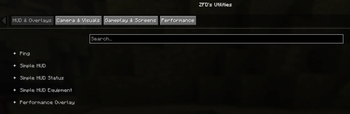
A client-side Minecraft control and diagnostics toolkit with a customizable HUD, zoom, pov freelook, chat heads, entity hiding, ping deep-dives, fly speed, play-screen folders for organization, and video-production visual cleanup.
ZFD's Utilities is a customizable client-side toolkit for players who want more control, cleaner visuals, and better diagnostics without stacking a bunch of separate small utility mods.
Use it for everyday gameplay, content creation, creative building, server testing, and troubleshooting ping, frame spikes, or mouse stutter. Most tools can be adjusted in the config screen, controlled with commands, or assigned to your own keybinds.
Highlights
Custom HUD Tools
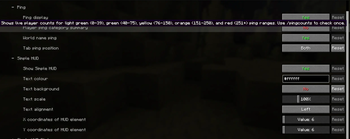
Compact Simple HUD overlay
Coordinates, dimension, facing direction, FPS, ping, and health
Equipment display for armor, held items, offhand, durability, and stack counts
Custom text color, background, scale, alignment, and screen position
Quick toggle support
Player Heads in Chat
Player skin heads beside chat messages, including hat layers
Subtle vanilla-style shadows for a natural Minecraft look
Supports ranked chat and nicknames when the sender can be identified
Passive, client-side detection using information Minecraft already receives—no server queries or additional gameplay packets
Enabled by default; toggle in settings or with /zfdutils chatheads on|off|toggle
Ping and Network Visibility
Colored ping display in the HUD and player list
Ping shown beside names, near the vanilla ping icon, or both
Optional ping on in-world player nametags
Ping category summaries for quickly seeing how a server is performing
/pingcounts for a quick ping breakdown
Camera and Visual Control
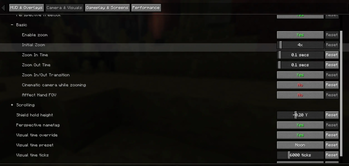
Smooth zoom with configurable strength and timing
Optional scroll zoom while holding the zoom key
Perspective freelook for third-person camera control without rotating your player
Optional own-nametag display in perspective views
Client-side visual time override
Client-side clear weather override for hiding rain and thunder
First-person shield height adjustment
Entity Hider
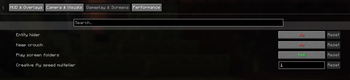
Hide other players client-side for cleaner visuals
Useful for recording, screenshots, crowded lobbies, and focused gameplay
Allowlist players by target, name, or UUID
Optional radius mode so nearby players can be hidden only within a chosen range
Performance and Diagnostics
Frametime graph overlay
Frametime spike logging
Mouse stutter diagnostics
PC specs logging helper
Configurable frame spike threshold
Logs are written to the normal Minecraft logs folder
Gameplay and Organization
Keep crouch active through inventories and menus
Creative-only fly speed multiplier
Optional singleplayer and multiplayer play-screen folders
Folder support is opt-in so every player can build their own layout
Built to Be Customized
ZFD's Utilities is not meant to force one setup on everyone. Fresh installs use clean defaults, advanced config sections start collapsed, and extra toggle-style keybinds are available but left unbound so you can assign the controls you actually want.
Default bound keys include:
H - Toggle Entity Hider
Grave / Backtick - Toggle Simple HUD
Z - Zoom
Left Alt - Hold Perspective Freelook
Other tools can be bound manually in Minecraft's Controls menu.
Useful For
Video production and cleaner recordings
Screenshots and cinematic shots
Creative building and testing
Server testing and ping checks
Diagnosing frame pacing or mouse stutter
Everyday quality-of-life gameplay
Organizing worlds and servers without a large mod setup
Server install is not required for the main utilities.
Visual time, clear weather, and entity hiding only affect your local client.
Creative fly speed only applies in creative mode/worlds.
Fabric API is required.
Mod Menu and Cloth Config are recommended for the best config experience.
License and Modpacks
ZFD's Utilities uses a custom permission license. You may use it for personal gameplay, content creation, recording, video production, screenshots, testing, and diagnostics.
Modpacks may include the official, unmodified mod file if they credit ZFDfilms and link back to this Modrinth project page. Standalone reuploads, selling the mod, publishing modified versions, or claiming ownership are not allowed without explicit permission.
## 1.2.6+mc26.3 — Crash & Input Fixes
- Fixed a crash when joining servers that affected some Minecraft 26.3 installations, especially those without existing saved keybindings.
- Updated all ZFD Utilities keybindings for Minecraft 26.3’s SDL3 input system.
- Corrected the default keys for Entity Hider (H), Simple HUD (grave accent), Zoom (Z), and freelook (left Alt).
- Fixed unbound keybindings so they remain safely unbound and cannot trigger unexpectedly.
- Added automatic repair for invalid saved ZFD keybindings while preserving valid custom bindings.
- Fixed folder arrow-key navigation, server-row mouse reordering, and Enter/keypad Enter confirmation in folder naming and profile saving.
- Added automated fresh-install, server join/rejoin, inventory, keybinding, and client restart tests.
The server-join fix has also been confirmed by a previously affected player.
## 1.2.5+mc26.3
### Player heads in chat
- Added player skin heads beside chat messages, including the sender's hat layer.
- Heads use Minecraft's built-in skin renderer with an explicit, subtle vanilla-style shadow.
- Added a **Player heads in chat** toggle in both settings screens, enabled by default.
- Toggle heads with `/zfdutils chatheads on|off|toggle`.
- Recording and Vanilla profiles keep chat heads disabled.
### Chat compatibility and fixes
- Improved sender detection for server-formatted chat, including supported nicknames, TAB/display names, and ranked chat prefixes.
- Improved passive nickname detection using complete TAB names, TAB entries containing `Nickname (RealUsername)`, and existing sender click/UUID hover metadata. Identified nicknames are remembered for the current connection.
- Fixed styled, obfuscated, and single-letter badge prefixes between rank tags hiding otherwise identifiable senders, and excluded artificial TAB layout slots from player matching.
- Chat-head detection uses data already received by Minecraft; it does not send server commands, nickname queries, or additional network packets.
- Fixed missing heads for rank formats with badge symbols between tags, such as `[61] ✔ [VIP] ZFDMC: h`, including legacy-server chat received by a Minecraft 26.3 client through protocol translation.
- Fixed heads relying on the renderer's default shadow flag; the native head now explicitly requests the same quarter-brightness, one-pixel shadow as vanilla white text.
- Preserves message colours, formatting, translations, click actions, and hover events.
- Prevents duplicate heads when a message already contains a player sprite.
- Avoids assigning heads to unknown or ambiguous senders, server notifications, or names mentioned within message text.
- Refreshes cached player information after relevant updates and clears server-specific identities when changing connections.
### Minecraft 26.3 and reliability
- Updated to Minecraft **26.3**.
- Requires Fabric Loader **0.19.5 or newer**, Fabric API **0.161.0+26.3 or newer**, and Java **25 or newer**.
- Improved frequently used HUD, screen, and player-name lookups.
- Improved cleanup of optional voice diagnostic recordings when Minecraft closes.
### Play-screen folders
- Fixed multiplayer server repositioning when folders and labels change the visible row indexes.
- Server entries can now be moved with the existing row controls or `Shift+Up`/`Shift+Down` while play-screen folders are enabled.
- Reordering is saved to the shared folder layout.
- Fixed newly discovered servers being restored into the currently open folder instead of the root folder.
- Fixed hidden server entries from reappearing after reload.
### Reliability and diagnostics
- Made world and server folder saves safer with recovery backups.
- Invalid legacy entity-hider configuration now falls back safely.
- Improved short voice diagnostic captures so timing jitter does not hide delayed-echo results. (beta)
# ZFD Utilities Changelog
## 1.2.2+mc26.2
This release contains the unreleased feature work added after `1.0.20+mc26.2`, plus the latest ping fixes.
### Settings and profiles
- Added a permanent Vanilla profile that disables ZFD gameplay, HUD, camera, ping, folder, visual, and diagnostic features while keeping settings entrypoints available.
- Added built-in Default, Gameplay, Recording, and Vanilla profiles with automatic profile persistence and backup recovery.
- Added profile switching, cycling, saving, and deleting through the settings screen, an unbound Cycle Settings Profile keybind, and `/zfdutils profile` commands.
- Added profile hover descriptions and a focused `Save current loadout` flow with no custom-profile count limit.
- Added a five-second safety cooldown between named profile saves.
- Added an explicit `Enable experimental features` switch; experimental Voice settings and processing remain hidden and fail closed until enabled.
### Voice Chat (Beta)
- Added optional Simple Voice Chat integration using its public pre-playback and pre-send PCM events.
- Added Smart Echo Fix modes, per-player incoming echo state, outgoing speaker-reference cancellation, and bounded local-only audio histories.
- Added voice processing and diagnostics settings, while keeping Simple Voice Chat optional.
- Fixed echo cancellation resetting during quiet microphone frames or short speech pauses.
- Improved render-reference tracking so outgoing delay and gain estimation remains accurate during two-way voice activity.
### Camera and player presentation
- Added `Freelook Scroll Zoom` for fixed-distance Perspective Freelook setups.
- Fixed Perspective Freelook scroll distance being incorrectly tied to normal Zoom scroll settings.
- Added an optional self nametag for third-person and ZFD freelook views while preserving vanilla/server team and rank formatting.
- Fixed world-ping colour leaking into the rest of player names.
### Keep Crouch
- Fixed Keep Crouch rapidly alternating sneak on/off while inventory, chat, pause, and other screens were open with Minecraft's Toggle Sneak option enabled.
- Keep Crouch now restores a released sneak state once and holds it steadily until the screen closes or the feature is disabled.
### Ping diagnostics and display
- Added player-name autofill to `/zfdping` so online Java players can be selected from the suggestion list.
- Added `/zfdping <player>` to check an online player's reported latency, with case-insensitive name lookup.
- Fixed the local player's ping incorrectly showing `0 ms`; ZFD now uses Minecraft's recent client-side network ping sample when the tab-list value has not populated yet.
- Zero or not-yet-available latency now displays as `Calculating...` instead of `0` across the HUD, player list, nametags, `/zfdping`, and `/pingcounts`.
- Crossplay/Bedrock-style player entries are filtered from ZFD's Java player ping displays and summaries, matching the existing `/pingcounts` filtering behavior.
### Additional improvements
- Various bug fixes, reliability improvements, and polish across settings, HUD, diagnostics, camera, and client-side integrations.
## 1.2.1+mc26.2
### Keep Crouch
- Fixed Keep Crouch rapidly alternating sneak on/off while inventory, chat, pause, and other screens were open with Minecraft's Toggle Sneak option enabled.
- Keep Crouch now restores a released sneak state once and holds it steadily until the screen closes or the feature is disabled.
### Settings and experimental voice
- Removed Voice (Beta) as a top-level tab.
- Added a Settings tab containing Settings Profiles, menu-button preferences, and an `Enable experimental features` switch.
- Voice (Beta) now appears as a collapsed Settings section only after experimental features are explicitly enabled and the settings screen is reopened.
- Voice processing and local voice diagnostics now fail closed while experimental features are disabled.
## 1.2.0+mc26.2
### Voice Chat (Beta)
- Added an optional Simple Voice Chat integration using its public pre-playback and pre-send PCM events.
- Added Smart Echo Fix modes, per-player incoming echo state, outgoing speaker-reference cancellation, and bounded local-only audio histories.
- Added Voice Chat settings for incoming/outgoing processing, diagnostics, and future server-supported broadcast helpers.
- Simple Voice Chat remains optional; ZFD does not declare it as a required dependency.
- Fixed the outgoing canceller disarming itself whenever the far side talked while the local microphone was quiet: three such frames (~30 ms) used to wipe the learned echo path, so suppression kept resetting during ordinary listening. Silent microphone frames are now skipped instead of counted as a lost path.
- Fixed speech pauses releasing a locked echo path: short reference gaps no longer collapse the learned alignment, so cancellation is armed immediately when talking resumes instead of bursting echo after every pause (verified by a new streaming pause/resume regression test).
- The render reference now records exactly what the speakers will play (after per-sender returned-self cleanup) so outgoing delay/gain estimation is not biased when both paths are active.
### Ping and perspective freelook
- Fixed fresh-install Perspective Freelook scroll distance being incorrectly gated by the separate normal Zoom scroll setting.
- Added `Freelook Scroll Zoom`, enabled by default, for fixed-distance freelook setups.
- Added `/zfdping` to show the latency reported by the current Minecraft connection without making an external network request.
## 1.0.20+mc26.2
This release targets Minecraft 26.2 only.
### Settings profile polish
- Settings Profiles now starts collapsed every time, matching the other advanced dropdown sections.
- Removed the long always-visible profile explanation from the settings page.
- Added a hover description for Default, Gameplay, Recording, Vanilla, and every custom profile so each loadout explains what it offers without taking up permanent screen space.
- Replaced the always-visible profile name field with a `Save current loadout` button.
- The save button first applies the settings currently shown on screen, then opens a focused profile-name dialog.
- Custom profile saves have no profile-count limit and become active immediately after saving.
- Added a five-second safety cooldown between named profile saves, including `/zfdutils profile save <name>`.
- Added the same named-profile save flow to the vanilla fallback settings screen.
## 1.0.19+mc26.2
This release targets Minecraft 26.2 only.
### Fixes and profiles
- Fixed the self nametag renderer by supplying the same entity attachment position and interpolated yaw that vanilla uses for normal player nametags.
- Added a permanent Vanilla profile that disables ZFD gameplay, HUD, camera, ping, folder, visual override, and diagnostic features while keeping settings entrypoints available.
- Added a `Save current settings as profile` name field directly below the active profile selector. Type a name, edit settings, and press Done to save and activate that profile.
- Existing upgrades preserve their current configuration as Default. Clean installations use ZFD's product defaults instead of inheriting a developer or another player's settings.
- Clean-install Default keeps the Simple HUD in the top-left, Z zoom, and Left Alt freelook, while self/world nametags and client-side overrides begin disabled.
## 1.0.18+mc26.2
This release targets Minecraft 26.2 only.
### Highlights
- Added an optional self nametag for third-person and ZFD freelook views.
- Self nametags use the player's vanilla/server display component so team colours, prefixes, suffixes, and rank formatting remain intact.
- ZFD's numeric world ping also appears on the self nametag when both ping features are enabled.
- Fixed world-ping colour leaking into the entire player name. Ping and vanilla/server name styling are now separate components.
- Added complete settings profiles with built-in Default, Gameplay, and Recording profiles.
- Added a Settings Profiles selector under Gameplay & Screens.
- Added an unbound `Cycle Settings Profile` keybind for instant profile switching.
- Added an unbound `Toggle Self Nametag` keybind.
- Added `/zfdutils profile list`, `cycle`, `switch <name>`, `save <name>`, and `delete <name>` commands for custom profiles.
- Added automatic profile persistence with backup recovery in `config/zfdutilities-profiles.json`.
### Recording profile
The initial Recording profile starts from the user's current settings, then hides HUD/ping/performance overlays, disables Entity Hider, enables clear-weather visuals, and keeps the rest available for customization.
### Notes
- ZFD Utilities remains fully client-side.
- Mod Menu and Cloth Config are recommended for the full settings panel but are not required.
- Existing `zfdutilities.json` settings are migrated into the initial Default and Gameplay profiles on first launch.
## 1.0.17+mc26.2
This release targets Minecraft 26.2 only.
### Menu integration fixes
- Added separate settings for showing the ZFD Utilities icon on the main title screen and the in-game pause menu.
- Kept title-screen and pause-menu icon rows centered when either ZFD icon is hidden.
- Made both menu injections fail safely when an unusual or modded screen layout cannot be adapted.
- Added both icon visibility toggles to the Cloth Config panel and the vanilla fallback settings screen.
## 1.0.16+mc26.2
Initial public release of ZFD's Utilities for Minecraft 26.2.
### Highlights
- Customizable Simple HUD with coordinates, FPS, ping, health, and equipment readouts.
- Colored ping display, ping category summaries, and `/pingcounts` diagnostics.
- Entity Hider with allowlists and optional radius mode.
- Smooth zoom, scroll zoom options, and hold-to-use perspective freelook.
- Client-side visual time and clear weather overrides for cleaner recordings and screenshots.
- Keep-crouch, creative fly speed, and first-person shield height customization.
- Optional singleplayer and multiplayer play-screen folders.
- Frametime graph, frame-spike logging, mouse-stutter diagnostics, and PC-spec logging.
- Assignable keybind slots for major toggle-style utilities.
- Clean first-release defaults intended for player customization.
### Notes
- Client-side Fabric mod.
- Fabric API is required.
- Mod Menu and Cloth Config are recommended for the best configuration experience.
- Visual time, clear weather, and entity hiding only affect the local client.
# ZFD Utilities Changelog
## 1.0.20+mc26.2
This release targets Minecraft 26.2 only.
### Settings profile polish
- Settings Profiles now starts collapsed every time, matching the other advanced dropdown sections.
- Removed the long always-visible profile explanation from the settings page.
- Added a hover description for Default, Gameplay, Recording, Vanilla, and every custom profile so each loadout explains what it offers without taking up permanent screen space.
- Replaced the always-visible profile name field with a `Save current loadout` button.
- The save button first applies the settings currently shown on screen, then opens a focused profile-name dialog.
- Custom profile saves have no profile-count limit and become active immediately after saving.
- Added a five-second safety cooldown between named profile saves, including `/zfdutils profile save <name>`.
- Added the same named-profile save flow to the vanilla fallback settings screen.
## 1.0.19+mc26.2
This release targets Minecraft 26.2 only.
### Fixes and profiles
- Fixed the self nametag renderer by supplying the same entity attachment position and interpolated yaw that vanilla uses for normal player nametags.
- Added a permanent Vanilla profile that disables ZFD gameplay, HUD, camera, ping, folder, visual override, and diagnostic features while keeping settings entrypoints available.
- Added a `Save current settings as profile` name field directly below the active profile selector. Type a name, edit settings, and press Done to save and activate that profile.
- Existing upgrades preserve their current configuration as Default. Clean installations use ZFD's product defaults instead of inheriting a developer or another player's settings.
- Clean-install Default keeps the Simple HUD in the top-left, Z zoom, and Left Alt freelook, while self/world nametags and client-side overrides begin disabled.
## 1.0.18+mc26.2
This release targets Minecraft 26.2 only.
### Highlights
- Added an optional self nametag for third-person and ZFD freelook views.
- Self nametags use the player's vanilla/server display component so team colours, prefixes, suffixes, and rank formatting remain intact.
- ZFD's numeric world ping also appears on the self nametag when both ping features are enabled.
- Fixed world-ping colour leaking into the entire player name. Ping and vanilla/server name styling are now separate components.
- Added complete settings profiles with built-in Default, Gameplay, and Recording profiles.
- Added a Settings Profiles selector under Gameplay & Screens.
- Added an unbound `Cycle Settings Profile` keybind for instant profile switching.
- Added an unbound `Toggle Self Nametag` keybind.
- Added `/zfdutils profile list`, `cycle`, `switch <name>`, `save <name>`, and `delete <name>` commands for custom profiles.
- Added automatic profile persistence with backup recovery in `config/zfdutilities-profiles.json`.
### Recording profile
The initial Recording profile starts from the user's current settings, then hides HUD/ping/performance overlays, disables Entity Hider, enables clear-weather visuals, and keeps the rest available for customization.
### Notes
- ZFD Utilities remains fully client-side.
- Mod Menu and Cloth Config are recommended for the full settings panel but are not required.
- Existing `zfdutilities.json` settings are migrated into the initial Default and Gameplay profiles on first launch.
## 1.0.17+mc26.2
This release targets Minecraft 26.2 only.
### Menu integration fixes
- Added separate settings for showing the ZFD Utilities icon on the main title screen and the in-game pause menu.
- Kept title-screen and pause-menu icon rows centered when either ZFD icon is hidden.
- Made both menu injections fail safely when an unusual or modded screen layout cannot be adapted.
- Added both icon visibility toggles to the Cloth Config panel and the vanilla fallback settings screen.
## 1.0.16+mc26.2
Initial public release of ZFD's Utilities for Minecraft 26.2.
### Highlights
- Customizable Simple HUD with coordinates, FPS, ping, health, and equipment readouts.
- Colored ping display, ping category summaries, and `/pingcounts` diagnostics.
- Entity Hider with allowlists and optional radius mode.
- Smooth zoom, scroll zoom options, and hold-to-use perspective freelook.
- Client-side visual time and clear weather overrides for cleaner recordings and screenshots.
- Keep-crouch, creative fly speed, and first-person shield height customization.
- Optional singleplayer and multiplayer play-screen folders.
- Frametime graph, frame-spike logging, mouse-stutter diagnostics, and PC-spec logging.
- Assignable keybind slots for major toggle-style utilities.
- Clean first-release defaults intended for player customization.
### Notes
- Client-side Fabric mod.
- Fabric API is required.
- Mod Menu and Cloth Config are recommended for the best configuration experience.
- Visual time, clear weather, and entity hiding only affect the local client.
Initial public release of ZFD's Utilities.
## Highlights
- Customizable Simple HUD with coordinates, FPS, ping, health, and equipment readouts
- Colored ping display, ping category summaries, and `/pingcounts` diagnostics
- Entity hider with allowlists and optional radius mode
- Smooth zoom, scroll zoom options, and hold-to-use perspective freelook
- Client-side visual time and clear weather overrides for cleaner recordings and screenshots
- Keep-crouch, creative fly speed, and first-person shield height customization
- Optional singleplayer and multiplayer play-screen folders
- Frametime graph, frame spike logging, mouse stutter diagnostics, and PC specs logging
- Assignable keybind slots for major toggle-style utilities
- Clean first-release defaults intended for player customization
## Notes
- Client-side Fabric mod
- Fabric API is required
- Mod Menu and Cloth Config are recommended for the best config experience
- Visual time, clear weather, and entity hiding only affect your local client