

TerraMath
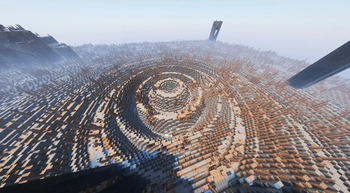
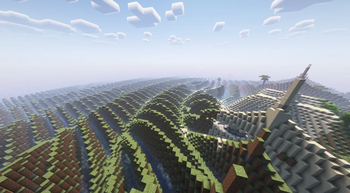
Create custom terrain using mathematical functions and formulas for unique procedural world generation.
Автор: addavriance24,9 тыс.148обновлён 19 окт. 2026 г.
ПроклятыеГенерация мира
Описание






Description
TerraMath is a Minecraft 1.20 - 1.21.x mod that allows you to customize world generation using mathematical functions. Create unique landscapes by defining terrain height through mathematical formulas!
You can also join my Discord to find more formulas or share yours.
Features
- Custom world generation through mathematical formulas
- Adjustable basic generation parameters (scale, height, variation, smoothing)
- Configurable noise overlay on top of your base formula
- Support for mathematical constants in formulas
How to Use on Client
- World generation settings interface
Parameter Configuration
- Go to "World" tab in world creation screen
- Open the terrain settings screen
- Enter your desired formula in the field
- Adjust additional parameters (optional):
- Scale
- Base Height (determines average surface level)
- Height Variation (amplitude of changes)
- Smoothing (terrain transition smoothness)
- Choose noise type and settings (optional):
- Noise type: Perlin, Simplex, Blended, Normal
- X, Y, Z coordinate multipliers
- General noise height multiplier
How to Use on Server
- Start the server with TerraMath mod installed
- Check the config folder, there will be a
terramath.jsonfile - Set the necessary parameters manually in the file, or...
- ...configure the mod on your client
- Set the parameters and save the config
- Transfer the config file to the server's config folder
Important Server Notes:
- For the config to apply to a new world, make sure the
useDefaultFormulaparameter in the config is set totrue - After changing config settings, you'll need to delete the existing world and restart the server for the new terrain formula to take effect
- Alternatively, you can transfer your entire world folder from a client to the server - the world will continue to generate according to the same formula without requiring config changes
Formula Examples
-
Basic wavy landscape:
sin(x) -
Spiky volcanic-like terrain with steep slopes:
abs(sin(x/10))*exp(cos(z/15))*8 + tanh(sqrt(x^2 + z^2)/20)*15 -
Rolling mountains:
sin(x/8)*cos(z/8)*10 + abs(sin(x/20))*15 + sqrt(abs(x/10))*5 -
Some crazy and heavy thing:
round(sin(x/15))*10 + round(cos(z/15))*10 + sqrt(abs(sin((x+z)/20)))*15 -
Terraced landscape with plateaus:
floor(sin(x/20) * cos(z/20) * 5) * 4 + sqrt(x^2 + z^2)/10 -
Crater-filled terrain:
10 * (1 - exp(-((x/30)^2 + (z/30)^2) / 2)) + 5 * perlin(x/50, 0, z/50)
Available Functions and Operators
Mathematical Functions:

Trigonometric:
- sin(x) - sine
- cos(x) - cosine
- tan(x) - tangent
- csc(x) - cosecant
- sec(x) - secant
- cot(x) - cotangent
- asin(x) - inverse sine
- acos(x) - inverse cosine
- atan(x) - inverse tangent
- atan2(x,y) - two-argument inverse tangent
- acsc(x) - inverse cosecant
- asec(x) - inverse secant
- acot(x) - inverse cotangent

Hyperbolic:
- sinh(x) - hyperbolic sine
- cosh(x) - hyperbolic cosine
- tanh(x) - hyperbolic tangent
- asinh(x) - inverse hyperbolic sine
- acosh(x) - inverse hyperbolic cosine
- atanh(x) - inverse hyperbolic tangent
- csch(x) - hyperbolic cosecant
- sech(x) - hyperbolic secant
- coth(x) - hyperbolic cotangent
- acsch(x) - inverse hyperbolic cosecant
- asech(x) - inverse hyperbolic secant
- acoth(x) - inverse hyperbolic cotangent

Root and Power:
- sqrt(x) - square root
- cbrt(x) - cube root
- root(x,n) - nth root of x
- pow(x,y) - x raised to power y
- exp(x) - exponential (e^x)

Logarithmic:
- ln(x) - natural logarithm
- lg(x) - base-10 logarithm

Rounding and Numbers:
- abs(x) - absolute value
- floor(x) - largest integer less than x
- ceil(x) - smallest integer greater than x
- round(x) - rounds to nearest integer
- sign(x) - returns sign of x (-1, 0, or 1)
- mod(x,y) - remainder of x divided by y
- gcd(x,y) - greatest common divisor
- lcm(x,y) - least common multiple
- modi(x,y) - modular inverse

Special Functions:
- gamma(x) - gamma function
- erf(x) - error function
- beta(x,y) - beta function

Random Number Generation:
- rand() - random number between 0 and 1
- randnormal(mean,stdev) - random number from normal distribution
- randrange(min,max) - random number between min and max

Noise Functions:
- perlin(x,y,z) - perlin noise
- simplex(x,y,z) - simplex noise
- normal(x,y,z) - normal noise
- blended(x,y,z) - blended noise
- octaved(x,z,octaves,persistence) - octaved noise

Utility Functions:
- max(x,y) - maximum of x and y
- min(x,y) - minimum of x and y
- sigmoid(x) - sigmoid function (1/(1+e^-x))
- clamp(x,min,max) - constrains x between min and max

Constants:
- pi, π - 3.14159... (π constant)
- e - 2.71828... (Euler's number)
- phi, φ - 1.61803... (Golden ratio)
- zeta3, ζ3 - 1.20205... (Apéry's constant)
- catalan, K - 0.91596... (Catalan's constant)
- alpha, α, feigenbaum - 2.50290... (Feigenbaum constant)
- delta, δ, feigenbaumdelta - 4.66920... (Feigenbaum delta)
- omega, Ω - 0.6889 (Cosmological constant)

Variables:
x, y, z - block coordinates in world

Operators:
+, -, *, /, ^, (), !
Known Issues
- Extreme formulas that produce XXL landscapes may impact performance (probably not a completely solvable problem)
- Random number generation functions can significantly impact world generation performance when used extensively. Consider using these functions sparingly, especially in complex terrain formulas, as they may cause frame rate drops or increased chunk loading time
Contributing
Feel free to report bugs or suggest features through the issue tracker!
Галерея


Последние версии
Все версии →release
terramath-1.4.0-26.2+neoforge
1.4.0-26.2+neoforge19 окт. 2026 г.28Minecraft: 26.2neoforge
Что нового
### Added
- **Equation mode.** A formula with a single `=` (for example `y = 64 + 8 * sin(x / 10)`) is treated as an implicit surface: the world is solid where the left side is not greater than the right side. Formulas may now use `y`, which makes caves, floating islands and arbitrary 3D shapes possible
- **Live 3D preview** inside the settings screen. A rotatable voxel preview is rebuilt in the background while you type, and a notice is shown when there is not enough screen space for it
- Terrain settings are now available for all noise-based world types
- **NeoForge support** for 1.20.4, 1.20.6, 1.21.1, 1.21.4, 1.21.11, 26.1.2 and 26.2
- Builds for 1.21.4, 1.21.11, 26.1.2 and 26.2 on Fabric and Forge. One codebase now produces 23 jars: 1.20, 1.20.4, 1.20.6, 1.21.1, 1.21.4, 1.21.11, 26.1.2 and 26.2 for Fabric and Forge, plus every version from 1.20.4 on for NeoForge
### Performance
- Compiled formulas are called through a typed interface
- Formula values are cached per column for formulas that do not use `y`, which speeds up chunk generation
- Noise lookups that do not depend on `y` (`simplex(x, z)`, `perlin(x, 0, z)`) are memoized per thread, so formulas that mix terrain noise with `y` no longer recompute it for every block
- The formula cache is thread-safe
- The preview evaluates in parallel and builds its mesh off the render thread
### Changed
- **Random formula generator** rewritten: it builds formulas from terrain archetypes, can crossbreed them, fits the scales to a sample and filters out dull results
- Dropped Architectury in favour of per-target Loom projects. Sources are split into `core`, `mc`, `loader` and `versions`
- Smoothing now applies only in Advanced mode, as in 1.3.0, and can be set to 0 to turn it off. Before, it was always on at 0.55 with no way to change it outside Advanced, which also made plain formulas five times more expensive
- Building now needs JDK 25 for the 26.x targets (Gradle downloads it automatically)
### Fixed
- The formula was applied only around spawn on some 1.20.1 worlds. It now covers every newly generated chunk and survives re-entering the world (#22)
- `floor` and `round` now return real numbers, so `1/floor(...)` gives infinity instead of failing with an integer division by zero, and `floor(5)/2` is `2.5`. Errors without a message no longer show up as `Syntax error: null` (#21)
- Points where a formula is not finite (`Infinity`, `NaN`) are treated as empty space instead of filling the world up to the build limit (#21)
- A formula that fails to compile no longer hangs a dedicated server: it is logged and the world generates empty instead of crashing on a client-only class
### Known issues
- Heavy formulas that use `y` together with several noise calls can slow chunk generation
release
terramath-1.4.0-26.2+forge
1.4.0-26.2+forge19 окт. 2026 г.18Minecraft: 26.2forge
Что нового
### Added
- **Equation mode.** A formula with a single `=` (for example `y = 64 + 8 * sin(x / 10)`) is treated as an implicit surface: the world is solid where the left side is not greater than the right side. Formulas may now use `y`, which makes caves, floating islands and arbitrary 3D shapes possible
- **Live 3D preview** inside the settings screen. A rotatable voxel preview is rebuilt in the background while you type, and a notice is shown when there is not enough screen space for it
- Terrain settings are now available for all noise-based world types
- **NeoForge support** for 1.20.4, 1.20.6, 1.21.1, 1.21.4, 1.21.11, 26.1.2 and 26.2
- Builds for 1.21.4, 1.21.11, 26.1.2 and 26.2 on Fabric and Forge. One codebase now produces 23 jars: 1.20, 1.20.4, 1.20.6, 1.21.1, 1.21.4, 1.21.11, 26.1.2 and 26.2 for Fabric and Forge, plus every version from 1.20.4 on for NeoForge
### Performance
- Compiled formulas are called through a typed interface
- Formula values are cached per column for formulas that do not use `y`, which speeds up chunk generation
- Noise lookups that do not depend on `y` (`simplex(x, z)`, `perlin(x, 0, z)`) are memoized per thread, so formulas that mix terrain noise with `y` no longer recompute it for every block
- The formula cache is thread-safe
- The preview evaluates in parallel and builds its mesh off the render thread
### Changed
- **Random formula generator** rewritten: it builds formulas from terrain archetypes, can crossbreed them, fits the scales to a sample and filters out dull results
- Dropped Architectury in favour of per-target Loom projects. Sources are split into `core`, `mc`, `loader` and `versions`
- Smoothing now applies only in Advanced mode, as in 1.3.0, and can be set to 0 to turn it off. Before, it was always on at 0.55 with no way to change it outside Advanced, which also made plain formulas five times more expensive
- Building now needs JDK 25 for the 26.x targets (Gradle downloads it automatically)
### Fixed
- The formula was applied only around spawn on some 1.20.1 worlds. It now covers every newly generated chunk and survives re-entering the world (#22)
- `floor` and `round` now return real numbers, so `1/floor(...)` gives infinity instead of failing with an integer division by zero, and `floor(5)/2` is `2.5`. Errors without a message no longer show up as `Syntax error: null` (#21)
- Points where a formula is not finite (`Infinity`, `NaN`) are treated as empty space instead of filling the world up to the build limit (#21)
- A formula that fails to compile no longer hangs a dedicated server: it is logged and the world generates empty instead of crashing on a client-only class
### Known issues
- Heavy formulas that use `y` together with several noise calls can slow chunk generation
release
terramath-1.4.0-26.2+fabric
1.4.0-26.2+fabric19 окт. 2026 г.114Minecraft: 26.2fabric
Что нового
### Added
- **Equation mode.** A formula with a single `=` (for example `y = 64 + 8 * sin(x / 10)`) is treated as an implicit surface: the world is solid where the left side is not greater than the right side. Formulas may now use `y`, which makes caves, floating islands and arbitrary 3D shapes possible
- **Live 3D preview** inside the settings screen. A rotatable voxel preview is rebuilt in the background while you type, and a notice is shown when there is not enough screen space for it
- Terrain settings are now available for all noise-based world types
- **NeoForge support** for 1.20.4, 1.20.6, 1.21.1, 1.21.4, 1.21.11, 26.1.2 and 26.2
- Builds for 1.21.4, 1.21.11, 26.1.2 and 26.2 on Fabric and Forge. One codebase now produces 23 jars: 1.20, 1.20.4, 1.20.6, 1.21.1, 1.21.4, 1.21.11, 26.1.2 and 26.2 for Fabric and Forge, plus every version from 1.20.4 on for NeoForge
### Performance
- Compiled formulas are called through a typed interface
- Formula values are cached per column for formulas that do not use `y`, which speeds up chunk generation
- Noise lookups that do not depend on `y` (`simplex(x, z)`, `perlin(x, 0, z)`) are memoized per thread, so formulas that mix terrain noise with `y` no longer recompute it for every block
- The formula cache is thread-safe
- The preview evaluates in parallel and builds its mesh off the render thread
### Changed
- **Random formula generator** rewritten: it builds formulas from terrain archetypes, can crossbreed them, fits the scales to a sample and filters out dull results
- Dropped Architectury in favour of per-target Loom projects. Sources are split into `core`, `mc`, `loader` and `versions`
- Smoothing now applies only in Advanced mode, as in 1.3.0, and can be set to 0 to turn it off. Before, it was always on at 0.55 with no way to change it outside Advanced, which also made plain formulas five times more expensive
- Building now needs JDK 25 for the 26.x targets (Gradle downloads it automatically)
### Fixed
- The formula was applied only around spawn on some 1.20.1 worlds. It now covers every newly generated chunk and survives re-entering the world (#22)
- `floor` and `round` now return real numbers, so `1/floor(...)` gives infinity instead of failing with an integer division by zero, and `floor(5)/2` is `2.5`. Errors without a message no longer show up as `Syntax error: null` (#21)
- Points where a formula is not finite (`Infinity`, `NaN`) are treated as empty space instead of filling the world up to the build limit (#21)
- A formula that fails to compile no longer hangs a dedicated server: it is logged and the world generates empty instead of crashing on a client-only class
### Known issues
- Heavy formulas that use `y` together with several noise calls can slow chunk generation
release
terramath-1.4.0-26.1.2+neoforge
1.4.0-26.1.2+neoforge19 окт. 2026 г.6Minecraft: 26.1.2neoforge
Что нового
### Added
- **Equation mode.** A formula with a single `=` (for example `y = 64 + 8 * sin(x / 10)`) is treated as an implicit surface: the world is solid where the left side is not greater than the right side. Formulas may now use `y`, which makes caves, floating islands and arbitrary 3D shapes possible
- **Live 3D preview** inside the settings screen. A rotatable voxel preview is rebuilt in the background while you type, and a notice is shown when there is not enough screen space for it
- Terrain settings are now available for all noise-based world types
- **NeoForge support** for 1.20.4, 1.20.6, 1.21.1, 1.21.4, 1.21.11, 26.1.2 and 26.2
- Builds for 1.21.4, 1.21.11, 26.1.2 and 26.2 on Fabric and Forge. One codebase now produces 23 jars: 1.20, 1.20.4, 1.20.6, 1.21.1, 1.21.4, 1.21.11, 26.1.2 and 26.2 for Fabric and Forge, plus every version from 1.20.4 on for NeoForge
### Performance
- Compiled formulas are called through a typed interface
- Formula values are cached per column for formulas that do not use `y`, which speeds up chunk generation
- Noise lookups that do not depend on `y` (`simplex(x, z)`, `perlin(x, 0, z)`) are memoized per thread, so formulas that mix terrain noise with `y` no longer recompute it for every block
- The formula cache is thread-safe
- The preview evaluates in parallel and builds its mesh off the render thread
### Changed
- **Random formula generator** rewritten: it builds formulas from terrain archetypes, can crossbreed them, fits the scales to a sample and filters out dull results
- Dropped Architectury in favour of per-target Loom projects. Sources are split into `core`, `mc`, `loader` and `versions`
- Smoothing now applies only in Advanced mode, as in 1.3.0, and can be set to 0 to turn it off. Before, it was always on at 0.55 with no way to change it outside Advanced, which also made plain formulas five times more expensive
- Building now needs JDK 25 for the 26.x targets (Gradle downloads it automatically)
### Fixed
- The formula was applied only around spawn on some 1.20.1 worlds. It now covers every newly generated chunk and survives re-entering the world (#22)
- `floor` and `round` now return real numbers, so `1/floor(...)` gives infinity instead of failing with an integer division by zero, and `floor(5)/2` is `2.5`. Errors without a message no longer show up as `Syntax error: null` (#21)
- Points where a formula is not finite (`Infinity`, `NaN`) are treated as empty space instead of filling the world up to the build limit (#21)
- A formula that fails to compile no longer hangs a dedicated server: it is logged and the world generates empty instead of crashing on a client-only class
### Known issues
- Heavy formulas that use `y` together with several noise calls can slow chunk generation
release
terramath-1.4.0-26.1.2+forge
1.4.0-26.1.2+forge19 окт. 2026 г.4Minecraft: 26.1.2forge
Что нового
### Added
- **Equation mode.** A formula with a single `=` (for example `y = 64 + 8 * sin(x / 10)`) is treated as an implicit surface: the world is solid where the left side is not greater than the right side. Formulas may now use `y`, which makes caves, floating islands and arbitrary 3D shapes possible
- **Live 3D preview** inside the settings screen. A rotatable voxel preview is rebuilt in the background while you type, and a notice is shown when there is not enough screen space for it
- Terrain settings are now available for all noise-based world types
- **NeoForge support** for 1.20.4, 1.20.6, 1.21.1, 1.21.4, 1.21.11, 26.1.2 and 26.2
- Builds for 1.21.4, 1.21.11, 26.1.2 and 26.2 on Fabric and Forge. One codebase now produces 23 jars: 1.20, 1.20.4, 1.20.6, 1.21.1, 1.21.4, 1.21.11, 26.1.2 and 26.2 for Fabric and Forge, plus every version from 1.20.4 on for NeoForge
### Performance
- Compiled formulas are called through a typed interface
- Formula values are cached per column for formulas that do not use `y`, which speeds up chunk generation
- Noise lookups that do not depend on `y` (`simplex(x, z)`, `perlin(x, 0, z)`) are memoized per thread, so formulas that mix terrain noise with `y` no longer recompute it for every block
- The formula cache is thread-safe
- The preview evaluates in parallel and builds its mesh off the render thread
### Changed
- **Random formula generator** rewritten: it builds formulas from terrain archetypes, can crossbreed them, fits the scales to a sample and filters out dull results
- Dropped Architectury in favour of per-target Loom projects. Sources are split into `core`, `mc`, `loader` and `versions`
- Smoothing now applies only in Advanced mode, as in 1.3.0, and can be set to 0 to turn it off. Before, it was always on at 0.55 with no way to change it outside Advanced, which also made plain formulas five times more expensive
- Building now needs JDK 25 for the 26.x targets (Gradle downloads it automatically)
### Fixed
- The formula was applied only around spawn on some 1.20.1 worlds. It now covers every newly generated chunk and survives re-entering the world (#22)
- `floor` and `round` now return real numbers, so `1/floor(...)` gives infinity instead of failing with an integer division by zero, and `floor(5)/2` is `2.5`. Errors without a message no longer show up as `Syntax error: null` (#21)
- Points where a formula is not finite (`Infinity`, `NaN`) are treated as empty space instead of filling the world up to the build limit (#21)
- A formula that fails to compile no longer hangs a dedicated server: it is logged and the world generates empty instead of crashing on a client-only class
### Known issues
- Heavy formulas that use `y` together with several noise calls can slow chunk generation
release
terramath-1.4.0-26.1.2+fabric
1.4.0-26.1.2+fabric19 окт. 2026 г.22Minecraft: 26.1.2fabric
Что нового
### Added
- **Equation mode.** A formula with a single `=` (for example `y = 64 + 8 * sin(x / 10)`) is treated as an implicit surface: the world is solid where the left side is not greater than the right side. Formulas may now use `y`, which makes caves, floating islands and arbitrary 3D shapes possible
- **Live 3D preview** inside the settings screen. A rotatable voxel preview is rebuilt in the background while you type, and a notice is shown when there is not enough screen space for it
- Terrain settings are now available for all noise-based world types
- **NeoForge support** for 1.20.4, 1.20.6, 1.21.1, 1.21.4, 1.21.11, 26.1.2 and 26.2
- Builds for 1.21.4, 1.21.11, 26.1.2 and 26.2 on Fabric and Forge. One codebase now produces 23 jars: 1.20, 1.20.4, 1.20.6, 1.21.1, 1.21.4, 1.21.11, 26.1.2 and 26.2 for Fabric and Forge, plus every version from 1.20.4 on for NeoForge
### Performance
- Compiled formulas are called through a typed interface
- Formula values are cached per column for formulas that do not use `y`, which speeds up chunk generation
- Noise lookups that do not depend on `y` (`simplex(x, z)`, `perlin(x, 0, z)`) are memoized per thread, so formulas that mix terrain noise with `y` no longer recompute it for every block
- The formula cache is thread-safe
- The preview evaluates in parallel and builds its mesh off the render thread
### Changed
- **Random formula generator** rewritten: it builds formulas from terrain archetypes, can crossbreed them, fits the scales to a sample and filters out dull results
- Dropped Architectury in favour of per-target Loom projects. Sources are split into `core`, `mc`, `loader` and `versions`
- Smoothing now applies only in Advanced mode, as in 1.3.0, and can be set to 0 to turn it off. Before, it was always on at 0.55 with no way to change it outside Advanced, which also made plain formulas five times more expensive
- Building now needs JDK 25 for the 26.x targets (Gradle downloads it automatically)
### Fixed
- The formula was applied only around spawn on some 1.20.1 worlds. It now covers every newly generated chunk and survives re-entering the world (#22)
- `floor` and `round` now return real numbers, so `1/floor(...)` gives infinity instead of failing with an integer division by zero, and `floor(5)/2` is `2.5`. Errors without a message no longer show up as `Syntax error: null` (#21)
- Points where a formula is not finite (`Infinity`, `NaN`) are treated as empty space instead of filling the world up to the build limit (#21)
- A formula that fails to compile no longer hangs a dedicated server: it is logged and the world generates empty instead of crashing on a client-only class
### Known issues
- Heavy formulas that use `y` together with several noise calls can slow chunk generation
release
terramath-1.4.0-1.21.11+neoforge
1.4.0-1.21.11+neoforge19 окт. 2026 г.12Minecraft: 1.21.11neoforge
Что нового
### Added
- **Equation mode.** A formula with a single `=` (for example `y = 64 + 8 * sin(x / 10)`) is treated as an implicit surface: the world is solid where the left side is not greater than the right side. Formulas may now use `y`, which makes caves, floating islands and arbitrary 3D shapes possible
- **Live 3D preview** inside the settings screen. A rotatable voxel preview is rebuilt in the background while you type, and a notice is shown when there is not enough screen space for it
- Terrain settings are now available for all noise-based world types
- **NeoForge support** for 1.20.4, 1.20.6, 1.21.1, 1.21.4, 1.21.11, 26.1.2 and 26.2
- Builds for 1.21.4, 1.21.11, 26.1.2 and 26.2 on Fabric and Forge. One codebase now produces 23 jars: 1.20, 1.20.4, 1.20.6, 1.21.1, 1.21.4, 1.21.11, 26.1.2 and 26.2 for Fabric and Forge, plus every version from 1.20.4 on for NeoForge
### Performance
- Compiled formulas are called through a typed interface
- Formula values are cached per column for formulas that do not use `y`, which speeds up chunk generation
- Noise lookups that do not depend on `y` (`simplex(x, z)`, `perlin(x, 0, z)`) are memoized per thread, so formulas that mix terrain noise with `y` no longer recompute it for every block
- The formula cache is thread-safe
- The preview evaluates in parallel and builds its mesh off the render thread
### Changed
- **Random formula generator** rewritten: it builds formulas from terrain archetypes, can crossbreed them, fits the scales to a sample and filters out dull results
- Dropped Architectury in favour of per-target Loom projects. Sources are split into `core`, `mc`, `loader` and `versions`
- Smoothing now applies only in Advanced mode, as in 1.3.0, and can be set to 0 to turn it off. Before, it was always on at 0.55 with no way to change it outside Advanced, which also made plain formulas five times more expensive
- Building now needs JDK 25 for the 26.x targets (Gradle downloads it automatically)
### Fixed
- The formula was applied only around spawn on some 1.20.1 worlds. It now covers every newly generated chunk and survives re-entering the world (#22)
- `floor` and `round` now return real numbers, so `1/floor(...)` gives infinity instead of failing with an integer division by zero, and `floor(5)/2` is `2.5`. Errors without a message no longer show up as `Syntax error: null` (#21)
- Points where a formula is not finite (`Infinity`, `NaN`) are treated as empty space instead of filling the world up to the build limit (#21)
- A formula that fails to compile no longer hangs a dedicated server: it is logged and the world generates empty instead of crashing on a client-only class
### Known issues
- Heavy formulas that use `y` together with several noise calls can slow chunk generation
release
terramath-1.4.0-1.21.11+forge
1.4.0-1.21.11+forge19 окт. 2026 г.8Minecraft: 1.21.11forge
Что нового
### Added
- **Equation mode.** A formula with a single `=` (for example `y = 64 + 8 * sin(x / 10)`) is treated as an implicit surface: the world is solid where the left side is not greater than the right side. Formulas may now use `y`, which makes caves, floating islands and arbitrary 3D shapes possible
- **Live 3D preview** inside the settings screen. A rotatable voxel preview is rebuilt in the background while you type, and a notice is shown when there is not enough screen space for it
- Terrain settings are now available for all noise-based world types
- **NeoForge support** for 1.20.4, 1.20.6, 1.21.1, 1.21.4, 1.21.11, 26.1.2 and 26.2
- Builds for 1.21.4, 1.21.11, 26.1.2 and 26.2 on Fabric and Forge. One codebase now produces 23 jars: 1.20, 1.20.4, 1.20.6, 1.21.1, 1.21.4, 1.21.11, 26.1.2 and 26.2 for Fabric and Forge, plus every version from 1.20.4 on for NeoForge
### Performance
- Compiled formulas are called through a typed interface
- Formula values are cached per column for formulas that do not use `y`, which speeds up chunk generation
- Noise lookups that do not depend on `y` (`simplex(x, z)`, `perlin(x, 0, z)`) are memoized per thread, so formulas that mix terrain noise with `y` no longer recompute it for every block
- The formula cache is thread-safe
- The preview evaluates in parallel and builds its mesh off the render thread
### Changed
- **Random formula generator** rewritten: it builds formulas from terrain archetypes, can crossbreed them, fits the scales to a sample and filters out dull results
- Dropped Architectury in favour of per-target Loom projects. Sources are split into `core`, `mc`, `loader` and `versions`
- Smoothing now applies only in Advanced mode, as in 1.3.0, and can be set to 0 to turn it off. Before, it was always on at 0.55 with no way to change it outside Advanced, which also made plain formulas five times more expensive
- Building now needs JDK 25 for the 26.x targets (Gradle downloads it automatically)
### Fixed
- The formula was applied only around spawn on some 1.20.1 worlds. It now covers every newly generated chunk and survives re-entering the world (#22)
- `floor` and `round` now return real numbers, so `1/floor(...)` gives infinity instead of failing with an integer division by zero, and `floor(5)/2` is `2.5`. Errors without a message no longer show up as `Syntax error: null` (#21)
- Points where a formula is not finite (`Infinity`, `NaN`) are treated as empty space instead of filling the world up to the build limit (#21)
- A formula that fails to compile no longer hangs a dedicated server: it is logged and the world generates empty instead of crashing on a client-only class
### Known issues
- Heavy formulas that use `y` together with several noise calls can slow chunk generation
release
terramath-1.4.0-1.21.11+fabric
1.4.0-1.21.11+fabric19 окт. 2026 г.98Minecraft: 1.21.11fabric
Что нового
### Added
- **Equation mode.** A formula with a single `=` (for example `y = 64 + 8 * sin(x / 10)`) is treated as an implicit surface: the world is solid where the left side is not greater than the right side. Formulas may now use `y`, which makes caves, floating islands and arbitrary 3D shapes possible
- **Live 3D preview** inside the settings screen. A rotatable voxel preview is rebuilt in the background while you type, and a notice is shown when there is not enough screen space for it
- Terrain settings are now available for all noise-based world types
- **NeoForge support** for 1.20.4, 1.20.6, 1.21.1, 1.21.4, 1.21.11, 26.1.2 and 26.2
- Builds for 1.21.4, 1.21.11, 26.1.2 and 26.2 on Fabric and Forge. One codebase now produces 23 jars: 1.20, 1.20.4, 1.20.6, 1.21.1, 1.21.4, 1.21.11, 26.1.2 and 26.2 for Fabric and Forge, plus every version from 1.20.4 on for NeoForge
### Performance
- Compiled formulas are called through a typed interface
- Formula values are cached per column for formulas that do not use `y`, which speeds up chunk generation
- Noise lookups that do not depend on `y` (`simplex(x, z)`, `perlin(x, 0, z)`) are memoized per thread, so formulas that mix terrain noise with `y` no longer recompute it for every block
- The formula cache is thread-safe
- The preview evaluates in parallel and builds its mesh off the render thread
### Changed
- **Random formula generator** rewritten: it builds formulas from terrain archetypes, can crossbreed them, fits the scales to a sample and filters out dull results
- Dropped Architectury in favour of per-target Loom projects. Sources are split into `core`, `mc`, `loader` and `versions`
- Smoothing now applies only in Advanced mode, as in 1.3.0, and can be set to 0 to turn it off. Before, it was always on at 0.55 with no way to change it outside Advanced, which also made plain formulas five times more expensive
- Building now needs JDK 25 for the 26.x targets (Gradle downloads it automatically)
### Fixed
- The formula was applied only around spawn on some 1.20.1 worlds. It now covers every newly generated chunk and survives re-entering the world (#22)
- `floor` and `round` now return real numbers, so `1/floor(...)` gives infinity instead of failing with an integer division by zero, and `floor(5)/2` is `2.5`. Errors without a message no longer show up as `Syntax error: null` (#21)
- Points where a formula is not finite (`Infinity`, `NaN`) are treated as empty space instead of filling the world up to the build limit (#21)
- A formula that fails to compile no longer hangs a dedicated server: it is logged and the world generates empty instead of crashing on a client-only class
### Known issues
- Heavy formulas that use `y` together with several noise calls can slow chunk generation
release
terramath-1.4.0-1.21.4+neoforge
1.4.0-1.21.4+neoforge19 окт. 2026 г.4Minecraft: 1.21.4neoforge
Что нового
### Added
- **Equation mode.** A formula with a single `=` (for example `y = 64 + 8 * sin(x / 10)`) is treated as an implicit surface: the world is solid where the left side is not greater than the right side. Formulas may now use `y`, which makes caves, floating islands and arbitrary 3D shapes possible
- **Live 3D preview** inside the settings screen. A rotatable voxel preview is rebuilt in the background while you type, and a notice is shown when there is not enough screen space for it
- Terrain settings are now available for all noise-based world types
- **NeoForge support** for 1.20.4, 1.20.6, 1.21.1, 1.21.4, 1.21.11, 26.1.2 and 26.2
- Builds for 1.21.4, 1.21.11, 26.1.2 and 26.2 on Fabric and Forge. One codebase now produces 23 jars: 1.20, 1.20.4, 1.20.6, 1.21.1, 1.21.4, 1.21.11, 26.1.2 and 26.2 for Fabric and Forge, plus every version from 1.20.4 on for NeoForge
### Performance
- Compiled formulas are called through a typed interface
- Formula values are cached per column for formulas that do not use `y`, which speeds up chunk generation
- Noise lookups that do not depend on `y` (`simplex(x, z)`, `perlin(x, 0, z)`) are memoized per thread, so formulas that mix terrain noise with `y` no longer recompute it for every block
- The formula cache is thread-safe
- The preview evaluates in parallel and builds its mesh off the render thread
### Changed
- **Random formula generator** rewritten: it builds formulas from terrain archetypes, can crossbreed them, fits the scales to a sample and filters out dull results
- Dropped Architectury in favour of per-target Loom projects. Sources are split into `core`, `mc`, `loader` and `versions`
- Smoothing now applies only in Advanced mode, as in 1.3.0, and can be set to 0 to turn it off. Before, it was always on at 0.55 with no way to change it outside Advanced, which also made plain formulas five times more expensive
- Building now needs JDK 25 for the 26.x targets (Gradle downloads it automatically)
### Fixed
- The formula was applied only around spawn on some 1.20.1 worlds. It now covers every newly generated chunk and survives re-entering the world (#22)
- `floor` and `round` now return real numbers, so `1/floor(...)` gives infinity instead of failing with an integer division by zero, and `floor(5)/2` is `2.5`. Errors without a message no longer show up as `Syntax error: null` (#21)
- Points where a formula is not finite (`Infinity`, `NaN`) are treated as empty space instead of filling the world up to the build limit (#21)
- A formula that fails to compile no longer hangs a dedicated server: it is logged and the world generates empty instead of crashing on a client-only class
### Known issues
- Heavy formulas that use `y` together with several noise calls can slow chunk generation