COWMODSКаталог модов

SoundtrackPlayer

This mod allows you to play persistent songs or sounds even when you're not in the world/server.

Автор: Cotii_Art1 тыс.8обновлён 30 сент. 2026 г.
Механики игрыУправлениеУтилиты

Описание

Play your own music in Minecraft and keep everyone on the same second of the song. Use sound events, ogg files from a resource pack, a direct link to an ogg, mp3 or wav file, or any link: YouTube, SoundCloud, videos...

Commands:

/soundtrack <play/stop/list>

/soundtrack play resource [volume] [fadeinTicks] [fadeoutTicks] [loop] [fadeloop] [pitch] [category]

/soundtrack play url [volume] ...

/soundtrack stop <id/all> [fadeoutTicks]

Pick resource and the tab completion shows your soundtracks folder files, modded and vanilla sounds. Pick url and paste the link. No quotes needed.

Soundtracks folder

Put your .ogg files in assets/<namespace>/soundtracks/ inside a resource pack, no sounds.json needed. Press F3+T and they show up in the tab completion as namespace:soundtracks/song.ogg.

Links

Paste a direct link to an ogg, mp3 or wav file and it plays. Each player downloads it once and keeps it cached.

Links to pages like YouTube or SoundCloud and to videos (mp4, webm...) work too. The first time you use one, the mod quietly downloads the free tools it needs (yt-dlp, deno and ffmpeg) from their official pages, nothing to install by hand.

Players can turn links off in config/soundtrackplayer.json.

Always in sync

If someone joins late, leaves and comes back, or reloads their resource packs, the song picks up at the same second as everyone else. Loops too. F3+T and the pause menu don't cut the music anymore.

Fades, loops and categories

  • fadein / fadeout: in ticks (20 = 1 second)
  • stop with a fade: the fadeout in stop overrides the one the song was started with. Leave it empty and it uses the original one
  • fadeloop: true fades every lap of a loop in and out, false only fades the first start and the stop
  • pitch: 0.5 to 2.0, it changes the speed too
  • category: SOUNDTRACKS by default, or any vanilla one like MUSIC, AMBIENT or RECORDS so it follows that slider

Running the same command again with the same id and sound changes the volume, pitch or fades live, the song keeps going from where it was. Your own soundtracks also keep playing after leaving and joining a world.

Soundtracks slider

There's a new "Soundtracks" slider in Music & Sounds to control the volume of every soundtrack in the SOUNDTRACKS category. It's translated to 20 languages.

Servers

  • Paper/Spigot: use the SoundtrackplayerPLUGIN plugin: /soundtrackplugin play <@a/player> <id> <url/resource> <link/sound> ... and /soundtrackplugin stop <@a/player> <id/all> [fadeoutTicks]. It saves everything, so players that join later hear the same thing at the same time. Tab completion shows the ids that are actually playing and the custom sounds your players have.
  • Singleplayer, Fabric, NeoForge and Forge servers: use the API from your own mod.

API

Server side (every loader, singleplayer included):

Soundtrack boss = Soundtrack.builder("boss", "soundtrackplayer:soundtracks/boss.ogg")
        .volume(0.8f).fadeIn(40).fadeOut(60).loop(true).build();
SoundtrackPlayerAPI.playForAll(server, boss);
SoundtrackPlayerAPI.play(player, boss);
SoundtrackPlayerAPI.stopForAll(server, "boss", 100);

Client side: SoundtrackClientAPI to play local tracks, stop them, read or change the Soundtracks volume and listen to tracks starting and stopping.

Plugin: SoundtrackPlayerAPI.get() with the same methods for Paper plugins, plus SoundtrackClientReadyEvent when a player with the mod joins.

Source code and docs: https://github.com/Cotiiii/soundtrackplayer

Available for Fabric 1.20.1 - 26.2, NeoForge 1.20.1 - 26.2 and Forge 1.20.1 / 1.20.4.

Галерея
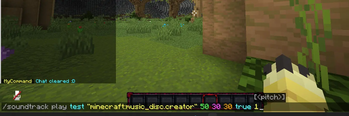
Soundtrack Command

Последние версии

Все версии →
release

SoundtrackPlayer 1.0.1+1.20.1+neoforge

1.0.1+1.20.1+neoforge
30 сент. 2026 г.36Minecraft: 1.20.1neoforge
Скачать
Что нового
- Ported to Fabric 26.2 and NeoForge 1.20.1, 1.20.4, 1.21.1, 1.21.4, 1.21.5, 1.21.8, 1.21.11 and 26.2 - 1.20.x builds run on Java 17 again - `/soundtrack play <id> resource <sound>` and `/soundtrack play <id> url <link>`, no quotes needed and resource autocompletes the resource pack sounds - Soundtracks folder: `.ogg` files in `assets/<namespace>/soundtracks/` of a resource pack work without a sounds.json and show up in tab completion after F3+T - Any link works: plain ogg/mp3/wav files, pages like YouTube or SoundCloud and other media like mp4 or m4a. The tools they need download by themselves the first time - Playing the same id and sound again changes volume, pitch or fades live without restarting the song - Local soundtracks keep playing (on the right second) after leaving and joining a world - The mod only talks in chat when something goes wrong - Late joiners, rejoins and resource reloads start the song at the same second as everyone else - F3+T and the pause menu no longer stop soundtracks - `stop` has an optional fade out that overrides the track's own one - `fadeloop` option: fade every lap of a loop in and out - `category` option: play in any vanilla sound category, default is the new SOUNDTRACKS one - "Soundtracks" volume slider in Music & Sounds, translated to 20 languages - `/soundtrack list` and `/soundtrack stop all` - Tracks in a category at 0% come back when the slider goes up again - Tracks from one server no longer keep playing on the next one - Server side API and client side API - Forge jars now ship a mixin refmap so they work outside the dev environment
release

SoundtrackPlayer PLUGIN 1.0.1

1.0.1+PLUGIN
30 сент. 2026 г.85Minecraft: 1.20.1, 1.20.4, 1.21.1, 1.21.4, 1.21.5, 1.21.8, 1.21.11, 26.2bukkit, paper, purpur, spigot
Скачать
Что нового
- `stop @a` also removes personal tracks, they used to come back after rejoining - `stop` takes an optional fade out - `play <target> <id> url|resource ...`, plus `fadeloop`, `category` and any link (YouTube and other sites too). The old argument order still works - Selectors (`@p`, `@a[distance=..10]`...) give each matched player their own track - Tab completion: real active ids in `stop`, custom sounds reported by the players' clients, soundtracks folder files, categories - `list [player]` - Stopping a personal track brings back the global one with the same id - `/soundtrackplayer` alias, permission based instead of op only - API through the services manager and `SoundtrackClientReadyEvent`
release

SoundtrackPlayer 1.0.1+26.2+neoforge

1.0.1+26.2+neoforge
30 сент. 2026 г.14Minecraft: 26.2neoforge
Скачать
Что нового
- Ported to Fabric 26.2 and NeoForge 1.20.1, 1.20.4, 1.21.1, 1.21.4, 1.21.5, 1.21.8, 1.21.11 and 26.2 - 1.20.x builds run on Java 17 again - `/soundtrack play <id> resource <sound>` and `/soundtrack play <id> url <link>`, no quotes needed and resource autocompletes the resource pack sounds - Soundtracks folder: `.ogg` files in `assets/<namespace>/soundtracks/` of a resource pack work without a sounds.json and show up in tab completion after F3+T - Any link works: plain ogg/mp3/wav files, pages like YouTube or SoundCloud and other media like mp4 or m4a. The tools they need download by themselves the first time - Playing the same id and sound again changes volume, pitch or fades live without restarting the song - Local soundtracks keep playing (on the right second) after leaving and joining a world - The mod only talks in chat when something goes wrong - Late joiners, rejoins and resource reloads start the song at the same second as everyone else - F3+T and the pause menu no longer stop soundtracks - `stop` has an optional fade out that overrides the track's own one - `fadeloop` option: fade every lap of a loop in and out - `category` option: play in any vanilla sound category, default is the new SOUNDTRACKS one - "Soundtracks" volume slider in Music & Sounds, translated to 20 languages - `/soundtrack list` and `/soundtrack stop all` - Tracks in a category at 0% come back when the slider goes up again - Tracks from one server no longer keep playing on the next one - Server side API and client side API - Forge jars now ship a mixin refmap so they work outside the dev environment
release

SoundtrackPlayer 1.0.1+1.21.11+neoforge

1.0.1+1.21.11+neoforge
30 сент. 2026 г.12Minecraft: 1.21.11neoforge
Скачать
Что нового
- Ported to Fabric 26.2 and NeoForge 1.20.1, 1.20.4, 1.21.1, 1.21.4, 1.21.5, 1.21.8, 1.21.11 and 26.2 - 1.20.x builds run on Java 17 again - `/soundtrack play <id> resource <sound>` and `/soundtrack play <id> url <link>`, no quotes needed and resource autocompletes the resource pack sounds - Soundtracks folder: `.ogg` files in `assets/<namespace>/soundtracks/` of a resource pack work without a sounds.json and show up in tab completion after F3+T - Any link works: plain ogg/mp3/wav files, pages like YouTube or SoundCloud and other media like mp4 or m4a. The tools they need download by themselves the first time - Playing the same id and sound again changes volume, pitch or fades live without restarting the song - Local soundtracks keep playing (on the right second) after leaving and joining a world - The mod only talks in chat when something goes wrong - Late joiners, rejoins and resource reloads start the song at the same second as everyone else - F3+T and the pause menu no longer stop soundtracks - `stop` has an optional fade out that overrides the track's own one - `fadeloop` option: fade every lap of a loop in and out - `category` option: play in any vanilla sound category, default is the new SOUNDTRACKS one - "Soundtracks" volume slider in Music & Sounds, translated to 20 languages - `/soundtrack list` and `/soundtrack stop all` - Tracks in a category at 0% come back when the slider goes up again - Tracks from one server no longer keep playing on the next one - Server side API and client side API - Forge jars now ship a mixin refmap so they work outside the dev environment
release

SoundtrackPlayer 1.0.1+1.21.8+neoforge

1.0.1+1.21.8+neoforge
30 сент. 2026 г.9Minecraft: 1.21.8neoforge
Скачать
Что нового
- Ported to Fabric 26.2 and NeoForge 1.20.1, 1.20.4, 1.21.1, 1.21.4, 1.21.5, 1.21.8, 1.21.11 and 26.2 - 1.20.x builds run on Java 17 again - `/soundtrack play <id> resource <sound>` and `/soundtrack play <id> url <link>`, no quotes needed and resource autocompletes the resource pack sounds - Soundtracks folder: `.ogg` files in `assets/<namespace>/soundtracks/` of a resource pack work without a sounds.json and show up in tab completion after F3+T - Any link works: plain ogg/mp3/wav files, pages like YouTube or SoundCloud and other media like mp4 or m4a. The tools they need download by themselves the first time - Playing the same id and sound again changes volume, pitch or fades live without restarting the song - Local soundtracks keep playing (on the right second) after leaving and joining a world - The mod only talks in chat when something goes wrong - Late joiners, rejoins and resource reloads start the song at the same second as everyone else - F3+T and the pause menu no longer stop soundtracks - `stop` has an optional fade out that overrides the track's own one - `fadeloop` option: fade every lap of a loop in and out - `category` option: play in any vanilla sound category, default is the new SOUNDTRACKS one - "Soundtracks" volume slider in Music & Sounds, translated to 20 languages - `/soundtrack list` and `/soundtrack stop all` - Tracks in a category at 0% come back when the slider goes up again - Tracks from one server no longer keep playing on the next one - Server side API and client side API - Forge jars now ship a mixin refmap so they work outside the dev environment
release

SoundtrackPlayer 1.0.1+1.21.5+neoforge

1.0.1+1.21.5+neoforge
30 сент. 2026 г.5Minecraft: 1.21.5neoforge
Скачать
Что нового
- Ported to Fabric 26.2 and NeoForge 1.20.1, 1.20.4, 1.21.1, 1.21.4, 1.21.5, 1.21.8, 1.21.11 and 26.2 - 1.20.x builds run on Java 17 again - `/soundtrack play <id> resource <sound>` and `/soundtrack play <id> url <link>`, no quotes needed and resource autocompletes the resource pack sounds - Soundtracks folder: `.ogg` files in `assets/<namespace>/soundtracks/` of a resource pack work without a sounds.json and show up in tab completion after F3+T - Any link works: plain ogg/mp3/wav files, pages like YouTube or SoundCloud and other media like mp4 or m4a. The tools they need download by themselves the first time - Playing the same id and sound again changes volume, pitch or fades live without restarting the song - Local soundtracks keep playing (on the right second) after leaving and joining a world - The mod only talks in chat when something goes wrong - Late joiners, rejoins and resource reloads start the song at the same second as everyone else - F3+T and the pause menu no longer stop soundtracks - `stop` has an optional fade out that overrides the track's own one - `fadeloop` option: fade every lap of a loop in and out - `category` option: play in any vanilla sound category, default is the new SOUNDTRACKS one - "Soundtracks" volume slider in Music & Sounds, translated to 20 languages - `/soundtrack list` and `/soundtrack stop all` - Tracks in a category at 0% come back when the slider goes up again - Tracks from one server no longer keep playing on the next one - Server side API and client side API - Forge jars now ship a mixin refmap so they work outside the dev environment
release

SoundtrackPlayer 1.0.1+1.21.4+neoforge

1.0.1+1.21.4+neoforge
30 сент. 2026 г.5Minecraft: 1.21.4neoforge
Скачать
Что нового
- Ported to Fabric 26.2 and NeoForge 1.20.1, 1.20.4, 1.21.1, 1.21.4, 1.21.5, 1.21.8, 1.21.11 and 26.2 - 1.20.x builds run on Java 17 again - `/soundtrack play <id> resource <sound>` and `/soundtrack play <id> url <link>`, no quotes needed and resource autocompletes the resource pack sounds - Soundtracks folder: `.ogg` files in `assets/<namespace>/soundtracks/` of a resource pack work without a sounds.json and show up in tab completion after F3+T - Any link works: plain ogg/mp3/wav files, pages like YouTube or SoundCloud and other media like mp4 or m4a. The tools they need download by themselves the first time - Playing the same id and sound again changes volume, pitch or fades live without restarting the song - Local soundtracks keep playing (on the right second) after leaving and joining a world - The mod only talks in chat when something goes wrong - Late joiners, rejoins and resource reloads start the song at the same second as everyone else - F3+T and the pause menu no longer stop soundtracks - `stop` has an optional fade out that overrides the track's own one - `fadeloop` option: fade every lap of a loop in and out - `category` option: play in any vanilla sound category, default is the new SOUNDTRACKS one - "Soundtracks" volume slider in Music & Sounds, translated to 20 languages - `/soundtrack list` and `/soundtrack stop all` - Tracks in a category at 0% come back when the slider goes up again - Tracks from one server no longer keep playing on the next one - Server side API and client side API - Forge jars now ship a mixin refmap so they work outside the dev environment
release

SoundtrackPlayer 1.0.1+1.21.1+neoforge

1.0.1+1.21.1+neoforge
30 сент. 2026 г.38Minecraft: 1.21.1neoforge
Скачать
Что нового
- Ported to Fabric 26.2 and NeoForge 1.20.1, 1.20.4, 1.21.1, 1.21.4, 1.21.5, 1.21.8, 1.21.11 and 26.2 - 1.20.x builds run on Java 17 again - `/soundtrack play <id> resource <sound>` and `/soundtrack play <id> url <link>`, no quotes needed and resource autocompletes the resource pack sounds - Soundtracks folder: `.ogg` files in `assets/<namespace>/soundtracks/` of a resource pack work without a sounds.json and show up in tab completion after F3+T - Any link works: plain ogg/mp3/wav files, pages like YouTube or SoundCloud and other media like mp4 or m4a. The tools they need download by themselves the first time - Playing the same id and sound again changes volume, pitch or fades live without restarting the song - Local soundtracks keep playing (on the right second) after leaving and joining a world - The mod only talks in chat when something goes wrong - Late joiners, rejoins and resource reloads start the song at the same second as everyone else - F3+T and the pause menu no longer stop soundtracks - `stop` has an optional fade out that overrides the track's own one - `fadeloop` option: fade every lap of a loop in and out - `category` option: play in any vanilla sound category, default is the new SOUNDTRACKS one - "Soundtracks" volume slider in Music & Sounds, translated to 20 languages - `/soundtrack list` and `/soundtrack stop all` - Tracks in a category at 0% come back when the slider goes up again - Tracks from one server no longer keep playing on the next one - Server side API and client side API - Forge jars now ship a mixin refmap so they work outside the dev environment
release

SoundtrackPlayer 1.0.1+1.20.4+neoforge

1.0.1+1.20.4+neoforge
30 сент. 2026 г.5Minecraft: 1.20.4neoforge
Скачать
Что нового
- Ported to Fabric 26.2 and NeoForge 1.20.1, 1.20.4, 1.21.1, 1.21.4, 1.21.5, 1.21.8, 1.21.11 and 26.2 - 1.20.x builds run on Java 17 again - `/soundtrack play <id> resource <sound>` and `/soundtrack play <id> url <link>`, no quotes needed and resource autocompletes the resource pack sounds - Soundtracks folder: `.ogg` files in `assets/<namespace>/soundtracks/` of a resource pack work without a sounds.json and show up in tab completion after F3+T - Any link works: plain ogg/mp3/wav files, pages like YouTube or SoundCloud and other media like mp4 or m4a. The tools they need download by themselves the first time - Playing the same id and sound again changes volume, pitch or fades live without restarting the song - Local soundtracks keep playing (on the right second) after leaving and joining a world - The mod only talks in chat when something goes wrong - Late joiners, rejoins and resource reloads start the song at the same second as everyone else - F3+T and the pause menu no longer stop soundtracks - `stop` has an optional fade out that overrides the track's own one - `fadeloop` option: fade every lap of a loop in and out - `category` option: play in any vanilla sound category, default is the new SOUNDTRACKS one - "Soundtracks" volume slider in Music & Sounds, translated to 20 languages - `/soundtrack list` and `/soundtrack stop all` - Tracks in a category at 0% come back when the slider goes up again - Tracks from one server no longer keep playing on the next one - Server side API and client side API - Forge jars now ship a mixin refmap so they work outside the dev environment
release

SoundtrackPlayer 1.0.1+1.20.4+forge

1.0.1+1.20.4+forge
30 сент. 2026 г.11Minecraft: 1.20.4forge
Скачать
Что нового
- Ported to Fabric 26.2 and NeoForge 1.20.1, 1.20.4, 1.21.1, 1.21.4, 1.21.5, 1.21.8, 1.21.11 and 26.2 - 1.20.x builds run on Java 17 again - `/soundtrack play <id> resource <sound>` and `/soundtrack play <id> url <link>`, no quotes needed and resource autocompletes the resource pack sounds - Soundtracks folder: `.ogg` files in `assets/<namespace>/soundtracks/` of a resource pack work without a sounds.json and show up in tab completion after F3+T - Any link works: plain ogg/mp3/wav files, pages like YouTube or SoundCloud and other media like mp4 or m4a. The tools they need download by themselves the first time - Playing the same id and sound again changes volume, pitch or fades live without restarting the song - Local soundtracks keep playing (on the right second) after leaving and joining a world - The mod only talks in chat when something goes wrong - Late joiners, rejoins and resource reloads start the song at the same second as everyone else - F3+T and the pause menu no longer stop soundtracks - `stop` has an optional fade out that overrides the track's own one - `fadeloop` option: fade every lap of a loop in and out - `category` option: play in any vanilla sound category, default is the new SOUNDTRACKS one - "Soundtracks" volume slider in Music & Sounds, translated to 20 languages - `/soundtrack list` and `/soundtrack stop all` - Tracks in a category at 0% come back when the slider goes up again - Tracks from one server no longer keep playing on the next one - Server side API and client side API - Forge jars now ship a mixin refmap so they work outside the dev environment