
Screenshot GalleryСкачатьСкачатьСкачатьСкачатьСкачатьСкачатьСкачатьСкачатьСкачатьСкачатьСкачатьСкачатьСкачатьСкачатьСкачатьСкачатьСкачатьСкачатьСкачатьСкачатьСкачатьСкачатьСкачатьСкачатьСкачатьСкачатьСкачатьСкачатьСкачатьСкачатьСкачатьСкачатьСкачатьСкачатьСкачатьСкачатьСкачатьСкачатьСкачатьСкачатьСкачатьСкачатьСкачатьСкачатьСкачатьСкачатьСкачатьСкачатьСкачатьСкачать
ВЕРСИИ (50)
release
Screenshot Gallery 2.1 (Fabric)
2.1+fabric20 сент. 2026 г.124,3 тыс.Minecraft: 26.3fabric
Что нового
Support for 26.3
release
Screenshot Gallery 2.1 (Fabric)
2.1+fabric1 сент. 2026 г.65Minecraft: 26.1.1fabric
Что нового
backport **v2.1** for 26.1.1 **fabric**
release
Screenshot Gallery 2.1 (Forge)
2.1+forge1 сент. 2026 г.163Minecraft: 1.20.1forge
Что нового
backport **v2.1** for 1.20.1 **forge**
release
Screenshot Gallery 2.1 (Fabric)
2.1+fabric1 сент. 2026 г.137Minecraft: 1.20.1fabric
Что нового
backport **v2.1** for 1.20.1 **fabric**
release
Screenshot Gallery 2.1 (NeoForge)
2.1+neoforge31 авг. 2026 г.596Minecraft: 1.21.1neoforge
Что нового
backport **v2.1** for 1.21.1 **neoforge**
release
Screenshot Gallery 2.1 (NeoForge)
2.1+neoforge31 авг. 2026 г.53Minecraft: 1.21.11neoforge
Что нового
backport **v2.1** for 1.21.11 **neoforge**
release
Screenshot Gallery 2.1 (Fabric)
2.1+fabric31 авг. 2026 г.1,6 тыс.Minecraft: 1.21.11fabric
Что нового
backport **v2.1** for 1.21.11 **fabric**
release
Screenshot Gallery 2.1 (NeoForge)
2.1+neoforge31 авг. 2026 г.81Minecraft: 26.1.2neoforge
Что нового
v2.1 for 26.1.2 Neoforge
release
Screenshot Gallery 2.1 (Fabric)
2.1+fabric31 авг. 2026 г.473Minecraft: 26.1.2fabric
Что нового
# Screenshot Gallery 2.1 (Minecraft 26.1.2)
### New Features
- **Interactive Drag-and-Drop Position Editor:**
- Added a visual position editor screen accessible directly from the configuration menu.
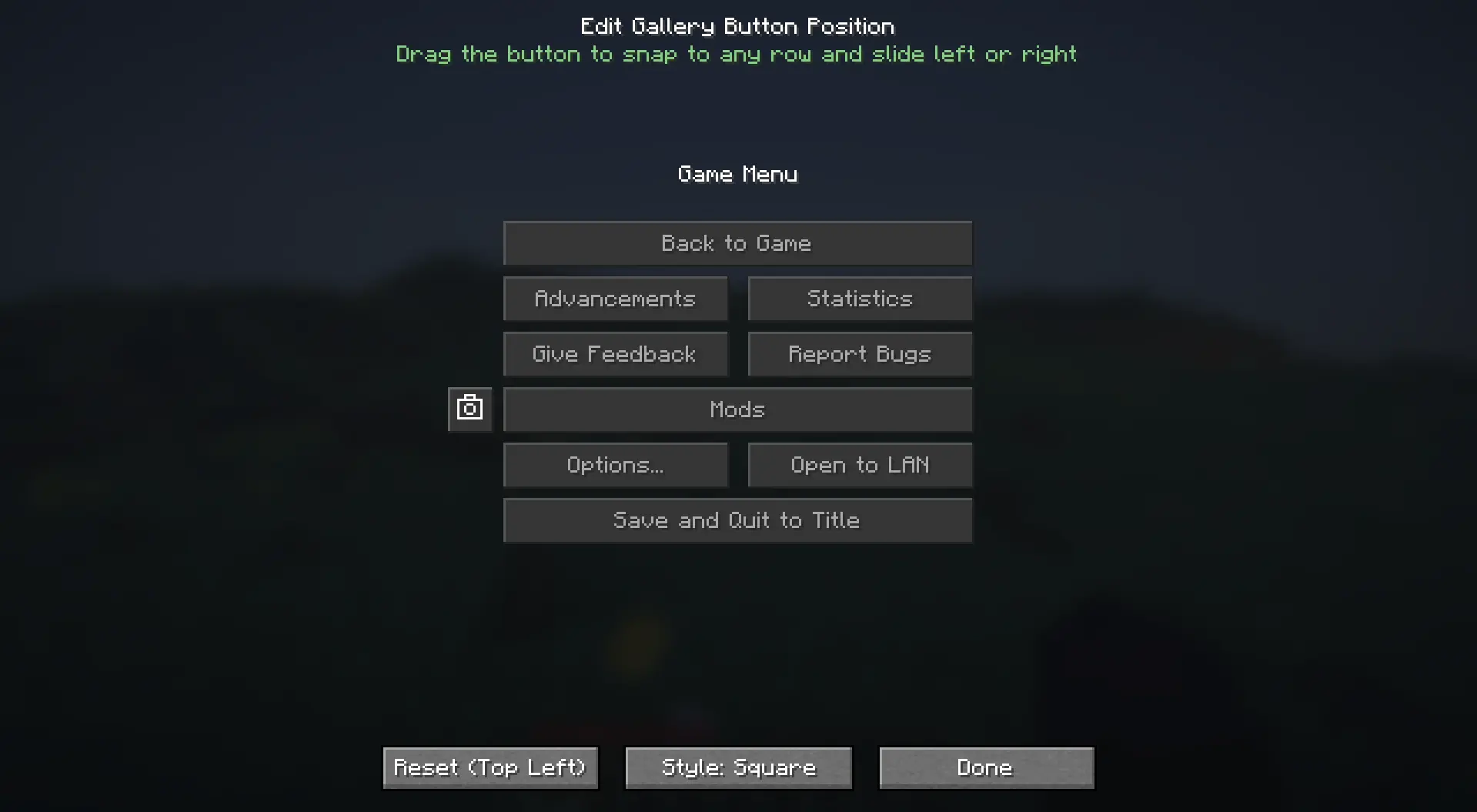
- Features an intuitive Snap-to-Row system that locks the button to the exact vertical heights of pause menu rows while allowing smooth horizontal sliding.
- Includes menu collision detection to prevent the gallery button from overlapping central game menu buttons.
- Renders a live preview of the pause menu with dynamic layout adaptation based on whether ModMenu is installed.
- **Square Camera Button Style:**
- Added a configuration toggle to switch between the classic **Normal (Wide)** style (`70x20`) and the compact **Square (Camera)** style (`20x20`).
- The square button renders standard Minecraft button background textures, hover states, and click animations with a centered camera icon and hover tooltip.
---
### Improvements and Fixes
- **Compatibility Improvements:** Enhanced compatibility with custom menu mods such as FancyMenu and ModMenu.
release
Screenshot Gallery 2.1 (fabric)
2.1+Fabric31 авг. 2026 г.4,6 тыс.Minecraft: 26.2fabric
Что нового
# Screenshot Gallery 2.1
Version 2.1 introduces native folder selection for custom directories, an in-viewer metadata toggle, true full-height image scaling in fullscreen mode, and improved metadata lifecycle handling.
---
### New Features
* **Native File Explorer Folder Picker**
* Added a `Browse...` button in the Cloth Config settings screen. Users can now select custom screenshot directories using the native operating system file explorer dialog directly from the game UI.

* **Fullscreen Metadata Quick Toggle**
* Added a direct toggle button in the top-left corner of the fullscreen viewer top bar (`Metadata: ON` / `Metadata: OFF`). Toggle metadata visibility instantly with a single click without opening config screens.
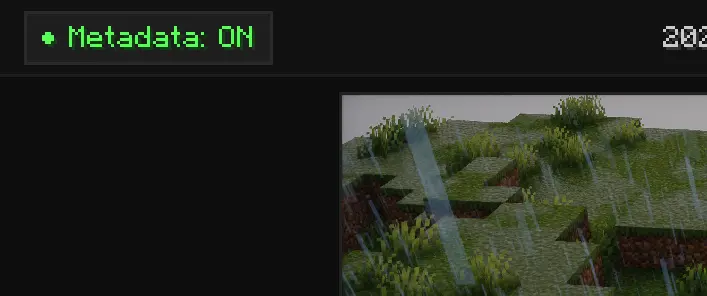
* **Dynamic Fullscreen Image Scaling**
* When metadata is disabled, the bottom info bar is hidden and the screenshot viewer dynamically expands vertically to fill the full height of the screen.
* **Automatic Metadata Lifecycle Management**
* Deleting or renaming screenshots inside the gallery now automatically removes or renames the corresponding `.meta.json` sidecar files.
---
### Fixes and Improvements
* **Cache Management**: Improved memory handling and texture cache invalidation during deletion and rapid image cycling.
release
Screenshot Gallery 2.0 (NeoForge)
2.0+neoforge21 июл. 2026 г.769Minecraft: 1.21.1neoforge
Что нового
**Backport** for _1.21.1_ **neoforge**
release
Screenshot Gallery 2.0 (Fabric)
2.0+fabric20 июл. 2026 г.2,5 тыс.Minecraft: 1.21.11fabric
Что нового
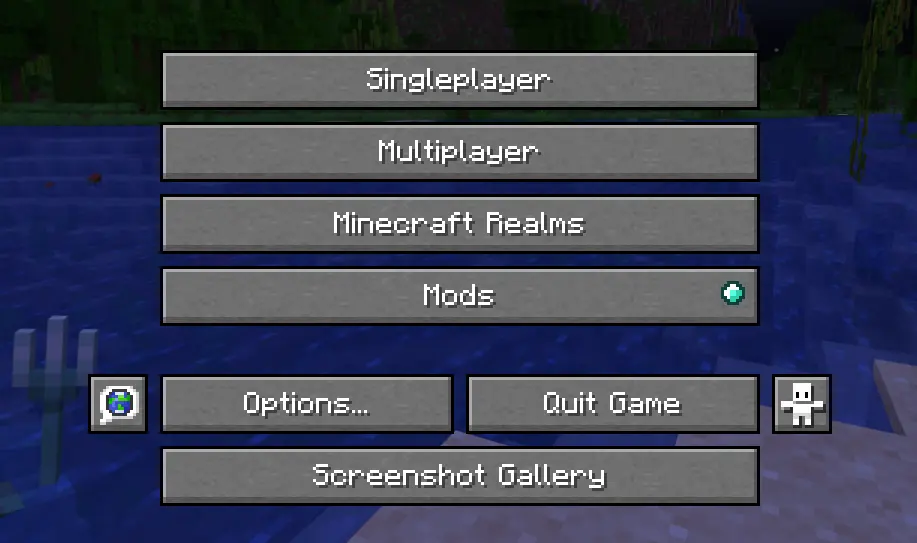
### Added a gallery button to the main menu, so you can browse your screenshots without loading a world.
release
Screenshot Gallery 2.0 (Fabric)
2.0+fabric20 июл. 2026 г.6,7 тыс.Minecraft: 26.2fabric
Что нового
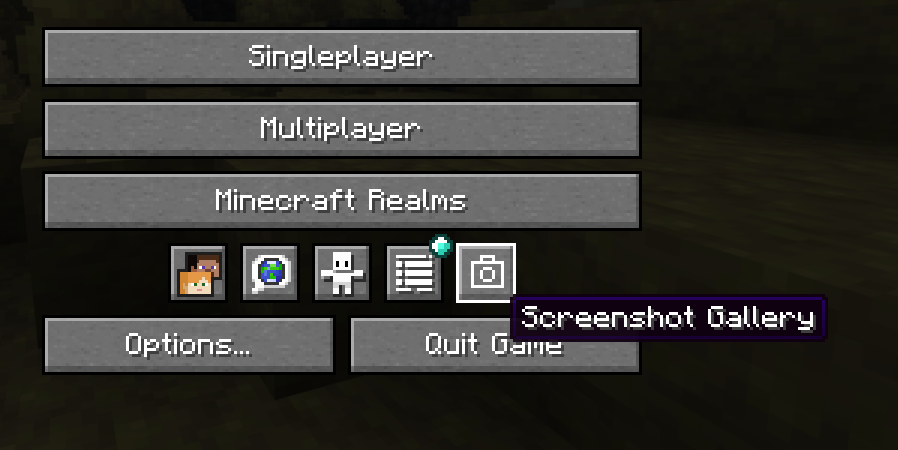
### Added a gallery button to the main menu, so you can browse your screenshots without loading a world.
release
Screenshot Gallery 1.9 (NeoForge)
1.9+neoforge2 июл. 2026 г.322Minecraft: 1.21.1neoforge
Что нового
## [1.9] — July 2, 2026 FOR _**1.21.1 NeoForge**_
### Bug Fixes
**Copy Image fix on Windows** Copy Image has been fixed on Windows in Fabric, Forge, and NeoForge versions:
- This function used to have issues due to some specificities in the way the clipboard is handled by Java. Now, instead, it copies an image using the clipboard on Windows.
- Simply copy a screenshot and paste it into the Discord chat or any other image editing program.
- Nothing external needed here it all happens inside the game.
- *Notice that this only works by copying the actual image, and not by copying a file. **So it can't be pasted into a File Explorer folder**.*
release
Screenshot Gallery 1.9.1 (Fabric)
1.9.1+fabric24 июн. 2026 г.2 тыс.Minecraft: 26.2fabric
Что нового
Moved the Gallery button into the pause menu's icon row
release
Screenshot Gallery 1.9 (Fabric)
1.9+fabric19 июн. 2026 г.229Minecraft: 26.2fabric
Что нового
## [1.9] — June 19, 2026
### Bug Fixes
**Copy Image fix on Windows** Copy Image has been fixed on Windows in Fabric, Forge, and NeoForge versions:
- This function used to have issues due to some specificities in the way the clipboard is handled by Java. Now, instead, it copies an image using the clipboard on Windows.
- Simply copy a screenshot and paste it into the Discord chat or any other image editing program.
- Nothing external needed here it all happens inside the game.
- *Notice that this only works by copying the actual image, and not by copying a file. **So it can't be pasted into a File Explorer folder**.*
release
Screenshot Gallery 1.9 (Fabric)
1.9+fabric19 июн. 2026 г.1,9 тыс.Minecraft: 1.21.11fabric
Что нового
## [1.9] — June 19, 2026
### Bug Fixes
**Copy Image fix on Windows** Copy Image has been fixed on Windows in Fabric, Forge, and NeoForge versions:
- This function used to have issues due to some specificities in the way the clipboard is handled by Java. Now, instead, it copies an image using the clipboard on Windows.
- Simply copy a screenshot and paste it into the Discord chat or any other image editing program.
- Nothing external needed here it all happens inside the game.
- *Notice that this only works by copying the actual image, and not by copying a file. **So it can't be pasted into a File Explorer folder**.*
release
Screenshot Gallery 1.8 (Fabric)
1.8+fabric18 июн. 2026 г.33Minecraft: 1.21.11fabric
Что нового
## [1.8] — June 18, 2026
Big stability update with thread safety fixes, coordinate precision improvements, and a new 1.21.11 Fabric backport.
---
### New Features
**Precise Coordinates** — Coordinates are now stored and displayed as full decimals instead of rounded integers. Your copied `/tp` commands will land exactly where you clicked, and the format is now consistent across Fabric and Forge.
---
### Bug Fixes
**Thread Safety (Critical)** — Fixed silent metadata corruption caused by the render and background threads hitting the cache at the same time.
**Race Condition on Load** — Metadata was sometimes finishing out of order. Moved async operations back onto the main thread so screenshots load correctly every time.
**Memory Leak** — Closing the gallery mid-load could leave orphaned textures on the GPU. Lifecycle checks now clean them up.
**Text Overflow** — Filenames and info cards were occasionally rendering outside thumbnail boundaries. Fixed with GL scissoring.
**Search + Navigation Desync** — Fullscreen navigation now correctly steps through only your filtered results instead of jumping to hidden ones.
**Search Performance** — Rewrote text truncation using binary search. Faster typing response and proper handling of special/RTL characters.
**Thumbnail Animation** — Was allocating a new object every frame for idle thumbnails. Replaced with a shared static instance.
**Delete/Rename Modal** — Dismissing the context menu could drop the active file target mid-operation. Now properly isolated.
**F2 Spam Safeguard** — Rapid screenshots could spawn multiple parallel polling tasks. An atomic lock now ensures only one runs at a time.
---
release
Screenshot Gallery 1.8 (NeoForge)
1.8+neoforge15 июн. 2026 г.193Minecraft: 1.21.1neoforge
Что нового
# Changelog
## [1.8] — June 15, 2026
Big stability update with thread safety fixes, coordinate precision improvements, and a **new 1.21.1 NeoForge** backport.
---
### New Features
**Precise Coordinates** — Coordinates are now stored and displayed as full decimals instead of rounded integers. Your copied `/tp` commands will land exactly where you clicked, and the format is now consistent across Fabric and Forge.
---
### Bug Fixes
**Thread Safety (Critical)** — Fixed silent metadata corruption caused by the render and background threads hitting the cache at the same time.
**Race Condition on Load** — Metadata was sometimes finishing out of order. Moved async operations back onto the main thread so screenshots load correctly every time.
**Memory Leak** — Closing the gallery mid-load could leave orphaned textures on the GPU. Lifecycle checks now clean them up.
**Text Overflow** — Filenames and info cards were occasionally rendering outside thumbnail boundaries. Fixed with GL scissoring.
**Search + Navigation Desync** — Fullscreen navigation now correctly steps through only your filtered results instead of jumping to hidden ones.
**Search Performance** — Rewrote text truncation using binary search. Faster typing response and proper handling of special/RTL characters.
**Thumbnail Animation** — Was allocating a new object every frame for idle thumbnails. Replaced with a shared static instance.
**Delete/Rename Modal** — Dismissing the context menu could drop the active file target mid-operation. Now properly isolated.
**F2 Spam Safeguard** — Rapid screenshots could spawn multiple parallel polling tasks. An atomic lock now ensures only one runs at a time.
release
Screenshot Gallery 1.8 (NeoForge)
1.8+neoforge3 июн. 2026 г.93Minecraft: 26.1.2neoforge
Что нового
# Changelog
## [1.8] — June 3, 2026 Support for 26.1.2 NeoForge
Big stability update with thread safety fixes, coordinate precision improvements, and a new 1.20.1 Fabric backport.
---
### New Features
**Precise Coordinates** — Coordinates are now stored and displayed as full decimals instead of rounded integers. Your copied `/tp` commands will land exactly where you clicked, and the format is now consistent across Fabric and Forge.
---
### Bug Fixes
**Thread Safety (Critical)** — Fixed silent metadata corruption caused by the render and background threads hitting the cache at the same time.
**Race Condition on Load** — Metadata was sometimes finishing out of order. Moved async operations back onto the main thread so screenshots load correctly every time.
**Memory Leak** — Closing the gallery mid-load could leave orphaned textures on the GPU. Lifecycle checks now clean them up.
**Text Overflow** — Filenames and info cards were occasionally rendering outside thumbnail boundaries. Fixed with GL scissoring.
**Search + Navigation Desync** — Fullscreen navigation now correctly steps through only your filtered results instead of jumping to hidden ones.
**Search Performance** — Rewrote text truncation using binary search. Faster typing response and proper handling of special/RTL characters.
**Thumbnail Animation** — Was allocating a new object every frame for idle thumbnails. Replaced with a shared static instance.
**Delete/Rename Modal** — Dismissing the context menu could drop the active file target mid-operation. Now properly isolated.
**F2 Spam Safeguard** — Rapid screenshots could spawn multiple parallel polling tasks. An atomic lock now ensures only one runs at a time.
release
Screenshot Gallery 1.8 (Forge)
1.8+forge30 мая 2026 г.87Minecraft: 1.21.11forge
Что нового
# Changelog
## [1.8] — May 30, 2026
Big stability update with thread safety fixes, coordinate precision improvements, and a new 1.20.1 Fabric backport.
---
### New Features
**Precise Coordinates** — Coordinates are now stored and displayed as full decimals instead of rounded integers. Your copied `/tp` commands will land exactly where you clicked, and the format is now consistent across Fabric and Forge.
---
### Bug Fixes
**Thread Safety (Critical)** — Fixed silent metadata corruption caused by the render and background threads hitting the cache at the same time.
**Race Condition on Load** — Metadata was sometimes finishing out of order. Moved async operations back onto the main thread so screenshots load correctly every time.
**Memory Leak** — Closing the gallery mid-load could leave orphaned textures on the GPU. Lifecycle checks now clean them up.
**Text Overflow** — Filenames and info cards were occasionally rendering outside thumbnail boundaries. Fixed with GL scissoring.
**Search + Navigation Desync** — Fullscreen navigation now correctly steps through only your filtered results instead of jumping to hidden ones.
**Search Performance** — Rewrote text truncation using binary search. Faster typing response and proper handling of special/RTL characters.
**Thumbnail Animation** — Was allocating a new object every frame for idle thumbnails. Replaced with a shared static instance.
**Delete/Rename Modal** — Dismissing the context menu could drop the active file target mid-operation. Now properly isolated.
**F2 Spam Safeguard** — Rapid screenshots could spawn multiple parallel polling tasks. An atomic lock now ensures only one runs at a time.
release
Screenshot Gallery 1.8 (NeoForge)
1.8+neoforge30 мая 2026 г.68Minecraft: 1.21.11neoforge
Что нового
# Changelog
## [1.8] — May 30, 2026
Big stability update with thread safety fixes, coordinate precision improvements, and a new 1.20.1 Fabric backport.
---
### New Features
**Precise Coordinates** — Coordinates are now stored and displayed as full decimals instead of rounded integers. Your copied `/tp` commands will land exactly where you clicked, and the format is now consistent across Fabric and Forge.
---
### Bug Fixes
**Thread Safety (Critical)** — Fixed silent metadata corruption caused by the render and background threads hitting the cache at the same time.
**Race Condition on Load** — Metadata was sometimes finishing out of order. Moved async operations back onto the main thread so screenshots load correctly every time.
**Memory Leak** — Closing the gallery mid-load could leave orphaned textures on the GPU. Lifecycle checks now clean them up.
**Text Overflow** — Filenames and info cards were occasionally rendering outside thumbnail boundaries. Fixed with GL scissoring.
**Search + Navigation Desync** — Fullscreen navigation now correctly steps through only your filtered results instead of jumping to hidden ones.
**Search Performance** — Rewrote text truncation using binary search. Faster typing response and proper handling of special/RTL characters.
**Thumbnail Animation** — Was allocating a new object every frame for idle thumbnails. Replaced with a shared static instance.
**Delete/Rename Modal** — Dismissing the context menu could drop the active file target mid-operation. Now properly isolated.
**F2 Spam Safeguard** — Rapid screenshots could spawn multiple parallel polling tasks. An atomic lock now ensures only one runs at a time.
release
Screenshot Gallery 1.8 (Forge 1.20.1)
1.8+forge28 мая 2026 г.271Minecraft: 1.20.1forge
Что нового
# Changelog
## [1.8] — May 28, 2026
Big stability update with thread safety fixes, coordinate precision improvements, and a new 1.20.1 Fabric backport.
---
### New Features
**Precise Coordinates** — Coordinates are now stored and displayed as full decimals instead of rounded integers. Your copied `/tp` commands will land exactly where you clicked, and the format is now consistent across Fabric and Forge.
---
### Bug Fixes
**Thread Safety (Critical)** — Fixed silent metadata corruption caused by the render and background threads hitting the cache at the same time.
**Race Condition on Load** — Metadata was sometimes finishing out of order. Moved async operations back onto the main thread so screenshots load correctly every time.
**Memory Leak** — Closing the gallery mid-load could leave orphaned textures on the GPU. Lifecycle checks now clean them up.
**Text Overflow** — Filenames and info cards were occasionally rendering outside thumbnail boundaries. Fixed with GL scissoring.
**Search + Navigation Desync** — Fullscreen navigation now correctly steps through only your filtered results instead of jumping to hidden ones.
**Search Performance** — Rewrote text truncation using binary search. Faster typing response and proper handling of special/RTL characters.
**Thumbnail Animation** — Was allocating a new object every frame for idle thumbnails. Replaced with a shared static instance.
**Delete/Rename Modal** — Dismissing the context menu could drop the active file target mid-operation. Now properly isolated.
**F2 Spam Safeguard** — Rapid screenshots could spawn multiple parallel polling tasks. An atomic lock now ensures only one runs at a time.
release
Screenshot Gallery 1.8 (Fabric)
1.8+fabric28 мая 2026 г.99Minecraft: 26.1.1fabric
Что нового
## [1.8] — May 28, 2026
Big stability update with thread safety fixes, coordinate precision improvements, and a new 1.20.1 Fabric backport.
---
### New Features
**Precise Coordinates** — Coordinates are now stored and displayed as full decimals instead of rounded integers. Your copied `/tp` commands will land exactly where you clicked, and the format is now consistent across Fabric and Forge.
---
### Bug Fixes
**Thread Safety (Critical)** — Fixed silent metadata corruption caused by the render and background threads hitting the cache at the same time.
**Race Condition on Load** — Metadata was sometimes finishing out of order. Moved async operations back onto the main thread so screenshots load correctly every time.
**Memory Leak** — Closing the gallery mid-load could leave orphaned textures on the GPU. Lifecycle checks now clean them up.
**Text Overflow** — Filenames and info cards were occasionally rendering outside thumbnail boundaries. Fixed with GL scissoring.
**Search + Navigation Desync** — Fullscreen navigation now correctly steps through only your filtered results instead of jumping to hidden ones.
**Search Performance** — Rewrote text truncation using binary search. Faster typing response and proper handling of special/RTL characters.
**Thumbnail Animation** — Was allocating a new object every frame for idle thumbnails. Replaced with a shared static instance.
**Delete/Rename Modal** — Dismissing the context menu could drop the active file target mid-operation. Now properly isolated.
**F2 Spam Safeguard** — Rapid screenshots could spawn multiple parallel polling tasks. An atomic lock now ensures only one runs at a time.
---
release
Screenshot Gallery 1.8 (Fabric)
1.8+fabric28 мая 2026 г.169Minecraft: 1.20.1fabric
Что нового
## [1.8] — May 28, 2026
Big stability update with thread safety fixes, coordinate precision improvements, and a new 1.20.1 Fabric backport.
---
### New Features
**Precise Coordinates** — Coordinates are now stored and displayed as full decimals instead of rounded integers. Your copied `/tp` commands will land exactly where you clicked, and the format is now consistent across Fabric and Forge.
---
### Bug Fixes
**Thread Safety (Critical)** — Fixed silent metadata corruption caused by the render and background threads hitting the cache at the same time.
**Race Condition on Load** — Metadata was sometimes finishing out of order. Moved async operations back onto the main thread so screenshots load correctly every time.
**Memory Leak** — Closing the gallery mid-load could leave orphaned textures on the GPU. Lifecycle checks now clean them up.
**Text Overflow** — Filenames and info cards were occasionally rendering outside thumbnail boundaries. Fixed with GL scissoring.
**Search + Navigation Desync** — Fullscreen navigation now correctly steps through only your filtered results instead of jumping to hidden ones.
**Search Performance** — Rewrote text truncation using binary search. Faster typing response and proper handling of special/RTL characters.
**Thumbnail Animation** — Was allocating a new object every frame for idle thumbnails. Replaced with a shared static instance.
**Delete/Rename Modal** — Dismissing the context menu could drop the active file target mid-operation. Now properly isolated.
**F2 Spam Safeguard** — Rapid screenshots could spawn multiple parallel polling tasks. An atomic lock now ensures only one runs at a time.
---
release
Screenshot Gallery 1.8 (Fabric)
1.8+fabric28 мая 2026 г.3,7 тыс.Minecraft: 26.1.2fabric
Что нового
# Changelog
## [1.8] — May 28, 2026
Big stability update with thread safety fixes, coordinate precision improvements, and a new 1.20.1 Fabric backport.
---
### New Features
**Precise Coordinates** — Coordinates are now stored and displayed as full decimals instead of rounded integers. Your copied `/tp` commands will land exactly where you clicked, and the format is now consistent across Fabric and Forge.
---
### Bug Fixes
**Thread Safety (Critical)** — Fixed silent metadata corruption caused by the render and background threads hitting the cache at the same time.
**Race Condition on Load** — Metadata was sometimes finishing out of order. Moved async operations back onto the main thread so screenshots load correctly every time.
**Memory Leak** — Closing the gallery mid-load could leave orphaned textures on the GPU. Lifecycle checks now clean them up.
**Text Overflow** — Filenames and info cards were occasionally rendering outside thumbnail boundaries. Fixed with GL scissoring.
**Search + Navigation Desync** — Fullscreen navigation now correctly steps through only your filtered results instead of jumping to hidden ones.
**Search Performance** — Rewrote text truncation using binary search. Faster typing response and proper handling of special/RTL characters.
**Thumbnail Animation** — Was allocating a new object every frame for idle thumbnails. Replaced with a shared static instance.
**Delete/Rename Modal** — Dismissing the context menu could drop the active file target mid-operation. Now properly isolated.
**F2 Spam Safeguard** — Rapid screenshots could spawn multiple parallel polling tasks. An atomic lock now ensures only one runs at a time.
release
Screenshot Gallery 1.7 (fabric)
1.7+fabric25 мая 2026 г.34Minecraft: 26.1.1fabric
Что нового
# Changelog
## [1.7] - 2026-05-22
### Screenshot Gallery 1.7
**New Features**
* **Fancy Menu Support:** Screenshot Gallery now works with Fancy Menu. You can add the gallery button to your custom main menu layout without any conflicts.
* **Yaw and Pitch in TP Command:** The copied `/tp` command now includes your camera's yaw and pitch values, so when you teleport back to a spot, you're facing the exact same direction you were when the screenshot was taken.
**Bug Fixes**
* **Silent screenshots now save metadata correctly:** Previously, screenshots taken silently (without the normal capture sound/flash) were missing coordinates, biome, dimension, and other data in their `.meta.json` file. That's been fixed — silent and normal captures now behave identically.
* **Fixed a bug where screenshots would go completely black after 20-25 captures in the same session:** This was caused by texture resources not being released properly after each capture, eventually exhausting the available slots. Textures are now disposed of correctly so the gallery stays functional no matter how many screenshots you take.
release
Screenshot Gallery 1.7 (Fabric)
1.7+fabric22 мая 2026 г.399Minecraft: 26.1fabric
Что нового
# Changelog
## [1.7] - 2026-05-22
### Screenshot Gallery 1.7
**_New Features_**
- **Fancy Menu Support**: Screenshot Gallery now works with Fancy Menu. You can add the gallery button to your custom main menu layout without any conflicts.
- **Yaw and Pitch in TP Command**: The copied /tp command now includes your camera's yaw and pitch values, so when you teleport back to a spot, you're facing the exact same direction you were when the screenshot was taken.
**_Bug Fixes_**
- **Silent screenshots now save metadata correctly**. Previously, screenshots taken silently (without the normal capture sound/flash) were missing coordinates, biome, dimension, and other data in their .meta.json file. That's been fixed — silent and normal captures now behave identically.
- **Fixed a bug where screenshots would go completely black after 20-25 captures in the same session**. This was caused by texture resources not being released properly after each capture, eventually exhausting the available slots. Textures are now disposed of correctly so the gallery stays functional no matter how many screenshots you take.
release
Screenshot Gallery 1.7 (Fabric)
1.7+fabric22 мая 2026 г.2,3 тыс.Minecraft: 1.21.11fabric
Что нового
# Changelog
## [1.7] - 2026-05-22
### Screenshot Gallery 1.7
**_New Features_**
- **Fancy Menu Support**: Screenshot Gallery now works with Fancy Menu. You can add the gallery button to your custom main menu layout without any conflicts.
- **Yaw and Pitch in TP Command**: The copied /tp command now includes your camera's yaw and pitch values, so when you teleport back to a spot, you're facing the exact same direction you were when the screenshot was taken.
**_Bug Fixes_**
- **Silent screenshots now save metadata correctly**. Previously, screenshots taken silently (without the normal capture sound/flash) were missing coordinates, biome, dimension, and other data in their .meta.json file. That's been fixed — silent and normal captures now behave identically.
- **Fixed a bug where screenshots would go completely black after 20-25 captures in the same session**. This was caused by texture resources not being released properly after each capture, eventually exhausting the available slots. Textures are now disposed of correctly so the gallery stays functional no matter how many screenshots you take.
release
Screenshot Gallery 1.6 (Fabric)
1.6+fabric3 апр. 2026 г.8,6 тыс.Minecraft: 1.21.11fabric
Что нового
# Changelog
## [1.6] - 2026-04-03
## Screenshot Gallery 1.6
### UI Redesign
- The interface has been completely overhauled for a minimal, professional look. We removed the busy visual effects—like heavy drop shadows, pulsing animations, glowing indicators, and bright accents—and replaced them with clean lines, subtle hover states, and a neutral dark color palette. The gallery grid, thumbnail overlays, and fullscreen viewer are now much cleaner and less distracting.
### New Features
- Seed Capture: Singleplayer screenshots now save the world seed. You can click the new "SEED" label in fullscreen mode to instantly copy the seed to your clipboard.
- Copy TP Command: The old "Go To" folder button has been replaced with a "Copy TP" button. Clicking it instantly copies the exact /tp X Y Z command to your clipboard.
### Bug Fixes
- Deleting a screenshot inside the gallery now correctly deletes its attached .meta.json file to keep your folders clean.
- Fixed a layout issue where metadata text (coordinates, biome, dimension) was getting cut off at the bottom of the fullscreen viewer.
- Replaced the tiny, hard-to-read crosshair text symbol with a clearer custom-drawn icon.
release
Screenshot Gallery 1.6 (Fabric)
1.6+fabric3 апр. 2026 г.775Minecraft: 26.1fabric
Что нового
# Changelog
## [1.6] - 2026-04-03
## Screenshot Gallery 1.6
### UI Redesign
- The interface has been completely overhauled for a minimal, professional look. We removed the busy visual effects—like heavy drop shadows, pulsing animations, glowing indicators, and bright accents—and replaced them with clean lines, subtle hover states, and a neutral dark color palette. The gallery grid, thumbnail overlays, and fullscreen viewer are now much cleaner and less distracting.
### New Features
- Seed Capture: Singleplayer screenshots now save the world seed. You can click the new "SEED" label in fullscreen mode to instantly copy the seed to your clipboard.
- Copy TP Command: The old "Go To" folder button has been replaced with a "Copy TP" button. Clicking it instantly copies the exact /tp X Y Z command to your clipboard.
### Bug Fixes
- Deleting a screenshot inside the gallery now correctly deletes its attached .meta.json file to keep your folders clean.
- Fixed a layout issue where metadata text (coordinates, biome, dimension) was getting cut off at the bottom of the fullscreen viewer.
- Replaced the tiny, hard-to-read crosshair text symbol with a clearer custom-drawn icon.
release
Screenshot Gallery 1.5 (Fabric)
1.5+fabric30 мар. 2026 г.1,3 тыс.Minecraft: 1.21.10, 1.21.11fabric
Что нового
For 1.21.10/1.21.11
release
Screenshot Gallery 1.5 (Fabric)
1.5+fabric29 мар. 2026 г.218Minecraft: 26.1fabric
Что нового
## [1.5] - 2026-03-29
## Screenshot Gallery 1.5
### New
- 4-column grid with dynamic thumbnail sizing
- Draggable scrollbar with click-to-jump
- Position counter in fullscreen viewer (e.g. 3 / 14)
- Selected thumbnails now have a subtle idle shake animation
- Thumbnails now preserve their original aspect ratio
- The mod now successfully captures your coordinates, current biome, dimension, and world name the exact moment a screenshot is taken.
### Improved
- Navigation arrows are now much more visible with background and hover effects
- Rename field no longer shows the .png extension
- Spacing between thumbnail rows is now consistent
- Border now wraps the image correctly instead of the empty cell
### Fixed
- Fixed GPU memory leak when reopening the gallery
release
Screenshot Gallery 1.3 (Fabric)
1.3+fabric27 мар. 2026 г.88Minecraft: 26.1fabric
Что нового
For **Minecraft 26.1** (Fabric)
release
Screenshot Gallery 1.3 (NeoForge)
1.3+neoforge27 мар. 2026 г.100Minecraft: 1.21.11neoforge
Что нового
# Changelog
## [1.3] - 2026-03-27
### Fixed
- Rename glitch (Space key triggering buttons, Z-index rendering)
- UI flickering during gallery transitions
## [1.2] - 2026-03-21
### Added
support: NeoForge 1.21.11
release
Screenshot Gallery 1.3 (Fabric)
1.3+fabric27 мар. 2026 г.1,6 тыс.Minecraft: 1.21.11fabric
Что нового
# Changelog
## [1.3] - 2026-03-27
### Fixed
- Rename glitch (Space key triggering buttons, Z-index rendering)
- UI flickering during gallery transitions
## [1.2] - 2026-03-21
### Added
support: NeoForge 1.21.11
release
Screenshot Gallery 1.2 (Forge)
1.2+forge23 мар. 2026 г.121Minecraft: 1.20.1forge
Что нового
v1.2 Backport for FORGE 1.20.1
release
Screenshot Gallery 1.2 (NeoForge)
1.2+neoforge22 мар. 2026 г.24Minecraft: 1.21.11neoforge
Что нового
# Changelog
## [1.2] - 2026-03-21
### Added
support: NeoForge 1.21.11
release
Screenshot Gallery 1.2 (NeoForge)
1.2+neoforge21 мар. 2026 г.756Minecraft: 1.21.1neoforge
Что нового
# Changelog
## [1.2] - 2026-03-21
### Added
- Multi-loader support: Fabric and NeoForge
- Architectury-based project structure
### Changed
- Migrated from Fabric-only to Architectury multi-loader project
release
Screenshot Gallery 1.2 (Fabric)
1.2+fabric21 мар. 2026 г.820Minecraft: 1.21.1fabric
Что нового
# Changelog
## [1.2] - 2026-03-21
### Added
- Multi-loader support: Fabric and NeoForge
- Architectury-based project structure
### Changed
- Migrated from Fabric-only to Architectury multi-loader project
release
Screenshot Gallery v1.2
1.219 мар. 2026 г.34Minecraft: 1.21.1fabric
Что нового
Backport 1.21.1
release
Screenshot Gallery v1.2
1.216 мар. 2026 г.1,1 тыс.Minecraft: 1.21.11fabric
Что нового
# Screenshot Gallery v1.2 - The Polish Update
Hey everyone, version 1.2 is here! For this update, I really focused on polishing things up so the gallery feels incredibly smooth, looks great, and runs completely lag free. Here is what is new:
### Easier to Use
* **Simple Selecting:** You can now select multiple screenshots just by clicking them. You don't need to hold down the Ctrl key anymore.
* **Favorites at the Top:** Your starred screenshots will now automatically pin themselves to the top of your gallery so they are always easy to find.
* **Bulk Favoriting:** You can select a bunch of pictures at once and star or unstar them all with a single click.
* **Cleaner Fullscreen:** I got rid of the bulky buttons when you are viewing a picture up close. Now, clean navigation arrows just fade in on the sides when you move your mouse.
### A Better Look and Feel

* **Frosted Glass Menus:** The top and bottom bars, as well as the notifications, now have a modern, slightly see through look.
* **Snappier Animations:** The gallery just feels better to use. Pictures give a satisfying little shake when you select them, and scrolling is a lot smoother.
* **Redesigned Icons:** The star and checkmark symbols have been updated to look much sharper.
### Massive Speed Boosts
* **No More Freezing:** The gallery now loads and sorts your pictures in the background. This means your game won't freeze up while the mod is thinking.
* **Better Performance:** The mod is now a lot smarter about memory usage. It only loads the specific pictures you are currently looking at on your screen, which saves your computer a ton of effort and keeps your framerate high.
release
Screenshot Gallery v1.1
1.115 мар. 2026 г.120Minecraft: 1.21.11fabric
Что нового
- **better ui**
- **copy button**

release
Screenshot Gallery v1.1
1.115 мар. 2026 г.28Minecraft: 1.21.1fabric
Что нового

**Copy Button:** Added a "Copy to Clipboard" button.
**UI Polish:** Included a symmetrical button layout and a "Copied!" notification.
beta
Screenshot Gallery v1.1
1.115 мар. 2026 г.25Minecraft: 1.21.1fabric
Что нового
For 1.21.1
release
Screenshot Gallery v1.1
1.114 мар. 2026 г.72Minecraft: 1.21.9fabric
Что нового
For 1.21.9
release
Screenshot Gallery v1.1
1.114 мар. 2026 г.82Minecraft: 1.21.10fabric
Что нового
For 1.21.10
release
Screenshot Gallery v1.1
1.113 мар. 2026 г.572Minecraft: 1.21.8fabric
Что нового
### For 1.21.8
release
Screenshot Gallery v1.1
1.113 мар. 2026 г.261Minecraft: 1.21.11fabric
Что нового
## Silky Smooth Animations:
Hovering over thumbnails and scrolling around the grid now use frame-interpolated delta-time, meaning it runs buttery **smooth at your monitor's actual refresh rate.**
## Cinematic Styling:
We replaced the flat colors and borders with **sleek background gradients**, d**ark vignette shadows in fullscreen**, and **drop-shadows behind the thumbnails.**
## Snappier Feel:
The fullscreen transitions and thumbnail pop-ups are now significantly faster and more responsive.
## Better Navigation:
You can now hit the **ESC** key to naturally back out of fullscreen images into the gallery, and the new **Go To button** will instantly open the exact screenshot inside your Windows File Explorer.
release
Screenshot Gallery v1.0.0
1.0.02 янв. 2026 г.3,1 тыс.Minecraft: 1.21.11fabric