

Screenshot Gallery
in game gallery to see your screenshots
Автор: Hicham175 тыс.127обновлён 20 сент. 2026 г.
УправлениеУтилиты
Описание
Screenshot Gallery






Adds a gallery screen to your pause menu so you can browse, delete, and locate screenshots without ever alt-tabbing out.
Hit Escape, click Gallery, and you're in. From there you can view shots fullscreen, delete the ones you don't want, or hit "Go To" to open File Explorer with the exact file already highlighted useful when you want to drag it into Discord or post it somewhere.
Features
- Gallery button in the pause menu (Esc)
- Fullscreen viewer
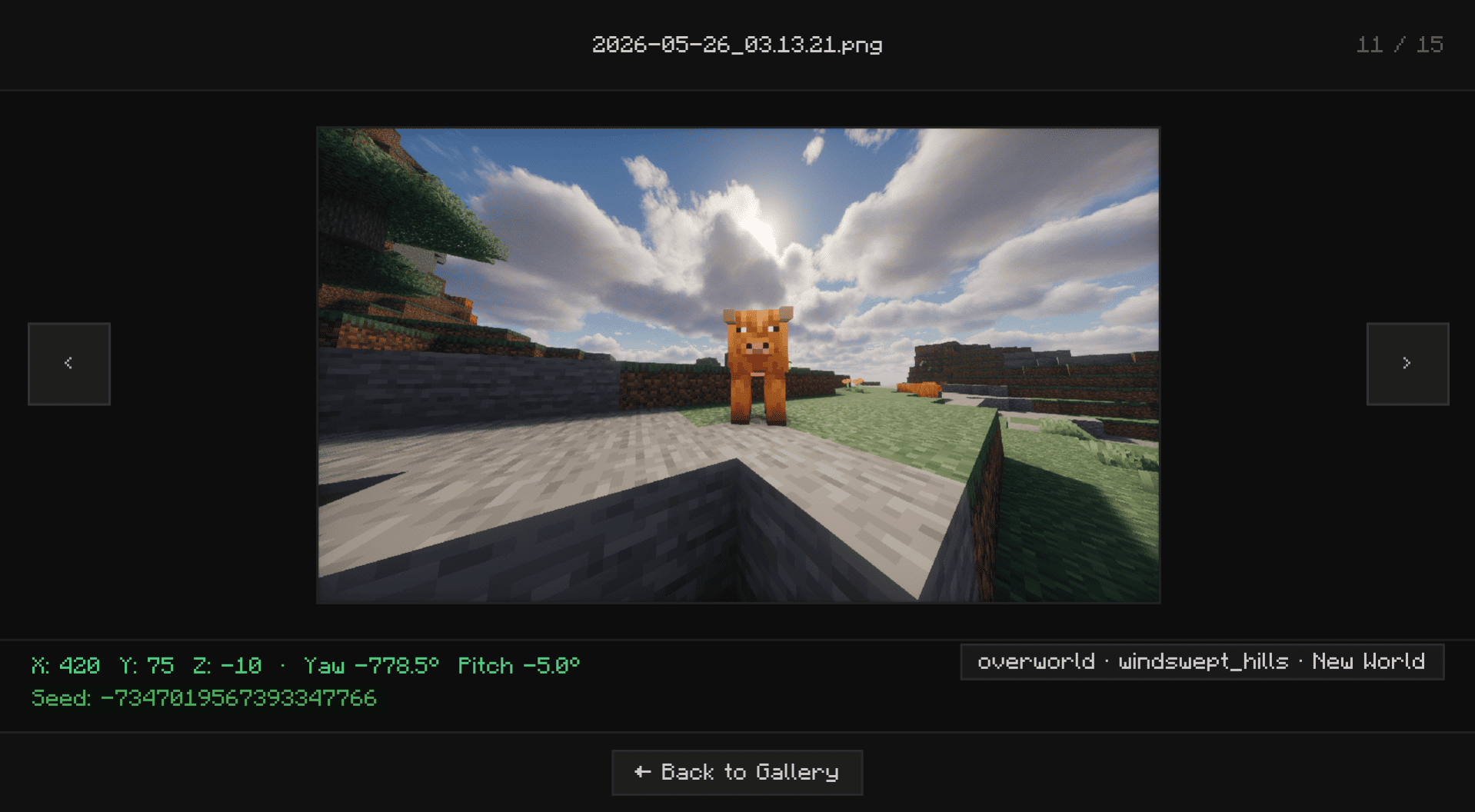
- Delete screenshots directly from the UI without touching your folders
- "Open Folder" opens File Explorer with the screenshot selected and ready to grab
- Lazy-loads images holds up fine even with large screenshot folders
Installation
Supports Fabric, Forge, and NeoForge.
Fabric: Grab the mod and Fabric API, then drop both into .minecraft/mods.
Forge / NeoForge: Download the version that matches your loader and drop it into .minecraft/mods. No extra mods needed.
Галерея


Последние версии
Все версии →release
Screenshot Gallery 2.1 (Fabric)
2.1+fabric20 сент. 2026 г.124,2 тыс.Minecraft: 26.3fabric
Что нового
Support for 26.3
release
Screenshot Gallery 2.1 (Fabric)
2.1+fabric1 сент. 2026 г.65Minecraft: 26.1.1fabric
Что нового
backport **v2.1** for 26.1.1 **fabric**
release
Screenshot Gallery 2.1 (Forge)
2.1+forge1 сент. 2026 г.163Minecraft: 1.20.1forge
Что нового
backport **v2.1** for 1.20.1 **forge**
release
Screenshot Gallery 2.1 (Fabric)
2.1+fabric1 сент. 2026 г.137Minecraft: 1.20.1fabric
Что нового
backport **v2.1** for 1.20.1 **fabric**
release
Screenshot Gallery 2.1 (NeoForge)
2.1+neoforge31 авг. 2026 г.596Minecraft: 1.21.1neoforge
Что нового
backport **v2.1** for 1.21.1 **neoforge**
release
Screenshot Gallery 2.1 (NeoForge)
2.1+neoforge31 авг. 2026 г.53Minecraft: 1.21.11neoforge
Что нового
backport **v2.1** for 1.21.11 **neoforge**
release
Screenshot Gallery 2.1 (Fabric)
2.1+fabric31 авг. 2026 г.1,6 тыс.Minecraft: 1.21.11fabric
Что нового
backport **v2.1** for 1.21.11 **fabric**
release
Screenshot Gallery 2.1 (NeoForge)
2.1+neoforge31 авг. 2026 г.81Minecraft: 26.1.2neoforge
Что нового
v2.1 for 26.1.2 Neoforge
release
Screenshot Gallery 2.1 (Fabric)
2.1+fabric31 авг. 2026 г.471Minecraft: 26.1.2fabric
Что нового
# Screenshot Gallery 2.1 (Minecraft 26.1.2)
### New Features
- **Interactive Drag-and-Drop Position Editor:**
- Added a visual position editor screen accessible directly from the configuration menu.
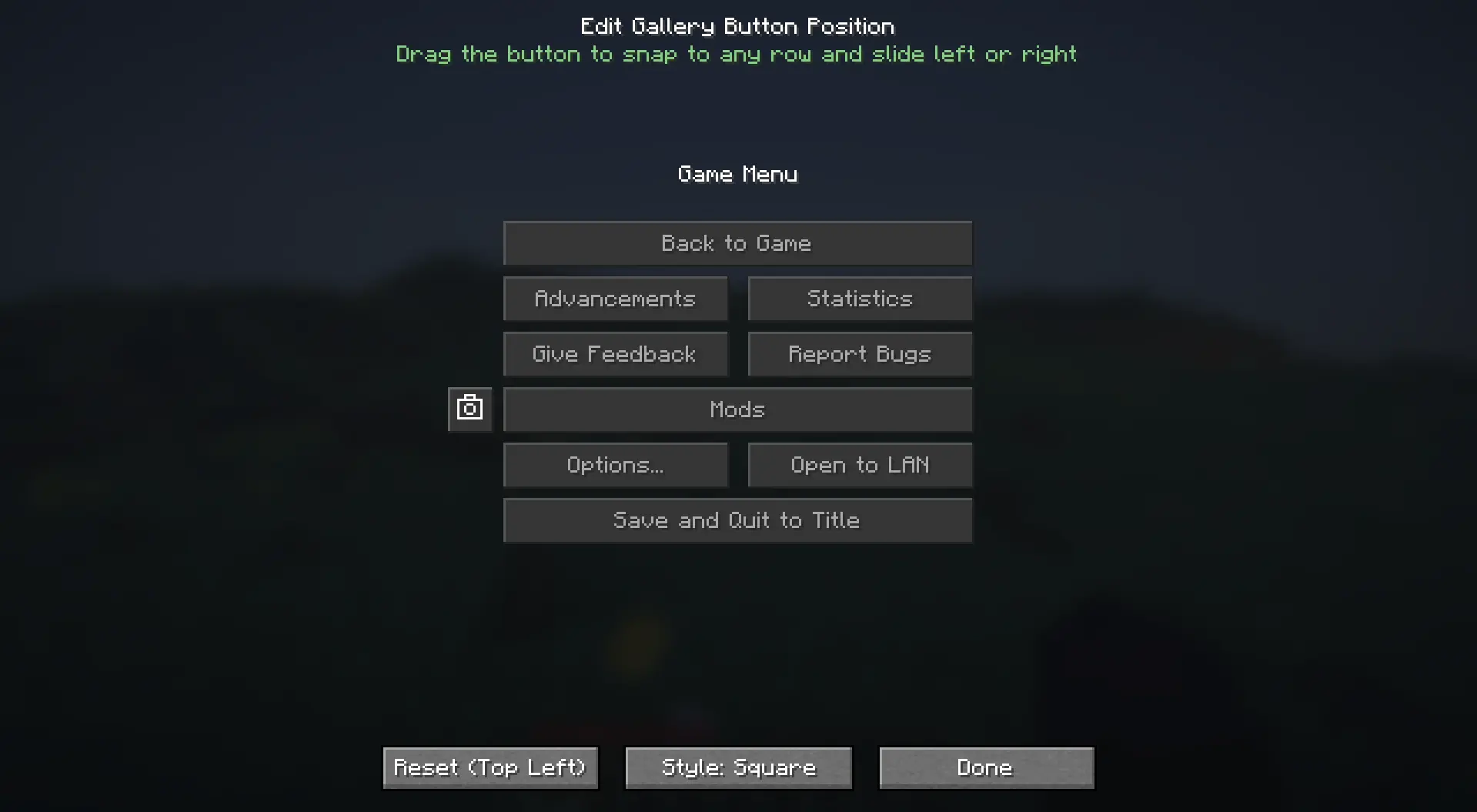
- Features an intuitive Snap-to-Row system that locks the button to the exact vertical heights of pause menu rows while allowing smooth horizontal sliding.
- Includes menu collision detection to prevent the gallery button from overlapping central game menu buttons.
- Renders a live preview of the pause menu with dynamic layout adaptation based on whether ModMenu is installed.
- **Square Camera Button Style:**
- Added a configuration toggle to switch between the classic **Normal (Wide)** style (`70x20`) and the compact **Square (Camera)** style (`20x20`).
- The square button renders standard Minecraft button background textures, hover states, and click animations with a centered camera icon and hover tooltip.
---
### Improvements and Fixes
- **Compatibility Improvements:** Enhanced compatibility with custom menu mods such as FancyMenu and ModMenu.
release
Screenshot Gallery 2.1 (fabric)
2.1+Fabric31 авг. 2026 г.4,6 тыс.Minecraft: 26.2fabric
Что нового
# Screenshot Gallery 2.1
Version 2.1 introduces native folder selection for custom directories, an in-viewer metadata toggle, true full-height image scaling in fullscreen mode, and improved metadata lifecycle handling.
---
### New Features
* **Native File Explorer Folder Picker**
* Added a `Browse...` button in the Cloth Config settings screen. Users can now select custom screenshot directories using the native operating system file explorer dialog directly from the game UI.

* **Fullscreen Metadata Quick Toggle**
* Added a direct toggle button in the top-left corner of the fullscreen viewer top bar (`Metadata: ON` / `Metadata: OFF`). Toggle metadata visibility instantly with a single click without opening config screens.
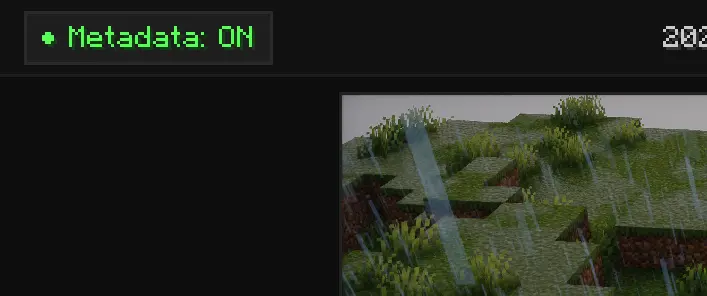
* **Dynamic Fullscreen Image Scaling**
* When metadata is disabled, the bottom info bar is hidden and the screenshot viewer dynamically expands vertically to fill the full height of the screen.
* **Automatic Metadata Lifecycle Management**
* Deleting or renaming screenshots inside the gallery now automatically removes or renames the corresponding `.meta.json` sidecar files.
---
### Fixes and Improvements
* **Cache Management**: Improved memory handling and texture cache invalidation during deletion and rapid image cycling.