COWMODSКаталог модов

RingWorld

A map modification that turns the overworld into a finite, seamles loop.

7,8 тыс.34обновлён 20 окт. 2026 г.
Механики игрыУтилитыГенерация мира

Описание

RingWorld

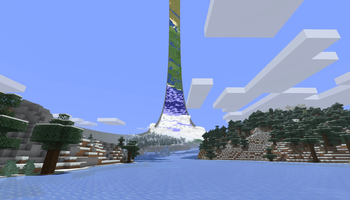
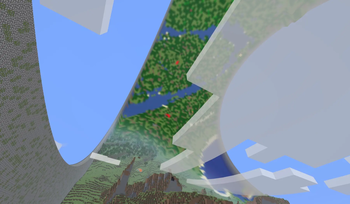
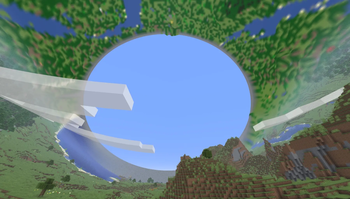
RingWorld wraps the Overworld into a ring. Keep travelling around it and you’ll come back to where you started. Look up and you can see the other side.

Build across the join, sail through it, or chase a mob around the whole ring. Blocks, redstone, water and projectiles work across it too. Walls run along the two edges, while the Nether and End stay unchanged.

Make it your ring

Choose a preset or set your own dimensions:

  • Small: 2,048 blocks around, 128 across.
  • Medium: 16,384 blocks around, 256 across. Our recommended starting point.
  • Large: 32,768 blocks around, 512 across.

Preview your seed and wall style before creating the world. Choose wall materials, adjust their height and decay, and pick a RingWorld Structure, Masonry or Gradient pattern. The default RingWorld Structure walls include embedded machinery, channels and structural details. The underside uses matching materials too.

You can also choose sky and sun presets, add a continuous river around the ring, or increase structure density. Nearby block correction reduces squeezed and stretched blocks on smaller rings. It defaults on and can be adjusted in Display settings.

Building beyond the side walls is enabled by default. The World settings menu and an operator command control it for the whole world, including multiplayer. Turning it off keeps existing builds.

See the world overhead

The Ring Atlas shows terrain beyond your normal render distance as a low-poly 3D model. It updates as the world changes, so you can see distant terrain without keeping every chunk loaded around you.

Real chunks become playable first. While background generation runs, a seed-based biome map fills the distant ring and gains detail progressively. The full 3D Atlas appears once generation is complete and verified. Check its progress in the corner of the screen or open RingWorld from the pause menu. Progress is saved, so generation can resume later.

Atlas generation uses processor time and disk space. Larger rings take longer; the time depends on the host machine. Automatic generation speed starts with four concurrent chunk requests and slows down under sustained performance pressure, recovering when there is capacity again. You can also set the rate manually.

Choose Low, Medium or High Atlas detail in Display settings or with a command. This is a personal performance setting: players on the same server can choose different levels. The distant Atlas is hidden underwater so normal water fog keeps its appearance.

Thin floating platforms made from recognized manufactured materials are left out of the Atlas to prevent artificial mountains underneath them. Nearby real blocks still render normally; natural terrain and unrecognized materials remain in the distant model.

Versions and compatibility

RingWorld 1.4 supports Minecraft 26.1, 26.1.1, 26.1.2, 26.2 and 26.3, on Fabric and NeoForge. A separate Minecraft 1.21.1 backport is also available in beta; the commands below describe the 1.4 release.

Shader compatibility has improved by preserving Minecraft’s shared shader state. Sodium support is experimental. This does not mean that Iris or shader packs are generally supported. See the compatibility notes for tested configurations and limits.

Source code · Report a bug

Open source under MPL-2.0.

Compatibility warning: RingWorld heavily modifies Minecraft’s rendering and world generation. It may conflict with other mods that change those systems, including shaders and rendering or world-generation replacements.

Slash commands

Commands below apply to RingWorld 1.4. In examples, | separates choices; type just one choice. Replace values in <angle brackets> with a number. Values in [square brackets] are optional.

Personal display settings

These affect your client only and do not require operator permissions.

CommandWhat it does
/ringworld lod or /ringworld lod showShows your Atlas detail setting and the server’s sampling resolution.
/ringworld lod low / /ringworld lod medium / /ringworld lod highSelects one of the three Atlas detail levels.
/ringworld lod resetReturns Atlas detail to Medium.
/ringworld distortion or /ringworld distortion showShows nearby block correction and its range.
/ringworld distortion on / /ringworld distortion offEnables or disables nearby block correction. Enabled by default; changes appearance only.
/ringworld distortion distance <1–8>Sets the correction range in chunks in each direction. Default: 3.
/ringworld ringlights or /ringworld ringlights showShows your distant Atlas lighting profile.
/ringworld ringlights <falloff> [peak]Advanced Atlas light tuning. Falloff: 0.5–6.0. Peak brightness: 0.1–3.0; omitted peak uses 1.25.
/ringworld ringlights resetRestores the midpoint Atlas lighting profile.

World and server controls

These require cheats in singleplayer or operator permission level 2 on a server. Changes apply to the world, not just your client.

CommandWhat it does
/ringworld atlas statusShows Atlas generation status and progress.
/ringworld atlas startStarts Atlas pregeneration.
/ringworld atlas pausePauses Atlas pregeneration.
/ringworld atlas resumeResumes paused Atlas pregeneration.
/ringworld chunk_gen_rateShows the current generation rate policy.
/ringworld chunk_gen_rate autoAutomatically adjusts generation speed to available performance. Default.
/ringworld chunk_gen_rate 1 / 2 / 4 / 8Sets a fixed number of concurrent chunk requests. This is not a CPU-core count, lasts for the current world session, and does not start or resume generation by itself.
/ringworld building outside showShows whether building outside the side walls is allowed.
/ringworld building outside on / /ringworld building outside offEnables or disables outside building for everyone. Saved with the world; enabled by default. Existing builds are kept when disabled.
/ringworld sky atmosphere / /ringworld sky night / /ringworld sky voidChanges the Overworld sky backdrop for everyone.
/ringworld sun small / /ringworld sun large / /ringworld sun noneChanges the Overworld sun style for everyone.

Галерея

Halo RingSmaller RingA view of the Loop

Последние версии

Все версии →
release

RingWorld 1.4 for Minecraft 1.21.1 (NeoForge)

1.4.0-neoforge+mc1.21.1
20 окт. 2026 г.316Minecraft: 1.21.1neoforge
Скачать
Что нового
# RingWorld 1.4 is out for Minecraft 1.21.1 You can now play RingWorld on **Minecraft 1.21.1**, with releases for **Fabric and NeoForge**. This backport brings the core features of the 26.x release to 1.21.1: the Ring Atlas, adaptive terrain generation, background saves, weather fading, and smoother transitions between nearby blocks and distant terrain. It also includes improvements to mesh uploads and Atlas cache handling for this version. All of this functionality is backported from 26.x, so the experience on 1.21.1 may not match 26.x exactly. **Requires Java 21.** Fabric also requires Fabric API. For multiplayer, install the same RingWorld version on the server and all clients. RingWorld is still a work in progress. If something breaks or looks wrong, please [report it on GitHub](https://github.com/Delaser/RingWorld/issues).
release

RingWorld 1.4 for Minecraft 1.21.1 (Fabric)

1.4.0-fabric+mc1.21.1
20 окт. 2026 г.524Minecraft: 1.21.1fabric
Скачать
Что нового
# RingWorld 1.4 is out for Minecraft 1.21.1 You can now play RingWorld on **Minecraft 1.21.1**, with releases for **Fabric and NeoForge**. This backport brings the core features of the 26.x release to 1.21.1: the Ring Atlas, adaptive terrain generation, background saves, weather fading, and smoother transitions between nearby blocks and distant terrain. It also includes improvements to mesh uploads and Atlas cache handling for this version. All of this functionality is backported from 26.x, so the experience on 1.21.1 may not match 26.x exactly. **Requires Java 21.** Fabric also requires Fabric API. For multiplayer, install the same RingWorld version on the server and all clients. RingWorld is still a work in progress. If something breaks or looks wrong, please [report it on GitHub](https://github.com/Delaser/RingWorld/issues).
release

RingWorld 1.4 for Minecraft 26.3 (NeoForge)

1.4.0-neoforge+mc26.3
14 окт. 2026 г.239Minecraft: 26.3neoforge
Скачать
Что нового
# RingWorld 1.4 ## Server performance - Spread automatic world saves over several ticks > Reduces the pause when a busy server saves > Tested autosave tick: ~387 ms → ~106 ms. - Reduced bursts of chunk cleanup and location checks while travelling > Less freezing when moving between loaded areas > Worst movement tick, excluding garbage-collection pauses: ~1,029 ms → ~177 ms in the paired test. - Reduced temporary memory use when updating lighting > Fewer long pauses while chunks load and unload > Memory allocation: ~254 MiB/s → ~181–183 MiB/s; worst server tick: ~796 ms → ~266–277 ms across two follow-up tests. The earlier 682 ms full garbage-collection pause did not recur. - Moved regular Atlas file writing into the background > Saving the distant terrain map no longer does its compression and disk writing on the gameplay thread; progress is preserved for resuming later. - Removed repeated checks of the entire completed Atlas > Reduces recurring server work when players view generation progress, especially on Large rings. ## Generation and Atlas updates - Added automatic chunk-generation speed control > Pregeneration can run faster when there is spare capacity and slow down when performance drops > Auto starts at four requests; `/ringworld chunk_gen_rate 1|2|4|8|auto` changes it live. - Made Atlas updates from newly loaded chunks adapt to server load > Reduces bursts of work as players explore; the distant view can catch up gradually during heavy loading. ## Building - Enabled building beyond the side walls > Build platforms and structures outside the ring > On by default, with a World-menu toggle and `/ringworld building outside on|off|show`. On servers, operators control the setting for everyone; turning it off keeps existing builds. - Fixed players and nearby entities disappearing outside the walls > Characters and other nearby entities remain visible when stepping off the ring. ## Rendering - Closed gaps along the distant terrain edges and damaged wall sections > Fewer visible holes between the terrain and walls. - Matched distant walls to the configured wall height and depth > The distant wall stays aligned with the real wall, including its top edge. - Improved the changeover between real blocks and distant terrain at altitude > Looking down from high above the ring no longer leaves the same terrain gaps. - Made clouds follow the configured wall height > Clouds look more consistent when viewed from different heights and on rings with different wall sizes. - Removed the flat Overworld horizon band > Cleaner skies around the ring, including sunrise and sunset. - Added nearby block correction > Reduces squeezed and stretched blocks on small rings > On by default; toggle it in Display settings or with `/ringworld distortion on|off`. `/ringworld distortion distance <1–8>` adjusts its range. This changes appearance only. - Improved how the Atlas handles floating platforms > Recognized thin, manufactured platforms with clear air underneath no longer turn the terrain below into artificial mountains in the distant view. Natural terrain and unrecognized materials are kept. - Corrected distant wall settings on Minecraft 26.3 > Wall style, height, decay and seed now match the saved world settings consistently across supported versions. ## Mod compatibility - Reworked the shared rendering core > Improves compatibility with rendering mods while preserving the existing ring appearance. - Improved shader compatibility by preserving Minecraft's shader state > Other rendering mods have fewer shared-state conflicts. This does not establish general Iris or shader-pack support. - Added experimental Sodium support and fixed its terrain curve and Atlas transition > Real blocks, walls and water line up with the distant ring. Sodium compatibility remains experimental; see the compatibility notes. - Hide the distant Atlas underwater > Nearby blocks keep normal water fog, without the far ring showing through; resurfacing restores the ring, including after a resource reload. ## Download size and cleanup - Compressed the wall preview images > Smaller downloads while keeping the previews in the selector > Development JARs: ~13 MB → ~3.3 MB, about 75% smaller. - Tidied shared seed-preview code > Reduces duplication between supported versions. ## Versions and testing Applies to Minecraft 26.1–26.1.2, 26.2 and 26.3 on Fabric and NeoForge. Older Atlas caches rebuild automatically for the floating-platform change. Performance figures come from development tests on a pregenerated Large ring with three players and a 4 GiB server heap. Autosave/movement and lighting figures come from separate stages of that testing; they are not chunk-loading times or guaranteed results on every server. Shorter pauses still occur. Corresponding source: https://github.com/Delaser/RingWorld/commit/1533878fe3a6eab7562830b3f39cbd7caae6d46a
release

RingWorld 1.4 for Minecraft 26.3 (Fabric)

1.4.0-fabric+mc26.3
14 окт. 2026 г.1,3 тыс.Minecraft: 26.3fabric
Скачать
Что нового
# RingWorld 1.4 ## Server performance - Spread automatic world saves over several ticks > Reduces the pause when a busy server saves > Tested autosave tick: ~387 ms → ~106 ms. - Reduced bursts of chunk cleanup and location checks while travelling > Less freezing when moving between loaded areas > Worst movement tick, excluding garbage-collection pauses: ~1,029 ms → ~177 ms in the paired test. - Reduced temporary memory use when updating lighting > Fewer long pauses while chunks load and unload > Memory allocation: ~254 MiB/s → ~181–183 MiB/s; worst server tick: ~796 ms → ~266–277 ms across two follow-up tests. The earlier 682 ms full garbage-collection pause did not recur. - Moved regular Atlas file writing into the background > Saving the distant terrain map no longer does its compression and disk writing on the gameplay thread; progress is preserved for resuming later. - Removed repeated checks of the entire completed Atlas > Reduces recurring server work when players view generation progress, especially on Large rings. ## Generation and Atlas updates - Added automatic chunk-generation speed control > Pregeneration can run faster when there is spare capacity and slow down when performance drops > Auto starts at four requests; `/ringworld chunk_gen_rate 1|2|4|8|auto` changes it live. - Made Atlas updates from newly loaded chunks adapt to server load > Reduces bursts of work as players explore; the distant view can catch up gradually during heavy loading. ## Building - Enabled building beyond the side walls > Build platforms and structures outside the ring > On by default, with a World-menu toggle and `/ringworld building outside on|off|show`. On servers, operators control the setting for everyone; turning it off keeps existing builds. - Fixed players and nearby entities disappearing outside the walls > Characters and other nearby entities remain visible when stepping off the ring. ## Rendering - Closed gaps along the distant terrain edges and damaged wall sections > Fewer visible holes between the terrain and walls. - Matched distant walls to the configured wall height and depth > The distant wall stays aligned with the real wall, including its top edge. - Improved the changeover between real blocks and distant terrain at altitude > Looking down from high above the ring no longer leaves the same terrain gaps. - Made clouds follow the configured wall height > Clouds look more consistent when viewed from different heights and on rings with different wall sizes. - Removed the flat Overworld horizon band > Cleaner skies around the ring, including sunrise and sunset. - Added nearby block correction > Reduces squeezed and stretched blocks on small rings > On by default; toggle it in Display settings or with `/ringworld distortion on|off`. `/ringworld distortion distance <1–8>` adjusts its range. This changes appearance only. - Improved how the Atlas handles floating platforms > Recognized thin, manufactured platforms with clear air underneath no longer turn the terrain below into artificial mountains in the distant view. Natural terrain and unrecognized materials are kept. - Corrected distant wall settings on Minecraft 26.3 > Wall style, height, decay and seed now match the saved world settings consistently across supported versions. ## Mod compatibility - Reworked the shared rendering core > Improves compatibility with rendering mods while preserving the existing ring appearance. - Improved shader compatibility by preserving Minecraft's shader state > Other rendering mods have fewer shared-state conflicts. This does not establish general Iris or shader-pack support. - Added experimental Sodium support and fixed its terrain curve and Atlas transition > Real blocks, walls and water line up with the distant ring. Sodium compatibility remains experimental; see the compatibility notes. - Hide the distant Atlas underwater > Nearby blocks keep normal water fog, without the far ring showing through; resurfacing restores the ring, including after a resource reload. ## Download size and cleanup - Compressed the wall preview images > Smaller downloads while keeping the previews in the selector > Development JARs: ~13 MB → ~3.3 MB, about 75% smaller. - Tidied shared seed-preview code > Reduces duplication between supported versions. ## Versions and testing Applies to Minecraft 26.1–26.1.2, 26.2 and 26.3 on Fabric and NeoForge. Older Atlas caches rebuild automatically for the floating-platform change. Performance figures come from development tests on a pregenerated Large ring with three players and a 4 GiB server heap. Autosave/movement and lighting figures come from separate stages of that testing; they are not chunk-loading times or guaranteed results on every server. Shorter pauses still occur. Corresponding source: https://github.com/Delaser/RingWorld/commit/1533878fe3a6eab7562830b3f39cbd7caae6d46a
release

RingWorld 1.4 for Minecraft 26.2 (NeoForge)

1.4.0-neoforge+mc26.2
14 окт. 2026 г.57Minecraft: 26.2neoforge
Скачать
Что нового
# RingWorld 1.4 ## Server performance - Spread automatic world saves over several ticks > Reduces the pause when a busy server saves > Tested autosave tick: ~387 ms → ~106 ms. - Reduced bursts of chunk cleanup and location checks while travelling > Less freezing when moving between loaded areas > Worst movement tick, excluding garbage-collection pauses: ~1,029 ms → ~177 ms in the paired test. - Reduced temporary memory use when updating lighting > Fewer long pauses while chunks load and unload > Memory allocation: ~254 MiB/s → ~181–183 MiB/s; worst server tick: ~796 ms → ~266–277 ms across two follow-up tests. The earlier 682 ms full garbage-collection pause did not recur. - Moved regular Atlas file writing into the background > Saving the distant terrain map no longer does its compression and disk writing on the gameplay thread; progress is preserved for resuming later. - Removed repeated checks of the entire completed Atlas > Reduces recurring server work when players view generation progress, especially on Large rings. ## Generation and Atlas updates - Added automatic chunk-generation speed control > Pregeneration can run faster when there is spare capacity and slow down when performance drops > Auto starts at four requests; `/ringworld chunk_gen_rate 1|2|4|8|auto` changes it live. - Made Atlas updates from newly loaded chunks adapt to server load > Reduces bursts of work as players explore; the distant view can catch up gradually during heavy loading. ## Building - Enabled building beyond the side walls > Build platforms and structures outside the ring > On by default, with a World-menu toggle and `/ringworld building outside on|off|show`. On servers, operators control the setting for everyone; turning it off keeps existing builds. - Fixed players and nearby entities disappearing outside the walls > Characters and other nearby entities remain visible when stepping off the ring. ## Rendering - Closed gaps along the distant terrain edges and damaged wall sections > Fewer visible holes between the terrain and walls. - Matched distant walls to the configured wall height and depth > The distant wall stays aligned with the real wall, including its top edge. - Improved the changeover between real blocks and distant terrain at altitude > Looking down from high above the ring no longer leaves the same terrain gaps. - Made clouds follow the configured wall height > Clouds look more consistent when viewed from different heights and on rings with different wall sizes. - Removed the flat Overworld horizon band > Cleaner skies around the ring, including sunrise and sunset. - Added nearby block correction > Reduces squeezed and stretched blocks on small rings > On by default; toggle it in Display settings or with `/ringworld distortion on|off`. `/ringworld distortion distance <1–8>` adjusts its range. This changes appearance only. - Improved how the Atlas handles floating platforms > Recognized thin, manufactured platforms with clear air underneath no longer turn the terrain below into artificial mountains in the distant view. Natural terrain and unrecognized materials are kept. - Corrected distant wall settings on Minecraft 26.3 > Wall style, height, decay and seed now match the saved world settings consistently across supported versions. ## Mod compatibility - Reworked the shared rendering core > Improves compatibility with rendering mods while preserving the existing ring appearance. - Improved shader compatibility by preserving Minecraft's shader state > Other rendering mods have fewer shared-state conflicts. This does not establish general Iris or shader-pack support. - Added experimental Sodium support and fixed its terrain curve and Atlas transition > Real blocks, walls and water line up with the distant ring. Sodium compatibility remains experimental; see the compatibility notes. - Hide the distant Atlas underwater > Nearby blocks keep normal water fog, without the far ring showing through; resurfacing restores the ring, including after a resource reload. ## Download size and cleanup - Compressed the wall preview images > Smaller downloads while keeping the previews in the selector > Development JARs: ~13 MB → ~3.3 MB, about 75% smaller. - Tidied shared seed-preview code > Reduces duplication between supported versions. ## Versions and testing Applies to Minecraft 26.1–26.1.2, 26.2 and 26.3 on Fabric and NeoForge. Older Atlas caches rebuild automatically for the floating-platform change. Performance figures come from development tests on a pregenerated Large ring with three players and a 4 GiB server heap. Autosave/movement and lighting figures come from separate stages of that testing; they are not chunk-loading times or guaranteed results on every server. Shorter pauses still occur. Corresponding source: https://github.com/Delaser/RingWorld/commit/1533878fe3a6eab7562830b3f39cbd7caae6d46a
release

RingWorld 1.4 for Minecraft 26.2 (Fabric)

1.4.0-fabric+mc26.2
14 окт. 2026 г.553Minecraft: 26.2fabric
Скачать
Что нового
# RingWorld 1.4 ## Server performance - Spread automatic world saves over several ticks > Reduces the pause when a busy server saves > Tested autosave tick: ~387 ms → ~106 ms. - Reduced bursts of chunk cleanup and location checks while travelling > Less freezing when moving between loaded areas > Worst movement tick, excluding garbage-collection pauses: ~1,029 ms → ~177 ms in the paired test. - Reduced temporary memory use when updating lighting > Fewer long pauses while chunks load and unload > Memory allocation: ~254 MiB/s → ~181–183 MiB/s; worst server tick: ~796 ms → ~266–277 ms across two follow-up tests. The earlier 682 ms full garbage-collection pause did not recur. - Moved regular Atlas file writing into the background > Saving the distant terrain map no longer does its compression and disk writing on the gameplay thread; progress is preserved for resuming later. - Removed repeated checks of the entire completed Atlas > Reduces recurring server work when players view generation progress, especially on Large rings. ## Generation and Atlas updates - Added automatic chunk-generation speed control > Pregeneration can run faster when there is spare capacity and slow down when performance drops > Auto starts at four requests; `/ringworld chunk_gen_rate 1|2|4|8|auto` changes it live. - Made Atlas updates from newly loaded chunks adapt to server load > Reduces bursts of work as players explore; the distant view can catch up gradually during heavy loading. ## Building - Enabled building beyond the side walls > Build platforms and structures outside the ring > On by default, with a World-menu toggle and `/ringworld building outside on|off|show`. On servers, operators control the setting for everyone; turning it off keeps existing builds. - Fixed players and nearby entities disappearing outside the walls > Characters and other nearby entities remain visible when stepping off the ring. ## Rendering - Closed gaps along the distant terrain edges and damaged wall sections > Fewer visible holes between the terrain and walls. - Matched distant walls to the configured wall height and depth > The distant wall stays aligned with the real wall, including its top edge. - Improved the changeover between real blocks and distant terrain at altitude > Looking down from high above the ring no longer leaves the same terrain gaps. - Made clouds follow the configured wall height > Clouds look more consistent when viewed from different heights and on rings with different wall sizes. - Removed the flat Overworld horizon band > Cleaner skies around the ring, including sunrise and sunset. - Added nearby block correction > Reduces squeezed and stretched blocks on small rings > On by default; toggle it in Display settings or with `/ringworld distortion on|off`. `/ringworld distortion distance <1–8>` adjusts its range. This changes appearance only. - Improved how the Atlas handles floating platforms > Recognized thin, manufactured platforms with clear air underneath no longer turn the terrain below into artificial mountains in the distant view. Natural terrain and unrecognized materials are kept. - Corrected distant wall settings on Minecraft 26.3 > Wall style, height, decay and seed now match the saved world settings consistently across supported versions. ## Mod compatibility - Reworked the shared rendering core > Improves compatibility with rendering mods while preserving the existing ring appearance. - Improved shader compatibility by preserving Minecraft's shader state > Other rendering mods have fewer shared-state conflicts. This does not establish general Iris or shader-pack support. - Added experimental Sodium support and fixed its terrain curve and Atlas transition > Real blocks, walls and water line up with the distant ring. Sodium compatibility remains experimental; see the compatibility notes. - Hide the distant Atlas underwater > Nearby blocks keep normal water fog, without the far ring showing through; resurfacing restores the ring, including after a resource reload. ## Download size and cleanup - Compressed the wall preview images > Smaller downloads while keeping the previews in the selector > Development JARs: ~13 MB → ~3.3 MB, about 75% smaller. - Tidied shared seed-preview code > Reduces duplication between supported versions. ## Versions and testing Applies to Minecraft 26.1–26.1.2, 26.2 and 26.3 on Fabric and NeoForge. Older Atlas caches rebuild automatically for the floating-platform change. Performance figures come from development tests on a pregenerated Large ring with three players and a 4 GiB server heap. Autosave/movement and lighting figures come from separate stages of that testing; they are not chunk-loading times or guaranteed results on every server. Shorter pauses still occur. Corresponding source: https://github.com/Delaser/RingWorld/commit/1533878fe3a6eab7562830b3f39cbd7caae6d46a
release

RingWorld 1.4 for Minecraft 26.1–26.1.2 (NeoForge)

1.4.0-neoforge+mc26.1
14 окт. 2026 г.64Minecraft: 26.1, 26.1.1, 26.1.2neoforge
Скачать
Что нового
# RingWorld 1.4 ## Server performance - Spread automatic world saves over several ticks > Reduces the pause when a busy server saves > Tested autosave tick: ~387 ms → ~106 ms. - Reduced bursts of chunk cleanup and location checks while travelling > Less freezing when moving between loaded areas > Worst movement tick, excluding garbage-collection pauses: ~1,029 ms → ~177 ms in the paired test. - Reduced temporary memory use when updating lighting > Fewer long pauses while chunks load and unload > Memory allocation: ~254 MiB/s → ~181–183 MiB/s; worst server tick: ~796 ms → ~266–277 ms across two follow-up tests. The earlier 682 ms full garbage-collection pause did not recur. - Moved regular Atlas file writing into the background > Saving the distant terrain map no longer does its compression and disk writing on the gameplay thread; progress is preserved for resuming later. - Removed repeated checks of the entire completed Atlas > Reduces recurring server work when players view generation progress, especially on Large rings. ## Generation and Atlas updates - Added automatic chunk-generation speed control > Pregeneration can run faster when there is spare capacity and slow down when performance drops > Auto starts at four requests; `/ringworld chunk_gen_rate 1|2|4|8|auto` changes it live. - Made Atlas updates from newly loaded chunks adapt to server load > Reduces bursts of work as players explore; the distant view can catch up gradually during heavy loading. ## Building - Enabled building beyond the side walls > Build platforms and structures outside the ring > On by default, with a World-menu toggle and `/ringworld building outside on|off|show`. On servers, operators control the setting for everyone; turning it off keeps existing builds. - Fixed players and nearby entities disappearing outside the walls > Characters and other nearby entities remain visible when stepping off the ring. ## Rendering - Closed gaps along the distant terrain edges and damaged wall sections > Fewer visible holes between the terrain and walls. - Matched distant walls to the configured wall height and depth > The distant wall stays aligned with the real wall, including its top edge. - Improved the changeover between real blocks and distant terrain at altitude > Looking down from high above the ring no longer leaves the same terrain gaps. - Made clouds follow the configured wall height > Clouds look more consistent when viewed from different heights and on rings with different wall sizes. - Removed the flat Overworld horizon band > Cleaner skies around the ring, including sunrise and sunset. - Added nearby block correction > Reduces squeezed and stretched blocks on small rings > On by default; toggle it in Display settings or with `/ringworld distortion on|off`. `/ringworld distortion distance <1–8>` adjusts its range. This changes appearance only. - Improved how the Atlas handles floating platforms > Recognized thin, manufactured platforms with clear air underneath no longer turn the terrain below into artificial mountains in the distant view. Natural terrain and unrecognized materials are kept. - Corrected distant wall settings on Minecraft 26.3 > Wall style, height, decay and seed now match the saved world settings consistently across supported versions. ## Mod compatibility - Reworked the shared rendering core > Improves compatibility with rendering mods while preserving the existing ring appearance. - Improved shader compatibility by preserving Minecraft's shader state > Other rendering mods have fewer shared-state conflicts. This does not establish general Iris or shader-pack support. - Added experimental Sodium support and fixed its terrain curve and Atlas transition > Real blocks, walls and water line up with the distant ring. Sodium compatibility remains experimental; see the compatibility notes. - Hide the distant Atlas underwater > Nearby blocks keep normal water fog, without the far ring showing through; resurfacing restores the ring, including after a resource reload. ## Download size and cleanup - Compressed the wall preview images > Smaller downloads while keeping the previews in the selector > Development JARs: ~13 MB → ~3.3 MB, about 75% smaller. - Tidied shared seed-preview code > Reduces duplication between supported versions. ## Versions and testing Applies to Minecraft 26.1–26.1.2, 26.2 and 26.3 on Fabric and NeoForge. Older Atlas caches rebuild automatically for the floating-platform change. Performance figures come from development tests on a pregenerated Large ring with three players and a 4 GiB server heap. Autosave/movement and lighting figures come from separate stages of that testing; they are not chunk-loading times or guaranteed results on every server. Shorter pauses still occur. Corresponding source: https://github.com/Delaser/RingWorld/commit/1533878fe3a6eab7562830b3f39cbd7caae6d46a
release

RingWorld 1.4 for Minecraft 26.1–26.1.2 (Fabric)

1.4.0-fabric+mc26.1
14 окт. 2026 г.197Minecraft: 26.1, 26.1.1, 26.1.2fabric
Скачать
Что нового
# RingWorld 1.4 ## Server performance - Spread automatic world saves over several ticks > Reduces the pause when a busy server saves > Tested autosave tick: ~387 ms → ~106 ms. - Reduced bursts of chunk cleanup and location checks while travelling > Less freezing when moving between loaded areas > Worst movement tick, excluding garbage-collection pauses: ~1,029 ms → ~177 ms in the paired test. - Reduced temporary memory use when updating lighting > Fewer long pauses while chunks load and unload > Memory allocation: ~254 MiB/s → ~181–183 MiB/s; worst server tick: ~796 ms → ~266–277 ms across two follow-up tests. The earlier 682 ms full garbage-collection pause did not recur. - Moved regular Atlas file writing into the background > Saving the distant terrain map no longer does its compression and disk writing on the gameplay thread; progress is preserved for resuming later. - Removed repeated checks of the entire completed Atlas > Reduces recurring server work when players view generation progress, especially on Large rings. ## Generation and Atlas updates - Added automatic chunk-generation speed control > Pregeneration can run faster when there is spare capacity and slow down when performance drops > Auto starts at four requests; `/ringworld chunk_gen_rate 1|2|4|8|auto` changes it live. - Made Atlas updates from newly loaded chunks adapt to server load > Reduces bursts of work as players explore; the distant view can catch up gradually during heavy loading. ## Building - Enabled building beyond the side walls > Build platforms and structures outside the ring > On by default, with a World-menu toggle and `/ringworld building outside on|off|show`. On servers, operators control the setting for everyone; turning it off keeps existing builds. - Fixed players and nearby entities disappearing outside the walls > Characters and other nearby entities remain visible when stepping off the ring. ## Rendering - Closed gaps along the distant terrain edges and damaged wall sections > Fewer visible holes between the terrain and walls. - Matched distant walls to the configured wall height and depth > The distant wall stays aligned with the real wall, including its top edge. - Improved the changeover between real blocks and distant terrain at altitude > Looking down from high above the ring no longer leaves the same terrain gaps. - Made clouds follow the configured wall height > Clouds look more consistent when viewed from different heights and on rings with different wall sizes. - Removed the flat Overworld horizon band > Cleaner skies around the ring, including sunrise and sunset. - Added nearby block correction > Reduces squeezed and stretched blocks on small rings > On by default; toggle it in Display settings or with `/ringworld distortion on|off`. `/ringworld distortion distance <1–8>` adjusts its range. This changes appearance only. - Improved how the Atlas handles floating platforms > Recognized thin, manufactured platforms with clear air underneath no longer turn the terrain below into artificial mountains in the distant view. Natural terrain and unrecognized materials are kept. - Corrected distant wall settings on Minecraft 26.3 > Wall style, height, decay and seed now match the saved world settings consistently across supported versions. ## Mod compatibility - Reworked the shared rendering core > Improves compatibility with rendering mods while preserving the existing ring appearance. - Improved shader compatibility by preserving Minecraft's shader state > Other rendering mods have fewer shared-state conflicts. This does not establish general Iris or shader-pack support. - Added experimental Sodium support and fixed its terrain curve and Atlas transition > Real blocks, walls and water line up with the distant ring. Sodium compatibility remains experimental; see the compatibility notes. - Hide the distant Atlas underwater > Nearby blocks keep normal water fog, without the far ring showing through; resurfacing restores the ring, including after a resource reload. ## Download size and cleanup - Compressed the wall preview images > Smaller downloads while keeping the previews in the selector > Development JARs: ~13 MB → ~3.3 MB, about 75% smaller. - Tidied shared seed-preview code > Reduces duplication between supported versions. ## Versions and testing Applies to Minecraft 26.1–26.1.2, 26.2 and 26.3 on Fabric and NeoForge. Older Atlas caches rebuild automatically for the floating-platform change. Performance figures come from development tests on a pregenerated Large ring with three players and a 4 GiB server heap. Autosave/movement and lighting figures come from separate stages of that testing; they are not chunk-loading times or guaranteed results on every server. Shorter pauses still occur. Corresponding source: https://github.com/Delaser/RingWorld/commit/1533878fe3a6eab7562830b3f39cbd7caae6d46a
release

RingWorld 1.3 for Minecraft 26.3 (NeoForge)

1.3.0-neoforge+mc26.3
14 окт. 2026 г.13Minecraft: 26.3neoforge
Скачать
Что нового
## RingWorld 1.3 — Minecraft 26.3 (NeoForge) ### World creation and controls - Rebuilt the RingWorld world-creation editor with separate Ring, Terrain, Walls, Sky, and Preview pages. The selected wall style now appears alongside its controls. - Added **Use** to the seed preview. Previewing or rerolling a seed leaves the world seed alone; **Use** locks in the previewed seed, and **Apply settings** copies it to Minecraft's World tab. That tab shows when the seed came from RingWorld. Cancelling the editor discards unapplied changes. - Reorganized the in-world panel so generation controls are separate from the player's Low, Medium, and High distant-ring detail setting. ### Gameplay and compatibility fixes - Fixed the black block-selection outline and mining cracks sliding sideways from the targeted block above or below the ring surface. - NeoForge files now accept loader builds newer than the stated minimum instead of rejecting them because they exceed the loader version used during testing. Minecraft version requirements are unchanged. ### Distant ring and transitions - Fixed distant terrain polygons flashing as the camera moves, most visible on sharp ridges and high-contrast structures. The distant wall pattern now uses filtered textures to reduce shimmer during movement. - Replaced irregular fade speckle with a fixed ordered pattern where real blocks give way to the distant ring. - Made distant wall colours follow the active block textures more closely, including resource packs. - Reduced the pale fog line where loaded land meets the distant ring. Water now fades toward the distant colour more gradually. The Atlas records actual water coverage rather than guessing from blue colour and sea level, so rivers and water above sea level receive the same treatment. ### Stability and performance - Reused unchanged distant-wall textures during Atlas updates, reducing repeated GPU uploads. - Delayed complete Atlas cache snapshots until incoming tile updates settle, reducing repeated cache-copy work during updates. On 26.3, resource reload no longer crashes when the new sky renderer has not recreated its colour state. Shader compilation also has its own worker so a busy chunk generator cannot hold up startup or reload. Those two failure mechanisms do not exist in the 26.1/26.2 renderer APIs. The transition between real chunks and the distant ring can still reveal heightfield differences around cliffs, trees, and thin structures. Some Atlas uploads and cache copies can still cause occasional long frames. Atlas caches rebuild after updating to 1.3, so the distant ring may take time to reappear. Update the server and its clients together. Corresponding source: [exact commit](https://github.com/Delaser/RingWorld/commit/f1b243af48f44452179f7a109877799584c8f47d).
release

RingWorld 1.3 for Minecraft 26.3 (Fabric)

1.3.0-fabric+mc26.3
14 окт. 2026 г.26Minecraft: 26.3fabric
Скачать
Что нового
## RingWorld 1.3 — Minecraft 26.3 (Fabric) ### World creation and controls - Rebuilt the RingWorld world-creation editor with separate Ring, Terrain, Walls, Sky, and Preview pages. The selected wall style now appears alongside its controls. - Added **Use** to the seed preview. Previewing or rerolling a seed leaves the world seed alone; **Use** locks in the previewed seed, and **Apply settings** copies it to Minecraft's World tab. That tab shows when the seed came from RingWorld. Cancelling the editor discards unapplied changes. - Reorganized the in-world panel so generation controls are separate from the player's Low, Medium, and High distant-ring detail setting. ### Gameplay and compatibility fixes - Fixed the black block-selection outline and mining cracks sliding sideways from the targeted block above or below the ring surface. - NeoForge files now accept loader builds newer than the stated minimum instead of rejecting them because they exceed the loader version used during testing. Minecraft version requirements are unchanged. ### Distant ring and transitions - Fixed distant terrain polygons flashing as the camera moves, most visible on sharp ridges and high-contrast structures. The distant wall pattern now uses filtered textures to reduce shimmer during movement. - Replaced irregular fade speckle with a fixed ordered pattern where real blocks give way to the distant ring. - Made distant wall colours follow the active block textures more closely, including resource packs. - Reduced the pale fog line where loaded land meets the distant ring. Water now fades toward the distant colour more gradually. The Atlas records actual water coverage rather than guessing from blue colour and sea level, so rivers and water above sea level receive the same treatment. ### Stability and performance - Reused unchanged distant-wall textures during Atlas updates, reducing repeated GPU uploads. - Delayed complete Atlas cache snapshots until incoming tile updates settle, reducing repeated cache-copy work during updates. On 26.3, resource reload no longer crashes when the new sky renderer has not recreated its colour state. Shader compilation also has its own worker so a busy chunk generator cannot hold up startup or reload. Those two failure mechanisms do not exist in the 26.1/26.2 renderer APIs. The transition between real chunks and the distant ring can still reveal heightfield differences around cliffs, trees, and thin structures. Some Atlas uploads and cache copies can still cause occasional long frames. Atlas caches rebuild after updating to 1.3, so the distant ring may take time to reappear. Update the server and its clients together. Corresponding source: [exact commit](https://github.com/Delaser/RingWorld/commit/f1b243af48f44452179f7a109877799584c8f47d).