COWMODSКаталог модов

SoundPlayer

Set a region to play a vanilla sound on enter or a custom made sound/music using items adder or other methods. 1.21+

Автор: xcaninex7558обновлён 22 дек. 2025 г.
ПриключенияМеханики игрыУтилиты

Описание


SoundPlayer

Version: 1.1 Author: XCaNiNeX

See it in action on caninecraft.reviverealm.net

Overview

SoundPlayer is a plugin that lets you create custom sound regions on your server. Play immersive sounds when players enter specific areas like hubs, spawn points, or mini-games. Regions can now be configured with different playback modes, loop timing, volume, and pitch for more control over how sounds behave.

Commands

Primary command: /player Aliases: /looper, /spl

Set Region Corners

  • /player pos1 Set the first corner of the region at your location.

    • Example: /player pos1
  • /player pos2 Set the second corner of the region at your location.

    • Example: /player pos2

Sound Formats

  • Minecraft sound example: entity.player.levelup
  • Minecraft Sound List: Minecraft Sound List
  • Sounds and Music Discs now added to tab completion!
  • Custom sound example: iamusic:music_disc.mozart (Example of a custom sound provided by ItemsAdder or a resource pack)

Create and Manage Regions

  • /player set <name> <sound> [message] Create a region with a name, sound, and an optional enter message.

    • Example: /player set spawn_area entity.player.levelup &6Welcome to spawn!
  • /player setmode <region> <mode> <loop-delay> Change how a region plays its sound.

  • Long sounds or music discs need delay to match duration

    • Modes: ON_ENTER, LOOP, INTERVAL
    • Example: /player setmode spawn_area LOOP <ticks>
  • /player play <name> Activate the region.

    • Example: /player play spawn_area
  • /player stop <name> Deactivate the region.

    • Example: /player stop spawn_area
  • /player remove <name> Delete the region permanently.

    • Example: /player remove spawn_area

Player Controls

  • /player toggle Enable or disable region sounds for yourself.

    • Useful for players who prefer silence in hubs or busy areas.

Plugin Management

  • /player reload Reloads the plugin’s configuration and region data.

    • Example: /player reload

How It Works

  1. Define a region: Use /player pos1 and /player pos2 to set corners.
  2. Create a region: Use /player set <name> <sound> [message] to save it.
  3. Choose playback behavior: Use /player setmode to control how the sound plays.
  4. Activate: Use /player play <name> to enable the region.
  5. Manage: Use /player stop to deactivate or /player remove to delete.

Configuration

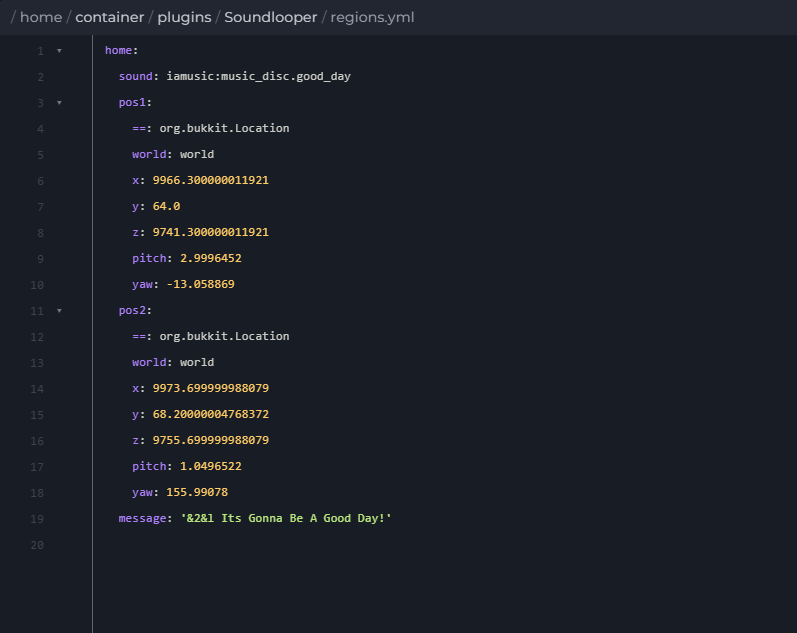
  • regions.yml Stores region bounds, sounds, messages, playback mode, volume, pitch, and loop timing.

  • active_regions.yml Tracks which regions are active across restarts.

Compatibility

  • Minecraft Version: 1.21+
  • Dependencies: None

Enjoy creating immersive soundscapes on your server with SoundPlayer.


Галерея

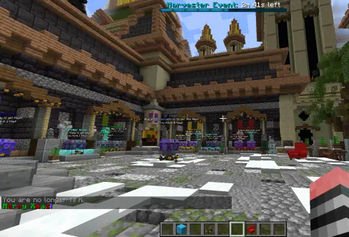
ShowcaseEnter Message!regions.yml-IA Example

Последние версии

Все версии →
release

1.1.2

1.1.2
22 дек. 2025 г.426Minecraft: 1.21, 1.21.1, 1.21.2, 1.21.3, 1.21.4, 1.21.5, 1.21.6, 1.21.7, 1.21.8, 1.21.9, 1.21.10, 1.21.11bukkit, paper, spigot
Скачать
Что нового
--- ## Added * Support for region sound playback modes: * `ON_ENTER` <plays once> * `LOOP` <plays on repeat> * `INTERVAL` <plays on repeat on delay> 'used for SoundEffects' * New command to change a region’s playback mode without recreating it: ``` /player setmode <region> <mode> ``` * Optional per-player sound toggle: ``` /player toggle ``` * Volume and pitch configuration per region (region.yml) * Loop delay configuration per region (in ticks) * Tab completion for: * Region names * Sound modes * All valid Minecraft sound IDs, including music discs --- ## Changed * Region sounds can now replay on a configurable loop or interval instead of only playing once * Region playback behavior is now configurable after creation * Region data now persists playback mode and loop timing in `regions.yml` * Command structure standardized under `/player` (aliases preserved) --- ## Fixed * Looping sounds no longer overlap or layer on top of each other * Music discs and long-duration sounds now replay correctly * Sound playback stops reliably when leaving a region or disconnecting * Active region state now restores correctly after server restart --- ## Notes * Loop and interval timing is measured in ticks (20 ticks = 1 second) * Existing regions remain compatible and do not need to be recreated * If using a long sound in LOOP mode set delay a few seconds longer than the sound ---
release

Region Sound Player 1.21+

1.1
10 дек. 2025 г.57Minecraft: 1.21, 1.21.1, 1.21.2, 1.21.3, 1.21.4, 1.21.5, 1.21.6, 1.21.7, 1.21.8, 1.21.9, 1.21.10paper, spigot
Скачать
Что нового
Support for recent update versions.
release

Region SoundLooper-IA Compatable

1.0
4 дек. 2024 г.272Minecraft: 1.21, 1.21.1, 1.21.2, 1.21.3paper, spigot
Скачать
Что нового
# **Soundlooper** *Version: 1.0* *Author: XCaNiNeX* ## **Overview** Soundlooper is a lightweight plugin that lets you create custom sound regions on your server. Play immersive sounds when players enter specific areas like hubs, spawn points, or mini-games. Configure regions, sounds, and messages easily using commands. ## **Commands** ### **Set Region Corners** - **`/looper pos1`** Set the first corner of the region at your location. - **Example:** `/looper pos1` - **`/looper pos2`** Set the second corner of the region at your location. - **Example:** `/looper pos2` ### **Create and Manage Regions** - **`/looper set <name> <sound> [message]`** Create a region with a name, sound, and optional enter message. - **Example:** `/looper set spawn_area ENTITY_PLAYER_LEVELUP Welcome to spawn!` - **`/looper play <name>`** Activate the region. - **Example:** `/looper play spawn_area` - **`/looper stop <name>`** Deactivate the region. - **Example:** `/looper stop spawn_area` - **`/looper remove <name>`** Delete the region permanently. - **Example:** `/looper remove spawn_area` ### **Plugin Management** - **`/looper reload`** Reloads the plugin’s configuration and region data. - **Example:** `/looper reload` ## **How It Works** 1. **Define a region:** Use `/looper pos1` and `/looper pos2` to set corners. 2. **Create a region:** Use `/looper set <name> <sound> [message]` to save it. 3. **Activate:** Use `/looper play <name>` to start the sound when players enter the region. 4. **Manage:** Use `/looper stop` to deactivate, `/looper remove` to delete. ## **Configuration** - **`regions.yml`**: Stores all defined regions, sounds, and messages. - **`active_regions.yml`**: Tracks active regions across restarts. ## **Compatibility** - **Minecraft Version:** 1.21+ - **Dependencies:** None Enjoy creating immersive soundscapes on your server with **Soundlooper**! 🎵