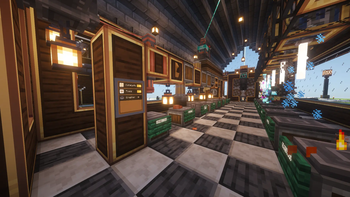
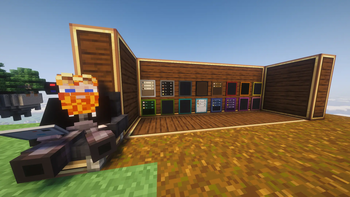
A smart-home control panel for your Create contraptions.
The Link Tablet is a handheld touchscreen that drives
Create's Redstone Links remotely. Name your
lights, doors, trains, and machines, give them icons, and flip them from one
screen anywhere in link range. It boots to a Home screen of apps — signals,
gauges, a clock, a live network monitor, even Twitch chat and a paint
canvas — mounts on walls where tablets merge into one big display, and
pins a mini-tablet to your HUD.
📱 A pocket OS
The tablet opens to a Home screen you arrange yourself; the built-in
App Store (searchable) installs and removes apps per tablet:
Signals — the control grid below; every tablet starts with it.
Clock — alarms, a searchable world clock, timer, stopwatch. They ring
even with the tablet closed; a placed Clock tablet is a wall clock.
Calculator — click buttons or type; a placed tablet shows its
live tape on the wall.
Gauges — the reverse of Signals: live dials that listen on link
frequencies and show the received 0–15. Merged walls make great
factory dashboards.
Monitor — an X-ray for your link network (below).
Twitch Chat — live stream chat, emotes included, no account (below).
Paint — a persistent pixel canvas that shows on walls (below).
Placed tablets show their app right on the glass — tap to open it, tap the
bezel to go Home — and the wall follows your GUI navigation.
🎛️ Signals, not levers
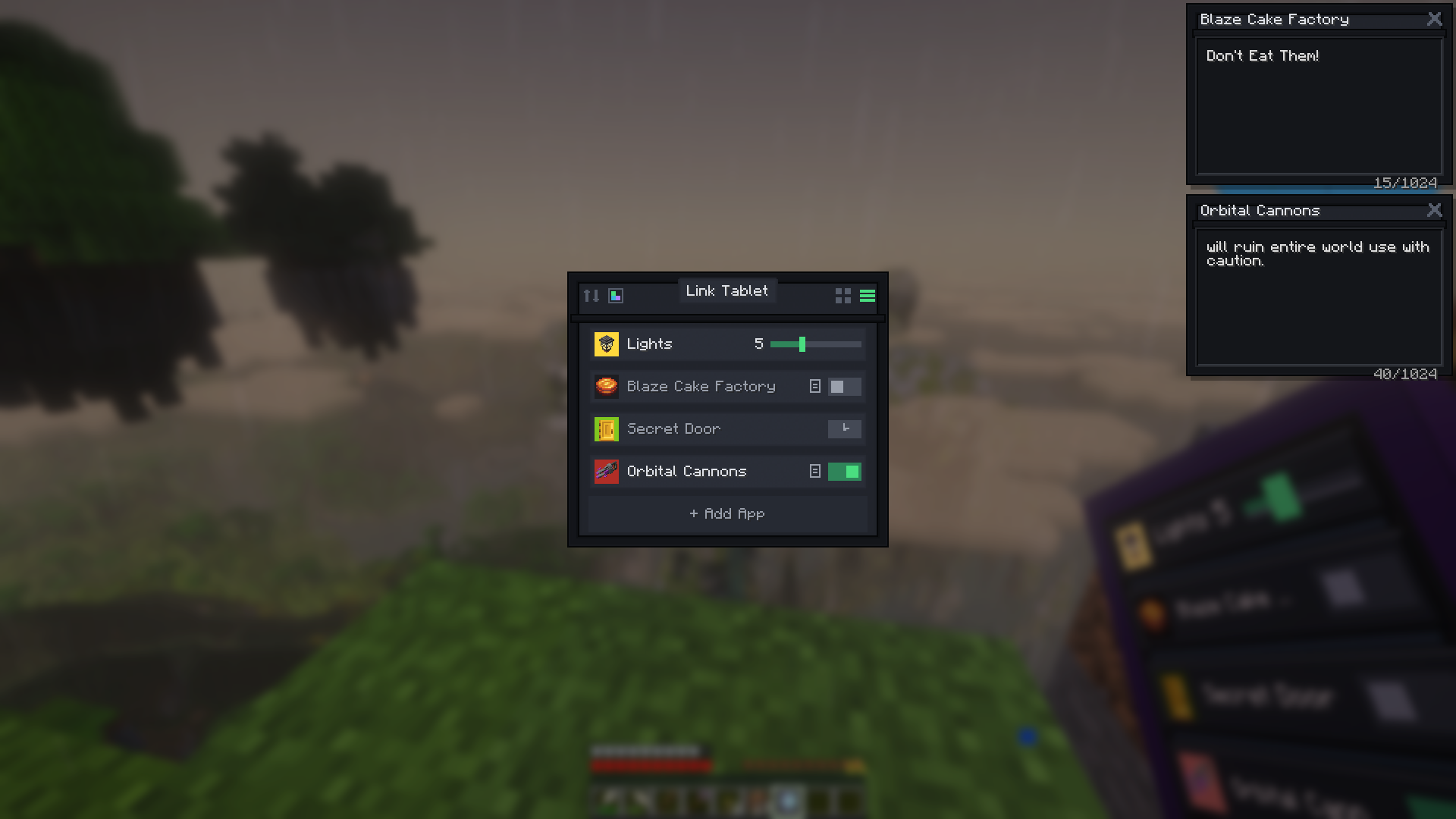
Up to 32 signals per tablet (+32 per tablet on merged walls), each with a
name, color, item icon, and state — grid or list view, drag to rearrange.
Four types: Toggle (on/off), Hold (transmits only while held — a
disconnect can never leave it stuck on), Slider (0–15), Timer
(transmits for 0.1–30 s, then switches off by itself).
Scenes — one signal drives up to 8 frequencies at once ("Shut down the
factory").
Signal links — signals drive each other: up to 8 targets each, set to
turn ON, turn OFF, or follow. Links chain, loops are safe, and a linked
signal needs no frequency of its own — pure scene master buttons.
Per-signal strength — strongest wins, exactly like stacked Redstone
Links.
📡 Real Create frequencies
Signals tune to Create's item-pair frequencies — anything a Redstone Link can
trigger, the tablet can too:
The editor includes your real inventory (slots take a copy — nothing is
consumed) plus a searchable all-items picker.
JEI/EMI: drag straight from the ingredient panel onto a frequency slot.
One-item frequencies work, and frequencies carry the full item, components
included — frequency-card mods, dyed and renamed items all count as
distinct channels, exactly like Create's own links.
📋 Tip — quick-add: right-click any Redstone Link while holding the
tablet — the editor opens with that frequency pre-filled. Just hit Save.
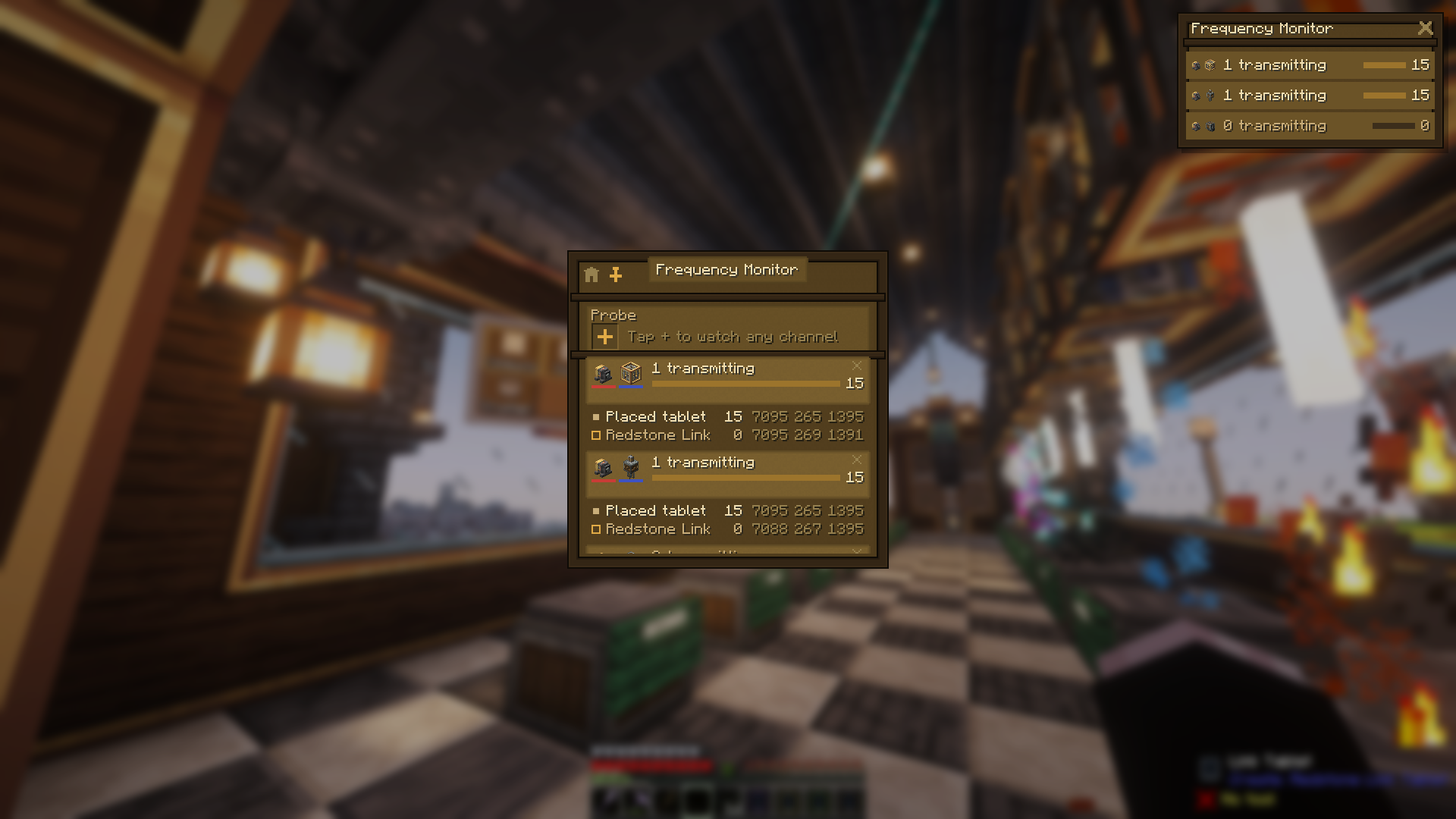
🔎 Who's on this frequency?
The Monitor app lists every channel your tablet touches — plus any you
probe (up to 8) — with live power and every member transmitting or
listening: Redstone Links, placed tablets, dropped or framed tablets, even
"a tablet in someone's inventory". When a receiver is mysteriously pinned
at 15, the Monitor points at the spare tablet in your pocket. Out-of-range
members wear a badge; wall tablets make it a status board, and the
overlay pin puts it on your HUD.
🎚️ Sliders you can feel
Sliders drag live in the GUI, and on a placed tablet you click-and-slide
right on the glass. Every slider shows its numeric level, and an optional
min/max range means a machine never fully turns off.
📝 Sticky notes for your factory
Every signal can carry a note in a floating window: drag it anywhere, keep
several open, and they follow you — over the tablet, over your inventory, even
pinned read-only on your HUD. Perfect for "flush the sorter before enabling"
warnings — two of them are pinned in the screenshot up top.
📌 Pin it to your HUD
The pin button keeps a floating mini-tablet on your screen while you play —
per app: live switch rows, a heads-up gauge cluster, the clock, a working
mini calculator, or the launcher as an app dock. Press the "Use Pinned
Tablet" key (default B) to free your mouse chat-style and tap toggles, drag
sliders, or hold buttons mid-mining — no GUI ever opens. Right-click any row
to jump into the full interface; the window remembers its spot across
sessions.
✨ The screen is real
The physical screen isn't a texture — it renders your actual signals live,
held or placed. Tiles size themselves to the signal count, active signals
glow, and on a placed tablet the glass is touchable: tap to toggle, hold a
Hold button, slide a slider — no GUI needed. Tap the bezel for the full
interface.
🧱 Place it on the wall
Sneak + right-click any surface to mount the tablet on a wall, floor, or
ceiling — it transmits from its own position and its screen glows while a
signal runs. Sneak + right-click with an empty hand picks it back up;
everything survives the trip. A Create wrench rotates the screen content
(glass) or physically flips the tablet between portrait and landscape (edge).
🎯 Aim it anywhere
Craft a Swivel Mount — an iron nugget atop two brass sheets — place the
stand on any surface, and click a tablet onto its ball joint. Wrench the glass
and it swings around to aim straight at your eyes, wherever you're
standing — one click, perfect angle. Wrench the bezel for landscape; sneak +
right-click swaps tablets and leaves the stand as furniture. The tilted
glass stays fully touchable.
And the party trick: power the mount with redstone and the screen follows
you, gliding after the nearest player like the enchanting table's book. Cut
the power and it freezes exactly where it points — aim by standing in the
right spot, lock with a lever.
🖥️ One screen, many tablets
Mount tablets side by side and they merge into one big display, up to
4 wide by 3 tall: a single continuous glass panel, no seams. Signals spread
across the whole surface at bigger tiles, taps and click-and-slide work
anywhere on the glass — and every merged tablet raises the signal cap by
another 32. Dye the lead tablet and the whole frame dyes.
🧮 A 4×3 wall = 12 merged tablets — 384 signals on one screen
Merging is always safe — every tablet keeps its own signals and gets them back
the moment it's split off — and always your choice: a chain-link button
keeps a tablet standalone or breaks a wall back apart.
💬 Your stream chat, in the game
Type a channel name and its live chat flows onto your held tablet, your HUD,
or a placed chat wall every viewer sees — merged walls give it the
big-screen treatment. No account, no login, nothing stored: an anonymous,
strictly read-only view of public chat, connected only while chat is actually
on a screen somewhere.
And it's real chat: emotes render as actual images — Twitch's own plus
7TV, BetterTTV, and FrankerFaceZ, animated ones animating (a header toggle
switches back to plain text). Keep Twitch as your last-used app and the
tablet in your hand becomes a pocket chat screen, even in third person.
Shared-server note: chat is live, unfiltered internet, and anyone who can open
a placed tablet's GUI can change its channel — same trust rules as its
signals.
🖌️ Paint on the walls
A pixel canvas that lives on the tablet: doodle, place it, and the picture
shows right on the glass. A proper toolbox rides along — brush, fill,
line, rectangle, an eyedropper, and a 32-step undo, each with a keyboard
shortcut. Merged walls become murals — paint across
the seams while viewers watch your strokes land live, split the wall and each
tablet keeps its slice, merge back and the mural reassembles. Break it, chest
it, gift it — the art travels with the tablet.
Every tablet keeps its slice — rearrange the wall, remix the painting.
🔒 Lock it down
On a shared server, tap the padlock in a placed tablet's GUI and it
locks: everyone can still flip its signals, drag its sliders, and use its
apps — but reconfiguring anything (signals, channels, the mural) and
unlocking again take a Create wrench in hand. Locking a merged wall
locks every tablet in it, and the pieces stay locked if the wall is split.
Perfect for public kiosks — and for keeping your mural safe.
🎨 Make it yours
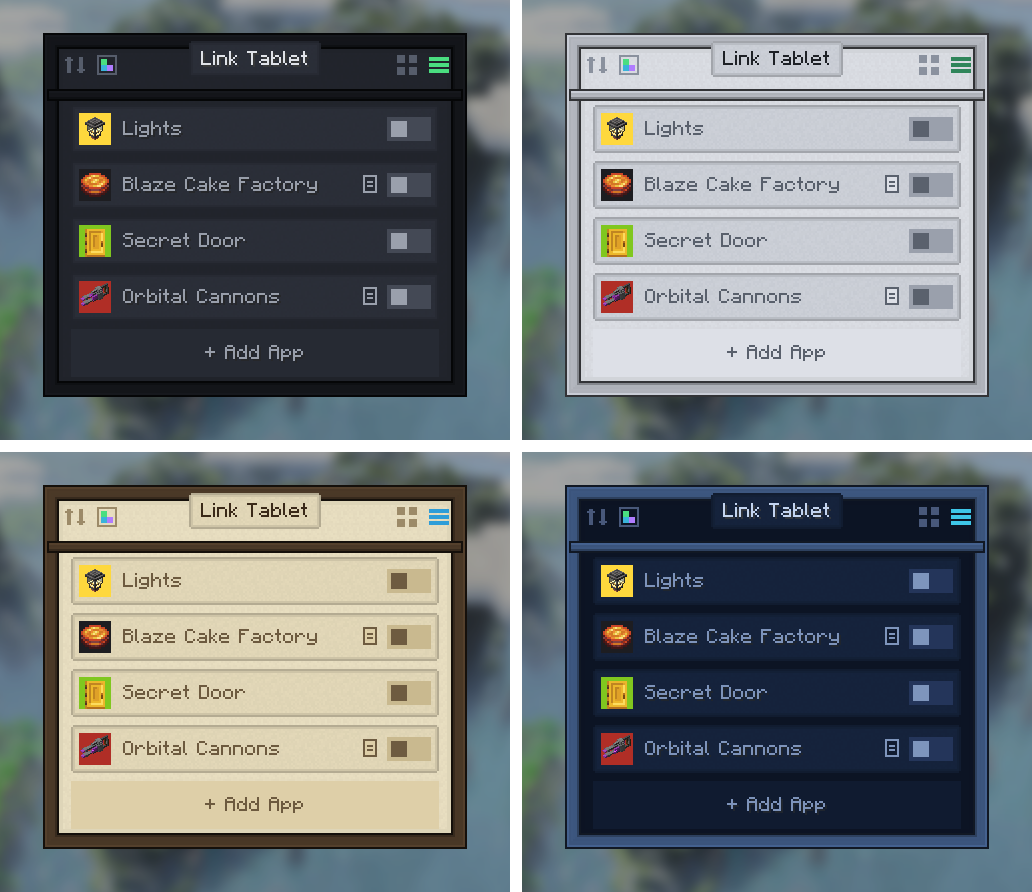
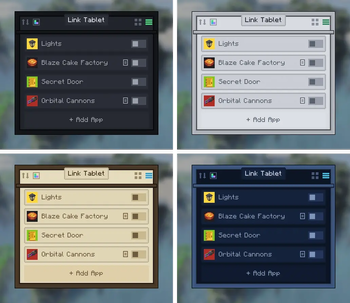
8 UI themes — Dark, Light, AMOLED, Brass, Terminal, PurpleFox, Parchment,
Avionics — stored per tablet, styling GUI and glass alike in Create's own
visual language.
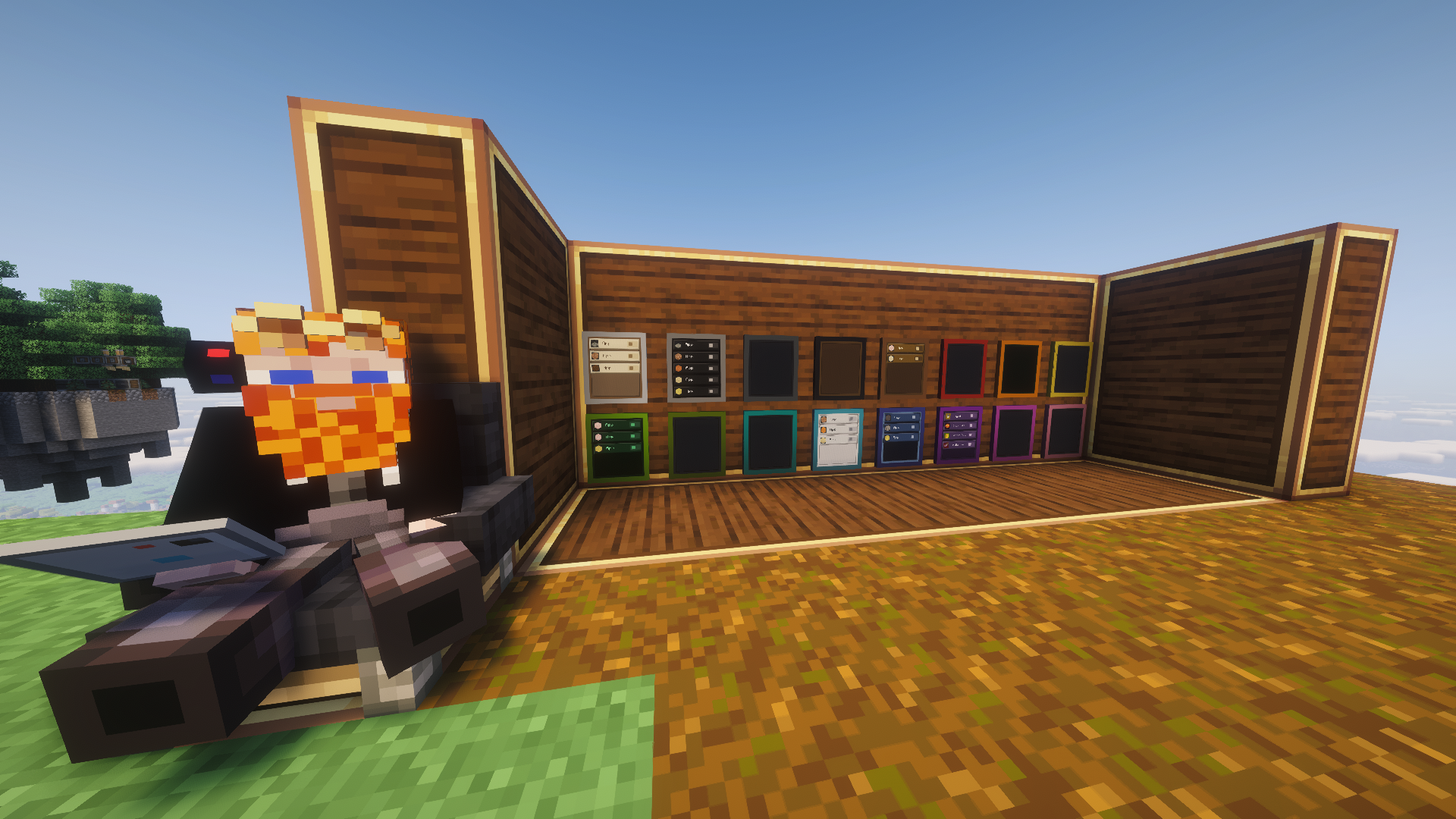
16 dyed cases — craft with any dye; wash it off in a cauldron or a fan's
washing stream.
A full set of UI sounds, including a faint click nearby players hear when
someone flips a signal.
Name your tablets on an anvil — the name titles the GUI and overlay and
survives placing and picking up.
🏭 Getting started
The tablet comes off a real assembly line — brass-age manufacturing, not
crafting. Shape a Tablet Case from five brass sheets, then send it down a
belt past three Deployers: the Link Logic Board (the radio), the
Clockwork Cell (the power), and the Quartz Display (the screen). The
in-progress tablet visibly gains each part, and JEI/EMI shows the whole
sequence.
Then:
Right-click to open the tablet, tap + to create a signal.
Pick the frequency items (like tuning a Redstone Link), Add, Save.
Set your receiving Redstone Links to the same frequency.
Left-click toggles, right-click edits.
There's a Ponder scene too — hold W over the tablet item. A tablet
anywhere in your inventory transmits like Create's handheld Linked Controller;
placed tablets transmit from the block — and a dropped tablet, or one sitting
in an item frame, keeps transmitting right from where it lies.
Full multiplayer support: server-authoritative edits, per-player transmitters.
Plays nicely with other link-network senders; frequency-card mods work out of
the box; optional JEI/EMI drag integration.
Twitch Chat is client-side and optional — anonymous and read-only,
connected only while chat is on a screen; nothing sent, nothing stored, and
it does nothing at all on the server side.
MIT licensed, free to use in any modpack.
❤️ Credits
Huge thanks to the Create team — this addon stands on their Redstone Link network and visual language. Go support the original mod!
Banner lettering uses the community Minecraft Ten font art by xllifi (CC-BY 4.0).
Enjoying the tablet? You can drop a tip ☕ — thank you!
Created by FryD42 · MIT licensed — free to use in any modpack.
## 1.14.0 — 2026-08-24
### Added
- **Addon apps.** Other mods can now build apps that install onto the
tablet from the App Store, the same way the built-in ones do. An addon
app knows *which* tablet it's running on — the one in your hand, the
one on the wall, or a specific member of a merged wall — and it can
keep its own small pocket of memory on that tablet: whatever it saves
rides along through placing, breaking, picking up, item frames and
chests, shows on the wall face for everyone, and survives a reload.
Two apps' memories never touch each other, and a locked tablet still
guards it the same as everything else. The first addon built on this
is **Link Tablet: Refined Storage**, which opens a real Refined
Storage crafting grid on your tablet.
### Changed
- Network protocol version unchanged (still 24), but tablets now carry a
new piece of data, so **1.14.0 pairs only with 1.14.0** — update your
server and all clients together. Worlds and tablets from 1.13.0 load
untouched.
## 1.13.0 — 2026-08-17
### Added
- Hover tooltips on every button and glyph across all program screens —
the wordless ones (chain-link, padlock, solo, eyedropper, emote
toggle) finally say what they are. Paint's tool tips also name their
keyboard shortcuts (B/F/L/R/I), which were previously undiscoverable.
Client-only, pairs with 1.12.x.
- Dropped tablets keep transmitting: a tablet lying on the ground (or
sitting in an item frame) now broadcasts its toggled-ON signals from
where it is — throw a scene tablet into the machine room and the
scene keeps running. The Frequency Monitor names these members
("Dropped tablet (player)" / "Framed tablet"), completing the
who-is-transmitting story. This changes the old "phantom copy"
diagnosis: dropping a spare tablet used to silence it — now the
Monitor just names it as a dropped member instead, so the fix for a
phantom-pinned receiver is to pick the copy up or destroy it, not
drop it. Edge case: a deliberate player toss (Q-drop or inventory
drag-out) now registers instantly via an add-only fast path, closing
the blink at the exact moment of a throw; because the handoff still
runs on a periodic sweep for every other case, edge-sensitive
contraptions may still see a brief blip at pickup, or on death
drops, dispensers, and other non-toss spawns.
### Changed
- Network protocol version unchanged (still 24) — 1.13.0 pairs with
1.12.x on both sides (tooltips are client-only, dropped-tablet
transmission is server-side only).
## 1.12.0 — 2026-08-11
### Added
- **Screen lock** (idea: Fluid Valve): placed tablets can be locked from the
GUI's new padlock button — and the wrench unlocks. Locked glass keeps
working (taps, holds, sliders, live faces), but every configuration
path — editing signals, themes, apps, rotation, painting, channels,
probes, gauges — needs a wrench in hand, enforced server-side. Any
wrench click on a locked tablet opens its GUI; sneak-pickup is blocked
while locked (mining still drops it, and it places back unlocked).
Locked walls show a small padlock in the glass corner. Splitting a
locked wall leaves every piece locked; merging anything into a locked
wall locks the whole surface.
- **GUI title header**: the tablet's name now sits on its own plaque above
the panel instead of sharing the button row.
### Fixed
- **Merged screens: untouchable seam gap** — clicks between the blocks of a
merged screen used to fall through to the wall behind; the whole panel is
now clickable edge to edge.
### Changed
- Network protocol version 24 — 1.12.0 clients/servers do not pair with
1.11.x (everyone updates together, as usual).
# Changelog
## 1.11.1 — 2026-08-10
- **Paint grew a toolbox** — bucket fill (floods across merged-wall
seams), line and rectangle tools with a live preview, an eyedropper,
and a 32-step undo that never reverts paint someone else laid down
after you. The tools live in the header bar as little painted
miniatures — the brush tip, pour stream, and dropper sample all show
your selected color. B/F/L/R/I pick tools, Z undoes. Client-only,
pairs with 1.11.0.
- **Fast paint strokes don't skip anymore** — dragging quickly across
the Paint canvas now fills every cell along the sweep instead of
leaving gaps where the cursor out-ran the brush. Held tablets and
walls both.
- **Long chat messages wrap on the pinned overlay** — the Twitch
overlay pane now wraps messages onto as many lines as they need
(same look as the full chat screen) instead of cutting everything
after the first line. The pane keeps a compact overall budget:
newest messages fill from the bottom, older ones drop off sooner
when the chat runs long-winded. Client-only, pairs with 1.11.0.
## 1.11.0 — 2026-08-09
- **The tablet in your hand shows chat** — when Twitch Chat is the
last app you used and you have a channel set, your own first-person
tablet renders the live chat wall right on its screen (emotes and
all) instead of the signals grid. Put it away or switch apps and the
signals face returns. Other people's tablets, item frames, and
dropped tablets are unaffected. Client-only — beta.7 still pairs
with beta.4/5/6.
- **Twitch chat gets emotes** — native Twitch emotes plus 7TV, BTTV,
and FFZ show as images inline in chat, animated ones included, on
every surface: the held app, the overlay pin, and placed/merged
walls. A toggle glyph next to the channel pin turns them off if
you'd rather have plain text (or a lighter-weight wall). Client-only
— no pairing impact, beta.6 pairs with beta.4/beta.5.
- **Paint is its own app now** — with paintings persisting and showing
on walls, Paint outgrew the Arcade: it has its own App Store row
(pink chip, painting icon). The Arcade keeps the other 18 games. If
an earlier beta folded your Paint tile into the Arcade tile, just
Get Paint from the store again.
- **Twitch chat walls read like chat now** — messages on placed
tablets stack as compact lines from the bottom of the screen
instead of spreading across the glass with big gaps; bigger merged
walls fit more lines at the same text size.
- New app: **Twitch Chat** — a read-only viewer of a chosen Twitch
channel's live chat, no account or login required (anonymous guest
access, nothing ever sent). Works on all three surfaces: held tablet
(channel box + scrolling colored chat), the overlay pin (compact HUD
chat while you play), and placed tablets (a wall-mounted chat board —
set once from the block's GUI, every viewer sees it with their own
connection). Your personal channel is remembered per-player; a placed
tablet remembers its own. The tablet only talks to Twitch while chat
is actually on screen — close every Twitch surface and the connection
drops, open one and it reconnects.
- New app: **Frequency Monitor** — see who's actually transmitting or
listening on a Redstone Link channel. Every frequency your signals
and gauges use gets a live member list: Create link blocks, placed
tablets, and tablets sitting in a player's inventory (named by
owner, so a creative phantom copy shows up as "Tablet (PlayerName)"
right next to the real placed one — the exact confusion behind the
1.10.2 "gauge pinned at 15" reports). Each member shows strength,
a listening/transmitting badge, and in-range vs. out-of-range
against your tablet's position, plus a channel summary (transmitter
count + effective power). Probes let you watch up to 8 extra
channels your tablet doesn't use: the + button opens an Add Probe
editor just like the signal editor — two frequency slots, your
inventory, an all-items search, and the JEI/EMI panel right there
to drag from. Remove a probe from its channel row. Distributed
through the App Store, same as Clock/Calculator/Gauges. Placed
tablets get a compact one-line-per-channel summary on the kiosk
face (tap it to open the full screen), and the overlay pin shows
the same compact lines in the mini window.
- **JEI/EMI drag everywhere**: the ghost-drag that the signal editor
has had since 1.7.0 now also covers the Add Probe editor and the
gauge editor's frequency slots — drag an item straight from the
viewer panel onto any of them. (Gauge editor: JEI-only installs
show the panel there; EMI can't display on that screen yet.)
- **App Store search** — a search box above the shelf filters the
catalog by name, description, or key.
- **Fixed**: the gauge editor's name field never accepted typing
(since 1.10.0) — clicking it now focuses it, and it starts focused
when the editor opens.
- **Paint on walls** (idea: Tommy) — the Paint app's canvas is no
longer session-only doodling: it persists on the tablet (20×14
cells of the 16-color signal palette), so a painting survives
closing the app, breaking and re-placing the tablet, and a trip
through a chest. Placed tablets show their canvas on the wall.
Merge several tablets into one surface and their canvases stitch
into a single mural spanning every member — paint across the seam
and each tablet's own slice updates; split the wall apart and each
tablet carries its own piece away; re-merge in the same arrangement
and the picture reassembles. Painting itself still happens through
the GUI (held, pip, or a wall's own menu) — the wall displays, it
doesn't take direct on-glass strokes, yet.
- New payloads for the Monitor, Twitch Chat, and Paint push the wire
registrar **"18" → "23" — a pairing break**: update client and
server together.
- **Arcade** — the 19 individual game apps are now one **Arcade** app:
a shelf with each game's best score, tap to play, ESC back to the
shelf. Existing tiles on your Home screen for a game (Snake, 2048,
etc.) become a single Arcade tile automatically, and the App Store
(and the launcher's add flow) shrinks to match — no more scrolling
past 19 games to find Clock or Gauges. Client-only change, no
pairing impact.
## 1.10.2 — 2026-08-03
- **Dedicated servers**: the Create: Aeronautics compat from 1.10.1
failed to activate on dedicated servers (it worked in singleplayer),
so vehicle tablets there still couldn't be aimed. Fixed — if you run
a server, update BOTH sides to 1.10.2 and skip 1.10.1 entirely.
- **Gauges**: a freshly placed gauge tablet now shows the channel's
current signal immediately. Before, it displayed 0 until the signal
next changed, which on a steady channel looked like a frozen dial.
Same fix applies to the first reading in the tablet menu.
## 1.10.1 — 2026-08-03
- **Create: Aeronautics compat**: tablets on physicalized contraptions
(Sable sub-levels) now work. Swivel-mounted tablets no longer fling
to one fixed angle the moment the vehicle is assembled — wrench
re-aiming, the bezel landscape flip, screen taps, slider drags, and
the pinned mini-window all track correctly on a moving build, and
interaction sounds play at the vehicle instead of 20 million blocks
away. Works with Sable installed or not (soft compat, no new
dependency); tablets that were already stuck un-stick with one
wrench.
- Safety net for the same bug class: a mounted tablet now refuses to
store an aim computed from an implausible position instead of
clamping to garbage, so future physics mods can't corrupt a stored
aim either.
## 1.10.0 — 2026-07-28
- The tablet now boots to a **Home screen** (the start of the tablet
"OS"): a launcher with the **Signals** app — today's whole toggle
grid — as its first program, with more to come. Opening a held
tablet resumes whatever you had open last; the new house button
(top-left) takes you Home.
- The things on the grid are now called **signals** everywhere ("Add
Signal", "New Signal", ...) — "app" now means the programs on the
launcher. Purely naming: your configured tablets carry over
untouched.
- Placed, mounted, and merged tablets get the same Home screen on
their in-world displays: they boot to the launcher (tap the Signals
tile to open your grid), and **tapping the bezel ring** on a running
screen takes it back Home. Existing placed tablets show the launcher
after updating — your signals are one tap away, exactly as you left
them. Wrench gestures are unchanged.
- The launcher carries the tablet's standard controls — theme picker,
overlay pin, merge link, and grid/list view — so device settings
live on the Home screen. Tapping a kiosk's bezel while it shows the
launcher opens that menu.
- **Your Home screen is yours**: the **App Store** — the permanent
last tile on every Home screen — shelves every program with a
description and a Get/Remove button; "getting" an app puts its tile
on that tablet's Home. Right-click a Home tile to remove it. New
tablets start with just Signals. The Home screen also honors the
grid/list toggle now.
- **Placed screens follow your navigation**: opening an app (or going
Home) in a placed tablet's GUI switches the wall screen to match —
the kiosk and the menu always show the same thing.
- A placed tablet showing the **Calculator** displays its live tape on
the wall — your own running sum, big on the glass.
- New app: **Clock** — alarms (daily, with a toggle per alarm), a
world clock with every real timezone (searchable), a countdown
timer, and a stopwatch. Alarms and timers ring even with the tablet
closed — a chime plus an on-screen note — and keep real wall-clock
time across sessions. A placed tablet showing the Clock becomes a
wall clock: big digital time and date on the screen, merged walls
included.
- New app: **Calculator** — a proper four-function calculator with
click buttons and full keyboard entry. It remembers where you were
if you close it mid-sum.
- New app: **Gauges** — live dials that LISTEN on Redstone Link
frequencies and show the received signal strength, the reverse of
what Signals does. Name each dial, pick its channel (same two-item
frequencies) and color. Dials work on the held screen, on placed
tablets (the block hears what a real link at that spot would), and
on the pinned overlay.
- The **overlay pin is now per-app** — the pin button pins whatever
screen you're on: Clock pins a clock overlay, Gauges a live dial
HUD (pin a gauges tablet and you have a vehicle dashboard while
driving), Calculator a working mini pad, and the launcher pins an
app dock — one click on the dock opens that app. Signals pins work
exactly as before, and existing pins carry over.
- **Signal links** — signals can now drive other signals: in the edit
screen, the new **Links** button lists your other signals; set each
one to *turn ON*, *turn OFF*, or *follow* (copy the tapped signal's
new state). Tapping the source anywhere — GUI, pinned overlay, or a
placed screen — drives its targets too, chains included (loops are
safe). Timer signals fire their pulse when linked-on; linked tiles
wear a small chain glyph. A signal with links doesn't even need a
frequency — make pure scene master buttons that only drive other
signals.
- **Follow mode** — power a tablet on its Swivel Mount with redstone
and the screen tracks the nearest player, enchanting-table-book
style, gliding smoothly. Cut the power and it stays exactly where
it's pointing — aim it by walking, freeze it with a lever. Wrench
gestures still work while powered.
- **Addon API**: other mods can now register their own tablet
programs — each shows up in the App Store with its name, icon, and
description, joins Home rosters, opens its screen from tiles and
placed-tablet taps, and can supply a pinned-overlay pane and a
custom face for placed screens. Mod developers: see the
`com.modpack.linktablet.api` package (both the program and its
client half register through events on your own mod bus).
- Placed-screen tiles no longer balloon on sparse tablets: one to
three signals now lay out at the four-signal tile size, **centered
on the glass** (a lone tile is a quarter-sized icon in the middle,
not a wall-to-wall poster). Tapping the empty glass around them
opens the GUI.
- Note for servers: the network protocol grew (renamed payloads plus
the new gauges traffic), so servers and clients need to update
together — this version does not pair with 1.9.x. Worlds and tablet
data are unaffected.
## 1.9.1 — 2026-07-26
- The app **icon slot now accepts JEI/EMI drags**: drag any item from
the ingredient panel onto the icon button in the edit screen to set
it as the app's custom icon — same as the frequency slots have
worked since 1.7.0, nothing is consumed. (EMI also highlights the
icon slot while dragging.)
- Client-only change, no new content — 1.9.1 pairs with 1.9.0 servers
and clients.
## 1.9.0 — 2026-07-25
- The Link Tablet is now **manufactured, not crafted**: build a Tablet
Case from brass sheets, then run it down a Deployer line — logic
board, clockwork cell, quartz display last — Create sequenced assembly,
shown step-by-step in JEI/EMI. The old crafting-table recipe is
gone; the three components absorb its ingredients, so the total
cost is about the same.
- The in-progress tablet **visibly gains its parts** on the belt: the
logic board appears after the first Deployer, the clockwork cell
after the second — the screen goes on last.
- New items: Tablet Case, Link Logic Board (redstone link + linked
controller + electron tube), Quartz Display (rose quartz + tinted
glass), Clockwork Cell (iron nugget + rose quartz + cogwheel), and
the in-progress Incomplete Link Tablet.
- Note for servers: this version adds items, so servers and clients
need to update together — it does not pair with 1.8.x.
## 1.8.1 — 2026-07-22
- The Swivel Mount is now **placeable on its own**: put the empty stand
on any floor, wall, or ceiling, then right-click it with a tablet to
mount the tablet on it — it aims at you automatically. Using the
mount item directly on an already-placed tablet still works exactly
like before.
- Tablets and stands now come apart **separately**, so you can swap
tablets between fixed consoles: sneak + right-click (empty hand) on
the tablet takes just the tablet and leaves the stand in place;
sneak-wrench the bezel does the same. Grabbing or sneak-wrenching the
**stand** underneath still takes both, and breaking the block still
drops both. Sneak-wrench on the glass rotates the screen content,
unchanged.
- Note for servers: 1.8.1 adds a block, so servers and clients need to
update together — 1.8.1 does not pair with 1.8.0.
## 1.8.0 — 2026-07-21
- New item: the **Swivel Mount** — craft it from brass sheets and an
iron nugget, then use it on any placed tablet to put it on a
ball-joint stand. Wrench the mounted tablet (anywhere) and it aims
itself straight at your eyes — angle it on a desk, a dashboard, or
the cockpit of whatever you're building. Wrench the bezel instead to
flip the mounted tablet between portrait and landscape — on floors
and ceilings too, not just walls — and sneak-wrench the glass to
rotate the screen content, same as a flat tablet. Taps and slider
drags work on the angled glass exactly like a flat tablet, and the
boxy block-selection outline stays out of the way. Sneak +
right-click (or sneak-wrench off the glass, or break it) returns
both the tablet and the mount. Mounted tablets stay standalone —
they never merge into multiblock screens.
- Tablets are nameable: rename one on an anvil and the tablet GUI (and
the pinned overlay's title bar) wears that name instead of "Link
Tablet". The name survives placing, breaking, and picking the tablet
back up. Perfect for telling "Factory Master" apart from "Barn Door
Remote".
- Note for servers: no protocol change — 1.8.0 pairs with 1.7.x.
## 1.7.1 — 2026-07-21
- Fixed a minor screen issue.
## 1.7.0 — 2026-07-21
- Multiblock screens: place tablets side by side (same wall, floor, or
ceiling — new tablets auto-adopt their neighbor's orientation, so
just slap them down) and they merge into one large display, up to 4
wide by 3 tall. It renders as ONE continuous screen: a single glass
panel covering the whole surface, a case-colored bezel frame around
it (dye the lead tablet and the whole frame dyes), and no per-block
seams or outlines. The lead (top-left) tablet's apps spread across
the big screen at bigger tiles; taps and slider drags work anywhere
on it, list rows run its full width, and the whole wall lights up
together. Wrench anywhere on the glass to rotate the content —
square surfaces turn in quarter steps, wide ones flip upside down.
Merging is always safe: every tablet keeps its own apps dormant and
gets them back the moment it's split off (sneak-wrench or break a
member to restructure). Bigger surfaces hold more apps — 32 per
member tablet.
- Pinned tablet overlay (requested by the tester crew): a pin button in
the tablet GUI keeps a floating mini-tablet on your screen while you
play — live app rows on the HUD, draggable, and it remembers its spot
and pin across sessions. Press the new "Use Pinned Tablet" key
(default B, rebindable) to free your mouse chat-style and tap apps,
drag sliders, or hold buttons without opening anything; it's also
clickable with the normal cursor over your inventory, chat, or any
other screen. Right-click a row to jump into the full tablet GUI.
Pinned placed tablets dim out of edit range; pinned carried tablets
follow the item around your inventory.
- New "Open Tablet" keybind (default unbound): opens the tablet GUI
from anywhere — hand first, then anywhere in your inventory.
- Notes and the pinned mini-tablet now stay out of the way on settings
menus (vanilla options, Sodium, any mod's config screen), the pause
menu, and other screens where they don't belong. They keep working
everywhere they're useful: the tablet, inventories and other
containers, chat, the JEI/EMI recipe browsers, and the HUD.
- JEI/EMI support: drag an item straight from the ingredient list onto
a frequency slot in the app editor — no need to own the item.
- Side-by-side without merging: placed tablets have a new chain-link
button in their screen header. Click it on a merged surface to break
the whole thing back into independent tablets (they won't re-merge),
or on a single tablet to keep it standalone before building next to
it. Click again to let a tablet rejoin its neighbors.
- Note for servers: the network protocol changed — these clients and
servers don't pair with 1.6.0 or older.
## 1.6.0 — 2026-07-19
- Per-app notes (requested by the tester crew): every app can carry a
free-text note, opened from a small note glyph on its tile or row.
Notes open as floating windows — drag them by the title bar, open
several at once, and they stay with you: over the tablet, over your
inventory or any other screen (fully editable there), and as
read-only panels on your HUD while you play. A note closes only via
its own X; ESC just leaves whatever screen you're on.
- New "Timer" app type (requested by migdzy): tap it and it transmits
for a set time — 0.1s to 30s, dialed in on a seconds+ticks slider —
then switches off by itself. Tapping again restarts the clock.
Timer taps on a placed tablet swing your arm like a real button,
and the tile glows for as long as the pulse runs.
- Note for servers: the network protocol changed — 1.6.0 clients and
servers don't pair with 1.5.x or older.
## 1.5.3 — 2026-07-17
- The tablet is now also listed in the vanilla Redstone creative tab —
the mod's own single-item tab was easy to miss.
## 1.5.2 — 2026-07-17
- Grid tiles now match the list rows' look on both the GUI and the
placed screen: a themed plaque button with the app color inset as a
chip behind the icon, instead of the color flooding the whole tile.
The densest placed-screen grids (13+ apps portrait) keep the classic
full-color pips — chips that small would crowd out the icons.
- Powered apps on placed tablets get a faint glowing outline around
their tile, echoing the GUI's accent border.
- Slider tiles show their level as a stack-count style number on the
chip's corner, and it now always draws on top — block icons could
previously cover it on both the GUI and the placed screen.
- New theme: "Avionics" — deep navy panels, steel-blue frames, and a
cyan accent, styled after a flight computer (requested by PurpleFox).
- Frequencies can now use just one item: stage a single item in either
slot and hit Add — matching Create's own links, where the second slot
may stay empty (requested by migdzy). One-item frequencies render
their lone item centered on the app tile.
- Note for servers: the network protocol version changed — 1.5.2
clients and servers don't pair with 1.5.1 or older.
## 1.5.1 — 2026-07-16
- The placed tablet's screen now matches the 1.5.0 GUI look: app tiles
and list rows render as beveled plaques, a theme-colored frame runs
around the glass, and slider bars sit in recessed grooves. Held
tablets get the same treatment. On the densest grids the accents
step aside automatically (tiles that small would just shimmer).
- Pure visual change — no network protocol change, so 1.5.1 clients and
servers pair freely with 1.5.0.
## 1.5.0 — 2026-07-16
- Create-style UI overhaul: the tablet home screen, app editor, and item
picker are rebuilt in the Stock Keeper's visual language — themed
canvas inside wooden rail frames, parchment plaques for tiles, rows,
and titles, chamfered banner buttons, and inset ink-well text fields.
Every layout, click target, and drag works exactly as before; the
placed tablet's in-world screen is untouched.
- New theme: "Parchment" — cream surfaces, dark-brown text, and a
Create-blue accent, made for the new chrome.
- Sliders now show their numeric signal level everywhere they render:
GUI list rows and both placed-screen layouts join the grid tile's
readout (bars and knobs track the slider's range; the number is always
the absolute 0–15 level).
- Sliders can be limited to a min/max range: in the app editor, the
slider type's strength row becomes a "Range" row with two draggable
knobs. The slider then travels only between those levels — a minimum
above 0 means the signal never fully turns off (set the minimum to 0
to keep an off position). Existing sliders keep the full 0–15 range.
- Note for servers: the network protocol version changed — 1.5.0 clients
and servers don't pair with 1.4.0.
## 1.4.0 — 2026-07-16
- Frequencies now carry the full item — including its data components —
so component-based frequency items (Create Unique Cards, Frequency
Create cards, dyed items, renamed items with dyed color) work as
distinct channels, exactly matching what Create's own Redstone Links
distinguish. Old tablets load seamlessly and upgrade on save.
- New app type: Slider. The transmitted signal follows the slider
position, 0 (off) to 15 — drag it live on the tablet GUI (grid tiles
get a value bar, list rows a wide track). On a placed tablet's screen,
click-and-slide: hold right-click on the slider's tile and sweep your
crosshair — the value tracks the crosshair exactly and keeps following
even past the tablet's edge. Pick the type in the app editor (click
the Type row to cycle Toggle → Hold → Slider); the strength slider
becomes the initial value and allows 0.
- The app editor now includes your real inventory with vanilla drag
mechanics: pick an item up and drop it on the red/blue frequency slots
(they take a copy — nothing is consumed), or shift-click it in.
Components ride along, so frequency cards work naturally. The
all-items search picker is still there as an overlay for items you
don't carry.
- Create wrench support on placed tablets: wrench the screen glass to
rotate the screen content 90° — tiles, labels, and tap-to-toggle all
follow. Wrench the bezel (or any edge) to rotate the tablet itself:
floor/ceiling tablets spin on their support, wall tablets physically
flip portrait ↔ landscape. Sneak+wrench picks the tablet up with
everything intact.
- Wash a dyed case back to default: dunk the tablet in a water cauldron,
or toss it into an encased fan's washing stream (apps, theme, and
everything else survive — only the dye comes off).
- App names no longer get cut off: GUI labels ellipsize (hover a tile for
the full name) and the placed screen's labels shrink to fit before
truncating.
- Fixed: typing in the app editor's name field could trigger the
inventory key — an 'e' closed the menu mid-word and the rest of the
keystrokes moved the player. Text fields now own the keyboard while
focused (ESC still exits).
- Note for servers: the network protocol version changed — 1.4.0 clients
and servers must both be updated.
## 1.3.2 — 2026-07-16
- Held momentary buttons now light up on a placed tablet's screen for
everyone nearby — including presses made through the GUI, and on your
own tablet's screen in first person.
- Fixed: clicking a momentary app faster than a server tick could produce
no signal at all; every press now transmits a short minimum pulse.
- Fixed: holding a momentary button on a placed tablet made the character
punch the tablet repeatedly.
## 1.3.1 — 2026-07-16
- Dynamic app tiles on the physical screen: the pip grid now sizes itself to
the app count — one app fills the whole glass, two split it, and so on,
converging on the old 4x5 grid at 17+ apps. Big tiles (up to 4 apps) also
show the app's name under its icon, outlined so it stays readable on
bright tile colors. Tap-to-toggle follows the new layout exactly.
- The physical screen's list mode now shows each app's name between its
icon chip and switch.
- Momentary apps are now pressable directly on a placed tablet's screen:
hold right-click on the button to transmit, let go to stop (the signal
drops within about half a second of release).
- Right-click any Redstone Link (or anything with a link frequency, like
elevator contacts) while holding the tablet: the app editor opens with that
link's frequency pre-filled and a name suggested — just hit Save. If an app
already has that frequency, the editor opens on it instead of duplicating.
- Themes: a new palette button in the tablet GUI (next to rearrange) picks
one of six UI themes — Dark (the classic), Light, AMOLED, Brass, Terminal,
and PurpleFox (named for the player who suggested it and helped test).
The theme is stored per tablet and
recolors the GUI, the edit screen, and the physical screen for everyone.
- Ponder: the tablet now has a Ponder scene (hold W over the item) showing a
mounted tablet toggling a Redstone Link and lamp, plus the new
link-to-app shortcut.
- Note for servers: the network protocol version changed — 1.3.0 clients and
servers must both be updated.
## 1.2.1 — 2026-07-15
- Fixed a crash ("Not building!") when rendering tablet screens whose app
icons are items with special render types (common with modded icons):
screen quads and item icons are now drawn in separate passes.
## 1.2.0 — 2026-07-15
- Live tablet screens: both the held tablet and the placed tablet now render
a real mini app grid on their physical screens — one colored pip per app
(4x5, first 20), glowing when active, hollow for momentary apps. Each
tablet remembers the layout you last used in its GUI: in list mode the
physical screen shows mini toggle-switch rows (first 5 apps) instead.
- Tap-to-toggle: clicking an app's pip directly on a placed tablet's screen
toggles that app on the spot — no GUI needed. Clicking anywhere else on
the tablet still opens the full GUI.
- The held tablet's lit screen now uses the same bright screen texture as
the placed tablet, and empty tablets show the same flat glass as in-use
ones (in the world; the inventory icon is unchanged).
- App reordering: a new rearrange button in the tablet's title bar enters a
drag-to-rearrange mode (in both grid and list view) — taps stop toggling,
apps reflow live as you drag, and the order syncs and persists. Works on
held and placed tablets.
- Fixed: releasing a momentary app could leave its signal stuck on if the
app list changed (app removed/reordered) while the button was held.
## 1.1.1 — 2026-07-15
- Recipe rework: the tablet is now crafted from 4 brass sheets, 2 redstone links,
tinted glass (screen), an electron tube, and a linked controller at the core —
no more nether stars. Fits Create's brass-age progression.
## 1.1.0 — 2026-07-15
- Placeable tablet: sneak + right-click any surface to mount the tablet on walls,
floors, or ceilings. Right-click to use the same GUI; the mounted tablet transmits
from its own position while the chunk is loaded. Its screen switches on (emissive,
light level 7) whenever any app is active. Sneak + right-click with an empty hand
picks it back up — apps and case color survive placing, breaking, and support loss.
- Dyed cases: craft the tablet with any dye (shapeless) to color its case — back,
edges, and front bezel ring. Apps are preserved; re-dye anytime. All 16 colors.
- Momentary apps: a per-app "Momentary" setting makes the app transmit only while the
button is held down (doorbells, dispensers). Held state is transient and server-side,
so a disconnect can never leave a signal stuck on. Momentary apps show a hollow ring
pip in grid view and a push button in list view.
- Per-app signal strength (1-15) via a slider in the edit screen; when multiple apps
drive the same frequency, the strongest signal wins, like stacked Redstone Links.
- Edit screen layout rework: two columns, and the color picker is now a compact
dropdown swatch button instead of an always-visible grid.
- UI sounds throughout the tablet: open/close, toggle clicks (distinct on/off pitch),
save chime, remove sound, frequency chip ticks, view-mode switch. Nearby players
hear a faint click when someone toggles an app.
## 1.0.0 — 2026-07-14
Initial release.
- Link Tablet item: craftable handheld (4 Redstone Links + 4 Nether Stars + Linked Controller).
- App-style GUI: up to 32 named on/off apps per tablet, each with color, optional item icon,
and persistent toggle state.
- Scenes: up to 8 Redstone Link frequencies per app, all toggled together.
- Transmits on Create's Redstone Link network from the player's position while the tablet
is in inventory (signal strength 15, Linked Controller semantics).
- Grid and list GUI layouts with a per-player toggle.
- Tablet screen lights up (emissive) while the GUI is open; solid back with camera + LED.
- Full multiplayer support (server-authoritative app edits, per-player transmitters).
# Changelog
## 1.11.0 — 2026-08-09
- **The tablet in your hand shows chat** — when Twitch Chat is the
last app you used and you have a channel set, your own first-person
tablet renders the live chat wall right on its screen (emotes and
all) instead of the signals grid. Put it away or switch apps and the
signals face returns. Other people's tablets, item frames, and
dropped tablets are unaffected. Client-only — beta.7 still pairs
with beta.4/5/6.
- **Twitch chat gets emotes** — native Twitch emotes plus 7TV, BTTV,
and FFZ show as images inline in chat, animated ones included, on
every surface: the held app, the overlay pin, and placed/merged
walls. A toggle glyph next to the channel pin turns them off if
you'd rather have plain text (or a lighter-weight wall). Client-only
— no pairing impact, beta.6 pairs with beta.4/beta.5.
- **Paint is its own app now** — with paintings persisting and showing
on walls, Paint outgrew the Arcade: it has its own App Store row
(pink chip, painting icon). The Arcade keeps the other 18 games. If
an earlier beta folded your Paint tile into the Arcade tile, just
Get Paint from the store again.
- **Twitch chat walls read like chat now** — messages on placed
tablets stack as compact lines from the bottom of the screen
instead of spreading across the glass with big gaps; bigger merged
walls fit more lines at the same text size.
- New app: **Twitch Chat** — a read-only viewer of a chosen Twitch
channel's live chat, no account or login required (anonymous guest
access, nothing ever sent). Works on all three surfaces: held tablet
(channel box + scrolling colored chat), the overlay pin (compact HUD
chat while you play), and placed tablets (a wall-mounted chat board —
set once from the block's GUI, every viewer sees it with their own
connection). Your personal channel is remembered per-player; a placed
tablet remembers its own. The tablet only talks to Twitch while chat
is actually on screen — close every Twitch surface and the connection
drops, open one and it reconnects.
- New app: **Frequency Monitor** — see who's actually transmitting or
listening on a Redstone Link channel. Every frequency your signals
and gauges use gets a live member list: Create link blocks, placed
tablets, and tablets sitting in a player's inventory (named by
owner, so a creative phantom copy shows up as "Tablet (PlayerName)"
right next to the real placed one — the exact confusion behind the
1.10.2 "gauge pinned at 15" reports). Each member shows strength,
a listening/transmitting badge, and in-range vs. out-of-range
against your tablet's position, plus a channel summary (transmitter
count + effective power). Probes let you watch up to 8 extra
channels your tablet doesn't use: the + button opens an Add Probe
editor just like the signal editor — two frequency slots, your
inventory, an all-items search, and the JEI/EMI panel right there
to drag from. Remove a probe from its channel row. Distributed
through the App Store, same as Clock/Calculator/Gauges. Placed
tablets get a compact one-line-per-channel summary on the kiosk
face (tap it to open the full screen), and the overlay pin shows
the same compact lines in the mini window.
- **JEI/EMI drag everywhere**: the ghost-drag that the signal editor
has had since 1.7.0 now also covers the Add Probe editor and the
gauge editor's frequency slots — drag an item straight from the
viewer panel onto any of them. (Gauge editor: JEI-only installs
show the panel there; EMI can't display on that screen yet.)
- **App Store search** — a search box above the shelf filters the
catalog by name, description, or key.
- **Fixed**: the gauge editor's name field never accepted typing
(since 1.10.0) — clicking it now focuses it, and it starts focused
when the editor opens.
- **Paint on walls** (idea: Tommy) — the Paint app's canvas is no
longer session-only doodling: it persists on the tablet (20×14
cells of the 16-color signal palette), so a painting survives
closing the app, breaking and re-placing the tablet, and a trip
through a chest. Placed tablets show their canvas on the wall.
Merge several tablets into one surface and their canvases stitch
into a single mural spanning every member — paint across the seam
and each tablet's own slice updates; split the wall apart and each
tablet carries its own piece away; re-merge in the same arrangement
and the picture reassembles. Painting itself still happens through
the GUI (held, pip, or a wall's own menu) — the wall displays, it
doesn't take direct on-glass strokes, yet.
- New payloads for the Monitor, Twitch Chat, and Paint push the wire
registrar **"18" → "23" — a pairing break**: update client and
server together.
- **Arcade** — the 19 individual game apps are now one **Arcade** app:
a shelf with each game's best score, tap to play, ESC back to the
shelf. Existing tiles on your Home screen for a game (Snake, 2048,
etc.) become a single Arcade tile automatically, and the App Store
(and the launcher's add flow) shrinks to match — no more scrolling
past 19 games to find Clock or Gauges. Client-only change, no
pairing impact.
## 1.10.2 — 2026-08-03
- **Dedicated servers**: the Create: Aeronautics compat from 1.10.1
failed to activate on dedicated servers (it worked in singleplayer),
so vehicle tablets there still couldn't be aimed. Fixed — if you run
a server, update BOTH sides to 1.10.2 and skip 1.10.1 entirely.
- **Gauges**: a freshly placed gauge tablet now shows the channel's
current signal immediately. Before, it displayed 0 until the signal
next changed, which on a steady channel looked like a frozen dial.
Same fix applies to the first reading in the tablet menu.
## 1.10.1 — 2026-08-03
- **Create: Aeronautics compat**: tablets on physicalized contraptions
(Sable sub-levels) now work. Swivel-mounted tablets no longer fling
to one fixed angle the moment the vehicle is assembled — wrench
re-aiming, the bezel landscape flip, screen taps, slider drags, and
the pinned mini-window all track correctly on a moving build, and
interaction sounds play at the vehicle instead of 20 million blocks
away. Works with Sable installed or not (soft compat, no new
dependency); tablets that were already stuck un-stick with one
wrench.
- Safety net for the same bug class: a mounted tablet now refuses to
store an aim computed from an implausible position instead of
clamping to garbage, so future physics mods can't corrupt a stored
aim either.
## 1.10.0 — 2026-07-28
- The tablet now boots to a **Home screen** (the start of the tablet
"OS"): a launcher with the **Signals** app — today's whole toggle
grid — as its first program, with more to come. Opening a held
tablet resumes whatever you had open last; the new house button
(top-left) takes you Home.
- The things on the grid are now called **signals** everywhere ("Add
Signal", "New Signal", ...) — "app" now means the programs on the
launcher. Purely naming: your configured tablets carry over
untouched.
- Placed, mounted, and merged tablets get the same Home screen on
their in-world displays: they boot to the launcher (tap the Signals
tile to open your grid), and **tapping the bezel ring** on a running
screen takes it back Home. Existing placed tablets show the launcher
after updating — your signals are one tap away, exactly as you left
them. Wrench gestures are unchanged.
- The launcher carries the tablet's standard controls — theme picker,
overlay pin, merge link, and grid/list view — so device settings
live on the Home screen. Tapping a kiosk's bezel while it shows the
launcher opens that menu.
- **Your Home screen is yours**: the **App Store** — the permanent
last tile on every Home screen — shelves every program with a
description and a Get/Remove button; "getting" an app puts its tile
on that tablet's Home. Right-click a Home tile to remove it. New
tablets start with just Signals. The Home screen also honors the
grid/list toggle now.
- **Placed screens follow your navigation**: opening an app (or going
Home) in a placed tablet's GUI switches the wall screen to match —
the kiosk and the menu always show the same thing.
- A placed tablet showing the **Calculator** displays its live tape on
the wall — your own running sum, big on the glass.
- New app: **Clock** — alarms (daily, with a toggle per alarm), a
world clock with every real timezone (searchable), a countdown
timer, and a stopwatch. Alarms and timers ring even with the tablet
closed — a chime plus an on-screen note — and keep real wall-clock
time across sessions. A placed tablet showing the Clock becomes a
wall clock: big digital time and date on the screen, merged walls
included.
- New app: **Calculator** — a proper four-function calculator with
click buttons and full keyboard entry. It remembers where you were
if you close it mid-sum.
- New app: **Gauges** — live dials that LISTEN on Redstone Link
frequencies and show the received signal strength, the reverse of
what Signals does. Name each dial, pick its channel (same two-item
frequencies) and color. Dials work on the held screen, on placed
tablets (the block hears what a real link at that spot would), and
on the pinned overlay.
- The **overlay pin is now per-app** — the pin button pins whatever
screen you're on: Clock pins a clock overlay, Gauges a live dial
HUD (pin a gauges tablet and you have a vehicle dashboard while
driving), Calculator a working mini pad, and the launcher pins an
app dock — one click on the dock opens that app. Signals pins work
exactly as before, and existing pins carry over.
- **Signal links** — signals can now drive other signals: in the edit
screen, the new **Links** button lists your other signals; set each
one to *turn ON*, *turn OFF*, or *follow* (copy the tapped signal's
new state). Tapping the source anywhere — GUI, pinned overlay, or a
placed screen — drives its targets too, chains included (loops are
safe). Timer signals fire their pulse when linked-on; linked tiles
wear a small chain glyph. A signal with links doesn't even need a
frequency — make pure scene master buttons that only drive other
signals.
- **Follow mode** — power a tablet on its Swivel Mount with redstone
and the screen tracks the nearest player, enchanting-table-book
style, gliding smoothly. Cut the power and it stays exactly where
it's pointing — aim it by walking, freeze it with a lever. Wrench
gestures still work while powered.
- **Addon API**: other mods can now register their own tablet
programs — each shows up in the App Store with its name, icon, and
description, joins Home rosters, opens its screen from tiles and
placed-tablet taps, and can supply a pinned-overlay pane and a
custom face for placed screens. Mod developers: see the
`com.modpack.linktablet.api` package (both the program and its
client half register through events on your own mod bus).
- Placed-screen tiles no longer balloon on sparse tablets: one to
three signals now lay out at the four-signal tile size, **centered
on the glass** (a lone tile is a quarter-sized icon in the middle,
not a wall-to-wall poster). Tapping the empty glass around them
opens the GUI.
- Note for servers: the network protocol grew (renamed payloads plus
the new gauges traffic), so servers and clients need to update
together — this version does not pair with 1.9.x. Worlds and tablet
data are unaffected.
## 1.9.1 — 2026-07-26
- The app **icon slot now accepts JEI/EMI drags**: drag any item from
the ingredient panel onto the icon button in the edit screen to set
it as the app's custom icon — same as the frequency slots have
worked since 1.7.0, nothing is consumed. (EMI also highlights the
icon slot while dragging.)
- Client-only change, no new content — 1.9.1 pairs with 1.9.0 servers
and clients.
## 1.9.0 — 2026-07-25
- The Link Tablet is now **manufactured, not crafted**: build a Tablet
Case from brass sheets, then run it down a Deployer line — logic
board, clockwork cell, quartz display last — Create sequenced assembly,
shown step-by-step in JEI/EMI. The old crafting-table recipe is
gone; the three components absorb its ingredients, so the total
cost is about the same.
- The in-progress tablet **visibly gains its parts** on the belt: the
logic board appears after the first Deployer, the clockwork cell
after the second — the screen goes on last.
- New items: Tablet Case, Link Logic Board (redstone link + linked
controller + electron tube), Quartz Display (rose quartz + tinted
glass), Clockwork Cell (iron nugget + rose quartz + cogwheel), and
the in-progress Incomplete Link Tablet.
- Note for servers: this version adds items, so servers and clients
need to update together — it does not pair with 1.8.x.
## 1.8.1 — 2026-07-22
- The Swivel Mount is now **placeable on its own**: put the empty stand
on any floor, wall, or ceiling, then right-click it with a tablet to
mount the tablet on it — it aims at you automatically. Using the
mount item directly on an already-placed tablet still works exactly
like before.
- Tablets and stands now come apart **separately**, so you can swap
tablets between fixed consoles: sneak + right-click (empty hand) on
the tablet takes just the tablet and leaves the stand in place;
sneak-wrench the bezel does the same. Grabbing or sneak-wrenching the
**stand** underneath still takes both, and breaking the block still
drops both. Sneak-wrench on the glass rotates the screen content,
unchanged.
- Note for servers: 1.8.1 adds a block, so servers and clients need to
update together — 1.8.1 does not pair with 1.8.0.
## 1.8.0 — 2026-07-21
- New item: the **Swivel Mount** — craft it from brass sheets and an
iron nugget, then use it on any placed tablet to put it on a
ball-joint stand. Wrench the mounted tablet (anywhere) and it aims
itself straight at your eyes — angle it on a desk, a dashboard, or
the cockpit of whatever you're building. Wrench the bezel instead to
flip the mounted tablet between portrait and landscape — on floors
and ceilings too, not just walls — and sneak-wrench the glass to
rotate the screen content, same as a flat tablet. Taps and slider
drags work on the angled glass exactly like a flat tablet, and the
boxy block-selection outline stays out of the way. Sneak +
right-click (or sneak-wrench off the glass, or break it) returns
both the tablet and the mount. Mounted tablets stay standalone —
they never merge into multiblock screens.
- Tablets are nameable: rename one on an anvil and the tablet GUI (and
the pinned overlay's title bar) wears that name instead of "Link
Tablet". The name survives placing, breaking, and picking the tablet
back up. Perfect for telling "Factory Master" apart from "Barn Door
Remote".
- Note for servers: no protocol change — 1.8.0 pairs with 1.7.x.
## 1.7.1 — 2026-07-21
- Fixed a minor screen issue.
## 1.7.0 — 2026-07-21
- Multiblock screens: place tablets side by side (same wall, floor, or
ceiling — new tablets auto-adopt their neighbor's orientation, so
just slap them down) and they merge into one large display, up to 4
wide by 3 tall. It renders as ONE continuous screen: a single glass
panel covering the whole surface, a case-colored bezel frame around
it (dye the lead tablet and the whole frame dyes), and no per-block
seams or outlines. The lead (top-left) tablet's apps spread across
the big screen at bigger tiles; taps and slider drags work anywhere
on it, list rows run its full width, and the whole wall lights up
together. Wrench anywhere on the glass to rotate the content —
square surfaces turn in quarter steps, wide ones flip upside down.
Merging is always safe: every tablet keeps its own apps dormant and
gets them back the moment it's split off (sneak-wrench or break a
member to restructure). Bigger surfaces hold more apps — 32 per
member tablet.
- Pinned tablet overlay (requested by the tester crew): a pin button in
the tablet GUI keeps a floating mini-tablet on your screen while you
play — live app rows on the HUD, draggable, and it remembers its spot
and pin across sessions. Press the new "Use Pinned Tablet" key
(default B, rebindable) to free your mouse chat-style and tap apps,
drag sliders, or hold buttons without opening anything; it's also
clickable with the normal cursor over your inventory, chat, or any
other screen. Right-click a row to jump into the full tablet GUI.
Pinned placed tablets dim out of edit range; pinned carried tablets
follow the item around your inventory.
- New "Open Tablet" keybind (default unbound): opens the tablet GUI
from anywhere — hand first, then anywhere in your inventory.
- Notes and the pinned mini-tablet now stay out of the way on settings
menus (vanilla options, Sodium, any mod's config screen), the pause
menu, and other screens where they don't belong. They keep working
everywhere they're useful: the tablet, inventories and other
containers, chat, the JEI/EMI recipe browsers, and the HUD.
- JEI/EMI support: drag an item straight from the ingredient list onto
a frequency slot in the app editor — no need to own the item.
- Side-by-side without merging: placed tablets have a new chain-link
button in their screen header. Click it on a merged surface to break
the whole thing back into independent tablets (they won't re-merge),
or on a single tablet to keep it standalone before building next to
it. Click again to let a tablet rejoin its neighbors.
- Note for servers: the network protocol changed — these clients and
servers don't pair with 1.6.0 or older.
## 1.6.0 — 2026-07-19
- Per-app notes (requested by the tester crew): every app can carry a
free-text note, opened from a small note glyph on its tile or row.
Notes open as floating windows — drag them by the title bar, open
several at once, and they stay with you: over the tablet, over your
inventory or any other screen (fully editable there), and as
read-only panels on your HUD while you play. A note closes only via
its own X; ESC just leaves whatever screen you're on.
- New "Timer" app type (requested by migdzy): tap it and it transmits
for a set time — 0.1s to 30s, dialed in on a seconds+ticks slider —
then switches off by itself. Tapping again restarts the clock.
Timer taps on a placed tablet swing your arm like a real button,
and the tile glows for as long as the pulse runs.
- Note for servers: the network protocol changed — 1.6.0 clients and
servers don't pair with 1.5.x or older.
## 1.5.3 — 2026-07-17
- The tablet is now also listed in the vanilla Redstone creative tab —
the mod's own single-item tab was easy to miss.
## 1.5.2 — 2026-07-17
- Grid tiles now match the list rows' look on both the GUI and the
placed screen: a themed plaque button with the app color inset as a
chip behind the icon, instead of the color flooding the whole tile.
The densest placed-screen grids (13+ apps portrait) keep the classic
full-color pips — chips that small would crowd out the icons.
- Powered apps on placed tablets get a faint glowing outline around
their tile, echoing the GUI's accent border.
- Slider tiles show their level as a stack-count style number on the
chip's corner, and it now always draws on top — block icons could
previously cover it on both the GUI and the placed screen.
- New theme: "Avionics" — deep navy panels, steel-blue frames, and a
cyan accent, styled after a flight computer (requested by PurpleFox).
- Frequencies can now use just one item: stage a single item in either
slot and hit Add — matching Create's own links, where the second slot
may stay empty (requested by migdzy). One-item frequencies render
their lone item centered on the app tile.
- Note for servers: the network protocol version changed — 1.5.2
clients and servers don't pair with 1.5.1 or older.
## 1.5.1 — 2026-07-16
- The placed tablet's screen now matches the 1.5.0 GUI look: app tiles
and list rows render as beveled plaques, a theme-colored frame runs
around the glass, and slider bars sit in recessed grooves. Held
tablets get the same treatment. On the densest grids the accents
step aside automatically (tiles that small would just shimmer).
- Pure visual change — no network protocol change, so 1.5.1 clients and
servers pair freely with 1.5.0.
## 1.5.0 — 2026-07-16
- Create-style UI overhaul: the tablet home screen, app editor, and item
picker are rebuilt in the Stock Keeper's visual language — themed
canvas inside wooden rail frames, parchment plaques for tiles, rows,
and titles, chamfered banner buttons, and inset ink-well text fields.
Every layout, click target, and drag works exactly as before; the
placed tablet's in-world screen is untouched.
- New theme: "Parchment" — cream surfaces, dark-brown text, and a
Create-blue accent, made for the new chrome.
- Sliders now show their numeric signal level everywhere they render:
GUI list rows and both placed-screen layouts join the grid tile's
readout (bars and knobs track the slider's range; the number is always
the absolute 0–15 level).
- Sliders can be limited to a min/max range: in the app editor, the
slider type's strength row becomes a "Range" row with two draggable
knobs. The slider then travels only between those levels — a minimum
above 0 means the signal never fully turns off (set the minimum to 0
to keep an off position). Existing sliders keep the full 0–15 range.
- Note for servers: the network protocol version changed — 1.5.0 clients
and servers don't pair with 1.4.0.
## 1.4.0 — 2026-07-16
- Frequencies now carry the full item — including its data components —
so component-based frequency items (Create Unique Cards, Frequency
Create cards, dyed items, renamed items with dyed color) work as
distinct channels, exactly matching what Create's own Redstone Links
distinguish. Old tablets load seamlessly and upgrade on save.
- New app type: Slider. The transmitted signal follows the slider
position, 0 (off) to 15 — drag it live on the tablet GUI (grid tiles
get a value bar, list rows a wide track). On a placed tablet's screen,
click-and-slide: hold right-click on the slider's tile and sweep your
crosshair — the value tracks the crosshair exactly and keeps following
even past the tablet's edge. Pick the type in the app editor (click
the Type row to cycle Toggle → Hold → Slider); the strength slider
becomes the initial value and allows 0.
- The app editor now includes your real inventory with vanilla drag
mechanics: pick an item up and drop it on the red/blue frequency slots
(they take a copy — nothing is consumed), or shift-click it in.
Components ride along, so frequency cards work naturally. The
all-items search picker is still there as an overlay for items you
don't carry.
- Create wrench support on placed tablets: wrench the screen glass to
rotate the screen content 90° — tiles, labels, and tap-to-toggle all
follow. Wrench the bezel (or any edge) to rotate the tablet itself:
floor/ceiling tablets spin on their support, wall tablets physically
flip portrait ↔ landscape. Sneak+wrench picks the tablet up with
everything intact.
- Wash a dyed case back to default: dunk the tablet in a water cauldron,
or toss it into an encased fan's washing stream (apps, theme, and
everything else survive — only the dye comes off).
- App names no longer get cut off: GUI labels ellipsize (hover a tile for
the full name) and the placed screen's labels shrink to fit before
truncating.
- Fixed: typing in the app editor's name field could trigger the
inventory key — an 'e' closed the menu mid-word and the rest of the
keystrokes moved the player. Text fields now own the keyboard while
focused (ESC still exits).
- Note for servers: the network protocol version changed — 1.4.0 clients
and servers must both be updated.
## 1.3.2 — 2026-07-16
- Held momentary buttons now light up on a placed tablet's screen for
everyone nearby — including presses made through the GUI, and on your
own tablet's screen in first person.
- Fixed: clicking a momentary app faster than a server tick could produce
no signal at all; every press now transmits a short minimum pulse.
- Fixed: holding a momentary button on a placed tablet made the character
punch the tablet repeatedly.
## 1.3.1 — 2026-07-16
- Dynamic app tiles on the physical screen: the pip grid now sizes itself to
the app count — one app fills the whole glass, two split it, and so on,
converging on the old 4x5 grid at 17+ apps. Big tiles (up to 4 apps) also
show the app's name under its icon, outlined so it stays readable on
bright tile colors. Tap-to-toggle follows the new layout exactly.
- The physical screen's list mode now shows each app's name between its
icon chip and switch.
- Momentary apps are now pressable directly on a placed tablet's screen:
hold right-click on the button to transmit, let go to stop (the signal
drops within about half a second of release).
- Right-click any Redstone Link (or anything with a link frequency, like
elevator contacts) while holding the tablet: the app editor opens with that
link's frequency pre-filled and a name suggested — just hit Save. If an app
already has that frequency, the editor opens on it instead of duplicating.
- Themes: a new palette button in the tablet GUI (next to rearrange) picks
one of six UI themes — Dark (the classic), Light, AMOLED, Brass, Terminal,
and PurpleFox (named for the player who suggested it and helped test).
The theme is stored per tablet and
recolors the GUI, the edit screen, and the physical screen for everyone.
- Ponder: the tablet now has a Ponder scene (hold W over the item) showing a
mounted tablet toggling a Redstone Link and lamp, plus the new
link-to-app shortcut.
- Note for servers: the network protocol version changed — 1.3.0 clients and
servers must both be updated.
## 1.2.1 — 2026-07-15
- Fixed a crash ("Not building!") when rendering tablet screens whose app
icons are items with special render types (common with modded icons):
screen quads and item icons are now drawn in separate passes.
## 1.2.0 — 2026-07-15
- Live tablet screens: both the held tablet and the placed tablet now render
a real mini app grid on their physical screens — one colored pip per app
(4x5, first 20), glowing when active, hollow for momentary apps. Each
tablet remembers the layout you last used in its GUI: in list mode the
physical screen shows mini toggle-switch rows (first 5 apps) instead.
- Tap-to-toggle: clicking an app's pip directly on a placed tablet's screen
toggles that app on the spot — no GUI needed. Clicking anywhere else on
the tablet still opens the full GUI.
- The held tablet's lit screen now uses the same bright screen texture as
the placed tablet, and empty tablets show the same flat glass as in-use
ones (in the world; the inventory icon is unchanged).
- App reordering: a new rearrange button in the tablet's title bar enters a
drag-to-rearrange mode (in both grid and list view) — taps stop toggling,
apps reflow live as you drag, and the order syncs and persists. Works on
held and placed tablets.
- Fixed: releasing a momentary app could leave its signal stuck on if the
app list changed (app removed/reordered) while the button was held.
## 1.1.1 — 2026-07-15
- Recipe rework: the tablet is now crafted from 4 brass sheets, 2 redstone links,
tinted glass (screen), an electron tube, and a linked controller at the core —
no more nether stars. Fits Create's brass-age progression.
## 1.1.0 — 2026-07-15
- Placeable tablet: sneak + right-click any surface to mount the tablet on walls,
floors, or ceilings. Right-click to use the same GUI; the mounted tablet transmits
from its own position while the chunk is loaded. Its screen switches on (emissive,
light level 7) whenever any app is active. Sneak + right-click with an empty hand
picks it back up — apps and case color survive placing, breaking, and support loss.
- Dyed cases: craft the tablet with any dye (shapeless) to color its case — back,
edges, and front bezel ring. Apps are preserved; re-dye anytime. All 16 colors.
- Momentary apps: a per-app "Momentary" setting makes the app transmit only while the
button is held down (doorbells, dispensers). Held state is transient and server-side,
so a disconnect can never leave a signal stuck on. Momentary apps show a hollow ring
pip in grid view and a push button in list view.
- Per-app signal strength (1-15) via a slider in the edit screen; when multiple apps
drive the same frequency, the strongest signal wins, like stacked Redstone Links.
- Edit screen layout rework: two columns, and the color picker is now a compact
dropdown swatch button instead of an always-visible grid.
- UI sounds throughout the tablet: open/close, toggle clicks (distinct on/off pitch),
save chime, remove sound, frequency chip ticks, view-mode switch. Nearby players
hear a faint click when someone toggles an app.
## 1.0.0 — 2026-07-14
Initial release.
- Link Tablet item: craftable handheld (4 Redstone Links + 4 Nether Stars + Linked Controller).
- App-style GUI: up to 32 named on/off apps per tablet, each with color, optional item icon,
and persistent toggle state.
- Scenes: up to 8 Redstone Link frequencies per app, all toggled together.
- Transmits on Create's Redstone Link network from the player's position while the tablet
is in inventory (signal strength 15, Linked Controller semantics).
- Grid and list GUI layouts with a per-player toggle.
- Tablet screen lights up (emissive) while the GUI is open; solid back with camera + LED.
- Full multiplayer support (server-authoritative app edits, per-player transmitters).
# Changelog
## 1.10.2 — 2026-08-03
- **Dedicated servers**: the Create: Aeronautics compat from 1.10.1
failed to activate on dedicated servers (it worked in singleplayer),
so vehicle tablets there still couldn't be aimed. Fixed — if you run
a server, update BOTH sides to 1.10.2 and skip 1.10.1 entirely.
- **Gauges**: a freshly placed gauge tablet now shows the channel's
current signal immediately. Before, it displayed 0 until the signal
next changed, which on a steady channel looked like a frozen dial.
Same fix applies to the first reading in the tablet menu.
## 1.10.1 — 2026-08-03
- **Create: Aeronautics compat**: tablets on physicalized contraptions
(Sable sub-levels) now work. Swivel-mounted tablets no longer fling
to one fixed angle the moment the vehicle is assembled — wrench
re-aiming, the bezel landscape flip, screen taps, slider drags, and
the pinned mini-window all track correctly on a moving build, and
interaction sounds play at the vehicle instead of 20 million blocks
away. Works with Sable installed or not (soft compat, no new
dependency); tablets that were already stuck un-stick with one
wrench.
- Safety net for the same bug class: a mounted tablet now refuses to
store an aim computed from an implausible position instead of
clamping to garbage, so future physics mods can't corrupt a stored
aim either.
## 1.10.0 — 2026-07-28
- The tablet now boots to a **Home screen** (the start of the tablet
"OS"): a launcher with the **Signals** app — today's whole toggle
grid — as its first program, with more to come. Opening a held
tablet resumes whatever you had open last; the new house button
(top-left) takes you Home.
- The things on the grid are now called **signals** everywhere ("Add
Signal", "New Signal", ...) — "app" now means the programs on the
launcher. Purely naming: your configured tablets carry over
untouched.
- Placed, mounted, and merged tablets get the same Home screen on
their in-world displays: they boot to the launcher (tap the Signals
tile to open your grid), and **tapping the bezel ring** on a running
screen takes it back Home. Existing placed tablets show the launcher
after updating — your signals are one tap away, exactly as you left
them. Wrench gestures are unchanged.
- The launcher carries the tablet's standard controls — theme picker,
overlay pin, merge link, and grid/list view — so device settings
live on the Home screen. Tapping a kiosk's bezel while it shows the
launcher opens that menu.
- **Your Home screen is yours**: the **App Store** — the permanent
last tile on every Home screen — shelves every program with a
description and a Get/Remove button; "getting" an app puts its tile
on that tablet's Home. Right-click a Home tile to remove it. New
tablets start with just Signals. The Home screen also honors the
grid/list toggle now.
- **Placed screens follow your navigation**: opening an app (or going
Home) in a placed tablet's GUI switches the wall screen to match —
the kiosk and the menu always show the same thing.
- A placed tablet showing the **Calculator** displays its live tape on
the wall — your own running sum, big on the glass.
- New app: **Clock** — alarms (daily, with a toggle per alarm), a
world clock with every real timezone (searchable), a countdown
timer, and a stopwatch. Alarms and timers ring even with the tablet
closed — a chime plus an on-screen note — and keep real wall-clock
time across sessions. A placed tablet showing the Clock becomes a
wall clock: big digital time and date on the screen, merged walls
included.
- New app: **Calculator** — a proper four-function calculator with
click buttons and full keyboard entry. It remembers where you were
if you close it mid-sum.
- New app: **Gauges** — live dials that LISTEN on Redstone Link
frequencies and show the received signal strength, the reverse of
what Signals does. Name each dial, pick its channel (same two-item
frequencies) and color. Dials work on the held screen, on placed
tablets (the block hears what a real link at that spot would), and
on the pinned overlay.
- The **overlay pin is now per-app** — the pin button pins whatever
screen you're on: Clock pins a clock overlay, Gauges a live dial
HUD (pin a gauges tablet and you have a vehicle dashboard while
driving), Calculator a working mini pad, and the launcher pins an
app dock — one click on the dock opens that app. Signals pins work
exactly as before, and existing pins carry over.
- **Signal links** — signals can now drive other signals: in the edit
screen, the new **Links** button lists your other signals; set each
one to *turn ON*, *turn OFF*, or *follow* (copy the tapped signal's
new state). Tapping the source anywhere — GUI, pinned overlay, or a
placed screen — drives its targets too, chains included (loops are
safe). Timer signals fire their pulse when linked-on; linked tiles
wear a small chain glyph. A signal with links doesn't even need a
frequency — make pure scene master buttons that only drive other
signals.
- **Follow mode** — power a tablet on its Swivel Mount with redstone
and the screen tracks the nearest player, enchanting-table-book
style, gliding smoothly. Cut the power and it stays exactly where
it's pointing — aim it by walking, freeze it with a lever. Wrench
gestures still work while powered.
- **Addon API**: other mods can now register their own tablet
programs — each shows up in the App Store with its name, icon, and
description, joins Home rosters, opens its screen from tiles and
placed-tablet taps, and can supply a pinned-overlay pane and a
custom face for placed screens. Mod developers: see the
`com.modpack.linktablet.api` package (both the program and its
client half register through events on your own mod bus).
- Placed-screen tiles no longer balloon on sparse tablets: one to
three signals now lay out at the four-signal tile size, **centered
on the glass** (a lone tile is a quarter-sized icon in the middle,
not a wall-to-wall poster). Tapping the empty glass around them
opens the GUI.
- Note for servers: the network protocol grew (renamed payloads plus
the new gauges traffic), so servers and clients need to update
together — this version does not pair with 1.9.x. Worlds and tablet
data are unaffected.
## 1.9.1 — 2026-07-26
- The app **icon slot now accepts JEI/EMI drags**: drag any item from
the ingredient panel onto the icon button in the edit screen to set
it as the app's custom icon — same as the frequency slots have
worked since 1.7.0, nothing is consumed. (EMI also highlights the
icon slot while dragging.)
- Client-only change, no new content — 1.9.1 pairs with 1.9.0 servers
and clients.
## 1.9.0 — 2026-07-25
- The Link Tablet is now **manufactured, not crafted**: build a Tablet
Case from brass sheets, then run it down a Deployer line — logic
board, clockwork cell, quartz display last — Create sequenced assembly,
shown step-by-step in JEI/EMI. The old crafting-table recipe is
gone; the three components absorb its ingredients, so the total
cost is about the same.
- The in-progress tablet **visibly gains its parts** on the belt: the
logic board appears after the first Deployer, the clockwork cell
after the second — the screen goes on last.
- New items: Tablet Case, Link Logic Board (redstone link + linked
controller + electron tube), Quartz Display (rose quartz + tinted
glass), Clockwork Cell (iron nugget + rose quartz + cogwheel), and
the in-progress Incomplete Link Tablet.
- Note for servers: this version adds items, so servers and clients
need to update together — it does not pair with 1.8.x.
## 1.8.1 — 2026-07-22
- The Swivel Mount is now **placeable on its own**: put the empty stand
on any floor, wall, or ceiling, then right-click it with a tablet to
mount the tablet on it — it aims at you automatically. Using the
mount item directly on an already-placed tablet still works exactly
like before.
- Tablets and stands now come apart **separately**, so you can swap
tablets between fixed consoles: sneak + right-click (empty hand) on
the tablet takes just the tablet and leaves the stand in place;
sneak-wrench the bezel does the same. Grabbing or sneak-wrenching the
**stand** underneath still takes both, and breaking the block still
drops both. Sneak-wrench on the glass rotates the screen content,
unchanged.
- Note for servers: 1.8.1 adds a block, so servers and clients need to
update together — 1.8.1 does not pair with 1.8.0.
## 1.8.0 — 2026-07-21
- New item: the **Swivel Mount** — craft it from brass sheets and an
iron nugget, then use it on any placed tablet to put it on a
ball-joint stand. Wrench the mounted tablet (anywhere) and it aims
itself straight at your eyes — angle it on a desk, a dashboard, or
the cockpit of whatever you're building. Wrench the bezel instead to
flip the mounted tablet between portrait and landscape — on floors
and ceilings too, not just walls — and sneak-wrench the glass to
rotate the screen content, same as a flat tablet. Taps and slider
drags work on the angled glass exactly like a flat tablet, and the
boxy block-selection outline stays out of the way. Sneak +
right-click (or sneak-wrench off the glass, or break it) returns
both the tablet and the mount. Mounted tablets stay standalone —
they never merge into multiblock screens.
- Tablets are nameable: rename one on an anvil and the tablet GUI (and
the pinned overlay's title bar) wears that name instead of "Link
Tablet". The name survives placing, breaking, and picking the tablet
back up. Perfect for telling "Factory Master" apart from "Barn Door
Remote".
- Note for servers: no protocol change — 1.8.0 pairs with 1.7.x.
## 1.7.1 — 2026-07-21
- Fixed a minor screen issue.
## 1.7.0 — 2026-07-21
- Multiblock screens: place tablets side by side (same wall, floor, or
ceiling — new tablets auto-adopt their neighbor's orientation, so
just slap them down) and they merge into one large display, up to 4
wide by 3 tall. It renders as ONE continuous screen: a single glass
panel covering the whole surface, a case-colored bezel frame around
it (dye the lead tablet and the whole frame dyes), and no per-block
seams or outlines. The lead (top-left) tablet's apps spread across
the big screen at bigger tiles; taps and slider drags work anywhere
on it, list rows run its full width, and the whole wall lights up
together. Wrench anywhere on the glass to rotate the content —
square surfaces turn in quarter steps, wide ones flip upside down.
Merging is always safe: every tablet keeps its own apps dormant and
gets them back the moment it's split off (sneak-wrench or break a
member to restructure). Bigger surfaces hold more apps — 32 per
member tablet.
- Pinned tablet overlay (requested by the tester crew): a pin button in
the tablet GUI keeps a floating mini-tablet on your screen while you
play — live app rows on the HUD, draggable, and it remembers its spot
and pin across sessions. Press the new "Use Pinned Tablet" key
(default B, rebindable) to free your mouse chat-style and tap apps,
drag sliders, or hold buttons without opening anything; it's also
clickable with the normal cursor over your inventory, chat, or any
other screen. Right-click a row to jump into the full tablet GUI.
Pinned placed tablets dim out of edit range; pinned carried tablets
follow the item around your inventory.
- New "Open Tablet" keybind (default unbound): opens the tablet GUI
from anywhere — hand first, then anywhere in your inventory.
- Notes and the pinned mini-tablet now stay out of the way on settings
menus (vanilla options, Sodium, any mod's config screen), the pause
menu, and other screens where they don't belong. They keep working
everywhere they're useful: the tablet, inventories and other
containers, chat, the JEI/EMI recipe browsers, and the HUD.
- JEI/EMI support: drag an item straight from the ingredient list onto
a frequency slot in the app editor — no need to own the item.
- Side-by-side without merging: placed tablets have a new chain-link
button in their screen header. Click it on a merged surface to break
the whole thing back into independent tablets (they won't re-merge),
or on a single tablet to keep it standalone before building next to
it. Click again to let a tablet rejoin its neighbors.
- Note for servers: the network protocol changed — these clients and
servers don't pair with 1.6.0 or older.
## 1.6.0 — 2026-07-19
- Per-app notes (requested by the tester crew): every app can carry a
free-text note, opened from a small note glyph on its tile or row.
Notes open as floating windows — drag them by the title bar, open
several at once, and they stay with you: over the tablet, over your
inventory or any other screen (fully editable there), and as
read-only panels on your HUD while you play. A note closes only via
its own X; ESC just leaves whatever screen you're on.
- New "Timer" app type (requested by migdzy): tap it and it transmits
for a set time — 0.1s to 30s, dialed in on a seconds+ticks slider —
then switches off by itself. Tapping again restarts the clock.
Timer taps on a placed tablet swing your arm like a real button,
and the tile glows for as long as the pulse runs.
- Note for servers: the network protocol changed — 1.6.0 clients and
servers don't pair with 1.5.x or older.
## 1.5.3 — 2026-07-17
- The tablet is now also listed in the vanilla Redstone creative tab —
the mod's own single-item tab was easy to miss.
## 1.5.2 — 2026-07-17
- Grid tiles now match the list rows' look on both the GUI and the
placed screen: a themed plaque button with the app color inset as a
chip behind the icon, instead of the color flooding the whole tile.
The densest placed-screen grids (13+ apps portrait) keep the classic
full-color pips — chips that small would crowd out the icons.
- Powered apps on placed tablets get a faint glowing outline around
their tile, echoing the GUI's accent border.
- Slider tiles show their level as a stack-count style number on the
chip's corner, and it now always draws on top — block icons could
previously cover it on both the GUI and the placed screen.
- New theme: "Avionics" — deep navy panels, steel-blue frames, and a
cyan accent, styled after a flight computer (requested by PurpleFox).
- Frequencies can now use just one item: stage a single item in either
slot and hit Add — matching Create's own links, where the second slot
may stay empty (requested by migdzy). One-item frequencies render
their lone item centered on the app tile.
- Note for servers: the network protocol version changed — 1.5.2
clients and servers don't pair with 1.5.1 or older.
## 1.5.1 — 2026-07-16
- The placed tablet's screen now matches the 1.5.0 GUI look: app tiles
and list rows render as beveled plaques, a theme-colored frame runs
around the glass, and slider bars sit in recessed grooves. Held
tablets get the same treatment. On the densest grids the accents
step aside automatically (tiles that small would just shimmer).
- Pure visual change — no network protocol change, so 1.5.1 clients and
servers pair freely with 1.5.0.
## 1.5.0 — 2026-07-16
- Create-style UI overhaul: the tablet home screen, app editor, and item
picker are rebuilt in the Stock Keeper's visual language — themed
canvas inside wooden rail frames, parchment plaques for tiles, rows,
and titles, chamfered banner buttons, and inset ink-well text fields.
Every layout, click target, and drag works exactly as before; the
placed tablet's in-world screen is untouched.
- New theme: "Parchment" — cream surfaces, dark-brown text, and a
Create-blue accent, made for the new chrome.
- Sliders now show their numeric signal level everywhere they render:
GUI list rows and both placed-screen layouts join the grid tile's
readout (bars and knobs track the slider's range; the number is always
the absolute 0–15 level).
- Sliders can be limited to a min/max range: in the app editor, the
slider type's strength row becomes a "Range" row with two draggable
knobs. The slider then travels only between those levels — a minimum
above 0 means the signal never fully turns off (set the minimum to 0
to keep an off position). Existing sliders keep the full 0–15 range.
- Note for servers: the network protocol version changed — 1.5.0 clients
and servers don't pair with 1.4.0.
## 1.4.0 — 2026-07-16
- Frequencies now carry the full item — including its data components —
so component-based frequency items (Create Unique Cards, Frequency
Create cards, dyed items, renamed items with dyed color) work as
distinct channels, exactly matching what Create's own Redstone Links
distinguish. Old tablets load seamlessly and upgrade on save.
- New app type: Slider. The transmitted signal follows the slider
position, 0 (off) to 15 — drag it live on the tablet GUI (grid tiles
get a value bar, list rows a wide track). On a placed tablet's screen,
click-and-slide: hold right-click on the slider's tile and sweep your
crosshair — the value tracks the crosshair exactly and keeps following
even past the tablet's edge. Pick the type in the app editor (click
the Type row to cycle Toggle → Hold → Slider); the strength slider
becomes the initial value and allows 0.
- The app editor now includes your real inventory with vanilla drag
mechanics: pick an item up and drop it on the red/blue frequency slots
(they take a copy — nothing is consumed), or shift-click it in.
Components ride along, so frequency cards work naturally. The
all-items search picker is still there as an overlay for items you
don't carry.
- Create wrench support on placed tablets: wrench the screen glass to
rotate the screen content 90° — tiles, labels, and tap-to-toggle all
follow. Wrench the bezel (or any edge) to rotate the tablet itself:
floor/ceiling tablets spin on their support, wall tablets physically
flip portrait ↔ landscape. Sneak+wrench picks the tablet up with
everything intact.
- Wash a dyed case back to default: dunk the tablet in a water cauldron,
or toss it into an encased fan's washing stream (apps, theme, and
everything else survive — only the dye comes off).
- App names no longer get cut off: GUI labels ellipsize (hover a tile for
the full name) and the placed screen's labels shrink to fit before
truncating.
- Fixed: typing in the app editor's name field could trigger the
inventory key — an 'e' closed the menu mid-word and the rest of the
keystrokes moved the player. Text fields now own the keyboard while
focused (ESC still exits).
- Note for servers: the network protocol version changed — 1.4.0 clients
and servers must both be updated.
## 1.3.2 — 2026-07-16
- Held momentary buttons now light up on a placed tablet's screen for
everyone nearby — including presses made through the GUI, and on your
own tablet's screen in first person.
- Fixed: clicking a momentary app faster than a server tick could produce
no signal at all; every press now transmits a short minimum pulse.
- Fixed: holding a momentary button on a placed tablet made the character
punch the tablet repeatedly.
## 1.3.1 — 2026-07-16
- Dynamic app tiles on the physical screen: the pip grid now sizes itself to
the app count — one app fills the whole glass, two split it, and so on,
converging on the old 4x5 grid at 17+ apps. Big tiles (up to 4 apps) also
show the app's name under its icon, outlined so it stays readable on
bright tile colors. Tap-to-toggle follows the new layout exactly.
- The physical screen's list mode now shows each app's name between its
icon chip and switch.
- Momentary apps are now pressable directly on a placed tablet's screen:
hold right-click on the button to transmit, let go to stop (the signal
drops within about half a second of release).
- Right-click any Redstone Link (or anything with a link frequency, like
elevator contacts) while holding the tablet: the app editor opens with that
link's frequency pre-filled and a name suggested — just hit Save. If an app
already has that frequency, the editor opens on it instead of duplicating.
- Themes: a new palette button in the tablet GUI (next to rearrange) picks
one of six UI themes — Dark (the classic), Light, AMOLED, Brass, Terminal,
and PurpleFox (named for the player who suggested it and helped test).
The theme is stored per tablet and
recolors the GUI, the edit screen, and the physical screen for everyone.
- Ponder: the tablet now has a Ponder scene (hold W over the item) showing a
mounted tablet toggling a Redstone Link and lamp, plus the new
link-to-app shortcut.
- Note for servers: the network protocol version changed — 1.3.0 clients and
servers must both be updated.
## 1.2.1 — 2026-07-15
- Fixed a crash ("Not building!") when rendering tablet screens whose app
icons are items with special render types (common with modded icons):
screen quads and item icons are now drawn in separate passes.
## 1.2.0 — 2026-07-15
- Live tablet screens: both the held tablet and the placed tablet now render
a real mini app grid on their physical screens — one colored pip per app
(4x5, first 20), glowing when active, hollow for momentary apps. Each
tablet remembers the layout you last used in its GUI: in list mode the
physical screen shows mini toggle-switch rows (first 5 apps) instead.
- Tap-to-toggle: clicking an app's pip directly on a placed tablet's screen
toggles that app on the spot — no GUI needed. Clicking anywhere else on
the tablet still opens the full GUI.
- The held tablet's lit screen now uses the same bright screen texture as
the placed tablet, and empty tablets show the same flat glass as in-use
ones (in the world; the inventory icon is unchanged).
- App reordering: a new rearrange button in the tablet's title bar enters a
drag-to-rearrange mode (in both grid and list view) — taps stop toggling,
apps reflow live as you drag, and the order syncs and persists. Works on
held and placed tablets.
- Fixed: releasing a momentary app could leave its signal stuck on if the
app list changed (app removed/reordered) while the button was held.
## 1.1.1 — 2026-07-15
- Recipe rework: the tablet is now crafted from 4 brass sheets, 2 redstone links,
tinted glass (screen), an electron tube, and a linked controller at the core —
no more nether stars. Fits Create's brass-age progression.
## 1.1.0 — 2026-07-15
- Placeable tablet: sneak + right-click any surface to mount the tablet on walls,
floors, or ceilings. Right-click to use the same GUI; the mounted tablet transmits
from its own position while the chunk is loaded. Its screen switches on (emissive,
light level 7) whenever any app is active. Sneak + right-click with an empty hand
picks it back up — apps and case color survive placing, breaking, and support loss.
- Dyed cases: craft the tablet with any dye (shapeless) to color its case — back,
edges, and front bezel ring. Apps are preserved; re-dye anytime. All 16 colors.
- Momentary apps: a per-app "Momentary" setting makes the app transmit only while the
button is held down (doorbells, dispensers). Held state is transient and server-side,
so a disconnect can never leave a signal stuck on. Momentary apps show a hollow ring
pip in grid view and a push button in list view.
- Per-app signal strength (1-15) via a slider in the edit screen; when multiple apps
drive the same frequency, the strongest signal wins, like stacked Redstone Links.
- Edit screen layout rework: two columns, and the color picker is now a compact
dropdown swatch button instead of an always-visible grid.
- UI sounds throughout the tablet: open/close, toggle clicks (distinct on/off pitch),
save chime, remove sound, frequency chip ticks, view-mode switch. Nearby players
hear a faint click when someone toggles an app.
## 1.0.0 — 2026-07-14
Initial release.
- Link Tablet item: craftable handheld (4 Redstone Links + 4 Nether Stars + Linked Controller).
- App-style GUI: up to 32 named on/off apps per tablet, each with color, optional item icon,
and persistent toggle state.
- Scenes: up to 8 Redstone Link frequencies per app, all toggled together.
- Transmits on Create's Redstone Link network from the player's position while the tablet
is in inventory (signal strength 15, Linked Controller semantics).
- Grid and list GUI layouts with a per-player toggle.
- Tablet screen lights up (emissive) while the GUI is open; solid back with camera + LED.
- Full multiplayer support (server-authoritative app edits, per-player transmitters).
# Changelog
## 1.10.1 — 2026-08-03
- **Create: Aeronautics compat**: tablets on physicalized contraptions
(Sable sub-levels) now work. Swivel-mounted tablets no longer fling
to one fixed angle the moment the vehicle is assembled — wrench
re-aiming, the bezel landscape flip, screen taps, slider drags, and
the pinned mini-window all track correctly on a moving build, and
interaction sounds play at the vehicle instead of 20 million blocks
away. Works with Sable installed or not (soft compat, no new
dependency); tablets that were already stuck un-stick with one
wrench.
- Safety net for the same bug class: a mounted tablet now refuses to
store an aim computed from an implausible position instead of
clamping to garbage, so future physics mods can't corrupt a stored
aim either.
## 1.10.0 — 2026-07-28
- The tablet now boots to a **Home screen** (the start of the tablet
"OS"): a launcher with the **Signals** app — today's whole toggle
grid — as its first program, with more to come. Opening a held
tablet resumes whatever you had open last; the new house button
(top-left) takes you Home.
- The things on the grid are now called **signals** everywhere ("Add
Signal", "New Signal", ...) — "app" now means the programs on the
launcher. Purely naming: your configured tablets carry over
untouched.
- Placed, mounted, and merged tablets get the same Home screen on
their in-world displays: they boot to the launcher (tap the Signals
tile to open your grid), and **tapping the bezel ring** on a running
screen takes it back Home. Existing placed tablets show the launcher
after updating — your signals are one tap away, exactly as you left
them. Wrench gestures are unchanged.
- The launcher carries the tablet's standard controls — theme picker,
overlay pin, merge link, and grid/list view — so device settings
live on the Home screen. Tapping a kiosk's bezel while it shows the
launcher opens that menu.
- **Your Home screen is yours**: the **App Store** — the permanent
last tile on every Home screen — shelves every program with a
description and a Get/Remove button; "getting" an app puts its tile
on that tablet's Home. Right-click a Home tile to remove it. New
tablets start with just Signals. The Home screen also honors the
grid/list toggle now.
- **Placed screens follow your navigation**: opening an app (or going
Home) in a placed tablet's GUI switches the wall screen to match —
the kiosk and the menu always show the same thing.
- A placed tablet showing the **Calculator** displays its live tape on
the wall — your own running sum, big on the glass.
- New app: **Clock** — alarms (daily, with a toggle per alarm), a
world clock with every real timezone (searchable), a countdown
timer, and a stopwatch. Alarms and timers ring even with the tablet
closed — a chime plus an on-screen note — and keep real wall-clock
time across sessions. A placed tablet showing the Clock becomes a
wall clock: big digital time and date on the screen, merged walls
included.
- New app: **Calculator** — a proper four-function calculator with
click buttons and full keyboard entry. It remembers where you were
if you close it mid-sum.
- New app: **Gauges** — live dials that LISTEN on Redstone Link
frequencies and show the received signal strength, the reverse of
what Signals does. Name each dial, pick its channel (same two-item
frequencies) and color. Dials work on the held screen, on placed
tablets (the block hears what a real link at that spot would), and
on the pinned overlay.
- The **overlay pin is now per-app** — the pin button pins whatever
screen you're on: Clock pins a clock overlay, Gauges a live dial
HUD (pin a gauges tablet and you have a vehicle dashboard while
driving), Calculator a working mini pad, and the launcher pins an
app dock — one click on the dock opens that app. Signals pins work
exactly as before, and existing pins carry over.
- **Signal links** — signals can now drive other signals: in the edit
screen, the new **Links** button lists your other signals; set each
one to *turn ON*, *turn OFF*, or *follow* (copy the tapped signal's
new state). Tapping the source anywhere — GUI, pinned overlay, or a
placed screen — drives its targets too, chains included (loops are
safe). Timer signals fire their pulse when linked-on; linked tiles
wear a small chain glyph. A signal with links doesn't even need a
frequency — make pure scene master buttons that only drive other
signals.
- **Follow mode** — power a tablet on its Swivel Mount with redstone
and the screen tracks the nearest player, enchanting-table-book
style, gliding smoothly. Cut the power and it stays exactly where
it's pointing — aim it by walking, freeze it with a lever. Wrench
gestures still work while powered.
- **Addon API**: other mods can now register their own tablet
programs — each shows up in the App Store with its name, icon, and
description, joins Home rosters, opens its screen from tiles and
placed-tablet taps, and can supply a pinned-overlay pane and a
custom face for placed screens. Mod developers: see the
`com.modpack.linktablet.api` package (both the program and its
client half register through events on your own mod bus).
- Placed-screen tiles no longer balloon on sparse tablets: one to
three signals now lay out at the four-signal tile size, **centered
on the glass** (a lone tile is a quarter-sized icon in the middle,
not a wall-to-wall poster). Tapping the empty glass around them
opens the GUI.
- Note for servers: the network protocol grew (renamed payloads plus
the new gauges traffic), so servers and clients need to update
together — this version does not pair with 1.9.x. Worlds and tablet
data are unaffected.
## 1.9.1 — 2026-07-26
- The app **icon slot now accepts JEI/EMI drags**: drag any item from
the ingredient panel onto the icon button in the edit screen to set
it as the app's custom icon — same as the frequency slots have
worked since 1.7.0, nothing is consumed. (EMI also highlights the
icon slot while dragging.)
- Client-only change, no new content — 1.9.1 pairs with 1.9.0 servers
and clients.
## 1.9.0 — 2026-07-25
- The Link Tablet is now **manufactured, not crafted**: build a Tablet
Case from brass sheets, then run it down a Deployer line — logic
board, clockwork cell, quartz display last — Create sequenced assembly,
shown step-by-step in JEI/EMI. The old crafting-table recipe is
gone; the three components absorb its ingredients, so the total
cost is about the same.
- The in-progress tablet **visibly gains its parts** on the belt: the
logic board appears after the first Deployer, the clockwork cell
after the second — the screen goes on last.
- New items: Tablet Case, Link Logic Board (redstone link + linked
controller + electron tube), Quartz Display (rose quartz + tinted
glass), Clockwork Cell (iron nugget + rose quartz + cogwheel), and
the in-progress Incomplete Link Tablet.
- Note for servers: this version adds items, so servers and clients
need to update together — it does not pair with 1.8.x.
## 1.8.1 — 2026-07-22
- The Swivel Mount is now **placeable on its own**: put the empty stand
on any floor, wall, or ceiling, then right-click it with a tablet to
mount the tablet on it — it aims at you automatically. Using the
mount item directly on an already-placed tablet still works exactly
like before.
- Tablets and stands now come apart **separately**, so you can swap
tablets between fixed consoles: sneak + right-click (empty hand) on
the tablet takes just the tablet and leaves the stand in place;
sneak-wrench the bezel does the same. Grabbing or sneak-wrenching the
**stand** underneath still takes both, and breaking the block still
drops both. Sneak-wrench on the glass rotates the screen content,
unchanged.
- Note for servers: 1.8.1 adds a block, so servers and clients need to
update together — 1.8.1 does not pair with 1.8.0.
## 1.8.0 — 2026-07-21
- New item: the **Swivel Mount** — craft it from brass sheets and an
iron nugget, then use it on any placed tablet to put it on a
ball-joint stand. Wrench the mounted tablet (anywhere) and it aims
itself straight at your eyes — angle it on a desk, a dashboard, or
the cockpit of whatever you're building. Wrench the bezel instead to
flip the mounted tablet between portrait and landscape — on floors
and ceilings too, not just walls — and sneak-wrench the glass to
rotate the screen content, same as a flat tablet. Taps and slider
drags work on the angled glass exactly like a flat tablet, and the
boxy block-selection outline stays out of the way. Sneak +
right-click (or sneak-wrench off the glass, or break it) returns
both the tablet and the mount. Mounted tablets stay standalone —
they never merge into multiblock screens.
- Tablets are nameable: rename one on an anvil and the tablet GUI (and
the pinned overlay's title bar) wears that name instead of "Link
Tablet". The name survives placing, breaking, and picking the tablet
back up. Perfect for telling "Factory Master" apart from "Barn Door
Remote".
- Note for servers: no protocol change — 1.8.0 pairs with 1.7.x.
## 1.7.1 — 2026-07-21
- Fixed a minor screen issue.
## 1.7.0 — 2026-07-21
- Multiblock screens: place tablets side by side (same wall, floor, or
ceiling — new tablets auto-adopt their neighbor's orientation, so
just slap them down) and they merge into one large display, up to 4
wide by 3 tall. It renders as ONE continuous screen: a single glass
panel covering the whole surface, a case-colored bezel frame around
it (dye the lead tablet and the whole frame dyes), and no per-block
seams or outlines. The lead (top-left) tablet's apps spread across
the big screen at bigger tiles; taps and slider drags work anywhere
on it, list rows run its full width, and the whole wall lights up
together. Wrench anywhere on the glass to rotate the content —
square surfaces turn in quarter steps, wide ones flip upside down.
Merging is always safe: every tablet keeps its own apps dormant and
gets them back the moment it's split off (sneak-wrench or break a
member to restructure). Bigger surfaces hold more apps — 32 per
member tablet.
- Pinned tablet overlay (requested by the tester crew): a pin button in
the tablet GUI keeps a floating mini-tablet on your screen while you
play — live app rows on the HUD, draggable, and it remembers its spot
and pin across sessions. Press the new "Use Pinned Tablet" key
(default B, rebindable) to free your mouse chat-style and tap apps,
drag sliders, or hold buttons without opening anything; it's also
clickable with the normal cursor over your inventory, chat, or any
other screen. Right-click a row to jump into the full tablet GUI.
Pinned placed tablets dim out of edit range; pinned carried tablets
follow the item around your inventory.
- New "Open Tablet" keybind (default unbound): opens the tablet GUI
from anywhere — hand first, then anywhere in your inventory.
- Notes and the pinned mini-tablet now stay out of the way on settings
menus (vanilla options, Sodium, any mod's config screen), the pause
menu, and other screens where they don't belong. They keep working
everywhere they're useful: the tablet, inventories and other
containers, chat, the JEI/EMI recipe browsers, and the HUD.
- JEI/EMI support: drag an item straight from the ingredient list onto
a frequency slot in the app editor — no need to own the item.
- Side-by-side without merging: placed tablets have a new chain-link
button in their screen header. Click it on a merged surface to break
the whole thing back into independent tablets (they won't re-merge),
or on a single tablet to keep it standalone before building next to
it. Click again to let a tablet rejoin its neighbors.
- Note for servers: the network protocol changed — these clients and
servers don't pair with 1.6.0 or older.
## 1.6.0 — 2026-07-19
- Per-app notes (requested by the tester crew): every app can carry a
free-text note, opened from a small note glyph on its tile or row.
Notes open as floating windows — drag them by the title bar, open
several at once, and they stay with you: over the tablet, over your
inventory or any other screen (fully editable there), and as
read-only panels on your HUD while you play. A note closes only via
its own X; ESC just leaves whatever screen you're on.
- New "Timer" app type (requested by migdzy): tap it and it transmits
for a set time — 0.1s to 30s, dialed in on a seconds+ticks slider —
then switches off by itself. Tapping again restarts the clock.
Timer taps on a placed tablet swing your arm like a real button,
and the tile glows for as long as the pulse runs.
- Note for servers: the network protocol changed — 1.6.0 clients and
servers don't pair with 1.5.x or older.
## 1.5.3 — 2026-07-17
- The tablet is now also listed in the vanilla Redstone creative tab —
the mod's own single-item tab was easy to miss.
## 1.5.2 — 2026-07-17
- Grid tiles now match the list rows' look on both the GUI and the
placed screen: a themed plaque button with the app color inset as a
chip behind the icon, instead of the color flooding the whole tile.
The densest placed-screen grids (13+ apps portrait) keep the classic
full-color pips — chips that small would crowd out the icons.
- Powered apps on placed tablets get a faint glowing outline around
their tile, echoing the GUI's accent border.
- Slider tiles show their level as a stack-count style number on the
chip's corner, and it now always draws on top — block icons could
previously cover it on both the GUI and the placed screen.
- New theme: "Avionics" — deep navy panels, steel-blue frames, and a
cyan accent, styled after a flight computer (requested by PurpleFox).
- Frequencies can now use just one item: stage a single item in either
slot and hit Add — matching Create's own links, where the second slot
may stay empty (requested by migdzy). One-item frequencies render
their lone item centered on the app tile.
- Note for servers: the network protocol version changed — 1.5.2
clients and servers don't pair with 1.5.1 or older.
## 1.5.1 — 2026-07-16
- The placed tablet's screen now matches the 1.5.0 GUI look: app tiles
and list rows render as beveled plaques, a theme-colored frame runs
around the glass, and slider bars sit in recessed grooves. Held
tablets get the same treatment. On the densest grids the accents
step aside automatically (tiles that small would just shimmer).
- Pure visual change — no network protocol change, so 1.5.1 clients and
servers pair freely with 1.5.0.
## 1.5.0 — 2026-07-16
- Create-style UI overhaul: the tablet home screen, app editor, and item
picker are rebuilt in the Stock Keeper's visual language — themed
canvas inside wooden rail frames, parchment plaques for tiles, rows,
and titles, chamfered banner buttons, and inset ink-well text fields.
Every layout, click target, and drag works exactly as before; the
placed tablet's in-world screen is untouched.
- New theme: "Parchment" — cream surfaces, dark-brown text, and a
Create-blue accent, made for the new chrome.
- Sliders now show their numeric signal level everywhere they render:
GUI list rows and both placed-screen layouts join the grid tile's
readout (bars and knobs track the slider's range; the number is always
the absolute 0–15 level).
- Sliders can be limited to a min/max range: in the app editor, the
slider type's strength row becomes a "Range" row with two draggable
knobs. The slider then travels only between those levels — a minimum
above 0 means the signal never fully turns off (set the minimum to 0
to keep an off position). Existing sliders keep the full 0–15 range.
- Note for servers: the network protocol version changed — 1.5.0 clients
and servers don't pair with 1.4.0.
## 1.4.0 — 2026-07-16
- Frequencies now carry the full item — including its data components —
so component-based frequency items (Create Unique Cards, Frequency
Create cards, dyed items, renamed items with dyed color) work as
distinct channels, exactly matching what Create's own Redstone Links
distinguish. Old tablets load seamlessly and upgrade on save.
- New app type: Slider. The transmitted signal follows the slider
position, 0 (off) to 15 — drag it live on the tablet GUI (grid tiles
get a value bar, list rows a wide track). On a placed tablet's screen,
click-and-slide: hold right-click on the slider's tile and sweep your
crosshair — the value tracks the crosshair exactly and keeps following
even past the tablet's edge. Pick the type in the app editor (click
the Type row to cycle Toggle → Hold → Slider); the strength slider
becomes the initial value and allows 0.
- The app editor now includes your real inventory with vanilla drag
mechanics: pick an item up and drop it on the red/blue frequency slots
(they take a copy — nothing is consumed), or shift-click it in.
Components ride along, so frequency cards work naturally. The
all-items search picker is still there as an overlay for items you
don't carry.
- Create wrench support on placed tablets: wrench the screen glass to
rotate the screen content 90° — tiles, labels, and tap-to-toggle all
follow. Wrench the bezel (or any edge) to rotate the tablet itself:
floor/ceiling tablets spin on their support, wall tablets physically
flip portrait ↔ landscape. Sneak+wrench picks the tablet up with
everything intact.
- Wash a dyed case back to default: dunk the tablet in a water cauldron,
or toss it into an encased fan's washing stream (apps, theme, and
everything else survive — only the dye comes off).
- App names no longer get cut off: GUI labels ellipsize (hover a tile for
the full name) and the placed screen's labels shrink to fit before
truncating.
- Fixed: typing in the app editor's name field could trigger the
inventory key — an 'e' closed the menu mid-word and the rest of the
keystrokes moved the player. Text fields now own the keyboard while
focused (ESC still exits).
- Note for servers: the network protocol version changed — 1.4.0 clients
and servers must both be updated.
## 1.3.2 — 2026-07-16
- Held momentary buttons now light up on a placed tablet's screen for
everyone nearby — including presses made through the GUI, and on your
own tablet's screen in first person.
- Fixed: clicking a momentary app faster than a server tick could produce
no signal at all; every press now transmits a short minimum pulse.
- Fixed: holding a momentary button on a placed tablet made the character
punch the tablet repeatedly.
## 1.3.1 — 2026-07-16
- Dynamic app tiles on the physical screen: the pip grid now sizes itself to
the app count — one app fills the whole glass, two split it, and so on,
converging on the old 4x5 grid at 17+ apps. Big tiles (up to 4 apps) also
show the app's name under its icon, outlined so it stays readable on
bright tile colors. Tap-to-toggle follows the new layout exactly.
- The physical screen's list mode now shows each app's name between its
icon chip and switch.
- Momentary apps are now pressable directly on a placed tablet's screen:
hold right-click on the button to transmit, let go to stop (the signal
drops within about half a second of release).
- Right-click any Redstone Link (or anything with a link frequency, like
elevator contacts) while holding the tablet: the app editor opens with that
link's frequency pre-filled and a name suggested — just hit Save. If an app
already has that frequency, the editor opens on it instead of duplicating.
- Themes: a new palette button in the tablet GUI (next to rearrange) picks
one of six UI themes — Dark (the classic), Light, AMOLED, Brass, Terminal,
and PurpleFox (named for the player who suggested it and helped test).
The theme is stored per tablet and
recolors the GUI, the edit screen, and the physical screen for everyone.
- Ponder: the tablet now has a Ponder scene (hold W over the item) showing a
mounted tablet toggling a Redstone Link and lamp, plus the new
link-to-app shortcut.
- Note for servers: the network protocol version changed — 1.3.0 clients and
servers must both be updated.
## 1.2.1 — 2026-07-15
- Fixed a crash ("Not building!") when rendering tablet screens whose app
icons are items with special render types (common with modded icons):
screen quads and item icons are now drawn in separate passes.
## 1.2.0 — 2026-07-15
- Live tablet screens: both the held tablet and the placed tablet now render
a real mini app grid on their physical screens — one colored pip per app
(4x5, first 20), glowing when active, hollow for momentary apps. Each
tablet remembers the layout you last used in its GUI: in list mode the
physical screen shows mini toggle-switch rows (first 5 apps) instead.
- Tap-to-toggle: clicking an app's pip directly on a placed tablet's screen
toggles that app on the spot — no GUI needed. Clicking anywhere else on
the tablet still opens the full GUI.
- The held tablet's lit screen now uses the same bright screen texture as
the placed tablet, and empty tablets show the same flat glass as in-use
ones (in the world; the inventory icon is unchanged).
- App reordering: a new rearrange button in the tablet's title bar enters a
drag-to-rearrange mode (in both grid and list view) — taps stop toggling,
apps reflow live as you drag, and the order syncs and persists. Works on
held and placed tablets.
- Fixed: releasing a momentary app could leave its signal stuck on if the
app list changed (app removed/reordered) while the button was held.
## 1.1.1 — 2026-07-15
- Recipe rework: the tablet is now crafted from 4 brass sheets, 2 redstone links,
tinted glass (screen), an electron tube, and a linked controller at the core —
no more nether stars. Fits Create's brass-age progression.
## 1.1.0 — 2026-07-15
- Placeable tablet: sneak + right-click any surface to mount the tablet on walls,
floors, or ceilings. Right-click to use the same GUI; the mounted tablet transmits
from its own position while the chunk is loaded. Its screen switches on (emissive,
light level 7) whenever any app is active. Sneak + right-click with an empty hand
picks it back up — apps and case color survive placing, breaking, and support loss.
- Dyed cases: craft the tablet with any dye (shapeless) to color its case — back,
edges, and front bezel ring. Apps are preserved; re-dye anytime. All 16 colors.
- Momentary apps: a per-app "Momentary" setting makes the app transmit only while the
button is held down (doorbells, dispensers). Held state is transient and server-side,
so a disconnect can never leave a signal stuck on. Momentary apps show a hollow ring
pip in grid view and a push button in list view.
- Per-app signal strength (1-15) via a slider in the edit screen; when multiple apps
drive the same frequency, the strongest signal wins, like stacked Redstone Links.
- Edit screen layout rework: two columns, and the color picker is now a compact
dropdown swatch button instead of an always-visible grid.
- UI sounds throughout the tablet: open/close, toggle clicks (distinct on/off pitch),
save chime, remove sound, frequency chip ticks, view-mode switch. Nearby players
hear a faint click when someone toggles an app.
## 1.0.0 — 2026-07-14
Initial release.
- Link Tablet item: craftable handheld (4 Redstone Links + 4 Nether Stars + Linked Controller).
- App-style GUI: up to 32 named on/off apps per tablet, each with color, optional item icon,
and persistent toggle state.
- Scenes: up to 8 Redstone Link frequencies per app, all toggled together.
- Transmits on Create's Redstone Link network from the player's position while the tablet
is in inventory (signal strength 15, Linked Controller semantics).
- Grid and list GUI layouts with a per-player toggle.
- Tablet screen lights up (emissive) while the GUI is open; solid back with camera + LED.
- Full multiplayer support (server-authoritative app edits, per-player transmitters).
# Changelog
## 1.10.0 — 2026-07-28
- The tablet now boots to a **Home screen** (the start of the tablet
"OS"): a launcher with the **Signals** app — today's whole toggle
grid — as its first program, with more to come. Opening a held
tablet resumes whatever you had open last; the new house button
(top-left) takes you Home.
- The things on the grid are now called **signals** everywhere ("Add
Signal", "New Signal", ...) — "app" now means the programs on the
launcher. Purely naming: your configured tablets carry over
untouched.
- Placed, mounted, and merged tablets get the same Home screen on
their in-world displays: they boot to the launcher (tap the Signals
tile to open your grid), and **tapping the bezel ring** on a running
screen takes it back Home. Existing placed tablets show the launcher
after updating — your signals are one tap away, exactly as you left
them. Wrench gestures are unchanged.
- The launcher carries the tablet's standard controls — theme picker,
overlay pin, merge link, and grid/list view — so device settings
live on the Home screen. Tapping a kiosk's bezel while it shows the
launcher opens that menu.
- **Your Home screen is yours**: the **App Store** — the permanent
last tile on every Home screen — shelves every program with a
description and a Get/Remove button; "getting" an app puts its tile
on that tablet's Home. Right-click a Home tile to remove it. New
tablets start with just Signals. The Home screen also honors the
grid/list toggle now.
- **Placed screens follow your navigation**: opening an app (or going
Home) in a placed tablet's GUI switches the wall screen to match —
the kiosk and the menu always show the same thing.
- A placed tablet showing the **Calculator** displays its live tape on
the wall — your own running sum, big on the glass.
- New app: **Clock** — alarms (daily, with a toggle per alarm), a
world clock with every real timezone (searchable), a countdown
timer, and a stopwatch. Alarms and timers ring even with the tablet
closed — a chime plus an on-screen note — and keep real wall-clock
time across sessions. A placed tablet showing the Clock becomes a
wall clock: big digital time and date on the screen, merged walls
included.
- New app: **Calculator** — a proper four-function calculator with
click buttons and full keyboard entry. It remembers where you were
if you close it mid-sum.
- New app: **Gauges** — live dials that LISTEN on Redstone Link
frequencies and show the received signal strength, the reverse of
what Signals does. Name each dial, pick its channel (same two-item
frequencies) and color. Dials work on the held screen, on placed
tablets (the block hears what a real link at that spot would), and
on the pinned overlay.
- The **overlay pin is now per-app** — the pin button pins whatever
screen you're on: Clock pins a clock overlay, Gauges a live dial
HUD (pin a gauges tablet and you have a vehicle dashboard while
driving), Calculator a working mini pad, and the launcher pins an
app dock — one click on the dock opens that app. Signals pins work
exactly as before, and existing pins carry over.
- **Signal links** — signals can now drive other signals: in the edit
screen, the new **Links** button lists your other signals; set each
one to *turn ON*, *turn OFF*, or *follow* (copy the tapped signal's
new state). Tapping the source anywhere — GUI, pinned overlay, or a
placed screen — drives its targets too, chains included (loops are
safe). Timer signals fire their pulse when linked-on; linked tiles
wear a small chain glyph. A signal with links doesn't even need a
frequency — make pure scene master buttons that only drive other
signals.
- **Follow mode** — power a tablet on its Swivel Mount with redstone
and the screen tracks the nearest player, enchanting-table-book
style, gliding smoothly. Cut the power and it stays exactly where
it's pointing — aim it by walking, freeze it with a lever. Wrench
gestures still work while powered.
- **Addon API**: other mods can now register their own tablet
programs — each shows up in the App Store with its name, icon, and
description, joins Home rosters, opens its screen from tiles and
placed-tablet taps, and can supply a pinned-overlay pane and a
custom face for placed screens. Mod developers: see the
`com.modpack.linktablet.api` package (both the program and its
client half register through events on your own mod bus).
- Placed-screen tiles no longer balloon on sparse tablets: one to
three signals now lay out at the four-signal tile size, **centered
on the glass** (a lone tile is a quarter-sized icon in the middle,
not a wall-to-wall poster). Tapping the empty glass around them
opens the GUI.
- Note for servers: the network protocol grew (renamed payloads plus
the new gauges traffic), so servers and clients need to update
together — this version does not pair with 1.9.x. Worlds and tablet
data are unaffected.
## 1.9.1 — 2026-07-26
- The app **icon slot now accepts JEI/EMI drags**: drag any item from
the ingredient panel onto the icon button in the edit screen to set
it as the app's custom icon — same as the frequency slots have
worked since 1.7.0, nothing is consumed. (EMI also highlights the
icon slot while dragging.)
- Client-only change, no new content — 1.9.1 pairs with 1.9.0 servers
and clients.
## 1.9.0 — 2026-07-25
- The Link Tablet is now **manufactured, not crafted**: build a Tablet
Case from brass sheets, then run it down a Deployer line — logic
board, clockwork cell, quartz display last — Create sequenced assembly,
shown step-by-step in JEI/EMI. The old crafting-table recipe is
gone; the three components absorb its ingredients, so the total
cost is about the same.
- The in-progress tablet **visibly gains its parts** on the belt: the
logic board appears after the first Deployer, the clockwork cell
after the second — the screen goes on last.
- New items: Tablet Case, Link Logic Board (redstone link + linked
controller + electron tube), Quartz Display (rose quartz + tinted
glass), Clockwork Cell (iron nugget + rose quartz + cogwheel), and
the in-progress Incomplete Link Tablet.
- Note for servers: this version adds items, so servers and clients
need to update together — it does not pair with 1.8.x.
## 1.8.1 — 2026-07-22
- The Swivel Mount is now **placeable on its own**: put the empty stand
on any floor, wall, or ceiling, then right-click it with a tablet to
mount the tablet on it — it aims at you automatically. Using the
mount item directly on an already-placed tablet still works exactly
like before.
- Tablets and stands now come apart **separately**, so you can swap
tablets between fixed consoles: sneak + right-click (empty hand) on
the tablet takes just the tablet and leaves the stand in place;
sneak-wrench the bezel does the same. Grabbing or sneak-wrenching the
**stand** underneath still takes both, and breaking the block still
drops both. Sneak-wrench on the glass rotates the screen content,
unchanged.
- Note for servers: 1.8.1 adds a block, so servers and clients need to
update together — 1.8.1 does not pair with 1.8.0.
## 1.8.0 — 2026-07-21
- New item: the **Swivel Mount** — craft it from brass sheets and an
iron nugget, then use it on any placed tablet to put it on a
ball-joint stand. Wrench the mounted tablet (anywhere) and it aims
itself straight at your eyes — angle it on a desk, a dashboard, or
the cockpit of whatever you're building. Wrench the bezel instead to
flip the mounted tablet between portrait and landscape — on floors
and ceilings too, not just walls — and sneak-wrench the glass to
rotate the screen content, same as a flat tablet. Taps and slider
drags work on the angled glass exactly like a flat tablet, and the
boxy block-selection outline stays out of the way. Sneak +
right-click (or sneak-wrench off the glass, or break it) returns
both the tablet and the mount. Mounted tablets stay standalone —
they never merge into multiblock screens.
- Tablets are nameable: rename one on an anvil and the tablet GUI (and
the pinned overlay's title bar) wears that name instead of "Link
Tablet". The name survives placing, breaking, and picking the tablet
back up. Perfect for telling "Factory Master" apart from "Barn Door
Remote".
- Note for servers: no protocol change — 1.8.0 pairs with 1.7.x.
## 1.7.1 — 2026-07-21
- Fixed a minor screen issue.
## 1.7.0 — 2026-07-21
- Multiblock screens: place tablets side by side (same wall, floor, or
ceiling — new tablets auto-adopt their neighbor's orientation, so
just slap them down) and they merge into one large display, up to 4
wide by 3 tall. It renders as ONE continuous screen: a single glass
panel covering the whole surface, a case-colored bezel frame around
it (dye the lead tablet and the whole frame dyes), and no per-block
seams or outlines. The lead (top-left) tablet's apps spread across
the big screen at bigger tiles; taps and slider drags work anywhere
on it, list rows run its full width, and the whole wall lights up
together. Wrench anywhere on the glass to rotate the content —
square surfaces turn in quarter steps, wide ones flip upside down.
Merging is always safe: every tablet keeps its own apps dormant and
gets them back the moment it's split off (sneak-wrench or break a
member to restructure). Bigger surfaces hold more apps — 32 per
member tablet.
- Pinned tablet overlay (requested by the tester crew): a pin button in
the tablet GUI keeps a floating mini-tablet on your screen while you
play — live app rows on the HUD, draggable, and it remembers its spot
and pin across sessions. Press the new "Use Pinned Tablet" key
(default B, rebindable) to free your mouse chat-style and tap apps,
drag sliders, or hold buttons without opening anything; it's also
clickable with the normal cursor over your inventory, chat, or any
other screen. Right-click a row to jump into the full tablet GUI.
Pinned placed tablets dim out of edit range; pinned carried tablets
follow the item around your inventory.
- New "Open Tablet" keybind (default unbound): opens the tablet GUI
from anywhere — hand first, then anywhere in your inventory.
- Notes and the pinned mini-tablet now stay out of the way on settings
menus (vanilla options, Sodium, any mod's config screen), the pause
menu, and other screens where they don't belong. They keep working
everywhere they're useful: the tablet, inventories and other
containers, chat, the JEI/EMI recipe browsers, and the HUD.
- JEI/EMI support: drag an item straight from the ingredient list onto
a frequency slot in the app editor — no need to own the item.
- Side-by-side without merging: placed tablets have a new chain-link
button in their screen header. Click it on a merged surface to break
the whole thing back into independent tablets (they won't re-merge),
or on a single tablet to keep it standalone before building next to
it. Click again to let a tablet rejoin its neighbors.
- Note for servers: the network protocol changed — these clients and
servers don't pair with 1.6.0 or older.
## 1.6.0 — 2026-07-19
- Per-app notes (requested by the tester crew): every app can carry a
free-text note, opened from a small note glyph on its tile or row.
Notes open as floating windows — drag them by the title bar, open
several at once, and they stay with you: over the tablet, over your
inventory or any other screen (fully editable there), and as
read-only panels on your HUD while you play. A note closes only via
its own X; ESC just leaves whatever screen you're on.
- New "Timer" app type (requested by migdzy): tap it and it transmits
for a set time — 0.1s to 30s, dialed in on a seconds+ticks slider —
then switches off by itself. Tapping again restarts the clock.
Timer taps on a placed tablet swing your arm like a real button,
and the tile glows for as long as the pulse runs.
- Note for servers: the network protocol changed — 1.6.0 clients and
servers don't pair with 1.5.x or older.
## 1.5.3 — 2026-07-17
- The tablet is now also listed in the vanilla Redstone creative tab —
the mod's own single-item tab was easy to miss.
## 1.5.2 — 2026-07-17
- Grid tiles now match the list rows' look on both the GUI and the
placed screen: a themed plaque button with the app color inset as a
chip behind the icon, instead of the color flooding the whole tile.
The densest placed-screen grids (13+ apps portrait) keep the classic
full-color pips — chips that small would crowd out the icons.
- Powered apps on placed tablets get a faint glowing outline around
their tile, echoing the GUI's accent border.
- Slider tiles show their level as a stack-count style number on the
chip's corner, and it now always draws on top — block icons could
previously cover it on both the GUI and the placed screen.
- New theme: "Avionics" — deep navy panels, steel-blue frames, and a
cyan accent, styled after a flight computer (requested by PurpleFox).
- Frequencies can now use just one item: stage a single item in either
slot and hit Add — matching Create's own links, where the second slot
may stay empty (requested by migdzy). One-item frequencies render
their lone item centered on the app tile.
- Note for servers: the network protocol version changed — 1.5.2
clients and servers don't pair with 1.5.1 or older.
## 1.5.1 — 2026-07-16
- The placed tablet's screen now matches the 1.5.0 GUI look: app tiles
and list rows render as beveled plaques, a theme-colored frame runs
around the glass, and slider bars sit in recessed grooves. Held
tablets get the same treatment. On the densest grids the accents
step aside automatically (tiles that small would just shimmer).
- Pure visual change — no network protocol change, so 1.5.1 clients and
servers pair freely with 1.5.0.
## 1.5.0 — 2026-07-16
- Create-style UI overhaul: the tablet home screen, app editor, and item
picker are rebuilt in the Stock Keeper's visual language — themed
canvas inside wooden rail frames, parchment plaques for tiles, rows,
and titles, chamfered banner buttons, and inset ink-well text fields.
Every layout, click target, and drag works exactly as before; the
placed tablet's in-world screen is untouched.
- New theme: "Parchment" — cream surfaces, dark-brown text, and a
Create-blue accent, made for the new chrome.
- Sliders now show their numeric signal level everywhere they render:
GUI list rows and both placed-screen layouts join the grid tile's
readout (bars and knobs track the slider's range; the number is always
the absolute 0–15 level).
- Sliders can be limited to a min/max range: in the app editor, the
slider type's strength row becomes a "Range" row with two draggable
knobs. The slider then travels only between those levels — a minimum
above 0 means the signal never fully turns off (set the minimum to 0
to keep an off position). Existing sliders keep the full 0–15 range.
- Note for servers: the network protocol version changed — 1.5.0 clients
and servers don't pair with 1.4.0.
## 1.4.0 — 2026-07-16
- Frequencies now carry the full item — including its data components —
so component-based frequency items (Create Unique Cards, Frequency
Create cards, dyed items, renamed items with dyed color) work as
distinct channels, exactly matching what Create's own Redstone Links
distinguish. Old tablets load seamlessly and upgrade on save.
- New app type: Slider. The transmitted signal follows the slider
position, 0 (off) to 15 — drag it live on the tablet GUI (grid tiles
get a value bar, list rows a wide track). On a placed tablet's screen,
click-and-slide: hold right-click on the slider's tile and sweep your
crosshair — the value tracks the crosshair exactly and keeps following
even past the tablet's edge. Pick the type in the app editor (click
the Type row to cycle Toggle → Hold → Slider); the strength slider
becomes the initial value and allows 0.
- The app editor now includes your real inventory with vanilla drag
mechanics: pick an item up and drop it on the red/blue frequency slots
(they take a copy — nothing is consumed), or shift-click it in.
Components ride along, so frequency cards work naturally. The
all-items search picker is still there as an overlay for items you
don't carry.
- Create wrench support on placed tablets: wrench the screen glass to
rotate the screen content 90° — tiles, labels, and tap-to-toggle all
follow. Wrench the bezel (or any edge) to rotate the tablet itself:
floor/ceiling tablets spin on their support, wall tablets physically
flip portrait ↔ landscape. Sneak+wrench picks the tablet up with
everything intact.
- Wash a dyed case back to default: dunk the tablet in a water cauldron,
or toss it into an encased fan's washing stream (apps, theme, and
everything else survive — only the dye comes off).
- App names no longer get cut off: GUI labels ellipsize (hover a tile for
the full name) and the placed screen's labels shrink to fit before
truncating.
- Fixed: typing in the app editor's name field could trigger the
inventory key — an 'e' closed the menu mid-word and the rest of the
keystrokes moved the player. Text fields now own the keyboard while
focused (ESC still exits).
- Note for servers: the network protocol version changed — 1.4.0 clients
and servers must both be updated.
## 1.3.2 — 2026-07-16
- Held momentary buttons now light up on a placed tablet's screen for
everyone nearby — including presses made through the GUI, and on your
own tablet's screen in first person.
- Fixed: clicking a momentary app faster than a server tick could produce
no signal at all; every press now transmits a short minimum pulse.
- Fixed: holding a momentary button on a placed tablet made the character
punch the tablet repeatedly.
## 1.3.1 — 2026-07-16
- Dynamic app tiles on the physical screen: the pip grid now sizes itself to
the app count — one app fills the whole glass, two split it, and so on,
converging on the old 4x5 grid at 17+ apps. Big tiles (up to 4 apps) also
show the app's name under its icon, outlined so it stays readable on
bright tile colors. Tap-to-toggle follows the new layout exactly.
- The physical screen's list mode now shows each app's name between its
icon chip and switch.
- Momentary apps are now pressable directly on a placed tablet's screen:
hold right-click on the button to transmit, let go to stop (the signal
drops within about half a second of release).
- Right-click any Redstone Link (or anything with a link frequency, like
elevator contacts) while holding the tablet: the app editor opens with that
link's frequency pre-filled and a name suggested — just hit Save. If an app
already has that frequency, the editor opens on it instead of duplicating.
- Themes: a new palette button in the tablet GUI (next to rearrange) picks
one of six UI themes — Dark (the classic), Light, AMOLED, Brass, Terminal,
and PurpleFox (named for the player who suggested it and helped test).
The theme is stored per tablet and
recolors the GUI, the edit screen, and the physical screen for everyone.
- Ponder: the tablet now has a Ponder scene (hold W over the item) showing a
mounted tablet toggling a Redstone Link and lamp, plus the new
link-to-app shortcut.
- Note for servers: the network protocol version changed — 1.3.0 clients and
servers must both be updated.
## 1.2.1 — 2026-07-15
- Fixed a crash ("Not building!") when rendering tablet screens whose app
icons are items with special render types (common with modded icons):
screen quads and item icons are now drawn in separate passes.
## 1.2.0 — 2026-07-15
- Live tablet screens: both the held tablet and the placed tablet now render
a real mini app grid on their physical screens — one colored pip per app
(4x5, first 20), glowing when active, hollow for momentary apps. Each
tablet remembers the layout you last used in its GUI: in list mode the
physical screen shows mini toggle-switch rows (first 5 apps) instead.
- Tap-to-toggle: clicking an app's pip directly on a placed tablet's screen
toggles that app on the spot — no GUI needed. Clicking anywhere else on
the tablet still opens the full GUI.
- The held tablet's lit screen now uses the same bright screen texture as
the placed tablet, and empty tablets show the same flat glass as in-use
ones (in the world; the inventory icon is unchanged).
- App reordering: a new rearrange button in the tablet's title bar enters a
drag-to-rearrange mode (in both grid and list view) — taps stop toggling,
apps reflow live as you drag, and the order syncs and persists. Works on
held and placed tablets.
- Fixed: releasing a momentary app could leave its signal stuck on if the
app list changed (app removed/reordered) while the button was held.
## 1.1.1 — 2026-07-15
- Recipe rework: the tablet is now crafted from 4 brass sheets, 2 redstone links,
tinted glass (screen), an electron tube, and a linked controller at the core —
no more nether stars. Fits Create's brass-age progression.
## 1.1.0 — 2026-07-15
- Placeable tablet: sneak + right-click any surface to mount the tablet on walls,
floors, or ceilings. Right-click to use the same GUI; the mounted tablet transmits
from its own position while the chunk is loaded. Its screen switches on (emissive,
light level 7) whenever any app is active. Sneak + right-click with an empty hand
picks it back up — apps and case color survive placing, breaking, and support loss.
- Dyed cases: craft the tablet with any dye (shapeless) to color its case — back,
edges, and front bezel ring. Apps are preserved; re-dye anytime. All 16 colors.
- Momentary apps: a per-app "Momentary" setting makes the app transmit only while the
button is held down (doorbells, dispensers). Held state is transient and server-side,
so a disconnect can never leave a signal stuck on. Momentary apps show a hollow ring
pip in grid view and a push button in list view.
- Per-app signal strength (1-15) via a slider in the edit screen; when multiple apps
drive the same frequency, the strongest signal wins, like stacked Redstone Links.
- Edit screen layout rework: two columns, and the color picker is now a compact
dropdown swatch button instead of an always-visible grid.
- UI sounds throughout the tablet: open/close, toggle clicks (distinct on/off pitch),
save chime, remove sound, frequency chip ticks, view-mode switch. Nearby players
hear a faint click when someone toggles an app.
## 1.0.0 — 2026-07-14
Initial release.
- Link Tablet item: craftable handheld (4 Redstone Links + 4 Nether Stars + Linked Controller).
- App-style GUI: up to 32 named on/off apps per tablet, each with color, optional item icon,
and persistent toggle state.
- Scenes: up to 8 Redstone Link frequencies per app, all toggled together.
- Transmits on Create's Redstone Link network from the player's position while the tablet
is in inventory (signal strength 15, Linked Controller semantics).
- Grid and list GUI layouts with a per-player toggle.
- Tablet screen lights up (emissive) while the GUI is open; solid back with camera + LED.
- Full multiplayer support (server-authoritative app edits, per-player transmitters).
# Changelog
## 1.9.1 — 2026-07-26
- The app **icon slot now accepts JEI/EMI drags**: drag any item from
the ingredient panel onto the icon button in the edit screen to set
it as the app's custom icon — same as the frequency slots have
worked since 1.7.0, nothing is consumed. (EMI also highlights the
icon slot while dragging.)
- Client-only change, no new content — 1.9.1 pairs with 1.9.0 servers
and clients.
## 1.9.0 — 2026-07-25
- The Link Tablet is now **manufactured, not crafted**: build a Tablet
Case from brass sheets, then run it down a Deployer line — logic
board, clockwork cell, quartz display last — Create sequenced assembly,
shown step-by-step in JEI/EMI. The old crafting-table recipe is
gone; the three components absorb its ingredients, so the total
cost is about the same.
- The in-progress tablet **visibly gains its parts** on the belt: the
logic board appears after the first Deployer, the clockwork cell
after the second — the screen goes on last.
- New items: Tablet Case, Link Logic Board (redstone link + linked
controller + electron tube), Quartz Display (rose quartz + tinted
glass), Clockwork Cell (iron nugget + rose quartz + cogwheel), and
the in-progress Incomplete Link Tablet.
- Note for servers: this version adds items, so servers and clients
need to update together — it does not pair with 1.8.x.
## 1.8.1 — 2026-07-22
- The Swivel Mount is now **placeable on its own**: put the empty stand
on any floor, wall, or ceiling, then right-click it with a tablet to
mount the tablet on it — it aims at you automatically. Using the
mount item directly on an already-placed tablet still works exactly
like before.
- Tablets and stands now come apart **separately**, so you can swap
tablets between fixed consoles: sneak + right-click (empty hand) on
the tablet takes just the tablet and leaves the stand in place;
sneak-wrench the bezel does the same. Grabbing or sneak-wrenching the
**stand** underneath still takes both, and breaking the block still
drops both. Sneak-wrench on the glass rotates the screen content,
unchanged.
- Note for servers: 1.8.1 adds a block, so servers and clients need to
update together — 1.8.1 does not pair with 1.8.0.
## 1.8.0 — 2026-07-21
- New item: the **Swivel Mount** — craft it from brass sheets and an
iron nugget, then use it on any placed tablet to put it on a
ball-joint stand. Wrench the mounted tablet (anywhere) and it aims
itself straight at your eyes — angle it on a desk, a dashboard, or
the cockpit of whatever you're building. Wrench the bezel instead to
flip the mounted tablet between portrait and landscape — on floors
and ceilings too, not just walls — and sneak-wrench the glass to
rotate the screen content, same as a flat tablet. Taps and slider
drags work on the angled glass exactly like a flat tablet, and the
boxy block-selection outline stays out of the way. Sneak +
right-click (or sneak-wrench off the glass, or break it) returns
both the tablet and the mount. Mounted tablets stay standalone —
they never merge into multiblock screens.
- Tablets are nameable: rename one on an anvil and the tablet GUI (and
the pinned overlay's title bar) wears that name instead of "Link
Tablet". The name survives placing, breaking, and picking the tablet
back up. Perfect for telling "Factory Master" apart from "Barn Door
Remote".
- Note for servers: no protocol change — 1.8.0 pairs with 1.7.x.
## 1.7.1 — 2026-07-21
- Fixed a minor screen issue.
## 1.7.0 — 2026-07-21
- Multiblock screens: place tablets side by side (same wall, floor, or
ceiling — new tablets auto-adopt their neighbor's orientation, so
just slap them down) and they merge into one large display, up to 4
wide by 3 tall. It renders as ONE continuous screen: a single glass
panel covering the whole surface, a case-colored bezel frame around
it (dye the lead tablet and the whole frame dyes), and no per-block
seams or outlines. The lead (top-left) tablet's apps spread across
the big screen at bigger tiles; taps and slider drags work anywhere
on it, list rows run its full width, and the whole wall lights up
together. Wrench anywhere on the glass to rotate the content —
square surfaces turn in quarter steps, wide ones flip upside down.
Merging is always safe: every tablet keeps its own apps dormant and
gets them back the moment it's split off (sneak-wrench or break a
member to restructure). Bigger surfaces hold more apps — 32 per
member tablet.
- Pinned tablet overlay (requested by the tester crew): a pin button in
the tablet GUI keeps a floating mini-tablet on your screen while you
play — live app rows on the HUD, draggable, and it remembers its spot
and pin across sessions. Press the new "Use Pinned Tablet" key
(default B, rebindable) to free your mouse chat-style and tap apps,
drag sliders, or hold buttons without opening anything; it's also
clickable with the normal cursor over your inventory, chat, or any
other screen. Right-click a row to jump into the full tablet GUI.
Pinned placed tablets dim out of edit range; pinned carried tablets
follow the item around your inventory.
- New "Open Tablet" keybind (default unbound): opens the tablet GUI
from anywhere — hand first, then anywhere in your inventory.
- Notes and the pinned mini-tablet now stay out of the way on settings
menus (vanilla options, Sodium, any mod's config screen), the pause
menu, and other screens where they don't belong. They keep working
everywhere they're useful: the tablet, inventories and other
containers, chat, the JEI/EMI recipe browsers, and the HUD.
- JEI/EMI support: drag an item straight from the ingredient list onto
a frequency slot in the app editor — no need to own the item.
- Side-by-side without merging: placed tablets have a new chain-link
button in their screen header. Click it on a merged surface to break
the whole thing back into independent tablets (they won't re-merge),
or on a single tablet to keep it standalone before building next to
it. Click again to let a tablet rejoin its neighbors.
- Note for servers: the network protocol changed — these clients and
servers don't pair with 1.6.0 or older.
## 1.6.0 — 2026-07-19
- Per-app notes (requested by the tester crew): every app can carry a
free-text note, opened from a small note glyph on its tile or row.
Notes open as floating windows — drag them by the title bar, open
several at once, and they stay with you: over the tablet, over your
inventory or any other screen (fully editable there), and as
read-only panels on your HUD while you play. A note closes only via
its own X; ESC just leaves whatever screen you're on.
- New "Timer" app type (requested by migdzy): tap it and it transmits
for a set time — 0.1s to 30s, dialed in on a seconds+ticks slider —
then switches off by itself. Tapping again restarts the clock.
Timer taps on a placed tablet swing your arm like a real button,
and the tile glows for as long as the pulse runs.
- Note for servers: the network protocol changed — 1.6.0 clients and
servers don't pair with 1.5.x or older.
## 1.5.3 — 2026-07-17
- The tablet is now also listed in the vanilla Redstone creative tab —
the mod's own single-item tab was easy to miss.
## 1.5.2 — 2026-07-17
- Grid tiles now match the list rows' look on both the GUI and the
placed screen: a themed plaque button with the app color inset as a
chip behind the icon, instead of the color flooding the whole tile.
The densest placed-screen grids (13+ apps portrait) keep the classic
full-color pips — chips that small would crowd out the icons.
- Powered apps on placed tablets get a faint glowing outline around
their tile, echoing the GUI's accent border.
- Slider tiles show their level as a stack-count style number on the
chip's corner, and it now always draws on top — block icons could
previously cover it on both the GUI and the placed screen.
- New theme: "Avionics" — deep navy panels, steel-blue frames, and a
cyan accent, styled after a flight computer (requested by PurpleFox).
- Frequencies can now use just one item: stage a single item in either
slot and hit Add — matching Create's own links, where the second slot
may stay empty (requested by migdzy). One-item frequencies render
their lone item centered on the app tile.
- Note for servers: the network protocol version changed — 1.5.2
clients and servers don't pair with 1.5.1 or older.
## 1.5.1 — 2026-07-16
- The placed tablet's screen now matches the 1.5.0 GUI look: app tiles
and list rows render as beveled plaques, a theme-colored frame runs
around the glass, and slider bars sit in recessed grooves. Held
tablets get the same treatment. On the densest grids the accents
step aside automatically (tiles that small would just shimmer).
- Pure visual change — no network protocol change, so 1.5.1 clients and
servers pair freely with 1.5.0.
## 1.5.0 — 2026-07-16
- Create-style UI overhaul: the tablet home screen, app editor, and item
picker are rebuilt in the Stock Keeper's visual language — themed
canvas inside wooden rail frames, parchment plaques for tiles, rows,
and titles, chamfered banner buttons, and inset ink-well text fields.
Every layout, click target, and drag works exactly as before; the
placed tablet's in-world screen is untouched.
- New theme: "Parchment" — cream surfaces, dark-brown text, and a
Create-blue accent, made for the new chrome.
- Sliders now show their numeric signal level everywhere they render:
GUI list rows and both placed-screen layouts join the grid tile's
readout (bars and knobs track the slider's range; the number is always
the absolute 0–15 level).
- Sliders can be limited to a min/max range: in the app editor, the
slider type's strength row becomes a "Range" row with two draggable
knobs. The slider then travels only between those levels — a minimum
above 0 means the signal never fully turns off (set the minimum to 0
to keep an off position). Existing sliders keep the full 0–15 range.
- Note for servers: the network protocol version changed — 1.5.0 clients
and servers don't pair with 1.4.0.
## 1.4.0 — 2026-07-16
- Frequencies now carry the full item — including its data components —
so component-based frequency items (Create Unique Cards, Frequency
Create cards, dyed items, renamed items with dyed color) work as
distinct channels, exactly matching what Create's own Redstone Links
distinguish. Old tablets load seamlessly and upgrade on save.
- New app type: Slider. The transmitted signal follows the slider
position, 0 (off) to 15 — drag it live on the tablet GUI (grid tiles
get a value bar, list rows a wide track). On a placed tablet's screen,
click-and-slide: hold right-click on the slider's tile and sweep your
crosshair — the value tracks the crosshair exactly and keeps following
even past the tablet's edge. Pick the type in the app editor (click
the Type row to cycle Toggle → Hold → Slider); the strength slider
becomes the initial value and allows 0.
- The app editor now includes your real inventory with vanilla drag
mechanics: pick an item up and drop it on the red/blue frequency slots
(they take a copy — nothing is consumed), or shift-click it in.
Components ride along, so frequency cards work naturally. The
all-items search picker is still there as an overlay for items you
don't carry.
- Create wrench support on placed tablets: wrench the screen glass to
rotate the screen content 90° — tiles, labels, and tap-to-toggle all
follow. Wrench the bezel (or any edge) to rotate the tablet itself:
floor/ceiling tablets spin on their support, wall tablets physically
flip portrait ↔ landscape. Sneak+wrench picks the tablet up with
everything intact.
- Wash a dyed case back to default: dunk the tablet in a water cauldron,
or toss it into an encased fan's washing stream (apps, theme, and
everything else survive — only the dye comes off).
- App names no longer get cut off: GUI labels ellipsize (hover a tile for
the full name) and the placed screen's labels shrink to fit before
truncating.
- Fixed: typing in the app editor's name field could trigger the
inventory key — an 'e' closed the menu mid-word and the rest of the
keystrokes moved the player. Text fields now own the keyboard while
focused (ESC still exits).
- Note for servers: the network protocol version changed — 1.4.0 clients
and servers must both be updated.
## 1.3.2 — 2026-07-16
- Held momentary buttons now light up on a placed tablet's screen for
everyone nearby — including presses made through the GUI, and on your
own tablet's screen in first person.
- Fixed: clicking a momentary app faster than a server tick could produce
no signal at all; every press now transmits a short minimum pulse.
- Fixed: holding a momentary button on a placed tablet made the character
punch the tablet repeatedly.
## 1.3.1 — 2026-07-16
- Dynamic app tiles on the physical screen: the pip grid now sizes itself to
the app count — one app fills the whole glass, two split it, and so on,
converging on the old 4x5 grid at 17+ apps. Big tiles (up to 4 apps) also
show the app's name under its icon, outlined so it stays readable on
bright tile colors. Tap-to-toggle follows the new layout exactly.
- The physical screen's list mode now shows each app's name between its
icon chip and switch.
- Momentary apps are now pressable directly on a placed tablet's screen:
hold right-click on the button to transmit, let go to stop (the signal
drops within about half a second of release).
- Right-click any Redstone Link (or anything with a link frequency, like
elevator contacts) while holding the tablet: the app editor opens with that
link's frequency pre-filled and a name suggested — just hit Save. If an app
already has that frequency, the editor opens on it instead of duplicating.
- Themes: a new palette button in the tablet GUI (next to rearrange) picks
one of six UI themes — Dark (the classic), Light, AMOLED, Brass, Terminal,
and PurpleFox (named for the player who suggested it and helped test).
The theme is stored per tablet and
recolors the GUI, the edit screen, and the physical screen for everyone.
- Ponder: the tablet now has a Ponder scene (hold W over the item) showing a
mounted tablet toggling a Redstone Link and lamp, plus the new
link-to-app shortcut.
- Note for servers: the network protocol version changed — 1.3.0 clients and
servers must both be updated.
## 1.2.1 — 2026-07-15
- Fixed a crash ("Not building!") when rendering tablet screens whose app
icons are items with special render types (common with modded icons):
screen quads and item icons are now drawn in separate passes.
## 1.2.0 — 2026-07-15
- Live tablet screens: both the held tablet and the placed tablet now render
a real mini app grid on their physical screens — one colored pip per app
(4x5, first 20), glowing when active, hollow for momentary apps. Each
tablet remembers the layout you last used in its GUI: in list mode the
physical screen shows mini toggle-switch rows (first 5 apps) instead.
- Tap-to-toggle: clicking an app's pip directly on a placed tablet's screen
toggles that app on the spot — no GUI needed. Clicking anywhere else on
the tablet still opens the full GUI.
- The held tablet's lit screen now uses the same bright screen texture as
the placed tablet, and empty tablets show the same flat glass as in-use
ones (in the world; the inventory icon is unchanged).
- App reordering: a new rearrange button in the tablet's title bar enters a
drag-to-rearrange mode (in both grid and list view) — taps stop toggling,
apps reflow live as you drag, and the order syncs and persists. Works on
held and placed tablets.
- Fixed: releasing a momentary app could leave its signal stuck on if the
app list changed (app removed/reordered) while the button was held.
## 1.1.1 — 2026-07-15
- Recipe rework: the tablet is now crafted from 4 brass sheets, 2 redstone links,
tinted glass (screen), an electron tube, and a linked controller at the core —
no more nether stars. Fits Create's brass-age progression.
## 1.1.0 — 2026-07-15
- Placeable tablet: sneak + right-click any surface to mount the tablet on walls,
floors, or ceilings. Right-click to use the same GUI; the mounted tablet transmits
from its own position while the chunk is loaded. Its screen switches on (emissive,
light level 7) whenever any app is active. Sneak + right-click with an empty hand
picks it back up — apps and case color survive placing, breaking, and support loss.
- Dyed cases: craft the tablet with any dye (shapeless) to color its case — back,
edges, and front bezel ring. Apps are preserved; re-dye anytime. All 16 colors.
- Momentary apps: a per-app "Momentary" setting makes the app transmit only while the
button is held down (doorbells, dispensers). Held state is transient and server-side,
so a disconnect can never leave a signal stuck on. Momentary apps show a hollow ring
pip in grid view and a push button in list view.
- Per-app signal strength (1-15) via a slider in the edit screen; when multiple apps
drive the same frequency, the strongest signal wins, like stacked Redstone Links.
- Edit screen layout rework: two columns, and the color picker is now a compact
dropdown swatch button instead of an always-visible grid.
- UI sounds throughout the tablet: open/close, toggle clicks (distinct on/off pitch),
save chime, remove sound, frequency chip ticks, view-mode switch. Nearby players
hear a faint click when someone toggles an app.
## 1.0.0 — 2026-07-14
Initial release.
- Link Tablet item: craftable handheld (4 Redstone Links + 4 Nether Stars + Linked Controller).
- App-style GUI: up to 32 named on/off apps per tablet, each with color, optional item icon,
and persistent toggle state.
- Scenes: up to 8 Redstone Link frequencies per app, all toggled together.
- Transmits on Create's Redstone Link network from the player's position while the tablet
is in inventory (signal strength 15, Linked Controller semantics).
- Grid and list GUI layouts with a per-player toggle.
- Tablet screen lights up (emissive) while the GUI is open; solid back with camera + LED.
- Full multiplayer support (server-authoritative app edits, per-player transmitters).
# Changelog
## 1.9.0 — 2026-07-25
- The Link Tablet is now **manufactured, not crafted**: build a Tablet
Case from brass sheets, then run it down a Deployer line — logic
board, clockwork cell, quartz display last — Create sequenced assembly,
shown step-by-step in JEI/EMI. The old crafting-table recipe is
gone; the three components absorb its ingredients, so the total
cost is about the same.
- The in-progress tablet **visibly gains its parts** on the belt: the
logic board appears after the first Deployer, the clockwork cell
after the second — the screen goes on last.
- New items: Tablet Case, Link Logic Board (redstone link + linked
controller + electron tube), Quartz Display (rose quartz + tinted
glass), Clockwork Cell (iron nugget + rose quartz + cogwheel), and
the in-progress Incomplete Link Tablet.
- Note for servers: this version adds items, so servers and clients
need to update together — it does not pair with 1.8.x.
## 1.8.1 — 2026-07-22
- The Swivel Mount is now **placeable on its own**: put the empty stand
on any floor, wall, or ceiling, then right-click it with a tablet to
mount the tablet on it — it aims at you automatically. Using the
mount item directly on an already-placed tablet still works exactly
like before.
- Tablets and stands now come apart **separately**, so you can swap
tablets between fixed consoles: sneak + right-click (empty hand) on
the tablet takes just the tablet and leaves the stand in place;
sneak-wrench the bezel does the same. Grabbing or sneak-wrenching the
**stand** underneath still takes both, and breaking the block still
drops both. Sneak-wrench on the glass rotates the screen content,
unchanged.
- Note for servers: 1.8.1 adds a block, so servers and clients need to
update together — 1.8.1 does not pair with 1.8.0.
## 1.8.0 — 2026-07-21
- New item: the **Swivel Mount** — craft it from brass sheets and an
iron nugget, then use it on any placed tablet to put it on a
ball-joint stand. Wrench the mounted tablet (anywhere) and it aims
itself straight at your eyes — angle it on a desk, a dashboard, or
the cockpit of whatever you're building. Wrench the bezel instead to
flip the mounted tablet between portrait and landscape — on floors
and ceilings too, not just walls — and sneak-wrench the glass to
rotate the screen content, same as a flat tablet. Taps and slider
drags work on the angled glass exactly like a flat tablet, and the
boxy block-selection outline stays out of the way. Sneak +
right-click (or sneak-wrench off the glass, or break it) returns
both the tablet and the mount. Mounted tablets stay standalone —
they never merge into multiblock screens.
- Tablets are nameable: rename one on an anvil and the tablet GUI (and
the pinned overlay's title bar) wears that name instead of "Link
Tablet". The name survives placing, breaking, and picking the tablet
back up. Perfect for telling "Factory Master" apart from "Barn Door
Remote".
- Note for servers: no protocol change — 1.8.0 pairs with 1.7.x.
## 1.7.1 — 2026-07-21
- Fixed a minor screen issue.
## 1.7.0 — 2026-07-21
- Multiblock screens: place tablets side by side (same wall, floor, or
ceiling — new tablets auto-adopt their neighbor's orientation, so
just slap them down) and they merge into one large display, up to 4
wide by 3 tall. It renders as ONE continuous screen: a single glass
panel covering the whole surface, a case-colored bezel frame around
it (dye the lead tablet and the whole frame dyes), and no per-block
seams or outlines. The lead (top-left) tablet's apps spread across
the big screen at bigger tiles; taps and slider drags work anywhere
on it, list rows run its full width, and the whole wall lights up
together. Wrench anywhere on the glass to rotate the content —
square surfaces turn in quarter steps, wide ones flip upside down.
Merging is always safe: every tablet keeps its own apps dormant and
gets them back the moment it's split off (sneak-wrench or break a
member to restructure). Bigger surfaces hold more apps — 32 per
member tablet.
- Pinned tablet overlay (requested by the tester crew): a pin button in
the tablet GUI keeps a floating mini-tablet on your screen while you
play — live app rows on the HUD, draggable, and it remembers its spot
and pin across sessions. Press the new "Use Pinned Tablet" key
(default B, rebindable) to free your mouse chat-style and tap apps,
drag sliders, or hold buttons without opening anything; it's also
clickable with the normal cursor over your inventory, chat, or any
other screen. Right-click a row to jump into the full tablet GUI.
Pinned placed tablets dim out of edit range; pinned carried tablets
follow the item around your inventory.
- New "Open Tablet" keybind (default unbound): opens the tablet GUI
from anywhere — hand first, then anywhere in your inventory.
- Notes and the pinned mini-tablet now stay out of the way on settings
menus (vanilla options, Sodium, any mod's config screen), the pause
menu, and other screens where they don't belong. They keep working
everywhere they're useful: the tablet, inventories and other
containers, chat, the JEI/EMI recipe browsers, and the HUD.
- JEI/EMI support: drag an item straight from the ingredient list onto
a frequency slot in the app editor — no need to own the item.
- Side-by-side without merging: placed tablets have a new chain-link
button in their screen header. Click it on a merged surface to break
the whole thing back into independent tablets (they won't re-merge),
or on a single tablet to keep it standalone before building next to
it. Click again to let a tablet rejoin its neighbors.
- Note for servers: the network protocol changed — these clients and
servers don't pair with 1.6.0 or older.
## 1.6.0 — 2026-07-19
- Per-app notes (requested by the tester crew): every app can carry a
free-text note, opened from a small note glyph on its tile or row.
Notes open as floating windows — drag them by the title bar, open
several at once, and they stay with you: over the tablet, over your
inventory or any other screen (fully editable there), and as
read-only panels on your HUD while you play. A note closes only via
its own X; ESC just leaves whatever screen you're on.
- New "Timer" app type (requested by migdzy): tap it and it transmits
for a set time — 0.1s to 30s, dialed in on a seconds+ticks slider —
then switches off by itself. Tapping again restarts the clock.
Timer taps on a placed tablet swing your arm like a real button,
and the tile glows for as long as the pulse runs.
- Note for servers: the network protocol changed — 1.6.0 clients and
servers don't pair with 1.5.x or older.
## 1.5.3 — 2026-07-17
- The tablet is now also listed in the vanilla Redstone creative tab —
the mod's own single-item tab was easy to miss.
## 1.5.2 — 2026-07-17
- Grid tiles now match the list rows' look on both the GUI and the
placed screen: a themed plaque button with the app color inset as a
chip behind the icon, instead of the color flooding the whole tile.
The densest placed-screen grids (13+ apps portrait) keep the classic
full-color pips — chips that small would crowd out the icons.
- Powered apps on placed tablets get a faint glowing outline around
their tile, echoing the GUI's accent border.
- Slider tiles show their level as a stack-count style number on the
chip's corner, and it now always draws on top — block icons could
previously cover it on both the GUI and the placed screen.
- New theme: "Avionics" — deep navy panels, steel-blue frames, and a
cyan accent, styled after a flight computer (requested by PurpleFox).
- Frequencies can now use just one item: stage a single item in either
slot and hit Add — matching Create's own links, where the second slot
may stay empty (requested by migdzy). One-item frequencies render
their lone item centered on the app tile.
- Note for servers: the network protocol version changed — 1.5.2
clients and servers don't pair with 1.5.1 or older.
## 1.5.1 — 2026-07-16
- The placed tablet's screen now matches the 1.5.0 GUI look: app tiles
and list rows render as beveled plaques, a theme-colored frame runs
around the glass, and slider bars sit in recessed grooves. Held
tablets get the same treatment. On the densest grids the accents
step aside automatically (tiles that small would just shimmer).
- Pure visual change — no network protocol change, so 1.5.1 clients and
servers pair freely with 1.5.0.
## 1.5.0 — 2026-07-16
- Create-style UI overhaul: the tablet home screen, app editor, and item
picker are rebuilt in the Stock Keeper's visual language — themed
canvas inside wooden rail frames, parchment plaques for tiles, rows,
and titles, chamfered banner buttons, and inset ink-well text fields.
Every layout, click target, and drag works exactly as before; the
placed tablet's in-world screen is untouched.
- New theme: "Parchment" — cream surfaces, dark-brown text, and a
Create-blue accent, made for the new chrome.
- Sliders now show their numeric signal level everywhere they render:
GUI list rows and both placed-screen layouts join the grid tile's
readout (bars and knobs track the slider's range; the number is always
the absolute 0–15 level).
- Sliders can be limited to a min/max range: in the app editor, the
slider type's strength row becomes a "Range" row with two draggable
knobs. The slider then travels only between those levels — a minimum
above 0 means the signal never fully turns off (set the minimum to 0
to keep an off position). Existing sliders keep the full 0–15 range.
- Note for servers: the network protocol version changed — 1.5.0 clients
and servers don't pair with 1.4.0.
## 1.4.0 — 2026-07-16
- Frequencies now carry the full item — including its data components —
so component-based frequency items (Create Unique Cards, Frequency
Create cards, dyed items, renamed items with dyed color) work as
distinct channels, exactly matching what Create's own Redstone Links
distinguish. Old tablets load seamlessly and upgrade on save.
- New app type: Slider. The transmitted signal follows the slider
position, 0 (off) to 15 — drag it live on the tablet GUI (grid tiles
get a value bar, list rows a wide track). On a placed tablet's screen,
click-and-slide: hold right-click on the slider's tile and sweep your
crosshair — the value tracks the crosshair exactly and keeps following
even past the tablet's edge. Pick the type in the app editor (click
the Type row to cycle Toggle → Hold → Slider); the strength slider
becomes the initial value and allows 0.
- The app editor now includes your real inventory with vanilla drag
mechanics: pick an item up and drop it on the red/blue frequency slots
(they take a copy — nothing is consumed), or shift-click it in.
Components ride along, so frequency cards work naturally. The
all-items search picker is still there as an overlay for items you
don't carry.
- Create wrench support on placed tablets: wrench the screen glass to
rotate the screen content 90° — tiles, labels, and tap-to-toggle all
follow. Wrench the bezel (or any edge) to rotate the tablet itself:
floor/ceiling tablets spin on their support, wall tablets physically
flip portrait ↔ landscape. Sneak+wrench picks the tablet up with
everything intact.
- Wash a dyed case back to default: dunk the tablet in a water cauldron,
or toss it into an encased fan's washing stream (apps, theme, and
everything else survive — only the dye comes off).
- App names no longer get cut off: GUI labels ellipsize (hover a tile for
the full name) and the placed screen's labels shrink to fit before
truncating.
- Fixed: typing in the app editor's name field could trigger the
inventory key — an 'e' closed the menu mid-word and the rest of the
keystrokes moved the player. Text fields now own the keyboard while
focused (ESC still exits).
- Note for servers: the network protocol version changed — 1.4.0 clients
and servers must both be updated.
## 1.3.2 — 2026-07-16
- Held momentary buttons now light up on a placed tablet's screen for
everyone nearby — including presses made through the GUI, and on your
own tablet's screen in first person.
- Fixed: clicking a momentary app faster than a server tick could produce
no signal at all; every press now transmits a short minimum pulse.
- Fixed: holding a momentary button on a placed tablet made the character
punch the tablet repeatedly.
## 1.3.1 — 2026-07-16
- Dynamic app tiles on the physical screen: the pip grid now sizes itself to
the app count — one app fills the whole glass, two split it, and so on,
converging on the old 4x5 grid at 17+ apps. Big tiles (up to 4 apps) also
show the app's name under its icon, outlined so it stays readable on
bright tile colors. Tap-to-toggle follows the new layout exactly.
- The physical screen's list mode now shows each app's name between its
icon chip and switch.
- Momentary apps are now pressable directly on a placed tablet's screen:
hold right-click on the button to transmit, let go to stop (the signal
drops within about half a second of release).
- Right-click any Redstone Link (or anything with a link frequency, like
elevator contacts) while holding the tablet: the app editor opens with that
link's frequency pre-filled and a name suggested — just hit Save. If an app
already has that frequency, the editor opens on it instead of duplicating.
- Themes: a new palette button in the tablet GUI (next to rearrange) picks
one of six UI themes — Dark (the classic), Light, AMOLED, Brass, Terminal,
and PurpleFox (named for the player who suggested it and helped test).
The theme is stored per tablet and
recolors the GUI, the edit screen, and the physical screen for everyone.
- Ponder: the tablet now has a Ponder scene (hold W over the item) showing a
mounted tablet toggling a Redstone Link and lamp, plus the new
link-to-app shortcut.
- Note for servers: the network protocol version changed — 1.3.0 clients and
servers must both be updated.
## 1.2.1 — 2026-07-15
- Fixed a crash ("Not building!") when rendering tablet screens whose app
icons are items with special render types (common with modded icons):
screen quads and item icons are now drawn in separate passes.
## 1.2.0 — 2026-07-15
- Live tablet screens: both the held tablet and the placed tablet now render
a real mini app grid on their physical screens — one colored pip per app
(4x5, first 20), glowing when active, hollow for momentary apps. Each
tablet remembers the layout you last used in its GUI: in list mode the
physical screen shows mini toggle-switch rows (first 5 apps) instead.
- Tap-to-toggle: clicking an app's pip directly on a placed tablet's screen
toggles that app on the spot — no GUI needed. Clicking anywhere else on
the tablet still opens the full GUI.
- The held tablet's lit screen now uses the same bright screen texture as
the placed tablet, and empty tablets show the same flat glass as in-use
ones (in the world; the inventory icon is unchanged).
- App reordering: a new rearrange button in the tablet's title bar enters a
drag-to-rearrange mode (in both grid and list view) — taps stop toggling,
apps reflow live as you drag, and the order syncs and persists. Works on
held and placed tablets.
- Fixed: releasing a momentary app could leave its signal stuck on if the
app list changed (app removed/reordered) while the button was held.
## 1.1.1 — 2026-07-15
- Recipe rework: the tablet is now crafted from 4 brass sheets, 2 redstone links,
tinted glass (screen), an electron tube, and a linked controller at the core —
no more nether stars. Fits Create's brass-age progression.
## 1.1.0 — 2026-07-15
- Placeable tablet: sneak + right-click any surface to mount the tablet on walls,
floors, or ceilings. Right-click to use the same GUI; the mounted tablet transmits
from its own position while the chunk is loaded. Its screen switches on (emissive,
light level 7) whenever any app is active. Sneak + right-click with an empty hand
picks it back up — apps and case color survive placing, breaking, and support loss.
- Dyed cases: craft the tablet with any dye (shapeless) to color its case — back,
edges, and front bezel ring. Apps are preserved; re-dye anytime. All 16 colors.
- Momentary apps: a per-app "Momentary" setting makes the app transmit only while the
button is held down (doorbells, dispensers). Held state is transient and server-side,
so a disconnect can never leave a signal stuck on. Momentary apps show a hollow ring
pip in grid view and a push button in list view.
- Per-app signal strength (1-15) via a slider in the edit screen; when multiple apps
drive the same frequency, the strongest signal wins, like stacked Redstone Links.
- Edit screen layout rework: two columns, and the color picker is now a compact
dropdown swatch button instead of an always-visible grid.
- UI sounds throughout the tablet: open/close, toggle clicks (distinct on/off pitch),
save chime, remove sound, frequency chip ticks, view-mode switch. Nearby players
hear a faint click when someone toggles an app.
## 1.0.0 — 2026-07-14
Initial release.
- Link Tablet item: craftable handheld (4 Redstone Links + 4 Nether Stars + Linked Controller).
- App-style GUI: up to 32 named on/off apps per tablet, each with color, optional item icon,
and persistent toggle state.
- Scenes: up to 8 Redstone Link frequencies per app, all toggled together.
- Transmits on Create's Redstone Link network from the player's position while the tablet
is in inventory (signal strength 15, Linked Controller semantics).
- Grid and list GUI layouts with a per-player toggle.
- Tablet screen lights up (emissive) while the GUI is open; solid back with camera + LED.
- Full multiplayer support (server-authoritative app edits, per-player transmitters).