COWMODSКаталог модов

RE:Constructed Wands

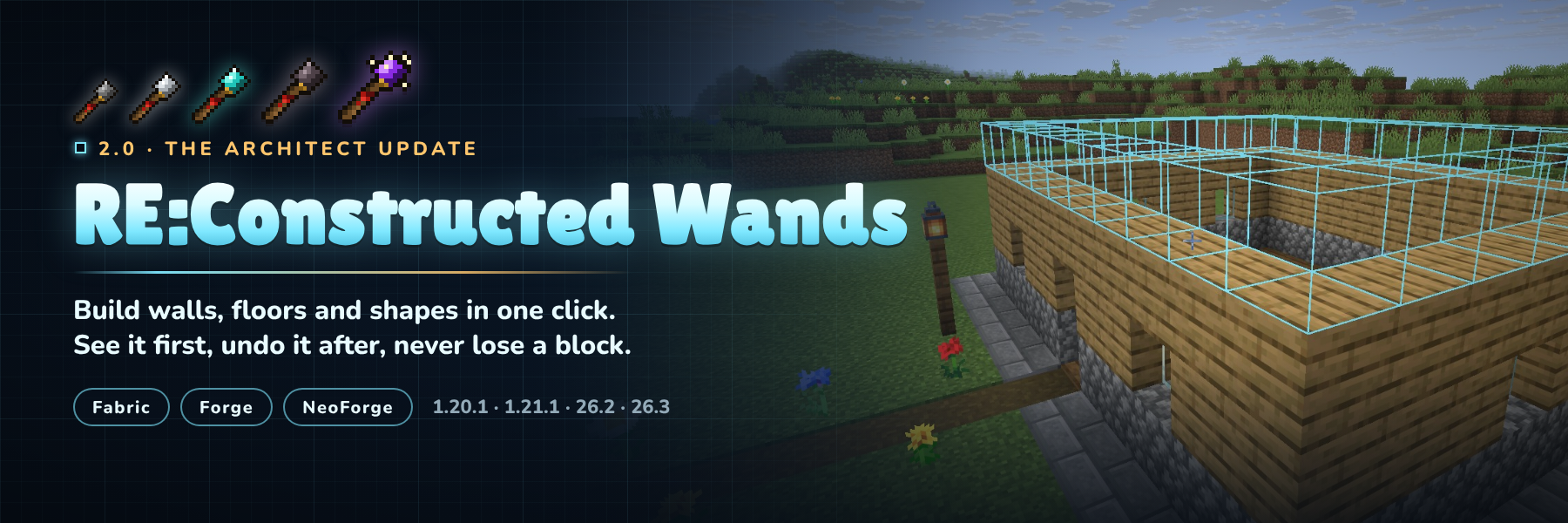
Building wands: extend walls and floors in one click, place in mid-air, clear or swap whole surfaces, and build lines, boxes and rings in two clicks. Live previews, undo and redo, blocks from shulker boxes, bundles and chests.

Автор: NAIZO31,1 тыс.9обновлён 24 окт. 2026 г.
Механики игрыУтилитыГенерация мира

Описание

RE:Constructed Wands

Build the boring parts in one click. Point a wand at a wall and the next layer appears. Fill a floor, clear a cliff face, swap cobblestone for stone bricks, or click twice and get a ring, a box or a whole wall. You see every block before you click, you can undo anything, and the wand takes its blocks from your shulker boxes, bundles, Ender Chest or a chest you bind it to.

Fabric and NeoForge (Forge on 1.20.1) · Minecraft 1.20.1, 1.21.1, 26.2 and 26.3 · install on server and client

What's new in 2.0

Version 2.0 rebuilds the whole mod. Here's what changed from 1.x:

  • Two new cores: Exchange swaps a surface for another block, Architect builds lines, walls, floors, boxes and cubes between two corners, and circles and rings around a centre
  • Undo and redo with Ctrl+Z and Ctrl+Y, ten steps deep, and nothing is ever duplicated
  • Blocks come from shulker boxes, bundles, your Ender Chest and a bound chest
  • Ctrl + scroll sets how many blocks a click places, Sneak + scroll locks a direction
  • A HUD, a mode wheel, a new settings screen and colour-coded previews
  • Claims and protection are respected on every loader, checked before anything moves
  • A server config synced to every player, deny tags, and /wands reload
  • New textures, recipes that no longer clash with vanilla, repairable and enchantable wands
  • Your 1.x wands keep their cores and settings

The wands

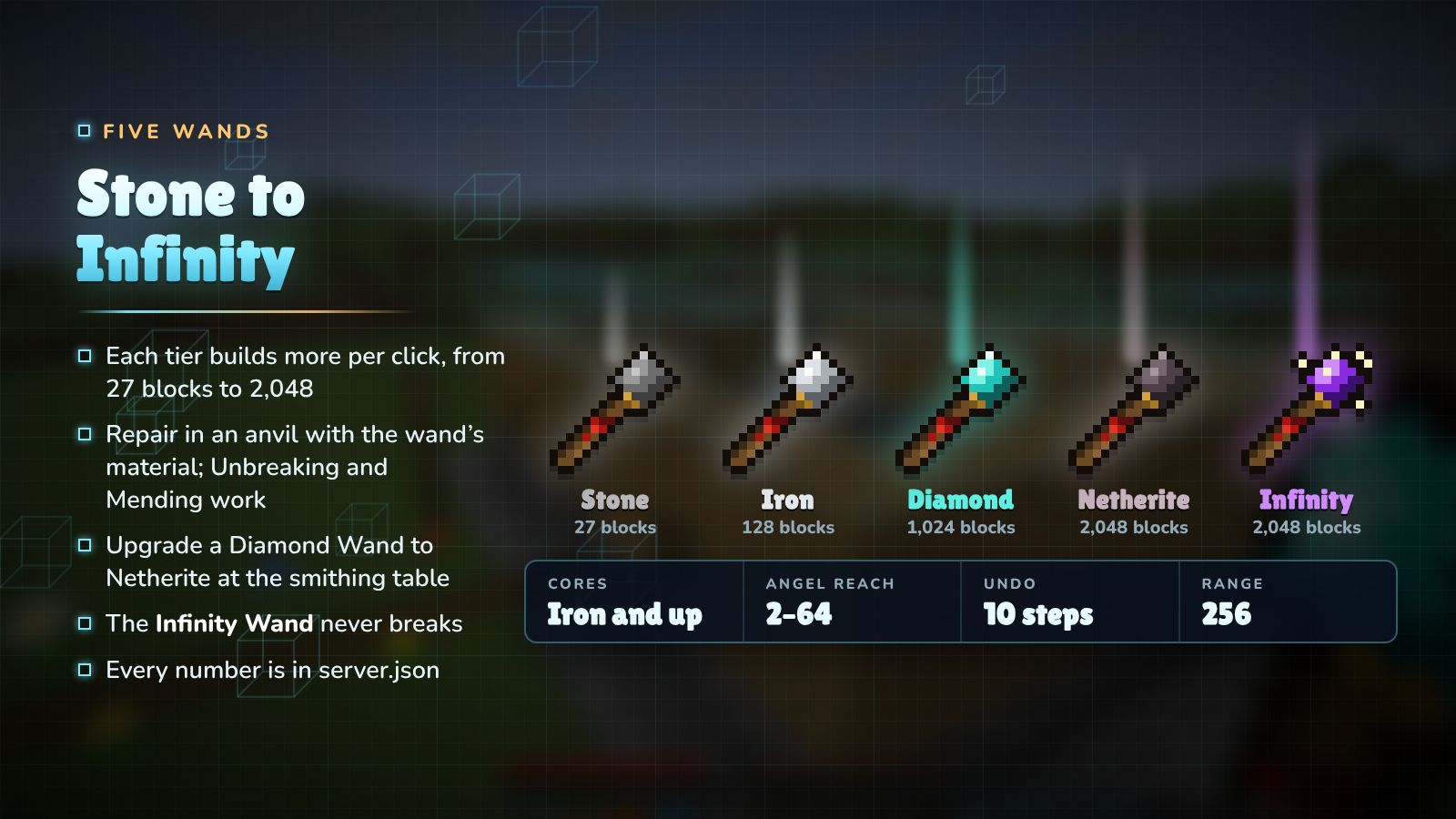
Five wands from Stone to Infinity

WandDurabilityBlocks per clickAngel reachDestruction / ExchangeCores
Stone1312724no
Iron25012849yes
Diamond1,5611,0241681yes
Netherite2,0312,04832128yes
Infinityunbreakable2,048 (8,192 in creative)64128yes

Wands repair in an anvil with their material and take Unbreaking and Mending. The Netherite Wand is a smithing upgrade of the Diamond Wand. Server owners can change every number in server.json.

Construction

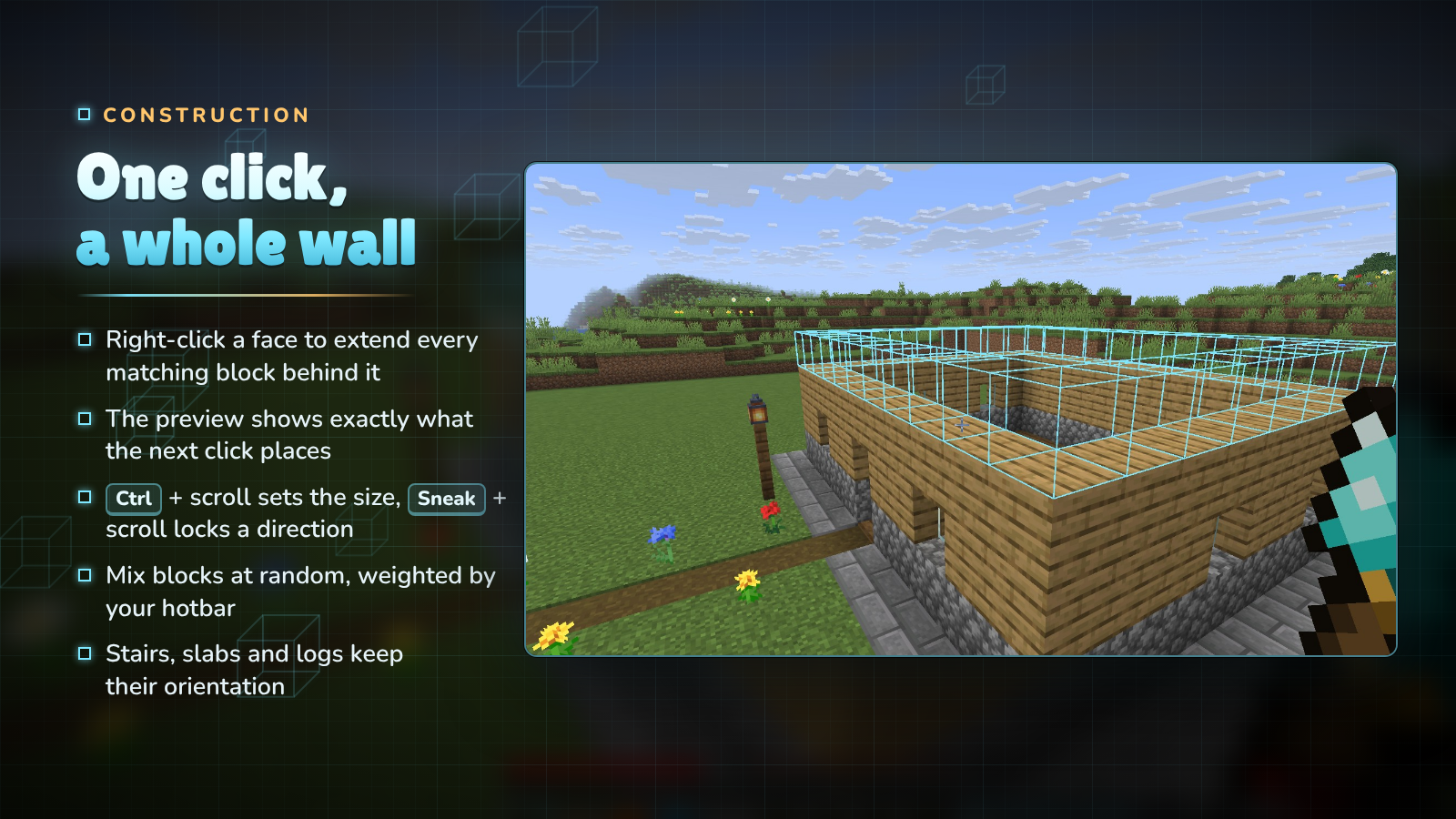
One click, a whole wall

Right-click the face of a block and the wand copies that face across every matching block behind it: the top of a floor adds a layer, the side of a wall makes it thicker, the edge of a path makes it wider. The outline shows exactly what the next click will place, and turns red where you are short of blocks.

  • Ctrl + scroll sets the size, from one block up to the wand's limit.
  • Sneak + scroll locks the direction: horizontal, vertical, north/south or east/west.
  • Match decides what counts as the same block: exact, similar (dirt and grass together) or anything.
  • Random mixes the blocks in your hotbar, weighted by how many slots hold each one.
  • Stairs, slabs, logs and pillars keep their orientation.

Cores and modes

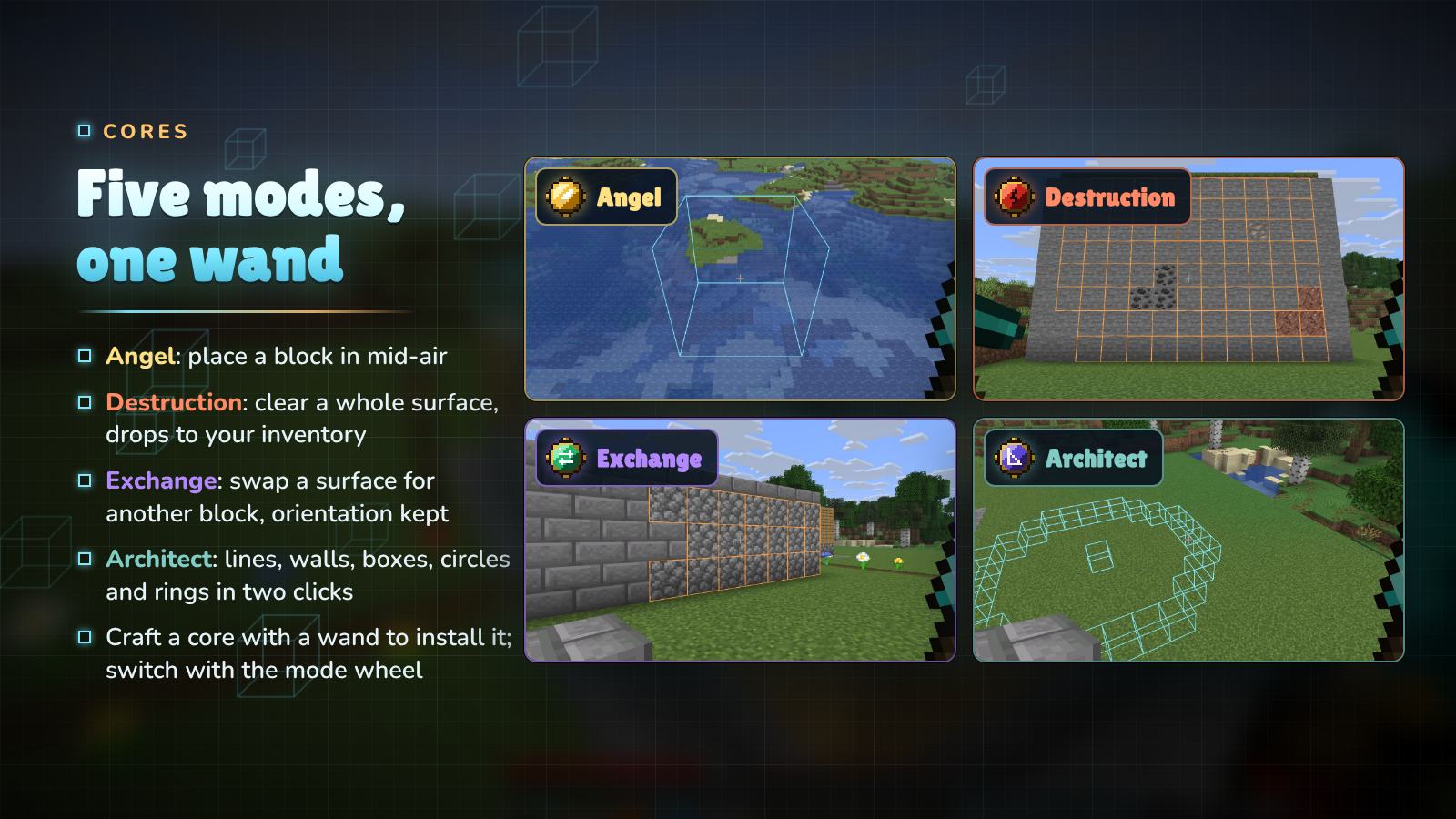
Five modes, one wand

Craft a core together with an Iron, Diamond, Netherite or Infinity Wand to install it. A wand holds every core at once; switch modes with the mode wheel (hold R) or the settings screen.

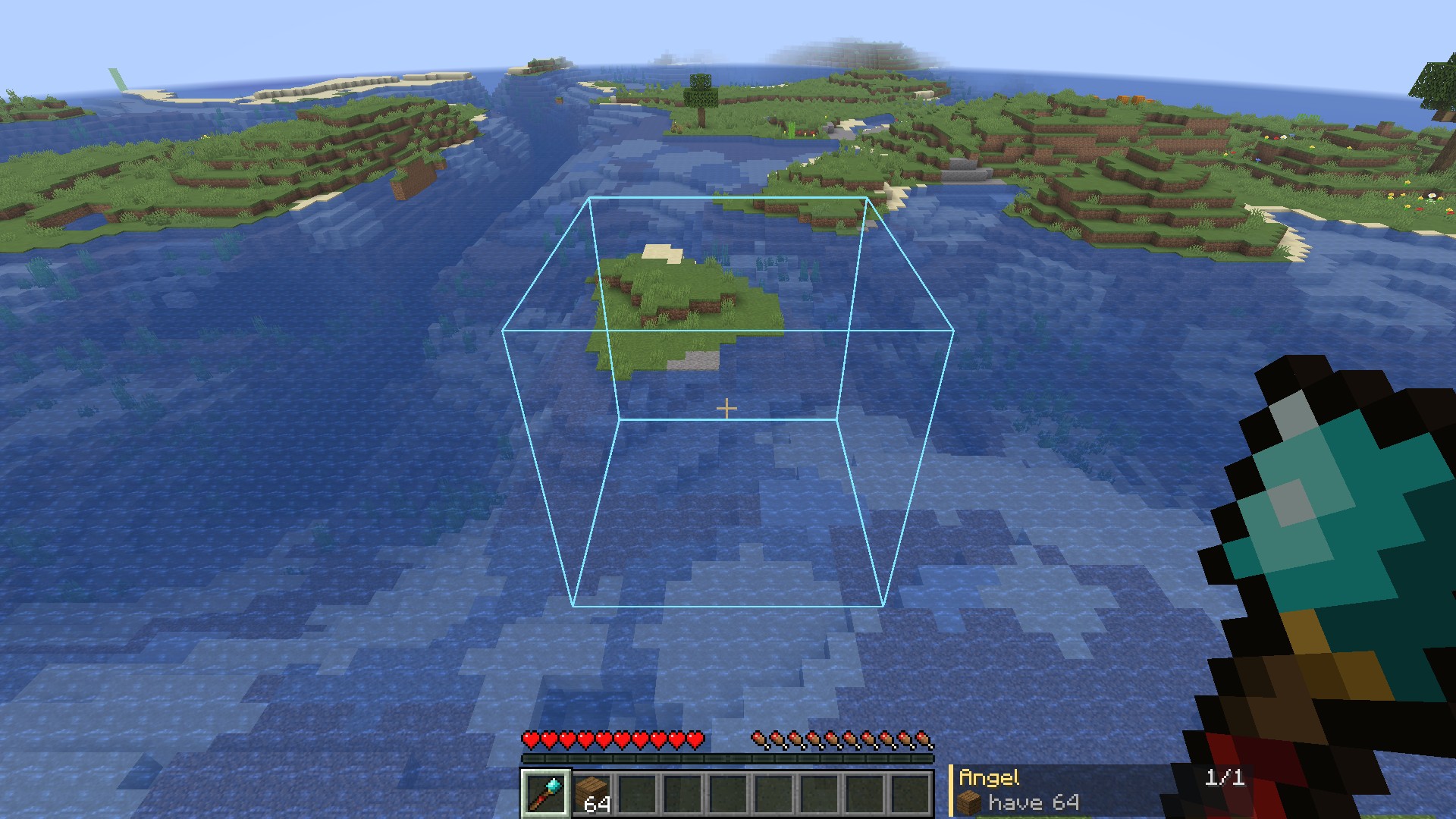
  • Angel Core: place a block in mid-air in front of you, or behind the block you click. Bridges, sky bases and scaffolding without scaffolding.
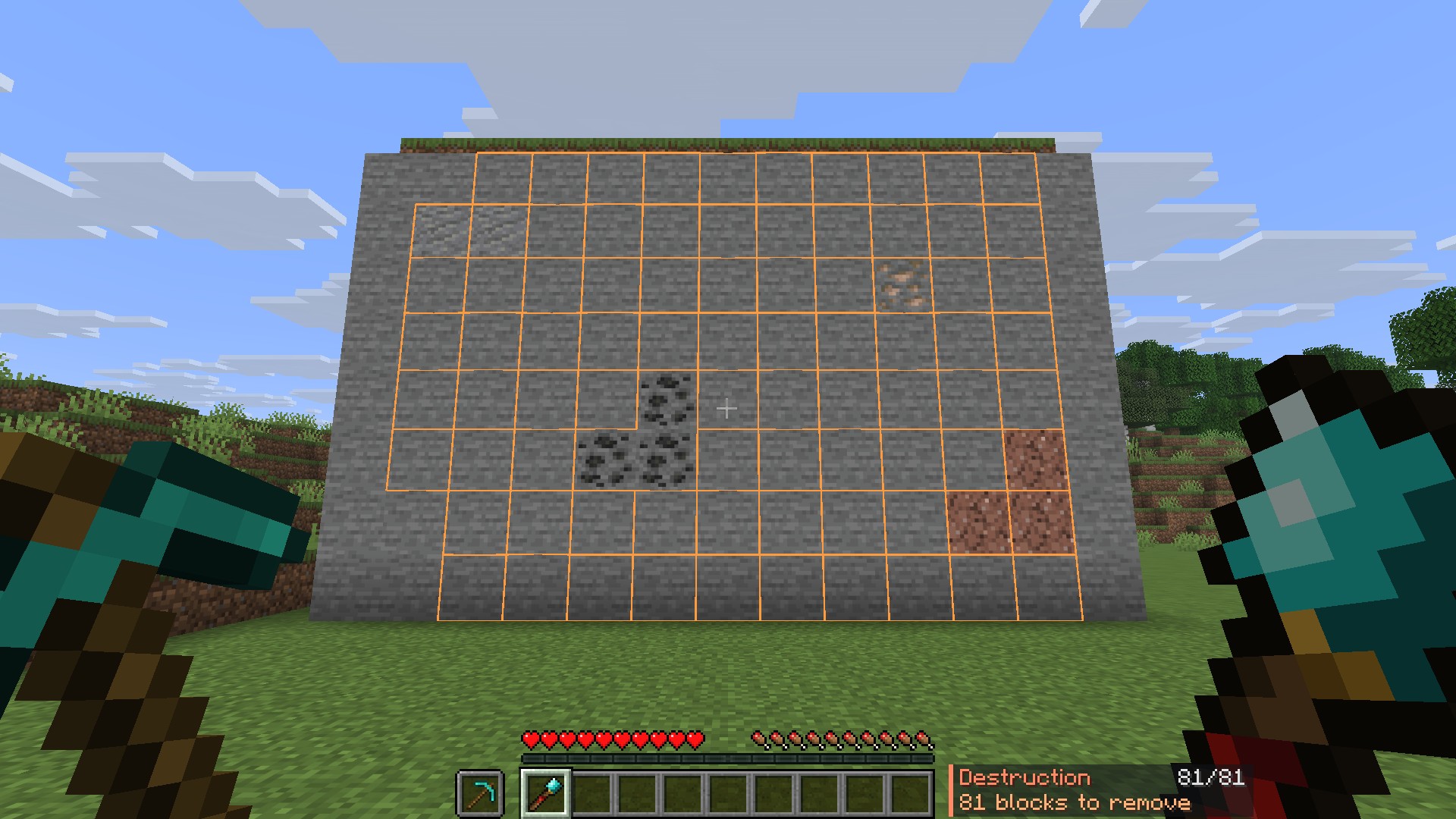
  • Destruction Core: remove the exposed surface of matching blocks. The drops go straight to your inventory, as if you broke them with the tool in your offhand, so a Silk Touch pickaxe there gives you the blocks themselves.
  • Exchange Core (new): swap a surface for the block in your offhand. Stairs and logs keep their facing, and the old blocks come back to you.
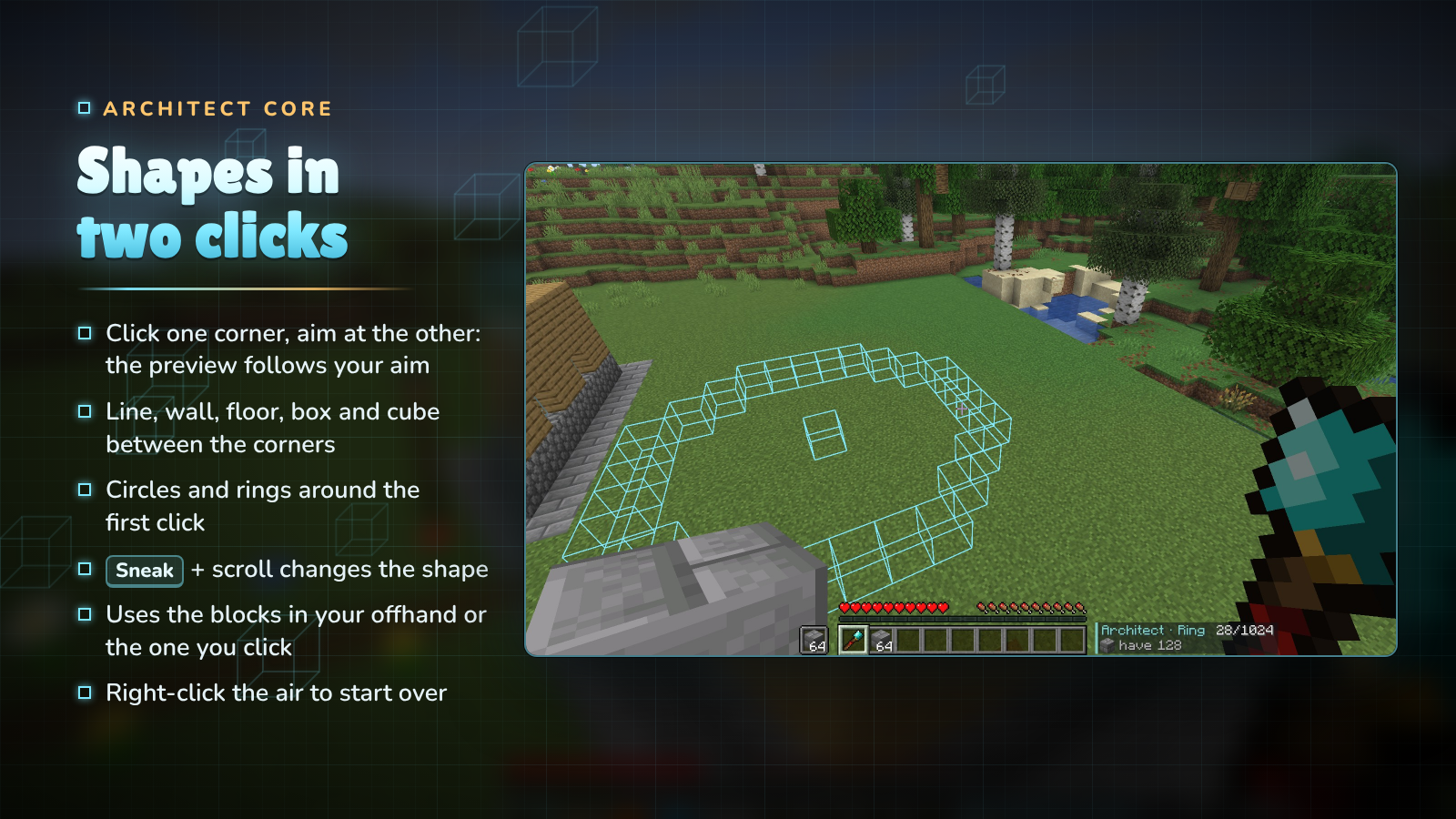
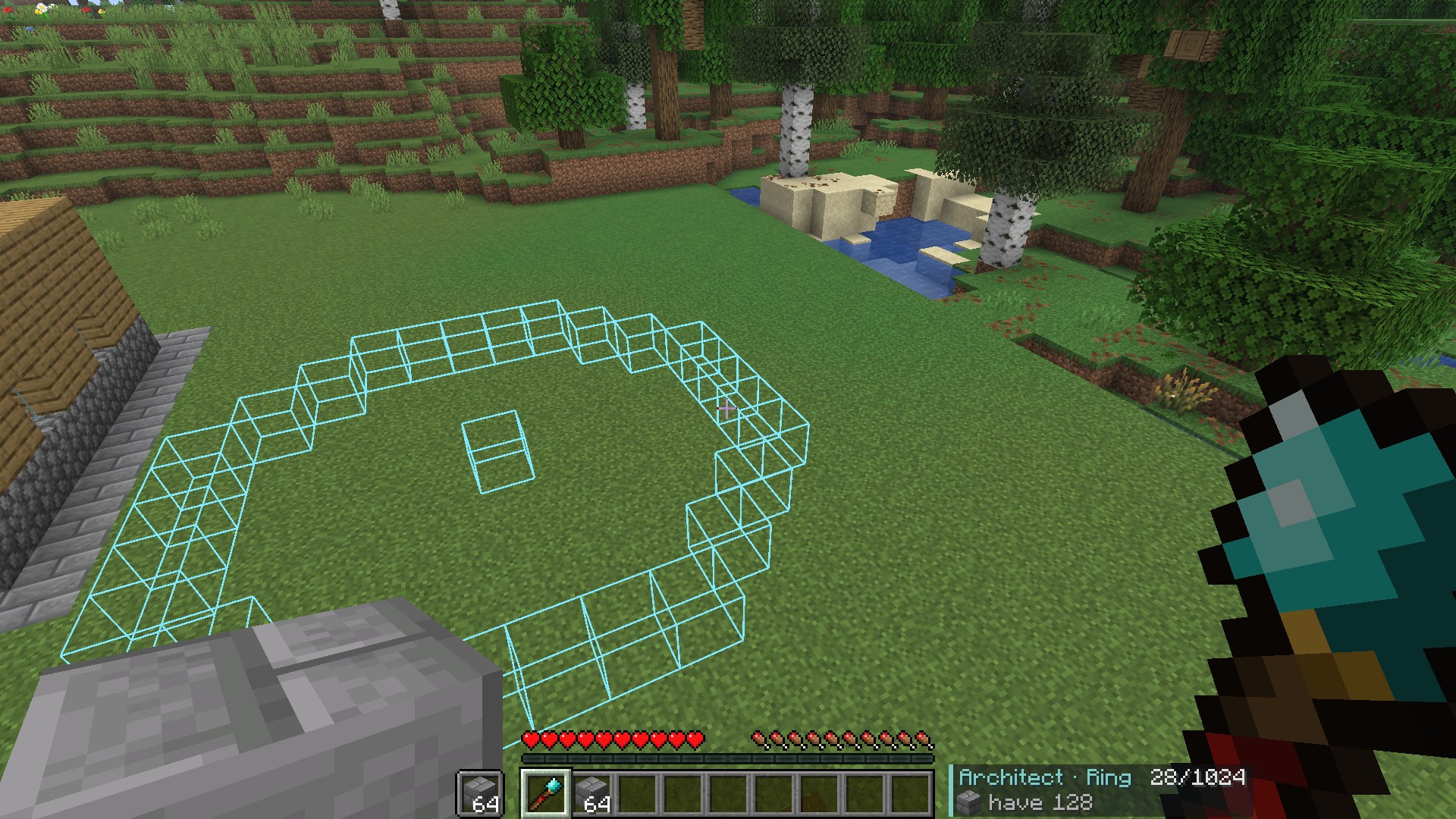
  • Architect Core (new): build shapes with two clicks. See below.

Architect

Shapes in two clicks

Right-click the first corner, then aim at the second: the preview follows your aim and the next right-click builds it. A line, wall, floor, box or cube fills the space between the two corners; a circle or ring is centred on the first click and reaches out to the second. Pick the shape with Sneak + scroll, and right-click the air to clear the first click and start again.

Block supply

Never run dry

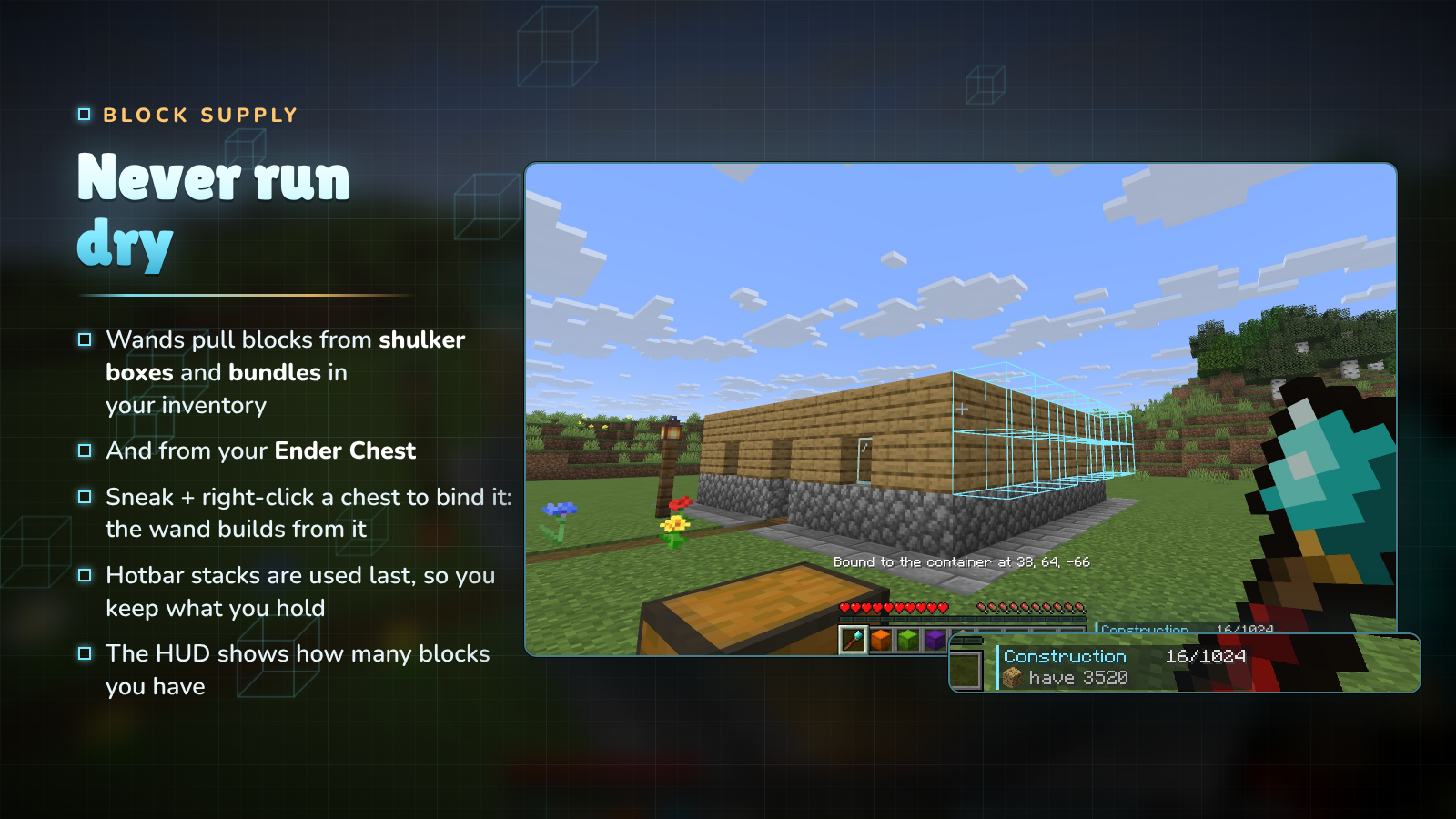
Wands look for blocks in this order:

  1. loose stacks in your inventory,
  2. shulker boxes and bundles you carry,
  3. the chest you bound the wand to (Sneak + right-click a chest, barrel or shulker box; again to unbind),
  4. your Ender Chest,
  5. and last your hotbar and offhand, so the stacks you hold are kept longest.

The HUD shows how many blocks you have across all of them. Only plain blocks are used: a renamed or enchanted stack is never placed by mistake.

Undo and redo

Changed your mind?

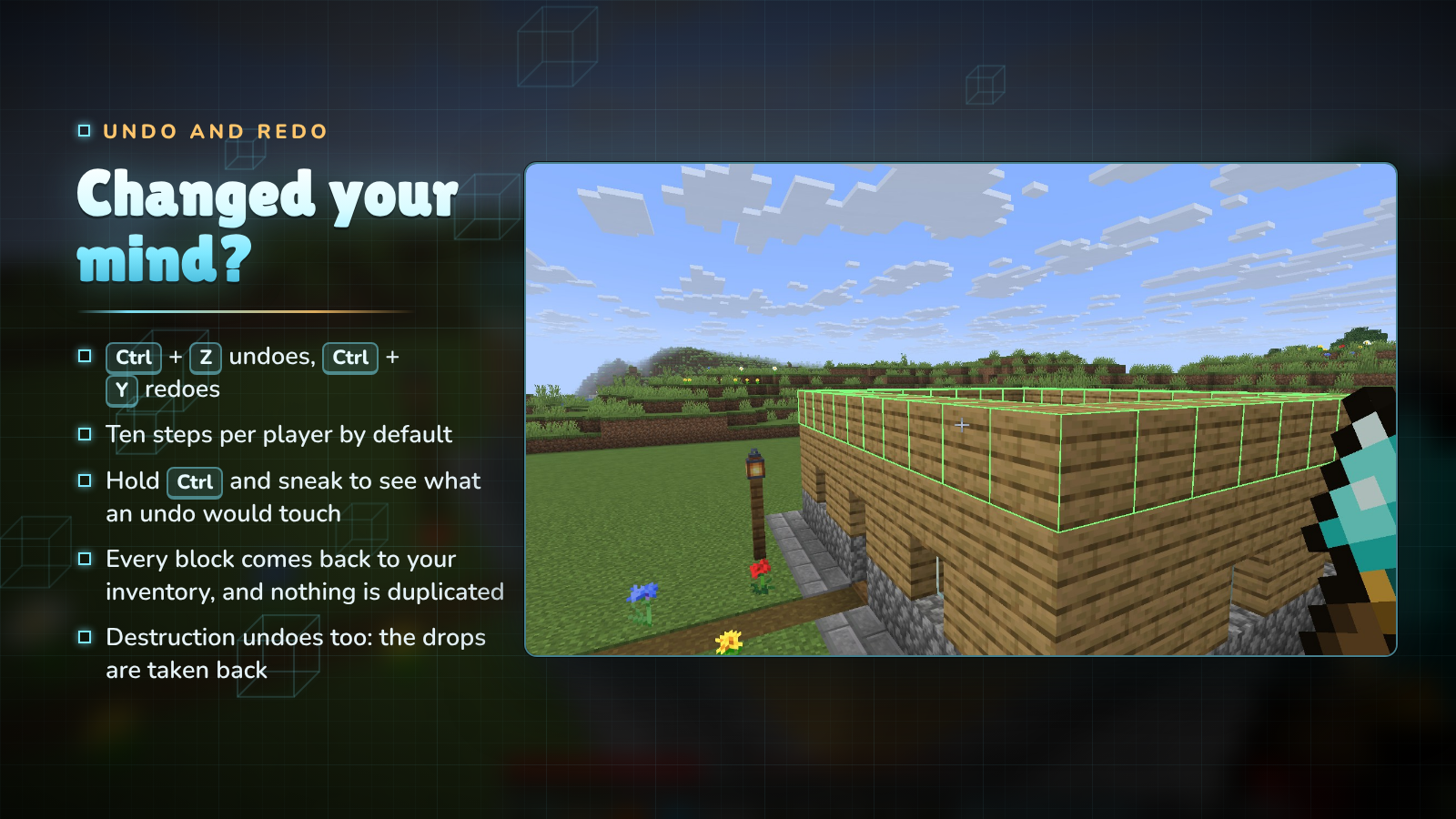
Ctrl + Z undoes your last wand action and Ctrl + Y redoes it, ten steps back by default. Hold Ctrl and sneak to see what an undo would touch. Undo gives back exactly the blocks it removes and takes back exactly the drops a Destruction gave you, so it can never be used to duplicate items. The 1.x gesture (hold Ctrl, sneak and right-click) still works.

Controls

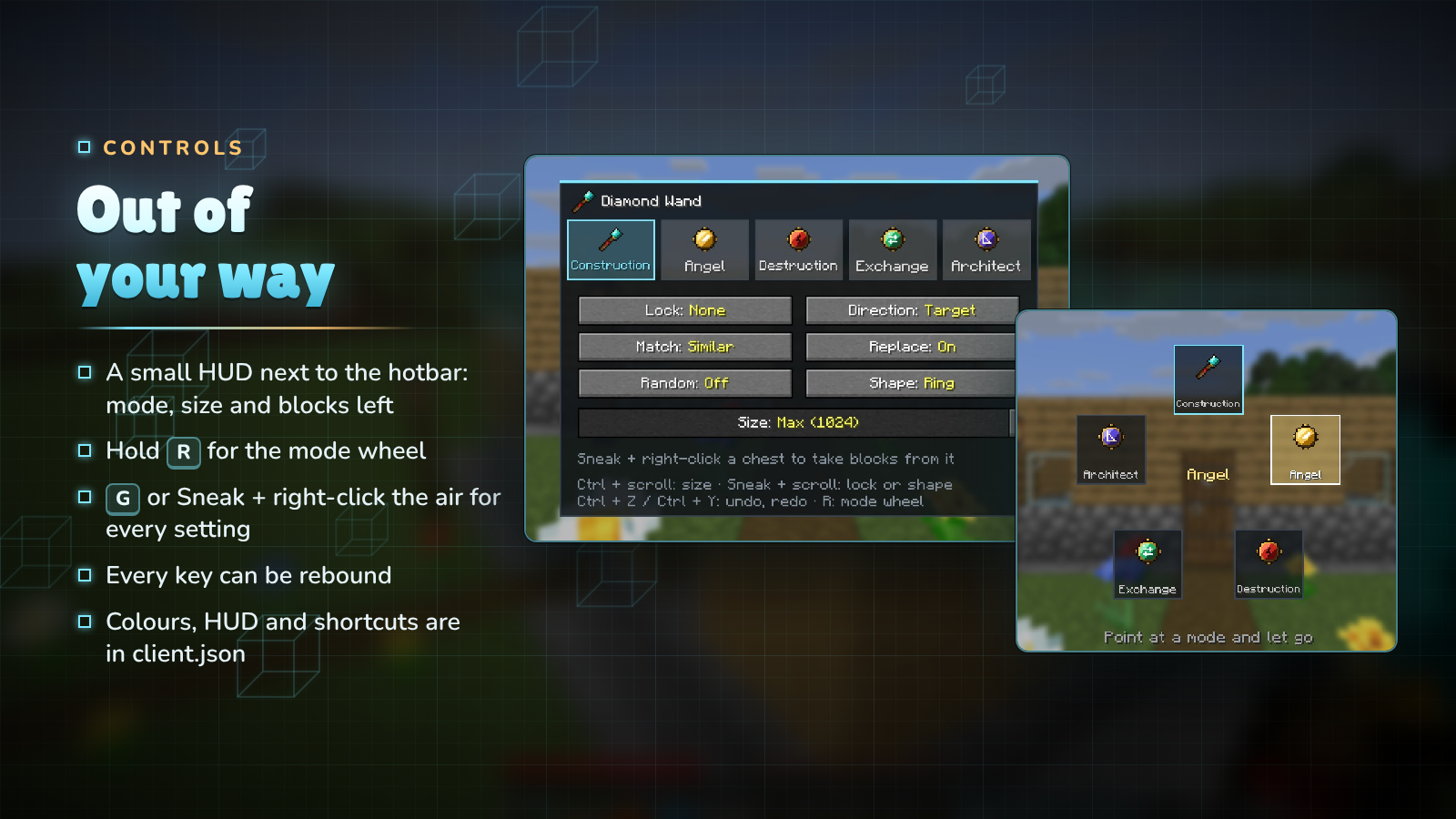
Out of your way

InputWhat it does
Right-click a blockuse the current mode
Right-click the airAngel: place in mid-air · Architect: clear the corner
G, or Sneak + right-click the airsettings screen
Hold Rmode wheel: point at a mode and let go
Ctrl + scrollsize
Sneak + scrolldirection lock, or the Architect's shape
Ctrl + Z / Ctrl + Yundo / redo
Sneak + right-click a containerbind or unbind it as a block source

Every key can be rebound in the controls menu, and client.json turns off the HUD, the previews, the scroll gestures or the shortcuts and changes the preview colours.

For servers

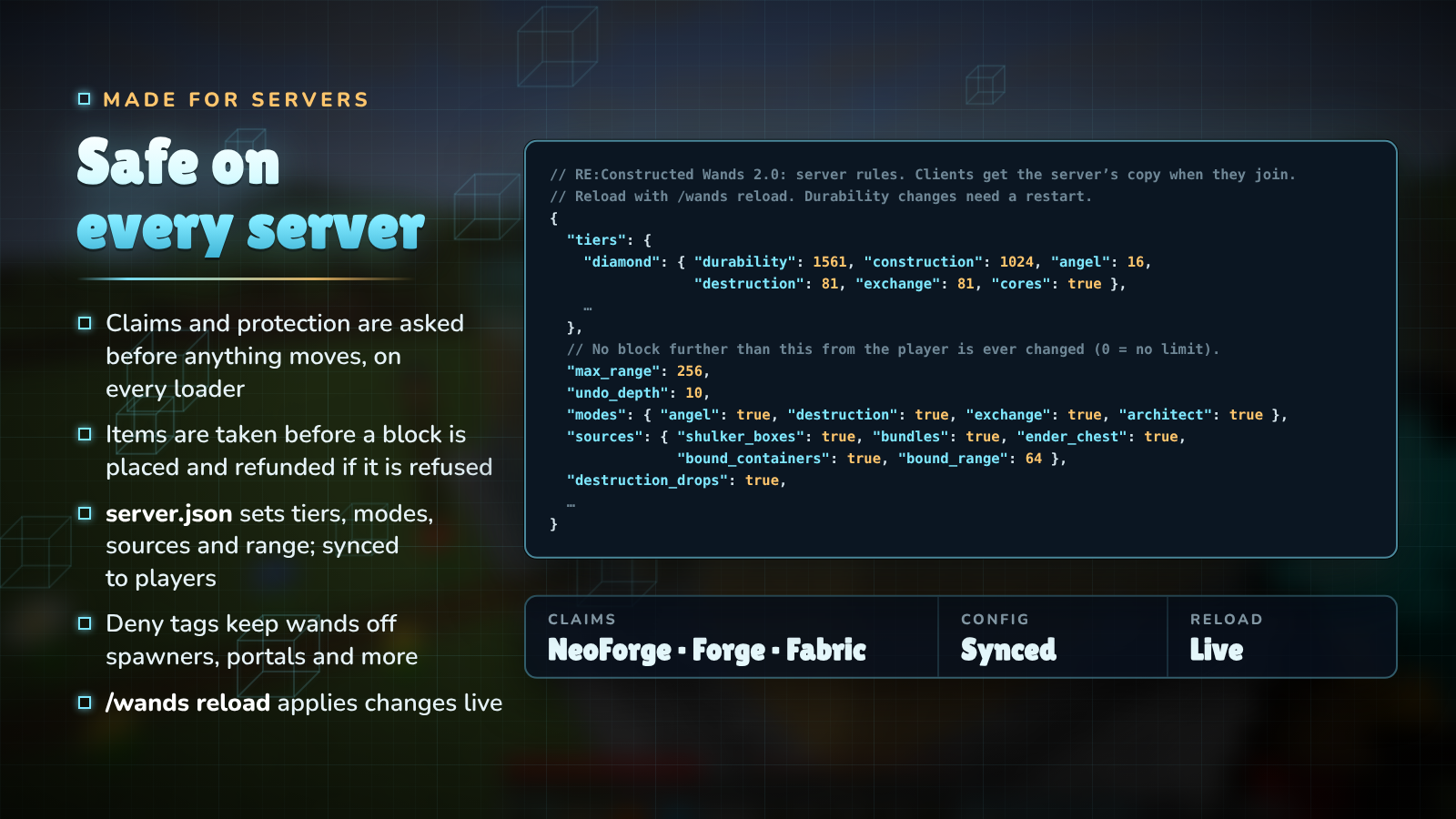
Safe on every server

  • Claims and protection: every block is checked before any item moves. NeoForge and Forge fire their normal place and break events (so claim mods can cancel them), and on Fabric the wand asks the claim mods that implement the Common Protection API (bundled) and fires Fabric's break events.
  • No duplication: the item is taken before the block is placed and refunded if the placement is refused, shulker boxes are edited through their item data, doors and beds are never placed half, and undo never prints items.
  • config/reconstructedwands/server.json: tier limits and durability, which cores work, the creative limit, the maximum range, undo depth, block sources, whether Destruction gives drops, and groups of similar blocks. It is sent to every player, so previews always match what the server will do. /wands reload applies changes live.
  • Deny tags: blocks in #reconstructedwands:denied are never placed, removed or swapped by a wand (bedrock, spawners, portals, command blocks and more by default); #reconstructedwands:no_dismantle protects ores and suspicious sand from Destruction and Exchange.

Crafting

  • Wands: the material in the top-right corner, redstone in the middle and a stick in the bottom-left (cobblestone, iron, diamond, or a nether star for the Infinity Wand). Netherite: upgrade a Diamond Wand at a smithing table.
  • Cores: glass panes around the centre, with
    • Angel: a feather and two gold ingots
    • Destruction: a block of diamond and two diamond pickaxes
    • Exchange: an ender pearl and two emeralds
    • Architect: a compass and two amethyst shards
  • Install a core: put the wand and the core anywhere in a crafting grid.

Downloads

MinecraftFabricNeoForge / ForgeJava
26.3✔ (Fabric API)✔ NeoForge25
26.2✔ (Fabric API)✔ NeoForge25
1.21.1✔ (Fabric API)✔ NeoForge21
1.20.1✔ (Fabric API)✔ Forge17

Pick the file whose name has your Minecraft version and loader, for example reconstructedwands-fabric-1.21.1-2.0.0.jar.

FAQ

Do my 1.x wands still work? Yes. Item IDs are unchanged and wands keep their cores and settings.

Is it needed on the server and the client? Both. It adds items, and the client draws the previews and the HUD.

Will it let players grief claimed land? No. Every block is checked with the loader's protection hooks before anything changes, the same way a block placed by hand is.

Can I stop wands from touching certain blocks? Yes: add them to #reconstructedwands:denied with a datapack.

Can I make wands weaker or stronger? Yes. Every tier's limits and durability are in server.json, and any core can be turned off.

Does Destruction work with Fortune and Silk Touch? Yes. Drops are worked out with the tool in your offhand.

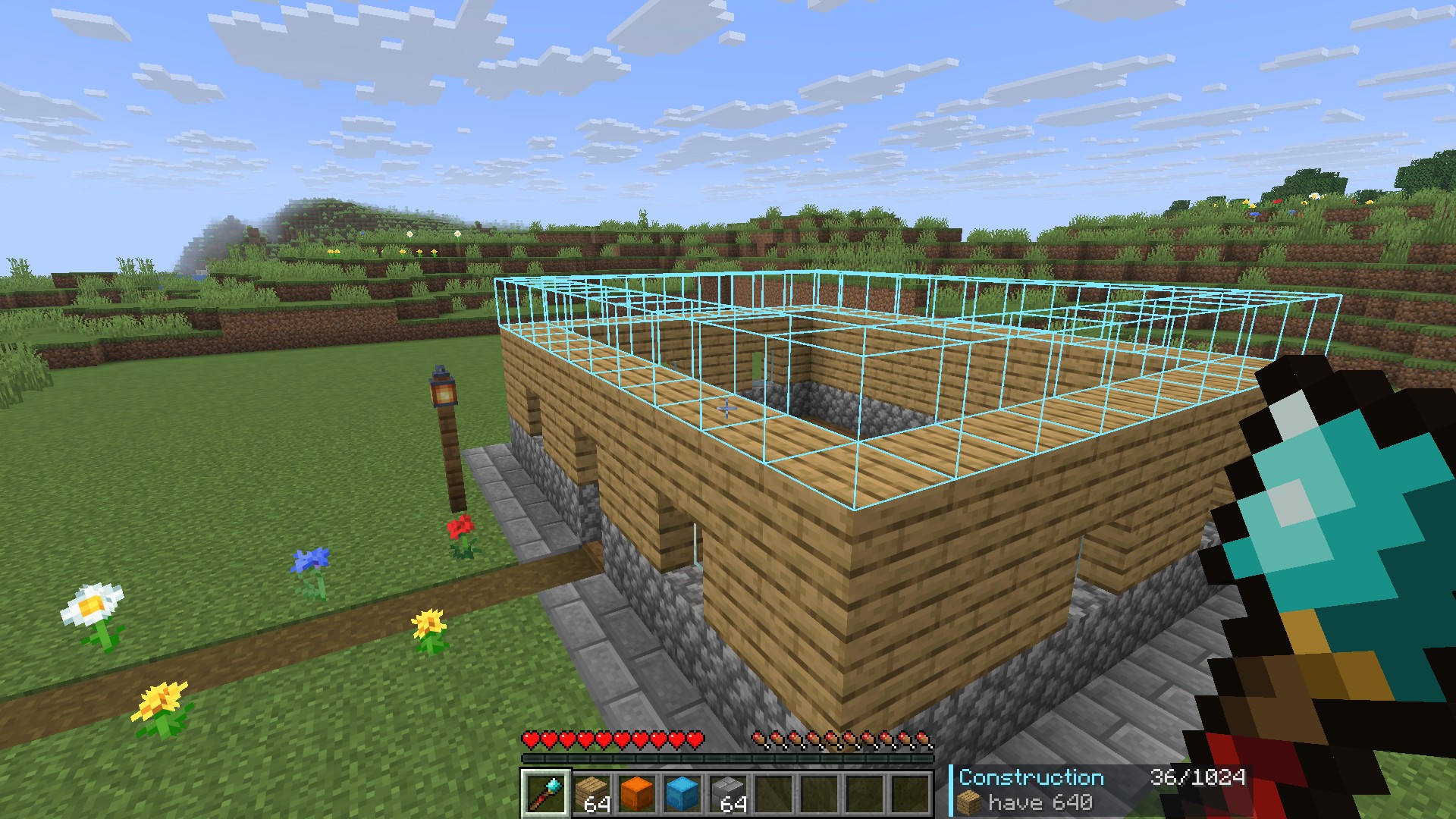
Gallery

Extending a wall

The Architect Core

Clearing a cliff face

Bridging with the Angel Core

Divider

Discord · Source and issues · Support Us · Made by NightBeam Studio

Галерея

Последние версии

Все версии →
release

2.0.0 neoforge 26.3

2.0.0+neoforge-26.3
24 окт. 2026 г.96Minecraft: 26.3neoforge
Скачать
Что нового
# RE:Constructed Wands 2.0.0 — The Architect Update A full rebuild of RE:Constructed Wands. The idea is unchanged (a wand places or removes many blocks at once), but the code, the textures, the recipes, the screens and the controls are new, and the mod now behaves the same on every loader and version. Wands from 1.x keep working: item IDs are the same and a wand keeps its cores and settings. Available for Minecraft 1.20.1, 1.21.1, 26.2 and 26.3 on Fabric (needs Fabric API) and NeoForge (Forge on 1.20.1). ## New - **Exchange Core**: swap the exposed surface of matching blocks for the block in your offhand. Stairs, slabs and logs keep their facing, and the old blocks come back to you as items. - **Architect Core**: right-click a first corner, aim at the second (the preview follows your aim) and right-click again to build a **line, wall, floor, box or cube** between them, or a **circle or ring** centred on the first click. Sneak + scroll picks the shape; right-click the air to clear the first click. - **Undo and redo** with **Ctrl+Z** and **Ctrl+Y**, ten steps per player (configurable). Hold Ctrl and sneak to see what an undo would touch. Undo gives back exactly the blocks it removes and takes back exactly the drops a Destruction gave you. The 1.x gesture (hold Ctrl, Sneak + right-click) still works. - **Block supply**: wands take blocks from loose stacks, then **shulker boxes and bundles** in your inventory, then a **bound container** (Sneak + right-click a chest, barrel or shulker box to bind or unbind it), then your **Ender Chest**, and last your hotbar and offhand. - **Size**: Ctrl + scroll sets how many blocks a click may place, from 1 up to the wand's limit. - **Direction lock** on Sneak + scroll: horizontal, vertical, north/south, east/west or none. - **HUD** next to the hotbar: the mode, the block count and limit, the block and how many you have, or what is wrong. - **Mode wheel**: hold R, point at a mode, let go. - **Settings screen** (G, or Sneak + right-click the air) with every mode and option, the size slider and the bound container. - **Colour-coded previews**: blocks to place, blocks to remove or swap, blocks you are short of, and the undo preview. - **Random palette** weighted by how many hotbar slots hold each block. - **Server config** `config/reconstructedwands/server.json`: durability and limits per tier, cores on or off, the creative limit, a 3D maximum range, undo depth, block sources and bound range, Destruction drops, Angel while falling, and groups of similar blocks. Sent to every player so previews match the server. `/wands reload` (permission level 2) applies it live. - **Client config** `config/reconstructedwands/client.json`: previews and their colours, the HUD, the undo shortcuts, the scroll gestures and the Sneak + right-click screen. - **Deny tags**: `#reconstructedwands:denied` (never placed, removed or swapped; bedrock, spawners, portals, command and structure blocks, and more by default) and `#reconstructedwands:no_dismantle` (never removed by Destruction or Exchange; ores, budding amethyst, suspicious and infested blocks). - Wands **repair in an anvil** with their material and take **Unbreaking and Mending**. The Netherite Wand is a **smithing upgrade** of the Diamond Wand. - New textures for every wand and core, and a new mod icon. ## Changed - **Destruction** hands the drops straight to your inventory, worked out with the tool in your offhand (so Fortune and Silk Touch apply), on every loader. 1.x dropped items on NeoForge and deleted them on Fabric. - **Recipes**: wands are crafted with the material in the top-right corner, redstone in the middle and a stick in the bottom-left, so they no longer clash with vanilla recipes. Cores use glass panes around a centre item. - The Angel Core places a block in mid-air two blocks in front of you, or in the first free spot behind the block you click, looking up to the tier's reach deep (2 blocks for Stone, 64 for Infinity). - Construction follows the same rules as 1.x (the face you click is copied across the matching blocks behind it), with Exact, Similar and Any matching. - Fabric now has the same controls and screens as NeoForge. ## Fixed - **Claims and protection** are checked before any item moves, for every block, on every loader. NeoForge and Forge fire their place and break events (and a cancelled placement is rolled back exactly). Fabric asks claim mods through the bundled Common Protection API and fires Fabric's break events. 1.x only checked on NeoForge, and fired the place event after placing. - **No duplication**: the item is taken before a block is placed and refunded if the placement is refused, container items are rewritten through their item data, two-block blocks (doors, beds, tall plants) are never placed, and undo can't print items. - Shulker boxes and bundles were advertised as a source in 1.x but never used; they are now. - Wands respect world height, the world border, spawn protection and adventure mode, and never change a block further than `max_range` from the player. ## For mod and pack developers - One code base per Minecraft version with nearly everything in `common/`; the loader modules only connect events. - Settings live in the wand's custom data under `wand_options` (`cores`, `cores_sel`, `lock`, `direction`, `replace`, `match`, `random`, plus `size`, `shape`, `anchor` and `bound`). - The MIT notice of Construction Wand (ThetaDev), which 1.x was based on, now ships in the jars.
release

2.0.0 neoforge 26.2

2.0.0+neoforge-26.2
24 окт. 2026 г.40Minecraft: 26.2neoforge
Скачать
Что нового
# RE:Constructed Wands 2.0.0 — The Architect Update A full rebuild of RE:Constructed Wands. The idea is unchanged (a wand places or removes many blocks at once), but the code, the textures, the recipes, the screens and the controls are new, and the mod now behaves the same on every loader and version. Wands from 1.x keep working: item IDs are the same and a wand keeps its cores and settings. Available for Minecraft 1.20.1, 1.21.1, 26.2 and 26.3 on Fabric (needs Fabric API) and NeoForge (Forge on 1.20.1). ## New - **Exchange Core**: swap the exposed surface of matching blocks for the block in your offhand. Stairs, slabs and logs keep their facing, and the old blocks come back to you as items. - **Architect Core**: right-click a first corner, aim at the second (the preview follows your aim) and right-click again to build a **line, wall, floor, box or cube** between them, or a **circle or ring** centred on the first click. Sneak + scroll picks the shape; right-click the air to clear the first click. - **Undo and redo** with **Ctrl+Z** and **Ctrl+Y**, ten steps per player (configurable). Hold Ctrl and sneak to see what an undo would touch. Undo gives back exactly the blocks it removes and takes back exactly the drops a Destruction gave you. The 1.x gesture (hold Ctrl, Sneak + right-click) still works. - **Block supply**: wands take blocks from loose stacks, then **shulker boxes and bundles** in your inventory, then a **bound container** (Sneak + right-click a chest, barrel or shulker box to bind or unbind it), then your **Ender Chest**, and last your hotbar and offhand. - **Size**: Ctrl + scroll sets how many blocks a click may place, from 1 up to the wand's limit. - **Direction lock** on Sneak + scroll: horizontal, vertical, north/south, east/west or none. - **HUD** next to the hotbar: the mode, the block count and limit, the block and how many you have, or what is wrong. - **Mode wheel**: hold R, point at a mode, let go. - **Settings screen** (G, or Sneak + right-click the air) with every mode and option, the size slider and the bound container. - **Colour-coded previews**: blocks to place, blocks to remove or swap, blocks you are short of, and the undo preview. - **Random palette** weighted by how many hotbar slots hold each block. - **Server config** `config/reconstructedwands/server.json`: durability and limits per tier, cores on or off, the creative limit, a 3D maximum range, undo depth, block sources and bound range, Destruction drops, Angel while falling, and groups of similar blocks. Sent to every player so previews match the server. `/wands reload` (permission level 2) applies it live. - **Client config** `config/reconstructedwands/client.json`: previews and their colours, the HUD, the undo shortcuts, the scroll gestures and the Sneak + right-click screen. - **Deny tags**: `#reconstructedwands:denied` (never placed, removed or swapped; bedrock, spawners, portals, command and structure blocks, and more by default) and `#reconstructedwands:no_dismantle` (never removed by Destruction or Exchange; ores, budding amethyst, suspicious and infested blocks). - Wands **repair in an anvil** with their material and take **Unbreaking and Mending**. The Netherite Wand is a **smithing upgrade** of the Diamond Wand. - New textures for every wand and core, and a new mod icon. ## Changed - **Destruction** hands the drops straight to your inventory, worked out with the tool in your offhand (so Fortune and Silk Touch apply), on every loader. 1.x dropped items on NeoForge and deleted them on Fabric. - **Recipes**: wands are crafted with the material in the top-right corner, redstone in the middle and a stick in the bottom-left, so they no longer clash with vanilla recipes. Cores use glass panes around a centre item. - The Angel Core places a block in mid-air two blocks in front of you, or in the first free spot behind the block you click, looking up to the tier's reach deep (2 blocks for Stone, 64 for Infinity). - Construction follows the same rules as 1.x (the face you click is copied across the matching blocks behind it), with Exact, Similar and Any matching. - Fabric now has the same controls and screens as NeoForge. ## Fixed - **Claims and protection** are checked before any item moves, for every block, on every loader. NeoForge and Forge fire their place and break events (and a cancelled placement is rolled back exactly). Fabric asks claim mods through the bundled Common Protection API and fires Fabric's break events. 1.x only checked on NeoForge, and fired the place event after placing. - **No duplication**: the item is taken before a block is placed and refunded if the placement is refused, container items are rewritten through their item data, two-block blocks (doors, beds, tall plants) are never placed, and undo can't print items. - Shulker boxes and bundles were advertised as a source in 1.x but never used; they are now. - Wands respect world height, the world border, spawn protection and adventure mode, and never change a block further than `max_range` from the player. ## For mod and pack developers - One code base per Minecraft version with nearly everything in `common/`; the loader modules only connect events. - Settings live in the wand's custom data under `wand_options` (`cores`, `cores_sel`, `lock`, `direction`, `replace`, `match`, `random`, plus `size`, `shape`, `anchor` and `bound`). - The MIT notice of Construction Wand (ThetaDev), which 1.x was based on, now ships in the jars.
release

2.0.0 neoforge 1.21.1

2.0.0+neoforge-1.21.1
24 окт. 2026 г.254Minecraft: 1.21.1neoforge
Скачать
Что нового
# RE:Constructed Wands 2.0.0 — The Architect Update A full rebuild of RE:Constructed Wands. The idea is unchanged (a wand places or removes many blocks at once), but the code, the textures, the recipes, the screens and the controls are new, and the mod now behaves the same on every loader and version. Wands from 1.x keep working: item IDs are the same and a wand keeps its cores and settings. Available for Minecraft 1.20.1, 1.21.1, 26.2 and 26.3 on Fabric (needs Fabric API) and NeoForge (Forge on 1.20.1). ## New - **Exchange Core**: swap the exposed surface of matching blocks for the block in your offhand. Stairs, slabs and logs keep their facing, and the old blocks come back to you as items. - **Architect Core**: right-click a first corner, aim at the second (the preview follows your aim) and right-click again to build a **line, wall, floor, box or cube** between them, or a **circle or ring** centred on the first click. Sneak + scroll picks the shape; right-click the air to clear the first click. - **Undo and redo** with **Ctrl+Z** and **Ctrl+Y**, ten steps per player (configurable). Hold Ctrl and sneak to see what an undo would touch. Undo gives back exactly the blocks it removes and takes back exactly the drops a Destruction gave you. The 1.x gesture (hold Ctrl, Sneak + right-click) still works. - **Block supply**: wands take blocks from loose stacks, then **shulker boxes and bundles** in your inventory, then a **bound container** (Sneak + right-click a chest, barrel or shulker box to bind or unbind it), then your **Ender Chest**, and last your hotbar and offhand. - **Size**: Ctrl + scroll sets how many blocks a click may place, from 1 up to the wand's limit. - **Direction lock** on Sneak + scroll: horizontal, vertical, north/south, east/west or none. - **HUD** next to the hotbar: the mode, the block count and limit, the block and how many you have, or what is wrong. - **Mode wheel**: hold R, point at a mode, let go. - **Settings screen** (G, or Sneak + right-click the air) with every mode and option, the size slider and the bound container. - **Colour-coded previews**: blocks to place, blocks to remove or swap, blocks you are short of, and the undo preview. - **Random palette** weighted by how many hotbar slots hold each block. - **Server config** `config/reconstructedwands/server.json`: durability and limits per tier, cores on or off, the creative limit, a 3D maximum range, undo depth, block sources and bound range, Destruction drops, Angel while falling, and groups of similar blocks. Sent to every player so previews match the server. `/wands reload` (permission level 2) applies it live. - **Client config** `config/reconstructedwands/client.json`: previews and their colours, the HUD, the undo shortcuts, the scroll gestures and the Sneak + right-click screen. - **Deny tags**: `#reconstructedwands:denied` (never placed, removed or swapped; bedrock, spawners, portals, command and structure blocks, and more by default) and `#reconstructedwands:no_dismantle` (never removed by Destruction or Exchange; ores, budding amethyst, suspicious and infested blocks). - Wands **repair in an anvil** with their material and take **Unbreaking and Mending**. The Netherite Wand is a **smithing upgrade** of the Diamond Wand. - New textures for every wand and core, and a new mod icon. ## Changed - **Destruction** hands the drops straight to your inventory, worked out with the tool in your offhand (so Fortune and Silk Touch apply), on every loader. 1.x dropped items on NeoForge and deleted them on Fabric. - **Recipes**: wands are crafted with the material in the top-right corner, redstone in the middle and a stick in the bottom-left, so they no longer clash with vanilla recipes. Cores use glass panes around a centre item. - The Angel Core places a block in mid-air two blocks in front of you, or in the first free spot behind the block you click, looking up to the tier's reach deep (2 blocks for Stone, 64 for Infinity). - Construction follows the same rules as 1.x (the face you click is copied across the matching blocks behind it), with Exact, Similar and Any matching. - Fabric now has the same controls and screens as NeoForge. ## Fixed - **Claims and protection** are checked before any item moves, for every block, on every loader. NeoForge and Forge fire their place and break events (and a cancelled placement is rolled back exactly). Fabric asks claim mods through the bundled Common Protection API and fires Fabric's break events. 1.x only checked on NeoForge, and fired the place event after placing. - **No duplication**: the item is taken before a block is placed and refunded if the placement is refused, container items are rewritten through their item data, two-block blocks (doors, beds, tall plants) are never placed, and undo can't print items. - Shulker boxes and bundles were advertised as a source in 1.x but never used; they are now. - Wands respect world height, the world border, spawn protection and adventure mode, and never change a block further than `max_range` from the player. ## For mod and pack developers - One code base per Minecraft version with nearly everything in `common/`; the loader modules only connect events. - Settings live in the wand's custom data under `wand_options` (`cores`, `cores_sel`, `lock`, `direction`, `replace`, `match`, `random`, plus `size`, `shape`, `anchor` and `bound`). - The MIT notice of Construction Wand (ThetaDev), which 1.x was based on, now ships in the jars.
release

2.0.0 forge 1.20.1

2.0.0+forge-1.20.1
24 окт. 2026 г.44Minecraft: 1.20.1forge
Скачать
Что нового
# RE:Constructed Wands 2.0.0 — The Architect Update A full rebuild of RE:Constructed Wands. The idea is unchanged (a wand places or removes many blocks at once), but the code, the textures, the recipes, the screens and the controls are new, and the mod now behaves the same on every loader and version. Wands from 1.x keep working: item IDs are the same and a wand keeps its cores and settings. Available for Minecraft 1.20.1, 1.21.1, 26.2 and 26.3 on Fabric (needs Fabric API) and NeoForge (Forge on 1.20.1). ## New - **Exchange Core**: swap the exposed surface of matching blocks for the block in your offhand. Stairs, slabs and logs keep their facing, and the old blocks come back to you as items. - **Architect Core**: right-click a first corner, aim at the second (the preview follows your aim) and right-click again to build a **line, wall, floor, box or cube** between them, or a **circle or ring** centred on the first click. Sneak + scroll picks the shape; right-click the air to clear the first click. - **Undo and redo** with **Ctrl+Z** and **Ctrl+Y**, ten steps per player (configurable). Hold Ctrl and sneak to see what an undo would touch. Undo gives back exactly the blocks it removes and takes back exactly the drops a Destruction gave you. The 1.x gesture (hold Ctrl, Sneak + right-click) still works. - **Block supply**: wands take blocks from loose stacks, then **shulker boxes and bundles** in your inventory, then a **bound container** (Sneak + right-click a chest, barrel or shulker box to bind or unbind it), then your **Ender Chest**, and last your hotbar and offhand. - **Size**: Ctrl + scroll sets how many blocks a click may place, from 1 up to the wand's limit. - **Direction lock** on Sneak + scroll: horizontal, vertical, north/south, east/west or none. - **HUD** next to the hotbar: the mode, the block count and limit, the block and how many you have, or what is wrong. - **Mode wheel**: hold R, point at a mode, let go. - **Settings screen** (G, or Sneak + right-click the air) with every mode and option, the size slider and the bound container. - **Colour-coded previews**: blocks to place, blocks to remove or swap, blocks you are short of, and the undo preview. - **Random palette** weighted by how many hotbar slots hold each block. - **Server config** `config/reconstructedwands/server.json`: durability and limits per tier, cores on or off, the creative limit, a 3D maximum range, undo depth, block sources and bound range, Destruction drops, Angel while falling, and groups of similar blocks. Sent to every player so previews match the server. `/wands reload` (permission level 2) applies it live. - **Client config** `config/reconstructedwands/client.json`: previews and their colours, the HUD, the undo shortcuts, the scroll gestures and the Sneak + right-click screen. - **Deny tags**: `#reconstructedwands:denied` (never placed, removed or swapped; bedrock, spawners, portals, command and structure blocks, and more by default) and `#reconstructedwands:no_dismantle` (never removed by Destruction or Exchange; ores, budding amethyst, suspicious and infested blocks). - Wands **repair in an anvil** with their material and take **Unbreaking and Mending**. The Netherite Wand is a **smithing upgrade** of the Diamond Wand. - New textures for every wand and core, and a new mod icon. ## Changed - **Destruction** hands the drops straight to your inventory, worked out with the tool in your offhand (so Fortune and Silk Touch apply), on every loader. 1.x dropped items on NeoForge and deleted them on Fabric. - **Recipes**: wands are crafted with the material in the top-right corner, redstone in the middle and a stick in the bottom-left, so they no longer clash with vanilla recipes. Cores use glass panes around a centre item. - The Angel Core places a block in mid-air two blocks in front of you, or in the first free spot behind the block you click, looking up to the tier's reach deep (2 blocks for Stone, 64 for Infinity). - Construction follows the same rules as 1.x (the face you click is copied across the matching blocks behind it), with Exact, Similar and Any matching. - Fabric now has the same controls and screens as NeoForge. ## Fixed - **Claims and protection** are checked before any item moves, for every block, on every loader. NeoForge and Forge fire their place and break events (and a cancelled placement is rolled back exactly). Fabric asks claim mods through the bundled Common Protection API and fires Fabric's break events. 1.x only checked on NeoForge, and fired the place event after placing. - **No duplication**: the item is taken before a block is placed and refunded if the placement is refused, container items are rewritten through their item data, two-block blocks (doors, beds, tall plants) are never placed, and undo can't print items. - Shulker boxes and bundles were advertised as a source in 1.x but never used; they are now. - Wands respect world height, the world border, spawn protection and adventure mode, and never change a block further than `max_range` from the player. ## For mod and pack developers - One code base per Minecraft version with nearly everything in `common/`; the loader modules only connect events. - Settings live in the wand's custom data under `wand_options` (`cores`, `cores_sel`, `lock`, `direction`, `replace`, `match`, `random`, plus `size`, `shape`, `anchor` and `bound`). - The MIT notice of Construction Wand (ThetaDev), which 1.x was based on, now ships in the jars.
release

2.0.0 fabric 26.3

2.0.0+fabric-26.3
24 окт. 2026 г.236Minecraft: 26.3fabric
Скачать
Что нового
# RE:Constructed Wands 2.0.0 — The Architect Update A full rebuild of RE:Constructed Wands. The idea is unchanged (a wand places or removes many blocks at once), but the code, the textures, the recipes, the screens and the controls are new, and the mod now behaves the same on every loader and version. Wands from 1.x keep working: item IDs are the same and a wand keeps its cores and settings. Available for Minecraft 1.20.1, 1.21.1, 26.2 and 26.3 on Fabric (needs Fabric API) and NeoForge (Forge on 1.20.1). ## New - **Exchange Core**: swap the exposed surface of matching blocks for the block in your offhand. Stairs, slabs and logs keep their facing, and the old blocks come back to you as items. - **Architect Core**: right-click a first corner, aim at the second (the preview follows your aim) and right-click again to build a **line, wall, floor, box or cube** between them, or a **circle or ring** centred on the first click. Sneak + scroll picks the shape; right-click the air to clear the first click. - **Undo and redo** with **Ctrl+Z** and **Ctrl+Y**, ten steps per player (configurable). Hold Ctrl and sneak to see what an undo would touch. Undo gives back exactly the blocks it removes and takes back exactly the drops a Destruction gave you. The 1.x gesture (hold Ctrl, Sneak + right-click) still works. - **Block supply**: wands take blocks from loose stacks, then **shulker boxes and bundles** in your inventory, then a **bound container** (Sneak + right-click a chest, barrel or shulker box to bind or unbind it), then your **Ender Chest**, and last your hotbar and offhand. - **Size**: Ctrl + scroll sets how many blocks a click may place, from 1 up to the wand's limit. - **Direction lock** on Sneak + scroll: horizontal, vertical, north/south, east/west or none. - **HUD** next to the hotbar: the mode, the block count and limit, the block and how many you have, or what is wrong. - **Mode wheel**: hold R, point at a mode, let go. - **Settings screen** (G, or Sneak + right-click the air) with every mode and option, the size slider and the bound container. - **Colour-coded previews**: blocks to place, blocks to remove or swap, blocks you are short of, and the undo preview. - **Random palette** weighted by how many hotbar slots hold each block. - **Server config** `config/reconstructedwands/server.json`: durability and limits per tier, cores on or off, the creative limit, a 3D maximum range, undo depth, block sources and bound range, Destruction drops, Angel while falling, and groups of similar blocks. Sent to every player so previews match the server. `/wands reload` (permission level 2) applies it live. - **Client config** `config/reconstructedwands/client.json`: previews and their colours, the HUD, the undo shortcuts, the scroll gestures and the Sneak + right-click screen. - **Deny tags**: `#reconstructedwands:denied` (never placed, removed or swapped; bedrock, spawners, portals, command and structure blocks, and more by default) and `#reconstructedwands:no_dismantle` (never removed by Destruction or Exchange; ores, budding amethyst, suspicious and infested blocks). - Wands **repair in an anvil** with their material and take **Unbreaking and Mending**. The Netherite Wand is a **smithing upgrade** of the Diamond Wand. - New textures for every wand and core, and a new mod icon. ## Changed - **Destruction** hands the drops straight to your inventory, worked out with the tool in your offhand (so Fortune and Silk Touch apply), on every loader. 1.x dropped items on NeoForge and deleted them on Fabric. - **Recipes**: wands are crafted with the material in the top-right corner, redstone in the middle and a stick in the bottom-left, so they no longer clash with vanilla recipes. Cores use glass panes around a centre item. - The Angel Core places a block in mid-air two blocks in front of you, or in the first free spot behind the block you click, looking up to the tier's reach deep (2 blocks for Stone, 64 for Infinity). - Construction follows the same rules as 1.x (the face you click is copied across the matching blocks behind it), with Exact, Similar and Any matching. - Fabric now has the same controls and screens as NeoForge. ## Fixed - **Claims and protection** are checked before any item moves, for every block, on every loader. NeoForge and Forge fire their place and break events (and a cancelled placement is rolled back exactly). Fabric asks claim mods through the bundled Common Protection API and fires Fabric's break events. 1.x only checked on NeoForge, and fired the place event after placing. - **No duplication**: the item is taken before a block is placed and refunded if the placement is refused, container items are rewritten through their item data, two-block blocks (doors, beds, tall plants) are never placed, and undo can't print items. - Shulker boxes and bundles were advertised as a source in 1.x but never used; they are now. - Wands respect world height, the world border, spawn protection and adventure mode, and never change a block further than `max_range` from the player. ## For mod and pack developers - One code base per Minecraft version with nearly everything in `common/`; the loader modules only connect events. - Settings live in the wand's custom data under `wand_options` (`cores`, `cores_sel`, `lock`, `direction`, `replace`, `match`, `random`, plus `size`, `shape`, `anchor` and `bound`). - The MIT notice of Construction Wand (ThetaDev), which 1.x was based on, now ships in the jars.
release

2.0.0 fabric 26.2

2.0.0+fabric-26.2
24 окт. 2026 г.42Minecraft: 26.2fabric
Скачать
Что нового
# RE:Constructed Wands 2.0.0 — The Architect Update A full rebuild of RE:Constructed Wands. The idea is unchanged (a wand places or removes many blocks at once), but the code, the textures, the recipes, the screens and the controls are new, and the mod now behaves the same on every loader and version. Wands from 1.x keep working: item IDs are the same and a wand keeps its cores and settings. Available for Minecraft 1.20.1, 1.21.1, 26.2 and 26.3 on Fabric (needs Fabric API) and NeoForge (Forge on 1.20.1). ## New - **Exchange Core**: swap the exposed surface of matching blocks for the block in your offhand. Stairs, slabs and logs keep their facing, and the old blocks come back to you as items. - **Architect Core**: right-click a first corner, aim at the second (the preview follows your aim) and right-click again to build a **line, wall, floor, box or cube** between them, or a **circle or ring** centred on the first click. Sneak + scroll picks the shape; right-click the air to clear the first click. - **Undo and redo** with **Ctrl+Z** and **Ctrl+Y**, ten steps per player (configurable). Hold Ctrl and sneak to see what an undo would touch. Undo gives back exactly the blocks it removes and takes back exactly the drops a Destruction gave you. The 1.x gesture (hold Ctrl, Sneak + right-click) still works. - **Block supply**: wands take blocks from loose stacks, then **shulker boxes and bundles** in your inventory, then a **bound container** (Sneak + right-click a chest, barrel or shulker box to bind or unbind it), then your **Ender Chest**, and last your hotbar and offhand. - **Size**: Ctrl + scroll sets how many blocks a click may place, from 1 up to the wand's limit. - **Direction lock** on Sneak + scroll: horizontal, vertical, north/south, east/west or none. - **HUD** next to the hotbar: the mode, the block count and limit, the block and how many you have, or what is wrong. - **Mode wheel**: hold R, point at a mode, let go. - **Settings screen** (G, or Sneak + right-click the air) with every mode and option, the size slider and the bound container. - **Colour-coded previews**: blocks to place, blocks to remove or swap, blocks you are short of, and the undo preview. - **Random palette** weighted by how many hotbar slots hold each block. - **Server config** `config/reconstructedwands/server.json`: durability and limits per tier, cores on or off, the creative limit, a 3D maximum range, undo depth, block sources and bound range, Destruction drops, Angel while falling, and groups of similar blocks. Sent to every player so previews match the server. `/wands reload` (permission level 2) applies it live. - **Client config** `config/reconstructedwands/client.json`: previews and their colours, the HUD, the undo shortcuts, the scroll gestures and the Sneak + right-click screen. - **Deny tags**: `#reconstructedwands:denied` (never placed, removed or swapped; bedrock, spawners, portals, command and structure blocks, and more by default) and `#reconstructedwands:no_dismantle` (never removed by Destruction or Exchange; ores, budding amethyst, suspicious and infested blocks). - Wands **repair in an anvil** with their material and take **Unbreaking and Mending**. The Netherite Wand is a **smithing upgrade** of the Diamond Wand. - New textures for every wand and core, and a new mod icon. ## Changed - **Destruction** hands the drops straight to your inventory, worked out with the tool in your offhand (so Fortune and Silk Touch apply), on every loader. 1.x dropped items on NeoForge and deleted them on Fabric. - **Recipes**: wands are crafted with the material in the top-right corner, redstone in the middle and a stick in the bottom-left, so they no longer clash with vanilla recipes. Cores use glass panes around a centre item. - The Angel Core places a block in mid-air two blocks in front of you, or in the first free spot behind the block you click, looking up to the tier's reach deep (2 blocks for Stone, 64 for Infinity). - Construction follows the same rules as 1.x (the face you click is copied across the matching blocks behind it), with Exact, Similar and Any matching. - Fabric now has the same controls and screens as NeoForge. ## Fixed - **Claims and protection** are checked before any item moves, for every block, on every loader. NeoForge and Forge fire their place and break events (and a cancelled placement is rolled back exactly). Fabric asks claim mods through the bundled Common Protection API and fires Fabric's break events. 1.x only checked on NeoForge, and fired the place event after placing. - **No duplication**: the item is taken before a block is placed and refunded if the placement is refused, container items are rewritten through their item data, two-block blocks (doors, beds, tall plants) are never placed, and undo can't print items. - Shulker boxes and bundles were advertised as a source in 1.x but never used; they are now. - Wands respect world height, the world border, spawn protection and adventure mode, and never change a block further than `max_range` from the player. ## For mod and pack developers - One code base per Minecraft version with nearly everything in `common/`; the loader modules only connect events. - Settings live in the wand's custom data under `wand_options` (`cores`, `cores_sel`, `lock`, `direction`, `replace`, `match`, `random`, plus `size`, `shape`, `anchor` and `bound`). - The MIT notice of Construction Wand (ThetaDev), which 1.x was based on, now ships in the jars.
release

2.0.0 fabric 1.21.1

2.0.0+fabric-1.21.1
24 окт. 2026 г.42Minecraft: 1.21.1fabric
Скачать
Что нового
# RE:Constructed Wands 2.0.0 — The Architect Update A full rebuild of RE:Constructed Wands. The idea is unchanged (a wand places or removes many blocks at once), but the code, the textures, the recipes, the screens and the controls are new, and the mod now behaves the same on every loader and version. Wands from 1.x keep working: item IDs are the same and a wand keeps its cores and settings. Available for Minecraft 1.20.1, 1.21.1, 26.2 and 26.3 on Fabric (needs Fabric API) and NeoForge (Forge on 1.20.1). ## New - **Exchange Core**: swap the exposed surface of matching blocks for the block in your offhand. Stairs, slabs and logs keep their facing, and the old blocks come back to you as items. - **Architect Core**: right-click a first corner, aim at the second (the preview follows your aim) and right-click again to build a **line, wall, floor, box or cube** between them, or a **circle or ring** centred on the first click. Sneak + scroll picks the shape; right-click the air to clear the first click. - **Undo and redo** with **Ctrl+Z** and **Ctrl+Y**, ten steps per player (configurable). Hold Ctrl and sneak to see what an undo would touch. Undo gives back exactly the blocks it removes and takes back exactly the drops a Destruction gave you. The 1.x gesture (hold Ctrl, Sneak + right-click) still works. - **Block supply**: wands take blocks from loose stacks, then **shulker boxes and bundles** in your inventory, then a **bound container** (Sneak + right-click a chest, barrel or shulker box to bind or unbind it), then your **Ender Chest**, and last your hotbar and offhand. - **Size**: Ctrl + scroll sets how many blocks a click may place, from 1 up to the wand's limit. - **Direction lock** on Sneak + scroll: horizontal, vertical, north/south, east/west or none. - **HUD** next to the hotbar: the mode, the block count and limit, the block and how many you have, or what is wrong. - **Mode wheel**: hold R, point at a mode, let go. - **Settings screen** (G, or Sneak + right-click the air) with every mode and option, the size slider and the bound container. - **Colour-coded previews**: blocks to place, blocks to remove or swap, blocks you are short of, and the undo preview. - **Random palette** weighted by how many hotbar slots hold each block. - **Server config** `config/reconstructedwands/server.json`: durability and limits per tier, cores on or off, the creative limit, a 3D maximum range, undo depth, block sources and bound range, Destruction drops, Angel while falling, and groups of similar blocks. Sent to every player so previews match the server. `/wands reload` (permission level 2) applies it live. - **Client config** `config/reconstructedwands/client.json`: previews and their colours, the HUD, the undo shortcuts, the scroll gestures and the Sneak + right-click screen. - **Deny tags**: `#reconstructedwands:denied` (never placed, removed or swapped; bedrock, spawners, portals, command and structure blocks, and more by default) and `#reconstructedwands:no_dismantle` (never removed by Destruction or Exchange; ores, budding amethyst, suspicious and infested blocks). - Wands **repair in an anvil** with their material and take **Unbreaking and Mending**. The Netherite Wand is a **smithing upgrade** of the Diamond Wand. - New textures for every wand and core, and a new mod icon. ## Changed - **Destruction** hands the drops straight to your inventory, worked out with the tool in your offhand (so Fortune and Silk Touch apply), on every loader. 1.x dropped items on NeoForge and deleted them on Fabric. - **Recipes**: wands are crafted with the material in the top-right corner, redstone in the middle and a stick in the bottom-left, so they no longer clash with vanilla recipes. Cores use glass panes around a centre item. - The Angel Core places a block in mid-air two blocks in front of you, or in the first free spot behind the block you click, looking up to the tier's reach deep (2 blocks for Stone, 64 for Infinity). - Construction follows the same rules as 1.x (the face you click is copied across the matching blocks behind it), with Exact, Similar and Any matching. - Fabric now has the same controls and screens as NeoForge. ## Fixed - **Claims and protection** are checked before any item moves, for every block, on every loader. NeoForge and Forge fire their place and break events (and a cancelled placement is rolled back exactly). Fabric asks claim mods through the bundled Common Protection API and fires Fabric's break events. 1.x only checked on NeoForge, and fired the place event after placing. - **No duplication**: the item is taken before a block is placed and refunded if the placement is refused, container items are rewritten through their item data, two-block blocks (doors, beds, tall plants) are never placed, and undo can't print items. - Shulker boxes and bundles were advertised as a source in 1.x but never used; they are now. - Wands respect world height, the world border, spawn protection and adventure mode, and never change a block further than `max_range` from the player. ## For mod and pack developers - One code base per Minecraft version with nearly everything in `common/`; the loader modules only connect events. - Settings live in the wand's custom data under `wand_options` (`cores`, `cores_sel`, `lock`, `direction`, `replace`, `match`, `random`, plus `size`, `shape`, `anchor` and `bound`). - The MIT notice of Construction Wand (ThetaDev), which 1.x was based on, now ships in the jars.
release

2.0.0 fabric 1.20.1

2.0.0+fabric-1.20.1
24 окт. 2026 г.12Minecraft: 1.20.1fabric
Скачать
Что нового
# RE:Constructed Wands 2.0.0 — The Architect Update A full rebuild of RE:Constructed Wands. The idea is unchanged (a wand places or removes many blocks at once), but the code, the textures, the recipes, the screens and the controls are new, and the mod now behaves the same on every loader and version. Wands from 1.x keep working: item IDs are the same and a wand keeps its cores and settings. Available for Minecraft 1.20.1, 1.21.1, 26.2 and 26.3 on Fabric (needs Fabric API) and NeoForge (Forge on 1.20.1). ## New - **Exchange Core**: swap the exposed surface of matching blocks for the block in your offhand. Stairs, slabs and logs keep their facing, and the old blocks come back to you as items. - **Architect Core**: right-click a first corner, aim at the second (the preview follows your aim) and right-click again to build a **line, wall, floor, box or cube** between them, or a **circle or ring** centred on the first click. Sneak + scroll picks the shape; right-click the air to clear the first click. - **Undo and redo** with **Ctrl+Z** and **Ctrl+Y**, ten steps per player (configurable). Hold Ctrl and sneak to see what an undo would touch. Undo gives back exactly the blocks it removes and takes back exactly the drops a Destruction gave you. The 1.x gesture (hold Ctrl, Sneak + right-click) still works. - **Block supply**: wands take blocks from loose stacks, then **shulker boxes and bundles** in your inventory, then a **bound container** (Sneak + right-click a chest, barrel or shulker box to bind or unbind it), then your **Ender Chest**, and last your hotbar and offhand. - **Size**: Ctrl + scroll sets how many blocks a click may place, from 1 up to the wand's limit. - **Direction lock** on Sneak + scroll: horizontal, vertical, north/south, east/west or none. - **HUD** next to the hotbar: the mode, the block count and limit, the block and how many you have, or what is wrong. - **Mode wheel**: hold R, point at a mode, let go. - **Settings screen** (G, or Sneak + right-click the air) with every mode and option, the size slider and the bound container. - **Colour-coded previews**: blocks to place, blocks to remove or swap, blocks you are short of, and the undo preview. - **Random palette** weighted by how many hotbar slots hold each block. - **Server config** `config/reconstructedwands/server.json`: durability and limits per tier, cores on or off, the creative limit, a 3D maximum range, undo depth, block sources and bound range, Destruction drops, Angel while falling, and groups of similar blocks. Sent to every player so previews match the server. `/wands reload` (permission level 2) applies it live. - **Client config** `config/reconstructedwands/client.json`: previews and their colours, the HUD, the undo shortcuts, the scroll gestures and the Sneak + right-click screen. - **Deny tags**: `#reconstructedwands:denied` (never placed, removed or swapped; bedrock, spawners, portals, command and structure blocks, and more by default) and `#reconstructedwands:no_dismantle` (never removed by Destruction or Exchange; ores, budding amethyst, suspicious and infested blocks). - Wands **repair in an anvil** with their material and take **Unbreaking and Mending**. The Netherite Wand is a **smithing upgrade** of the Diamond Wand. - New textures for every wand and core, and a new mod icon. ## Changed - **Destruction** hands the drops straight to your inventory, worked out with the tool in your offhand (so Fortune and Silk Touch apply), on every loader. 1.x dropped items on NeoForge and deleted them on Fabric. - **Recipes**: wands are crafted with the material in the top-right corner, redstone in the middle and a stick in the bottom-left, so they no longer clash with vanilla recipes. Cores use glass panes around a centre item. - The Angel Core places a block in mid-air two blocks in front of you, or in the first free spot behind the block you click, looking up to the tier's reach deep (2 blocks for Stone, 64 for Infinity). - Construction follows the same rules as 1.x (the face you click is copied across the matching blocks behind it), with Exact, Similar and Any matching. - Fabric now has the same controls and screens as NeoForge. ## Fixed - **Claims and protection** are checked before any item moves, for every block, on every loader. NeoForge and Forge fire their place and break events (and a cancelled placement is rolled back exactly). Fabric asks claim mods through the bundled Common Protection API and fires Fabric's break events. 1.x only checked on NeoForge, and fired the place event after placing. - **No duplication**: the item is taken before a block is placed and refunded if the placement is refused, container items are rewritten through their item data, two-block blocks (doors, beds, tall plants) are never placed, and undo can't print items. - Shulker boxes and bundles were advertised as a source in 1.x but never used; they are now. - Wands respect world height, the world border, spawn protection and adventure mode, and never change a block further than `max_range` from the player. ## For mod and pack developers - One code base per Minecraft version with nearly everything in `common/`; the loader modules only connect events. - Settings live in the wand's custom data under `wand_options` (`cores`, `cores_sel`, `lock`, `direction`, `replace`, `match`, `random`, plus `size`, `shape`, `anchor` and `bound`). - The MIT notice of Construction Wand (ThetaDev), which 1.x was based on, now ships in the jars.
release

1.1.5 neoforge 26.2

1.1.5+neoforge-26.2
4 авг. 2026 г.766Minecraft: 26.2neoforge
Скачать
Что нового
# REConstructed Wands v1.1.5 ### Bug Fixes * **26.2 NeoForge/Fabric wand GUI crash** — Removed duplicate background blur in `ScreenWand.extractRenderState` that caused `IllegalStateException: Can only blur once per frame` (#1). * **Survival undo duplication (placement)** — Undoing a placement now removes the block without drops (`removeBlock(pos, false)`), so items are not duplicated when `UndoHistory` refunds the block item. * **Survival undo duplication (destruction)** — Restoring a destroyed block in survival now consumes one matching block item from the player inventory before placing; creative mode skips consumption. ### New Features / Improvements * **EnableUndo client config** — New `EnableUndo` option (default `true`) in client config disables OPTKEY undo (green highlight + sneak+RMB revert) when set to `false`. Server-side undo hooks are gated for future dedicated-server config support. ### Compatibility * Drop-in replacement for 1.1.4 on all six loader targets * Minecraft 1.20.1 — Fabric, Forge * Minecraft 1.21.1 — Fabric, NeoForge * Minecraft 26.2 — Fabric, NeoForge ### Upgrade Notes 1. Install **1.1.5** for your loader from Modrinth / CurseForge / `releases/` 2. Fully restart the game (not only `/reload`) 3. To disable undo: set `EnableUndo = false` under the `keys` section in `reconstructedwands-client.toml` (Forge/NeoForge) or equivalent client config
release

1.1.5 neoforge 1.21.1

1.1.5+neoforge-1.21.1
4 авг. 2026 г.4,9 тыс.Minecraft: 1.21.1neoforge
Скачать
Что нового
# REConstructed Wands v1.1.5 ### Bug Fixes * **26.2 NeoForge/Fabric wand GUI crash** — Removed duplicate background blur in `ScreenWand.extractRenderState` that caused `IllegalStateException: Can only blur once per frame` (#1). * **Survival undo duplication (placement)** — Undoing a placement now removes the block without drops (`removeBlock(pos, false)`), so items are not duplicated when `UndoHistory` refunds the block item. * **Survival undo duplication (destruction)** — Restoring a destroyed block in survival now consumes one matching block item from the player inventory before placing; creative mode skips consumption. ### New Features / Improvements * **EnableUndo client config** — New `EnableUndo` option (default `true`) in client config disables OPTKEY undo (green highlight + sneak+RMB revert) when set to `false`. Server-side undo hooks are gated for future dedicated-server config support. ### Compatibility * Drop-in replacement for 1.1.4 on all six loader targets * Minecraft 1.20.1 — Fabric, Forge * Minecraft 1.21.1 — Fabric, NeoForge * Minecraft 26.2 — Fabric, NeoForge ### Upgrade Notes 1. Install **1.1.5** for your loader from Modrinth / CurseForge / `releases/` 2. Fully restart the game (not only `/reload`) 3. To disable undo: set `EnableUndo = false` under the `keys` section in `reconstructedwands-client.toml` (Forge/NeoForge) or equivalent client config