MobTag
Display mob health tags above mobs | Fully configurable | PAPI & MythicMobs support
Описание

About
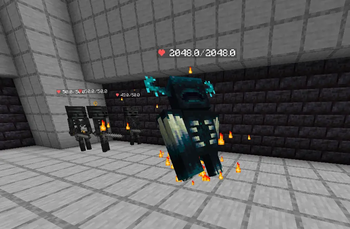
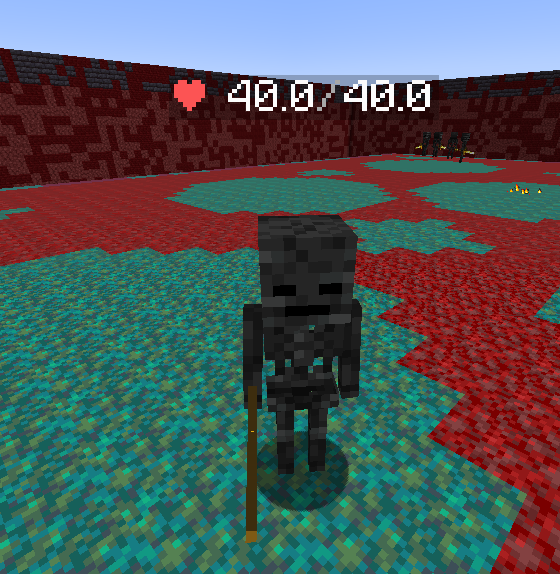
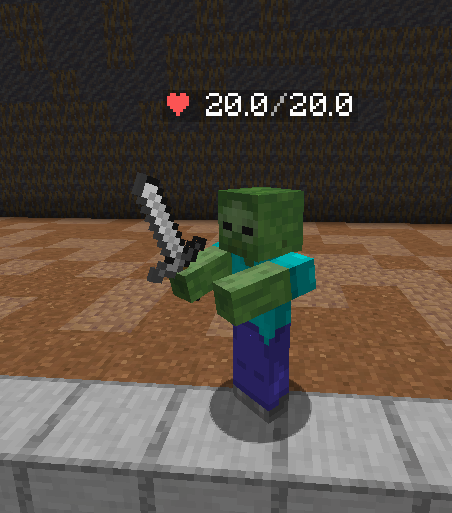
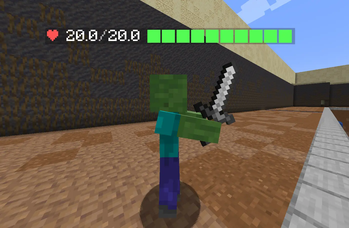
MobTag displays a clean, fully customizable health tag above mobs — and optionally above players — whenever someone gets close enough to see it.
Tags are drawn client-side, so nothing is written to your world, nothing survives a restart, and every tag is rendered per player. Two people standing side by side can see different tags, or none at all. The update loop works outward from each player instead of scanning your worlds, so the cost scales with how many mobs are actually near someone — not with how many mobs your server is holding.
What's new in 2.1.0
- MiniMessage support — gradients and modern tags in every format, alongside
&-codes and hex /mobtag toggle— flip your own tags without opening the menu- Smarter hiding — at full health, out of combat, on invisible mobs, on vanished players, on NPCs and pets
- Damage stacking — repeated hits on the same mob roll into one running total, with a per-player cap
- Much faster — the update loop, health bars,
LOOKING_ATraycasts and damage indicators were all rewritten - Plus a long list of fixes — hex colours, projectile damage numbers, riding mobs, per-player toggles in ArmorStand mode and more
Features
Display
- Two rendering backends — client-side text displays via PacketEvents (smooth, zero server entities) or invisible armor stands as a universal fallback.
AUTOpicks the best one available - Fully configurable tag format with colours, symbols, custom name and health bar
- Gradient health bar that shifts colour as the mob drops
- Per-entity-type formats — make bosses, or any mob you like, look different
- Per-entity-type height offsets — fine-tune tall and tiny mobs individually
- Configurable tag scale and display range
- Damage animations — tags flash and bounce on hit
Damage indicators
- Floating damage numbers with motion, fade-out and critical-hit formatting
- Works with melee, bows, crossbows, tridents, snowballs and splash potions
- Repeated hits on the same mob merge into one running total instead of stacking clutter
- Per-player cap so AoE attacks and grinders cannot flood a client
- Numbers spawn on the mob's surface facing the attacker, not buried inside the model
Visibility & filtering
- Visibility modes:
ALL,DAMAGER(only whoever last hit it) orLOOKING_AT(only what you are aiming at) - Line-of-sight requirement for
LOOKING_AT— walls now block targeting - DAMAGER timeout — how long a mob remembers who hit it
- Hide at full health and hide once a mob leaves combat
- Skip invisible mobs and vanished players (Essentials, CMI, SuperVanish, PremiumVanish)
- Skip NPCs and pets via a configurable metadata key list
- Ignore passive mobs — detected by behaviour, so modded and newly added animals are covered automatically
- Boss handling with a configurable extra-boss list (Warden and Elder Guardian included)
- World blacklist
Players
- Player health tags with their own format, range and height offset
- In-game settings menu — every player toggles mob tags, player tags and damage indicators for themselves
- Command toggles for the same three, no menu needed
- Preferences persist across restarts, saved in batches off the main thread
Integrations
- PlaceholderAPI — works inside tag formats and provides its own placeholders
- MythicMobs — custom format and internal mob names
- PacketEvents — smooth lag-free tags and damage indicators
- Floodgate / Geyser — Bedrock players get their own height offsets, since Geyser anchors tags differently
- MiniMessage when your server ships Adventure, with automatic fallback to legacy colours when it does not
Quality of life
- Drop-in upgrades — new config keys are merged in automatically, your settings are kept
- Crash recovery — leftover tag armor stands from an unclean shutdown are swept on startup
/mobtag admin debug— live tag counts, loop timing and hook status- Update checker with console and in-game notices
Screenshots


Requirements
| Server | Spigot, Paper or a fork — 1.21+ |
| Java | 17 or newer |
| Optional | PacketEvents, PlaceholderAPI, MythicMobs, Floodgate |
Without PacketEvents, MobTag falls back to armor stands. Damage indicators and tag animations require PacketEvents.
Commands
| Command | Permission | Description |
|---|---|---|
/mobtag | mobtag.toggle | Opens the personal settings menu |
/mobtag toggle mobs | mobtag.toggle | Toggles mob health tags for yourself |
/mobtag toggle players | mobtag.toggle | Toggles player health tags for yourself |
/mobtag toggle damage | mobtag.toggle | Toggles damage indicators for yourself |
/mobtag admin reload | mobtag.admin | Reloads config.yml |
/mobtag admin debug | mobtag.admin | Tag counts, loop timing and hook status |
Permissions
| Permission | Default | Description |
|---|---|---|
mobtag.use | everyone | Required to run /mobtag at all |
mobtag.toggle | everyone | Settings menu and personal toggles |
mobtag.admin | op | Reload, debug and update notices on join |
PlaceholderAPI
PlaceholderAPI placeholders work inside your tag formats and are resolved per viewer. MobTag also provides its own:
| Placeholder | Returns |
|---|---|
%mobtag_nearby_mob_health% | Health of the nearest tagged mob |
%mobtag_nearby_mob_maxhealth% | Its max health |
%mobtag_nearby_mob_percent% | Its health percentage |
%mobtag_nearby_mob_bar% | Its rendered health bar |
%mobtag_nearby_mob_name% | Its name |
%mobtag_tags_hidden% | Whether this player hid mob tags |
%mobtag_indicators_hidden% | Whether this player hid damage indicators |
Tag placeholders & colours
{name} · {type} · {current} · {max} · {bar} · {percent} · {mythic_name}
Legacy &a codes, &#RRGGBB hex, and MiniMessage tags such as <gradient:#ff0000:#00ff00> all work.
Installation
- Drop the jar into your
pluginsfolder - (Recommended) Install PacketEvents for smooth tags and damage indicators
- Start the server once to generate
plugins/MobTag/config.yml - Edit the config to your liking
- Run
/mobtag admin reloadto apply changes
Upgrading from 2.0.0 is drop-in. New config keys are merged into your existing config.yml automatically and your current settings are preserved.
config.yml
# ╔══════════════════════════════════════╗
# ║           MobTag Config              ║
# ║        by Abood_8001                 ║
# ╚══════════════════════════════════════╝

# Internal. Do not edit — MobTag uses this to merge in new options on update
# without touching the settings you already changed.
config-version: 2

# -----------------------------------------------
# GENERAL SETTINGS
# -----------------------------------------------

# Log the full stack trace when something goes wrong internally.
# Leave this off unless you are chasing a bug.
debug: false

# Worlds where MobTag will NOT display tags
blacklisted-worlds:
  - example_world1
  - example_world2

# How often (in ticks) the tags are updated.
# 1 second = 20 ticks. Lower = smoother but more CPU. Recommended: 4
update-interval: 4

# The range (in blocks) a player must be within to see a tag.
display-range: 16.0

# -----------------------------------------------
# TEXT FORMATTING
# -----------------------------------------------
# When enabled, formats written with MiniMessage tags (e.g. <gradient:#ff0000:#00ff00>)
# are rendered with MiniMessage. Requires a server that ships Adventure — on servers
# that do not, MobTag falls back to legacy codes automatically and nothing breaks.
# Legacy '&' codes and '&#RRGGBB' hex always work regardless of this setting.
use-minimessage: true

# -----------------------------------------------
# BEDROCK DETECTION (for Geyser/Floodgate servers)
# -----------------------------------------------
bedrock:
  # Use Floodgate API to detect Bedrock players (recommended if installed)
  use-floodgate: true
  # Fallback: detect Bedrock players by username prefix
  prefix: "."

# -----------------------------------------------
# DISPLAY MODE
# -----------------------------------------------
# Options:
#   AUTO        - Automatically uses PacketEvents if installed, ArmorStand otherwise
#   ARMORSTAND  - Always use ArmorStands (works everywhere)
#   PACKET      - Always use PacketEvents (smooth movement, requires PacketEvents plugin)
display-mode: AUTO

# ArmorStand mode only.
armorstand:
  # Attach the tag to the mob as a real passenger. Motion becomes perfectly smooth,
  # but tag-height-offset no longer applies (the client positions the tag itself) and
  # the mob can no longer be ridden. Leave false to keep the classic behaviour.
  ride-mob: false

# -----------------------------------------------
# VISIBILITY
# -----------------------------------------------
# Who can see the tags?
#   ALL        - All players within range see the tag
#   DAMAGER    - Only the player who last damaged the mob sees the tag
#   LOOKING_AT - Only the player currently looking at the mob sees the tag
visibility-mode: ALL

# How far the LOOKING_AT ray reaches, in blocks.
looking-at-range: 5.0

# Require an unobstructed view in LOOKING_AT mode, so you cannot target
# a mob through a wall.
looking-at-requires-line-of-sight: true

# DAMAGER mode: stop showing the tag this many seconds after the last hit.
# Set to 0 to remember the damager forever.
damager-timeout-seconds: 30

# Ignore peaceful mobs (cows, pigs, sheep, etc)?
# Detected by mob behaviour, so modded and newly added animals are covered automatically.
ignore-passive: false

# Ignore player entities? Must be false for player-tags below to do anything.
ignore-players: true

# Should tags be shown on boss mobs (Ender Dragon, Wither)?
show-on-bosses: true

# Extra entity types to treat as bosses for the setting above.
extra-boss-types:
  - WARDEN
  - ELDER_GUARDIAN

# Hide the tag while the mob is on full health.
hide-at-full-health: false

# Hide the tag this many seconds after the mob was last damaged.
# Set to 0 to always show tags regardless of combat.
hide-after-seconds-out-of-combat: 0

# Do not tag mobs or players under an invisibility effect.
hide-on-invisible: true

# Do not tag players hidden by a vanish plugin (Essentials, CMI, SuperVanish, PremiumVanish).
hide-on-vanished: true

# Skip any entity carrying one of these metadata keys.
# Covers NPC and pet plugins — add your own as needed.
ignore-metadata:
  - NPC
  - shopkeeper
  - citizens-npc

# -----------------------------------------------
# TAG POSITION AND SIZE
# -----------------------------------------------
# Height offset of the tag above the mob's head (in blocks).
# Bedrock players (via Geyser) often need a different offset.
tag-height-offset:
  java: 0.3
  bedrock: 0.0
  # Per entity type overrides. Useful because the client anchors a packet tag to the
  # mob's rider position, which sits at a different height on each mob.
  per-type: {}
  #  ENDER_DRAGON: 1.5
  #  BEE: 0.1

# Size multiplier for packet-based tags (PACKET mode only).
# 1.0 = default, 0.5 = half size, 2.0 = double size.
tag-scale: 1.0

# -----------------------------------------------
# PLAYER TAGS
# -----------------------------------------------
# Show health tags above players too?
# (ignore-players above must be false for this to work)
player-tags:
  enabled: false
  # Separate format for player tags
  format: "&c❤ &f{current}&7/&f{max}"
  # Separate height offset for player tags
  height-offset:
    java: 0.3
    bedrock: 0.0
  # Separate display range for player tags (blocks)
  display-range: 16.0

# -----------------------------------------------
# TAG FORMAT
# -----------------------------------------------
# Available placeholders:
#   {name}       - Mob's custom name (or type if no custom name)
#   {type}       - Mob entity type (e.g. ZOMBIE)
#   {current}    - Current health
#   {max}        - Max health
#   {bar}        - Health bar (see health-bar section below)
#   {percent}    - Health percentage (e.g. 75.0)
#
# Color codes: Use & followed by a color code (e.g. &c = red, &a = green)
# Hex colors:  Use &#RRGGBB format (e.g. &#ff0000 = red)
# MiniMessage: <red>, <gradient:#ff0000:#0000ff>, ... when use-minimessage is on
# -----------------------------------------------

tag-format: "&c❤ &f{current}&7/&f{max}"

# -----------------------------------------------
# HEALTH BAR
# -----------------------------------------------

health-bar:
  # Total number of characters in the bar
  length: 10

  # Character used for filled portion
  filled-char: "█"

  # Character used for empty portion
  empty-char: "░"

  # Color of the filled portion
  # Supports gradient based on health percentage:
  #   Use 'gradient' to enable dynamic color
  #   Or set a fixed color like '&a'
  filled-color: gradient

  # Colors for gradient (used when filled-color: gradient)
  # high   = above 60% health
  # medium = between 30% and 60%
  # low    = below 30%
  gradient-high: "&a"
  gradient-medium: "&e"
  gradient-low: "&c"

  # Color of the empty portion
  empty-color: "&8"

# -----------------------------------------------
# MYTHICMOBS INTEGRATION
# -----------------------------------------------

mythicmobs:
  # Enable MythicMobs support?
  enabled: false

  # Show the MythicMob's internal name instead of entity type?
  show-mythic-name: true

  # Custom format for MythicMob tags (leave empty to use global tag-format)
  # Supports same placeholders as tag-format plus:
  #   {mythic_name} - The MythicMob's internal name
  custom-format: "&5⚔ &f{mythic_name} &8| &c❤ &f{current}&7/&f{max} {bar}"

# -----------------------------------------------
# PLACEHOLDERAPI INTEGRATION
# -----------------------------------------------

placeholderapi:
  # Enable PlaceholderAPI support?
  enabled: true

# -----------------------------------------------
# PER ENTITY FORMATS
# -----------------------------------------------
# Override the global tag-format for specific entity types.
# Use the entity type name in CAPS (e.g. ZOMBIE, CREEPER, ENDER_DRAGON)
# Leave empty to use the global tag-format for all mobs.
# Supports all the same placeholders as tag-format.

entity-formats:
  ENDER_DRAGON: "&5❤ &f{current}&7/&f{max} &7| {bar} &5[Dragon]"
  WITHER: "&8❤ &f{current}&7/&f{max} &7| {bar} &8[Wither]"

# -----------------------------------------------
# DAMAGE ANIMATION
# -----------------------------------------------
# Animate the tag when the mob takes damage (PACKET mode only).
damage-animation:
  enabled: false
  flash: false
  scale-bounce: false
  duration: 8

# -----------------------------------------------
# DAMAGE INDICATOR
# -----------------------------------------------
# Show floating damage numbers when a mob takes damage (PACKET mode only).
damage-indicator:
  enabled: true
  format: "&c-{damage}"
  crit-format: "&d-{damage} ✸"
  show-on-players: true
  duration: 20
  height-offset: -0.5
  # Motion direction: UP, DOWN, FORWARD, RANDOM, NONE
  # FORWARD = moves toward the player who hit the mob
  motion: UP
  # How far it travels over its lifetime (in blocks)
  motion-distance: 1.0
  # Fade out towards the end of its lifetime?
  fade-out: true
  # Repeated hits on the same mob within this many ticks stack into one running
  # total instead of spawning a new number each time. Set to 0 to disable merging.
  merge-window-ticks: 10
  # Hard cap on how many damage numbers a single player can see at once.
  # Stops AoE attacks and grinders from flooding the client.
  max-per-player: 24

# -----------------------------------------------
# UPDATE CHECKER
# -----------------------------------------------
update-checker: true

# -----------------------------------------------
# MESSAGES
# -----------------------------------------------

messages:
  prefix: "&8[&bMobTag&8] "
  reload-success: "&aConfiguration reloaded successfully!"
  no-permission: "&cYou don't have permission to do that."
  unknown-command: "&cUnknown sub-command. Usage: /mobtag admin reload"
  players-only: "&cOnly players can use that."
  toggle-on: "&a{feature} enabled."
  toggle-off: "&c{feature} disabled."
Metrics
MobTag uses bStats to collect anonymous usage statistics. You can opt out at any time in plugins/bStats/config.yml.
If you enjoy the plugin, please leave a review!
Source code: github.com/Abood8001/MobTag
Галерея