COWMODSКаталог модов

MineLights

MineLights is a Minecraft mod that brings RGB lighting integrations to Minecraft Java Edition - OpenRGB, Corsair iCUE, Logitech G HUB, Razer Chroma, MSI Mystic Light, ASUS Aura, SteelSeries GameSense, and Wooting

Автор: MegaBytesMe11,9 тыс.44обновлён 2 окт. 2026 г.
Механики игрыТехнологииУтилиты

Описание

MineLights

output

MineLights running on an Asus laptop. Video courtesy of Nukepatrol99.

MineLights is a Minecraft Fabric, Quilt, Forge, and NeoForge mod that brings your world to life with dynamic RGB lighting effects for your peripherals. It targets Minecraft versions from 1.14.3 onward on Fabric, 1.14.4 onward on Quilt, Forge releases from 1.7.2 onward, and NeoForge releases from 1.20.2 onward.

Currently supported: Minecraft 1.14.3 - 26.3 (Fabric), 1.14.4 - 26.3 (Quilt), 1.7.2 - 26.3 (Forge), and 1.20.2 - 26.3 (NeoForge)

Features

  • Extensive Multi-SDK Support: Integrates with a wide array of RGB SDKs simultaneously, including OpenRGB, Corsair iCUE, Logitech G HUB, Razer Chroma, MSI Mystic Light, ASUS Aura, SteelSeries GameSense, and Wooting.
  • Dynamic Environmental Effects: Your lighting changes in real-time based on your in-game surroundings.
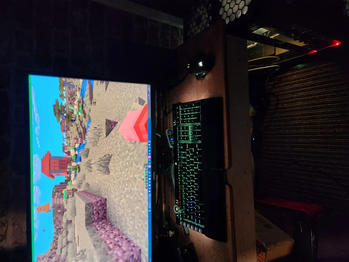
    • Biome Colors: Your keyboard's background color smoothly transitions to match the biome you're in.
    • Weather Effects: Experience rain and dramatic lightning flashes during in-game thunderstorms.
    • Status Effects: Your lighting will react when you are on fire, poisoned, or withering.
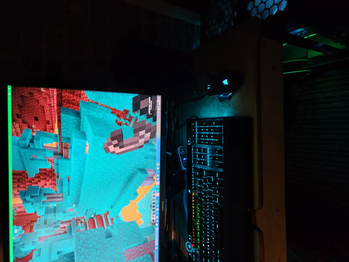
    • Block Effects: Standing in lava, fire, or portals will trigger unique lighting themes.
  • In-Game Status Bars: Use your keyboard's function keys as real-time status bars for health, hunger, and experience, alongside tracking other players or waypoints!
  • Compass: A compass on your numpad (Extended keyboards only) will appear, if you have either a compass or recovery compass in your inventory! Alternatively it can always be displayed via a toggle in settings.
  • Highly Configurable: An in-game configuration screen (via Mod Menu) lets you enable/disable every feature, integration, and even individual devices.
  • Multiple Languages: Support for English, Anglish, German and Chinese (Simplified) has been added (Along with some joke languages)

Supported RGB Software

  • OpenRGB Full device support (DIRECT mode!). Requires OpenRGB - Windows, Linux and MacOS.
  • Corsair iCUE: Full device support for keyboards, mice, headsets, and more via the iCUE SDK (requires Corsair iCUE - Windows).
  • Logitech G HUB / Lightsync: Controls Logitech G keyboards, mice, headsets, and other Lightsync-enabled gear (requires Logitech G HUB - Windows).
  • Razer Chroma: Extensive support for all Razer Chroma-enabled peripherals like keyboards, mice, and mousepads (requires Razer Synapse - Windows).
  • MSI Mystic Light: Control for motherboards, GPUs, and other devices via the Mystic Light SDK (requires MSI Center - Windows).
  • ASUS Aura Sync: Control for motherboards, GPUs, and other devices via the ASUS Aura SDK (requires Armoury Crate - Windows).
  • SteelSeries GameSense: Integration with SteelSeries peripherals like keyboards, mice, and headsets (requires SteelSeries GG - Windows).
  • Wooting: Direct, low-latency control for Wooting analog keyboards (requires Wootility software to be running - Windows).
  • Novation: Support for Novation MIDI controllers like the Launchpad, enabling unique grid-based effects (Windows).
  • Raspberry Pi Pico: Directly control custom DIY lighting projects powered by a Raspberry Pi Pico (Windows).
  • Yeelights Directly control your Yeelights smarthome bulbs (Universal).

This project uses the RGB.Net Nuget package.

🛠️ Installation

Prerequisites

  • Minecraft Fabric or Quilt: Install the matching Fabric or Quilt Loader.
  • Minecraft NeoForge: Install NeoForge for the supported Minecraft version.
  • Minecraft Forge: Install Forge for one of the supported Minecraft versions.
  • Mod Menu: Required to access the in-game configuration screen.
  • Cloth Config API: Required to access the in-game configuration screen.
  • No Quilt API bundle required: MineLights runs on Quilt without QSL, QFAPI, or Fabric API.
  • (Optional) OpenRGB: The latest OpenRGB version is recommended for OpenRGB devices.
  • (Optional) All other RGB software: If you have any other hardware, ensure their official software is installed and running.

Installation

  • Simply place the mod in your mods folder, then start Minecraft. Wait 20+- seconds, and your RGB will be detected! (112MB+- download for the RGB Server on Windows on first launch).

Installing MineLights version 2.2: Simply place the mod in your mods folder, then start Minecraft. Follow the on-screen instructions.

Installing MineLights version 2.1 or below: Follow the guide in the release changelog.

OpenRGB setup (optional)

  1. Install the latest OpenRGB version (recommended) if you want to use OpenRGB devices.
  2. After installing or updating OpenRGB, restart your computer before using MineLights.
  3. Start OpenRGB, open the SDK Server tab, and click Start Server. Keep OpenRGB running while Minecraft is open. MineLights connects to the local server at 127.0.0.1:6742 (the default SDK server address and port).

Usage

  1. Launch Minecraft: Start the game with your Fabric, Quilt, Forge, or NeoForge profile.
  2. Configure:
    • In the main menu, go to Mods > MineLights > Config (the gear icon).
    • Enable the integrations you want to use (OpenRGB, Corsair iCUE, etc.).
    • Save the config.
    • Refresh devices to show newly added devices.
    • You can re-enter the config to disable specific devices if you wish.
    • ⚠️: MSI Mystic Light integration requires you to restart the MineLights server as administrator to work!
  3. Enjoy! Your lighting will now sync with your game.

Roadmap

  • Windows Dynamic Lighting: Integration with Windows Dynamic Lighting is planned for the future.
  • Improve Device Compatibility: Continuously working to improve support for more devices across all SDKs.
  • Community Testing: Ideally have testers, well test!
  • Resolve Issues: I aim to resolve problems either within the issues page or issues I personally find and log.

Contributing

Contributions are welcome! Please fork the repository and submit a pull request.

Contact

For any questions, suggestions, or bug reports, please open an issue on the GitHub repository.

Галерея
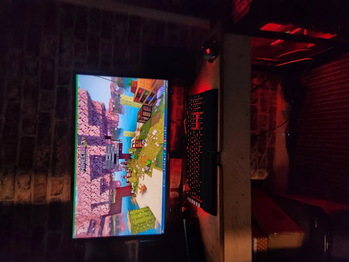
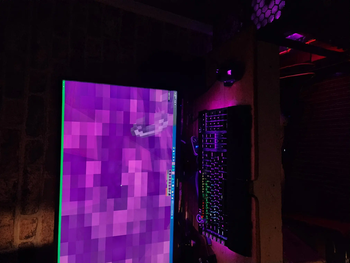
Minecraft main screenIn-game - Savanna biomeIn-game - Nether PortalIn-game - Warped Forest

Последние версии

Все версии →
release

MineLights 2.3.8.4 for 26.2 (Quilt)

2.3.8.4+26.2-quilt
2 окт. 2026 г.77Minecraft: 26.2quilt
Скачать
Что нового
# MineLights 2.3.8.4 This release adds Forge configuration menus, refined settings across Minecraft versions, improved reliability of the mod update checker, and fixes issues with the config screen on NeoForge. Previous server version compatible (as of 2.3.1)! ## Key Features & Major Changes - Added Forge configuration menu support, including a built-in settings screen for older Forge versions. - Fixed MineLights settings failing to open on NeoForge 1.21.1 with Mod Menu ([#30](https://github.com/megabytesme/MineLights/issues/30)). - Updated settings menus to show features available in the current Minecraft version. - Fixed update notices being dropped when the Modrinth check finished before a world was joined. ## Installation / Upgrade Instructions - DELETE your old mine-lights-\*.jar file completely. - Download the jar from this release. - Place the new minelights-\*.jar into your mods folder. - Install Cloth Config, here: [https://modrinth.com/mod/cloth-config](https://modrinth.com/mod/cloth-config) - **OpenRGB (optional):** The latest OpenRGB version is recommended. After installing or updating OpenRGB, restart your computer before using MineLights. Start OpenRGB, open the **SDK Server** tab, and click **Start Server**. Keep OpenRGB running while Minecraft is open. MineLights connects to the local server at `127.0.0.1:6742` (the default SDK server address and port). - Run Minecraft. - Using anything which is not OpenRGB? 1. Start Minecraft. 2. Wait for MineLights.exe to finish downloading in the background. 3. If all goes well, you will see a dialog asking you if you want to grant `MineLights.exe` permission to access the internet. 4. After accepting, your supported devices will show red. ## Full Changelog & Technical Details - Added Forge config screen integration across supported releases, with a native screen on older versions that do not use Cloth Config. - Fixed the NeoForge config screen factory for the API signature used by NeoForge 1.21.1, resolving the `AbstractMethodError` reported in [issue #30](https://github.com/megabytesme/MineLights/issues/30). - Reworked legacy Forge settings with separate category tabs, page navigation that stays within the selected tab, and a dedicated About section. - Hid Locator Bar settings before Minecraft 26.1 and End Flash settings before Minecraft 1.21.9 in applicable configuration menus. - Queued Modrinth update notices until a player is available, across Fabric, Quilt, Forge, and NeoForge. - Updated older Fabric version detection and tick callback registration, including the Modrinth update check's Minecraft version lookup. - Corrected Fabric API and Java 8 build settings for Minecraft 1.14.3, and hardened Forge and NeoForge shutdown handling.
release

MineLights 2.3.8.4 for 1.17 (Quilt)

2.3.8.4+1.17-quilt
2 окт. 2026 г.34Minecraft: 1.17, 1.17.1, 1.18, 1.18.1, 1.18.2quilt
Скачать
Что нового
# MineLights 2.3.8.4 This release adds Forge configuration menus, refined settings across Minecraft versions, improved reliability of the mod update checker, and fixes issues with the config screen on NeoForge. Previous server version compatible (as of 2.3.1)! ## Key Features & Major Changes - Added Forge configuration menu support, including a built-in settings screen for older Forge versions. - Fixed MineLights settings failing to open on NeoForge 1.21.1 with Mod Menu ([#30](https://github.com/megabytesme/MineLights/issues/30)). - Updated settings menus to show features available in the current Minecraft version. - Fixed update notices being dropped when the Modrinth check finished before a world was joined. ## Installation / Upgrade Instructions - DELETE your old mine-lights-\*.jar file completely. - Download the jar from this release. - Place the new minelights-\*.jar into your mods folder. - Install Cloth Config, here: [https://modrinth.com/mod/cloth-config](https://modrinth.com/mod/cloth-config) - **OpenRGB (optional):** The latest OpenRGB version is recommended. After installing or updating OpenRGB, restart your computer before using MineLights. Start OpenRGB, open the **SDK Server** tab, and click **Start Server**. Keep OpenRGB running while Minecraft is open. MineLights connects to the local server at `127.0.0.1:6742` (the default SDK server address and port). - Run Minecraft. - Using anything which is not OpenRGB? 1. Start Minecraft. 2. Wait for MineLights.exe to finish downloading in the background. 3. If all goes well, you will see a dialog asking you if you want to grant `MineLights.exe` permission to access the internet. 4. After accepting, your supported devices will show red. ## Full Changelog & Technical Details - Added Forge config screen integration across supported releases, with a native screen on older versions that do not use Cloth Config. - Fixed the NeoForge config screen factory for the API signature used by NeoForge 1.21.1, resolving the `AbstractMethodError` reported in [issue #30](https://github.com/megabytesme/MineLights/issues/30). - Reworked legacy Forge settings with separate category tabs, page navigation that stays within the selected tab, and a dedicated About section. - Hid Locator Bar settings before Minecraft 26.1 and End Flash settings before Minecraft 1.21.9 in applicable configuration menus. - Queued Modrinth update notices until a player is available, across Fabric, Quilt, Forge, and NeoForge. - Updated older Fabric version detection and tick callback registration, including the Modrinth update check's Minecraft version lookup. - Corrected Fabric API and Java 8 build settings for Minecraft 1.14.3, and hardened Forge and NeoForge shutdown handling.
release

MineLights 2.3.8.4 for 1.20 (Quilt)

2.3.8.4+1.20-quilt
2 окт. 2026 г.42Minecraft: 1.20, 1.20.1, 1.20.2, 1.20.3, 1.20.4quilt
Скачать
Что нового
# MineLights 2.3.8.4 This release adds Forge configuration menus, refined settings across Minecraft versions, improved reliability of the mod update checker, and fixes issues with the config screen on NeoForge. Previous server version compatible (as of 2.3.1)! ## Key Features & Major Changes - Added Forge configuration menu support, including a built-in settings screen for older Forge versions. - Fixed MineLights settings failing to open on NeoForge 1.21.1 with Mod Menu ([#30](https://github.com/megabytesme/MineLights/issues/30)). - Updated settings menus to show features available in the current Minecraft version. - Fixed update notices being dropped when the Modrinth check finished before a world was joined. ## Installation / Upgrade Instructions - DELETE your old mine-lights-\*.jar file completely. - Download the jar from this release. - Place the new minelights-\*.jar into your mods folder. - Install Cloth Config, here: [https://modrinth.com/mod/cloth-config](https://modrinth.com/mod/cloth-config) - **OpenRGB (optional):** The latest OpenRGB version is recommended. After installing or updating OpenRGB, restart your computer before using MineLights. Start OpenRGB, open the **SDK Server** tab, and click **Start Server**. Keep OpenRGB running while Minecraft is open. MineLights connects to the local server at `127.0.0.1:6742` (the default SDK server address and port). - Run Minecraft. - Using anything which is not OpenRGB? 1. Start Minecraft. 2. Wait for MineLights.exe to finish downloading in the background. 3. If all goes well, you will see a dialog asking you if you want to grant `MineLights.exe` permission to access the internet. 4. After accepting, your supported devices will show red. ## Full Changelog & Technical Details - Added Forge config screen integration across supported releases, with a native screen on older versions that do not use Cloth Config. - Fixed the NeoForge config screen factory for the API signature used by NeoForge 1.21.1, resolving the `AbstractMethodError` reported in [issue #30](https://github.com/megabytesme/MineLights/issues/30). - Reworked legacy Forge settings with separate category tabs, page navigation that stays within the selected tab, and a dedicated About section. - Hid Locator Bar settings before Minecraft 26.1 and End Flash settings before Minecraft 1.21.9 in applicable configuration menus. - Queued Modrinth update notices until a player is available, across Fabric, Quilt, Forge, and NeoForge. - Updated older Fabric version detection and tick callback registration, including the Modrinth update check's Minecraft version lookup. - Corrected Fabric API and Java 8 build settings for Minecraft 1.14.3, and hardened Forge and NeoForge shutdown handling.
release

MineLights 2.3.8.4 for 26.3 (Quilt)

2.3.8.4+26.3-quilt
2 окт. 2026 г.58Minecraft: 26.3quilt
Скачать
Что нового
# MineLights 2.3.8.4 This release adds Forge configuration menus, refined settings across Minecraft versions, improved reliability of the mod update checker, and fixes issues with the config screen on NeoForge. Previous server version compatible (as of 2.3.1)! ## Key Features & Major Changes - Added Forge configuration menu support, including a built-in settings screen for older Forge versions. - Fixed MineLights settings failing to open on NeoForge 1.21.1 with Mod Menu ([#30](https://github.com/megabytesme/MineLights/issues/30)). - Updated settings menus to show features available in the current Minecraft version. - Fixed update notices being dropped when the Modrinth check finished before a world was joined. ## Installation / Upgrade Instructions - DELETE your old mine-lights-\*.jar file completely. - Download the jar from this release. - Place the new minelights-\*.jar into your mods folder. - Install Cloth Config, here: [https://modrinth.com/mod/cloth-config](https://modrinth.com/mod/cloth-config) - **OpenRGB (optional):** The latest OpenRGB version is recommended. After installing or updating OpenRGB, restart your computer before using MineLights. Start OpenRGB, open the **SDK Server** tab, and click **Start Server**. Keep OpenRGB running while Minecraft is open. MineLights connects to the local server at `127.0.0.1:6742` (the default SDK server address and port). - Run Minecraft. - Using anything which is not OpenRGB? 1. Start Minecraft. 2. Wait for MineLights.exe to finish downloading in the background. 3. If all goes well, you will see a dialog asking you if you want to grant `MineLights.exe` permission to access the internet. 4. After accepting, your supported devices will show red. ## Full Changelog & Technical Details - Added Forge config screen integration across supported releases, with a native screen on older versions that do not use Cloth Config. - Fixed the NeoForge config screen factory for the API signature used by NeoForge 1.21.1, resolving the `AbstractMethodError` reported in [issue #30](https://github.com/megabytesme/MineLights/issues/30). - Reworked legacy Forge settings with separate category tabs, page navigation that stays within the selected tab, and a dedicated About section. - Hid Locator Bar settings before Minecraft 26.1 and End Flash settings before Minecraft 1.21.9 in applicable configuration menus. - Queued Modrinth update notices until a player is available, across Fabric, Quilt, Forge, and NeoForge. - Updated older Fabric version detection and tick callback registration, including the Modrinth update check's Minecraft version lookup. - Corrected Fabric API and Java 8 build settings for Minecraft 1.14.3, and hardened Forge and NeoForge shutdown handling.
release

MineLights 2.3.8.4 for 1.20.5 (Quilt)

2.3.8.4+1.20.5-quilt
2 окт. 2026 г.62Minecraft: 1.20.5, 1.20.6, 1.21, 1.21.1quilt
Скачать
Что нового
# MineLights 2.3.8.4 This release adds Forge configuration menus, refined settings across Minecraft versions, improved reliability of the mod update checker, and fixes issues with the config screen on NeoForge. Previous server version compatible (as of 2.3.1)! ## Key Features & Major Changes - Added Forge configuration menu support, including a built-in settings screen for older Forge versions. - Fixed MineLights settings failing to open on NeoForge 1.21.1 with Mod Menu ([#30](https://github.com/megabytesme/MineLights/issues/30)). - Updated settings menus to show features available in the current Minecraft version. - Fixed update notices being dropped when the Modrinth check finished before a world was joined. ## Installation / Upgrade Instructions - DELETE your old mine-lights-\*.jar file completely. - Download the jar from this release. - Place the new minelights-\*.jar into your mods folder. - Install Cloth Config, here: [https://modrinth.com/mod/cloth-config](https://modrinth.com/mod/cloth-config) - **OpenRGB (optional):** The latest OpenRGB version is recommended. After installing or updating OpenRGB, restart your computer before using MineLights. Start OpenRGB, open the **SDK Server** tab, and click **Start Server**. Keep OpenRGB running while Minecraft is open. MineLights connects to the local server at `127.0.0.1:6742` (the default SDK server address and port). - Run Minecraft. - Using anything which is not OpenRGB? 1. Start Minecraft. 2. Wait for MineLights.exe to finish downloading in the background. 3. If all goes well, you will see a dialog asking you if you want to grant `MineLights.exe` permission to access the internet. 4. After accepting, your supported devices will show red. ## Full Changelog & Technical Details - Added Forge config screen integration across supported releases, with a native screen on older versions that do not use Cloth Config. - Fixed the NeoForge config screen factory for the API signature used by NeoForge 1.21.1, resolving the `AbstractMethodError` reported in [issue #30](https://github.com/megabytesme/MineLights/issues/30). - Reworked legacy Forge settings with separate category tabs, page navigation that stays within the selected tab, and a dedicated About section. - Hid Locator Bar settings before Minecraft 26.1 and End Flash settings before Minecraft 1.21.9 in applicable configuration menus. - Queued Modrinth update notices until a player is available, across Fabric, Quilt, Forge, and NeoForge. - Updated older Fabric version detection and tick callback registration, including the Modrinth update check's Minecraft version lookup. - Corrected Fabric API and Java 8 build settings for Minecraft 1.14.3, and hardened Forge and NeoForge shutdown handling.
release

MineLights 2.3.8.4 for 1.21.6 (Quilt)

2.3.8.4+1.21.6-quilt
2 окт. 2026 г.36Minecraft: 1.21.6, 1.21.7quilt
Скачать
Что нового
# MineLights 2.3.8.4 This release adds Forge configuration menus, refined settings across Minecraft versions, improved reliability of the mod update checker, and fixes issues with the config screen on NeoForge. Previous server version compatible (as of 2.3.1)! ## Key Features & Major Changes - Added Forge configuration menu support, including a built-in settings screen for older Forge versions. - Fixed MineLights settings failing to open on NeoForge 1.21.1 with Mod Menu ([#30](https://github.com/megabytesme/MineLights/issues/30)). - Updated settings menus to show features available in the current Minecraft version. - Fixed update notices being dropped when the Modrinth check finished before a world was joined. ## Installation / Upgrade Instructions - DELETE your old mine-lights-\*.jar file completely. - Download the jar from this release. - Place the new minelights-\*.jar into your mods folder. - Install Cloth Config, here: [https://modrinth.com/mod/cloth-config](https://modrinth.com/mod/cloth-config) - **OpenRGB (optional):** The latest OpenRGB version is recommended. After installing or updating OpenRGB, restart your computer before using MineLights. Start OpenRGB, open the **SDK Server** tab, and click **Start Server**. Keep OpenRGB running while Minecraft is open. MineLights connects to the local server at `127.0.0.1:6742` (the default SDK server address and port). - Run Minecraft. - Using anything which is not OpenRGB? 1. Start Minecraft. 2. Wait for MineLights.exe to finish downloading in the background. 3. If all goes well, you will see a dialog asking you if you want to grant `MineLights.exe` permission to access the internet. 4. After accepting, your supported devices will show red. ## Full Changelog & Technical Details - Added Forge config screen integration across supported releases, with a native screen on older versions that do not use Cloth Config. - Fixed the NeoForge config screen factory for the API signature used by NeoForge 1.21.1, resolving the `AbstractMethodError` reported in [issue #30](https://github.com/megabytesme/MineLights/issues/30). - Reworked legacy Forge settings with separate category tabs, page navigation that stays within the selected tab, and a dedicated About section. - Hid Locator Bar settings before Minecraft 26.1 and End Flash settings before Minecraft 1.21.9 in applicable configuration menus. - Queued Modrinth update notices until a player is available, across Fabric, Quilt, Forge, and NeoForge. - Updated older Fabric version detection and tick callback registration, including the Modrinth update check's Minecraft version lookup. - Corrected Fabric API and Java 8 build settings for Minecraft 1.14.3, and hardened Forge and NeoForge shutdown handling.
release

MineLights 2.3.8.4 for 1.14.4 (Quilt)

2.3.8.4+1.14.4-quilt
2 окт. 2026 г.34Minecraft: 1.14.4quilt
Скачать
Что нового
# MineLights 2.3.8.4 This release adds Forge configuration menus, refined settings across Minecraft versions, improved reliability of the mod update checker, and fixes issues with the config screen on NeoForge. Previous server version compatible (as of 2.3.1)! ## Key Features & Major Changes - Added Forge configuration menu support, including a built-in settings screen for older Forge versions. - Fixed MineLights settings failing to open on NeoForge 1.21.1 with Mod Menu ([#30](https://github.com/megabytesme/MineLights/issues/30)). - Updated settings menus to show features available in the current Minecraft version. - Fixed update notices being dropped when the Modrinth check finished before a world was joined. ## Installation / Upgrade Instructions - DELETE your old mine-lights-\*.jar file completely. - Download the jar from this release. - Place the new minelights-\*.jar into your mods folder. - Install Cloth Config, here: [https://modrinth.com/mod/cloth-config](https://modrinth.com/mod/cloth-config) - **OpenRGB (optional):** The latest OpenRGB version is recommended. After installing or updating OpenRGB, restart your computer before using MineLights. Start OpenRGB, open the **SDK Server** tab, and click **Start Server**. Keep OpenRGB running while Minecraft is open. MineLights connects to the local server at `127.0.0.1:6742` (the default SDK server address and port). - Run Minecraft. - Using anything which is not OpenRGB? 1. Start Minecraft. 2. Wait for MineLights.exe to finish downloading in the background. 3. If all goes well, you will see a dialog asking you if you want to grant `MineLights.exe` permission to access the internet. 4. After accepting, your supported devices will show red. ## Full Changelog & Technical Details - Added Forge config screen integration across supported releases, with a native screen on older versions that do not use Cloth Config. - Fixed the NeoForge config screen factory for the API signature used by NeoForge 1.21.1, resolving the `AbstractMethodError` reported in [issue #30](https://github.com/megabytesme/MineLights/issues/30). - Reworked legacy Forge settings with separate category tabs, page navigation that stays within the selected tab, and a dedicated About section. - Hid Locator Bar settings before Minecraft 26.1 and End Flash settings before Minecraft 1.21.9 in applicable configuration menus. - Queued Modrinth update notices until a player is available, across Fabric, Quilt, Forge, and NeoForge. - Updated older Fabric version detection and tick callback registration, including the Modrinth update check's Minecraft version lookup. - Corrected Fabric API and Java 8 build settings for Minecraft 1.14.3, and hardened Forge and NeoForge shutdown handling.
release

MineLights 2.3.8.4 for 1.19 (Quilt)

2.3.8.4+1.19-quilt
2 окт. 2026 г.38Minecraft: 1.19, 1.19.1, 1.19.2, 1.19.3, 1.19.4quilt
Скачать
Что нового
# MineLights 2.3.8.4 This release adds Forge configuration menus, refined settings across Minecraft versions, improved reliability of the mod update checker, and fixes issues with the config screen on NeoForge. Previous server version compatible (as of 2.3.1)! ## Key Features & Major Changes - Added Forge configuration menu support, including a built-in settings screen for older Forge versions. - Fixed MineLights settings failing to open on NeoForge 1.21.1 with Mod Menu ([#30](https://github.com/megabytesme/MineLights/issues/30)). - Updated settings menus to show features available in the current Minecraft version. - Fixed update notices being dropped when the Modrinth check finished before a world was joined. ## Installation / Upgrade Instructions - DELETE your old mine-lights-\*.jar file completely. - Download the jar from this release. - Place the new minelights-\*.jar into your mods folder. - Install Cloth Config, here: [https://modrinth.com/mod/cloth-config](https://modrinth.com/mod/cloth-config) - **OpenRGB (optional):** The latest OpenRGB version is recommended. After installing or updating OpenRGB, restart your computer before using MineLights. Start OpenRGB, open the **SDK Server** tab, and click **Start Server**. Keep OpenRGB running while Minecraft is open. MineLights connects to the local server at `127.0.0.1:6742` (the default SDK server address and port). - Run Minecraft. - Using anything which is not OpenRGB? 1. Start Minecraft. 2. Wait for MineLights.exe to finish downloading in the background. 3. If all goes well, you will see a dialog asking you if you want to grant `MineLights.exe` permission to access the internet. 4. After accepting, your supported devices will show red. ## Full Changelog & Technical Details - Added Forge config screen integration across supported releases, with a native screen on older versions that do not use Cloth Config. - Fixed the NeoForge config screen factory for the API signature used by NeoForge 1.21.1, resolving the `AbstractMethodError` reported in [issue #30](https://github.com/megabytesme/MineLights/issues/30). - Reworked legacy Forge settings with separate category tabs, page navigation that stays within the selected tab, and a dedicated About section. - Hid Locator Bar settings before Minecraft 26.1 and End Flash settings before Minecraft 1.21.9 in applicable configuration menus. - Queued Modrinth update notices until a player is available, across Fabric, Quilt, Forge, and NeoForge. - Updated older Fabric version detection and tick callback registration, including the Modrinth update check's Minecraft version lookup. - Corrected Fabric API and Java 8 build settings for Minecraft 1.14.3, and hardened Forge and NeoForge shutdown handling.
release

MineLights 2.3.8.4 for 26.1 (Quilt)

2.3.8.4+26.1-quilt
2 окт. 2026 г.46Minecraft: 26.1, 26.1.1, 26.1.2quilt
Скачать
Что нового
# MineLights 2.3.8.4 This release adds Forge configuration menus, refined settings across Minecraft versions, improved reliability of the mod update checker, and fixes issues with the config screen on NeoForge. Previous server version compatible (as of 2.3.1)! ## Key Features & Major Changes - Added Forge configuration menu support, including a built-in settings screen for older Forge versions. - Fixed MineLights settings failing to open on NeoForge 1.21.1 with Mod Menu ([#30](https://github.com/megabytesme/MineLights/issues/30)). - Updated settings menus to show features available in the current Minecraft version. - Fixed update notices being dropped when the Modrinth check finished before a world was joined. ## Installation / Upgrade Instructions - DELETE your old mine-lights-\*.jar file completely. - Download the jar from this release. - Place the new minelights-\*.jar into your mods folder. - Install Cloth Config, here: [https://modrinth.com/mod/cloth-config](https://modrinth.com/mod/cloth-config) - **OpenRGB (optional):** The latest OpenRGB version is recommended. After installing or updating OpenRGB, restart your computer before using MineLights. Start OpenRGB, open the **SDK Server** tab, and click **Start Server**. Keep OpenRGB running while Minecraft is open. MineLights connects to the local server at `127.0.0.1:6742` (the default SDK server address and port). - Run Minecraft. - Using anything which is not OpenRGB? 1. Start Minecraft. 2. Wait for MineLights.exe to finish downloading in the background. 3. If all goes well, you will see a dialog asking you if you want to grant `MineLights.exe` permission to access the internet. 4. After accepting, your supported devices will show red. ## Full Changelog & Technical Details - Added Forge config screen integration across supported releases, with a native screen on older versions that do not use Cloth Config. - Fixed the NeoForge config screen factory for the API signature used by NeoForge 1.21.1, resolving the `AbstractMethodError` reported in [issue #30](https://github.com/megabytesme/MineLights/issues/30). - Reworked legacy Forge settings with separate category tabs, page navigation that stays within the selected tab, and a dedicated About section. - Hid Locator Bar settings before Minecraft 26.1 and End Flash settings before Minecraft 1.21.9 in applicable configuration menus. - Queued Modrinth update notices until a player is available, across Fabric, Quilt, Forge, and NeoForge. - Updated older Fabric version detection and tick callback registration, including the Modrinth update check's Minecraft version lookup. - Corrected Fabric API and Java 8 build settings for Minecraft 1.14.3, and hardened Forge and NeoForge shutdown handling.
release

MineLights 2.3.8.4 for 1.16.2 (Quilt)

2.3.8.4+1.16.2-quilt
2 окт. 2026 г.38Minecraft: 1.16.2, 1.16.3, 1.16.4, 1.16.5quilt
Скачать
Что нового
# MineLights 2.3.8.4 This release adds Forge configuration menus, refined settings across Minecraft versions, improved reliability of the mod update checker, and fixes issues with the config screen on NeoForge. Previous server version compatible (as of 2.3.1)! ## Key Features & Major Changes - Added Forge configuration menu support, including a built-in settings screen for older Forge versions. - Fixed MineLights settings failing to open on NeoForge 1.21.1 with Mod Menu ([#30](https://github.com/megabytesme/MineLights/issues/30)). - Updated settings menus to show features available in the current Minecraft version. - Fixed update notices being dropped when the Modrinth check finished before a world was joined. ## Installation / Upgrade Instructions - DELETE your old mine-lights-\*.jar file completely. - Download the jar from this release. - Place the new minelights-\*.jar into your mods folder. - Install Cloth Config, here: [https://modrinth.com/mod/cloth-config](https://modrinth.com/mod/cloth-config) - **OpenRGB (optional):** The latest OpenRGB version is recommended. After installing or updating OpenRGB, restart your computer before using MineLights. Start OpenRGB, open the **SDK Server** tab, and click **Start Server**. Keep OpenRGB running while Minecraft is open. MineLights connects to the local server at `127.0.0.1:6742` (the default SDK server address and port). - Run Minecraft. - Using anything which is not OpenRGB? 1. Start Minecraft. 2. Wait for MineLights.exe to finish downloading in the background. 3. If all goes well, you will see a dialog asking you if you want to grant `MineLights.exe` permission to access the internet. 4. After accepting, your supported devices will show red. ## Full Changelog & Technical Details - Added Forge config screen integration across supported releases, with a native screen on older versions that do not use Cloth Config. - Fixed the NeoForge config screen factory for the API signature used by NeoForge 1.21.1, resolving the `AbstractMethodError` reported in [issue #30](https://github.com/megabytesme/MineLights/issues/30). - Reworked legacy Forge settings with separate category tabs, page navigation that stays within the selected tab, and a dedicated About section. - Hid Locator Bar settings before Minecraft 26.1 and End Flash settings before Minecraft 1.21.9 in applicable configuration menus. - Queued Modrinth update notices until a player is available, across Fabric, Quilt, Forge, and NeoForge. - Updated older Fabric version detection and tick callback registration, including the Modrinth update check's Minecraft version lookup. - Corrected Fabric API and Java 8 build settings for Minecraft 1.14.3, and hardened Forge and NeoForge shutdown handling.