
Location Tooltip
A mod that allows players to see and set a location UI element for their world.
Автор: fugginbeenus1,7 тыс.12обновлён 26 окт. 2026 г.
Утилиты
Описание
Location Display Mod
A location display system for Minecraft that shows players their current area at the top of their screen. Works well for servers with shopping districts, themed areas, player shops, and points of interest.
Heavily inspired by the Origin Realms location system.
Overview
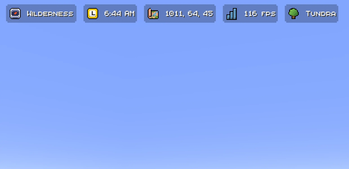
Adds a location indicator to the HUD that automatically updates as you move between defined regions — from "Wilderness" to "Shopping District" to individual shop names.
Features
Location Display
- HUD element at the top of the screen showing your current area
- Fade transitions when crossing region boundaries
- Adjustable color, size, position, and style
Region Management
- Click-and-drag visual editor for defining region boundaries
- Full XYZ boundary support (not just 2D)
- Nested/hierarchical regions with priority-based display
- Region type categories (city, shop, wilderness, dungeon, etc.)
Permissions
- Players can create and name their own regions
- Admin controls for full region management and overrides
- Region ownership tracking
Nested Region Example
Shopping District (Priority: 1)
  ├── Bob's Emporium (Priority: 2)
  │   ├── Weapons Section (Priority: 3)
  │   └── Armor Section (Priority: 3)
  └── Alice's Bakery (Priority: 2)
Roadmap
- ✅ Waypoint system integration
- Minimap compatibility
- Sophisticated Core integration
Support
If you find a bug or have a feature request, open an issue.
Галерея


Последние версии
Все версии →release
Location Tooltip 0.7.0 for 26.2
0.7.0+26.226 окт. 2026 г.26Minecraft: 26.2fabric
Что нового
## Location Tooltip 0.7.0
Every screen has a new look: a navy leather book with paper pages, made to sit right next to Minecraft's own screens.
### Changed
- **The region panel is now a book.** The left page lists your regions with a map icon and how far away each one is. Pick one and the right page shows it on a small map, with its size, centre, owner and protections.
- **Protections are icons.** Click one to switch between Inherit, Allow and Deny. It turns green or red, and hovering it tells you which flag it is.
- **Settings fit on one spread.** The left page picks which pills show and the right page sets how they look. Mod Menu opens it straight away, so the extra menu screen is gone.
- **Buttons, page arrows and tooltips are vanilla.** They look and sound like the rest of the game.
- **Delete asks twice.** The first press arms it and the second one deletes.
- **Moving pills shows the screen zones.** While you drag, the zone your pill will stick to lights up.
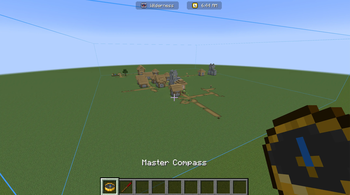
- **The compass is called the Admin Compass in game**, matching the wiki. It used to say Master Compass.
### Fixed
- **The region list on 26.x no longer flips between all regions and nearby ones** while you hold the Admin Compass with the book open.
### Notes
- Each Minecraft version is a separate download. Pick the file that matches your game.
- Villages and temples get their own map icons when the server runs 0.7.0 too. On an older server they show a plain marker.
- Nothing changes for existing worlds or settings.
---
*Requires Fabric API. Mod Menu and Waystones are optional.*
release
Location Tooltip 0.7.0 for 1.21.1
0.7.0+1.21.126 окт. 2026 г.16Minecraft: 1.21.1fabric
Что нового
## Location Tooltip 0.7.0
Every screen has a new look: a navy leather book with paper pages, made to sit right next to Minecraft's own screens.
### Changed
- **The region panel is now a book.** The left page lists your regions with a map icon and how far away each one is. Pick one and the right page shows it on a small map, with its size, centre, owner and protections.
- **Protections are icons.** Click one to switch between Inherit, Allow and Deny. It turns green or red, and hovering it tells you which flag it is.
- **Settings fit on one spread.** The left page picks which pills show and the right page sets how they look. Mod Menu opens it straight away, so the extra menu screen is gone.
- **Buttons, page arrows and tooltips are vanilla.** They look and sound like the rest of the game.
- **Delete asks twice.** The first press arms it and the second one deletes.
- **Moving pills shows the screen zones.** While you drag, the zone your pill will stick to lights up.
- **The compass is called the Admin Compass in game**, matching the wiki. It used to say Master Compass.
### Fixed
- **The region list on 26.x no longer flips between all regions and nearby ones** while you hold the Admin Compass with the book open.
### Notes
- Each Minecraft version is a separate download. Pick the file that matches your game.
- Villages and temples get their own map icons when the server runs 0.7.0 too. On an older server they show a plain marker.
- Nothing changes for existing worlds or settings.
---
*Requires Fabric API. Mod Menu and Waystones are optional.*
release
Location Tooltip 0.7.0 for 1.20.1
0.7.0+1.20.126 окт. 2026 г.7Minecraft: 1.20.1fabric
Что нового
## Location Tooltip 0.7.0
Every screen has a new look: a navy leather book with paper pages, made to sit right next to Minecraft's own screens.
### Changed
- **The region panel is now a book.** The left page lists your regions with a map icon and how far away each one is. Pick one and the right page shows it on a small map, with its size, centre, owner and protections.
- **Protections are icons.** Click one to switch between Inherit, Allow and Deny. It turns green or red, and hovering it tells you which flag it is.
- **Settings fit on one spread.** The left page picks which pills show and the right page sets how they look. Mod Menu opens it straight away, so the extra menu screen is gone.
- **Buttons, page arrows and tooltips are vanilla.** They look and sound like the rest of the game.
- **Delete asks twice.** The first press arms it and the second one deletes.
- **Moving pills shows the screen zones.** While you drag, the zone your pill will stick to lights up.
- **The compass is called the Admin Compass in game**, matching the wiki. It used to say Master Compass.
### Fixed
- **The region list on 26.x no longer flips between all regions and nearby ones** while you hold the Admin Compass with the book open.
### Notes
- Each Minecraft version is a separate download. Pick the file that matches your game.
- Villages and temples get their own map icons when the server runs 0.7.0 too. On an older server they show a plain marker.
- Nothing changes for existing worlds or settings.
---
*Requires Fabric API. Mod Menu and Waystones are optional.*
release
Location Tooltip 0.7.0 for 1.21.11
0.7.0+1.21.1126 окт. 2026 г.10Minecraft: 1.21.11fabric
Что нового
## Location Tooltip 0.7.0
Every screen has a new look: a navy leather book with paper pages, made to sit right next to Minecraft's own screens.
### Changed
- **The region panel is now a book.** The left page lists your regions with a map icon and how far away each one is. Pick one and the right page shows it on a small map, with its size, centre, owner and protections.
- **Protections are icons.** Click one to switch between Inherit, Allow and Deny. It turns green or red, and hovering it tells you which flag it is.
- **Settings fit on one spread.** The left page picks which pills show and the right page sets how they look. Mod Menu opens it straight away, so the extra menu screen is gone.
- **Buttons, page arrows and tooltips are vanilla.** They look and sound like the rest of the game.
- **Delete asks twice.** The first press arms it and the second one deletes.
- **Moving pills shows the screen zones.** While you drag, the zone your pill will stick to lights up.
- **The compass is called the Admin Compass in game**, matching the wiki. It used to say Master Compass.
### Fixed
- **The region list on 26.x no longer flips between all regions and nearby ones** while you hold the Admin Compass with the book open.
### Notes
- Each Minecraft version is a separate download. Pick the file that matches your game.
- Villages and temples get their own map icons when the server runs 0.7.0 too. On an older server they show a plain marker.
- Nothing changes for existing worlds or settings.
---
*Requires Fabric API. Mod Menu and Waystones are optional.*
release
Location Tooltip 0.7.0 for 26.1.2
0.7.0+26.1.226 окт. 2026 г.19Minecraft: 26.1, 26.1.1, 26.1.2fabric
Что нового
## Location Tooltip 0.7.0
Every screen has a new look: a navy leather book with paper pages, made to sit right next to Minecraft's own screens.
### Changed
- **The region panel is now a book.** The left page lists your regions with a map icon and how far away each one is. Pick one and the right page shows it on a small map, with its size, centre, owner and protections.
- **Protections are icons.** Click one to switch between Inherit, Allow and Deny. It turns green or red, and hovering it tells you which flag it is.
- **Settings fit on one spread.** The left page picks which pills show and the right page sets how they look. Mod Menu opens it straight away, so the extra menu screen is gone.
- **Buttons, page arrows and tooltips are vanilla.** They look and sound like the rest of the game.
- **Delete asks twice.** The first press arms it and the second one deletes.
- **Moving pills shows the screen zones.** While you drag, the zone your pill will stick to lights up.
- **The compass is called the Admin Compass in game**, matching the wiki. It used to say Master Compass.
### Fixed
- **The region list on 26.x no longer flips between all regions and nearby ones** while you hold the Admin Compass with the book open.
### Notes
- Each Minecraft version is a separate download. Pick the file that matches your game.
- Villages and temples get their own map icons when the server runs 0.7.0 too. On an older server they show a plain marker.
- Nothing changes for existing worlds or settings.
---
*Requires Fabric API. Mod Menu and Waystones are optional.*
release
Location Tooltip 0.6.1 for 26.2
0.6.1+26.214 сент. 2026 г.73Minecraft: 26.2fabric
Что нового
## Location Tooltip 0.6.1
A fix for a crash. Update as soon as you can.
### Fixed
- **The game no longer crashes when an enderman picks up a block.** A helper class for the mob griefing protection was in the wrong package, and the game refused to load it the first time an enderman tried to grab a block near you. It has been in the mod since 0.5.3 and it affected every Minecraft version. It only fired when an enderman was close by, which is why it looked random.
- **The Region Wand and Admin Compass can be crafted on 1.21.11 again.** Their recipes were written in the older format, which 1.21.11 rejects, so both were silently missing from that version.
### Notes
- Each Minecraft version is a separate download. Pick the file that matches your game.
- Nothing changes for existing worlds or settings.
---
*Requires Fabric API. Mod Menu and Waystones are optional.*
release
Location Tooltip 0.6.1 for 1.21.11
0.6.1+1.21.1114 сент. 2026 г.23Minecraft: 1.21.11fabric
Что нового
## Location Tooltip 0.6.1
A fix for a crash. Update as soon as you can.
### Fixed
- **The game no longer crashes when an enderman picks up a block.** A helper class for the mob griefing protection was in the wrong package, and the game refused to load it the first time an enderman tried to grab a block near you. It has been in the mod since 0.5.3 and it affected every Minecraft version. It only fired when an enderman was close by, which is why it looked random.
- **The Region Wand and Admin Compass can be crafted on 1.21.11 again.** Their recipes were written in the older format, which 1.21.11 rejects, so both were silently missing from that version.
### Notes
- Each Minecraft version is a separate download. Pick the file that matches your game.
- Nothing changes for existing worlds or settings.
---
*Requires Fabric API. Mod Menu and Waystones are optional.*
release
Location Tooltip 0.6.1 for 1.21.1
0.6.1+1.21.114 сент. 2026 г.21Minecraft: 1.21.1fabric
Что нового
## Location Tooltip 0.6.1
A fix for a crash. Update as soon as you can.
### Fixed
- **The game no longer crashes when an enderman picks up a block.** A helper class for the mob griefing protection was in the wrong package, and the game refused to load it the first time an enderman tried to grab a block near you. It has been in the mod since 0.5.3 and it affected every Minecraft version. It only fired when an enderman was close by, which is why it looked random.
- **The Region Wand and Admin Compass can be crafted on 1.21.11 again.** Their recipes were written in the older format, which 1.21.11 rejects, so both were silently missing from that version.
### Notes
- Each Minecraft version is a separate download. Pick the file that matches your game.
- Nothing changes for existing worlds or settings.
---
*Requires Fabric API. Mod Menu and Waystones are optional.*
release
Location Tooltip 0.6.1 for 26.1.2
0.6.1+26.1.214 сент. 2026 г.28Minecraft: 26.1, 26.1.1, 26.1.2fabric
Что нового
## Location Tooltip 0.6.1
A fix for a crash. Update as soon as you can.
### Fixed
- **The game no longer crashes when an enderman picks up a block.** A helper class for the mob griefing protection was in the wrong package, and the game refused to load it the first time an enderman tried to grab a block near you. It has been in the mod since 0.5.3 and it affected every Minecraft version. It only fired when an enderman was close by, which is why it looked random.
- **The Region Wand and Admin Compass can be crafted on 1.21.11 again.** Their recipes were written in the older format, which 1.21.11 rejects, so both were silently missing from that version.
### Notes
- Each Minecraft version is a separate download. Pick the file that matches your game.
- Nothing changes for existing worlds or settings.
---
*Requires Fabric API. Mod Menu and Waystones are optional.*
release
Location Tooltip 0.6.1 for 1.20.1
0.6.1+1.20.114 сент. 2026 г.19Minecraft: 1.20.1fabric
Что нового
## Location Tooltip 0.6.1
A fix for a crash. Update as soon as you can.
### Fixed
- **The game no longer crashes when an enderman picks up a block.** A helper class for the mob griefing protection was in the wrong package, and the game refused to load it the first time an enderman tried to grab a block near you. It has been in the mod since 0.5.3 and it affected every Minecraft version. It only fired when an enderman was close by, which is why it looked random.
- **The Region Wand and Admin Compass can be crafted on 1.21.11 again.** Their recipes were written in the older format, which 1.21.11 rejects, so both were silently missing from that version.
### Notes
- Each Minecraft version is a separate download. Pick the file that matches your game.
- Nothing changes for existing worlds or settings.
---
*Requires Fabric API. Mod Menu and Waystones are optional.*