!lag
Smoother, steadier Minecraft: smart culling, adaptive render distance, an FPS HUD and every graphics option on one searchable screen.
Описание
!lag™
💬 Is !lag any good? I want to hear from you! Join the !lag Discord server and tell me what you think: what works, what doesn't, and what you want next. Every bit of feedback shapes the next update.
20,000 downloads, thank you! 🎉
!lag™ is a lightweight optimization mod that makes Minecraft run smoother and makes it easier to tune. It only runs on your client: it never changes gameplay and works on any server.
Why !lag
- More frames and steadier frame times, with no change to how the game plays
- Every graphics and performance option in one place, so there's no menu digging
- Sensible defaults that already work, plus full control if you like to tweak
- Light enough to leave on all the time, even on low-end PCs and laptops
Features
- Video + !lag screen: the vanilla video settings and every !lag option on one screen
- Search and tabs: search matches option names and descriptions, hover for tooltips, or browse the Performance, Safety, Visuals, Distance and FPS tabs
- Adaptive render distance: lowers your render distance when FPS drops and puts your own setting back once things settle
- Smart culling: skips entities and block entities you can't see, including mobs behind you, with adjustable distance and frustum culling
- Particle budget: caps how many particles spawn each tick so explosions and farms don't tank your FPS
- Quick presets: switch between Potato, Balanced and Quality in one click
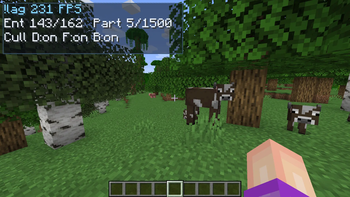
- FPS HUD: current FPS, 1% low and an optional rolling average, with an optional frame-time graph, adjustable scale and any corner placement
- Background FPS caps: separate limits for menus, overlays, an unfocused or minimized window, AFK and deep AFK, so your PC stays cool when you're not playing
- Smooth zoom: hold
Vto zoom and scroll to change how far - Optional fullbright: see clearly in caves without torches
- Visual toggles: weather effects, entity shadows and leaf quality
- !lag loading screen: a clean custom startup screen
Tuning options
You can adjust all of these in game:
- Entity and block entity cull distance
- Visibility cache interval and async worker count
- Particle budget per tick
- Adaptive render distance limits and cooldown
- Weather, shadows and leaf mode
- FPS HUD scale
- Every background FPS cap
Mega updates ⚡
Most !lag updates are small and steady, with a couple of real improvements each time. A mega update is different: it's a huge release that bundles many new features, FPS wins and fixes at once. Mega updates drop at big milestones and carry -mega in their version number.
The first one, 3.2.0-mega, celebrates 20,000 downloads 🎉 and comes with quick presets, a bigger FPS HUD, smarter culling and an in-game 20K thank-you screen.
Versions
- Fabric: Minecraft 1.21 through 26.3. Pick the file that matches your game version.
- !lag legacy: a Forge build for Minecraft 1.8.9, for PvP and classic players.
- Java: Java 21 for 1.21.x, Java 25 for 26.x, and Java 8 for 1.8.9.
- Side: client only. Servers don't need it.
Found a bug?
Join the Discord (linked on the right) or open a report. Include your Minecraft version, loader version, other mods and what happened, and it'll get fixed fast.
Support
!lag is free and MIT licensed. If it helped your game, you can buy me a coffee on Ko-fi. ☕
Галерея