COWMODSКаталог модов

Join and Quit Messages

Join and Quit Messages is a plugin that gives you the opportunity to customize the messages when a player joins or leaves your server.

Автор: thedutchruben1,7 тыс.3обновлён 19 авг. 2026 г.
ОбщениеУтилиты

Описание

Join and Quit Messages

Join and Quit Messages is a plugin that gives you the opportunity to customize the messages when a player joins or leaves your server. It is really easy to use and gives a personal touch to your Minecraft server. You can customize your own join and quit messages easily by changing the information within the config.

Give brand new players their own welcome, give each rank its own message, use different messages per world, let staff join unseen, and make any part of a message clickable.

Requirements

  • Spigot or Paper 1.16 or newer
  • Java 17 or newer
  • PlaceholderAPI (optional)

Hex colors

It is possible to use hex colors or standard Minecraft colors. You can pick your own hex colors here. You can completely customize your own messages. However, the hex colors need to be like this: <#RRGGBB>. This is also shown in the config below.

Config using hex colors

The result of this config is the following:

The resulting join message

Standard Minecraft colors

You do not have to use hex colors. The standard Minecraft colors work too, and you can mix both in the same message. You can choose from the following colors:
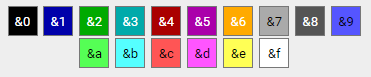
Minecraft color codes

Your config will then look like the following:

Config using standard colors

Then this will be the result of this config.

The resulting default join message

A single & that is not followed by a real color code is left alone, so a message like Tom & Jerry joined shows exactly as written.

Clickable and hover messages

Any part of a message can run a command, open a link, copy text, or show a tooltip when hovered.

joinmessage: "&7[&2+&7]&a%player% <click:suggest_command:/msg %player% ><hover:show_text:&7Send a message>&8[msg]</hover></click>"
TagWhat it does
<click:run_command:/spawn>text</click>Runs the command as the player who clicks
<click:suggest_command:/msg Steve >text</click>Puts the command in their chat box
<click:open_url:https://example.com>text</click>Opens a link
<click:copy_to_clipboard:hello>text</click>Copies text to their clipboard
<hover:show_text:&7Tooltip>text</hover>Shows a tooltip on hover

Click and hover can be combined and nested, colors carry across a tag, and placeholders work inside a tag's value. Use /jqm test <message> to try one out — it renders the result clickable and tells you if a tag has a typo.

Only messages in your own config can create clickable text, so another plugin supplying a custom nickname can never inject a clickable command into your join messages.

First join messages

Players who have never joined before can get their own message.

first_join:
  enabled: true
  message: "&7[&2+&7] &6Welcome &e%player% &6to the server! &7(&a#%playercount_online%&7)"

Permission based Messages

Give each rank its own join and quit message. A player who holds several of these gets the one listed first under priority.

permission_messages:
  enabled: true
  priority:
    - myserver.premium
    - myserver.vip
  join:
    "myserver.vip": "&7[&6VIP+&7] &6%player% &7joined with style!"
    "myserver.premium": "&7[&5PREMIUM+&7] &5%player% &7entered the server!"
  leave:
    "myserver.vip": "&7[&6VIP-&7] &6%player% &7left the server"
    "myserver.premium": "&7[&5PREMIUM-&7] &5%player% &7departed"

Messages per world

Show a different message depending on which world the player is in. You can set these up in game, without touching the config file — changes save and apply straight away.

/jqm world list
/jqm world add <world> <join|leave> <message>
/jqm world remove <world> [join|leave]

The message is everything after join or leave, so it does not need quotes. World names and join/leave are tab-completable.

Per-world messages use the world the player is in at the moment they join or quit, so walking through a portal does not trigger them.

Silent join and quit

Players with the joinandquitmessages.silent permission are not announced at all. Useful for staff, and it works nicely alongside vanish plugins. Suppressed messages are still written to the console so you keep a record.

Random Messages

It is possible to show arbitrary join and quit messages and you can edit the list. In the config.yml there are 2 lists for the messages, which can be edited for other random messages. The same line is never picked twice in a row.
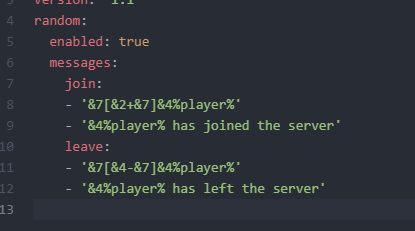
Random messages config

Which message wins

When more than one could apply, they are used in this order:

  1. Silent — players with the silent permission are never announced
  2. First join message
  3. Permission message
  4. World message
  5. Random message
  6. The default join or quit message

🎯 Commands

CommandDescriptionPermission
/jqm testTest configured join messagejoinandquitmessages.test
/jqm test <message>Test custom messagejoinandquitmessages.test
/jqm quittestTest configured quit messagejoinandquitmessages.test
/jqm quittest <message>Test a custom quit messagejoinandquitmessages.test
/jqm world listList worlds that have a messagejoinandquitmessages.world
/jqm world add <world> <join|leave> <message>Set a message for a worldjoinandquitmessages.world
/jqm world remove <world> [join|leave]Remove a world's messagejoinandquitmessages.world
/jqm reloadReload configurationjoinandquitmessages.reload

🔐 Permissions

PermissionDescriptionDefault
joinandquitmessages.useAccess to main commandtrue
joinandquitmessages.testTest message formattingtrue
joinandquitmessages.reloadReload configurationop
joinandquitmessages.worldAdd and remove per-world messagesop
joinandquitmessages.silentJoin and quit without being announcedfalse
joinandquitmessages.checkupdateBe notified when an update is availableop

Placeholders

  • %player% : Player name
  • %displayname% : Player display name
  • %world% : World name where the player leaves/joins
  • %playercount_online% : Current amount of players (also works as %online%)
  • %playercount_max% : Maximum amount of players (also works as %max%)

Placeholder API

Within the join and quit messages you can also use the placeholder API. This lets you customize the messages even more. More information about what you can use can be found here.

Metrics

This plugin uses bStats to record which features are actually used, so development can follow what servers really configure. Only on/off flags and counts are sent, never message content, player names or world names. You can turn it off in plugins/bStats/config.yml.

Последние версии

Все версии →
release

JoinAndQuitMessages 1.6.0

1.6.0
19 авг. 2026 г.392Minecraft: 1.19, 1.19.1, 1.19.2, 1.19.3, 1.19.4, 1.20, 1.20.1, 1.20.2, 1.20.3, 1.20.4, 1.20.5, 1.20.6, 1.21, 1.21.1, 1.21.2, 1.21.3, 1.21.4, 1.21.5, 1.21.6, 1.21.7, 1.21.8, 1.21.9, 1.21.10, 1.21.11, 26.1, 26.1.1, 26.1.2, 26.2bukkit, paper, spigot
Скачать
Что нового
# JoinAndQuitMessages 1.6.0 The biggest release yet: clickable messages, first-join and per-world messages, in-game commands to manage them — and a fix for hex colours, which had silently stopped working on modern Spigot. > **Heads up:** this release now requires **Java 17 or newer**. See [Upgrading](#upgrading). --- ## 🚨 Hex colours work again on Spigot 26.x If you use `<#RRGGBB>` colours, they had stopped rendering entirely on recent Spigot builds — every hex tag showed as plain text. The version check read the *minor* version number, so `1.21.8` gave `21` and passed, but `26.2` gave `2` and failed the "is this 1.16+?" test. Hex support is now detected by asking the server what it can actually do, so it cannot break again when the version scheme changes. --- ## ✨ Clickable and hover messages Messages can now run a command, open a link, copy text, or show a tooltip. ```yaml joinmessage: "&7[&2+&7]&a%player% <click:suggest_command:/msg %player% ><hover:show_text:&7Send a message>&8[msg]</hover></click>" ``` | Tag | What it does | |-----|--------------| | `<click:run_command:/spawn>text</click>` | Runs the command as the player who clicks | | `<click:suggest_command:/msg Steve >text</click>` | Puts the command in their chat box | | `<click:open_url:https://example.com>text</click>` | Opens a link | | `<click:copy_to_clipboard:hello>text</click>` | Copies text to their clipboard | | `<hover:show_text:&7Tooltip>text</hover>` | Shows a tooltip on hover | - Click and hover **combine and nest** - **Colours carry across a tag** — `<#FF0000>a <click:...>b</click> c` stays red throughout - Placeholders work inside a tag's value: `<click:suggest_command:/msg %player% >` - `/jqm test <message>` renders the result clickable and **tells you about typos**, instead of leaving you with a tag that quietly does nothing Only messages in your `config.yml` can create clickable text. Tags are read before placeholders are filled in, so another plugin supplying a custom nickname can never inject a clickable `run_command` into your join messages. ## 🎉 First join messages Give brand new players their own welcome. ```yaml first_join: enabled: true message: "&7[&2+&7] &6Welcome &e%player% &6to the server! &7(&a#%playercount_online%&7)" ``` ## 🤫 Silent join and quit Anyone with `joinandquitmessages.silent` is not announced at all — ideal for staff and alongside vanish plugins. Suppressed messages still reach the console by default. ## 🌍 Per-world messages, managed in-game Different messages depending on which world the player is in — no YAML editing required. Changes save and apply straight away, and work from the console too. ``` /jqm world list /jqm world add <world> <join|leave> <message> /jqm world remove <world> [join|leave] ``` - The message is everything after the type, so it needs no quoting - World names and `join`/`leave` are tab-completable - Adding a message while the feature is off switches it on for you - Worlds that are not loaded yet can still be configured Per-world messages use the world the player is in **at the moment they join or quit** — they are not triggered by walking through a portal. ## 📋 A documented config.yml The plugin used to build its config in code, leaving you with an uncommented file and the wiki for company. It now ships a fully commented `config.yml` explaining every option, every placeholder, and which message wins when several could apply. --- ## Other improvements - **Rank messages now have a real priority.** Previously a player holding several configured permissions got an unpredictable message that could change between restarts. Add a `permission_messages.priority` list to decide the order. - **`/jqm test` matches reality.** The test command and the real join message used different placeholder names, so a preview could render differently than the real thing. - **`&` is no longer replaced blindly.** "Tom & Jerry joined" rendered as "Tom § Jerry joined". Only `&` followed by a real colour code is translated now, and translation happens after placeholders, so codes coming out of PlaceholderAPI are coloured too. - **`/jqm quittest`** — quit messages were previously impossible to preview. - **Smarter random messages** — the same line is never picked twice in a row. - **An empty random message list** no longer errors; it falls back to your default message. - **New built-in placeholders** — `%displayname%`, plus `%online%` / `%max%` as aliases. ## Commands | Command | Description | Permission | |---------|-------------|------------| | `/jqm test [message]` | Preview a join message | `joinandquitmessages.test` | | `/jqm quittest [message]` | Preview a quit message | `joinandquitmessages.test` | | `/jqm world list` | List worlds with a configured message | `joinandquitmessages.world` | | `/jqm world add <world> <join\|leave> <message>` | Set a per-world message | `joinandquitmessages.world` | | `/jqm world remove <world> [join\|leave]` | Remove a per-world message | `joinandquitmessages.world` | | `/jqm reload` | Reload the configuration | `joinandquitmessages.reload` | ## Permissions | Permission | Description | Default | |------------|-------------|---------| | `joinandquitmessages.use` | Use the main command | `true` | | `joinandquitmessages.test` | Preview messages | `true` | | `joinandquitmessages.reload` | Reload the configuration | `op` | | `joinandquitmessages.world` | Manage per-world messages | `op` | | `joinandquitmessages.silent` | Join and quit unannounced | `false` | | `joinandquitmessages.checkupdate` | Be told about updates | `op` | --- ## Upgrading **From any earlier version — please read:** 1. **Java 17 or newer is now required.** Any server running a Minecraft version this plugin targets already meets that, but double-check if you are on an old JVM. 2. **Your existing config keeps working** and picks up the new options automatically on first start. Nothing to migrate by hand. 3. **Small behaviour change:** a stray `&` in a message now shows as a literal `&` instead of turning into a colour character. If you relied on that, replace it with a real code. 4. **Recommended:** delete `config.yml` and restart to get the fully commented version. 5. **Recommended:** if you use rank messages, add a `permission_messages.priority` list so the order is yours rather than arbitrary. ## Metrics bStats now records which features are actually in use, so development can follow what servers really configure. Only feature on/off flags and counts are sent — never message content, player data, or world names. It can still be disabled in `plugins/bStats/config.yml`. --- **Requires:** Spigot/Paper 1.16+ · Java 17+ **Optional:** PlaceholderAPI Full technical changelog, including internal changes: [CHANGELOG.md](https://github.com/thedutchruben/joinandquitmessages/blob/master/CHANGELOG.md) Found a problem? [Open an issue](https://github.com/thedutchruben/joinandquitmessages/issues).
release

1.5.0

1.5.0
22 нояб. 2025 г.688Minecraft: 1.18, 1.18.1, 1.18.2, 1.19, 1.19.1, 1.19.2, 1.19.3, 1.19.4, 1.20, 1.20.1, 1.20.2, 1.20.3, 1.20.4, 1.20.5, 1.20.6, 1.21, 1.21.1, 1.21.2, 1.21.3, 1.21.4, 1.21.5, 1.21.6, 1.21.7, 1.21.8, 1.21.9, 1.21.10bukkit, paper, spigot
Скачать
Что нового
#### Permission based Messages ```yaml permission_messages: enabled: true join: "myserver.vip": "&7[&6VIP+&7] &6%player% &7joined with style!" "myserver.premium": "&7[&5PREMIUM+&7] &5%player% &7entered the server!" leave: "myserver.vip": "&7[&6VIP-&7] &6%player% &7left the server" "myserver.premium": "&7[&5PREMIUM-&7] &5%player% &7departed" ``` ### 🎯 Commands | Command | Description | Permission | |---------|-------------|------------| | `/jqm test` | Test configured join message | `joinandquitmessages.test` | | `/jqm test <message>` | Test custom message | `joinandquitmessages.test` | | `/jqm reload` | Reload configuration | `joinandquitmessages.reload` | ### 🔐 Permissions | Permission | Description | Default | |------------|-------------|---------| | `joinandquitmessages.use` | Access to main command | `true` | | `joinandquitmessages.test` | Test message formatting | `true` | | `joinandquitmessages.reload` | Reload configuration | `op` | ### Placeholders - %player% : Player name - %world% : World name where the player leaves/joins - %playercount_online% : Current amount of players - %playercount_max% : Maximum amount of players
release

1.4.0

1.4.0
10 авг. 2025 г.267Minecraft: 1.16.5, 1.17, 1.17.1, 1.18, 1.18.1, 1.18.2, 1.19, 1.19.1, 1.19.2, 1.19.3, 1.19.4, 1.20, 1.20.1, 1.20.2, 1.20.3, 1.20.4, 1.20.5, 1.20.6, 1.21, 1.21.1, 1.21.2, 1.21.3, 1.21.4, 1.21.5, 1.21.6, 1.21.7, 1.21.8bukkit, paper, spigot
Скачать
Что нового
#### Permission-Based Messages - **NEW**: Players can now have custom join/quit messages based on their permissions - Configurable permission-based message system with priority handling - Example: VIP players get gold messages, Premium players get purple messages #### Commands - **NEW**: `/jqm test` - Test your configured join message with full formatting - **NEW**: `/jqm test <custom message>` - Test any custom message with colors, hex codes, and placeholders - **NEW**: `/jqm reload` - Reload configuration with proper permission checks #### Basic Permission Messages ```yaml permission_messages: enabled: true join: "myserver.vip": "&7[&6VIP+&7] &6%player% &7joined with style!" "myserver.premium": "&7[&5PREMIUM+&7] &5%player% &7entered the server!" leave: "myserver.vip": "&7[&6VIP-&7] &6%player% &7left the server" "myserver.premium": "&7[&5PREMIUM-&7] &5%player% &7departed" ``` ### 🎯 Commands | Command | Description | Permission | |---------|-------------|------------| | `/jqm test` | Test configured join message | `joinandquitmessages.test` | | `/jqm test <message>` | Test custom message | `joinandquitmessages.test` | | `/jqm reload` | Reload configuration | `joinandquitmessages.reload` | ### 🔐 Permissions | Permission | Description | Default | |------------|-------------|---------| | `joinandquitmessages.use` | Access to main command | `true` | | `joinandquitmessages.test` | Test message formatting | `true` | | `joinandquitmessages.reload` | Reload configuration | `op` |
release

Join and Quit Messages 1.3.0

1.3.0
9 июл. 2025 г.106Minecraft: 1.17, 1.17.1, 1.18, 1.18.1, 1.18.2, 1.19, 1.19.1, 1.19.2, 1.19.3, 1.19.4, 1.20, 1.20.1, 1.20.2, 1.20.3, 1.20.4, 1.20.5, 1.20.6, 1.21, 1.21.1, 1.21.2, 1.21.3, 1.21.4, 1.21.5, 1.21.6, 1.21.7bukkit, paper, spigot
Скачать
Что нового
Update dependency versions
release

Join and Quit Messages 1.2.0

1.2.0
10 окт. 2024 г.262Minecraft: 1.16, 1.16.1, 1.16.2, 1.16.3, 1.16.4, 1.16.5, 1.17, 1.17.1, 1.18, 1.18.1, 1.18.2, 1.19, 1.19.1, 1.19.2, 1.19.3, 1.19.4, 1.20, 1.20.1, 1.20.2, 1.20.3, 1.20.4, 1.20.5, 1.20.6, 1.21, 1.21.1bukkit, paper, spigot
Скачать
Что нового
Add support for random messages ![Information](https://cdn.modrinth.com/data/cached_images/b71b536aef70eaeacc29bacbfb0eed0552ec41af.png)