COWMODSКаталог модов

Grid Easy

A lightweight 3D grid overlay for precise building, alignment, and per-axis spacing control. 정밀한 건축과 축별 간격 조절을 위한 가볍고 최적화된 3D Grid Overlay 모드입니다.

Автор: Codeboy3 тыс.4обновлён 28 окт. 2026 г.
ДекорУтилиты

Описание

🧱 Grid Easy

Big builds. Better spacing.

A visual guide for cleaner layouts, consistent spacing, and confident building.

Minecraft 1.20–26.3 · Fabric · Client-side

A red-and-white school building with cyan Grid Easy guides across the surrounding courtyard in Minecraft 26.3.

Keep the big picture in view. Let the grid handle the intervals.

Planning a row of windows, lining up pillars, or checking the width of a room? Grid Easy puts adjustable guides directly into your world, with distance pins and saved markers for the details that matter.


📐 Every interval, in view

Choose your spacing and see the pattern around your build. Give X, Y, and Z different intervals, or keep them matched for a consistent layout.

  • Build in three dimensions with XYZ, or work on a single XZ, XY, or YZ plane.
  • Start where you need it. Enable the grid while looking at a block to use it as your reference point.
  • Fine-tune the fit with origin offsets, visible axes, colors, and opacity.

Cyan three-dimensional spacing guides between the repeating windows and floors of a school courtyard.

Make repeating details easier to line up, from windows to floor heights.

📏 Two pins. A clear answer.

Aim at a block and press N to place Pin A. Aim at another block and press it again for Pin B.

Read the distance above B, then get back to building. Axis-aligned measurements also show the number of block spaces between the endpoints; diagonal measurements include X/Y/Z differences and straight-line distance. Completed measurements are copied to your clipboard.

Press N once more to clear both pins.

A cyan A pin and yellow B pin marking a courtyard measurement, with the distance result displayed above B.

A quick width check, right where you are working.

✨ Refined in 1.5.2

  • Edit a pin without placing it again. Change its X/Y/Z coordinates and apply to update the measurement.
  • Use clear world coordinates. A/B positions stay independent of the grid's reference point.
  • Adjust with confidence. Undo and redo pin moves from the settings screen.
  • See which pin you are styling. Separate A/B cards and a matching color preview make selection clearer.

Grid Easy 1.5.2 Distance pins settings in English, showing separate A/B world-coordinate cards, Apply coordinates, Undo, Redo, and the selected pin's palette.

Move Pin B by one block: the distance updates from 12 to 13.


🎨 Your grid, your setup

Choose a color that stands out against your build, soften the opacity, and save a setup you will use again.

The English Color settings page with color controls and a preset palette for customizing Grid Easy.

  • 📍 Markers: name important positions and edit their coordinates and colors. Markers stay visible when the repeating grid is off and are saved locally for each world/server and dimension.
  • 🗂️ Profiles: reuse your grid settings for facades, interiors, or another project. Press P to cycle through saved profiles.
  • 🔗 Sharing: import and export profiles and markers through the clipboard or JSON files.
👀 Explore the settings

Grid controls

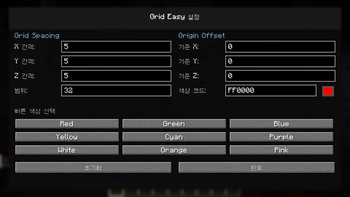
Set spacing from 1 to 64 blocks per axis, choose a plane, and adjust the drawing radius.

The English General settings page with Grid Easy's grid controls and eight settings tabs.

Named markers

The English Markers page with a named Courtyard origin marker, editable world coordinates, and a color palette.

Reusable profiles

Profiles save your configuration. Marker positions and distance pins are managed separately.

The English Profiles page showing saved Courtyard layout, Ceiling lights, and Facade alignment configurations.

🎮 Start in seconds

Default keyAction
.Toggle the grid
,Open Grid Easy settings
NPlace A → place B → clear pins
MAdd or remove a marker at the targeted position
PSwitch to the next saved profile

All key bindings can be changed in Minecraft's Controls menu.

⚡ Quick adjustments while building
  • Hold [ and scroll to change spacing.
  • Hold ] and scroll to shift the grid origin.
  • Press \ to cycle the adjustment axis: All → X → Y → Z.

📦 Ready for your Minecraft version

Grid Easy 1.5.2 offers version-specific downloads spanning Minecraft 1.20 through 26.3. Choose the file that matches your exact Minecraft version.

  1. Install Fabric Loader and the matching Fabric API.
  2. Place the matching Grid Easy JAR in your mods folder.
  3. Launch the game, enter a world, and press . to begin.

Client-side: install it on your own game client. No server installation is required. Mod Menu is optional.

Updating? Close the game and replace the old Grid Easy JAR, keeping only one matching version installed.

Supported versions & Java

Minecraft: 1.20, 1.20.1, 1.20.2, 1.20.3, 1.20.4, 1.20.5, 1.20.6; 1.21, 1.21.1, 1.21.2, 1.21.3, 1.21.4, 1.21.5, 1.21.6, 1.21.7, 1.21.8, 1.21.9, 1.21.10, 1.21.11; 26.1, 26.1.1, 26.1.2, 26.2, 26.3.

Java: 17 for Minecraft 1.20–1.20.4; 21 for 1.20.5–1.21.11; 25 for 26.x.

Less counting. More building.


Screenshots: Grid Easy 1.5.2 on Minecraft 26.3. Showcase build by Eduard Georgiev, used under the MIT license. Imported and staged for these screenshots.

Галерея
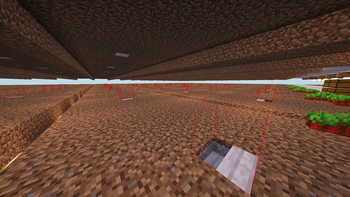
Perfect Block Alignment with Grid Easy

Последние версии

Все версии →
release

Grid Easy 1.5.3 - Minecraft 26.3

grid-1.5.3+26.3
28 окт. 2026 г.166Minecraft: 26.3fabric
Скачать
Что нового
# Grid Easy 1.5.3 ## 한국어 - 격자에서 바라보는 블록을 미리 표시합니다. A핀을 찍으면 조준한 위치까지의 연결선과 거리, 축 방향 측정의 중간 빈칸을 미리 볼 수 있습니다. - 격자를 시작하거나 기준점을 옮기면 기준 블록을 약 2초 동안 강조합니다. - 격자, 마커·거리핀, 미리보기의 투명도를 각각 조절할 수 있습니다. - 현재 설정 탭 검색, 마커의 저장순·거리순·이름순 정렬, 선택한 마커와 적용된 A/B 좌표 복사를 추가했습니다. - 가까운 A/B핀과 격자·기준점 강조를 함께 표시할 때 발생하던 표시 오류를 수정했습니다. - 아주 먼 핀을 표시할 때 측정값은 유지하면서 화면 표시가 깨지지 않도록 보완했습니다. 차원 이동·부활·재접속 때 이전 위치의 표시가 남지 않도록 정리합니다. - Minecraft 1.20~1.21.1의 거리 글자, 1.21.11의 오버레이 표시, 26.3의 선 투명도를 수정했습니다. ## English - Preview the block you are aiming at while using the grid. After placing pin A, preview the connecting line, distance and empty-block gap for axis-aligned measurements to the aimed position. - The reference block is highlighted for about two seconds when starting or moving the grid origin. - Adjust grid, marker/distance-pin and preview opacity separately. - Added search within the current settings tab, marker sorting by saved order, distance or name, and copying coordinates of the selected marker or applied A/B pins. - Fixed display errors when nearby A/B pins, the grid and the origin highlight are shown together. - Improved display of very distant pins while preserving their measured distance. Old-position overlays are cleared during dimension changes, respawning and reconnecting. - Fixed distance labels on Minecraft 1.20–1.21.1, overlay display on 1.21.11 and line opacity on 26.3.
release

Grid Easy 1.5.3 - Minecraft 26.2

grid-1.5.3+26.2
28 окт. 2026 г.8Minecraft: 26.2fabric
Скачать
Что нового
# Grid Easy 1.5.3 ## 한국어 - 격자에서 바라보는 블록을 미리 표시합니다. A핀을 찍으면 조준한 위치까지의 연결선과 거리, 축 방향 측정의 중간 빈칸을 미리 볼 수 있습니다. - 격자를 시작하거나 기준점을 옮기면 기준 블록을 약 2초 동안 강조합니다. - 격자, 마커·거리핀, 미리보기의 투명도를 각각 조절할 수 있습니다. - 현재 설정 탭 검색, 마커의 저장순·거리순·이름순 정렬, 선택한 마커와 적용된 A/B 좌표 복사를 추가했습니다. - 가까운 A/B핀과 격자·기준점 강조를 함께 표시할 때 발생하던 표시 오류를 수정했습니다. - 아주 먼 핀을 표시할 때 측정값은 유지하면서 화면 표시가 깨지지 않도록 보완했습니다. 차원 이동·부활·재접속 때 이전 위치의 표시가 남지 않도록 정리합니다. - Minecraft 1.20~1.21.1의 거리 글자, 1.21.11의 오버레이 표시, 26.3의 선 투명도를 수정했습니다. ## English - Preview the block you are aiming at while using the grid. After placing pin A, preview the connecting line, distance and empty-block gap for axis-aligned measurements to the aimed position. - The reference block is highlighted for about two seconds when starting or moving the grid origin. - Adjust grid, marker/distance-pin and preview opacity separately. - Added search within the current settings tab, marker sorting by saved order, distance or name, and copying coordinates of the selected marker or applied A/B pins. - Fixed display errors when nearby A/B pins, the grid and the origin highlight are shown together. - Improved display of very distant pins while preserving their measured distance. Old-position overlays are cleared during dimension changes, respawning and reconnecting. - Fixed distance labels on Minecraft 1.20–1.21.1, overlay display on 1.21.11 and line opacity on 26.3.
release

Grid Easy 1.5.3 - Minecraft 26.1.2

grid-1.5.3+26.1.2
28 окт. 2026 г.5Minecraft: 26.1.2fabric
Скачать
Что нового
# Grid Easy 1.5.3 ## 한국어 - 격자에서 바라보는 블록을 미리 표시합니다. A핀을 찍으면 조준한 위치까지의 연결선과 거리, 축 방향 측정의 중간 빈칸을 미리 볼 수 있습니다. - 격자를 시작하거나 기준점을 옮기면 기준 블록을 약 2초 동안 강조합니다. - 격자, 마커·거리핀, 미리보기의 투명도를 각각 조절할 수 있습니다. - 현재 설정 탭 검색, 마커의 저장순·거리순·이름순 정렬, 선택한 마커와 적용된 A/B 좌표 복사를 추가했습니다. - 가까운 A/B핀과 격자·기준점 강조를 함께 표시할 때 발생하던 표시 오류를 수정했습니다. - 아주 먼 핀을 표시할 때 측정값은 유지하면서 화면 표시가 깨지지 않도록 보완했습니다. 차원 이동·부활·재접속 때 이전 위치의 표시가 남지 않도록 정리합니다. - Minecraft 1.20~1.21.1의 거리 글자, 1.21.11의 오버레이 표시, 26.3의 선 투명도를 수정했습니다. ## English - Preview the block you are aiming at while using the grid. After placing pin A, preview the connecting line, distance and empty-block gap for axis-aligned measurements to the aimed position. - The reference block is highlighted for about two seconds when starting or moving the grid origin. - Adjust grid, marker/distance-pin and preview opacity separately. - Added search within the current settings tab, marker sorting by saved order, distance or name, and copying coordinates of the selected marker or applied A/B pins. - Fixed display errors when nearby A/B pins, the grid and the origin highlight are shown together. - Improved display of very distant pins while preserving their measured distance. Old-position overlays are cleared during dimension changes, respawning and reconnecting. - Fixed distance labels on Minecraft 1.20–1.21.1, overlay display on 1.21.11 and line opacity on 26.3.
release

Grid Easy 1.5.3 - Minecraft 26.1.1

grid-1.5.3+26.1.1
28 окт. 2026 г.4Minecraft: 26.1.1fabric
Скачать
Что нового
# Grid Easy 1.5.3 ## 한국어 - 격자에서 바라보는 블록을 미리 표시합니다. A핀을 찍으면 조준한 위치까지의 연결선과 거리, 축 방향 측정의 중간 빈칸을 미리 볼 수 있습니다. - 격자를 시작하거나 기준점을 옮기면 기준 블록을 약 2초 동안 강조합니다. - 격자, 마커·거리핀, 미리보기의 투명도를 각각 조절할 수 있습니다. - 현재 설정 탭 검색, 마커의 저장순·거리순·이름순 정렬, 선택한 마커와 적용된 A/B 좌표 복사를 추가했습니다. - 가까운 A/B핀과 격자·기준점 강조를 함께 표시할 때 발생하던 표시 오류를 수정했습니다. - 아주 먼 핀을 표시할 때 측정값은 유지하면서 화면 표시가 깨지지 않도록 보완했습니다. 차원 이동·부활·재접속 때 이전 위치의 표시가 남지 않도록 정리합니다. - Minecraft 1.20~1.21.1의 거리 글자, 1.21.11의 오버레이 표시, 26.3의 선 투명도를 수정했습니다. ## English - Preview the block you are aiming at while using the grid. After placing pin A, preview the connecting line, distance and empty-block gap for axis-aligned measurements to the aimed position. - The reference block is highlighted for about two seconds when starting or moving the grid origin. - Adjust grid, marker/distance-pin and preview opacity separately. - Added search within the current settings tab, marker sorting by saved order, distance or name, and copying coordinates of the selected marker or applied A/B pins. - Fixed display errors when nearby A/B pins, the grid and the origin highlight are shown together. - Improved display of very distant pins while preserving their measured distance. Old-position overlays are cleared during dimension changes, respawning and reconnecting. - Fixed distance labels on Minecraft 1.20–1.21.1, overlay display on 1.21.11 and line opacity on 26.3.
release

Grid Easy 1.5.3 - Minecraft 26.1

grid-1.5.3+26.1
28 окт. 2026 г.2Minecraft: 26.1fabric
Скачать
Что нового
# Grid Easy 1.5.3 ## 한국어 - 격자에서 바라보는 블록을 미리 표시합니다. A핀을 찍으면 조준한 위치까지의 연결선과 거리, 축 방향 측정의 중간 빈칸을 미리 볼 수 있습니다. - 격자를 시작하거나 기준점을 옮기면 기준 블록을 약 2초 동안 강조합니다. - 격자, 마커·거리핀, 미리보기의 투명도를 각각 조절할 수 있습니다. - 현재 설정 탭 검색, 마커의 저장순·거리순·이름순 정렬, 선택한 마커와 적용된 A/B 좌표 복사를 추가했습니다. - 가까운 A/B핀과 격자·기준점 강조를 함께 표시할 때 발생하던 표시 오류를 수정했습니다. - 아주 먼 핀을 표시할 때 측정값은 유지하면서 화면 표시가 깨지지 않도록 보완했습니다. 차원 이동·부활·재접속 때 이전 위치의 표시가 남지 않도록 정리합니다. - Minecraft 1.20~1.21.1의 거리 글자, 1.21.11의 오버레이 표시, 26.3의 선 투명도를 수정했습니다. ## English - Preview the block you are aiming at while using the grid. After placing pin A, preview the connecting line, distance and empty-block gap for axis-aligned measurements to the aimed position. - The reference block is highlighted for about two seconds when starting or moving the grid origin. - Adjust grid, marker/distance-pin and preview opacity separately. - Added search within the current settings tab, marker sorting by saved order, distance or name, and copying coordinates of the selected marker or applied A/B pins. - Fixed display errors when nearby A/B pins, the grid and the origin highlight are shown together. - Improved display of very distant pins while preserving their measured distance. Old-position overlays are cleared during dimension changes, respawning and reconnecting. - Fixed distance labels on Minecraft 1.20–1.21.1, overlay display on 1.21.11 and line opacity on 26.3.
release

Grid Easy 1.5.3 - Minecraft 1.21.11

grid-1.5.3+1.21.11
28 окт. 2026 г.4Minecraft: 1.21.11fabric
Скачать
Что нового
# Grid Easy 1.5.3 ## 한국어 - 격자에서 바라보는 블록을 미리 표시합니다. A핀을 찍으면 조준한 위치까지의 연결선과 거리, 축 방향 측정의 중간 빈칸을 미리 볼 수 있습니다. - 격자를 시작하거나 기준점을 옮기면 기준 블록을 약 2초 동안 강조합니다. - 격자, 마커·거리핀, 미리보기의 투명도를 각각 조절할 수 있습니다. - 현재 설정 탭 검색, 마커의 저장순·거리순·이름순 정렬, 선택한 마커와 적용된 A/B 좌표 복사를 추가했습니다. - 가까운 A/B핀과 격자·기준점 강조를 함께 표시할 때 발생하던 표시 오류를 수정했습니다. - 아주 먼 핀을 표시할 때 측정값은 유지하면서 화면 표시가 깨지지 않도록 보완했습니다. 차원 이동·부활·재접속 때 이전 위치의 표시가 남지 않도록 정리합니다. - Minecraft 1.20~1.21.1의 거리 글자, 1.21.11의 오버레이 표시, 26.3의 선 투명도를 수정했습니다. ## English - Preview the block you are aiming at while using the grid. After placing pin A, preview the connecting line, distance and empty-block gap for axis-aligned measurements to the aimed position. - The reference block is highlighted for about two seconds when starting or moving the grid origin. - Adjust grid, marker/distance-pin and preview opacity separately. - Added search within the current settings tab, marker sorting by saved order, distance or name, and copying coordinates of the selected marker or applied A/B pins. - Fixed display errors when nearby A/B pins, the grid and the origin highlight are shown together. - Improved display of very distant pins while preserving their measured distance. Old-position overlays are cleared during dimension changes, respawning and reconnecting. - Fixed distance labels on Minecraft 1.20–1.21.1, overlay display on 1.21.11 and line opacity on 26.3.
release

Grid Easy 1.5.3 - Minecraft 1.21.10

grid-1.5.3+1.21.10
28 окт. 2026 г.5Minecraft: 1.21.10fabric
Скачать
Что нового
# Grid Easy 1.5.3 ## 한국어 - 격자에서 바라보는 블록을 미리 표시합니다. A핀을 찍으면 조준한 위치까지의 연결선과 거리, 축 방향 측정의 중간 빈칸을 미리 볼 수 있습니다. - 격자를 시작하거나 기준점을 옮기면 기준 블록을 약 2초 동안 강조합니다. - 격자, 마커·거리핀, 미리보기의 투명도를 각각 조절할 수 있습니다. - 현재 설정 탭 검색, 마커의 저장순·거리순·이름순 정렬, 선택한 마커와 적용된 A/B 좌표 복사를 추가했습니다. - 가까운 A/B핀과 격자·기준점 강조를 함께 표시할 때 발생하던 표시 오류를 수정했습니다. - 아주 먼 핀을 표시할 때 측정값은 유지하면서 화면 표시가 깨지지 않도록 보완했습니다. 차원 이동·부활·재접속 때 이전 위치의 표시가 남지 않도록 정리합니다. - Minecraft 1.20~1.21.1의 거리 글자, 1.21.11의 오버레이 표시, 26.3의 선 투명도를 수정했습니다. ## English - Preview the block you are aiming at while using the grid. After placing pin A, preview the connecting line, distance and empty-block gap for axis-aligned measurements to the aimed position. - The reference block is highlighted for about two seconds when starting or moving the grid origin. - Adjust grid, marker/distance-pin and preview opacity separately. - Added search within the current settings tab, marker sorting by saved order, distance or name, and copying coordinates of the selected marker or applied A/B pins. - Fixed display errors when nearby A/B pins, the grid and the origin highlight are shown together. - Improved display of very distant pins while preserving their measured distance. Old-position overlays are cleared during dimension changes, respawning and reconnecting. - Fixed distance labels on Minecraft 1.20–1.21.1, overlay display on 1.21.11 and line opacity on 26.3.
release

Grid Easy 1.5.3 - Minecraft 1.21.9

grid-1.5.3+1.21.9
28 окт. 2026 г.3Minecraft: 1.21.9fabric
Скачать
Что нового
# Grid Easy 1.5.3 ## 한국어 - 격자에서 바라보는 블록을 미리 표시합니다. A핀을 찍으면 조준한 위치까지의 연결선과 거리, 축 방향 측정의 중간 빈칸을 미리 볼 수 있습니다. - 격자를 시작하거나 기준점을 옮기면 기준 블록을 약 2초 동안 강조합니다. - 격자, 마커·거리핀, 미리보기의 투명도를 각각 조절할 수 있습니다. - 현재 설정 탭 검색, 마커의 저장순·거리순·이름순 정렬, 선택한 마커와 적용된 A/B 좌표 복사를 추가했습니다. - 가까운 A/B핀과 격자·기준점 강조를 함께 표시할 때 발생하던 표시 오류를 수정했습니다. - 아주 먼 핀을 표시할 때 측정값은 유지하면서 화면 표시가 깨지지 않도록 보완했습니다. 차원 이동·부활·재접속 때 이전 위치의 표시가 남지 않도록 정리합니다. - Minecraft 1.20~1.21.1의 거리 글자, 1.21.11의 오버레이 표시, 26.3의 선 투명도를 수정했습니다. ## English - Preview the block you are aiming at while using the grid. After placing pin A, preview the connecting line, distance and empty-block gap for axis-aligned measurements to the aimed position. - The reference block is highlighted for about two seconds when starting or moving the grid origin. - Adjust grid, marker/distance-pin and preview opacity separately. - Added search within the current settings tab, marker sorting by saved order, distance or name, and copying coordinates of the selected marker or applied A/B pins. - Fixed display errors when nearby A/B pins, the grid and the origin highlight are shown together. - Improved display of very distant pins while preserving their measured distance. Old-position overlays are cleared during dimension changes, respawning and reconnecting. - Fixed distance labels on Minecraft 1.20–1.21.1, overlay display on 1.21.11 and line opacity on 26.3.
release

Grid Easy 1.5.3 - Minecraft 1.21.8

grid-1.5.3+1.21.8
28 окт. 2026 г.0Minecraft: 1.21.8fabric
Скачать
Что нового
# Grid Easy 1.5.3 ## 한국어 - 격자에서 바라보는 블록을 미리 표시합니다. A핀을 찍으면 조준한 위치까지의 연결선과 거리, 축 방향 측정의 중간 빈칸을 미리 볼 수 있습니다. - 격자를 시작하거나 기준점을 옮기면 기준 블록을 약 2초 동안 강조합니다. - 격자, 마커·거리핀, 미리보기의 투명도를 각각 조절할 수 있습니다. - 현재 설정 탭 검색, 마커의 저장순·거리순·이름순 정렬, 선택한 마커와 적용된 A/B 좌표 복사를 추가했습니다. - 가까운 A/B핀과 격자·기준점 강조를 함께 표시할 때 발생하던 표시 오류를 수정했습니다. - 아주 먼 핀을 표시할 때 측정값은 유지하면서 화면 표시가 깨지지 않도록 보완했습니다. 차원 이동·부활·재접속 때 이전 위치의 표시가 남지 않도록 정리합니다. - Minecraft 1.20~1.21.1의 거리 글자, 1.21.11의 오버레이 표시, 26.3의 선 투명도를 수정했습니다. ## English - Preview the block you are aiming at while using the grid. After placing pin A, preview the connecting line, distance and empty-block gap for axis-aligned measurements to the aimed position. - The reference block is highlighted for about two seconds when starting or moving the grid origin. - Adjust grid, marker/distance-pin and preview opacity separately. - Added search within the current settings tab, marker sorting by saved order, distance or name, and copying coordinates of the selected marker or applied A/B pins. - Fixed display errors when nearby A/B pins, the grid and the origin highlight are shown together. - Improved display of very distant pins while preserving their measured distance. Old-position overlays are cleared during dimension changes, respawning and reconnecting. - Fixed distance labels on Minecraft 1.20–1.21.1, overlay display on 1.21.11 and line opacity on 26.3.
release

Grid Easy 1.5.3 - Minecraft 1.21.7

grid-1.5.3+1.21.7
28 окт. 2026 г.2Minecraft: 1.21.7fabric
Скачать
Что нового
# Grid Easy 1.5.3 ## 한국어 - 격자에서 바라보는 블록을 미리 표시합니다. A핀을 찍으면 조준한 위치까지의 연결선과 거리, 축 방향 측정의 중간 빈칸을 미리 볼 수 있습니다. - 격자를 시작하거나 기준점을 옮기면 기준 블록을 약 2초 동안 강조합니다. - 격자, 마커·거리핀, 미리보기의 투명도를 각각 조절할 수 있습니다. - 현재 설정 탭 검색, 마커의 저장순·거리순·이름순 정렬, 선택한 마커와 적용된 A/B 좌표 복사를 추가했습니다. - 가까운 A/B핀과 격자·기준점 강조를 함께 표시할 때 발생하던 표시 오류를 수정했습니다. - 아주 먼 핀을 표시할 때 측정값은 유지하면서 화면 표시가 깨지지 않도록 보완했습니다. 차원 이동·부활·재접속 때 이전 위치의 표시가 남지 않도록 정리합니다. - Minecraft 1.20~1.21.1의 거리 글자, 1.21.11의 오버레이 표시, 26.3의 선 투명도를 수정했습니다. ## English - Preview the block you are aiming at while using the grid. After placing pin A, preview the connecting line, distance and empty-block gap for axis-aligned measurements to the aimed position. - The reference block is highlighted for about two seconds when starting or moving the grid origin. - Adjust grid, marker/distance-pin and preview opacity separately. - Added search within the current settings tab, marker sorting by saved order, distance or name, and copying coordinates of the selected marker or applied A/B pins. - Fixed display errors when nearby A/B pins, the grid and the origin highlight are shown together. - Improved display of very distant pins while preserving their measured distance. Old-position overlays are cleared during dimension changes, respawning and reconnecting. - Fixed distance labels on Minecraft 1.20–1.21.1, overlay display on 1.21.11 and line opacity on 26.3.