

Find me
Find Me is a mod for storing, summoning, and managing creatures and vehicles.
Автор: Kuzhizaizheli25,1 тыс.21обновлён 16 авг. 2026 г.
ПриключенияМеханики игрыОптимизация
Описание
Overview
Find Me is a mod for storing, summoning, and managing creatures and vehicles.
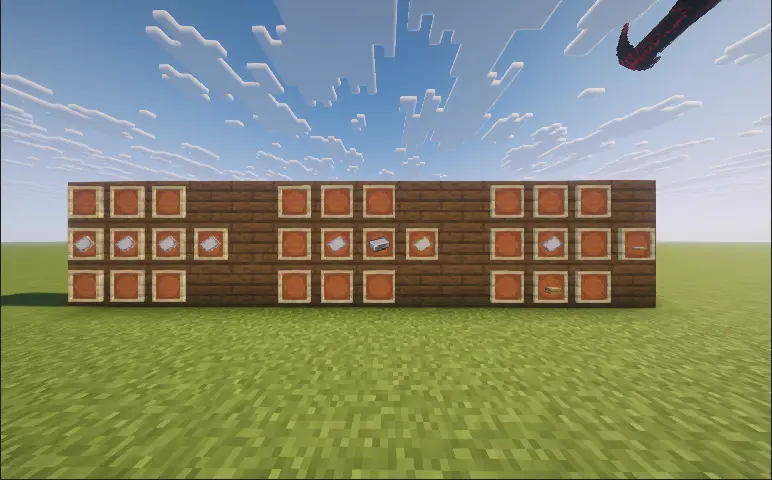
- You can register supported mounts and companions from vanilla Minecraft or other mods with Find Me, then quickly summon, switch, or recall them using radial wheels.
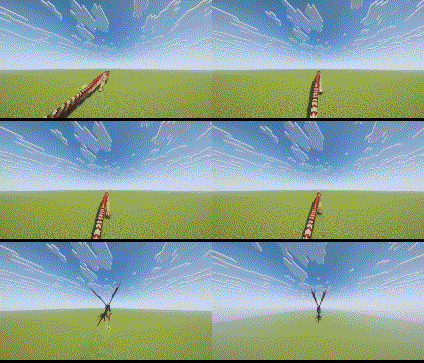
- Land, flying, and aquatic creatures use different approach animations when summoned;
- When switching mounts, the previous mount leaves while the new one actively approaches;
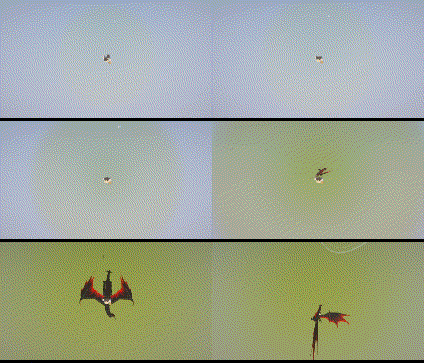
- When falling from a great height, players can also call a mount for an aerial rescue.
Main Features
- Issue follow, wait, guard, protect, and attack commands to individual creatures or entire teams;
- Use the Manager to organize teams, storage, and radial wheel slots;
- Assign companions to Nests and set them to rest, wander, or guard;
- Registered creatures are protected from fatal damage by entering a critical state. Stored creatures recover health over time, while critically injured creatures can recuperate inside a Nest;
- Whenever a player wakes up, there is a chance that one eligible dead creature will be revived;
- Bind supported vehicles using the Vehicle Binder. Aeronautics vehicles require a Locator Seat to determine which seat will be used when summoned;
- Optional friendly-fire protection and companion block protection prevent accidental attacks and damage to your home.
Controls
- Right-click an eligible creature with a “Name Paper” to register it with Find Me;
- Right-click a supported vehicle with a “Vehicle Binder” to register it with Find Me;
- Right-click a Nest, then click or drag creatures from the list on the right to assign them to it.
- R: Press to summon or switch the active mount. Hold to open the mount wheel. It can also trigger a rescue while falling;
- V: Press to summon or switch the active companion. Hold to open the companion wheel;
- G: Open the Find Me Manager;
- While the wheel is open, point at a creature and right-click to open its individual command wheel;
- Middle-click while the wheel is open to access commands for the entire team.
Command System
- Follow Me: The creature follows the player. Flying creatures will follow from the air;
- Wait Here: The creature remains at its current position and stops following the player;
- Move Forward: The creature continuously moves forward. Press the corresponding summon key again to teleport to its current location, after which the creature will be stored;
- Move to Crosshair: The creature moves to the location targeted by the player’s crosshair;
- Guard Here: The creature guards the designated area and attacks nearby hostile targets;
- Protect Me: The creature follows and protects the player, attacking anything that threatens them;
- Attack Target: Orders the creature to attack the target currently selected by the player;
- Land: Orders a flying creature to find a suitable landing location;
- Ride Home: Summons a mount assigned to a Nest and has it carry the player back to that Nest;
- Teleport: Opens the Waystones destination list. After selecting a destination, the player and their current mount will teleport together. Requires Waystones;
- Stop Action: Immediately cancels the creature’s current command;
- Team Follow: All available creatures in the current team follow the player;
- Team Guard: All available creatures in the current team guard the designated area;
- Team Protect: All available creatures in the current team protect the player;
- Team Attack: All available creatures in the current team attack the designated target;
- Store Team: Stores all currently deployed creatures in the current team.
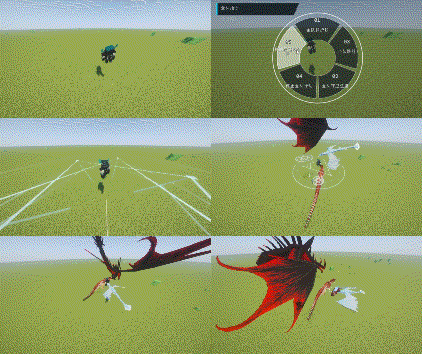
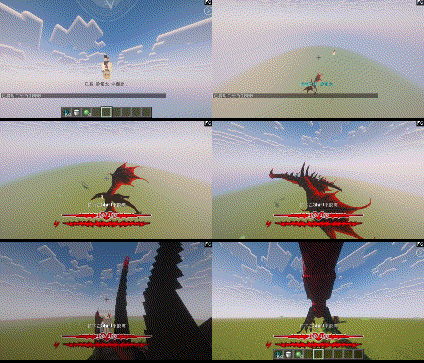
Manager and Nests
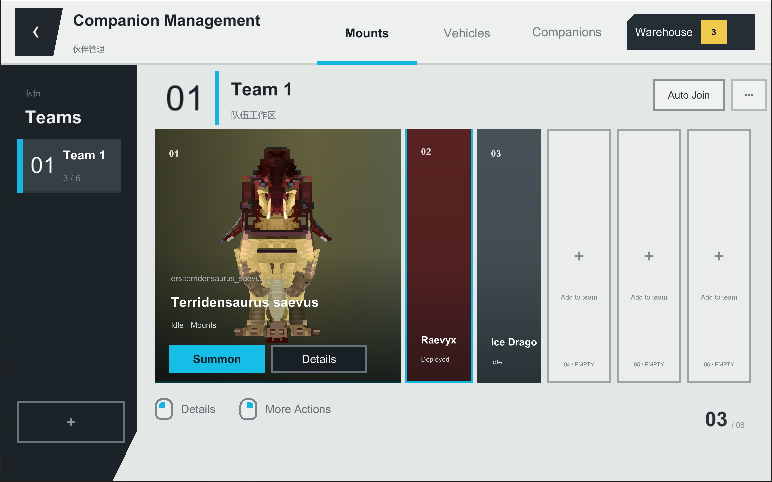
- The Manager allows you to create and organize teams, search for creatures, move storage members, assign radial wheel slots, and inspect models, health, locations, current states, and recovery records.
- Each Nest has its own capacity, wandering range, and maximum activity boundary. Companions assigned to a Nest can rest, wander, or work together to defend the surrounding area.
- If a creature enters a critical state while assigned to a Nest, it will automatically recuperate and reappear once its health has been fully restored.
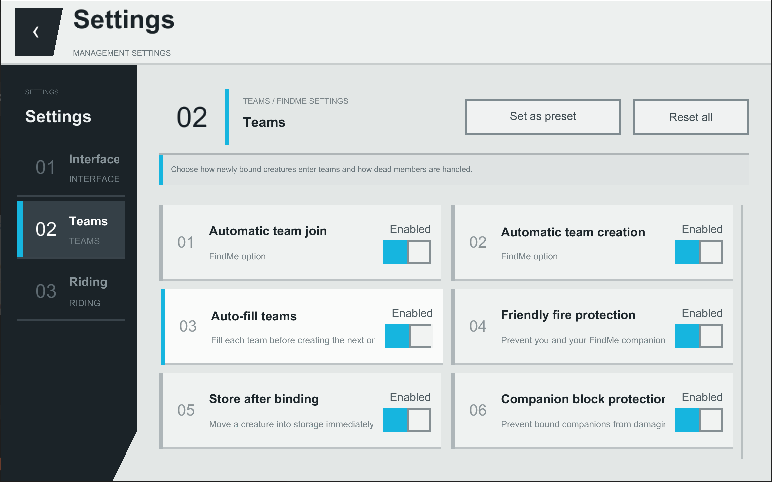
Player Settings
- Players can configure summon animations, creature sounds, wheel styles, interface animations, opacity, fonts, text size, the companion status HUD, riding camera behavior, automatic team assignment, deployment limits, friendly-fire protection, and companion block protection.
- Servers can configure summon cooldowns, deployment limits, rescue heights, default Nest capacity and activity ranges, backups, and sleep revival probability and cooldown.
Commands
- /findme manage: Opens the Manager;
- /findme hud edit: Edits the position of the companion status HUD;
- /findme hud reset: Resets the HUD layout;
- /findme reload: Reloads creature compatibility presets. Administrator permission required;
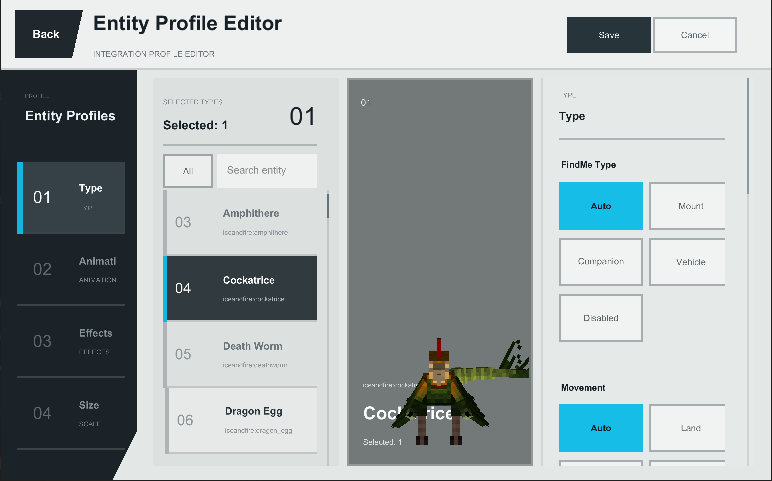
- /findme editor: Opens the visual compatibility editor, where creature categories, movement types, binding requirements, and other compatibility data can be configured;
- /findme tame: Force-tames the creature under the crosshair or a specified creature. Administrator permission required.
Mod Compatibility
- Find Me uses general-purpose entity logic to support many vanilla and modded creatures, with dedicated compatibility handling for Ice and Fire, Saint’s Dragons, and selected other mods.
- Ownership, animation, flight, and riding implementations differ greatly between mods. Modpack creators can use the built-in editor and entity presets to configure compatibility for individual creatures.
- Important Notes
- ApricityUI 1.2.0 or later must be installed on the client.
- For multiplayer, Find Me must be installed on both the server and every client.
- Before updating the mod, exit the world normally and keep a backup of your save.
- Frequently Asked Questions
- Why does a tamed creature not appear in the radial wheel?
- Find Me does not automatically register tamed creatures. Craft a “Name Paper” using 3 pieces of paper, then right-click the creature while holding it.
- How do I summon a registered creature?
- Hold R to open the mount wheel or hold V to open the companion wheel. Move the mouse to select a creature, then left-click.
- How do I issue commands to one creature or an entire team?
- Open the companion wheel, point at a creature, and right-click to open its individual command wheel. Middle-click within the companion wheel to open the command wheel for the current team.
- Why can’t I summon every companion in a team at once?
- Only registered companions that meet the deployment requirements will respond. By default, a player can deploy up to 2 companions at once. This can be adjusted under G → Settings.
- Why does right-clicking always mount a creature instead of feeding it or opening its original interface?
- The current version normally prioritizes the creature’s original right-click interaction. You can also check “Prioritize Native Mount Interaction” in the player settings. If the problem persists, please report the creature’s entity ID and attach your latest.log.
- How do I register a vehicle?
- Name Paper is used for creatures. Craft a “Vehicle Binder” using 1 Name Paper and 1 Iron Ingot, then right-click the vehicle. Some vehicles may require dedicated compatibility support. When reporting an issue, include the vehicle mod and entity ID.
- Can creatures that cannot normally be tamed still be registered?
- Modpack creators and administrators can use /findme editor, configure the relevant entity category, and set its binding requirement to “Ignore.”
- What should I do if a creature dies, turns red, or the server shuts down unexpectedly?
- Press G to open the Manager, then inspect the Backup page and restore a verified backup. It is recommended to back up the world before doing so.
- Is there a Fabric version?
- There is currently no official Fabric version. A port is planned after the Forge version is more complete.
- What should I do if the game reports a missing dependency or crashes during startup?
- The current version requires ApricityUI 1.2.0 or later. When reporting startup issues, include your Find Me version, ApricityUI version, and latest.log.
Feedback and Suggestions
If you encounter a problem or would like to request compatibility for a creature, please submit an issue here:
https://github.com/Ku00115/find-me-1.3/issues
Author’s Note
- Find Me aims to ensure that mounts and companions from every mod are no longer forgotten somewhere in the world, but instead become genuine members of the player’s journey.
- Creature implementations vary greatly between mods. Thank you to everyone who helps test the mod and provides detailed reports, logs, and suggestions.
Последние версии
Все версии →release
Find me 1.3.3
1.3.316 авг. 2026 г.5,1 тыс.Minecraft: 1.20.1, 1.20.2, 1.20.3, 1.20.4, 1.20.5, 1.20.6forge
release
Find me 1.2.3
1.2.36 июл. 2026 г.3,1 тыс.Minecraft: 1.20.1forge
release
Find me 1.2.3(Create: Aeronautics Beta)
1.2.35 июл. 2026 г.2 тыс.Minecraft: 1.21.1neoforge
Что нового
Compatible with Create: Aeronautics.
Uses the Sable Schematic Tool API, so to use this feature you need to download the Sable Schematic Tool mod.
Since it's a test, stability isn't guaranteed, so it's recommended to back up before downloading and using it.
release
Find me 1.2.3
1.2.35 июл. 2026 г.127Minecraft: 1.21.1neoforge
release
Find me 1.2.2
1.2.24 июл. 2026 г.108Minecraft: 1.20.1forge
Что нового
## Version 1.2.2
### New: Name Paper Manual Binding
- Added Name Paper as the main manual binding item for creatures.
- Name Paper is crafted from three pieces of paper.
- A successful non-creative binding consumes one Name Paper.
- Manual binding is now the recommended way to add creatures.
- Automatic binding is disabled by default and can be re-enabled in config.
- Binding now blocks invalid targets more reliably, so unrelated creatures are less likely to be added by mistake.
### Binding Ceremony And Magic Effects
- Added an optional Name Paper contract ceremony.
- The ceremony can use a temporary cinematic camera.
- Ceremony effects include hexagram-style magic circles, contract visuals, warding effects, and storage-style completion.
- Ceremony animation and cinematic camera can be disabled in config.
- Binding visuals were cleaned up by removing older effects that looked noisy or unclear.
### Summon, Rescue, And Storage Visuals
- Added reusable magic-circle rendering for summon, rescue, storage, and binding effects.
- Mount summons usually use a vertical portal-style circle.
- Companion summons and companion rescue use horizontal ground circles.
- Rescue effects are brighter and faster than normal summons.
- Storage now uses a wrapping magic effect instead of an instant disappearance.
- Magic-circle colors now stay in a white/blue range with brightness changes instead of shifting through unrelated colors.
- Summon and rescue effects now try to appear before the creature becomes visible.
- Magic-circle size now uses visual bounds so large creatures receive larger circles.
### Dialogue And Feedback
- Added optional small subtitle dialogue for summon, rescue, storage, home, registration, cooldowns, and warnings.
- Dialogue is disabled by default.
- When dialogue is disabled, Find me falls back to practical action-bar style messages.
- Dialogue text is configurable through Forge config.
- Dialogue entries support placeholders such as `{player}`, `{name}`, and `{seconds}` where applicable.
- Creature arrival voice and magic effect volume are configurable separately.
### Small House / Home System
- Added the Small House block for home management.
- Small House is crafted with Name Paper and any wooden slab.
- Right-clicking a Small House opens the manager in home mode.
- Creatures can be assigned to that house as their home.
- Home-bound creatures show an `H` marker in the wheel and lists.
- Storing a home-bound creature returns it home when possible.
- If the home area is loaded and valid, creatures may appear near the Small House as residents.
- Breaking the exact Small House clears the house marker for affected online players without deleting the creature.
### Companion And Mount Improvements
- Companion deployment limit is enforced at the server state, not just the UI.
- Companion rescue is focused on combat rescue behavior.
- Rescue protection now reduces cases where the player or companion dies immediately after a rescue.
- Flying mount rescue and void handling were made stricter and safer.
- Flying mounts can be summoned directly in unsafe void conditions; non-flying mounts and companions refuse.
- Mount switching was revised to avoid dismount/remount jitter and to keep old rides safe until the new ride succeeds.
- Large and multipart mounts have improved contact-box handling.
### UI / UX Improvements
- Added blacklist controls for entity types.
- Improved manager context menus, rename overlays, search layout, and home actions.
- The manager no longer shows old home action buttons in places where Small House mode owns those actions.
- Wheels show home markers and better active/summon/store state.
- Preview rendering now caches entities more effectively and supports non-living vehicle previews used later in 1.2.3.
### Safety, Recovery, And Compatibility
- Improved player data copy handling for dimension return and clone-like situations.
- Added stronger backup/vault style recovery tools and safety checks.
- Sleep revive was moved to wake-up event handling for more reliable timing.
- External owned-entity recreation from other mods is handled more defensively.
- Stored entity NBT is cleaned so temporary animation, invisible, no-gravity, and NoAI states are not saved into long-term data.
- Restore logic avoids deleting stored NBT unless the entity was actually added successfully or a loaded same-UUID entity was safely reused.
- Added diagnostics config for contact boxes and Find me state debugging.
release
Find me 1.2
1.2.114 июн. 2026 г.8 тыс.Minecraft: 1.20.1forge
Что нового
Fixed the issue where keys couldn't be bound.
release
Find me 1.2
1.213 июн. 2026 г.59Minecraft: 1.20.1forge
Что нового
# Find me 1.2 Changelog
## Safety & Recovery
- Added Vault: saves creature snapshots before high‑risk operations such as deletion or death migration.
- Added Auto Backup: by default, backs up player companion, mount, death list, and radial menu data every 30 minutes.
- Added Resurrect on Wake Up: creatures in the death list have a chance to return to the list or appear nearby when the player wakes up after sleeping.
- Companions and mounts now regenerate health over time after being recalled.
## Death & Loss Protection
- Reduced the risk of creatures disappearing unexpectedly from radial menus or lists.
- Dead creatures now go into the death list and no longer occupy companion or mount radial slots.
- Fixed issues where some death, deletion, or switching flows could incorrectly move creatures into the death list or prevent deletion.
## Summoning & Switching
- Improved mount switching, reducing cases where the old mount disappears too early or the player falls.
- When switching from a flying mount to a land/water mount mid‑air, the new mount now preferentially spawns on suitable ground.
- The new mount accelerates toward the player based on the player‘s movement speed; if it fails to catch up for a long time, a fallback acceleration is applied.
- Optimised pre‑summon space checking, reducing cases where summoning fails despite there being available space.
## GUI Improvements
- Management GUI, detail screens, death list, and ignore list now use adaptive layouts.
- Added fade‑in animations to the management GUI and radial menus.
- Improved radial menu model positioning to reduce models blocking the name or health bar.
- Fixed overlapping between note popups, right‑click menu text, and the background list.
- Adjusted some colors and transparency for a more unified interface style.
## Commands & Configuration
- All commands have been unified under `/findme`.
- Streamlined public commands, keeping only the most frequently used ones: list, summon, recall, delete, vault restore, and backup restore.
- Reorganised and clarified the config options; kept compatibility with old config key names.
release
Find me 1.1
1.113 июн. 2026 г.23Minecraft: 1.20.1forge
Что нового
# Find me Changelog
## 1.1 Hotfix - 2026-06-13
### Death List
- When a creature dies, it is no longer kept in the companion/mount radial menus, but moved to the death list.
- Dead creatures are displayed as a greyed-out preview of the original model, with the name formatted as `Name (Dead)`.
- The death list has its own GUI that can be opened separately.
- In the death list, left-click to open a preview as it appeared when alive; right-click to edit or remove the entry directly from the death list.
- Fixed issues where dead creatures could not be deleted from either the management list or the death list.
- Added compatibility for mods that replace a dead creature with a corpse entity, reducing false positives where living creatures are mistakenly added to the death list.
### Mount Switching & Rescue
- When switching mounts, the old mount is no longer recalled before the player actually mounts the new one, preventing the player from falling.
- Fixed issues where large / multi‑part mounts could prematurely trigger switching due to collisions between their head/tail and other mounts.
- Mount collision detection now more accurately checks the entity body, parts, and custom contact segments near the player, reducing false triggers on large dragons.
- When switching mounts mid‑air, the new mount accelerates toward the player based on the player’s actual movement speed.
- Speed detection no longer relies solely on `DeltaMovement`; the player’s real horizontal displacement between the previous tick and the current tick is the primary factor, improving compatibility with special flying mounts.
- Default approach speed for flying mounts has been increased.
- If the mount has not caught up to the player after 5 seconds, approach speed is boosted to 3x as a fallback.
- Increased the timeout for failed mount switching, so the fallback acceleration has time to trigger before the switch fails.
- Fixed a risk where the previous mount would disappear from the radial menu or be incorrectly moved to the death list after a switch.
- Retained automatic dismount (shift) as a last‑resort measure, but prevented it from triggering too early and interfering with normal switches.
### Summoning & Recalling
- Space checking before summoning/switching now calculates the actual target point first, then checks whether that point is suitable.
- When the target point lacks space, the mod searches for a nearby usable location, reducing cases where summoning fails even though a valid spot exists.
- Switching from a flying mount to a land/aquatic mount in mid‑air now follows a logic similar to rescue: the new mount spawns at an appropriate location and then approaches the player.
- Fixed an issue where some land pets would spawn next to the player mid‑air and fall straight down after a switch.
### Preview GUI
- The radial menu preview now reuses the same rendering method as the management GUI, reducing inconsistencies between different interfaces.
- Preview entities are frozen on the first idle frame, reducing twitching of heads, bodies, or parts.
- The preview now strips dynamic state NBT such as position, velocity, passenger, vehicle, leash, and UUID, preventing live state from polluting the preview.
- For Saints Dragons, a cleaner display NBT is used, reducing jitter caused by live or mounted states.
- For Ice and Fire dragons (fire, ice, lightning), added a fallback preview scale for large creatures, preventing the name from being obscured or the model from being too large to see.
- The detail preview area has been enlarged, and the camera drag range has been expanded.
- Right‑click drag now rotates the camera view, and the drag direction has been corrected.
### Management GUI & Display
- The death list GUI now uses a softer, more transparent colour scheme.
- The GUI layout is now dynamic, preventing the interface from covering text below it while maintaining a gap from the bottom of the screen.
- Fixed name truncation issues when names are too long.
- When using a custom note, the background text is now obscured, preventing the note layer and the text behind it from overlapping.
### Commands & Debug
- Added a command to directly tame the target creature, making it easier to test creatures from other mods.
- Fixed an issue where previously added commands could not be used in‑game.
### Compatibility Adjustments
- Removed the special prefix‑based handling for large Saint's Dragons models, preferring to use general size/collision logic.
- Collision detection for large, multi‑part entities has been generalised, reducing reliance on entity name keywords.
- Mount classification now increasingly trusts actual behaviour: a creature is automatically added to mount logic only if the player has actually ridden it.
- Flying/swimming detection now prioritises entity class, behaviour, and aquatic classification, using configuration only as a fallback.
### Known Notes
- Some mod mounts that completely bypass vanilla riding, movement, or collision logic may still require manual configuration.
- Preview of large multi‑part creatures may still be affected by the mod’s own animation system, but dynamic states have been cleaned as much as possible and jitter reduced.
- `src.zip` is a local untracked backup file; this update does not modify it.
release
Find me 1.0.0
1.0.011 июн. 2026 г.34Minecraft: 1.20.1forge