COWMODSКаталог модов

Create: Colored Connections

Colorize Factory Gauge recipe links with the 16 vanilla dyes to keep crossed connections readable.

Автор: Rlosking-C1,4 тыс.8обновлён 13 окт. 2026 г.
Технологии

Описание

Colorize the recipe-mode connection lines of Create's Factory Gauges with the 16 vanilla dyes, so that heavily crossed networks stay readable at a glance.

Client + server addon — in multiplayer, install it on both sides; the server stores the colors and syncs them to everyone.
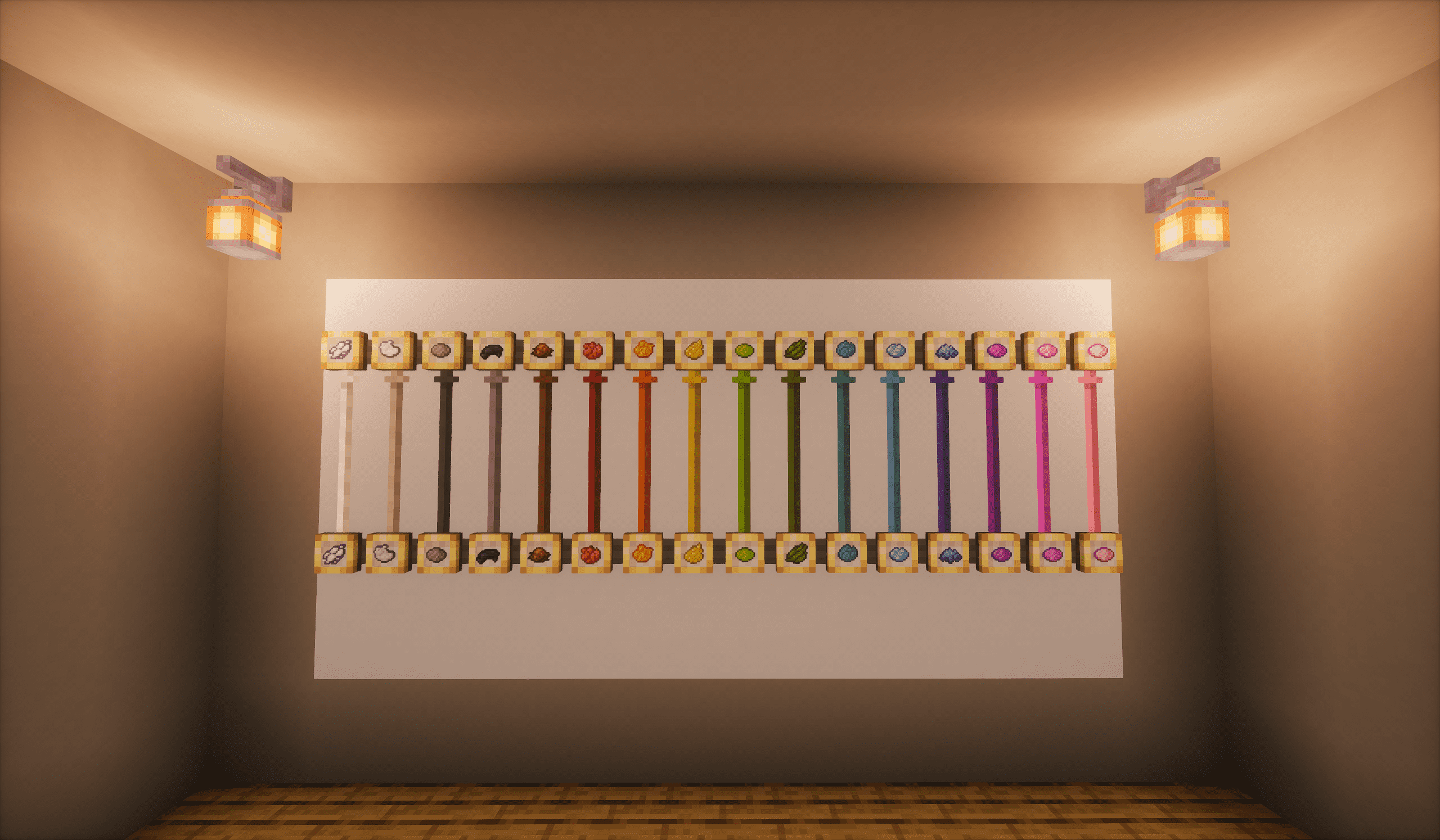
all-16-colors

Features

  • Right-click a link with any dye to color it. Lines are drawn on the wall between gauges — point at the line itself, not the gauge panel. By default the dye is never consumed — not even in survival mode — so recolor as often as you like (a config option can make dyeing cost one dye per action).
  • Black dye = reset. Restores the vanilla status color.
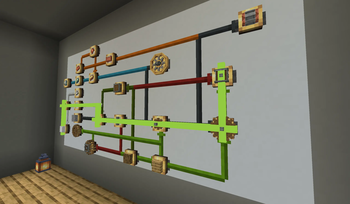
  • Path dyeing. Shift+right-click a gauge to start a path, then simply sweep your crosshair over further gauges: each one joins the chain, connected to the previous gauge along its own shortest route — the sweep decides the branch, so the dyed path is exactly the route you traced. While building, every pending link carries a floating green beam. Hover the last gauge again to undo it, right-click the last gauge to dye the whole chain in one action, right-click anywhere else to cancel.
  • Tactile feedback. A successful dyeing plays the same sound Create uses when two gauges link, plus a small puff of dust in the applied dye's color.
  • Smart inheritance. A newly created link inherits the source gauge's incoming color — but only when all incoming links share exactly one color. Mixed or uncolored inputs stay vanilla.
  • Status colors stay intact. Idle lines are fully dyed; active lines (in progress / satisfied / failed / flashing) keep their vanilla status-colored core and gain a thin 1px dye border on each side. Animations like the scrolling texture and restock flashing are untouched.
  • Hover lift. Looking at any link smoothly lifts the whole line above its neighbors (a few microns — only the occlusion order changes), so you can always tell which line is which where links cross or overlap.
  • Sticky hover. Once a line is hovered it stays picked while the crosshair is on it; small mouse movements over crossing or overlapping lines no longer make the highlight jump between them. The dye click targets exactly the line that is lifted on screen.
  • Goggles tracing. Wearing Create's Engineer's Goggles and hovering a dyed link highlights the whole same-colored group and dims that factory's other links, and adds a summary and per-state counts to Create's goggle overlay. The highlight itself is a client-side overlay (the addon still needs to be installed on both sides so colors save and sync); switchable in the config, with an adjustable trigger distance.
  • Link lines are never dyed. Redstone and display link lines carry status semantics in their color and are left fully vanilla.
  • Create: Factory Controller integration (optional). With Factory Controller 1.2.1 or newer installed, its virtual logistics wires become dyeable right inside the GUI — same pick-up-a-dye gesture as in the world — and link colors survive blueprint export and import. Only logistics (ingredient) wires are dyeable; number and redstone wires stay vanilla.

Colors are stored per dimension in the world save, survive panel relocation, and sync to every player automatically — on login, dimension change, and chunk load. An optional config file covers the extras: dye consumption (off by default), the one-time first-gauge hint, the feedback effects, and the hover lift. Nothing to set up, no commands — just vanilla dye mechanics.

Requirements

This page ships two branches. Pick the file that matches your game version.

Minecraft 1.21.1 · NeoForge

  • File: the 0.5.0 build (create-colored-connections-0.5.0.jar)
  • Requires: NeoForge 21.1.x, Java 21, and Create 6.0.10 or newer (the 1.21.1 line)
  • Optional: Create: Factory Controller 1.2.1 or newer

Minecraft 1.20.1 · Forge

  • File: the 1.20.1-0.5.0 build (create-colored-connections-1.20.1-0.5.0.jar)
  • Requires: Forge 47.x, Java 17, and Create 6.0.0 – 6.0.8 for 1.20.1 — 6.0.8 is the newest 1.20.1 build; 6.0.9 / 6.0.10 are 1.21.1-only
  • Optional: Create: Factory Controller 1.2.1 or newer
  • Playing with Factory Controller too? Its wires become dyeable in the controller GUI — but Factory Controller itself needs Create 6.0.3 or newer. On Create 6.0.0 - 6.0.2 its own mixins fail to load, so use 6.0.3 or newer to get both.

Install on both client and server for multiplayer.

About the two branches

The 1.20.1 Forge build is a port of the 1.21.1 NeoForge original, at feature parity: dyeing, path dyeing, hover lift, sticky hover, status-color preservation, color inheritance, and per-dimension color storage with multiplayer sync. Colors live in the world save per dimension, so each branch reads the worlds it created. The only differences are the loader, the required Create build (6.0.10+ on 1.21.1; 6.0.0 – 6.0.8 on 1.20.1, see the Factory Controller note above), and the Java version (21 vs 17).

Галерея
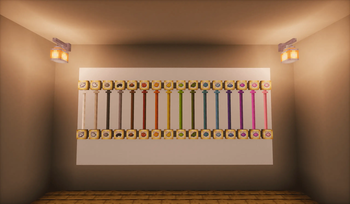
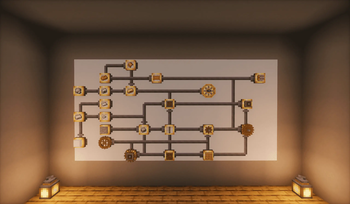
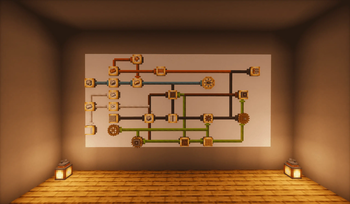
All 16 dye colorsVanilla gauge networkColor-coded gauge networkGreen preview line

Последние версии

Все версии →
release

Create: Colored Connections 1.20.1-0.5.1

1.20.1-0.5.1
13 окт. 2026 г.94Minecraft: 1.20.1forge
Скачать
Что нового
# 1.20.1-0.5.1 - Create: Extra Gauges support.
release

Create: Colored Connections 0.5.1

0.5.1
13 окт. 2026 г.493Minecraft: 1.21.1neoforge
Скачать
Что нового
# 0.5.1 - Create: Extra Gauges support.
release

Minecraft 1.20.1 · Forge build

1.20.1-0.5.0
27 сент. 2026 г.46Minecraft: 1.20.1forge
Скачать
Что нового
## Added - **Minecraft 1.20.1 / Forge build.** Feature parity with the 1.21.1 NeoForge build: dyeing, path dyeing, hover lift, sticky hover, status-color preservation, color inheritance, and per-dimension color storage with multiplayer sync. - Create: Factory Controller integration on this branch as well — with Factory Controller 1.2.1 or newer installed, its virtual logistics wires become dyeable inside the controller GUI, and link colors survive blueprint export and import. ## Notes - Needs **Forge 47.x, Java 17**, and **Create 6.0.0 – 6.0.8** for 1.20.1 (6.0.8 is the newest 1.20.1 build; 6.0.9 / 6.0.10 are 1.21.1-only). The mod version reads `1.20.1-0.5.0`. - **Playing with Factory Controller too?** Its wires become dyeable in the controller GUI — but Factory Controller itself needs **Create 6.0.3 or newer**, because on Create 6.0.0 - 6.0.2 its own mixins fail to load. - Colors are stored per dimension in the world save, so each branch reads the worlds it created.
release

Create: Colored Connections 0.5.0

0.5.0
24 сент. 2026 г.378Minecraft: 1.21.1neoforge
Скачать
Что нового
### Compatibility - Create 6.0.10 is now the minimum supported version. - Create: Factory Controller remains optional: without it, or below 1.2.1, the integration stays off. ### Configuration - Config split into `create_colored_connections-common.toml` (server) and `create_colored_connections-client.toml` (client), so in-game config editors list both. Existing files migrate automatically. - Config option names and descriptions are now translated. ### Dyeing - Dyeing uses the vanilla use action. It does not open the gauge panel and does not place a block. - Path dyeing follows Create's connection controls: Shift+right-click cancels, right-click on a gauge appends, right-click on the start gauge or on any non-gauge cancels. - A pending path shows an action-bar hint and a blinking outline on the gauge the next click would confirm. - A gauge that cannot join reports the reason in red, with Create's deny sound. - Create's gauge hover tip is hidden while a path is pending. ### Rendering - Preview beams are 1 px wide and no longer overlap; crossings and gauge turns render as clean lines. - Dyed right-angle corners no longer show a stepped patch over the vanilla line. - The dye border samples the line texture at 1:1, matching the vanilla line's pattern density. ### Languages - Added Russian, German, French, Japanese, Korean, Brazilian Portuguese and European Spanish. - Terminology follows Create's translations and vanilla's dye and colour names. - Fixed the goggles trace readout detaching from its item icon in longer languages. - The action-bar path hint is shortened to fit every language.
release

Create: Colored Connections 0.4.1

0.4.1
13 сент. 2026 г.157Minecraft: 1.21.1neoforge
Скачать
Что нового
# 0.4.1 * Special thanks to [flamemaster396](https://www.curseforge.com/members/flamemaster396/projects) for suggesting this feature! * Factory Controller compatibility (optional): when [Factory Controller](https://modrinth.com/mod/create-factory-controller) 1.2.1+ is installed, its virtual connection wires become dyeable too. Older Factory Controller versions disable the integration cleanly — wires stay vanilla, nothing crashes. * Dye wires inside the Factory Controller GUI: pick a dye up onto the cursor and right-click a hovered logistics wire to color it — the same pick-up-and-apply gesture as on the world side (a dye in the main hand works as a fallback). Black dye clears the color, the dye is never consumed, and the client-side dyeing config option carries over. * The GUI rendering mirrors the world side: idle wires take the dye color over their whole line, active wires keep their vanilla status core and flash animations and gain a textured 2px dye border per side — the same border-to-core proportion as a dyed wall link, reusing Factory Controller's own connection textures. * Hovering keeps both: the dye look stays while Factory Controller's white highlight bar still marks the hovered wire. The wire's hover tooltip (after Factory Controller's hover delay) gains a dye line showing the applied dye, its name rendered in the dye's own color. * Blueprint import carries colors: scanning wall gauges with a blueprint and quill keeps their link colors when the board is imported into the Factory Controller GUI. Colors also survive saving a board as a blueprint and placing that blueprint into another controller. * Only logistics (ingredient) wires are dyeable — number and redstone wires are left fully vanilla, mirroring the world-side rule that status-semantic lines stay untouched.
release

Create: Colored Connections 0.3.0

0.3.0
3 сент. 2026 г.170Minecraft: 1.21.1neoforge
Скачать
Что нового
- Goggles tracing: while wearing Engineer's Goggles, resting the crosshair on a dyed link lights up its whole color group — the "read your network" tool for dense factories. - The highlight follows the crosshair: switching to a different color (or the same color in another factory) cross-fades — the old group dims out on the fade-out curve while the new one lights up on the fade-in curve — and the highlight smoothly fades out as soon as the crosshair leaves the dyed links. - Graying stays inside the hovered link's factory: other color groups in the same network dim to gray, while other factories render completely untouched. - The trace readout is appended straight into Create's own goggle overlay. - When every gauge in the group requests the same item, a yellow line shows the group's shortage: how many more items it still needs (target − in storage − in transit), the shopping list for restocking runs — stack mode ("stacks" row) gauges count full stacks, exactly like the game's own requests. - Status counters hide zero values and lead with what matters: failed (red) first, then running, idle and met counts. A yellow warning (Create's own wording) appears when some stock links sit in unloaded chunks. - Status counts match what the network is doing: links with shipments in transit are running, satisfied (green) ones are done, red restock flashes are failed, and everything else — including outstanding requests with nothing moving — is idle. - Tracing is per-player in multiplayer: entirely client-side, no network traffic, two players can trace different colors of the same network. - New config options: gogglesTracing, traceDistance, traceHud.
release

Create: Colored Connections 0.2.0

0.2.0
25 авг. 2026 г.10Minecraft: 1.21.1neoforge
Скачать
Что нового
New in 0.2.0 - Path dyeing — shift+right-click a gauge to start a path, then simply sweep your crosshair over further gauges: each one joins the chain along its own shortest route, so the dyed path is exactly the route you traced. Hover the last gauge again to undo it, right-click the last gauge to dye the whole chain, right-click anywhere else to cancel. While building, every pending link carries a floating green beam. - Tactile feedback — a successful dyeing plays the same sound Create uses when two gauges link, plus a small trail of dye-colored dust along the dyed line. - Config file (config/create_colored_connections-common.toml) — dye consumption (off by default; when enabled, one dye per action rather than per link, survival only), the first-use hint, feedback effects, and hover lift. - First-use hint — placing your first factory gauge briefly explains dyeing and path dyeing in chat, exactly once.
release

Create: Colored Connections 0.1.1

0.1.1
24 авг. 2026 г.6Minecraft: 1.21.1neoforge
Скачать
Что нового
Right-click a link with any dye to color it. Lines are drawn on the wall between gauges — point at the line itself, not the gauge panel. The dye is never consumed — not even in survival mode — so recolor as often as you like.
release

Create: Colored Connections 0.1.0

0.1.0
23 авг. 2026 г.9Minecraft: 1.21.1neoforge
Скачать
Что нового
Initial release. - Dye Factory Gauge recipe links with any of the 16 vanilla dyes; black dye resets to the vanilla color. - New links inherit the source gauge's color when all incoming links share a single color. - Status-colored lines keep their vanilla core and gain a thin dye border; animations are untouched. - Hovered links lift above their neighbors to stay distinguishable at crossings; hover picking is sticky, so crossing lines no longer flip the highlight on tiny mouse movements. - Redstone and display link lines are never dyed.