
ChatSphereСкачатьСкачатьСкачатьСкачатьСкачатьСкачатьСкачатьСкачатьСкачатьСкачатьСкачатьСкачатьСкачатьСкачатьСкачатьСкачатьСкачатьСкачатьСкачатьСкачатьСкачатьСкачатьСкачатьСкачатьСкачатьСкачатьСкачатьСкачатьСкачатьСкачатьСкачатьСкачатьСкачатьСкачатьСкачать
ВЕРСИИ (35)
release
ChatSphere 2.5.2-1.20.1
2.5.22 нояб. 2026 г.8Minecraft: 1.20.1forge
Что нового
## 2.5.2
### Changed
- A channel with sub-channels now keeps main chat off and opens on its first sub-channel
- The default sub-channel can be changed in the channel settings, or typed while creating the channel
- The explore screen lists each public channel with its icon, before you join it
### Fixed
- The channel template's description, main chat switch and default sub-channel now reach the created channel
- Deleting or leaving a channel no longer leaves an empty channel info panel behind
- Deleting a channel now clears its history, so a channel created under the same name starts empty
- Deleting or leaving the channel you are reading switches you back to the default channel
release
ChatSphere 2.5.2-1.20.1
2.5.22 нояб. 2026 г.5Minecraft: 1.20.1fabric
Что нового
## 2.5.2
### Changed
- A channel with sub-channels now keeps main chat off and opens on its first sub-channel
- The default sub-channel can be changed in the channel settings, or typed while creating the channel
- The explore screen lists each public channel with its icon, before you join it
### Fixed
- The channel template's description, main chat switch and default sub-channel now reach the created channel
- Deleting or leaving a channel no longer leaves an empty channel info panel behind
- Deleting a channel now clears its history, so a channel created under the same name starts empty
- Deleting or leaving the channel you are reading switches you back to the default channel
release
ChatSphere 2.5.2
2.5.22 нояб. 2026 г.9Minecraft: 1.21.1fabric
Что нового
## 2.5.2
### Changed
- A channel with sub-channels now keeps main chat off and opens on its first sub-channel
- The default sub-channel can be changed in the channel settings, or typed while creating the channel
- The explore screen lists each public channel with its icon, before you join it
### Fixed
- The channel template's description, main chat switch and default sub-channel now reach the created channel
- Deleting or leaving a channel no longer leaves an empty channel info panel behind
- Deleting a channel now clears its history, so a channel created under the same name starts empty
- Deleting or leaving the channel you are reading switches you back to the default channel
release
ChatSphere 2.5.2
2.5.22 нояб. 2026 г.7Minecraft: 1.21.1neoforge
Что нового
## 2.5.2
### Changed
- A channel with sub-channels now keeps main chat off and opens on its first sub-channel
- The default sub-channel can be changed in the channel settings, or typed while creating the channel
- The explore screen lists each public channel with its icon, before you join it
### Fixed
- The channel template's description, main chat switch and default sub-channel now reach the created channel
- Deleting or leaving a channel no longer leaves an empty channel info panel behind
- Deleting a channel now clears its history, so a channel created under the same name starts empty
- Deleting or leaving the channel you are reading switches you back to the default channel
release
ChatSphere 2.5.1-1.20.1
2.5.11 нояб. 2026 г.6Minecraft: 1.20.1forge
Что нового

## 2.5.1
### Added
- Channel icons: the rail, sidebar, info header and explorer show the name initial until one is set
- Channel icons: drop a png/jpg on the icon row or paste a link, and a non-square image is centre-cropped
- Voice rooms get their own section under the channel tree, with the head count and each occupant listed under the room
### Changed
- Server config is split into General and Chat media, each page made of collapsible titled groups
- General holds chat, sync, voice, emoji and backup; Chat media holds link previews and chat images
- Sidebar channel rows keep their `#` prefix and show the icon once one is set
- Redrawn toolbar and panel icons; voice room rows use a speaker, voice messages a microphone
### Fixed
- An image URL that fails to download stays in the chat box, so it can be retried
- The viewer had no close button while the image was missing; that state now says how to leave
- The UI border setting turned itself back on after every restart
release
ChatSphere 2.5.1-1.20.1
2.5.11 нояб. 2026 г.4Minecraft: 1.20.1fabric
Что нового

## 2.5.1
### Added
- Channel icons: the rail, sidebar, info header and explorer show the name initial until one is set
- Channel icons: drop a png/jpg on the icon row or paste a link, and a non-square image is centre-cropped
- Voice rooms get their own section under the channel tree, with the head count and each occupant listed under the room
### Changed
- Server config is split into General and Chat media, each page made of collapsible titled groups
- General holds chat, sync, voice, emoji and backup; Chat media holds link previews and chat images
- Sidebar channel rows keep their `#` prefix and show the icon once one is set
- Redrawn toolbar and panel icons; voice room rows use a speaker, voice messages a microphone
### Fixed
- An image URL that fails to download stays in the chat box, so it can be retried
- The viewer had no close button while the image was missing; that state now says how to leave
- The UI border setting turned itself back on after every restart
release
ChatSphere 2.5.1
2.5.11 нояб. 2026 г.6Minecraft: 1.21.1fabric
Что нового

## 2.5.1
### Added
- Channel icons: the rail, sidebar, info header and explorer show the name initial until one is set
- Channel icons: drop a png/jpg on the icon row or paste a link, and a non-square image is centre-cropped
- Voice rooms get their own section under the channel tree, with the head count and each occupant listed under the room
### Changed
- Server config is split into General and Chat media, each page made of collapsible titled groups
- General holds chat, sync, voice, emoji and backup; Chat media holds link previews and chat images
- Sidebar channel rows keep their `#` prefix and show the icon once one is set
- Redrawn toolbar and panel icons; voice room rows use a speaker, voice messages a microphone
### Fixed
- An image URL that fails to download stays in the chat box, so it can be retried
- The viewer had no close button while the image was missing; that state now says how to leave
- The UI border setting turned itself back on after every restart
release
ChatSphere 2.5.1
2.5.11 нояб. 2026 г.4Minecraft: 1.21.1neoforge
Что нового

## 2.5.1
### Added
- Channel icons: the rail, sidebar, info header and explorer show the name initial until one is set
- Channel icons: drop a png/jpg on the icon row or paste a link, and a non-square image is centre-cropped
- Voice rooms get their own section under the channel tree, with the head count and each occupant listed under the room
### Changed
- Server config is split into General and Chat media, each page made of collapsible titled groups
- General holds chat, sync, voice, emoji and backup; Chat media holds link previews and chat images
- Sidebar channel rows keep their `#` prefix and show the icon once one is set
- Redrawn toolbar and panel icons; voice room rows use a speaker, voice messages a microphone
### Fixed
- An image URL that fails to download stays in the chat box, so it can be retried
- The viewer had no close button while the image was missing; that state now says how to leave
- The UI border setting turned itself back on after every restart
release
ChatSphere 2.5.0-1.20.1
2.5.08 окт. 2026 г.41Minecraft: 1.20.1forge
Что нового
## 2.5.0
### Added
- Link cards under messages: title, description and thumbnail, with three modes (off, text plus card, card only)
- Link previews are fetched only for messages on screen; the server can disable them or restrict the hosts
- Chat images: drag a png/jpg into the chat, or paste an image URL, and they load on demand from the server cache
- `[Image]` stands in wherever an image cannot be drawn, such as the HUD bubble and search results
- Client image settings, and a server Images category for size, dimensions, lifetime, cooldown and per-player cap
- Forge 1.20.1 support
### Fixed
- Console tabs keep the selected tab after a command is sent, and a tab edit refreshes the view
- The repeats counter sits on the left of console lines instead of running off the right edge
release
ChatSphere 2.5.0-1.20.1
2.5.08 окт. 2026 г.22Minecraft: 1.20.1fabric
Что нового
## 2.5.0
### Added
- Link cards under messages: title, description and thumbnail, with three modes (off, text plus card, card only)
- Link previews are fetched only for messages on screen; the server can disable them or restrict the hosts
- Chat images: drag a png/jpg into the chat, or paste an image URL, and they load on demand from the server cache
- `[Image]` stands in wherever an image cannot be drawn, such as the HUD bubble and search results
- Client image settings, and a server Images category for size, dimensions, lifetime, cooldown and per-player cap
- Forge 1.20.1 support
### Fixed
- Console tabs keep the selected tab after a command is sent, and a tab edit refreshes the view
- The repeats counter sits on the left of console lines instead of running off the right edge
release
ChatSphere 2.5.0
2.5.08 окт. 2026 г.20Minecraft: 1.21.1fabric
Что нового
## 2.5.0
### Added
- Link cards under messages: title, description and thumbnail, with three modes (off, text plus card, card only)
- Link previews are fetched only for messages on screen; the server can disable them or restrict the hosts
- Chat images: drag a png/jpg into the chat, or paste an image URL, and they load on demand from the server cache
- `[Image]` stands in wherever an image cannot be drawn, such as the HUD bubble and search results
- Client image settings, and a server Images category for size, dimensions, lifetime, cooldown and per-player cap
- Forge 1.20.1 support
### Fixed
- Console tabs keep the selected tab after a command is sent, and a tab edit refreshes the view
- The repeats counter sits on the left of console lines instead of running off the right edge
release
ChatSphere 2.5.0
2.5.08 окт. 2026 г.46Minecraft: 1.21.1neoforge
Что нового
## 2.5.0
### Added
- Link cards under messages: title, description and thumbnail, with three modes (off, text plus card, card only)
- Link previews are fetched only for messages on screen; the server can disable them or restrict the hosts
- Chat images: drag a png/jpg into the chat, or paste an image URL, and they load on demand from the server cache
- `[Image]` stands in wherever an image cannot be drawn, such as the HUD bubble and search results
- Client image settings, and a server Images category for size, dimensions, lifetime, cooldown and per-player cap
- Forge 1.20.1 support
### Fixed
- Console tabs keep the selected tab after a command is sent, and a tab edit refreshes the view
- The repeats counter sits on the left of console lines instead of running off the right edge
release
ChatSphere 2.4.1-1.20.1
2.4.130 сент. 2026 г.16Minecraft: 1.20.1fabric
Что нового
## 2.4.1
### Added
- Console tabs, off by default: split the console into tabs by regex
- Console tabs can be edited in the settings screen: name, regex, order, hide from All, live match count
### Fixed
- Arrow keys in the console cycle the command history again; ctrl+up/down moves through the suggestions
- The sub-channel parent picker listed channels from other trees, and its top entry tried to leave the tree; it now offers this channel plus same-tree parents
- Moving a sub-channel back up to its parent channel was refused, so nesting only ever worked downwards
- Console lines can no longer be quote replied from the right-click menu
- The local emoji list scrolls with the wheel and has a scrollbar
- Console search finds command output
- The item share picker, emoji and mention autocomplete and the quick phrase panel follow the corner style and popup border settings
- Buttons follow the corner style too
release
ChatSphere 2.4.1
2.4.130 сент. 2026 г.13Minecraft: 1.21.1fabric
Что нового
## 2.4.1
### Added
- Console tabs, off by default: split the console into tabs by regex
- Console tabs can be edited in the settings screen: name, regex, order, hide from All, live match count
### Fixed
- Arrow keys in the console cycle the command history again; ctrl+up/down moves through the suggestions
- The sub-channel parent picker listed channels from other trees, and its top entry tried to leave the tree; it now offers this channel plus same-tree parents
- Moving a sub-channel back up to its parent channel was refused, so nesting only ever worked downwards
- Console lines can no longer be quote replied from the right-click menu
- The local emoji list scrolls with the wheel and has a scrollbar
- Console search finds command output
- The item share picker, emoji and mention autocomplete and the quick phrase panel follow the corner style and popup border settings
- Buttons follow the corner style too
release
ChatSphere 2.4.1
2.4.130 сент. 2026 г.15Minecraft: 1.21.1neoforge
Что нового
## 2.4.1
### Added
- Console tabs, off by default: split the console into tabs by regex
- Console tabs can be edited in the settings screen: name, regex, order, hide from All, live match count
### Fixed
- Arrow keys in the console cycle the command history again; ctrl+up/down moves through the suggestions
- The sub-channel parent picker listed channels from other trees, and its top entry tried to leave the tree; it now offers this channel plus same-tree parents
- Moving a sub-channel back up to its parent channel was refused, so nesting only ever worked downwards
- Console lines can no longer be quote replied from the right-click menu
- The local emoji list scrolls with the wheel and has a scrollbar
- Console search finds command output
- The item share picker, emoji and mention autocomplete and the quick phrase panel follow the corner style and popup border settings
- Buttons follow the corner style too
release
ChatSphere 2.4.0-1.20.1
2.4.016 сент. 2026 г.24Minecraft: 1.20.1fabric
Что нового
## 2.4.0
### Added
- `/chatsphere doctor` data status: rows against the caps, file sizes, backups, Discord state
- `/chatsphere backup`, `backups`, `restore <timestamp>`, `purge <channel>`, `reload`
- Typing indicator, plus a notification level per conversation (all / mentions / muted), both configurable
- Channel history for players who join mid-session, and unread counts that survive a restart
- `inviteHistoryEnabled` server option: joining a channel delivers its stored history
- Create channel screen: three step wizard (template, basics, sub-channels) with templates that prefill the name and suggest sub-channels
- Client settings for the outside-chat HUD and the character cap per bubble
- HUD bubbles show custom emoji as `[emoji]` / `[animated emoji]` instead of the raw shortcode
- Optional Discord bridge: mirror one channel to Discord with a webhook, or both ways with a bot token (off by default)
### Changed
- Chat, console and channel writes are batched instead of one disk write per message
- Chat scrollback is never capped below the server's `maxChatHistory`
- Emoji uploads allow 512 KB, animated GIFs 320x320 / 60 frames, sprite sheets up to 8192 px
- Client settings page: notifications and HUD options have their own groups
### Fixed
- `/chatsphere info` showed the raw translation key instead of the label
- HUD unread badge could render underneath the chat icon while the count refreshed
- Channel info: the invite code no longer overlaps its label in longer languages
- The left rail and the sidebar scroll, so a long channel list no longer pushes the create button off screen
- Channel info: the owner gets a delete button instead of a leave button that did nothing
- Deleting a channel from its config screen no longer leaves the info panel open
- Custom skin API: avatars are fetched properly, and the refresh button updates every known player
release
ChatSphere 2.4.0
2.4.016 сент. 2026 г.26Minecraft: 1.21.1fabric
Что нового
## 2.4.0
### Added
- `/chatsphere doctor` data status: rows against the caps, file sizes, backups, Discord state
- `/chatsphere backup`, `backups`, `restore <timestamp>`, `purge <channel>`, `reload`
- Typing indicator, plus a notification level per conversation (all / mentions / muted), both configurable
- Channel history for players who join mid-session, and unread counts that survive a restart
- `inviteHistoryEnabled` server option: joining a channel delivers its stored history
- Create channel screen: three step wizard (template, basics, sub-channels) with templates that prefill the name and suggest sub-channels
- Client settings for the outside-chat HUD and the character cap per bubble
- HUD bubbles show custom emoji as `[emoji]` / `[animated emoji]` instead of the raw shortcode
- Optional Discord bridge: mirror one channel to Discord with a webhook, or both ways with a bot token (off by default)
### Changed
- Chat, console and channel writes are batched instead of one disk write per message
- Chat scrollback is never capped below the server's `maxChatHistory`
- Emoji uploads allow 512 KB, animated GIFs 320x320 / 60 frames, sprite sheets up to 8192 px
- Client settings page: notifications and HUD options have their own groups
### Fixed
- `/chatsphere info` showed the raw translation key instead of the label
- HUD unread badge could render underneath the chat icon while the count refreshed
- Channel info: the invite code no longer overlaps its label in longer languages
- The left rail and the sidebar scroll, so a long channel list no longer pushes the create button off screen
- Channel info: the owner gets a delete button instead of a leave button that did nothing
- Deleting a channel from its config screen no longer leaves the info panel open
- Custom skin API: avatars are fetched properly, and the refresh button updates every known player
release
ChatSphere 2.4.0
2.4.016 сент. 2026 г.12Minecraft: 1.21.1neoforge
Что нового
## 2.4.0
### Added
- `/chatsphere doctor` data status: rows against the caps, file sizes, backups, Discord state
- `/chatsphere backup`, `backups`, `restore <timestamp>`, `purge <channel>`, `reload`
- Typing indicator, plus a notification level per conversation (all / mentions / muted), both configurable
- Channel history for players who join mid-session, and unread counts that survive a restart
- `inviteHistoryEnabled` server option: joining a channel delivers its stored history
- Create channel screen: three step wizard (template, basics, sub-channels) with templates that prefill the name and suggest sub-channels
- Client settings for the outside-chat HUD and the character cap per bubble
- HUD bubbles show custom emoji as `[emoji]` / `[animated emoji]` instead of the raw shortcode
- Optional Discord bridge: mirror one channel to Discord with a webhook, or both ways with a bot token (off by default)
### Changed
- Chat, console and channel writes are batched instead of one disk write per message
- Chat scrollback is never capped below the server's `maxChatHistory`
- Emoji uploads allow 512 KB, animated GIFs 320x320 / 60 frames, sprite sheets up to 8192 px
- Client settings page: notifications and HUD options have their own groups
### Fixed
- `/chatsphere info` showed the raw translation key instead of the label
- HUD unread badge could render underneath the chat icon while the count refreshed
- Channel info: the invite code no longer overlaps its label in longer languages
- The left rail and the sidebar scroll, so a long channel list no longer pushes the create button off screen
- Channel info: the owner gets a delete button instead of a leave button that did nothing
- Deleting a channel from its config screen no longer leaves the info panel open
- Custom skin API: avatars are fetched properly, and the refresh button updates every known player
release
ChatSphere 2.3.1-1.20.1
2.3.18 сент. 2026 г.10Minecraft: 1.20.1fabric
Что нового
## 2.3.1
### Fixed
- Chat history no longer lost when console output fills up: console/command entries have their own cap (`maxCommandMessages`) and can no longer evict channel/private messages
- Server history is trimmed to `maxChatHistory`/`maxCommandMessages` on load, and legacy files are split on load
- Client console history cap follows the server config instead of a hardcoded 500
- Server config is synced before history on login so the client applies the correct caps
- Voice messages always relay through ChatSphere in every conversation type, so the sender's row and audio upload stay consistent
- A cancelled voice recording can no longer make the next received voice look like your own
release
ChatSphere 2.3.1
2.3.18 сент. 2026 г.18Minecraft: 1.21.1fabric
Что нового
## 2.3.1
### Fixed
- Chat history no longer lost when console output fills up: console/command entries have their own cap (`maxCommandMessages`) and can no longer evict channel/private messages
- Server history is trimmed to `maxChatHistory`/`maxCommandMessages` on load, and legacy files are split on load
- Client console history cap follows the server config instead of a hardcoded 500
- Server config is synced before history on login so the client applies the correct caps
- Voice messages always relay through ChatSphere in every conversation type, so the sender's row and audio upload stay consistent
- A cancelled voice recording can no longer make the next received voice look like your own
release
ChatSphere 2.3.1
2.3.18 сент. 2026 г.11Minecraft: 1.21.1neoforge
Что нового
## 2.3.1
### Fixed
- Chat history no longer lost when console output fills up: console/command entries have their own cap (`maxCommandMessages`) and can no longer evict channel/private messages
- Server history is trimmed to `maxChatHistory`/`maxCommandMessages` on load, and legacy files are split on load
- Client console history cap follows the server config instead of a hardcoded 500
- Server config is synced before history on login so the client applies the correct caps
- Voice messages always relay through ChatSphere in every conversation type, so the sender's row and audio upload stay consistent
- A cancelled voice recording can no longer make the next received voice look like your own
release
ChatSphere 2.3.0-1.20.1
2.3.022 авг. 2026 г.41Minecraft: 1.20.1fabric
Что нового
## 2.3.0
### Added
- Custom emoji: local png/gif uploads, animated GIFs, server sharing (public or per-channel), configurable limits
- Channel slow mode
- Per-player command console history
- Server-assigned message UUIDs (`messageId`), backward-compatible wire format
- `Ui` helper layer (`withOpacity`, `visible`, `containsRounded`, `withRoundedClip`)
- `ThemeSnapshot` for frame-consistent theming
### Changed
- Chat UI reworked to a modern messenger style (channel info, member list, invite/explore/join/create, block list)
- Corner radius follows the corner preset; popup borders work in every style
- Public channels, sub-channels and online status cached with version counters
- Console input/output stored per player
### Fixed
- Voice messages sometimes appearing as duplicate rows
- Crash when queued packets ran after disconnect
- Console output shown as player-sent messages
release
ChatSphere 2.3.0
2.3.022 авг. 2026 г.19Minecraft: 1.21.1fabric
Что нового
## 2.3.0
### Added
- Custom emoji: local png/gif uploads, animated GIFs, server sharing (public or per-channel), configurable limits
- Channel slow mode
- Per-player command console history
- Server-assigned message UUIDs (`messageId`), backward-compatible wire format
- `Ui` helper layer (`withOpacity`, `visible`, `containsRounded`, `withRoundedClip`)
- `ThemeSnapshot` for frame-consistent theming
### Changed
- Chat UI reworked to a modern messenger style (channel info, member list, invite/explore/join/create, block list)
- Corner radius follows the corner preset; popup borders work in every style
- Public channels, sub-channels and online status cached with version counters
- Console input/output stored per player
### Fixed
- Voice messages sometimes appearing as duplicate rows
- Crash when queued packets ran after disconnect
- Console output shown as player-sent messages
release
ChatSphere 2.3.0
2.3.022 авг. 2026 г.23Minecraft: 1.21.1neoforge
Что нового
## 2.3.0
### Added
- Custom emoji: local png/gif uploads, animated GIFs, server sharing (public or per-channel), configurable limits
- Channel slow mode
- Per-player command console history
- Server-assigned message UUIDs (`messageId`), backward-compatible wire format
- `Ui` helper layer (`withOpacity`, `visible`, `containsRounded`, `withRoundedClip`)
- `ThemeSnapshot` for frame-consistent theming
### Changed
- Chat UI reworked to a modern messenger style (channel info, member list, invite/explore/join/create, block list)
- Corner radius follows the corner preset; popup borders work in every style
- Public channels, sub-channels and online status cached with version counters
- Console input/output stored per player
### Fixed
- Voice messages sometimes appearing as duplicate rows
- Crash when queued packets ran after disconnect
- Console output shown as player-sent messages
release
ChatSphere 2.2.1-1.20.1
2.2.112 авг. 2026 г.17Minecraft: 1.20.1fabric
Что нового
## 2.2.1
### Added
- Multi-platform build (Architectury): **Fabric** support alongside NeoForge for Minecraft 1.21.1, plus a **Fabric 1.20.1** port
- Bare URLs in messages are auto-linkified and clickable, subject to the URL whitelist config
- Quoting an item-show message now displays the item name instead of the raw slot placeholder
- Server config: `voiceStorageMax` (voice retention cap, 16–10000)
- Voice history re-delivery: players who join receive recent voice messages from their conversations
### Changed
- Voice playback resolution is event-driven (audio arrival registers the playback directly) with a failure short-circuit — no per-frame reflection in the render loop
- Voice uploads deduplicated server-side: multiple recipients uploading the same message are recorded and relayed once
- Config screens debounce per-keystroke saves / config-update packets
- Bundled presets carry a version marker; stale or corrupt presets are reinstalled from the jar automatically
- Date formatters precompiled (removes per-frame allocations)
- Hardcoded UI strings moved to lang keys
### Fixed
- Server security: voice packets validated before history writes, private-channel join requires membership/invite, forged command-message UUIDs dropped, config-update ints range-checked, item NBT capped on the server and parsed with a size-limited `NbtAccounter` on the client
- Corrupted config JSON no longer crashes the game (backed up as `.corrupt`, defaults used)
- Server data files (channels/messages/voice index) written atomically (tmp + atomic move)
- Lock-order inversion between message history and channel state removed
- Theme `preset-stream.ctheme` had invalid 10-digit hex values in its light block, rejecting the whole theme
- Malformed voice frames rejected (frame length validated, no OOM)
release
ChatSphere 2.2.1
2.2.112 авг. 2026 г.22Minecraft: 1.21.1fabric
Что нового
## 2.2.1
### Added
- Multi-platform build (Architectury): **Fabric** support alongside NeoForge for Minecraft 1.21.1, plus a **Fabric 1.20.1** port
- Bare URLs in messages are auto-linkified and clickable, subject to the URL whitelist config
- Quoting an item-show message now displays the item name instead of the raw slot placeholder
- Server config: `voiceStorageMax` (voice retention cap, 16–10000)
- Voice history re-delivery: players who join receive recent voice messages from their conversations
### Changed
- Voice playback resolution is event-driven (audio arrival registers the playback directly) with a failure short-circuit — no per-frame reflection in the render loop
- Voice uploads deduplicated server-side: multiple recipients uploading the same message are recorded and relayed once
- Config screens debounce per-keystroke saves / config-update packets
- Bundled presets carry a version marker; stale or corrupt presets are reinstalled from the jar automatically
- Date formatters precompiled (removes per-frame allocations)
- Hardcoded UI strings moved to lang keys
### Fixed
- Server security: voice packets validated before history writes, private-channel join requires membership/invite, forged command-message UUIDs dropped, config-update ints range-checked, item NBT capped on the server and parsed with a size-limited `NbtAccounter` on the client
- Corrupted config JSON no longer crashes the game (backed up as `.corrupt`, defaults used)
- Server data files (channels/messages/voice index) written atomically (tmp + atomic move)
- Lock-order inversion between message history and channel state removed
- Theme `preset-stream.ctheme` had invalid 10-digit hex values in its light block, rejecting the whole theme
- Malformed voice frames rejected (frame length validated, no OOM)
release
ChatSphere 2.2.1
2.2.112 авг. 2026 г.30Minecraft: 1.21.1neoforge
Что нового
## 2.2.1
### Added
- Multi-platform build (Architectury): **Fabric** support alongside NeoForge for Minecraft 1.21.1, plus a **Fabric 1.20.1** port
- Bare URLs in messages are auto-linkified and clickable, subject to the URL whitelist config
- Quoting an item-show message now displays the item name instead of the raw slot placeholder
- Server config: `voiceStorageMax` (voice retention cap, 16–10000)
- Voice history re-delivery: players who join receive recent voice messages from their conversations
### Changed
- Voice playback resolution is event-driven (audio arrival registers the playback directly) with a failure short-circuit — no per-frame reflection in the render loop
- Voice uploads deduplicated server-side: multiple recipients uploading the same message are recorded and relayed once
- Config screens debounce per-keystroke saves / config-update packets
- Bundled presets carry a version marker; stale or corrupt presets are reinstalled from the jar automatically
- Date formatters precompiled (removes per-frame allocations)
- Hardcoded UI strings moved to lang keys
### Fixed
- Server security: voice packets validated before history writes, private-channel join requires membership/invite, forged command-message UUIDs dropped, config-update ints range-checked, item NBT capped on the server and parsed with a size-limited `NbtAccounter` on the client
- Corrupted config JSON no longer crashes the game (backed up as `.corrupt`, defaults used)
- Server data files (channels/messages/voice index) written atomically (tmp + atomic move)
- Lock-order inversion between message history and channel state removed
- Theme `preset-stream.ctheme` had invalid 10-digit hex values in its light block, rejecting the whole theme
- Malformed voice frames rejected (frame length validated, no OOM)
release
ChatSphere 2.2.0
2.2.08 авг. 2026 г.16Minecraft: 1.21.1neoforge
Что нового
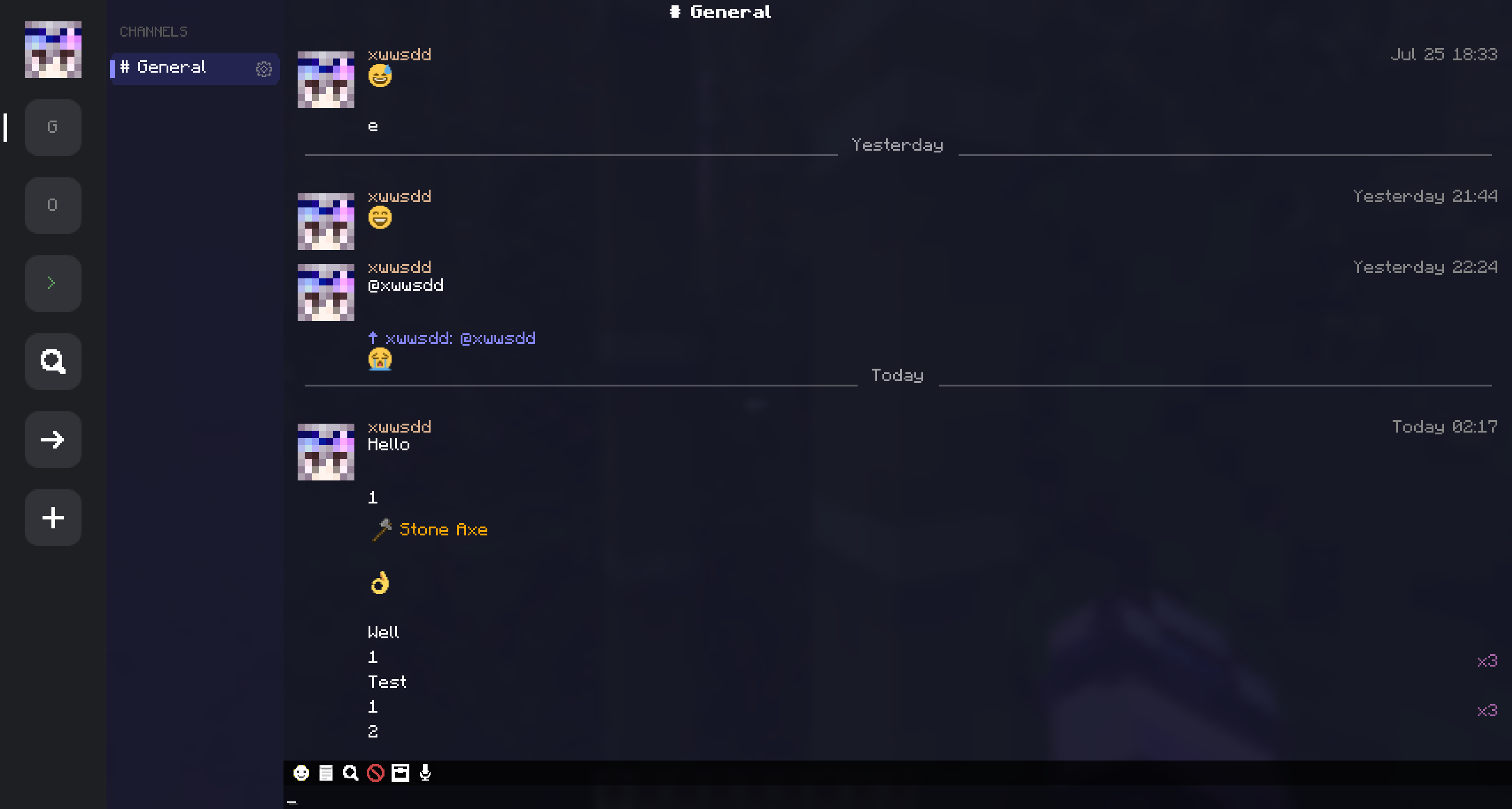
## 2.2.0
### Added
- **Stream style** (4th corner style): icon rail with avatar/channels/console/explore/join/create, flat message rows, avatar right-click menu (@mention / private message), unread indicators, date headers; auto-compact layout for small windows
- Custom theme gallery with live preview cards and load error hints
- Sub-channels: create, rename, delete, drag-to-reorder; inherit parent members and permissions
- Rich text markup in chat messages (bold, color, gradient, links, etc.)
- Configurable voice cache size limit
### Improved
- Chat history now respects the configured limit (server was hardcoded to 200)
- Long messages wrap automatically
- Performance: smoother chat rendering, theme previews and emoji panel
### Fixed
- Server security: payload overflows could crash the server, forged player identity, channel message leaks
- Longer voice messages no longer dropped
- Corrupt save files are backed up instead of wiping all data
- Anti-spam duplicate label (xN) now displays correctly in Stream style
release
ChatSphere 2.1.2
2.1.24 авг. 2026 г.38Minecraft: 1.21.1neoforge
Что нового
## 2.1.2
### Added
- Custom theme system: `.ctheme` files in `config/chatsphere/themes/` — `dark`/`light` color blocks, `styles` numeric block, `animations` block; white-listed keys, strict parsing, size/property limits, rejected themes keep the previous one
- All built-in colors overridable per dark/light mode; new numerics: bubble gradient, sidebar width, message line spacing, avatar radius, blur intensity
- Three bundled style presets as editable `.ctheme` files (auto-installed on first run); `uiCornerStyle` editable from the config screen
- `colorSeed` tonal derivation: unset colors derive harmonized tints from one seed; explicit colors always win
- Custom Themes gallery screen (Config -> Custom Theme -> Browse): real-color preview cards, enable toggle
- Animations now render: `messageSlideIn`, `bubblePopIn`, `notificationPulse`, with configurable duration and easing
- Config screen linkage — bubble corner radius, bubble colors and the corner style cards write through to the active theme file (presets and custom themes included)
- Command console unread badge — the sidebar console entry shows the same digit count as the HUD icon for new command output
### Changed
- Background blur switched from the vanilla post-effect shader to a self-drawn GL blit blur (no global post slot, Iris-friendly)
- Voice playback cache bounded (LRU, 256 entries)
- Parsed item stacks cached — the HUD no longer re-deserializes item NBT per frame
- Lying in bed opens the mod's chat screen instead of the vanilla sleeping chat bar
- Chat background follows the corner style (solid/blurred variants; original style unchanged)
- Floating text and inputs follow the theme again instead of being locked light; command bubbles keep their dark terminal look in light mode
- HUD bubbles now include new command console messages (`>` / `→` prefixed)
### Fixed
- Chat data never falls back to the config folder when the storage context is unresolved
- Emoji panel bottom hint truncated and clipped instead of overflowing the panel
release
ChatSphere 2.1.1
2.1.131 июл. 2026 г.19Minecraft: 1.21.1neoforge
Что нового
## 2.1.1
### Added
- Corner style system — square / pixel-rounded / original, applied to all UI in real time, with a dedicated config category showing live preview cards
- Pending server config queue — toggle server options from the mod list menu, applied on joining a world
- Background blur toggle for config and list screens
### Changed
- Config screen reorganized into 6 categories with collapsible sections
- Original style preserves the pre-2.1.1 UI as a retro option
- Toggle sliders now follow the selected corner style
- Pixel-rounded corners use a cached alpha table (faster rendering)
- Chat data now saved atomically — interrupted saves can no longer corrupt your data
### Fixed
- Crash when toggling server-side options before joining a world
- Voice message parsing crash with invalid message IDs (PR #1)
- File stream leak in backup pruning (PR #1)
- Duplicate config change listener registration (PR #1)
- Multi-codepoint emoji (ZWJ sequences) rendering incorrectly (PR #1)
- Options and labels rendering outside the clipped config area
### Credits
- Special thanks to [Spagles](https://github.com/Spagles) for contributing PR #1 — voice message parsing crash fix, file/listener leak fixes, and emoji rendering glitch fixes
release
ChatSphere 2.1.0
2.1.030 июл. 2026 г.22Minecraft: 1.21.1neoforge
Что нового
## 2.1.0
### Added
- VoiceMessages mod compatibility — offline delivery, local cache, chat bubble playback, custom packet routing
- Command console persistence — input/output stored on server, restored on reconnect
- HUD unread count badge on chat icon (configurable toggle)
- Multi-line command output rendering with per-line click/hover support
### Changed
- Color and formatting now preserved across reconnects (JSON serialization)
- System messages use correct UUID to fix green `"> "` prefix on reconnect
- Voice messages routed through ChatSphere custom packets (VM used as library only)
- Version bumped to 2.1.0
### Fixed
- Color codes lost on reconnect
- Multi-line command output shown as separate bubbles instead of one message
- Text overflow outside bubble in narrow windows
- Banned words input extending past screen edge
- Missing PV addon localization
release
ChatSphere 2.0.2
2.0.228 июл. 2026 г.24Minecraft: 1.21.1neoforge
Что нового
## v2.0.2
### Added
- Item sharing — pick an item from inventory via the new item picker panel (item_chest icon); item NBT serialized and sent with chat messages; displayed as item icon + name in chat bubbles (ModChatScreen) and HUD overlay (ChatHudOverlay)
- ItemSerialization utility for NBT-based item serialization/deserialization
- ItemPickerPanel widget for inventory item selection
### Changed
- ChatMessageData, StoredMessage records now carry an optional `itemNbt` field through the entire pipeline: client send → server channel action → bridge relay → message sync → client display
- Duplicate message detection now compares `itemNbt` to avoid merging different items
- HUD bubble rendering adapts height and layout when an item is present
- `addMessage()` skips reply bar rendering when `replyContent`/`replySender` is empty
- ModChatScreen preserves `currentConversation` for PRIVATE conversations on window resize
- Input placeholder uses dynamic `[slotNumber]` format when an item is selected
- Version bumped to 2.0.2
### Fixed
- Window resize no longer resets current conversation from PRIVATE to default channel
- Missing `bridge_info` payload registration causing handshake failure on proxy setups
### Removed
- ServerboundConfigUpdatePayload registration (unused)
release
ChatSphere 2.0.1
2.0.126 июл. 2026 г.37Minecraft: 1.21.1neoforge
Что нового
## 2.0.1
### Added
- Right-click context menu: Block Messages from a player
- BlockListScreen — manage blocked players (click to unblock), blur background
- Online status indicator — green/gray dot in private chat header, sidebar, and member list
- Banned words library — server-side regex filtering in SEND_CHAT handler
- Skin cache refresh button in settings UI
- Context menu type system (CTX_BUBBLE) for future extensibility
### Changed
- Context menu: now only activates on bubble hit area, third option "Block Messages" added
- PlayerSkinCache: network I/O moved to background thread; `pendingFetches` removal after successful cache
- `drawContextMenu`/`handleContextMenuClick` use `contextType` instead of raw `contextMsgIndex`
- Skin config screen: "Refresh Skin Cache" button added
- Duplicate message "xN" label no longer shifts own message bubble position
- Translation: blocklist empty state text corrected
### Fixed
- Channel config not persisting after `applyServerChannels()` — missing `loaded = true`
- Reply/quote data not transmitted over network — missing fields in 3 payload classes
- "N new messages" bar scrolled to top instead of bottom — reversed scroll direction
- Skin race condition causing duplicate fetches — `pendingFetches.remove()` before cache populated
- Server crash on startup — `ModNetworkSetup` reading client config on server side
- Duplicate-detected own message bubbles shifted left — `dupW` wrongly subtracted from `bubbleX`
release
ChatSphere 2.0.0
2.0.025 июл. 2026 г.23Minecraft: 1.21.1neoforge
Что нового
## 2.0.0
### Added
- Full IM-style chat GUI with left sidebar (channels/DMs) and right sidebar (online members)
- Emoji picker — 349 twemoji, category tabs, search, `:shortcode:` autocomplete
- Voice chat — Simple Voice Chat and PlasmoVoice integration
- Channel explore/discovery screen
- Chat search, quote reply, right-click context menu
- Member management: admins, mute, invite, transfer ownership
- Server configuration GUI
- Quick phrases panel, @mention autocomplete
- NCR compatibility settings tab
### Changed
- Complete UI rewrite — tabbed settings, bubble customization, per-type sound toggles
- Network protocol updated (requires matching server version)
### Fixed
- Various chat history and synchronization issues
release
ChatSphere 1.0.0
1.0.013 июл. 2026 г.33Minecraft: 1.21.1neoforge
Что нового
**ChatSphere 1.0.0 - Initial Release**
- Full replacement of vanilla chat with modern GUI
- Channel system – create public/private channels with custom names & descriptions
- Private messaging – click players to start conversations
- Command console with history support
- HUD message bubbles with notification alerts
- Settings menu (F7) – toggle timestamps, avatars, sounds & more
- Server-side sync with local storage fallback