COWMODSКаталог модов

ChatSphere

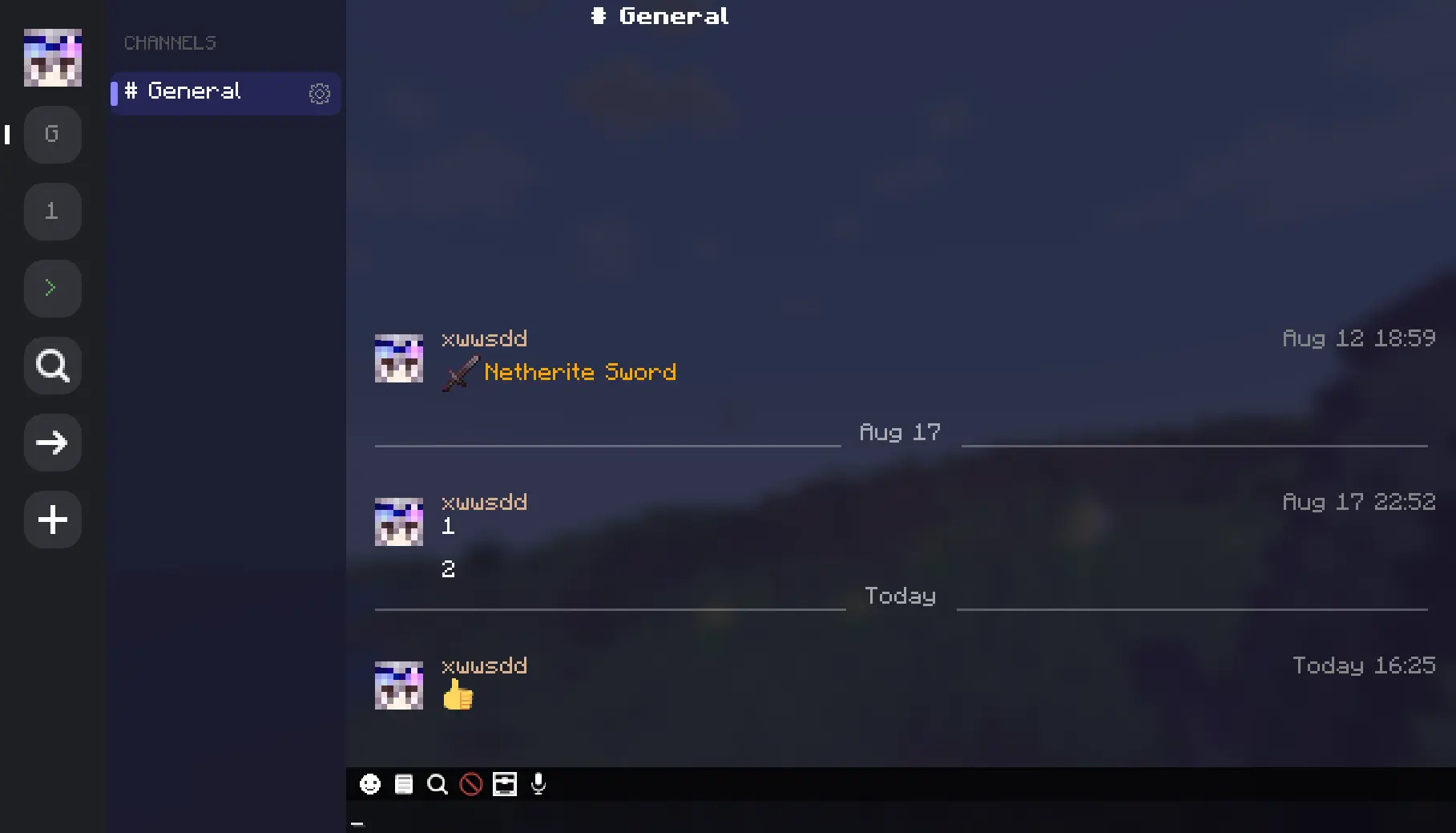
A sleek social chat mod for Minecraft that replaces vanilla chat with channels, private messaging, and a modern GUI.

Автор: xwwsdd6937обновлён 2 нояб. 2026 г.
ОбщениеУтилиты

Описание

ChatSphere

NeoForge Fabric Minecraft License

ChatSphere

A modern instant-messaging chat mod for Minecraft 1.21.1 (NeoForge & Fabric) and 1.20.1 (Fabric & Forge). Replaces vanilla chat with channels, private messaging, emoji, voice rooms, and a full GUI.

Works on the client side — in singleplayer or on vanilla/plugin servers (with "Allow Vanilla Connection" enabled, then restart), it runs in local storage mode. On NeoForge or Fabric servers, install on both sides for channel sync, private messaging, and voice chat.


Features

  • Channel system: public/private, invite codes, sub-channels, explore
  • Private messaging, /msg and /tell
  • Custom emoji — local or server-shared, png/gif, animated
  • 349 built-in emoji with search and :shortcode: autocomplete
  • Voice rooms via Simple Voice Chat or PlasmoVoice
  • Command console with history inside the chat window
  • Message search, quote reply, right-click menu
  • Member management: admins, mute, kick, invites, ownership
  • Anti-spam duplicate merging
  • Settings GUI; in-game server config for ops
  • No Chat Reports compatible

Controls

KeyAction
TOpen chat GUI
/Open chat in command mode
F7Open settings

Configuration

Client — press F7

TabOptions
UITimestamps, sender name, avatar, dark theme, preserve input, right sidebar, channel toggle
BubblesOwn/other color (ARGB), corner radius
SkinAvatar cache toggle, custom API URL
NCRNCR compatibility toggle, safety status display, preventsChatReports setting (when No Chat Reports is installed)
BehaviorChat history limit, scroll limit
SoundMaster toggle, @mention / whisper / system / public sounds, screen popup

Server — config/chatsphere-server.json

OptionDefaultDescription
Anti-SpamtrueCollapse duplicate messages
Max Chat History200Messages stored per conversation
Enable ChannelstrueToggle the channel system
Explore EnabledtruePublic channel discovery
Explore Min Members2Min members to appear in explore
Backup Interval30 minServer data backup frequency
Prevents Chat ReportstrueAdvertise preventsChatReports in server status (NCR section in client UI)

FAQ

Does the mod need to be on the server? It works on the client alone in local mode. Install on both sides to unlock channel sync, private messaging across players, and voice chat.

Which voice chat mods are supported? Simple Voice Chat and PlasmoVoice. Both work simultaneously if installed.

How do I join a channel? Use the → button and enter an invite code, or browse public channels from the Explore screen (search icon next to →).

How do I create a channel? Click + next to the Channels header, or type #name in the input and press Enter.

Where is my data stored? Client data in ChatSphere/client/ per world/server. Server data in ChatSphere/server/.

Can I use this in a modpack? Yes.


Commands

CommandDescription
/chatsphere helpShow help
/chatsphere listList all channels
/chatsphere info <name>Channel details

License

GNU LGPLv3

Emoji by twemoji (Twitter / CC-BY 4.0).

Галерея

UIExploreChannel InfoConfig Panel

Последние версии

Все версии →
release

ChatSphere 2.5.2-1.20.1

2.5.2
2 нояб. 2026 г.8Minecraft: 1.20.1forge
Скачать
Что нового
## 2.5.2 ### Changed - A channel with sub-channels now keeps main chat off and opens on its first sub-channel - The default sub-channel can be changed in the channel settings, or typed while creating the channel - The explore screen lists each public channel with its icon, before you join it ### Fixed - The channel template's description, main chat switch and default sub-channel now reach the created channel - Deleting or leaving a channel no longer leaves an empty channel info panel behind - Deleting a channel now clears its history, so a channel created under the same name starts empty - Deleting or leaving the channel you are reading switches you back to the default channel
release

ChatSphere 2.5.2-1.20.1

2.5.2
2 нояб. 2026 г.5Minecraft: 1.20.1fabric
Скачать
Что нового
## 2.5.2 ### Changed - A channel with sub-channels now keeps main chat off and opens on its first sub-channel - The default sub-channel can be changed in the channel settings, or typed while creating the channel - The explore screen lists each public channel with its icon, before you join it ### Fixed - The channel template's description, main chat switch and default sub-channel now reach the created channel - Deleting or leaving a channel no longer leaves an empty channel info panel behind - Deleting a channel now clears its history, so a channel created under the same name starts empty - Deleting or leaving the channel you are reading switches you back to the default channel
release

ChatSphere 2.5.2

2.5.2
2 нояб. 2026 г.9Minecraft: 1.21.1fabric
Скачать
Что нового
## 2.5.2 ### Changed - A channel with sub-channels now keeps main chat off and opens on its first sub-channel - The default sub-channel can be changed in the channel settings, or typed while creating the channel - The explore screen lists each public channel with its icon, before you join it ### Fixed - The channel template's description, main chat switch and default sub-channel now reach the created channel - Deleting or leaving a channel no longer leaves an empty channel info panel behind - Deleting a channel now clears its history, so a channel created under the same name starts empty - Deleting or leaving the channel you are reading switches you back to the default channel
release

ChatSphere 2.5.2

2.5.2
2 нояб. 2026 г.7Minecraft: 1.21.1neoforge
Скачать
Что нового
## 2.5.2 ### Changed - A channel with sub-channels now keeps main chat off and opens on its first sub-channel - The default sub-channel can be changed in the channel settings, or typed while creating the channel - The explore screen lists each public channel with its icon, before you join it ### Fixed - The channel template's description, main chat switch and default sub-channel now reach the created channel - Deleting or leaving a channel no longer leaves an empty channel info panel behind - Deleting a channel now clears its history, so a channel created under the same name starts empty - Deleting or leaving the channel you are reading switches you back to the default channel
release

ChatSphere 2.5.1-1.20.1

2.5.1
1 нояб. 2026 г.6Minecraft: 1.20.1forge
Скачать
Что нового
![New](https://cdn.modrinth.com/data/cached_images/3190b0a91110fc581b2e47b23edc578bd2ac1b05_0.webp) ## 2.5.1 ### Added - Channel icons: the rail, sidebar, info header and explorer show the name initial until one is set - Channel icons: drop a png/jpg on the icon row or paste a link, and a non-square image is centre-cropped - Voice rooms get their own section under the channel tree, with the head count and each occupant listed under the room ### Changed - Server config is split into General and Chat media, each page made of collapsible titled groups - General holds chat, sync, voice, emoji and backup; Chat media holds link previews and chat images - Sidebar channel rows keep their `#` prefix and show the icon once one is set - Redrawn toolbar and panel icons; voice room rows use a speaker, voice messages a microphone ### Fixed - An image URL that fails to download stays in the chat box, so it can be retried - The viewer had no close button while the image was missing; that state now says how to leave - The UI border setting turned itself back on after every restart
release

ChatSphere 2.5.1-1.20.1

2.5.1
1 нояб. 2026 г.4Minecraft: 1.20.1fabric
Скачать
Что нового
![New](https://cdn.modrinth.com/data/cached_images/3190b0a91110fc581b2e47b23edc578bd2ac1b05_0.webp) ## 2.5.1 ### Added - Channel icons: the rail, sidebar, info header and explorer show the name initial until one is set - Channel icons: drop a png/jpg on the icon row or paste a link, and a non-square image is centre-cropped - Voice rooms get their own section under the channel tree, with the head count and each occupant listed under the room ### Changed - Server config is split into General and Chat media, each page made of collapsible titled groups - General holds chat, sync, voice, emoji and backup; Chat media holds link previews and chat images - Sidebar channel rows keep their `#` prefix and show the icon once one is set - Redrawn toolbar and panel icons; voice room rows use a speaker, voice messages a microphone ### Fixed - An image URL that fails to download stays in the chat box, so it can be retried - The viewer had no close button while the image was missing; that state now says how to leave - The UI border setting turned itself back on after every restart
release

ChatSphere 2.5.1

2.5.1
1 нояб. 2026 г.6Minecraft: 1.21.1fabric
Скачать
Что нового
![New](https://cdn.modrinth.com/data/cached_images/3190b0a91110fc581b2e47b23edc578bd2ac1b05_0.webp) ## 2.5.1 ### Added - Channel icons: the rail, sidebar, info header and explorer show the name initial until one is set - Channel icons: drop a png/jpg on the icon row or paste a link, and a non-square image is centre-cropped - Voice rooms get their own section under the channel tree, with the head count and each occupant listed under the room ### Changed - Server config is split into General and Chat media, each page made of collapsible titled groups - General holds chat, sync, voice, emoji and backup; Chat media holds link previews and chat images - Sidebar channel rows keep their `#` prefix and show the icon once one is set - Redrawn toolbar and panel icons; voice room rows use a speaker, voice messages a microphone ### Fixed - An image URL that fails to download stays in the chat box, so it can be retried - The viewer had no close button while the image was missing; that state now says how to leave - The UI border setting turned itself back on after every restart
release

ChatSphere 2.5.1

2.5.1
1 нояб. 2026 г.4Minecraft: 1.21.1neoforge
Скачать
Что нового
![New](https://cdn.modrinth.com/data/cached_images/3190b0a91110fc581b2e47b23edc578bd2ac1b05_0.webp) ## 2.5.1 ### Added - Channel icons: the rail, sidebar, info header and explorer show the name initial until one is set - Channel icons: drop a png/jpg on the icon row or paste a link, and a non-square image is centre-cropped - Voice rooms get their own section under the channel tree, with the head count and each occupant listed under the room ### Changed - Server config is split into General and Chat media, each page made of collapsible titled groups - General holds chat, sync, voice, emoji and backup; Chat media holds link previews and chat images - Sidebar channel rows keep their `#` prefix and show the icon once one is set - Redrawn toolbar and panel icons; voice room rows use a speaker, voice messages a microphone ### Fixed - An image URL that fails to download stays in the chat box, so it can be retried - The viewer had no close button while the image was missing; that state now says how to leave - The UI border setting turned itself back on after every restart
release

ChatSphere 2.5.0-1.20.1

2.5.0
8 окт. 2026 г.41Minecraft: 1.20.1forge
Скачать
Что нового
## 2.5.0 ### Added - Link cards under messages: title, description and thumbnail, with three modes (off, text plus card, card only) - Link previews are fetched only for messages on screen; the server can disable them or restrict the hosts - Chat images: drag a png/jpg into the chat, or paste an image URL, and they load on demand from the server cache - `[Image]` stands in wherever an image cannot be drawn, such as the HUD bubble and search results - Client image settings, and a server Images category for size, dimensions, lifetime, cooldown and per-player cap - Forge 1.20.1 support ### Fixed - Console tabs keep the selected tab after a command is sent, and a tab edit refreshes the view - The repeats counter sits on the left of console lines instead of running off the right edge
release

ChatSphere 2.5.0-1.20.1

2.5.0
8 окт. 2026 г.22Minecraft: 1.20.1fabric
Скачать
Что нового
## 2.5.0 ### Added - Link cards under messages: title, description and thumbnail, with three modes (off, text plus card, card only) - Link previews are fetched only for messages on screen; the server can disable them or restrict the hosts - Chat images: drag a png/jpg into the chat, or paste an image URL, and they load on demand from the server cache - `[Image]` stands in wherever an image cannot be drawn, such as the HUD bubble and search results - Client image settings, and a server Images category for size, dimensions, lifetime, cooldown and per-player cap - Forge 1.20.1 support ### Fixed - Console tabs keep the selected tab after a command is sent, and a tab edit refreshes the view - The repeats counter sits on the left of console lines instead of running off the right edge