burger-economy
Fully fledged economy mod (server-only) inspired by DonutSMP
Описание
A complete server-side economy for Fabric: balances, a shop, a player auction house, and a buy-order market. Everything runs on the server, so your players join with a totally vanilla client and interact through normal chest menus. No client mod, no proxy, no database, no setup.
Works on both online-mode and offline-mode servers with no configuration.
Features
- 💰 Balances. Every player gets an account. They can pay each other and check a live leaderboard.
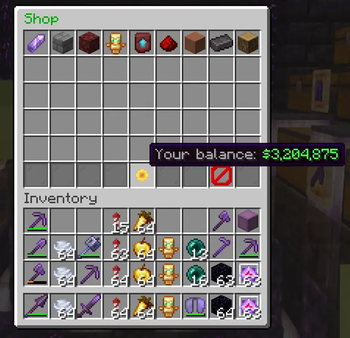
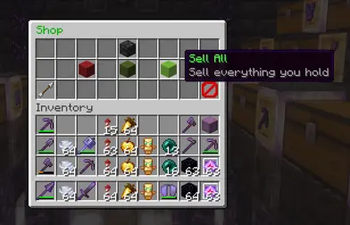
- 🛒 Shop. Set it up with simple JSON files, one per category. Buy, sell, and Sell All, with a running total. Comes with sensible defaults so it works the moment you install it.
- 📥 Bulk selling with
/sell. Drop a pile of items into a grid and see exactly what everything is worth before you confirm. The window stays open so you can keep selling. - ⚡ Quick Buy. Every player builds their own one-click buy screen for the things they buy over and over, one item or a full stack per slot. Each click pays the cheapest price available right now, across the shop and the auction house, and the tooltip shows the exact total before you click.
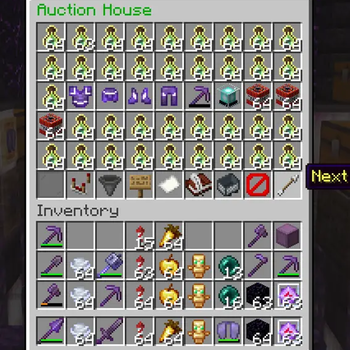
- 🏷️ Auction House. Player-run buy-now listings that never expire. Enchantments, custom names and all other item data are kept exactly as they were. Buyers can take one item from a stack or the whole lot, and the seller still gets the full listed price. Anything you buy or cancel waits safely in a collection box, so nothing is ever lost to a full inventory.
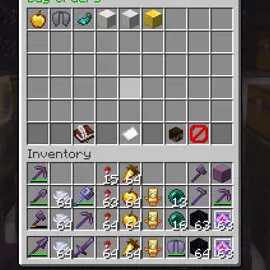
- 📦 Buy-Order Market. Post a request for items you want, at a price you set, and other players fill it for the money.
- 🎁 Daily reward on the first login of each day.
- ☠️ Death penalty, a configurable money sink when players die.
- 🧮 Economy controls for bigger servers: daily sell limits, a shop that only sells what players have sold to it, and prices that shift with supply. All optional and off by default.
- 🛡️ Double-click protection. A fast click can never charge a player twice.
- 📊 Scoreboard integration. Keeps a
moneyobjective in sync so sidebar mods can display balances.
Commands
| Command | Description |
|---|---|
/shop | Open the shop (buy, sell, sell all, paginated) |
/sell | Open the bulk sell window |
/qb (or /quickbuy) | Open your Quick Buy screen |
/ah (or /auction) | Open the auction house |
/ah buy <name> | Open the auction house filtered to items matching a name |
/ah sell <price> | List the item in your hand for buy-now (price is for the whole stack) |
/ah claim | Claim items from your collection box |
/orders | Open the buy-order market (create, view, fill) |
/pay <player> <amount> | Pay another player (with a confirmation screen) |
/baltop | Top balances in chat (also works from the server console) |
/balance [player], /money, /bal | View your balance, or someone else's |
/eco give|take|set <player> <amount> | Operators. Adjust a balance |
/shop enable <true|false> | Operators. Turn selling off or back on |
/shop reload | Operators. Reload shop files without restarting |
Quick Buy
Open /qb (or the ⚡ button in the shop), press ✎ Edit, and add items from the picker: anything tradeable, plus custom shop items and whatever is on the auction house right now. Choose one or a full stack for each slot, then Save. From then on it's one click per purchase, with no confirmation screen.
Every click buys item by item from whichever source is cheapest at that moment, so one click might take 20 Ender Pearls from a cheap listing, 12 from a pricier one, and the rest from the shop. If the market, your balance or your inventory space can't cover a whole stack, the slot buys as many as it can and shows you that amount and price first.
Configuration
On first launch the mod writes everything it needs to config/economy/ and config/orders/. There is no manual setup. Edit config/economy/config.json to tune it:
{
  "startingBalance": 15000,
  "dailyRewardAmount": 2000,
  "deathPenaltyPercentage": 2,
  "maxBalance": 0,
  "currencySymbol": "$"
}
Set dailyRewardAmount or deathPenaltyPercentage to 0 to switch either off, and maxBalance to 0 for no cap.
The shop
One JSON file per category in config/economy/shop/. A set of defaults (building blocks, wood, redstone, terracotta, valuables and more) is written on first launch, and you can edit, add or delete them freely. Run /shop reload to apply your changes.
{
  "category_name": "Valuables",
  "category_item": "minecraft:diamond",
  "items": [
    {
      "id": "minecraft:diamond",
      "can_buy": true,
      "can_sell": true,
      "quantity": 1,
      "buy_price": 800,
      "sell_price": 400
    }
  ]
}
quantity is how many items one purchase gives you, so you can price things by the stack. Keep buy_price above sell_price or players can farm the difference.
Items can also carry a components block (custom name, lore, custom data) if you want to sell datapack items or custom gear.
Controlling your economy (optional)
If money is piling up on your server, these extra fields on any shop item help pull it back. They are all off unless you add them.
| Setting | What it does |
|---|---|
daily_sell_limit | How many a player can sell per day at full price. They are shown how many they have left before they click. |
stock_backed | The shop can only sell what players have sold to it. Nothing is created from nothing. |
sell_price_floor, sell_price_floor_at | The more of an item the shop holds, the less it pays. Dumping 500 diamonds no longer pays the same as selling your first one. |
buy_price_floor, buy_price_floor_at | The other half. An overstocked shop sells cheaper, which clears the backlog again. |
There is also /shop enable false, which switches off selling while leaving buying open. Players can still spend, but they cannot make more money.
Which version has what
| Feature | 1.0.0 (MC 1.21.11) | 1.1.0 (MC 26.2) | 1.2.0 (MC 26.3) |
|---|---|---|---|
| Balances, shop, auction house, buy orders, daily reward, death penalty | ✅ | ✅ | ✅ |
/sell, /shop enable, /shop reload, economy controls | ❌ | ✅ | ✅ |
Quick Buy, buying part of an auction listing, /ah buy <name>, double-click protection | ❌ | ❌ | ✅ |
Галерея