COWMODSКаталог модов

Attuned Anchors

Build Anchor waypoints for either Local or Global range with Permissions, Menu and HUD markers.

Автор: Mach9Liquid2222обновлён 1 июл. 2026 г.
Механики игрыТранспортУтилиты

Описание

Mach9Games Studio

Attuned Anchors

Attuned Anchors!

Attuned Anchors Banner

YouTube GitHub Issues

Attuned Anchors adds buildable waypoint shrines to Minecraft.

Instead of placing waypoints from a map screen, players build an Anchor structure in the world, activate it, and then use it through an in-game waypoint menu and HUD.
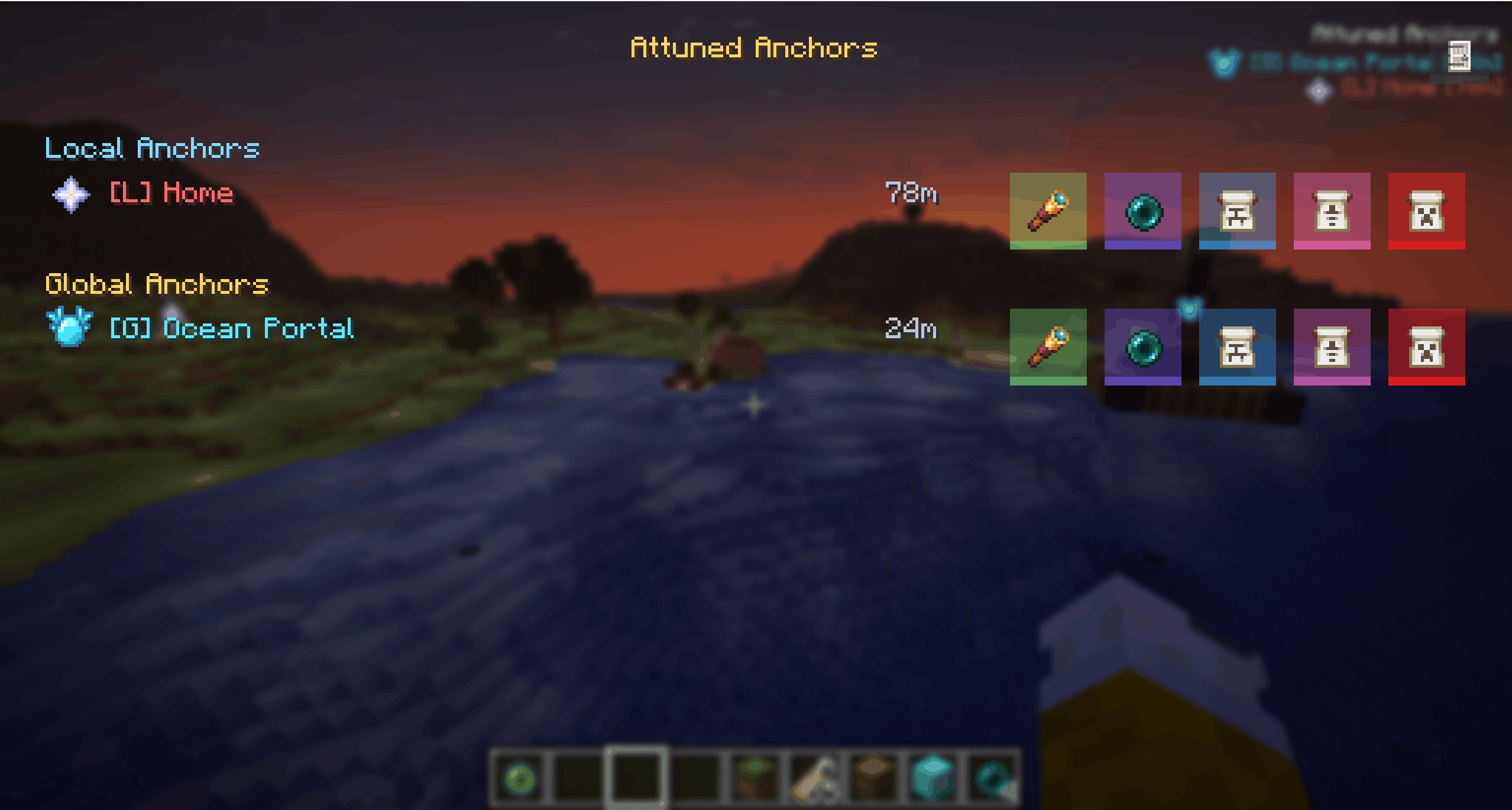
Waypoint Menu

Installation

Install the same jar on both the client and server.

  • Client: required
  • Server: required

Features

  • Buildable Local Anchors and Global Anchors
  • In-game waypoint HUD with distance markers
  • N menu for viewing, editing, teleporting, and managing Anchors
  • Admin teleport button for fast travel
  • Name Tag based access control
  • Public Anchors, private Anchors, and assigned-user Anchors
  • Automatic structure validation
  • Broken Anchors disable themselves and reactivate when repaired
  • Fully removed Anchors are cleaned from storage
  • Persistent world storage

Anchor Types

Attuned Anchors has two Anchor types with different visibility ranges.

TypeVisibility RangeCore BlockItem Frame
Local Anchor< 256mIron BlockEnder Pearl
Global Anchor> 256mDiamond BlockEye of Ender

Local Anchors are short-range waypoints. By default, they are visible up to 256m away.

Global Anchors are long-range waypoints. They can be seen from beyond 256m and remain available from anywhere in the same dimension.
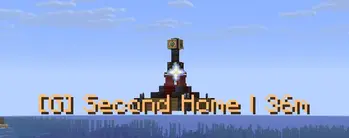
Global Anchor HUD

Access Control

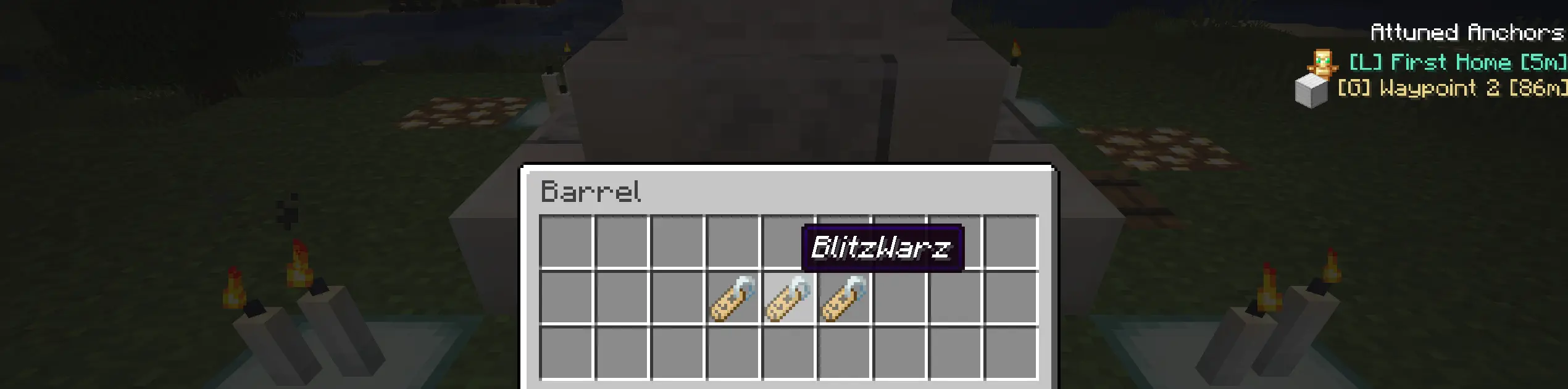
Anchor access is controlled through Name Tags placed inside the Anchor barrels.

  • Add a default Name Tag to make the Anchor public.
  • Add renamed Name Tags with player names to make the Anchor visible only to those players.
  • Leave out Name Tags to keep the Anchor disabled until access is configured.
  • More barrels means more room for access names.
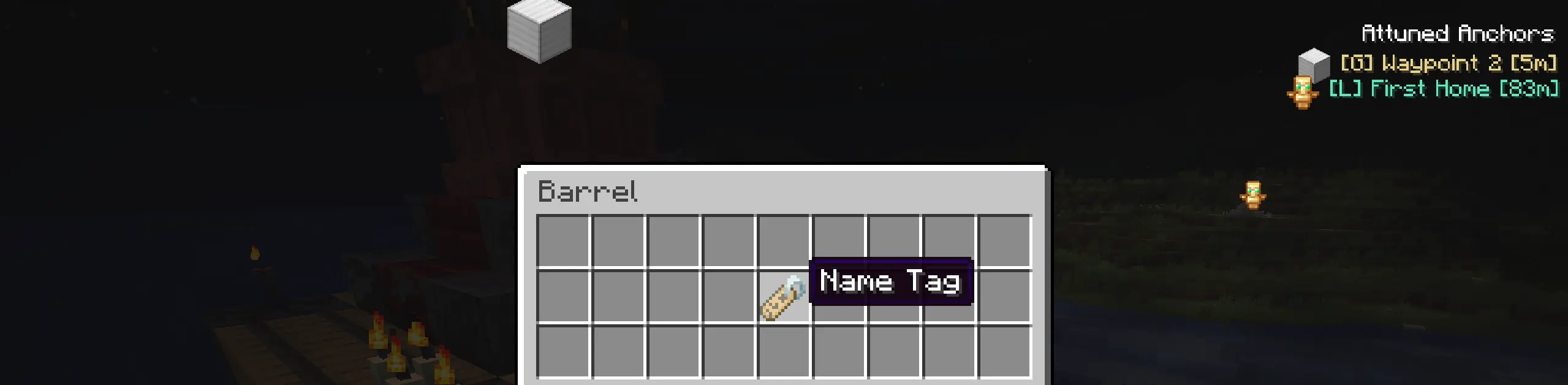
Public Anchor

Private Anchor

Waypoint Menu

Press N to open the Attuned Anchors menu.

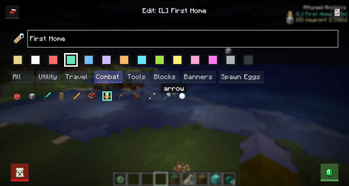
From the menu, players can view available Anchors, toggle HUD visibility, inspect access, edit marker appearance, and manage Anchors they are allowed to control.
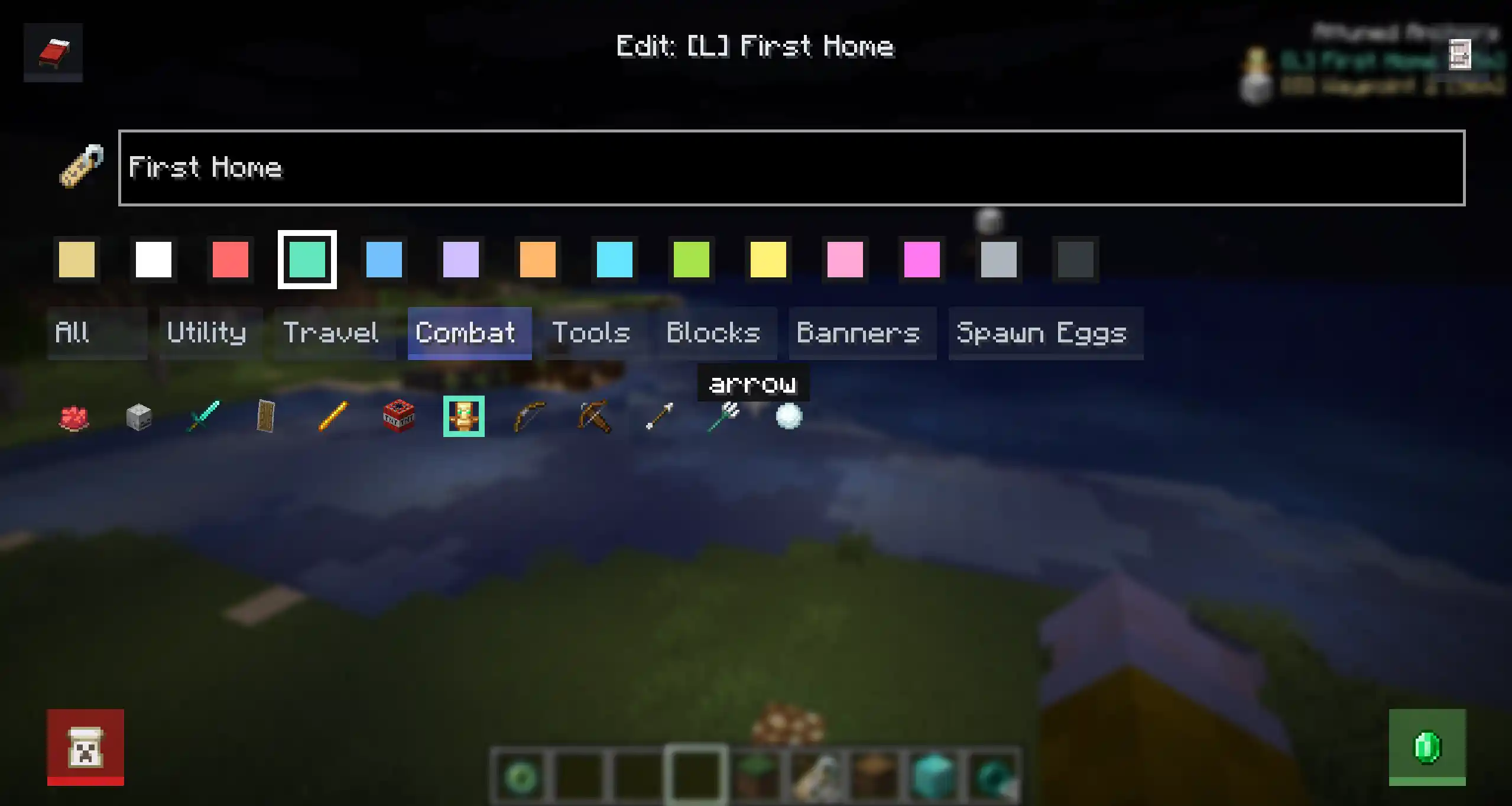
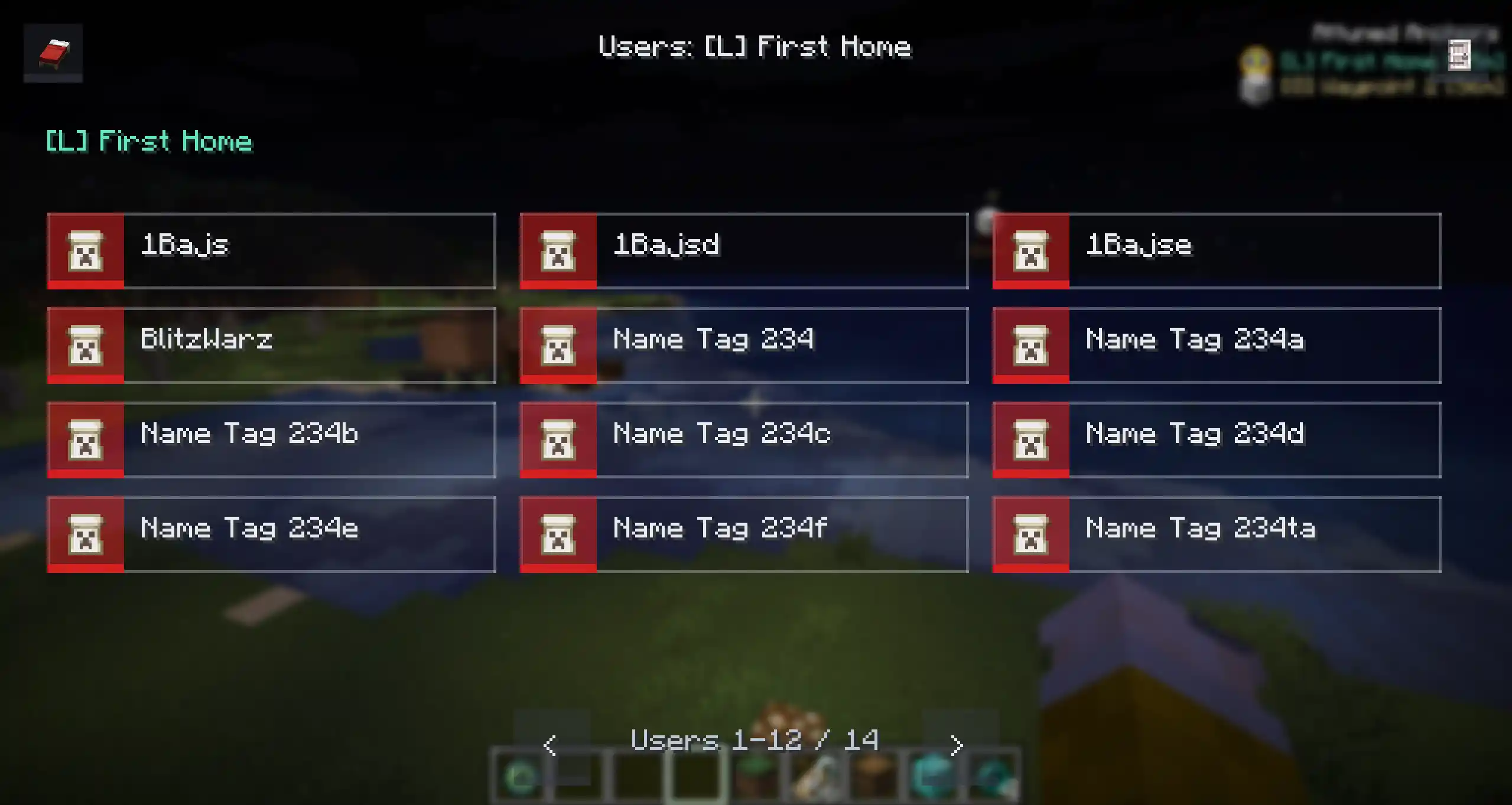
Edit Menu

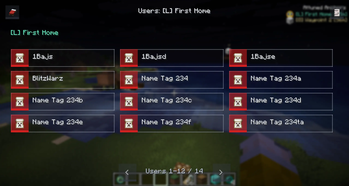
User List

Deleting an Anchor uses a confirmation screen to prevent accidental removals.
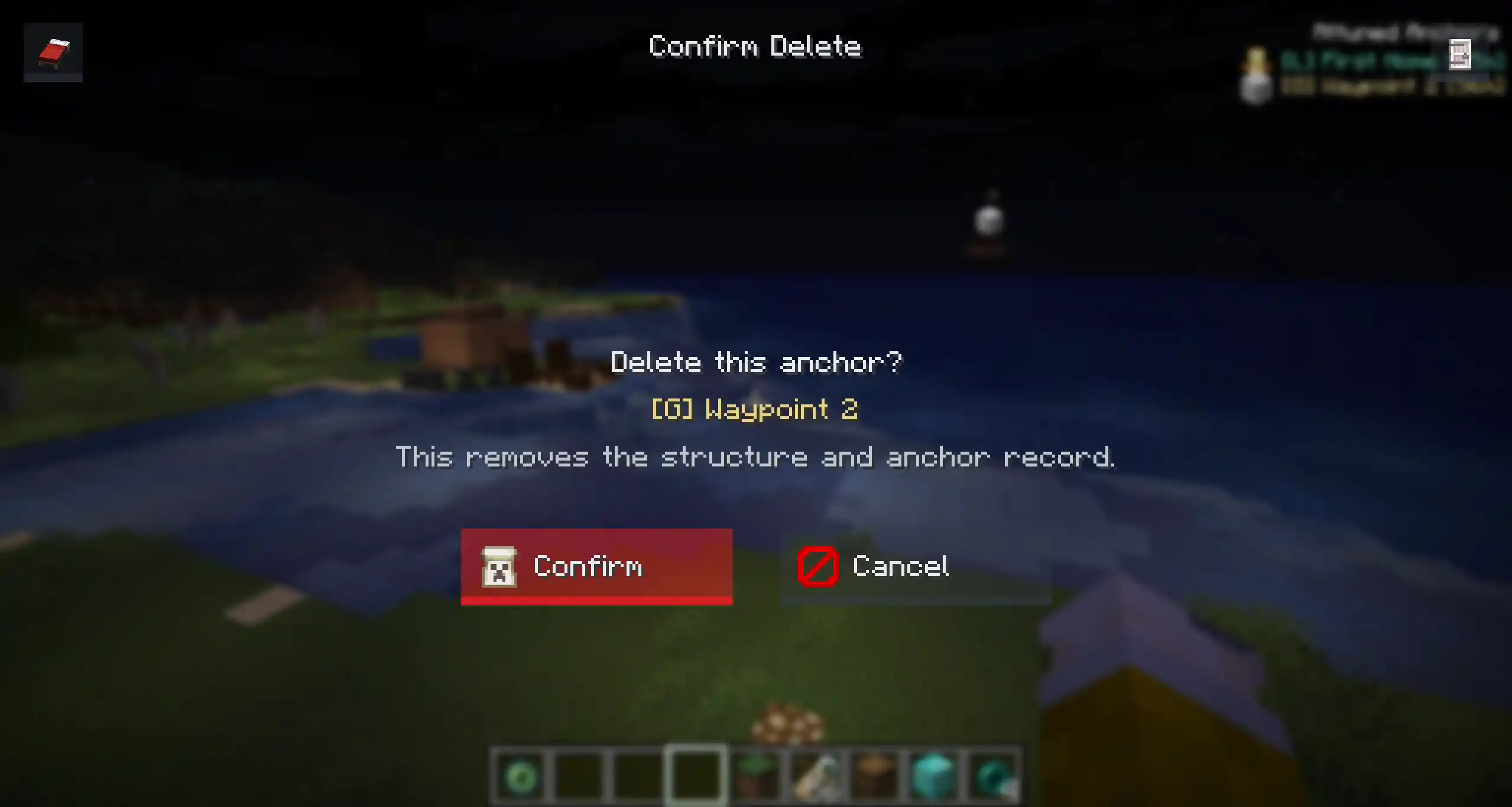
Delete Confirmation

Activation

Build the structure, place the required item frames, then interact with one of the Anchor item frames.

If the structure is valid, the Anchor is registered, its candles are managed by the mod, and it becomes visible to players with access.

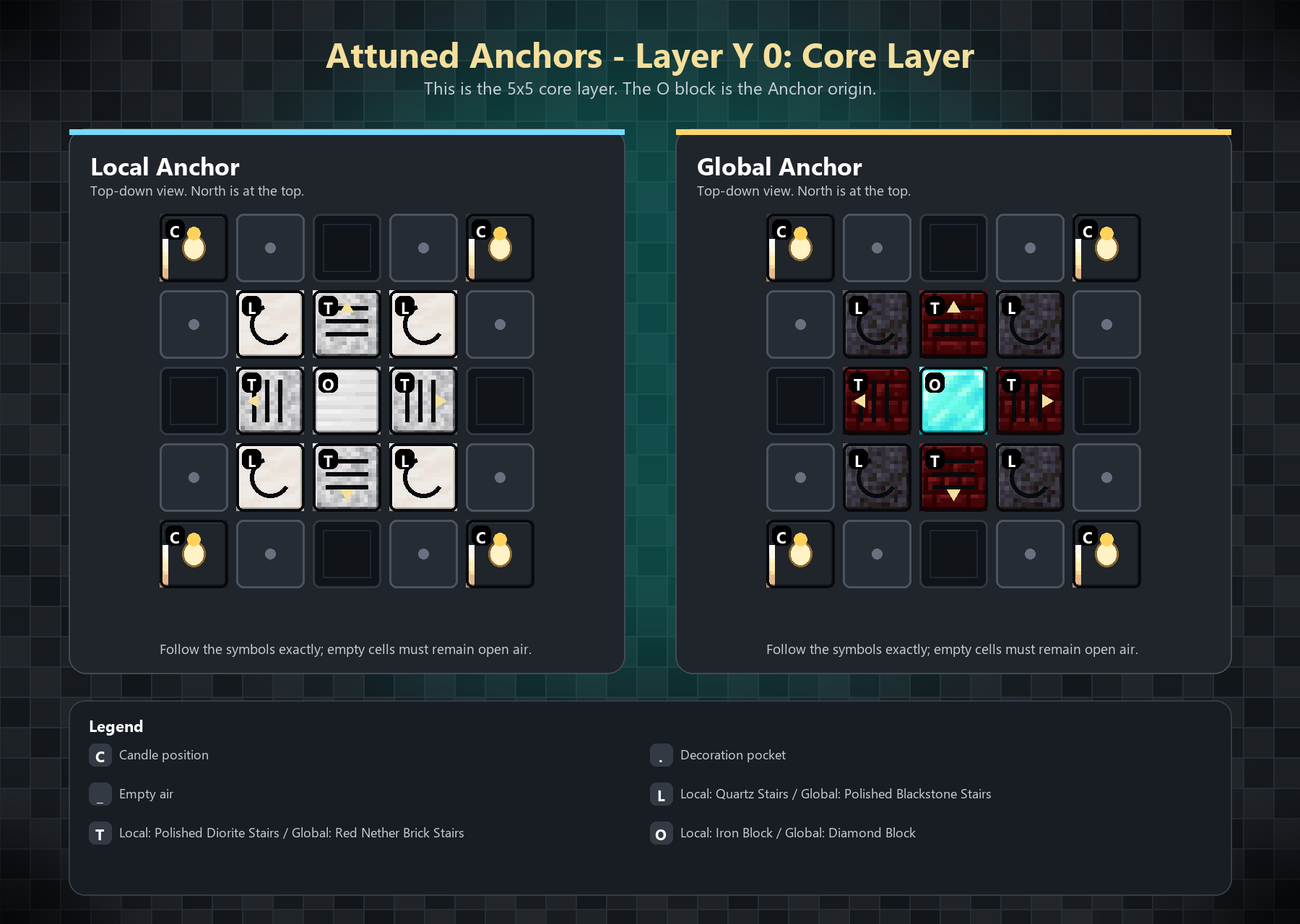
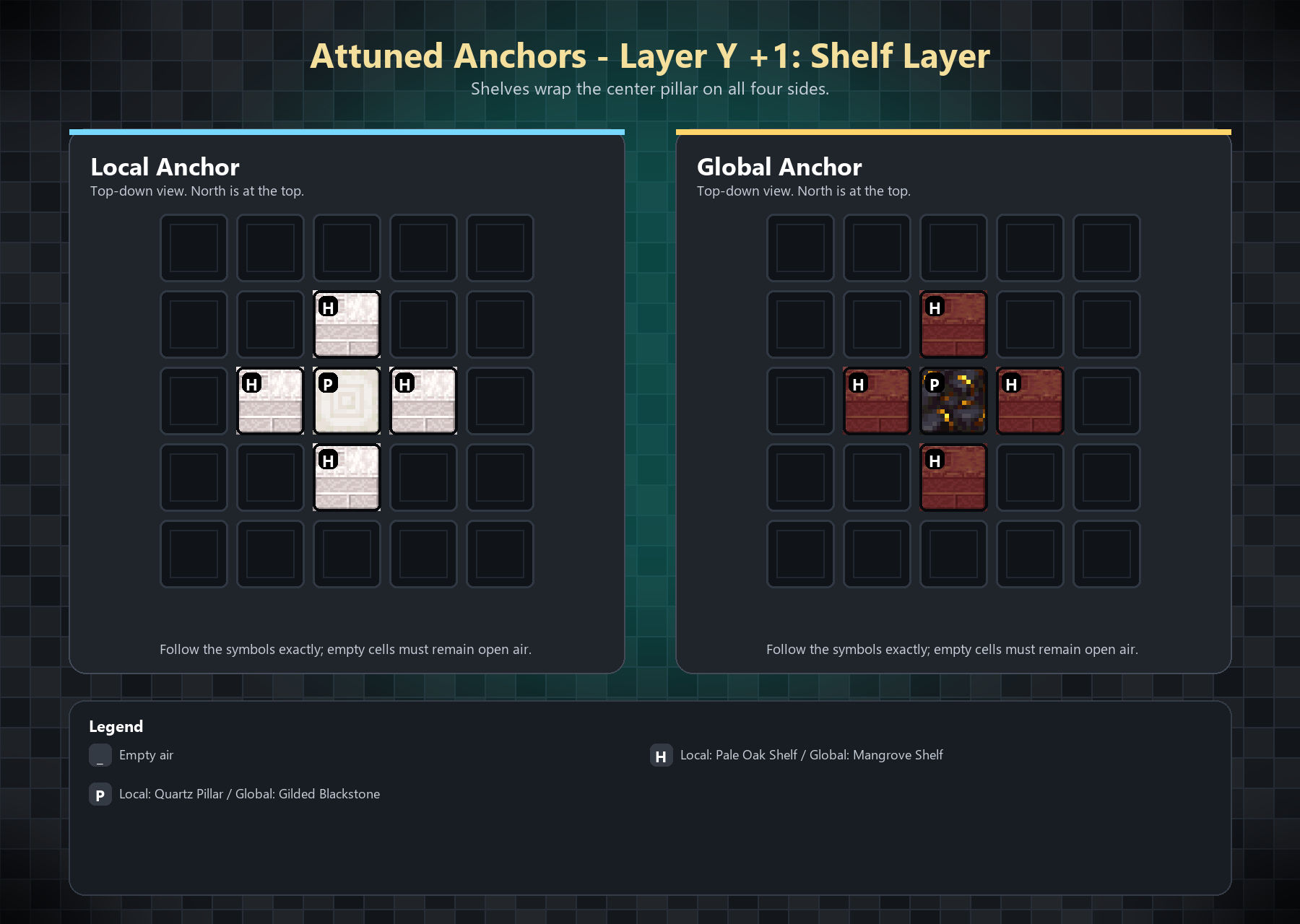
Layer-by-Layer Construction Guide

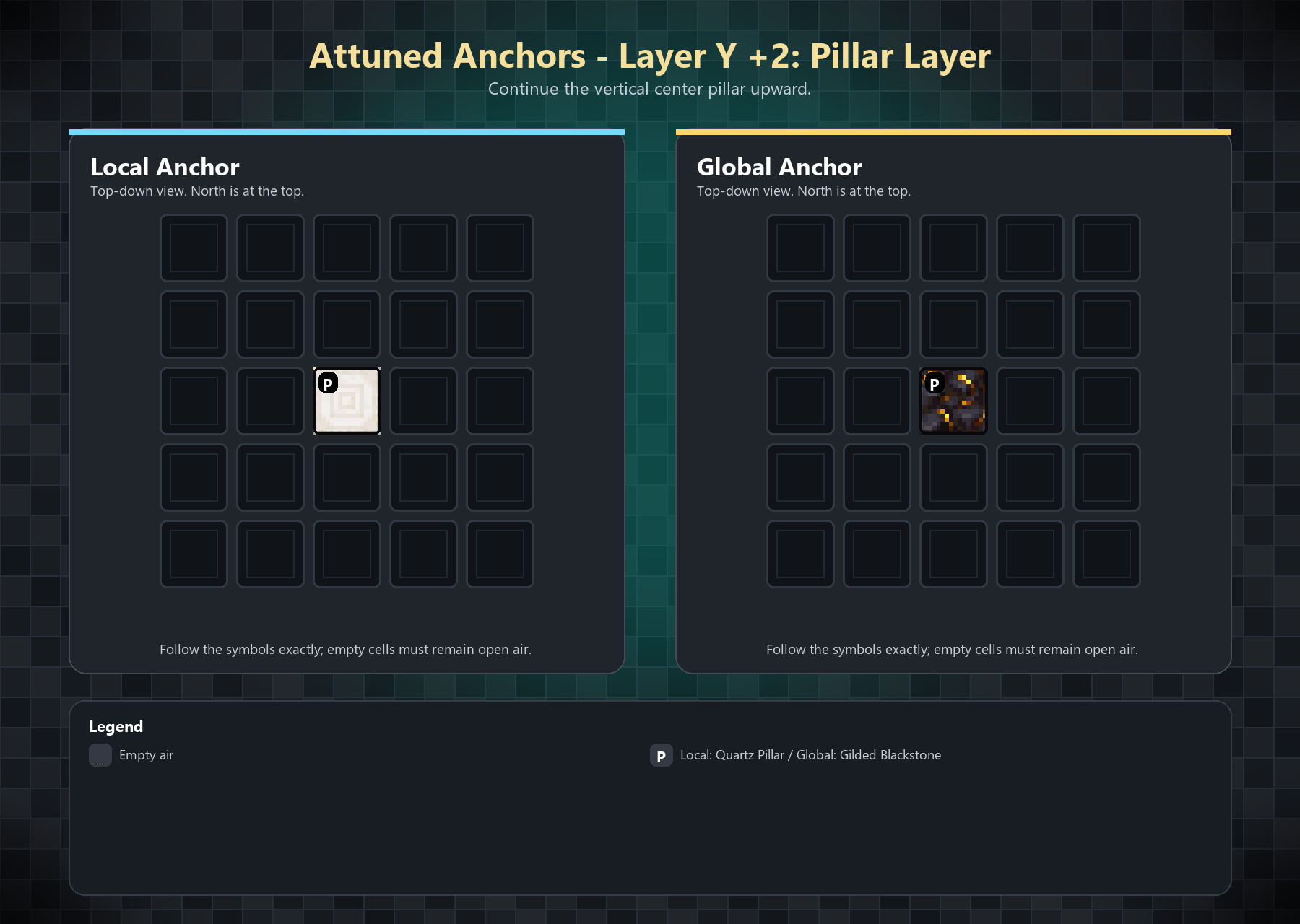
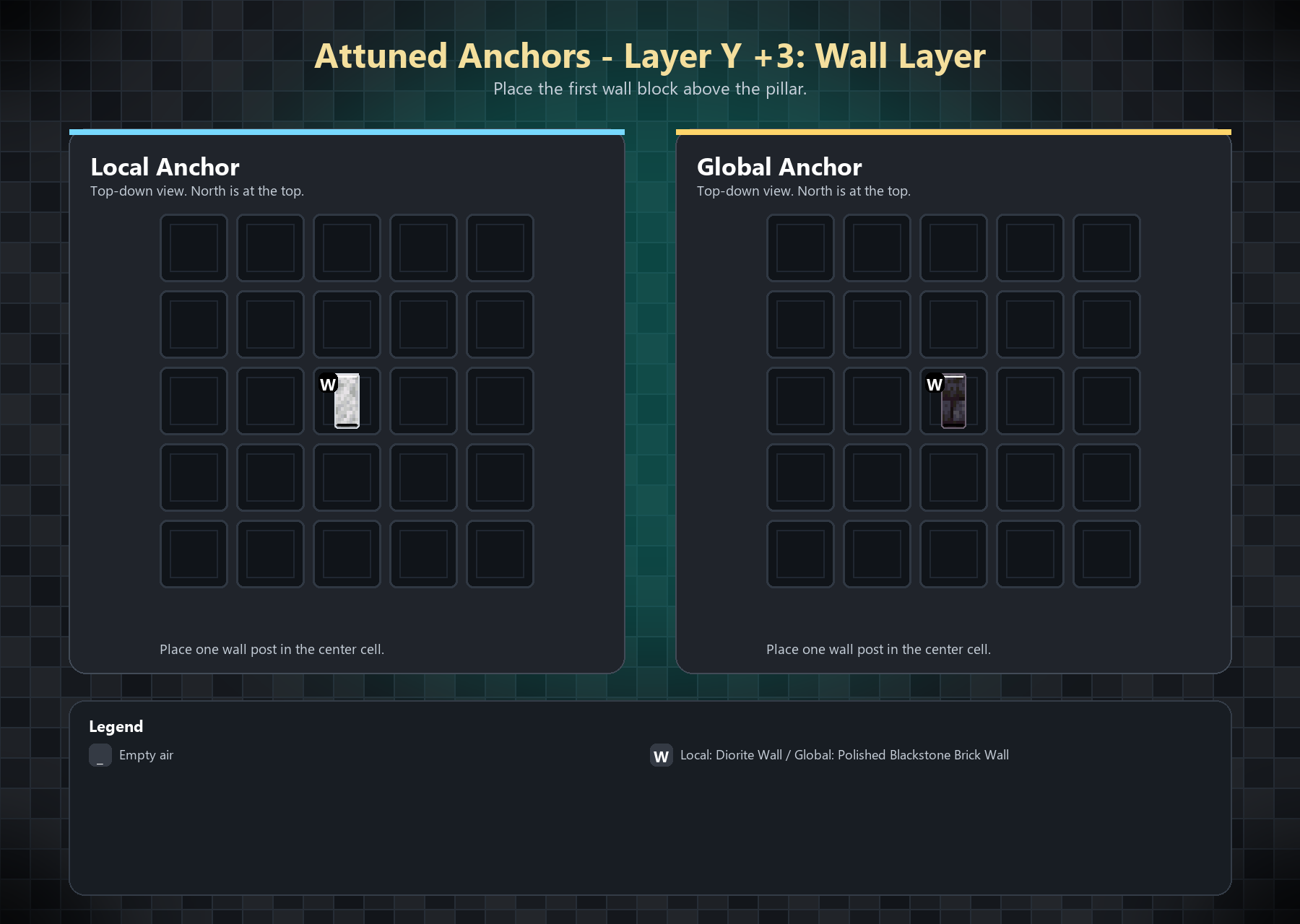
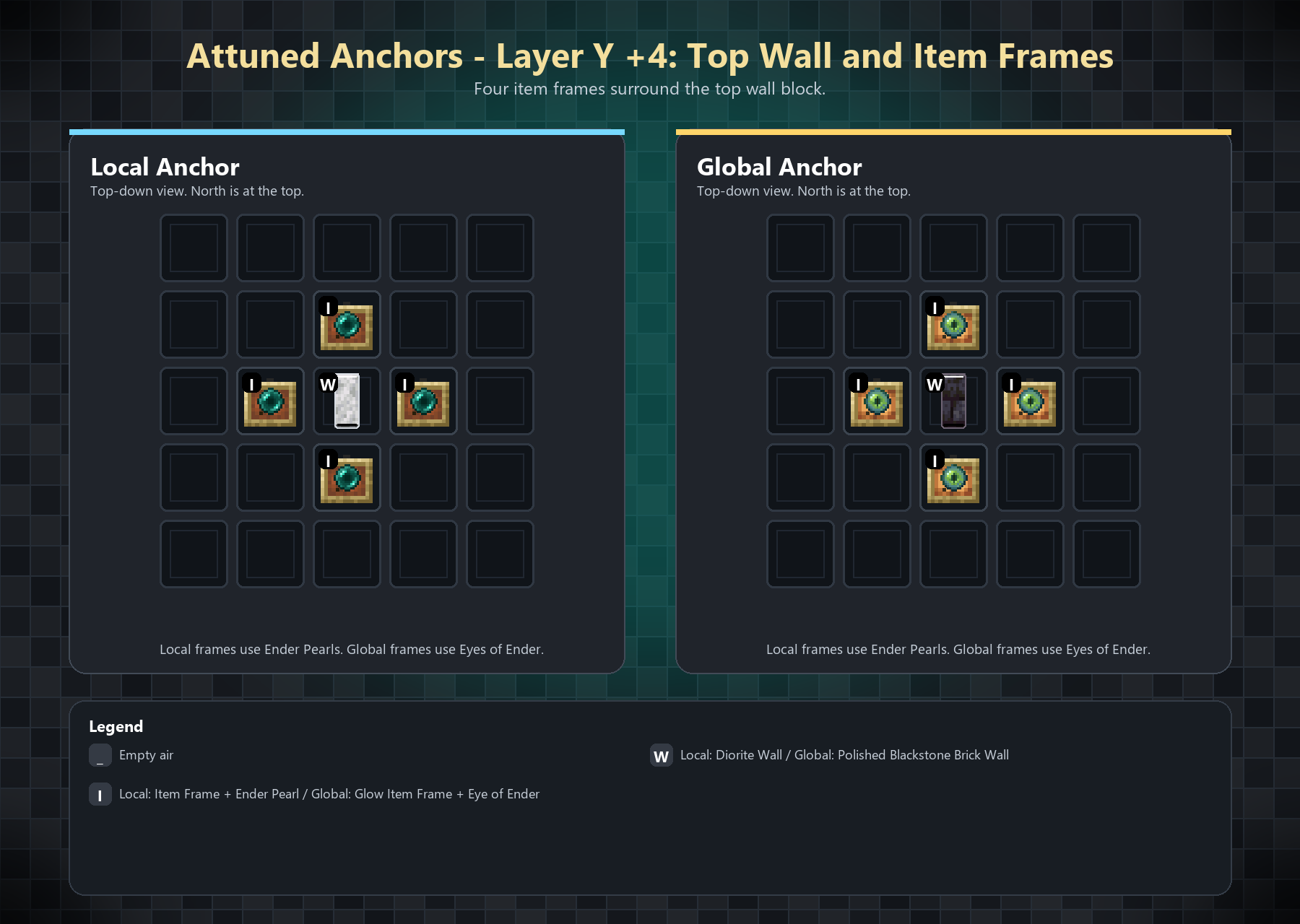
Anchors use a 5x5 footprint. Build each layer centered on the core block position.
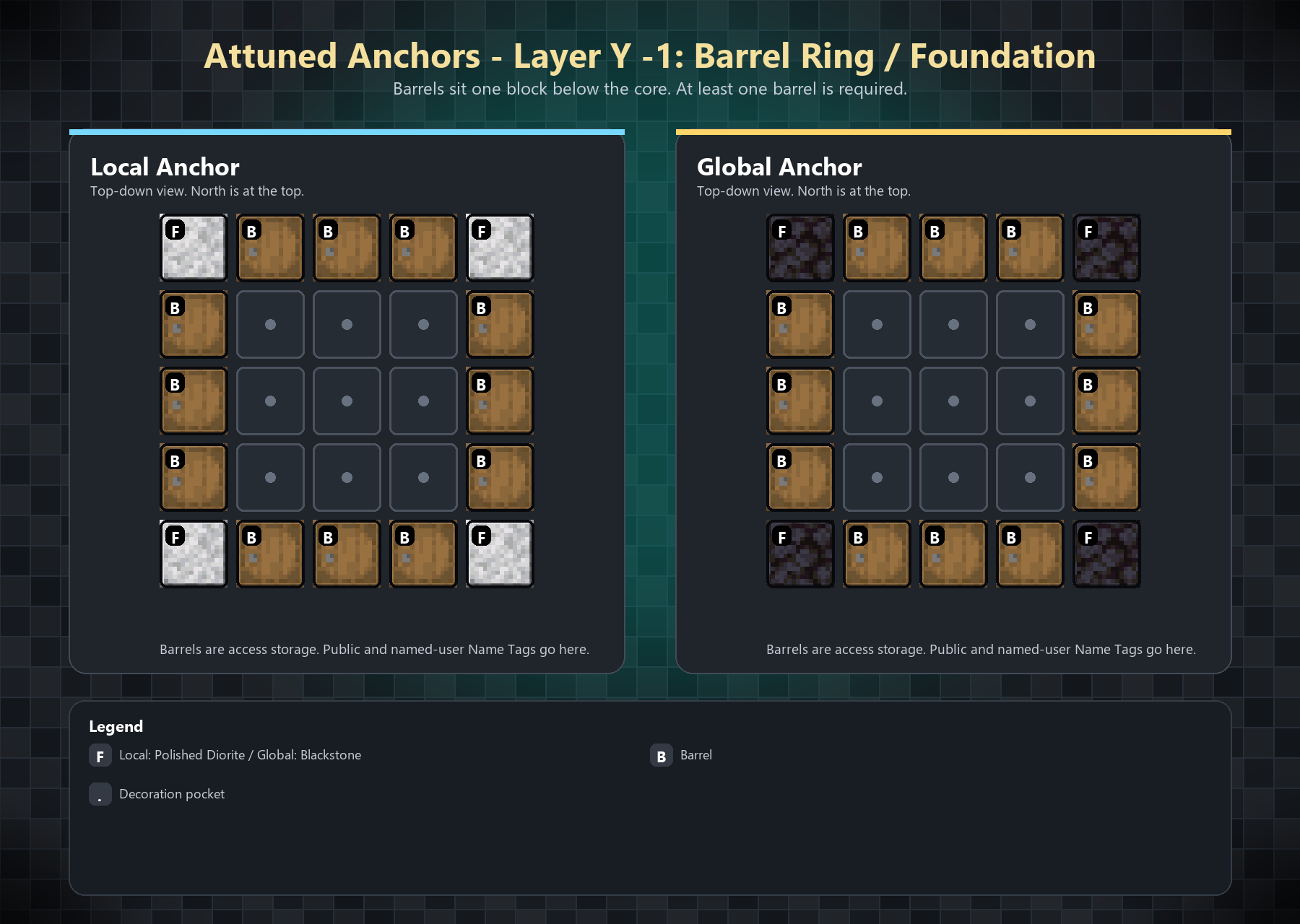
Layer -1

Layer 0

Layer 1

Layer 2

Layer 3

Layer 4

The item frames must contain:

  • Local Anchor: Ender Pearl
  • Global Anchor: Eye of Ender

Global Anchors use glowing item frames by default.

Commands

The main command is /anchor, with /an as a shortcut.

  • /anchor spawn <local | global> [<color> [<icon> [<name>]]] creates a complete Anchor.
  • /anchor despawn removes the nearest registered Anchor structure within 32 blocks.
  • /anchor list shows Anchors visible to the player.
  • /anchor remove deletes the nearest registered Anchor record without breaking blocks.
  • /anchor help [spawn | despawn | list | remove] shows command help.

Add this near the bottom, replacing the current Configuration section:

Configuration

Attuned Anchors creates its config files in:

config/attunedanchors/

Main Config

config/attunedanchors/config.json

Default values:

{
  "localRadius": 256,
  "validationIntervalSeconds": 60,
  "globalSameDimensionOnly": true,
  "anchorNameMaxLength": 16,
  "localNamePrefix": "[L] ",
  "globalNamePrefix": "[G] "
}

Anchor records are saved per world at:

data/attuned_anchors.tsv

Structure definitions are configurable through:

config/attunedanchors/structures.json

Admins and Permissions

Attuned Anchors supports the Fabric Permissions API.

Grant this node to give full access:

attunedanchors.admin

Individual permission nodes:

PermissionAllows
attunedanchors.menuOpen the Anchor menu
attunedanchors.editEdit Anchor name, color, and icon
attunedanchors.manageManage Anchor users and delete Anchors
attunedanchors.teleportTeleport to Anchors from the menu
attunedanchors.command.listUse /anchor list
attunedanchors.command.spawnUse /anchor spawn
attunedanchors.command.removeUse /anchor remove
attunedanchors.command.despawnUse /anchor despawn

If you do not use a permissions mod, fallback admins can be added here:

config/attunedanchors/admins.json

Example:

{
  "uuids": [
    "00000000-0000-0000-0000-000000000000"
  ],
  "names": [
  ]
}
{
  "uuids": [
  ],
  "names": [
    "PlayerName"
  ]
}

Галерея
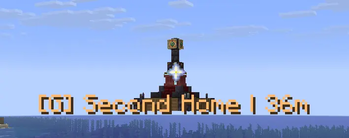
Global Anchor - With HUDGlobal AnchorAttuned Anchor User ListAttuned Anchor Edit Anchor Menu

Последние версии

Все версии →
beta

Server and Client Split

0.3.3
1 июл. 2026 г.128Minecraft: 26.1.2, 26.2fabric
Скачать
Что нового
<iframe width="560" height="315" src="https://www.youtube-nocookie.com/embed/4Vqfj7o_vRc" title="YouTube video player" frameborder="0" allow="accelerometer; autoplay; clipboard-write; encrypted-media; gyroscope; picture-in-picture; web-share" allowfullscreen></iframe> Server functionality: - Anchor structures, activation, validation, storage, permissions, and teleporting. - `/anchor teleport <name>` and `/an teleport <name>`. - `/anchor about` with the installed version, author, Modrinth page, and issue-report link. - Modrinth update notices with direct download links for players with `attunedanchors.update.notify`. Client functionality: - Waypoint menu. - HUD markers. - Icon and color editing. - Access controls. - Clickable management buttons. ### Improved - Improved command messages with clearer colors and clickable links. - Updated the mod author and homepage shown by mod loaders. - Existing `permissions.json` files now include the update notice permission in the default group.
beta

Permission Groups 0.3.2

0.3.2
29 июн. 2026 г.28Minecraft: 26.1.2, 26.2fabric
Скачать
Что нового
### Added - Added `permissions.json` support for configurable permission groups. - Added a default `Default` group that every player gets automatically. - Added default permissions for normal gameplay, including opening the waypoint menu, editing/managing anchors, spawning/listing/removing/despawning anchors, and teleporting. - Added an `Admin` group with full permission override through `attunedanchors.admin`. - Added player group assignments by UUID or player name. ### Changed - Replaced the old `admins.json` fallback with `config/attunedanchors/permissions.json`. - Updated startup logging to show loaded permission groups and player assignments. - Updated the README with the generated permissions format. ### Server Note - Existing server owners using `admins.json` should move those players into the new `permissions.json` `Admin` group.
beta

Attuned Anchors 0.3.1

0.3.1
14 июн. 2026 г.36Minecraft: 26.1.2fabric
Скачать
Что нового
**Changelog 0.3.1** - Fixed local anchors not showing correctly in the waypoint/HUD data flow. - Added the anchor `enabled` state to the visible-anchor network payload so the client can distinguish active, enabled, and HUD-visible anchors correctly. - Fixed HUD visibility logic so manually toggling an out-of-range or disabled anchor cannot force it visible. - Improved waypoint menu organization for `local` vs `global` anchors. - Refactored anchor activation, validation, teleport, debug highlighting, and waypoint screen code into smaller services/classes. - Improved anchor store lookups with ID and dimension indexes. - Added/updated tests for local anchor visibility and HUD override behavior.
beta

Attuned Anchors 0.3.0

0.3.0
11 июн. 2026 г.30Minecraft: 26.1.2fabric
Скачать
Что нового
![Attuned Anchor Banner](https://cdn.modrinth.com/data/cached_images/329cab9b60b10451f51fa53c324bc9de04bcb7ab.png) ## Attuned Anchors 0.3.0 Initial Modrinth release. ### Features - Buildable Local Anchors and Global Anchors. - Local anchors work within a configured nearby radius. - Global anchors stay available from anywhere in the same dimension. - Admin command spawning for local and global anchor structures. - Anchor activation through item frames and configured anchor items. - In-game N menu for anchor management. - Admin teleport button in the N menu. - HUD markers for visible anchors with distance display. - Anchor rename, color, and icon customization. - Large selectable marker icon set with categories. - User access management through name tags. - Public anchors using an unnamed/default name tag. - Private anchors using named name tags. - Users view showing assigned users, public status, or no-user state. - Anchor deletion from the admin menu. - Safe teleport placement near anchors to avoid landing inside blocks. - Automatic anchor validation. - Broken structures disable their anchor. - Repaired structures reactivate automatically. - Fully removed structures are cleaned from storage. - Candle state feedback for active/inactive anchors. - Persistent anchor storage across world/server restarts. - Admin permission checks for menu, edit, delete, teleport, spawn, and despawn actions. ### Technical Notes - Combined client/server jar. - Client and server are both required. - Refactored systems for activation, validation, teleport, debug, storage, and UI rendering. - Java source files are kept under 500 lines for maintainability.