COWMODSКаталог модов

Angelo Achievements

AngeloAchievements is a plugin that allows you to add and customize achievements on your server.

Автор: AngelO24234обновлён 17 нояб. 2024 г.
УправлениеОбщениеУтилиты

Описание

AngeloAchievements is a plugin that allows you to add and customize achievements on your server. With this addon, you can modify achievements to customize with celebratory messages and execute specific commands when players unlock achievements. Ideal for servers looking to enhance the gaming experience and motivate players with unique rewards..

The plugin supports color formatting like MiniMessage.

To reload the plugin use /achievementreload
As easy as talking to a woman!

The plugin is compatible with datapacks, you can use it for datapack achievements as well. Just do the same as the other achievements, /pirates.

Example:

type: more_advancments:pirates_of_the_carribean

List of Achievements: https://www.digminecraft.com/lists/advancements_pc.php

Configuration file

config.yml

# AngeloAchievements is a plugin focused on customizing the default Minecraft advancements.
# I RECOMMEND using the command '/gamerule announceAdvancements false' so that the default messages
# don't bother you, and you can enjoy only the customized messages from the plugin.

# The function of 'default_message' is to provide a default message that will be shown for all advancements
# if they do not have a specific configuration under the 'achievements:' section.
# If an advancement has a specific type configured under 'achievements:', the default message will be ignored
# for that advancement, and the customized message will be shown instead.

# AngeloAchievements supports MiniMessage, allowing you to customize messages with great flexibility.

# Section to customize specific advancements:
# You can name the entries under 'achievements:' however you like; the name does not affect the plugin's functionality.
# Make sure to set the advancement type with 'type', followed by its Minecraft path (e.g., minecraft:story/mine_diamond).

# Example configuration for advancements:
# achievements:
#   Achievement1:  ⬅ This name is free; you can change it to whatever you want.
#     type: minecraft:story/mine_diamond  ⬅ The type of advancement you want to customize.
#     message:  ⬅ The messages that will be sent upon completing this advancement.
#       - "<blue>You have completed the advancement <yellow>Mine a Diamond&"
#       - "<green>Congratulations!"
#   Achievement2:
#     type: minecraft:adventure/kill_a_mob
#     message:
#       - "<gradient:#ff0000:#00ff00>You have completed the achievement First Blood!</gradient>"
#       - "<red><bold>Incredible!"
#     title: "You completed an achievement"  ⬅ Title that will appear on the player's screen.
#     subtitle: "Check the chat"  ⬅ Subtitle that will appear on the player's screen.
#     commands:  ⬅ Commands that will execute upon completing the achievement. Use '%player%' for the player's name.
#       - "give %player% diamond 1"
#       - "[BROCAST] %player% has killed their first mob!" ⬅ Broadcasts a message to all players.
#       - "[SOUND] entity_player_levelup 1.0 1.0" ⬅ Plays a sound when the achievement is completed.

# Default message that will be shown if an achievement does not have a specific configuration.
default_message: "<green>%player% has earned the achievement %achievements%!"

achievements:
  Achievement1: 
    type: minecraft:story/mine_diamond
    message:
      - "<blue>You have completed the advancement <yellow>Mine a Diamond"
      - "<green>Congratulations!"
  Achievement2:
    type: minecraft:adventure/kill_a_mob
    message:
      - "<gradient:#ff0000:#00ff00>You have completed the achievement First Blood!</gradient>"
      - "<red><bold>Incredible!"
    title: "You completed an achievement"
    subtitle: "Check the chat"
    commands:
      - "give %player% diamond 1"
      - "[BROADCAST] <gold>%player% has completed an achievement and was rewarded with 1 diamond."
      - "[SOUND] entity_player_levelup 1.0 1.0"

Галерея
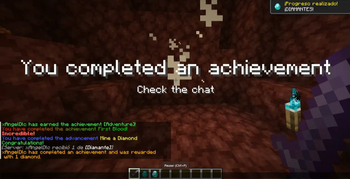
Plugin operation

Последние версии

Все версии →
release

Important changes

0.6
17 нояб. 2024 г.189Minecraft: 1.20, 1.20.1, 1.20.2, 1.20.3, 1.20.4, 1.20.5, 1.20.6, 1.21, 1.21.1, 1.21.2, 1.21.3, 1.21.4paper, purpur, spigot
Скачать
Что нового
### I have recoded the plugin code for a better experience. ## Changes for config.yml: - [BRODCAST] was changed to [BROADCAST]. - The “hover:” section was removed since minimessage already offers a hover option. - The plugin now only accepts the minimessage format. ## Compatible with _DATAPACKS_ **The plugin is compatible with datapacks, you can use it for datapack achievements as well.** Just do the same as the other achievements, <datapack name>/pirates. **Example:** **type: more_advancments:pirates_of_the_carribean**
release

Bug fixed [SOUND]

0.5
15 сент. 2024 г.47Minecraft: 1.20, 1.20.1, 1.20.2, 1.20.3, 1.20.4, 1.20.5, 1.20.6, 1.21, 1.21.1paper, purpur
Скачать
Что нового
# Now you can use [SOUND] without problems.
release

[SOUND] | "default_message:"

0.4
13 сент. 2024 г.39Minecraft: 1.20, 1.20.1, 1.20.2, 1.20.3, 1.20.4, 1.20.5, 1.20.6, 1.21, 1.21.1paper, purpur
Скачать
Что нового
### **[Update] New Version of AngeloAchievements** Hello everyone! 🎉 We are excited to announce a new update for **AngeloAchievements**, the plugin that allows you to customize Minecraft advancements. In this version, we have added a **highly requested feature** to further enhance your achievement customization experience. #### **🆕 New Feature - [SOUND]** You can now play **custom sounds** when an achievement is completed on your Minecraft server. This feature allows you to set a specific sound, volume, and pitch for each completed achievement, creating a more immersive experience for your players. #### **How does it work?** In the `commands` section of the `config.yml` file, simply add the following format to play a sound when an achievement is completed: ```yml [SOUND] sound_name volume pitch ``` - `sound_name`: The name of the sound you want to play (e.g., `entity_player_levelup`). - `volume`: The volume of the sound (optional, default: `1.0`). - `pitch`: The pitch of the sound (optional, default: `1.0`). #### **Example:** ```yml commands: - "[SOUND] entity_player_levelup 1.0 1.0" ``` #### **Full Example in the Configuration File:** ```yml achievements: Achievement2: type: minecraft:adventure/kill_a_mob message: - "<gradient:#ff0000:#00ff00>You have completed the achievement First Blood!</gradient>" - "<red><bold>Incredible!" title: "You completed an achievement" subtitle: "Check the chat" hover: - "<gray>You killed your first mob!" - "<gold>Good job!" commands: - "[SOUND] entity_player_levelup 1.0 1.0" ``` If you leave `default_message: ""` empty, a default message will not appear.
release

RELOAD COMMAND

0.3
26 авг. 2024 г.54Minecraft: 1.20, 1.20.1, 1.20.2, 1.20.3, 1.20.4, 1.20.5, 1.20.6, 1.21, 1.21.1paper, purpur
Скачать
Что нового
## 🆕 News: **New Command:** /reloadangeloachievements **Description:** This command allows you to reload the plugin configuration from the config.yml file in real time. **Use:** /reloadangeloachievements **Permission required:** angeloachievements.reload
release

AngeloAchievements v0.2

0.2
24 авг. 2024 г.42Minecraft: 1.20, 1.20.1, 1.20.2, 1.20.3, 1.20.4, 1.20.5, 1.20.6, 1.21, 1.21.1paper
Скачать
Что нового
# What's New: 1. **_PlaceholderAPI Support:_** AngeloAchievements is now fully compatible with PlaceholderAPI! You can now use advanced placeholders in your achievement messages and commands, allowing for even more dynamic and personalized content. 2. **_[BROCAST] Command Prefix:_** We've added a new [BROCAST] command prefix. When using [BROCAST] in the commands section of your config.yml, the following message will be broadcast to all players on the server. This feature allows you to easily announce achievements to everyone!
release

AngeloAchievements v0.1

0.1
21 авг. 2024 г.52Minecraft: 1.20.1, 1.20.2, 1.20.3, 1.20.4, 1.20.5, 1.20.6, 1.21, 1.21.1paper
Скачать
Что нового
**AngeloAchievements just published** **:)**