COWMODSКаталог модов

ZombiesEverywhere

Do you like zombie games? Are you troubled by the difficulty of the original Minecraft version being too simple? It's okay, now this Zombies Everywhere may meet your needs!

Автор: smy-oi3,3 тыс.2обновлён 22 окт. 2026 г.
ПриключенияСнаряжениеМобы

Описание

ZombiesEverywhere - Ultimate Zombie Survival Mod

Tired of the bland difficulty of vanilla Minecraft? Craving a truly intense, heart-pounding zombie apocalypse experience? ZombiesEverywhere is built exactly for you. Designed to fit seamlessly into the vanilla gameplay ecosystem, this mod adds unique zombie variants, an infection mechanic, dynamic difficulty scaling and infinitely upgradable endgame gear, building a perilous survival world where danger lurks at every turn.


Core Gameplay Features

Six Distinct Zombie Types for Rich Combat

The mod adds 6 zombie entities with fully unique roles, without modifying any vanilla mob attributes. All zombies feature custom models and visual effects rendered via GeckoLib.

  • Common Zombie: The baseline enemy, tuned to work with the mod's spawn and day-scaling systems.

  • Toxic Zombie: Attacks apply poison to wear down players over time.

  • Swift Zombie: Strikes at blistering speed with almost no reaction time, built for relentless pressure.

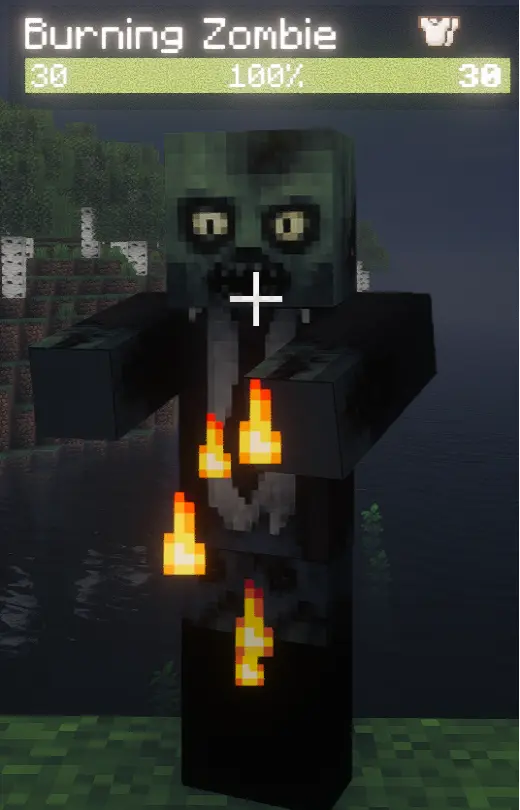
  • Burning Zombie: Immune to fire. Wields two ranged abilities — Fire Volley and Enhanced Fireball — and ignites targets on melee hits.

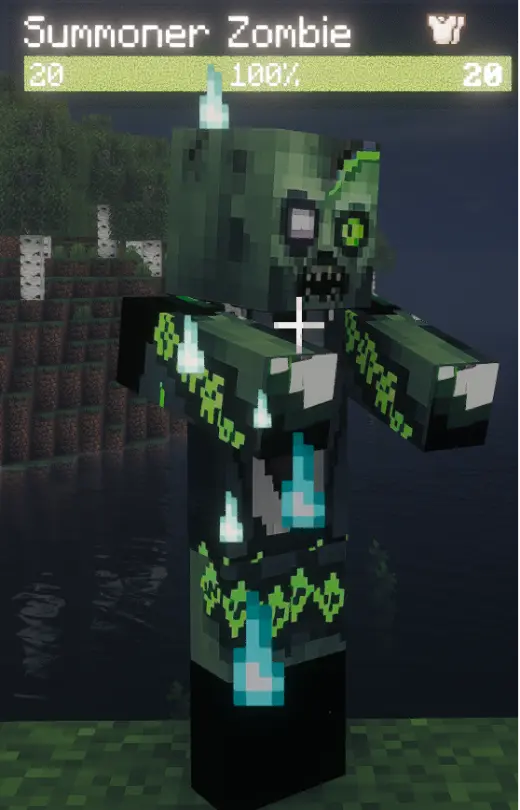
  • Undead Summoner: Continuously summons common and special zombies to fight alongside it, and unleashes a massive horde burst upon death.

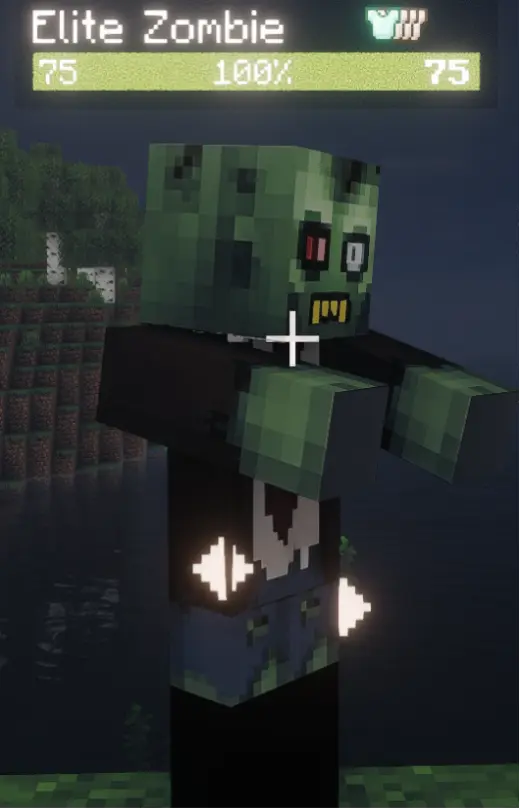
  • Elite Zombie: A top-tier foe with overwhelmingly superior stats, raw power is its greatest strength. elite zombies burning zombie fast zombie normal zombie poison zombie summoner zombie
All zombies share a 35-block detection range and do not trigger vanilla reinforcement mechanics.

Tiered Infection Mechanic for True Survival Pressure

Attacks from modded zombies have a chance to inflict the Infection debuff, which scales across 5 tiers. Higher tiers impose increasingly severe penalties, reducing movement speed, max health and attack power while amplifying incoming damage.

  • Consecutive hits stack infection chance; infection triggers once the threshold is met. The chance fully resets after a long period without taking damage.

  • Infection automatically levels up over time, and taking additional damage while infected speeds up the progression.

  • A short immunity window applies after each level-up, with a maximum cap of Tier 5.

  • Drinking milk clears all tiers of infection instantly.

Dynamic Day-Based Scaling: Harder the Longer You Survive

Zombie strength grows dynamically with the number of in-game days — the longer your world survives, the deadlier the threat. This only applies to zombies from this mod and does not affect vanilla mobs.

  • Scaling level is tied directly to in-game days and displayed after the zombie's name (e.g. Common Zombie Lv.5).

  • Health, attack, defense and movement speed all scale progressively, each with its own growth rate and maximum multiplier.

  • The entire system is fully toggleable and numerically configurable, so you can fine-tune the difficulty curve to your preference.

Dual-Pool Loot System with Rewarding Drops

The loot system was completely rebuilt in V1.2.0 with a separate Common Pool + Exclusive Pool mechanic, where every zombie type has its own dedicated drop table.

  • Common Pool: Shared by all zombies with a guaranteed minimum drop count, providing a steady supply of basic resources.

  • Exclusive Pool: Unique to each zombie type, dropping themed rare items covering valuable resources from all vanilla dimensions.

  • Supports adding loot from other mods via external JSON files, which are automatically assigned to the appropriate zombie's drop pool.

Corrupted Gear System with Infinite Upgrades

To stand against the ever-growing zombie threat, the mod introduces a full set of top-tier Corrupted Gear forged from Netherite, including a sword, full armor set, bow and trident — all infinitely upgradeable at the smithing table.

  • Base gear comes with built-in special effects: weapons can apply Infection, armor grants infection resistance, and the trident features permanent channeling and a kill-summon effect.

  • Upgrades alternate between Normal Enhancement and Special Enhancement every 4 levels: Normal Enhancement grants steady stat gains with no failure penalty; Special Enhancement grants enchantments and permanent stat bonuses, but degrades the item by 1 level on failure.

  • The Corrupted Bow has 4 exclusive powerful enchantments: Splitting (arrows fragment into a spread), Volley (fires multiple arrows in one shot), Piercing Shot (gravity-free, armor-piercing projectiles) and Armor Break (bypasses target defense).

Highly Customizable Spawn & Difficulty Controls

The mod runs its own independent zombie spawn system, fully separate from vanilla mob spawning, with extensive customization options.

  • Adjust spawn weights for each zombie type, with total weights automatically normalized.

  • Biome-specific spawn bonuses: certain zombies receive greatly increased spawn weight in their matching biomes or dimensions.

  • Tune spawn chance, maximum zombies per chunk, spawn radius, daytime spawning and many more parameters.

  • Built-in Zombie-Only Mode: Disables natural spawning of non-zombie vanilla mobs for a pure zombie apocalypse experience, with a configurable whitelist for allowed entities.


Additional Quality Features

  • Floating Damage Numbers: Damage values pop up above zombies when struck — red for normal damage, gold for critical hits — with a smooth rise-and-fade animation.

  • Custom Models & Textures: Replace all zombie models and textures via external config files, with automatic resource integrity verification on game launch.

  • 3x Experience Bonus: Modded zombies drop triple the vanilla experience to match the elevated combat challenge.

  • Automatic AttributeFix Support: Automatically detects the AttributeFix mod and configures itself to lift vanilla attribute caps, unlocking the full potential of the day-scaling system.


Compatibility & Dependencies

Required Dependencies

  • As of version 1.2.0, the mod uses custom zombie textures powered by GeckoLib, making it a required dependency. Version 4.9.2 or higher is recommended.

Recommended Mods

  • AttributeFix: Lifts vanilla attribute caps. The mod auto-detects it and configures compatibility automatically.

  • Bookshelf & Prickle: Required frontend dependencies for AttributeFix.

Compatibility Notes

  • To maximize cross-mod compatibility, this mod does not use Mixins and makes minimal changes to the base game, resulting in excellent overall stability (tested to run reliably in the "New Journey" and "Severe Mechanic Syndrome" modpacks).

  • All zombies are independently added entities and do not alter the attributes or behavior of any vanilla mobs.

  • Every feature supports deep adjustment via config files, so you can tailor the experience to your preferred difficulty.

Галерея

ZombiesEverywhere

Последние версии

Все версии →
beta

ZombiesEverywhere 1.0.2-neoforge+mc26.1.2-beta

1.0.2-neoforge+mc26.1.2-beta
22 окт. 2026 г.36Minecraft: 26.1.2neoforge
Скачать
Что нового
## V1.0.2 Changelog ### Fixes 1. Loot system rework: In the old loot system, players could not change a zombie's drop rules on their own through config files, and the files were misleading. This update reworks the loot system: - The drop types no longer differ by zombie-only mode. The only difference is that with zombie-only mode off, the default zombie drop chance is just 50% of the configured value. - Zombie loot comes from two config files: `common.json` and `<zombieName>.json`. - `common.json` holds the drops shared by every zombie type - configure it there, for example, to make all zombies drop a Nether Star. - `<zombieName>.json` holds one zombie's own drops - to make only Elite Zombies drop a Dragon Egg, configure it in `elite_zombies.json`. - Say you want Elite Zombies to drop Rotten Flesh more often, but that entry lives in `common.json`, and editing it there would affect every other zombie too. No need to worry: write the same-named Rotten Flesh entry in `elite_zombies.json` and it overrides the common one. - New command: `/ze loot preview <type>` prints the expected drops per dimension for each zombie type, to help tune the numbers. - Assigning third-party mod items to zombies is supported as well. ### Additions 1. Fully ported and synced from the 1.21.1 mainline V1.4.3, plus selected features from V1.4.4.
beta

ZombiesEverywhere 1.0.2-forge+mc1.20.1-beta

1.0.2-forge+mc1.20.1-beta
16 окт. 2026 г.216Minecraft: 1.20.1forge
Скачать
Что нового
## V1.0.2 Changelog ### Fixes 1. Hardened the network packets against malformed input. 2. Improved the Mixin configuration switches. 3. Completed the Chinese translations of the TOML config. 4. Improved the loot bag mechanics.
beta

ZombiesEverywhere 1.0.1-forge+mc1.20.1-beta

1.0.1-forge+mc1.20.1-beta
11 окт. 2026 г.88Minecraft: 1.20.1forge
Скачать
Что нового
## V1.0.1-beta Changelog ### Fixes 1. Loot system rework: In the old loot system, players could not change a zombie's drop rules on their own through config files, and the files were misleading. This update reworks the loot system: - The drop types no longer differ by zombie-only mode. The only difference is that with zombie-only mode off, the default zombie drop chance is just 50% of the configured value. - Zombie loot comes from two config files: `common.json` and `<zombieName>.json`. - `common.json` holds the drops shared by every zombie type - configure it there, for example, to make all zombies drop a Nether Star. - `<zombieName>.json` holds one zombie's own drops - to make only Elite Zombies drop a Dragon Egg, configure it in `elite_zombies.json`. - Say you want Elite Zombies to drop Rotten Flesh more often, but that entry lives in `common.json`, and editing it there would affect every other zombie too. No need to worry: write the same-named Rotten Flesh entry in `elite_zombies.json` and it overrides the common one. - New command: `/zombieseverywhere loot preview <type>` prints the expected drops per dimension for each zombie type, to help tune the numbers. - Assigning third-party mod items to zombies is supported as well.
release

ZombiesEverywhere 1.4.3-neoforge+mc1.21.1-hotfix

1.4.3-neoforge+mc1.21.1-hotfix
11 окт. 2026 г.250Minecraft: 1.21.1neoforge
Скачать
Что нового
## V1.4.3 Changelog ### Fixes 1. Loot system rework: In the old loot system, players could not change a zombie's drop rules on their own through config files, and the files were misleading. This update reworks the loot system: - The drop types no longer differ by zombie-only mode. The only difference is that with zombie-only mode off, the default zombie drop chance is just 50% of the configured value. - Zombie loot comes from two config files: `common.json` and `<zombieName>.json`. - `common.json` holds the drops shared by every zombie type - configure it there, for example, to make all zombies drop a Nether Star. - `<zombieName>.json` holds one zombie's own drops - to make only Elite Zombies drop a Dragon Egg, configure it in `elite_zombies.json`. - Say you want Elite Zombies to drop Rotten Flesh more often, but that entry lives in `common.json`, and editing it there would affect every other zombie too. No need to worry: write the same-named Rotten Flesh entry in `elite_zombies.json` and it overrides the common one. - New command: `/zombieseverywhere loot preview <type>` prints the expected drops per dimension for each zombie type, to help tune the numbers. - Assigning third-party mod items to zombies is supported as well.
beta

ZombiesEverywhere 1.0.0-forge+mc1.20.1-beta

1.0.0-forge+mc1.20.1-beta
10 окт. 2026 г.39Minecraft: 1.20.1forge
Скачать
Что нового
# V1.0.0-beta changelog This is a 1.20.1-forge port version built based on the mod ZombiesEverywher-V1.4.2-1.21.1neoforge
release

ZombiesEverywhere 1.4.2-neoforge+mc1.21.1-release

1.4.2-neoforge+mc1.21.1-release
10 окт. 2026 г.44Minecraft: 1.21.1neoforge
Скачать
Что нового
## V1.4.2 Changelog ### Fixes 1. Fixed corrupted swords and armor being placeable in the enchanting table (even though no enchantment could actually be rolled anyway). 2. Fixed corrupted armor not rendering when worn. 3. Improved the starter gear grant mechanism. 4. Fixed the "Auto-Collect from Other Mobs" config (`lootAutoCollectAllMobs`) having no effect. 5. Performance improvements. ### New 1. Added a config option that lifts the enchanting restriction on this mod's gear (`manualEnchantingEnabled`: corrupted gear can be enchanted at anvils and enchanting tables like its vanilla counterpart).
release

ZombiesEverywhere 1.4.1-neoforge+mc1.21.1-release

1.4.1-neoforge+mc1.21.1-release
1 окт. 2026 г.155Minecraft: 1.21.1neoforge
Скачать
Что нового
## V1.4.1 Changelog ### Fixes 1. Performance: optimized hot code paths for more stable TPS; improved the client-side render LOD system. 2. Fixed the join message: it is now shown only once, when first entering a world. 3. Improved the Patchouli guide book descriptions. 4. Fixed Corruption Core list entries not syncing promptly. 5. Zombie model and animation polish: updated the default zombie model and the default animations. 6. Fixed the player hurt cooldown issue. 7. Fixed an external-file registration timing issue: on a fresh server start, non-vanilla item entries written into the loot files did not take effect until a manual reload command was run. 8. Reworked the external file manager: after upgrading from an older version, outdated external default files now update automatically, while player-customized files are kept. The `/zombieseverywhere resources` command family was also added to manage these default resources. 9. Config improvements: - Tuned the overly aggressive zombie spawn parameters from older versions. - Performance options are now grouped under "Rendering & Performance", split into three subsections: "Client Rendering / Server Load Reduction / Network Throttling" (all performance entries previously scattered in "Basic Settings" were moved out); "Elite Targeting Range" moved to "Zombie Upgrade → AI Progression → Zombie Perception". - The "Zombie Push-Apart Interval" added in 1.4.0 moved position, so it resets to its default (3) after upgrading - re-set it if you had customized it. 10. Overhauled zombie pathfinding: - Improved A* pathfinding with a leader-based mechanism. - This update introduces distance-field navigation, which can guide zombies more efficiently than A* in certain situations. It is an experimental option. - The A* pathfinding and the distance-field navigation are two parallel, self-consistent systems, each with its own strengths; players can enable either one, or both. ### New 1. Corruption Cores are now attacked by zombies: - Zombies can bite into suppression energy: they attack corruption cores, and each hit drains suppression energy based on attack damage. - Once a corruption core's energy is fully bitten away, a Corruption Leak triggers: corruption energy leaks out in a cube-shaped area centered on the core. A leak lasts 8 minutes by default; refilling the core ends it early (breaking the core does not make the leak go away). This close to a leak the screen edge glows corruption-green as a warning, and the first step inside plays a warning sound. - Under a Corruption Leak: any living creature that enters the area gets infected. (This means zombies can catch Infection too - but for zombies the Infection is inverted into the Corruption Boon effect.) 2. Added casting animations for Burning Zombies and Summoner Zombies. 3. Summoner Zombie upgrade: - New skill: periodically summons Undead Minions to fight alongside it. - Active from stage 3. - Undead Minions fly and pass through walls like vanilla vexes, and spawn holding a weapon. 4. Added sound broadcast throttling. 5. Added a Mixin that modifies the vanilla entity collision query; it mainly reduces the performance cost of large crowds of mod zombies squeezing together. If you run into related problems, try disabling it in the TOML config - the optimization stops working while it is off. Because this optimization targets the vanilla implementation, the Lithium mod is known to modify the same injection point, so the optimization is inactive when Lithium is installed. 6. Added a Mixin that listens to world block events. If you do not need zombie pathfinding, you can turn it off together with the distance field to avoid compatibility risks. If another mod overrides that change, distance-field pathfinding may break.
release

ZombiesEverywhere 1.4.0-neoforge+mc1.21.1-release

1.4.0-neoforge+mc1.21.1-release
21 сент. 2026 г.215Minecraft: 1.21.1neoforge
Скачать
Что нового
## V1.4.0 Changelog ### Fixes 1. Zombie AI architecture overhaul: zombies used to twitch and jitter in some situations; their behavior is now far more consistent and noticeably more aggressive. Improved zombie intelligence: - Burning Zombies no longer join melee after stage 3 - they keep their distance and harass the target instead, with a chance to knock it back if it gets too close. - After stage 3, Summoner Zombies try to stay out of the player's sight - hiding behind blocks, behind other zombies or behind the player - and summon reinforcements from the shadows. - Zombies coordinate their tactics much more smoothly and tightly. 2. Reworked how Corruption Gates are placed and how they spawn zombies, cutting pointless performance cost and network traffic. 3. Improved zombie swimming physics and fixed behavior issues in water. 4. Performance: optimized hot code paths for more stable TPS. 5. Fixed the kill feed not recognizing gun icons when the "TaCZ 1.21.1 NeoForge Port" mod is installed - the HUD now shows the gun used for the kill correctly. 6. Updated the default zombie spawn configuration for performance reasons. ### New 1. Infection system upgrade: - Infection Resistance: every point reduces the chance of an infection being applied by 2%. - All entities start at 0. 2. Corruption Star upgrade: While an entity holds a Corruption Star it gains the matching effects (with several stars, the one holding the most energy counts): - At 0-40% corruption energy the holder suffers the **Corruption Curse**. At full strength (empty star) it causes: 1. -40% max health. 2. +32% food exhaustion. 3. +32% damage taken. 4. -24% mining speed. Every bit of extra energy weakens the curse by one tier. - From 50% corruption energy the holder gains the **Corruption Blessing**. At full strength it grants: 1. +25% damage. 2. +10 infection resistance. 3. +150% mining speed. 4. -20% damage taken. The lowest blessing tier starts at 50% of the star's cap; more energy means a stronger blessing, and a completely full star reaches the top tier. - While the Corruption Star is completely full: 1. +25% extra damage. 2. +5 extra infection resistance. 3. +10% extra final damage reduction. 4. +50% extra mining speed. 5. +1 Luck. 6. +20% extra movement speed. 3. Curios API integration: with Curios API installed, the Corruption Star also works as a charm accessory. Also integrated with Touhou Little Maid - maids are compatible with nearly every Corruption Star mechanic. 4. Configuration improvements: - Cloth Config integration for a much better in-game config screen. - New config preset system: - Players can now load and export their own full config. - Presets live in `config/ZombiesEverywhere/presets/`. - Four initial difficulty presets ship with the mod: Easy, Standard, Hard and Hell. They mainly tune Corruption Gate spawning and the day-based zombie growth. - Note: the higher the difficulty, the heavier the performance cost - choose carefully. - Preset command: `/zombieseverywhere preset [list | xxxx]` 5. To make the Corruption Curse's faster food exhaustion possible, the mod now ships a Mixin. If you run into related problems, try turning it off in the TOML config. 6. To avoid the huge pile of dropped items (and the entity lag it causes) during hordes: New automatic loot pickup: - The mod adds its own bag (a button in the E-key inventory screen in survival; the B key opens it by default too). It offers high stack sizes and is take-only - items can be taken out but never put in. Loot from the mod's zombies killed by the player goes straight into this bag instead of dropping on the ground. - By default it only covers kills of this mod's zombies. The mod also offers collection for everything the player kills - configure it in the loot drop section. - With keep-inventory enabled, the bag's item count is halved as a penalty. - The bag is a separate data attachment, so the vanilla `/clear` command cannot touch it. Use `/zombieseverywhere bag [count|clear]` instead. - The mod also provides a block (pointing at the bound player's loot bag) as an interactable container, so hoppers and similar blocks can move items. - Note: this is a compromise for performance. It is convenient, but it can noticeably change the game for hardcore players, so there is a config switch; it is enabled by default. 7. New in-game guide (requires Patchouli): - With Patchouli installed, a guide book is generated automatically the first time you join a world. 8. New Corruption Gate suppression: - New block: Corruption Core. - Crafted with a Corruption Star (spending corruption energy), Corrupted Blood and a Nether Star. - Place it and right-click to open its screen: rename it, browse every Corruption Core you have placed, and put a Corruption Star into the input slot to convert its corruption energy into suppression energy, which suppresses Corruption Gate spawning. Amethyst Shards can be used to charge it as well. - Every gate it suppresses costs a certain amount of suppression energy.
release

ZombiesEverywhere 1.3.10-neoforge+mc1.21.1-hotfix

1.3.10-neoforge+mc1.21.1-hotfix
11 сент. 2026 г.296Minecraft: 1.21.1neoforge
Скачать
Что нового
# V1.3.10 Changelog ## Fixes: 1. Fixed an issue where Corruption Gate checks could cause the heap memory to overflow (out-of-memory). 2. Fixed zombie attacks being unable to infect NPCs.
release

ZombiesEverywhere 1.0.1-neoforge+mc26.1.2-hotfix

1.0.1-neoforge+mc26.1.2-hotfix
11 сент. 2026 г.158Minecraft: 26.1.2neoforge
Скачать
Что нового
# V1.0.1 Changelog ## Fixes: 1. Fixed Corruption Gate checks that could overflow memory and crash the game. Long sessions with many gates open no longer risk a sudden freeze or a forced shutdown. 2. Fixed zombies being unable to infect NPCs. Previously only players could catch the Infection from a zombie's bite, while pets and other creatures were unaffected. They are now infected the same way, worsen at the same rate and are cured the same way. ## Additions: 1. Infection rework — every living creature can be infected now: - Sources: bites from mod zombies, melee hits from corrupted weapons (sword / bow / trident), and attacks made by an already infected creature. Each of the three sources can be switched off separately. - Everything about Infection sits in the config screen under Infection System: Enable Infection System, Infection Auto Level-Up Interval (Minutes), Immunity Time after Level-Up (Seconds), Max Health Drain per Level, plus the three source switches and roll chances under Sources & Roll. In multiplayer the server's config is the one that counts. - Infection worsens on its own, up to level 5. Higher levels take away more movement speed and max health and lower your damage. A bar above your health bar shows the current level and how long until it worsens again. - Infected creatures constantly give off dark red particles, so you can see at a glance who is infected. From level 3 the particles get noticeably thicker, and at max level they turn a brighter colour. - Mod zombies are immune to Infection. Hitting them does not weaken them — it grants them Corruption Boon instead: purple particles, more speed and more max health the more you hit them. - Curing: drink milk or a honey bottle, or eat a golden apple / enchanted golden apple (yourself); or hold a cure item and right-click an infected creature. This also works on pets and other NPCs that cannot eat on their own. One item is consumed and its container is returned (a milk bucket gives back an empty bucket). - The cure item list is configurable in config/ZombiesEverywhere/infection/cure_items.json (item ids; an empty list disables curing). Run /zombieseverywhere reload infection_cure_items to apply it in game. 2. Combat value display rework: - Values are shown as a queue of cards on screen: red = normal damage, gold = critical, green = healing. Cards share the same size, numbers sit in their own right-aligned column, repeated hits on the same target add up instead of flooding the list, and anything past the row limit shows as "… +N more". - Move the panel with F6: press F6 to enter drag mode (the mouse is released), drag it where you want it, then press F6 again to save and exit (leaving the screen also saves). - Each row reads attacker · weapon or potion icon · target · value. Damage taken by your pets is shown on your screen as well, and damage you take is marked with "(you)". - Settings: Basic Settings → Combat Value Display → On-Screen Queue — Max Rows, Card Rows, Value Column Width, Panel Opacity, and the toggles for PvP damage, damage taken and companion damage. The Reset Position button at the bottom of that page puts the panel back in the bottom-right corner. - The three colours (Normal Damage / Critical / Healing) are set one page up as 6-digit hex values (for example FF5555) and apply immediately.