

ZeroVisuals
ZeroVisuals - visuals for minecraft fabric
Автор: mooncode27,6 тыс.19обновлён 12 авг. 2026 г.
ДекорОптимизацияУтилиты
Описание
Join our Telegram community: @zerovisualsoff
EN:
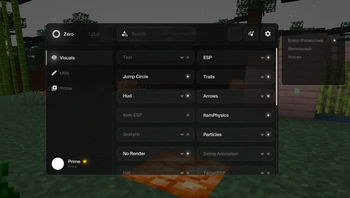
ZeroVisuals: Our features
| Function | What Does |
|---|---|
| ESP | These are custom hitboxes for player, customize them with color and choose, on who it will display (Mobs/Players) |
| Jump Circles | Draws a circle below you when you jump |
| Trails | Creates a line behind you as you move |
| Hud | Displays useful information about the game on your screen |
| Arrows | Draws arrows to another player, works only in the field of visibility |
| ItemESP | Custom effects for dropped items |
| ItemPhysics | Give physics for dropped items |
| NoRender | Disables rendering of selected components |
| Swing Animation | Animates the actions of the character's main hand, it is possible to change the position of the hands |
| Hat | Adds a Chinese hat / halo to your character's head |
| TargetESP | Adds visual effects when hovering over a target |
| Custom World | Adds the ability to customize fog / time of day |
| Night Vision | Changes the gamma settings in the game to the maximum possible or gives an endless night vision effect |
| Aspect Ratio | Change your aspect ratio in the game |
| Keystokers | Adds display of pressed keys to the screen |
| Svetych | Adds beautiful flying cubes to the game world |
| Particles | Adds beautiful flying particles to the game world |
| Projectile | Displays the projectile's trajectory |
| Block Overlay | Replaces the vanilla block selection overlay |
Zero Visuals is the open source project
We have a GNU General Public License and you need to post the source code if you are going to change/edit the project.
Support the project: USDT via the TRC-20 network: TJRSyCBqeJHicFAXCN5CLrdenACj8fytT1
Developer: @unsoftik > discord
Telegram Chanel: @zerovisualsoff
RU
ZeroVisuals: Наши функции
| Функция | Что делает |
|---|---|
| ESP | Это пользовательские хитбоксы для игрока, настройте их цвет и выберите, на ком они будут отображаться (мобы/игроки) |
| Jump Circle | Рисует круг под вами при прыжке |
| Trails | Создает линию позади вас при движении |
| HUD | Отображает полезную информацию об игре на вашем экране |
| Arrows | Рисует стрелки в сторону другого игрока, работает только в поле видимости |
| ItemESP | Пользовательские эффекты для выпавших предметов |
| ItemPhysics | Задает физику для выпавших предметов |
| NoRender | Отключает рендеринг выбранных компонентов |
| Swing Animation | Анимирует действия основной руки персонажа, можно изменить положение рук |
| Hat | Добавляет китайскую шляпу/нимб на голову вашего персонажа |
| TargetESP | Добавляет визуальные эффекты при наведении курсора на цель |
| Custom World | Добавляет возможность настройки тумана/времени суток |
| Night Vision | Изменяет настройки гаммы в игре на максимально возможные или дает бесконечный эффект ночного видения |
| Aspect Ration | Изменяет соотношение сторон в игре |
| Keystokers | Добавляет отображение нажатых клавиш на экране |
| Svetych | Добавляет красивые летающие кубы в игровой мир |
| Particles | Добавляет красивые летающие частицы в игровой мир |
| Projectile | Отображает траекторию снаряда |
| Block Overlay | Заменяет стандартное наложение выбора блоков |
ZeroVisuals - это open source проект
Мы используем лицензию GNU General Public License, по этому ты обязан публиковать исходный код, если собираешься изменять/редактировать проект
Поддержать проект: USDT через сеть TRC-20: TJRSyCBqeJHicFAXCN5CLrdenACj8fytT1
Разработчик: @unsoftik > Discord
Телеграм канал: @zerovisualsoff
Галерея

Последние версии
Все версии →release
ZeroVisuals 3.0
3.012 авг. 2026 г.4,4 тыс.Minecraft: 1.21.11fabric
Что нового
**[+] LiqudGlass effect in GUI and HUD**
[+] MaceHelper
[+] CustomHitbox
[+] DiscordRPC
[+] HUD > BossBar, Scoreboard
**[+] Language manager: .language (.lang) RU/EN (WIP: PL)**
The Zero Visuals renderer has been ported to the Vulkan graphics engine, for optimization, if you want to go back to the OpenGL version, use the java argument: -Dzero.renderer=gl
Please report any bugs you find and feedback from the game: https://github.com/mooncode2/ZeroVisual/issues
<details>
<summary>RU</summary>
**[+] LiquidGlass эффект в GUI и HUD**
[+] MaceHelper
[+] CustomHitbox
[+] DiscordRPC
[+] HUD > BossBar, Scoreboard
**[+] Смена языка: .language (.lang) RU/EN (В разработке: PL)**
Рендер Zero Visuals перенесен на графический движек Vulkan, для оптимизации, если вы хотите вернуться на версию OpenGL, используйте java аргумент: -Dzero.renderer=gl
**Пожалуйста сообщайте о найденых ошибках и фидбеке от игры:
https://github.com/mooncode2/ZeroVisual/issues**
</details>
release
ZeroVisuals 2.3 Stable
2.329 июн. 2026 г.1,6 тыс.Minecraft: 1.21.11fabric
Что нового
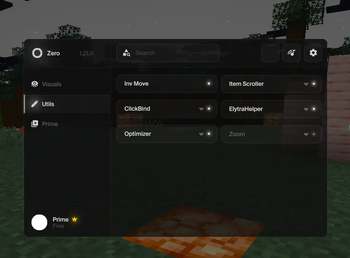
[+] Zoom
[+] AutoResell (FT)
[+] AutoInvisibility
[+] NoFluid
[+] HitColor
More in development: NameTags
release
ZeroVisuals 2.2.1 Stable
2.2.14 июн. 2026 г.918Minecraft: 1.21.11fabric
Что нового
**[/] Lunar comprability**
release
ZeroVisuals 2.2 Stable
2.22 июн. 2026 г.110Minecraft: 1.21.11fabric
Что нового
**[+] Zero now usable for Lunar!**
release
ZeroVisuals 2.1 Stable
2.11 июн. 2026 г.82Minecraft: 1.21.11fabric
Что нового
[+] Added Crosshair, No Fluid, Custom HitBox, Shulker Preview
[+] Added tab FunTime with AutoResell, Auto Invisibility, AutoEat
[/] Optimization
release
ZeroVisuals 2.0 Stable
2.028 мая 2026 г.161Minecraft: 1.21.11fabric
Что нового
[+] Too many changes...
beta
ZeroVisuals 2.0 HotFix 4
2.028 мая 2026 г.42Minecraft: 1.21.11fabric
Что нового
[/] Optimizated added functions
beta
ZeroVisuals 2.0 HotFix 3
2.027 мая 2026 г.55Minecraft: 1.21.11fabric
Что нового
[+] Added Block Hiliter
[+] Added Projictle
[/] Optimized
beta
ZeroVisuals 2.0 HotFix 2
2.027 мая 2026 г.46Minecraft: 1.21.11fabric
Что нового
[/] Removed Black Screen Bug
[/] Minor changes
beta
ZeroVisuals 2.0 HotFix
2.025 мая 2026 г.95Minecraft: 1.21.11fabric
Что нового
[/] Fixed black screens
[/] Optimized config system
[/] Fixed crashes