COWMODSКаталог модов

Zeo's Click Bot

Play click and keyboard sounds ingame! The most realistic clickbot mod for Minecraft.

Автор: zeozeozeo1,8 тыс.4обновлён 2 июл. 2026 г.
ДекорМеханики игрыУтилиты

Описание

ZCB Live for Minecraft

ZCB Live had a long history of being a Geometry Dash only mod. Today we are expanding the horizons of what's possible with Minecraft modding, and bringing the untamed power of ZCB Live to Minecraft!

ZCB Live is a next-generation Minecraft clickbot. What it does is replicate the sound of a mouse and keyboard in the most realistic manner possible. Whether you're recording intense PvP matches, filming Bedwars highlights, or just playing casually, ZCB is designed to deliver an unforgettable Minecraft experience.

Features

  • Incredibly easy to use
  • ClickpackDB integration: download more than 800 clickpacks without ever leaving the game. We owe the Geometry Dash community for this one.
  • Realistic click sound algorithm: pitch variation, volume changes, softclick/microclick/hardclick timings
  • Keyboard timing can be tracked per row or per hand, with per-row as the default

Minecraft clickpacks

ZCB Live supports the GD player1 / player2 / *clicks / *releases layout and an optional new Minecraft format:

pack/
  player1/ # can also be `clicks`, `softclicks`, ... for mouse only
  player2/ # can also be `releases`, `softreleases`, ... for mouse only
  keyboard/
    row1/
    row2/
    row3/
    row4/
    special/
      spacebar/
      backspace/
      enter/
      tab/
      modifiers/
      navigation/
      function/
      numpad/
      other/ # fallback for special keys if the corresponding folder above is not present
  mouse/
    side/ # fallback for side keys if the corresponding folder below is not present
    side4/
    side5/

Each of the new Minecraft folders use the same softclicks/microclicks/clicks folder structure under the hood, except hardclicks/hardreleases are ignored. You don't have to fill all the folders, for missing folders inside the mouse and keyboard/special folders the clickbot will first choose fallback sounds from mouse/side or keyboard/special/other -> if that is also missing fallback sounds are for regular mouse clicks or keyboard

Screenshots

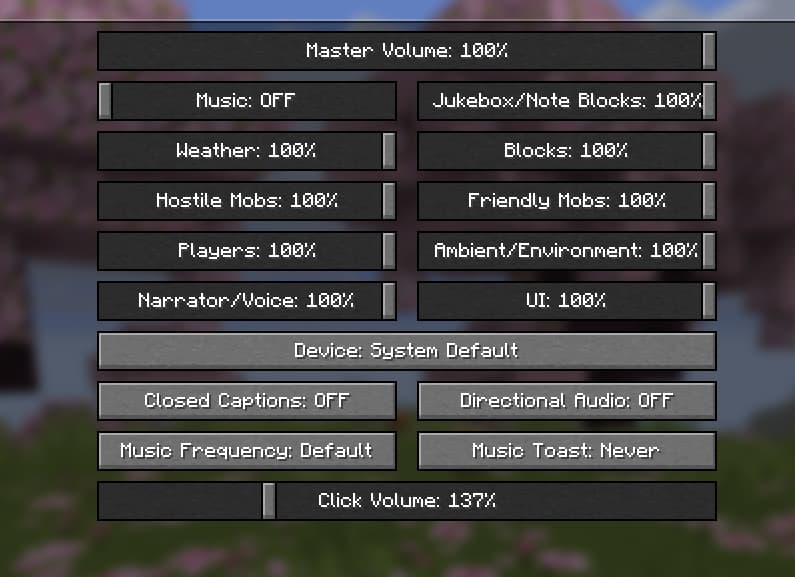
The ClickpackDB menu Configurable clicks volume

Discord

Join the Discord server for support on ZCB and a way to create and submit your own clickpacks: https://discord.gg/BRVVVzxESu

Галерея
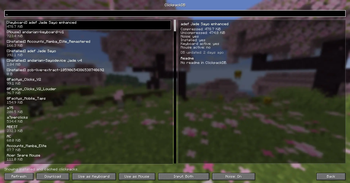
ClickpackDB integration in ZCB LiveAdded sound options

Последние версии

Все версии →
release

Zeo's Click Bot 1.1.2

1.1.2
2 июл. 2026 г.575Minecraft: 1.21.8, 1.21.9, 1.21.10, 1.21.11fabric
Скачать
Что нового
* Add download counter * Add sorting options * Port to 26.2
release

Zeo's Click Bot 1.1.2

1.1.2
2 июл. 2026 г.61Minecraft: 1.21.11fabric
Скачать
Что нового
* Add download counter * Add sorting options * Port to 26.2
release

Zeo's Click Bot 1.1.2

1.1.2
2 июл. 2026 г.193Minecraft: 26.1.1, 26.1.2fabric
Скачать
Что нового
* Add download counter * Add sorting options * Port to 26.2
release

Zeo's Click Bot 1.1.2

1.1.2
2 июл. 2026 г.364Minecraft: 26.2fabric
Скачать
Что нового
* Add download counter * Add sorting options * Port to 26.2
release

ZCB Live 1.1.1

1.1.1
14 апр. 2026 г.271Minecraft: 1.21.8, 1.21.9, 1.21.10, 1.21.11fabric
Скачать
Что нового
1.1.1: * Fix broken padding in clickpack browser 1.1.0: * Separate options (timing, volume, pitch, ...) for keyboard and mouse * Integration with Mod Menu * Add keybinds for toggling the clickbot and cycling the input mode * Add per-row timings for keyboard, with the ability to change back to the old per-hand timings with a toggle * Add the ability to delete clickpacks and open their folder in the clickpack browser * Add the ability to feature/unfeature clickpacks in the clickpack browser. Featured clickpacks will be shown at the top * Fix the browser menu not re-sorting after a clickpack was downloaded/featured * Add options to ignore (bypass) all click types, not just hardclicks/hardreleases * Add an extension to the existing clickpack format: now it is possible to add different sound for keyboard rows 1-4, 8 special keys (& fallback), mouse4/mouse5 (& other with fallback) 1.0.1: * Fix buttons overflowing the clickpacks menu on smaller gui scales * Add config options for timings, volume changes, etc. * Move click volume into Clickpacks > Options * Fix click sounds not playing in menus (inventory, options etc) * Fix side mouse buttons not playing any sounds. Now they will always play microclicks or softclicks. * Add an option to disable hardclicks * Fix scrollbar not working on 1.21.8
release

ZCB Live 1.1.1

1.1.1
14 апр. 2026 г.61Minecraft: 1.21.11fabric
Скачать
Что нового
1.1.1: * Fix broken padding in clickpack browser 1.1.0: * Separate options (timing, volume, pitch, ...) for keyboard and mouse * Integration with Mod Menu * Add keybinds for toggling the clickbot and cycling the input mode * Add per-row timings for keyboard, with the ability to change back to the old per-hand timings with a toggle * Add the ability to delete clickpacks and open their folder in the clickpack browser * Add the ability to feature/unfeature clickpacks in the clickpack browser. Featured clickpacks will be shown at the top * Fix the browser menu not re-sorting after a clickpack was downloaded/featured * Add options to ignore (bypass) all click types, not just hardclicks/hardreleases * Add an extension to the existing clickpack format: now it is possible to add different sound for keyboard rows 1-4, 8 special keys (& fallback), mouse4/mouse5 (& other with fallback) 1.0.1: * Fix buttons overflowing the clickpacks menu on smaller gui scales * Add config options for timings, volume changes, etc. * Move click volume into Clickpacks > Options * Fix click sounds not playing in menus (inventory, options etc) * Fix side mouse buttons not playing any sounds. Now they will always play microclicks or softclicks. * Add an option to disable hardclicks * Fix scrollbar not working on 1.21.8
release

ZCB Live 1.1.1

1.1.1
14 апр. 2026 г.209Minecraft: 26.1.1, 26.1.2fabric
Скачать
Что нового
1.1.1: * Fix broken padding in clickpack browser 1.1.0: * Separate options (timing, volume, pitch, ...) for keyboard and mouse * Integration with Mod Menu * Add keybinds for toggling the clickbot and cycling the input mode * Add per-row timings for keyboard, with the ability to change back to the old per-hand timings with a toggle * Add the ability to delete clickpacks and open their folder in the clickpack browser * Add the ability to feature/unfeature clickpacks in the clickpack browser. Featured clickpacks will be shown at the top * Fix the browser menu not re-sorting after a clickpack was downloaded/featured * Add options to ignore (bypass) all click types, not just hardclicks/hardreleases * Add an extension to the existing clickpack format: now it is possible to add different sound for keyboard rows 1-4, 8 special keys (& fallback), mouse4/mouse5 (& other with fallback) 1.0.1: * Fix buttons overflowing the clickpacks menu on smaller gui scales * Add config options for timings, volume changes, etc. * Move click volume into Clickpacks > Options * Fix click sounds not playing in menus (inventory, options etc) * Fix side mouse buttons not playing any sounds. Now they will always play microclicks or softclicks. * Add an option to disable hardclicks * Fix scrollbar not working on 1.21.8
release

ZCB Live 1.0.0 for Minecraft 26.1.1

1.0.0
1 апр. 2026 г.34Minecraft: 26.1.1fabric
Скачать
Что нового
Initial release for Minecraft 26.1.1