COWMODSКаталог модов

WTB Plugin

WTB is a modern player-driven buy-order marketplace plugin for Minecraft that lets players create buy requests, manage listings, claim fulfilled items, and run a clean server economy.

Автор: CARTER-BNW570обновлён 14 июн. 2026 г.
ЭкономикаУправлениеУтилиты

Описание

WTB Plugin – Want‑To‑Buy Marketplace System

A clean, modern, GUI‑driven buy‑order marketplace plugin for Minecraft servers.
Players create buy requests, sellers fulfill them, and the economy becomes player‑driven and dynamic.
Built for Spigot/Paper 1.20+ with full Vault economy support.


📘 Overview

The WTB Plugin introduces a buyer‑driven trading system to Minecraft.
Instead of auctions or chest shops, players post buy orders for items they want, and other players fulfill them.

This creates:

  • A healthier server economy
  • More player interaction
  • A reason to gather resources
  • A clean, intuitive trading experience

Perfect for Survival, Economy, and SMP servers.


✨ Features

🎯 Player Features

  • Create buy orders:
    /wtb buy <material> <quantity> <price>
  • Browse all listings through a GUI
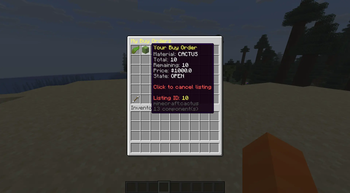
  • Manage personal orders via My Listings
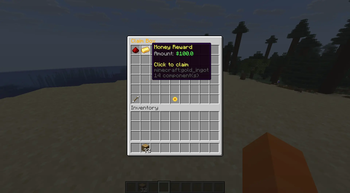
  • Claim fulfilled items through the Claim Box (infinite pagination)
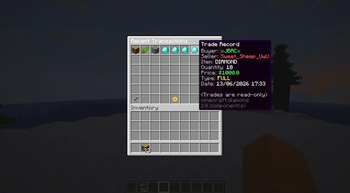
  • View transaction history in the Transactions GUI
  • Cooldown system to prevent spam
  • Blocked‑material enforcement
  • Safe claim handling with no item loss

🛠 Admin Features

  • /wtb admin list — view all active listings
  • /wtb admin cancel <id> — force‑cancel any listing
  • Admin‑only listing IDs in GUIs
  • Admin‑only tab completion
  • UUID → player name resolution for readable output

🧩 Technical Details

  • Platform: Spigot/Paper 1.20+
  • Economy: Vault
  • Database: SQLite or MySQL
  • Architecture:
    • ListingService — business logic
    • ListingDAO — database operations
    • GUI system built with Bukkit Inventory API
  • Permissions:
    • wtb.admin — admin commands & listing visibility

📦 Installation

  1. Download the latest release from the Releases page.
  2. Place the JAR into your server’s plugins/ folder.
  3. Start the server to generate configuration files.
  4. Edit config.yml and settings.yml as needed.
  5. Reload or restart the server.

📝 Commands

Player Commands

/wtb buy <material> <qty> <price>
/wtb

Admin Commands

/wtb admin list
/wtb admin cancel <id>

📄 Configuration Files

  • config.yml — database, cooldowns, and general settings
  • settings.yml — GUI settings and blocked materials
  • plugin.yml — plugin metadata

🛡 Stability & Safety

  • Safe claim handling
  • Pagination for large datasets
  • Validation for invalid or expired listings
  • Async database operations

🚀 Roadmap (Future Ideas)

  • Listing expiration system
  • Sorting & filtering in GUIs
  • Seller‑side GUI for fulfilling orders
  • Analytics dashboard for admins
  • Multi‑currency support

📬 Support

Found a bug? Have a feature request?
Open an Issue on GitHub — contributions and suggestions are welcome.


📜 License

This project is licensed under the MIT License.

Галерея
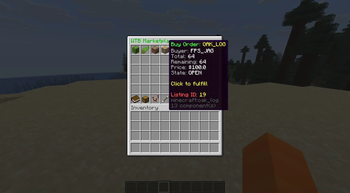
Main GUIClaim Box GUIMy Listing GUITransaction GUI

Последние версии

Все версии →
release

WTB Plugin 2.0.0

2.0.0
14 июн. 2026 г.42Minecraft: 1.21, 1.21.1, 1.21.2, 1.21.3, 1.21.4, 1.21.5, 1.21.6, 1.21.7, 1.21.8, 1.21.9, 1.21.10, 1.21.11paper, spigot
Скачать
Что нового
# 🟩 WTB Plugin — Version 2.0 A major stability and correctness update that fixes all known issues from v1.0, improves GUI consistency, ensures accurate payouts, and fully resolves Claim Box behavior. --- ## 🚀 Major Fixes ### **1. Correct Listing Selection (GUI Index Bug)** Listings in the Main GUI now correctly map to the clicked slot. - Fixed incorrect index calculation - Correctly accounts for page offset - No more selecting the wrong listing --- ### **2. Correct Payout Calculation** Payouts now always match the exact number of items sold. - Amount is clamped to seller inventory - Amount is clamped to listing remaining quantity - Payout = `pricePerItem * amount` is now always correct --- ### **3. Fill‑All Uses Sorted Listings** The Fill All button now respects the current sort mode. - Uses `mainGUI.getSortedListings()` - No more inconsistent fill order - No more skipping or mis‑filling listings --- ### **4. Shared GUI Instances (Critical Fix)** All GUIs and services now use **single shared instances** from `Main`. - Fixed Claim Box not updating - Fixed My Listings not refreshing - Fixed Main GUI desync - Fixed Transactions GUI inconsistencies - Removed all accidental `new GUI()` duplicates --- ### **5. Claim Box Entry ID System** Each claim entry now includes a unique ID in its lore. - Prevents claiming the wrong entry - Fixes silent claim failures - Enables reliable click detection --- ### **6. Claim Box Cache Fix** Claim Box no longer shows entries from the wrong player. - Cache is cleared on GUI open - Viewer UUID is updated correctly - No more cross‑player claim issues --- ### **7. Correct Claim Amounts (Final Fix)** Claim messages now match the exact stack size shown in the Claim Box. - Captures amount **before** Bukkit mutates the ItemStack - Prevents auto‑stacking from altering the message - Claiming 64/36 stacks now prints exactly 64/36 --- ### **8. Correct Item Storage in Claim Box** Items delivered to the buyer are now stored exactly as intended. - Listing fulfillment splits into 64‑stacks - Claim Box displays correct stack sizes - Claiming each stack gives the correct amount --- ## 🧹 Minor Improvements - Improved debug logging for payouts and fulfillment - Cleaned up async DB operations - Ensured all GUI opens run on the main thread - Improved money formatting consistency - Removed redundant code paths in click handlers --- ## 🛡 Stability & Data Integrity - Verified DB schema correctness - Ensured ClaimEntry serialization is stable - Ensured Listing model updates correctly - Ensured no duplicate GUI/service instances - Ensured all caches refresh correctly --- ## 🎉 Summary Version 2.0 delivers: - Fully accurate payouts - Fully accurate claim amounts - Fully correct GUI behavior - Fully stable Claim Box - Fully correct listing selection - Fully correct Fill All logic This release resolves every major issue from v1.0 and brings the plugin to production‑ready stability.
release

WTB Plugin 1.0.0

1.0.0
14 июн. 2026 г.15Minecraft: 1.21, 1.21.1, 1.21.2, 1.21.3, 1.21.4, 1.21.5, 1.21.6, 1.21.7, 1.21.8, 1.21.9, 1.21.10, 1.21.11paper, spigot
Скачать
Что нового
# WTB Plugin – Want‑To‑Buy Marketplace System A clean, modern, GUI‑driven buy‑order marketplace plugin for Minecraft servers. Players create buy requests, sellers fulfill them, and the economy becomes player‑driven and dynamic. Built for Spigot/Paper 1.20+ with full Vault economy support. --- ## 📘 Overview The **WTB Plugin** introduces a buyer‑driven trading system to Minecraft. Instead of auctions or chest shops, players post *buy orders* for items they want, and other players fulfill them. This creates: - A healthier server economy - More player interaction - A reason to gather resources - A clean, intuitive trading experience Perfect for Survival, Economy, and SMP servers. --- ## ✨ Features ### 🎯 Player Features - Create buy orders: `/wtb buy <material> <quantity> <price>` - Browse all listings through a GUI - Manage personal orders via **My Listings** - Claim fulfilled items through the **Claim Box** (infinite pagination) - View transaction history in the **Transactions GUI** - Cooldown system to prevent spam - Blocked‑material enforcement - Safe claim handling with no item loss ### 🛠 Admin Features - `/wtb admin list` — view all active listings - `/wtb admin cancel <id>` — force‑cancel any listing - Admin‑only listing IDs in GUIs - Admin‑only tab completion - UUID → player name resolution for readable output --- ## 🧩 Technical Details - **Platform:** Spigot/Paper 1.20+ - **Economy:** Vault - **Database:** SQLite or MySQL - **Architecture:** - `ListingService` — business logic - `ListingDAO` — database operations - GUI system built with Bukkit Inventory API - **Permissions:** - `wtb.admin` — admin commands & listing visibility --- ## 📦 Installation 1. Download the latest release from the **Releases** page. 2. Place the JAR into your server’s `plugins/` folder. 3. Start the server to generate configuration files. 4. Edit `config.yml` and `settings.yml` as needed. 5. Reload or restart the server. --- ## 📝 Commands ### Player Commands ``` /wtb buy <material> <qty> <price> /wtb ``` ### Admin Commands ``` /wtb admin list /wtb admin cancel <id> ``` --- ## 📄 Configuration Files - `config.yml` — database, cooldowns, and general settings - `settings.yml` — GUI settings and blocked materials - `plugin.yml` — plugin metadata --- ## 🛡 Stability & Safety - Safe claim handling - Pagination for large datasets - Validation for invalid or expired listings - Async database operations --- ## 🚀 Roadmap (Future Ideas) - Listing expiration system - Sorting & filtering in GUIs - Seller‑side GUI for fulfilling orders - Analytics dashboard for admins - Multi‑currency support --- ## 📬 Support Found a bug? Have a feature request? Open an Issue on GitHub — contributions and suggestions are welcome. --- ## 📜 License This project is licensed under the **MIT License**.