COWMODSКаталог модов

WorldBinder

Client-side Fabric tool for permitted world capture, customizable HUD widgets and Movement Tool badges, recovery, target-version export and optional movement assistance.

Автор: philiipp067161обновлён 28 окт. 2026 г.
УправлениеТехнологииУтилиты

Описание

WorldBinder

Capture today. Continue tomorrow. Export on your terms.

WorldBinder is a client-side Minecraft mod for saving the world data your client receives and turning it into a playable vanilla world or a schematic. Keep a World Project across sessions, explore new areas and return later to update the parts you choose.

Available for Fabric on Minecraft 26.1–26.3 and NeoForge on Minecraft 26.3, with separate downloads for each loader. No server-side WorldBinder installation is needed.

A project you can keep

Finish a session without starting from scratch next time. Reopen saved projects, continue after restarting Minecraft and deliberately rescan known chunks, including blocks that have been removed. Maps, recording coverage and received extra data stay with the project. Failed writes preserve the previous complete revision.

Related Overworld, Nether, End and supported custom dimensions can share a project and one exported world. Independent worlds behind a proxy address stay separate. If a destination cannot be identified safely, WorldBinder saves Recovery and asks you to assign it. The network-project browser groups backends and dimensions without guessing that identical coordinates mean the same world.

Optional automatic capture starts after joining a server and receiving terrain. It is off by default, supports server profiles and can resume an explicitly assigned project.

Save what you actually received

  • Containers: preserve confirmed slots and full item data, with verified empty slots distinct from unknown ones. The optional scanner opens one supported container at a time within normal reach and waits for its complete server response. Choose Keep, Overwrite confirmed slots or Fill missing slots in the container overlay, and optionally remember the strategy for the project.
  • Maps and Map-Art: retain received map images and available map data, with the correct references in items and frames.
  • Biomes and lighting: retain original received section biomes, block light and sky light. Changes that affect lighting request recalculation.
  • Player state: optionally include available own inventory, equipment, XP, health, food, position, ender-chest contents, statistics and advancements. Leave the option off to use a prepared player.
  • Resource packs: keep available received server packs for later offline exports.
  • Live filters: skip new item, XP-orb, armor-stand, hostile-mob or custom entity-ID records before they enter WorldBinder's cache. Existing saved records remain intact.

Unknown data stays unknown. WorldBinder cannot retrieve hidden terrain or inventories the client never received, and it does not reproduce server plugins or server-only logic.

Explore and select in 2D or 3D

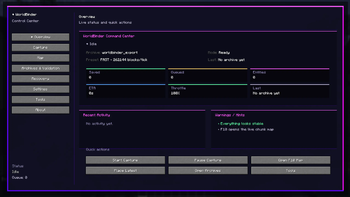
Open F9 or /worldbinder for the Control Center and F10 for the live map. Both map views use received terrain, including without active recording. Explore mode can keep the map building while closed.

Switch dimensions, inspect chunk coverage, filter layers, place waypoints and use the chunk inspector. Optional in-world chunk frames distinguish confirmed recording areas, work in progress and failures. Exploration alone is never shown as a safely saved recording.

The map retains texture colors from received resource packs, terrain relief and a rotatable/tiltable 3D view with real vertical geometry. Export the map as a PNG, region tiles, a GLB/OBJ model or a rendered image. The HUD radar can rotate with the view or act as a minimap. Map images and models are separate from the full-data vanilla-world and schematic exports below.

F7/F8 and F10 use the same three-dimensional selection. Draw an X/Z rectangle, set the lower and upper Y bounds and inspect its size and coverage. Large selections are processed in steps, and missing areas remain visible.

Choose how to export

Export the whole project or a selected area as a vanilla world, or export an area as a Sponge v3 .schem using full recorded block states, block entities and supported entities.

Before exporting:

  • Review known changes for the selected Minecraft target version and choose valid replacement blocks.
  • Exclude entities or block types from the export copy, with counts shown before saving. The original archive stays intact.
  • Choose Void, Flat or Normal generation outside recorded chunks. Normal generation accepts an optional seed; it cannot restore unknown parts of the original server.
  • Decide whether to include your received player state.

The export monitor shows phases, progress, recorded counts and estimated time remaining. Preparation runs in the background and the approved snapshot is reused for export. WorldBinder then reopens the actual written files and compares the expected contents. Reports separate file validity from capture completeness, so a readable world can still clearly report a missing inventory or map image.

Capture from ReplayMod or Flashback

Install a compatible ReplayMod or Flashback on Fabric, open a replay and capture during playback. WorldBinder uses the normal project, map, Recovery and export workflow. It supports pause, protects newer data during backward seeks and offers a separate project for the earlier state. Resume with the same recording after restarting Minecraft.

Playback integration is optional; direct replay-file import is not included. Only data present in the recording can be recovered, and a replay camera does not become a saved player inventory.

Make the interface yours

English, German and French menus, status messages and reports are included. Unopened containers can be highlighted in the world, and exports can add a player list (CSV) and a dimension tree (TXT). Game rules are edited per target version with categories and tooltips. Customize the HUD, radar, themes, colors, notifications, tooltips and accessibility settings. Use client-only commands such as /worldbinder settings, /worldbinder map and /worldbinder status.

Arrange widgets in the HUD Widget Editor with snapping, anchors, undo/redo and color controls. The Queue Dashboard/Profiler shows capture/export activity. Keyboard focus, high contrast, reduced motion, interface sounds and the Interactive/Vanilla resource-reload choice remain available.

The 24 optional Movement Tools include Speed, Step, Fly, Safe Walk, Spider, Water Speed and Elytra Boost, with strength controls, Explorer/Builder/Parkour/Aquatic/Sky profiles, individual hotkeys and a master switch. Use them in singleplayer, test worlds and servers that allow them. They do not grant server permissions.

Installation and compatibility

LoaderMinecraft versionsRequirements
Fabric26.1, 26.1.1, 26.1.2, 26.2, 26.3Java 25, Fabric Loader 0.19.5+, matching Fabric API
NeoForge26.3Java 25, NeoForge 26.3.0.95 or newer within 26.3

Use worldbinder-1.7.0+mc26.1-26.3-fabric.jar for Fabric or worldbinder-1.7.0+mc26.3-neoforge.jar for NeoForge. Mod Menu is optional on Fabric. ReplayMod, Flashback, WorldEdit, FAWE and Litematica are not required for ordinary capture or vanilla export.

Replay playback was tested with the matching Minecraft builds of ReplayMod 2.6.28 and Flashback 0.43.6 on Fabric. Sponge imports were checked with WorldEdit 7.4.6, FAWE 2.16.1 and Litematica 0.29.1 / MaLiLib 0.30.2. Other versions and modpacks may differ. Supporting a loader does not guarantee conversion of arbitrary modded blocks, entities or dimensions.

Network tests include BungeeCord Build 2107 on Fabric/NeoForge 26.3, Waterfall Build 615 on Fabric 26.2 and server-side ViaVersion 5.12.1 on Velocity with 26.3 clients and Vanilla 1.20.4 backends. Separate client-side tests use ViaFabric 0.4.22+188-26.x and ViaFabricPlus 5.1.2 on Fabric 26.3 against Vanilla 1.20.4. End portal round trips and a custom dimension using a received vanilla type were checked on both 26.3 loaders. Other custom registries and server/plugin combinations may differ. Void/Flat generation in recorded Nether/End dimensions can trigger Minecraft's experimental-settings warning; review the version preview before exporting.

Existing settings, older archives and legacy Recovery folders remain readable. Back up projects before upgrading; new format-4 projects should be edited with 1.7.0.

Minecraft 1.13 cannot retain map locks and may update received Map-Art when a map is used. Lighting after block replacements or filters may remain dark in that target. The version preview reports both limits; choose a newer target for locked maps and relighting. The original capture archive stays complete.

Deutsch

Heute aufnehmen. Morgen weitermachen. WorldBinder sichert empfangene Minecraft-Weltdaten als dauerhafte Weltprojekte und exportiert sie als Vanilla-Welt oder Sponge-v3-Schematic. Setze Aufnahmen nach einem Neustart fort, aktualisiere bekannte Bereiche und verwalte zusammengehörige Dimensionen gemeinsam. Unabhängige Proxy-Welten bleiben getrennt; unklare Wechsel verlangen eine bewusste Zuordnung.

Nutze die 2D-/3D-Karte, Bereichsauswahl, Chunkrahmen, Container-Scanner, manuelle Slot-Strategien, Live-Filter und einen optionalen Auto-Start. Empfangene Kartenbilder, Biome, Licht und Ressourcenpakete bleiben erhalten. Den verfügbaren eigenen Spielerstand kannst du auf Wunsch übernehmen. ReplayMod-/Flashback-Wiedergaben lassen sich auf Fabric aufnehmen, mit Schutz bei Rückwärtssprüngen.

Prüfe vor dem Export Versionsänderungen, Ersatzblöcke, Filter und die Weltgenerierung außerhalb der Aufnahme. Der Exportcheck liest die geschriebenen Dateien erneut und trennt Dateigültigkeit von Aufnahmevollständigkeit. Fehlende Inhalte bleiben sichtbar. Deutsch, Englisch und Französisch sind vollständig im Sprachsystem eingebunden.

Minecraft 1.13 unterstützt keine gesperrten Karten; Map-Art kann beim Benutzen aktualisiert werden. Auch das Licht geänderter Chunks kann dunkel bleiben. Die Versionsvorschau zeigt beide Grenzen. Das Originalarchiv bleibt für einen erneuten Export in eine neuere Zielversion erhalten.

Fabric: 26.1, 26.1.1, 26.1.2, 26.2, 26.3. NeoForge: 26.3. Getrennte JARs, Java 25; auf Fabric zusätzlich passende Fabric API. Sichere ausschließlich Inhalte, die dir gehören oder deren Sicherung erlaubt ist.

Links

User guide / Anleitung · Projects and replay guide / Projekte und Replays · Tested versions and limits / Prüfmatrix · Source · Issues · Discord

Archive only worlds, builds and resource packs you own or have permission to save.

Галерея
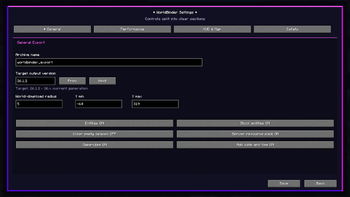
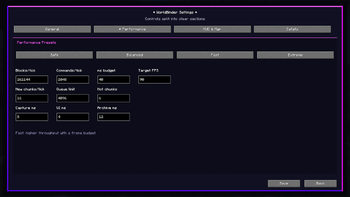
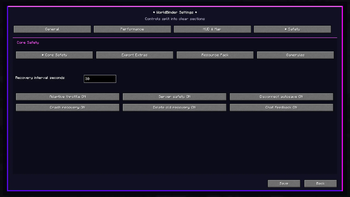
Responsive Settings MenuPerformance PresetsSafety and Recovery ControlsF9 Control Center

Последние версии

Все версии →
release

WorldBinder 1.7.0

1.7.0
28 окт. 2026 г.32Minecraft: 26.3neoforge
Скачать
Что нового
# WorldBinder 1.7.0 **Keep a World Project across sessions, capture related dimensions and choose exactly what goes into each export.** Changes below are relative to **WorldBinder 1.6.3**. ## Added - Persistent World Projects: resume finished archives after restarting Minecraft, add new areas and deliberately update recorded chunks, including removed blocks. - Multi-dimension projects and a dimension selector in the 2D/3D map. Related dimensions export into one vanilla world. - **Version-aware game-rule editor:** 60 rules with exact availability, vanilla defaults and 26.x registry keys for every export target. Seven categories, a "Changed only" filter, per-rule reset, sliders/steps for numbers and detailed tooltips. - Network-project management with separate proxy backends, saved Recovery before world changes and explicit assignment when the destination is unclear. - Optional automatic capture on server join, off by default, with global/per-server profiles and resume for explicitly assigned projects. - Optional sequential container scanner with normal interaction reach, full-response checks, double-chest handling, retries, timeouts and interruption on manual input. - Manual container merging: **Keep**, **Overwrite confirmed slots** or **Fill missing slots**, with optional project defaults and separate known-empty/unknown slot states. - **Unopened containers highlighted in the world:** amber for unopened, blue for partly known and optionally green for verified, including double chests and container entities, with slot labels and an HUD counter. - Live entity filters for new dropped items, XP orbs, armor stands, hostile mobs and individual registry IDs. Existing saved data is retained. - Optional ReplayMod/Flashback **playback capture on Fabric**, with pause support, protection on backward seeks, separate earlier-time projects and resume with the same recording after restart. - Shared F7/F8/F10 area selection with editable Y bounds, size and coverage. Selected-area vanilla world and **Sponge v3 `.schem`** export uses full recorded blocks, states, block entities and supported entities. - Optional in-world chunk frames for confirmed, processing and failed recording areas. - Export-only entity/block filters with excluded counts. The source archive stays unchanged. - Optional export extras: `worldbinder/players.csv` player list (opt-in recording from the tab list and visible players) and `worldbinder/dimensions.txt` dimension tree with target folders and contents. - Received map-image coverage and original section biome/light data stored with the project. Optional own player state includes available inventory, equipment, XP, health, food, position, ender chest, statistics and advancements. - Void, Flat or Normal generation outside recorded chunks; optional seed for Normal. - Separate **NeoForge 26.3** build alongside Fabric. - **French** interface language next to English and German; all three catalogs are audited for keys, order and placeholders. - New **Capture** settings tab for container highlights, the world overlay and player lists. - Client-only `/worldbinder` plus `settings`, `map`, `capture`, `archives`, `movement`, `tools`, `profiler`, `status` and `help`. ## Improved and fixed - Export preparation runs in the background, reuses the reviewed snapshot and reduces duplicate cache/region processing. Compact archives reduce storage use while retaining read-back checks. - Export monitor with project, target, counts, phases, progress and elapsed/estimated remaining time, including clear disconnect information. - Written-world validation compares expected chunks, blocks and supported additional content, including player items and advancement data. File validity and capture completeness are reported separately. - Permanent project-scoped Recovery prevents collisions between equally named projects. Failed writes preserve the previous complete revision. - Available received server resource packs stay tied to their saved revision for offline resume and re-export; failed pack/archive writes do not replace the previous complete state. - Missing, zero-byte or corrupt expected cache files stop saving with an error; valid recorded empty chunks remain supported. - Invalid replacement block IDs, properties and values are rejected without changing the previous selection. - Block replacement/filter changes invalidate affected light for recalculation. - Large selections are processed in bounded steps; entities and block entities respect all three selection axes. Unreceived areas are not recorded as air. - The 2D and 3D maps use received chunks consistently, including outside active recording. Player headings no longer spin across angle wraparound or map rotation. - Cancelling export review no longer starts another export. Returning to a paused single-dimension project no longer triggers repeated world-change saves. - Correct game-rule translations, export replacement-button layout and German/English status, menu and report text. - Improved older-version block/property/biome mappings and sign/spawner data. Minecraft 1.13 receives the correct completed-chunk status so recorded terrain is retained. - Later received entity metadata and equipment refresh the capture cache, including frame map contents and rotation. - Verified legacy play-time statistic renames preserve exact tick counts. Conflicting aliases are rejected, and version-specific player progress limits are reported without changing the original archive. - Minecraft 1.13 export review explicitly reports unavailable map locks and unreliable lighting recalculation after block replacements or filters. Original map pixels and capture data remain in the archive for newer export targets. ## Retained from 1.6.3 - Existing 2D/3D live map, chunk radar, waypoints, received resource-pack colors, PNG/tile exports, GLB/OBJ models and rendered map images. - HUD Widget Editor, Queue Dashboard/Profiler, theme/accessibility/notification controls and 24 optional Movement Tools with profiles and hotkeys. - The 1.6.3 fixes for Minecraft 26.3 block-state palettes and bundled world packs, plus terrain visibility below barriers/glass and the Invisible blocks layer. These are retained behavior, not new 1.7.0 features. Nonstandard Void/Flat generators can still show the separate experimental-settings warning described below. ## Compatibility - **Fabric:** Minecraft 26.1, 26.1.1, 26.1.2, 26.2, 26.3; Java 25, Fabric Loader 0.19.5+ and matching Fabric API. - **NeoForge:** Minecraft 26.3; Java 25 and NeoForge 26.3.0.95 or newer within 26.3. - Install the matching loader's JAR. Mod Menu is optional on Fabric. - Optional Fabric replay integration was tested with the matching Minecraft builds of ReplayMod 2.6.28 and Flashback 0.43.6. It captures playback, not direct file import. - Schematic imports were checked with WorldEdit 7.4.6, FAWE 2.16.1 and Litematica 0.29.1 / MaLiLib 0.30.2. - Network tests: BungeeCord Build 2107 on Fabric/NeoForge 26.3; Waterfall Build 615 on Fabric 26.2; server-side ViaVersion 5.12.1 on Velocity with Fabric/NeoForge 26.3 clients and Vanilla 1.20.4 backends. Separate client-side tests use ViaFabric 0.4.22+188-26.x and ViaFabricPlus 5.1.2 on Fabric 26.3 against Vanilla 1.20.4. Both 26.3 loaders were checked with End portal round trips and a custom dimension using a received vanilla type. - Void/Flat generation in recorded Nether/End dimensions may trigger Minecraft's experimental-settings warning; the version preview reports this consequence. - Existing settings, archives and legacy Recovery folders remain readable. Back up before upgrading; new format-4 projects should be edited with 1.7.0. ## Deutsch **Weltprojekte behalten und später fortsetzen:** Neue Gebiete ergänzen, bekannte Chunks samt entfernten Blöcken aktualisieren und zusammengehörige Dimensionen gemeinsam exportieren. Proxy-Backends bleiben getrennt; unklare Wechsel pausieren nach einer Recovery für deine Zuordnung. Optionaler Auto-Start und Serverprofile erleichtern wiederkehrende Aufnahmen. Neu sind Französisch, hervorgehobene ungeöffnete Container in der Welt, Spielerliste (CSV) und Dimensionsbaum (TXT) im Export, der Einstellungsreiter „Aufnahme“ und versionsgenaue Spielregeln, außerdem Container-Scanner und manuelles **Behalten / Überschreiben bestätigter Slots / Fehlendes ergänzen**, Live-Entity-Filter, ReplayMod-/Flashback-Aufnahme während der Wiedergabe auf Fabric, eine gemeinsame F7/F8/F10-Auswahl, Sponge-v3-`.schem`-Export und Chunkrahmen. Empfangene Kartenbilder, Biome, Licht und Ressourcenpakete bleiben erhalten; den verfügbaren eigenen Spielerstand kannst du bewusst übernehmen. Der Export verwendet die vorbereiteten Daten erneut, arbeitet sparsamer und zeigt Phasen sowie Fortschritt ausführlicher an. Die Dateiprüfung vergleicht erwartete Inhalte und trennt gültige Dateien von vollständigen Aufnahmen. Behoben sind unter anderem Recovery-Kollisionen, ungültige Ersatzblöcke, beschädigte Cachedateien, veraltetes Licht nach Ersetzungen, rotierende Spieler-Markierungen, abgeschnittene Ersatzblock-Buttons und wiederholte Exportstarts nach dem Abbrechen. Legacy-Mappings und der 1.13-Chunkstatus wurden verbessert. Getrennte JARs: **Fabric für 26.1, 26.1.1, 26.1.2, 26.2 und 26.3**, **NeoForge für 26.3**. Java 25; Fabric benötigt zusätzlich die passende Fabric API. Alte Archive und Einstellungen bleiben lesbar. WorldBinder only saves data received by the client; missing content and uncertain conversions remain visible. Archive only content you own or have permission to save. / WorldBinder sichert ausschließlich empfangene Daten. Fehlende Inhalte und unsichere Konvertierungen bleiben sichtbar. Nimm nur eigene oder zur Sicherung freigegebene Inhalte auf. [User guide / Anleitung](https://github.com/Philiipp06/WorldBinder/blob/main/HOW_TO_USE.md) · [Tested versions and limits / Prüfmatrix](https://github.com/Philiipp06/WorldBinder/blob/main/docs/1.7.0-validation.md)
release

WorldBinder 1.7.0

1.7.0
28 окт. 2026 г.19Minecraft: 26.1, 26.1.1, 26.1.2, 26.2, 26.3fabric
Скачать
Что нового
# WorldBinder 1.7.0 **Keep a World Project across sessions, capture related dimensions and choose exactly what goes into each export.** Changes below are relative to **WorldBinder 1.6.3**. ## Added - Persistent World Projects: resume finished archives after restarting Minecraft, add new areas and deliberately update recorded chunks, including removed blocks. - Multi-dimension projects and a dimension selector in the 2D/3D map. Related dimensions export into one vanilla world. - **Version-aware game-rule editor:** 60 rules with exact availability, vanilla defaults and 26.x registry keys for every export target. Seven categories, a "Changed only" filter, per-rule reset, sliders/steps for numbers and detailed tooltips. - Network-project management with separate proxy backends, saved Recovery before world changes and explicit assignment when the destination is unclear. - Optional automatic capture on server join, off by default, with global/per-server profiles and resume for explicitly assigned projects. - Optional sequential container scanner with normal interaction reach, full-response checks, double-chest handling, retries, timeouts and interruption on manual input. - Manual container merging: **Keep**, **Overwrite confirmed slots** or **Fill missing slots**, with optional project defaults and separate known-empty/unknown slot states. - **Unopened containers highlighted in the world:** amber for unopened, blue for partly known and optionally green for verified, including double chests and container entities, with slot labels and an HUD counter. - Live entity filters for new dropped items, XP orbs, armor stands, hostile mobs and individual registry IDs. Existing saved data is retained. - Optional ReplayMod/Flashback **playback capture on Fabric**, with pause support, protection on backward seeks, separate earlier-time projects and resume with the same recording after restart. - Shared F7/F8/F10 area selection with editable Y bounds, size and coverage. Selected-area vanilla world and **Sponge v3 `.schem`** export uses full recorded blocks, states, block entities and supported entities. - Optional in-world chunk frames for confirmed, processing and failed recording areas. - Export-only entity/block filters with excluded counts. The source archive stays unchanged. - Optional export extras: `worldbinder/players.csv` player list (opt-in recording from the tab list and visible players) and `worldbinder/dimensions.txt` dimension tree with target folders and contents. - Received map-image coverage and original section biome/light data stored with the project. Optional own player state includes available inventory, equipment, XP, health, food, position, ender chest, statistics and advancements. - Void, Flat or Normal generation outside recorded chunks; optional seed for Normal. - Separate **NeoForge 26.3** build alongside Fabric. - **French** interface language next to English and German; all three catalogs are audited for keys, order and placeholders. - New **Capture** settings tab for container highlights, the world overlay and player lists. - Client-only `/worldbinder` plus `settings`, `map`, `capture`, `archives`, `movement`, `tools`, `profiler`, `status` and `help`. ## Improved and fixed - Export preparation runs in the background, reuses the reviewed snapshot and reduces duplicate cache/region processing. Compact archives reduce storage use while retaining read-back checks. - Export monitor with project, target, counts, phases, progress and elapsed/estimated remaining time, including clear disconnect information. - Written-world validation compares expected chunks, blocks and supported additional content, including player items and advancement data. File validity and capture completeness are reported separately. - Permanent project-scoped Recovery prevents collisions between equally named projects. Failed writes preserve the previous complete revision. - Available received server resource packs stay tied to their saved revision for offline resume and re-export; failed pack/archive writes do not replace the previous complete state. - Missing, zero-byte or corrupt expected cache files stop saving with an error; valid recorded empty chunks remain supported. - Invalid replacement block IDs, properties and values are rejected without changing the previous selection. - Block replacement/filter changes invalidate affected light for recalculation. - Large selections are processed in bounded steps; entities and block entities respect all three selection axes. Unreceived areas are not recorded as air. - The 2D and 3D maps use received chunks consistently, including outside active recording. Player headings no longer spin across angle wraparound or map rotation. - Cancelling export review no longer starts another export. Returning to a paused single-dimension project no longer triggers repeated world-change saves. - Correct game-rule translations, export replacement-button layout and German/English status, menu and report text. - Improved older-version block/property/biome mappings and sign/spawner data. Minecraft 1.13 receives the correct completed-chunk status so recorded terrain is retained. - Later received entity metadata and equipment refresh the capture cache, including frame map contents and rotation. - Verified legacy play-time statistic renames preserve exact tick counts. Conflicting aliases are rejected, and version-specific player progress limits are reported without changing the original archive. - Minecraft 1.13 export review explicitly reports unavailable map locks and unreliable lighting recalculation after block replacements or filters. Original map pixels and capture data remain in the archive for newer export targets. ## Retained from 1.6.3 - Existing 2D/3D live map, chunk radar, waypoints, received resource-pack colors, PNG/tile exports, GLB/OBJ models and rendered map images. - HUD Widget Editor, Queue Dashboard/Profiler, theme/accessibility/notification controls and 24 optional Movement Tools with profiles and hotkeys. - The 1.6.3 fixes for Minecraft 26.3 block-state palettes and bundled world packs, plus terrain visibility below barriers/glass and the Invisible blocks layer. These are retained behavior, not new 1.7.0 features. Nonstandard Void/Flat generators can still show the separate experimental-settings warning described below. ## Compatibility - **Fabric:** Minecraft 26.1, 26.1.1, 26.1.2, 26.2, 26.3; Java 25, Fabric Loader 0.19.5+ and matching Fabric API. - **NeoForge:** Minecraft 26.3; Java 25 and NeoForge 26.3.0.95 or newer within 26.3. - Install the matching loader's JAR. Mod Menu is optional on Fabric. - Optional Fabric replay integration was tested with the matching Minecraft builds of ReplayMod 2.6.28 and Flashback 0.43.6. It captures playback, not direct file import. - Schematic imports were checked with WorldEdit 7.4.6, FAWE 2.16.1 and Litematica 0.29.1 / MaLiLib 0.30.2. - Network tests: BungeeCord Build 2107 on Fabric/NeoForge 26.3; Waterfall Build 615 on Fabric 26.2; server-side ViaVersion 5.12.1 on Velocity with Fabric/NeoForge 26.3 clients and Vanilla 1.20.4 backends. Separate client-side tests use ViaFabric 0.4.22+188-26.x and ViaFabricPlus 5.1.2 on Fabric 26.3 against Vanilla 1.20.4. Both 26.3 loaders were checked with End portal round trips and a custom dimension using a received vanilla type. - Void/Flat generation in recorded Nether/End dimensions may trigger Minecraft's experimental-settings warning; the version preview reports this consequence. - Existing settings, archives and legacy Recovery folders remain readable. Back up before upgrading; new format-4 projects should be edited with 1.7.0. ## Deutsch **Weltprojekte behalten und später fortsetzen:** Neue Gebiete ergänzen, bekannte Chunks samt entfernten Blöcken aktualisieren und zusammengehörige Dimensionen gemeinsam exportieren. Proxy-Backends bleiben getrennt; unklare Wechsel pausieren nach einer Recovery für deine Zuordnung. Optionaler Auto-Start und Serverprofile erleichtern wiederkehrende Aufnahmen. Neu sind Französisch, hervorgehobene ungeöffnete Container in der Welt, Spielerliste (CSV) und Dimensionsbaum (TXT) im Export, der Einstellungsreiter „Aufnahme“ und versionsgenaue Spielregeln, außerdem Container-Scanner und manuelles **Behalten / Überschreiben bestätigter Slots / Fehlendes ergänzen**, Live-Entity-Filter, ReplayMod-/Flashback-Aufnahme während der Wiedergabe auf Fabric, eine gemeinsame F7/F8/F10-Auswahl, Sponge-v3-`.schem`-Export und Chunkrahmen. Empfangene Kartenbilder, Biome, Licht und Ressourcenpakete bleiben erhalten; den verfügbaren eigenen Spielerstand kannst du bewusst übernehmen. Der Export verwendet die vorbereiteten Daten erneut, arbeitet sparsamer und zeigt Phasen sowie Fortschritt ausführlicher an. Die Dateiprüfung vergleicht erwartete Inhalte und trennt gültige Dateien von vollständigen Aufnahmen. Behoben sind unter anderem Recovery-Kollisionen, ungültige Ersatzblöcke, beschädigte Cachedateien, veraltetes Licht nach Ersetzungen, rotierende Spieler-Markierungen, abgeschnittene Ersatzblock-Buttons und wiederholte Exportstarts nach dem Abbrechen. Legacy-Mappings und der 1.13-Chunkstatus wurden verbessert. Getrennte JARs: **Fabric für 26.1, 26.1.1, 26.1.2, 26.2 und 26.3**, **NeoForge für 26.3**. Java 25; Fabric benötigt zusätzlich die passende Fabric API. Alte Archive und Einstellungen bleiben lesbar. WorldBinder only saves data received by the client; missing content and uncertain conversions remain visible. Archive only content you own or have permission to save. / WorldBinder sichert ausschließlich empfangene Daten. Fehlende Inhalte und unsichere Konvertierungen bleiben sichtbar. Nimm nur eigene oder zur Sicherung freigegebene Inhalte auf. [User guide / Anleitung](https://github.com/Philiipp06/WorldBinder/blob/main/HOW_TO_USE.md) · [Tested versions and limits / Prüfmatrix](https://github.com/Philiipp06/WorldBinder/blob/main/docs/1.7.0-validation.md)
release

WorldBinder 1.6.3

1.6.3
22 окт. 2026 г.44Minecraft: 26.1, 26.1.1, 26.1.2, 26.2, 26.3fabric
Скачать
Что нового
# WorldBinder 1.6.3 – Hotfix for Minecraft 26.3 exports One Fabric jar for Minecraft 26.1, 26.1.1, 26.1.2, 26.2 and 26.3. ## Fixes - **Blocks are exported again for 26.3:** Minecraft 26.3 changed the chunk block-state format; exports now use the new format. Before, 26.3 exports loaded with only entities and no blocks – also when capturing older servers through ViaFabric. - **Server resource pack is offered again:** exports store it at `resourcepacks/resources.zip`, where Minecraft 26.x looks for it. - **No more experimental-settings warning:** exports define Overworld, Nether and End; `stopwatches.dat` uses the correct format. ## Map fixes - Grass under barrier layers no longer appears as gray stone on the radar, F10 map and 3D view: blocks without a map color (barriers, light, glass …) are looked through like on a vanilla map. - New **Layers > Invisible blocks** toggle to show barriers, light blocks and structure voids. ## Repair old exports Select an export from 1.6.0–1.6.2 in the archive list (F9) and click **Export again** to rebuild it from its stored archive. The original folder is kept. ## Compatibility and limits Requires Fabric Loader 0.19.5+, Java 25 and Fabric API matching Minecraft 26.1–26.3. Mod Menu is optional. Existing configs load unchanged. WorldBinder still archives only data received by the client; movement assistance is meant for local worlds or servers that expressly allow it. Feedback: https://github.com/Philiipp06/WorldBinder/issues Discord: https://discord.com/invite/V7h3vaXxDZ
release

WorldBinder 1.6.2

1.6.2
22 окт. 2026 г.25Minecraft: 26.1, 26.1.1, 26.1.2, 26.2, 26.3fabric
Скачать
Что нового
# WorldBinder 1.6.2 – 3D Map, Custom Blocks & Waypoints One Fabric jar for Minecraft 26.1, 26.1.1, 26.1.2, 26.2 and 26.3. ## 3D live map - Press **V** in the F10 map: the map tilts smoothly into a rotatable 3D view (right-drag rotates and tilts). - Real overhangs: air under bridges, roller coasters and tree crowns stays visible; light, sun shadows and block edges. - Background rendering keeps the game smooth; your marker stands on the ground and shows through terrain as an outline. - Adjustable height scale (50–300 %), quick buttons for rotate, tilt and reset, keyboard controls. - Players, entities and waypoints are shown in place in 3D. ## 3D export - **3D model (GLB/OBJ):** the known surface as a colored block mesh for Blender, the Windows 3D Viewer or web viewers. - **3D render (PNG):** the current 3D view in high resolution, anti-aliased, transparent and with sky. - 3D models now include overhangs and merged faces; 2D PNG exports use up to 4 px per block. - Every export info file now contains the legal / responsible-use notice. ## Fixes - Explore mode sampled the surface one block too low (dirt instead of grass). ## Custom blocks on the map - New color mode (Layers > Colors): *Auto*, *Vanilla* or *Textures*. - *Auto* shows blocks changed by resource packs – e.g. custom server blocks made from note block states – in their real texture color. ## Waypoints - Place waypoints with **P** or Shift+right click, remove them with a right click. - Automatic "last death" point; edge markers for off-screen waypoints; saved per world and dimension. ## Project - Reworked Code of Conduct, Contributing guide and Security policy, new Accessibility statement and GitHub issue/PR templates. ## Compatibility and limits Requires Fabric Loader 0.19.5+, Java 25 and Fabric API matching Minecraft 26.1–26.3. Mod Menu is optional. Existing configs load unchanged. The 3D view and model show the top surface known to the map, not full block data. WorldBinder still archives only data received by the client; movement assistance is meant for local worlds or servers that expressly allow it. Feedback: https://github.com/Philiipp06/WorldBinder/issues Discord: https://discord.com/invite/V7h3vaXxDZ
release

WorldBinder 1.6.1

1.6.1
18 окт. 2026 г.38Minecraft: 26.1, 26.1.1, 26.1.2, 26.2, 26.3fabric
Скачать
Что нового
# WorldBinder 1.6.1 A small polish update for the capture HUD. One Fabric jar for Minecraft 26.1, 26.1.1, 26.1.2, 26.2 and 26.3. ## Chunk radar - The radar map now uses the full widget width. - New info strip below the map: current chunk, coverage of the radar area in percent and a coverage bar. - The old title bar was removed; coordinates are optional (off by default) and shown as one compact line that never gets cut off. ## Capture status bar - Title centered with the real WorldBinder logo. - Centered status line with pulsing state dot and ETA. - Percentage shown in a small pill on the right. ## Compatibility and limits Requires Fabric Loader 0.19.5+, Java 25 and Fabric API matching Minecraft 26.1–26.3. Mod Menu is optional. Existing configs load unchanged. WorldBinder still archives only data received by the client; movement assistance is meant for local worlds or servers that expressly allow it. Feedback: https://github.com/Philiipp06/WorldBinder/issues Discord: https://discord.com/invite/V7h3vaXxDZ
release

WorldBinder 1.6.0

1.6.0
16 окт. 2026 г.35Minecraft: 26.1, 26.1.1, 26.1.2, 26.2, 26.3fabric
Скачать
Что нового
# WorldBinder 1.6.0 – Interface, Movement & Live Map One Fabric jar for Minecraft 26.1, 26.1.1, 26.1.2, 26.2 and 26.3. Capture, cache, recovery, validation and export keep their established workflow. ## New interface - Every WorldBinder screen uses a new design system: rounded panels, soft shadows, gradients, pixel icons, animated toggle switches, sliders with value bubbles and keycap hints. - Smooth screen-open and page transitions, eased hover states and press ripples. Reduce motion turns them off. - Theme accents: Aqua, Violet, Emerald, Amber, Rose, Crimson, Mono or a custom color. Menus, HUD widgets and the live map follow the accent. - New Settings > Interface tab: background dim, animation speed, transitions, icons, high contrast, sounds, volume, tooltip delay and hints. - Interface and notification sounds with their own volume. - Settings show unsaved changes, confirm before discarding, can reset the current page and save with Ctrl+S. - Restyled toast notifications with status icons and a new capture status bar. - Smooth scrolling in F9; dropdowns scroll into view automatically. - New target version picker grouped by official updates with colors, emblems, years and a detail card. - New F6 capture setup with folder preview and quick setup cards. - Widget Editor 2.0: snapping guides, anchor presets, keyboard nudging, undo/redo, preview mode and widget extras. - Chunk radar rebuilt on the live map textures: terrain colors, relief, rotation, entities, coordinates and minimap mode. ## Tooltips - Rebuilt tooltips with delay, fade-in, title, description and shortcut hint. - Tooltips always render above buttons and fields; focus tooltips only appear for keyboard users. ## Movement Tools 2.0 - 10 new tools (24 total): Bunny Hop, Long Jump, Sneak Speed, No Slow, Parkour, No Jump Delay, Jetpack, Low Gravity, Elytra Boost, Auto Surface. - Card-based settings in four categories with icons, descriptions and per-category counters; click a card to toggle a tool. - Master switch, Reset values, All off and five profiles (Explorer, Builder, Parkour, Aquatic, Sky). - Optional toggle key for every tool plus a master key (unbound by default) with on-screen feedback. - "Off on servers" safety option. - Movement HUD with Detailed, Compact and Icons-only styles, value display and a paused indicator. ## Live Map (F10) rebuilt - Texture-based rendering with cached region textures – much lower CPU cost and crisp at every zoom level. - Vanilla map colors with relief shading; capture status as a separate layer. - Smooth zoom to the cursor, drag/keyboard panning, follow mode, remembered zoom. - Layers and Filters dropdowns, info sidebar with coverage, cursor details and chunk inspector (Rescan/Copy/Center). - Navigation arrow with view cone and entity markers (hostile, passive, items, players, other) with hover details. - Reworked filters with status/content groups, Invert and Hide others. - Explore mode: map every loaded chunk without capturing. - Panning stays inside the known area. - Export as PNG or 256x256 region tiles. - Capture radius, scale bar, compass and a coordinate jump field. ## Compatibility and limits Requires Fabric Loader 0.19.5+, Java 25 and Fabric API matching Minecraft 26.1–26.3. Mod Menu is optional. Existing configs migrate automatically. WorldBinder still archives only data received by the client; movement assistance is meant for local worlds or servers that expressly allow it and does not bypass server checks. Feedback: https://github.com/Philiipp06/WorldBinder/issues Discord: https://discord.com/invite/V7h3vaXxDZ
release

WorldBinder 1.5.0

1.5.0
28 сент. 2026 г.51Minecraft: 26.1, 26.1.1, 26.1.2, 26.2, 26.3fabric
Скачать
Что нового
# WorldBinder 1.5.0 One Fabric jar now supports Minecraft 26.1, 26.1.1, 26.1.2, 26.2 and 26.3. Every supported 26.x runtime is also an export target; older targets remain available. ## Interface - Refined F9 Control Center, Settings, HUD-related screens and toast presentation while preserving the fixed virtual GUI size. - Searchable target-version picker and gamerules filtered and translated for the selected export version. - More organized Movement Tools settings with improved sliders, English/German labels and shorter tooltips. The existing 14 movement features are unchanged. - Visible keyboard focus, Tab navigation and Ctrl+Tab/Ctrl+Shift+Tab section switching. - New Display & Input settings for High contrast and Reduce motion, both off by default. - F6 quick-start legal notice opens the full notice in F9 and returns with the entered archive name intact. - Toasts avoid other WorldBinder HUD widgets when room is available. - The Widget Editor settings panel can be dragged; active Movement Tools appear as stacked, customizable HUD badges. - F9 Capture/Map spacing and scrolling are corrected. F10 marks unrecorded chunks honestly, provides clearer hover details and updates replaced map tiles. - The Info page links to a more detailed permission/export notice. ## Resource reload display Interactive and Vanilla modes cover title/menu and in-world resource reloads. Interactive is the new default: there is no extra WorldBinder percentage display, and a ready menu or world stays visible and usable while loading. Old Compact choices and unmarked legacy Vanilla values migrate to Interactive; explicitly select Vanilla to keep Minecraft's blocking loading screen. Early startup without a ready screen and reload failures retain Minecraft's original loading/error behavior. Resource loading itself is not modified. ## Compatibility and limits Requires Fabric Loader 0.19.5+, Java 25 and Fabric API matching Minecraft 26.1-26.3. Mod Menu is optional. WorldBinder still archives only data received by the client; movement assistance requires a local world or an expressly permitting server and does not bypass server checks. Feedback: https://github.com/Philiipp06/WorldBinder/issues Discord: https://discord.com/invite/V7h3vaXxDZ
release

WorldBinder 1.4.1

1.4.1
24 сент. 2026 г.17Minecraft: 26.3fabric
Скачать
Что нового
# WorldBinder 1.4.1 This Minecraft 26.3 update makes Fly more natural and adds direct access to Movement Tools. ## Movement Tools - Enable Fly, then double-tap Jump to start or stop flight with Creative-style timing. - Jump rises, Sneak descends and Sprint boosts horizontal flight speed. The existing 0.5-5.0x Fly setting still controls base speed. - Smoothed flight steering remains collision-aware; landing returns to walking. - Native Creative flight and player ability flags are not modified. Fly only overrides other helpers while custom flight is active. - Added F12 as a configurable shortcut to Settings > Movement Tools. - Updated English/German Fly tooltips and controls documentation. The other 13 Movement Tools and their saved settings remain available. The central Chat / Toast / Chat & Toast / None message choice, Widget Editor, F9 Control Center, F10 map, capture, durable cache, recovery, validation and export workflows remain in place. Minecraft 26.2 continues as an export target while the runtime stays on 26.3. ## Compatibility Requires Minecraft 26.3, Fabric Loader 0.19.5+, Fabric API 0.160.7+26.3+ and Java 25. Mod Menu is optional. Use movement assistance only in local worlds or on servers that expressly allow it. Remote server movement validation remains authoritative; no permission or anti-cheat bypass is provided. Archive only content you own or have permission to save. Feedback: https://github.com/Philiipp06/WorldBinder/issues Discord: https://discord.com/invite/V7h3vaXxDZ
release

WorldBinder 1.4.0

1.4.0
22 сент. 2026 г.17Minecraft: 26.3fabric
Скачать
Что нового
# WorldBinder 1.4.0 Minecraft 26.3 support, unified notifications and optional Movement Tools. ## Minecraft 26.3 port - Updated Fabric Loader to 0.19.5 and Fabric API to 0.160.7+26.3 - Updated Loom to 1.17.21 and Gradle to 9.6.0 - Adapted keybindings, mouse buttons and copy shortcuts to SDL-based input - Updated the menu button rendering pipeline API - Updated the current export target and version metadata to Minecraft 26.3 - Retained Java 25; optional Mod Menu integration uses 21.0.0-beta.1 ## Messages and notifications Settings > HUD & Map now offers Chat, Toast, Chat & Toast and None. Status, success, warning and error messages share this central setting. Fresh installations default to Toast. Old preferences migrate automatically, and disabling the notification widget preserves a selected chat channel. None also hides warnings/errors; logging remains enabled. ## Movement Tools - Completed water-only collision support for source and flowing water, including Sneak release and underwater/shoreline transitions - Added shared movement eligibility and priorities, actual wall/obstacle checks, menu input guards and Auto Sprint release - Preserved the 26.2 export target independently from the 26.3 runtime A dedicated Settings tab adds independently configurable tools, all disabled by default: - Speed (1.0-5.0x) - Fly (free flight, separate 0.5-5.0x speed) - Spider (wall climbing) - Jesus (water-surface walking) - No Fall (local-world fall protection) - Step (1.0-3.0 blocks) - High Jump (1.0-3.0x jump strength) - Glide (adjustable reduced falling speed) - Fast Ladder (1.0-5.0x climbing speed) - Auto Sprint - Safe Walk (block-edge protection) - Auto Jump (suppressed when Step is enabled) - Water Speed (1.0-5.0x underwater acceleration setting) - Air Control (1.0-5.0x airborne steering setting) Settings persist across restarts, numeric values are bounded, and all feature labels/tooltips are available in English and German. Fly takes priority over other helpers; Glide does not override climbing or vanilla elytra flight. ## Preserved foundation The code cleanup splits capture, export and UI responsibilities into smaller components. The 26.3 port builds on that structure without additional capture, cache, recovery or export algorithm changes. Movement sliders reuse the shared UI component. The visual Widget Editor, proportional scaling, color picker, F9 Control Center and F10 map remain available. A separate client game-test suite exercises configuration, UI, message routing and movement behavior. ## Important notice Use Movement Tools only in singleplayer, local test worlds or on explicitly permitted servers. Server movement validation remains authoritative; No Fall does not bypass remote-server damage. Archive only content you own or have permission to save. Exports are limited to data received by the client. Feedback: https://github.com/Philiipp06/WorldBinder/issues Discord: https://discord.com/invite/V7h3vaXxDZ
release

WorldBinder 1.3.0

1.3.0
28 июл. 2026 г.94Minecraft: 26.2fabric
Скачать
Что нового
# WorldBinder WorldBinder is a client-side Fabric mod for capturing loaded Minecraft world data and exporting it into playable vanilla world saves. It is designed for players, server owners, builders, developers and preservation-focused users who want to locally save world data that their Minecraft client has already received. WorldBinder focuses on world capture, export, recovery, inspection and responsible preservation tools. WorldBinder does **not** provide cheats, combat advantages, movement advantages, X-ray features or hidden server bypasses. --- ## WorldBinder 1.3.0 Version 1.3.0 refines WorldBinder's everyday interface for Minecraft 26.2: - visual HUD Widget Editor with drag positioning and direct resize controls - per-widget visibility, accent, background and opacity settings - compact custom toast notifications with readable text - cleaner optional chat feedback - substantially modernized settings screens - improved dropdown appearance and usability - more polished and consistent menus - direct WorldBinder icon access from Minecraft's main menu - direct WorldBinder icon access from Minecraft's pause menu The existing F9 Control Center and F10 live map workflows remain available. --- ## What WorldBinder does WorldBinder captures world data that is already loaded on your client and turns it into a local Minecraft world save. This can be useful for: - backing up your own builds - preserving maps you created or administer - archiving server projects you have permission to save - inspecting captured world data locally - testing exports across different Minecraft versions - recovering captured chunks after crashes or disconnects WorldBinder can only save data that your client actually receives. It cannot reconstruct server-side-only logic, unloaded chunks or hidden data that was never sent to your game. --- ## Main features - Client-side world capture - HotCache-first chunk capture - Durable chunk block cache for large captures - Vanilla world export - Target output version selection - Block, block entity and entity export where available - Map, stats and advancement export where available - Server resource pack export as `resources.zip` - Recovery and autosave tools - Configurable performance presets - Export validation reports - F9 Control Center - F10 live chunk map - Ctrl+C chunk center coordinate copying - Queue Dashboard / Profiler - Visual HUD Widget Editor for status, radar and notification overlays - Compact WorldBinder toast notifications with readable text - Modernized settings, dropdowns and menus - Main-menu and pause-menu WorldBinder icon buttons - Dedicated WorldBinder keybind category - German and English language support - Responsive interface for different window sizes and GUI scales --- ## Direct menu access WorldBinder is available directly from Minecraft's interface. Select the WorldBinder icon button in the main menu to open it before joining a world, or use the WorldBinder icon button in the pause menu while a world is open. The default **F9** keybind continues to open the Control Center as well. --- ## F9 Control Center WorldBinder includes a central Control Center that can be opened with **F9** by default. The Control Center gives quick access to: - capture status - archive progress - recent activity - warnings - capture actions - map tools - recovery tools - settings - profiler / queue dashboard - documentation and about pages It is designed as the main hub for controlling WorldBinder without having to remember every individual menu. --- ## HUD Widget Editor, modern settings and custom toasts WorldBinder's settings, dropdowns and shared menu components use a consistent interface designed to keep configuration readable across different screen sizes and GUI scales. Labels and controls stay correctly inset inside their cards. The compact visual HUD Widget Editor lets you click, drag, proportionally resize, recolor or disable the export status, chunk radar and notification overlays. Its tool panel can be collapsed for an unobstructed canvas, and the visual color picker also accepts exact HEX/ARGB input. Positions are stored relative to the screen so layouts remain stable across window sizes. Important feedback can appear through WorldBinder's custom toast notification system. In 1.3.0, the complete notification scales proportionally, longer messages wrap across additional lines, and exact colors can be customized in the Widget Editor. --- ## F10 live chunk map The F10 map shows captured world data in real time. It can display: - captured chunks - partial chunks - queued chunks - chunks with entities - chunks with block entities - warning and error states - coverage information - inspector tooltips - manual chunk navigation - follow mode and filters You can also select a chunk and copy its center coordinate with **Ctrl+C**, making it easier to teleport to or inspect captured locations. --- ## Durable chunk cache WorldBinder includes a durable chunk cache for large captures. During bigger world downloads, captured chunk block data can be written into a temporary cache under: ```text saves/WorldBinder/.cache/ ``` This helps protect captured block data during long sessions and makes large exports more reliable. After a successful export, temporary cache data is cleaned up automatically. If Minecraft crashes or the export fails, the cache can remain available for recovery. --- ## Capture and export workflow A typical WorldBinder workflow looks like this: 1. Join a singleplayer world or multiplayer server. 2. Open the WorldBinder Control Center with F9 or the WorldBinder menu icon. 3. Configure the capture mode, target version and performance preset. 4. Start capturing. 5. Move through the area you want to save. 6. Use the F10 map to inspect capture coverage. 7. Export the captured data into a local world save. 8. Open the exported world in Minecraft or import it into a server setup you control. WorldBinder is designed to keep capture and export actions visible and understandable instead of silently writing files in the background without feedback. --- ## Target output versions WorldBinder can export captured worlds for different target Minecraft versions. This means you can capture with a newer client version and choose an older output version where supported. WorldBinder applies version-aware export handling for folder layout, gamerules, entities, POI data, saved data and world metadata. Some version downgrades may still be imperfect, especially when the captured world contains blocks, entities, item data, NBT structures or resource pack content that did not exist in the selected target version. --- ## Export structure and validation WorldBinder exports are designed to be readable as normal Minecraft world saves. Exports may include: - `level.dat` - `level.dat_old` - `session.lock` - `icon.png` - `region/` - `entities/` - `poi/` - `data/` - `resources.zip` - an export `README.md` - validation reports where available For modern Minecraft versions, WorldBinder also writes additional saved-data and dimension-related structures where needed for better compatibility with vanilla and server import workflows. The built-in validation system helps detect missing or suspicious export files before users assume an export is complete. --- ## Resource pack export If the server sends a resource pack and the client has access to it, WorldBinder can export the resource pack as: ```text resources.zip ``` WorldBinder tries to detect the currently active server resource pack, including cases where a server switches packs during gameplay or reuses an already-downloaded pack. Resource pack export depends on what the client actually received and what the server allowed the client to download. --- ## Recovery and autosave WorldBinder includes recovery and autosave features to reduce data loss during longer capture sessions. This is useful when: - the game crashes - the server disconnects you - Minecraft is closed unexpectedly - a long capture session is interrupted - you want safer capture behavior during testing Recovery can reuse matching chunk cache data where available, which makes crash recovery safer for large captures. Recovery does not replace careful exports, but it helps preserve captured data during unstable sessions. --- ## Performance presets WorldBinder includes configurable performance presets to balance capture speed and game performance. Available presets may include: - Safe - Balanced - Fast - Extreme - Custom Users can choose a preset depending on their system, server conditions and how aggressively they want WorldBinder to process captured data. Advanced users can fine-tune capture limits, queue behavior, autosave timing and HUD/map behavior in the settings. --- ## Responsive interface WorldBinder uses a responsive interface system designed to keep menus usable across different Minecraft window sizes and GUI scales. This affects major screens such as: - F9 Control Center - F10 Map - Capture screen - Settings - Safety and recovery options - Performance configuration - Profiler / Queue Dashboard - Progress screens - Export and finish screens Very small windows may still appear more pixelated because Minecraft's pixel-style UI is being scaled down, but the layout is designed to remain consistent and usable. --- ## Keybinds WorldBinder includes configurable keybinds in Minecraft's controls screen under the dedicated **WorldBinder** category. Default bindings: - **F6**: Start / stop world download - **F7**: Set position 1 - **F8**: Set position 2 - **F9**: Open WorldBinder Control Center - **F10**: Open WorldBinder Map All keybinds can be changed in Minecraft's normal controls menu. --- ## Loader support WorldBinder 1.3.0 is built for **Fabric** on Minecraft **26.2**. Use Fabric Loader 0.19.3 or newer and Fabric API 0.155.2+26.2 or newer. Mod Menu 20.0.1 or newer is optional. Forge, NeoForge and Quilt are not supported in this release. --- ## Important limitations WorldBinder can only export data that the Minecraft client actually receives. That means exported worlds may be incomplete if the server never sent certain data to the client, such as: - unloaded chunks - distant entities - inventories - some block entity data - server-side-only logic - hidden dimensions - plugin-managed data - custom server systems - inaccessible resource pack content WorldBinder exports may also differ from the original server-side world depending on server setup, custom content, resource packs, entities, dimensions, gamerules and Minecraft version differences. WorldBinder is not a replacement for proper server backups. --- ## Responsible use Only use WorldBinder on worlds, servers, maps, builds and resource packs that you own, administer, created yourself, or where you have explicit permission to archive or export the content. You are responsible for how exported data is used. WorldBinder does not grant rights to copy, redistribute, publish or reuse content owned by other people, servers or projects. Please respect server rules, creator rights and community guidelines. --- ## Feedback and bug reports WorldBinder is actively being improved. Please report bugs, ideas and feedback on GitHub or Discord: - Repository: https://github.com/Philiipp06/WorldBinder - Issues: https://github.com/Philiipp06/WorldBinder/issues - Discord: https://discord.com/invite/V7h3vaXxDZ Helpful reports include: - Minecraft version - WorldBinder version - selected target output version - Fabric Loader version - Fabric API version - window mode and GUI scale if the issue is UI-related - relevant toast or menu settings - what was captured - what went wrong - screenshots - logs - exported test worlds if possible Clear reports make it much easier to reproduce and fix issues. --- ## Project status WorldBinder is actively developed. Version 1.3.0 is the current stable release for Minecraft 26.2. The goal is to continue improving world export accuracy, target-version compatibility, entity handling, recovery behavior, performance, UI polish and overall usability based on real feedback.