COWMODSКаталог модов

World Viewer

Download the chunks a server sends you into a normal singleplayer world, with a live 2D/3D map of exactly what you have.

Автор: Kalpe86811обновлён 29 авг. 2026 г.
ПриключенияТехнологииУтилиты

Описание

World Viewer

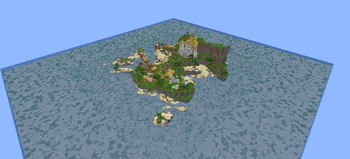
World Viewer is a client-side mod that saves the chunks a server streams to you into a normal Anvil world you can open in singleplayer, and shows you a live map of exactly which chunks you have downloaded, not just a count.

As you move around, the area you have explored fills in. Places you never visited stay as void, so the edge of your download is obvious at a glance.

Features

  • Automatic download. On by default. Join a server, start moving, and every chunk the server sends is saved as you load it. A small status indicator shows at the top of the screen.
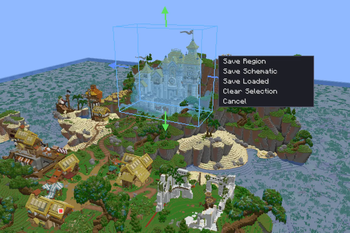
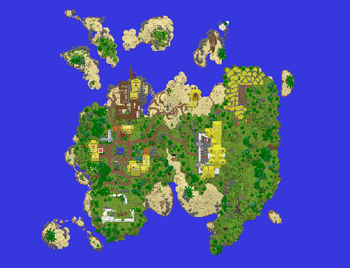
  • Live download map. Press M to open it. A 3D voxel view of your downloaded world plus a flat 2D top-down map (toggle with V). Brightly coloured chunks are saved to disk; dimmed chunks are loaded but not yet saved.
  • Two cameras. Orbit (right-drag to rotate, left-drag to pan, scroll to zoom) and a free-fly "drone" (WASD to move, space/shift for up/down, drag to look, scroll to change speed).
  • Area selection and export. Pick a box in either view, then save it as a clipped Anvil region or a .schem schematic. You can also save everything currently loaded around you.
  • Real, version-correct saves. Chunk data is written with Minecraft's own serializer, so palettes, biomes, heightmaps and lighting are byte-exact and the world opens normally in singleplayer.
  • Multi-dimensional. Fly through a portal and the Nether and End are written into the same world.
  • Configurable. Auto-download, 3D detail capture, anti-aliasing, detail range, field of view, look sensitivity, a rebindable open-map key, and the save folder. All saved to config/wdl.json.

Commands

Command / keyWhat it does
Press MOpen the map (rebindable in the settings panel or Controls).
/wdl saveForce-save every chunk currently loaded around you.
/wdl auto on / offToggle automatic downloading.
/wdl detail on / offToggle full 3D voxel capture.
/wdl output <folder>Set where worlds are saved (blank = .minecraft/saves).
/wdl settingsOpen the settings panel.
/wdl statusShow state, saved/loaded counts, and the output folder.

Requirements

  • Fabric Loader and Fabric API
  • Use the download that matches your Minecraft version. Builds are provided per version (currently 1.21.8 and 1.21.11).

Good to know

These are inherent to any client-side downloader, not bugs:

  • You can only save what the server sends you, i.e. chunks within your render distance. To download an area, go there. A higher render distance loads more at once.
  • Container contents are usually empty. Servers do not send chest/barrel inventories until you open them, so most containers download empty. Signs, banners, and similar block data are saved.
  • No entities yet (mobs, item frames, paintings). Blocks, block entities, biomes, and lighting are saved.
  • Respect server rules. Many servers forbid world-ripping. Use this on your own servers, in singleplayer, or where you have permission.

THIS MOD IS EXPERIMENTAL REPORT BUGS TO @alpha.162 ON DISCORD

License

Source-available, all rights reserved. You may use the official builds and include them in modpacks (unmodified, with credit and a link back). Please do not re-upload the mod elsewhere or distribute modified versions without permission.

Галерея
Последние версии

Все версии →
release

World Viewer 0.3.0+mc26.2

0.3.0+mc26.2
29 авг. 2026 г.291Minecraft: 26.2fabric
Скачать
release

World Viewer 0.3.0+mc1.21.11

0.3.0+mc1.21.11
2 авг. 2026 г.360Minecraft: 1.21.11fabric
Скачать
Что нового
## World Viewer 0.3.0 - Saving update Three separate bugs could each make a save look like it had failed when the data was actually fine. If you have a download that opened as empty void, or a `.schem` a server rejected, it was probably correct all along. **Fixed** - **Downloads from servers with custom dimensions opened as empty void.** Most creative-plot and minigame networks run you outside the normal overworld, and those chunks landed in a folder the saved world could never load. Your session's dimension is now always saved as the overworld. - **You could open a download and be nowhere near it.** Minecraft hunts for a "safe" spawn near the stored point and gives up over void, dumping you at 0,0. Saved worlds now put you exactly on your download, flying. - **WorldEdit rejected `.schem` files as corrupt.** One missing byte of header. The blocks inside were always fine. Schematics now import cleanly into WorldEdit, FAWE and Litematica. - **"Too big for schematic" on normal-sized selections.** The exporter is roughly 20x faster and the limit now scales with your allocated RAM. A 333x163x315 area exports in under half a second. **New** - **Signs, banners, heads and beds survive a schematic export.** (Chests still come out empty: servers never send container contents to your client.) - **Sponge v3 schematics**, switchable in settings. Default stays v2 for the widest support. - **Saves tell you what they captured**: where the world will open, and how many chunks were too far away to save. - Downloaded worlds freeze random ticks, so captured builds do not decay: no leaf decay, no melting snow, no spreading grass. **Changed** - The HUD is now drawn by [kUI](https://modrinth.com/project/kui), so it matches your other KALPE mods and can be moved in kUI's layout editor. kUI is optional: without it everything still works and only the HUD is off. **Install:** drop the jar matching your Minecraft version (`+mc1.21.8` or `+mc1.21.11`) plus Fabric API into `.minecraft/mods/`. Add [kUI](https://modrinth.com/project/kui) 1.1.0+ if you want the HUD.
release

World Viewer 0.3.0+mc1.21.8

0.3.0+mc1.21.8
2 авг. 2026 г.91Minecraft: 1.21.8, 1.21.9, 1.21.10fabric
Скачать
Что нового
## World Viewer 0.3.0 - Saving update Three separate bugs could each make a save look like it had failed when the data was actually fine. If you have a download that opened as empty void, or a `.schem` a server rejected, it was probably correct all along. **Fixed** - **Downloads from servers with custom dimensions opened as empty void.** Most creative-plot and minigame networks run you outside the normal overworld, and those chunks landed in a folder the saved world could never load. Your session's dimension is now always saved as the overworld. - **You could open a download and be nowhere near it.** Minecraft hunts for a "safe" spawn near the stored point and gives up over void, dumping you at 0,0. Saved worlds now put you exactly on your download, flying. - **WorldEdit rejected `.schem` files as corrupt.** One missing byte of header. The blocks inside were always fine. Schematics now import cleanly into WorldEdit, FAWE and Litematica. - **"Too big for schematic" on normal-sized selections.** The exporter is roughly 20x faster and the limit now scales with your allocated RAM. A 333x163x315 area exports in under half a second. **New** - **Signs, banners, heads and beds survive a schematic export.** (Chests still come out empty: servers never send container contents to your client.) - **Sponge v3 schematics**, switchable in settings. Default stays v2 for the widest support. - **Saves tell you what they captured**: where the world will open, and how many chunks were too far away to save. - Downloaded worlds freeze random ticks, so captured builds do not decay: no leaf decay, no melting snow, no spreading grass. **Changed** - The HUD is now drawn by [kUI](https://modrinth.com/project/kui), so it matches your other KALPE mods and can be moved in kUI's layout editor. kUI is optional: without it everything still works and only the HUD is off. **Install:** drop the jar matching your Minecraft version (`+mc1.21.8` or `+mc1.21.11`) plus Fabric API into `.minecraft/mods/`. Add [kUI](https://modrinth.com/project/kui) 1.1.0+ if you want the HUD.
release

World Viewer 0.1.0+mc1.21.11

0.1.0+mc1.21.11
3 июл. 2026 г.97Minecraft: 1.21.11fabric
Скачать
release

World Viewer 0.1.0+mc1.21.8

0.1.0+mc1.21.8
3 июл. 2026 г.28Minecraft: 1.21.8fabric
Скачать