Wards
Physical land claim protection for Paper & Purpur 1.21 through 26.x. Place ward blocks to protect builds from griefing, manage members via GUI, track events with Ward Intelligence, and customize tiers, radii, and recipes in config.
Описание

MachinaWards
Protect your builds with configurable land claim wards — no grief, no drama.
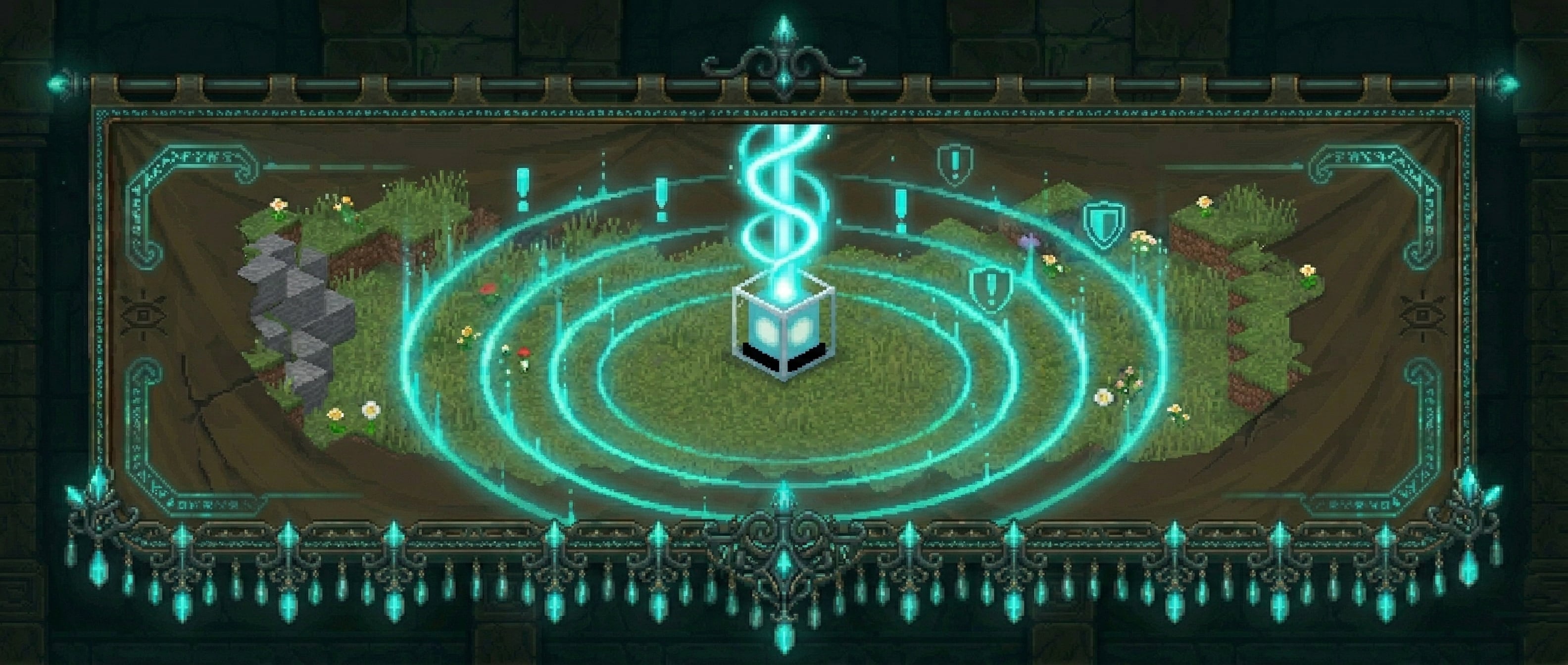
MachinaWards lets players place physical ward blocks to claim and protect an area. Members can be added by the owner, events are logged, and outsiders are stopped cold. Three tiers of wards scale from starter bases to high-value infrastructure.
How It Works
Craft a ward item and place it like any block. The block marks the center of your protected zone. Break it, or sneak+right-click it twice, to pick it back up — the ward item is returned to your inventory so you can relocate it any time.
Right-click the ward block to open the management menu.
Ward Tiers
| Tier | Block | Default Radius | Member Limit | Ward Intelligence |
|---|---|---|---|---|
| Basic | Lantern | 12 blocks | 5 | — |
| Advanced | Beacon | 20 blocks | 10 | — |
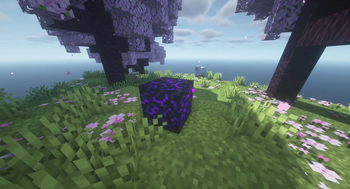
| Super | Crying Obsidian | 30 blocks | Unlimited | Yes |
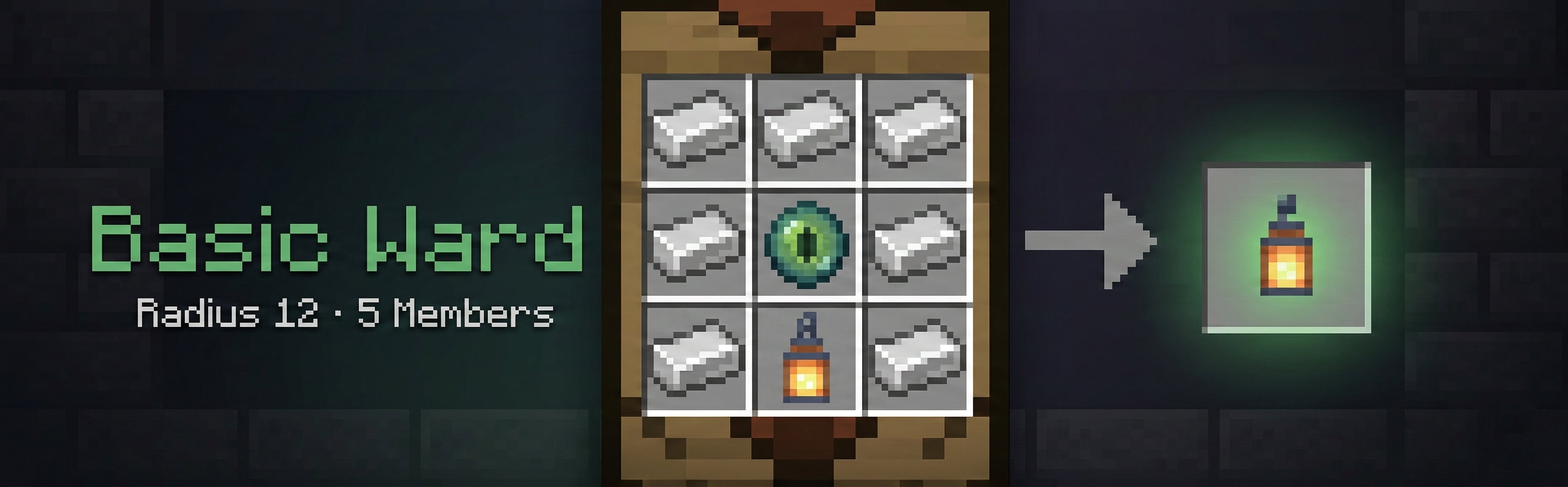
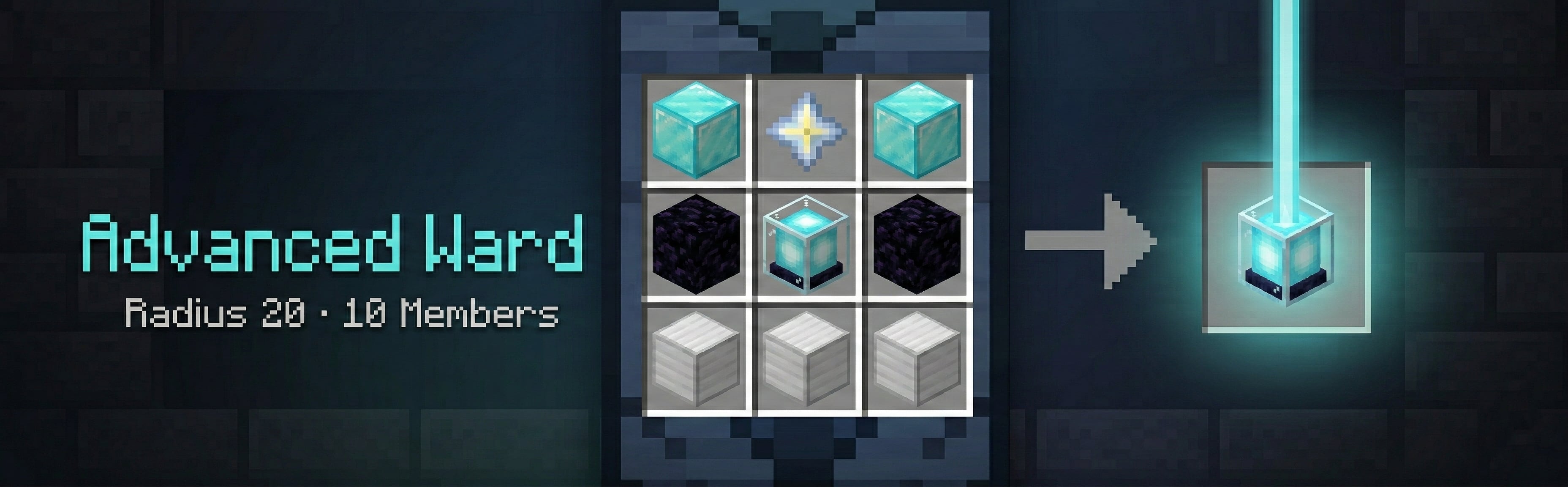
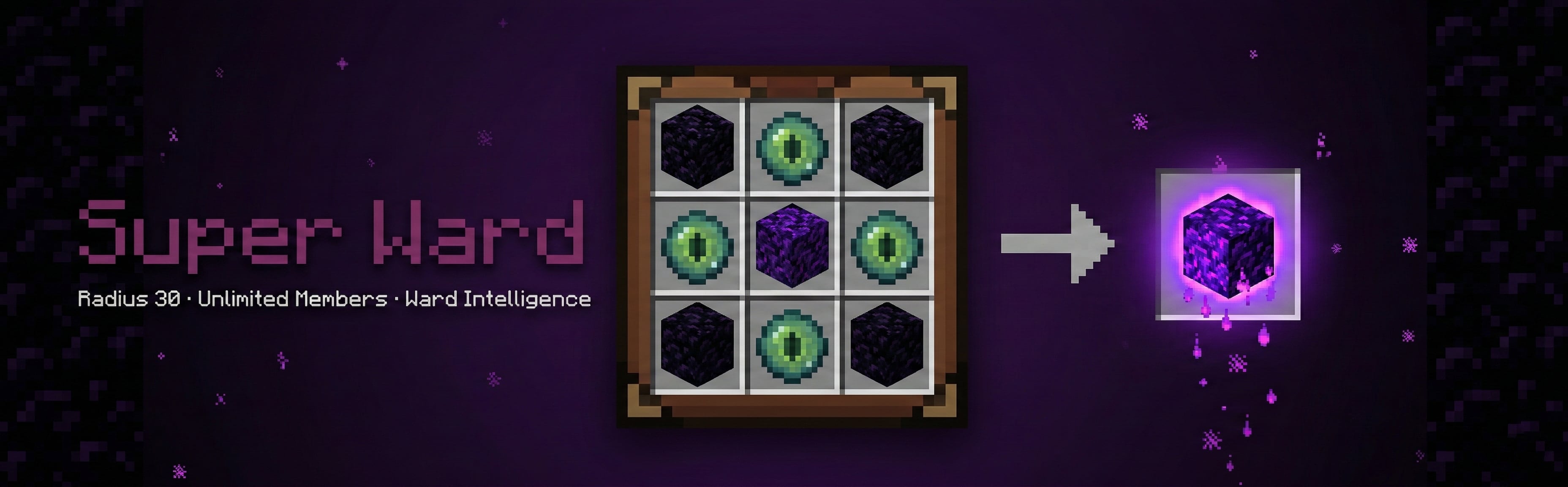
All tiers, recipes, radii, prices, and member limits are fully configurable in config.yml. Server operators can add or rename tiers freely.
Protection
Inside a ward the following are blocked for non-members (all individually toggleable in config.yml):
| Category | Config key | Notes |
|---|---|---|
| Block placing | block_place | |
| Block breaking | block_break | |
| Block interaction | interact | Buttons, chests, doors, etc. VISITOR trust members can still interact — see Trust Levels |
| Explosions | explosion | Creeper, TNT, etc. |
| Fire spread | fire | |
| Piston push/pull | piston | Blocks cannot be pushed or pulled across ward boundaries |
| Entity grief | entity_grief | Endermen, silverfish, Wither, Ravagers, and other griefing mobs cannot alter blocks |
| Fluid flow | fluid_flow | Lava and water cannot flow into a ward from outside |
| Hanging entities | hanging | Item frames and paintings are protected from non-members |
| PVP | pvp | Outsiders cannot attack players inside. Per-ward override: Allow PVP flag |
| Entity damage | entity_damage | Outsiders cannot damage animals or mobs inside. Per-ward override: Allow Mob Damage flag |
| Crop trampling | crop_trample | Non-members cannot trample farmland |
| Bucket pouring | bucket_pour | Non-members cannot pour lava or water buckets inside a ward |
| Entity placement | entity_place | Non-members cannot place armor stands, boats, or minecarts |
| Vehicle destruction | vehicle_destroy | Non-members cannot damage or destroy vehicles inside a ward |
| Block spread | block_spread | Fire, sculk, vines, etc. cannot spread into a ward from outside |
The ward owner and all added members bypass all restrictions. Players with wards.admin bypass everything.
Wards cannot overlap — placement is blocked if the new ward's radius intersects an existing one, keeping protection zones unambiguous.
Trust Levels
When adding a member to a ward, they receive a trust level that controls what they can do inside:
| Level | Can Do | Cannot Do |
|---|---|---|
| Member (default) | Build, break blocks, use all items | — |
| Visitor | Open doors, chests, buttons, containers | Place or break blocks, use buckets |
Trust levels are assigned and changed per-member from the Manage Members screen in the ward GUI. Click a member's skull to open their trust sub-menu and select a level. The change takes effect immediately.
Trust level enforcement can be disabled server-wide in config.yml (trust_levels.enabled: false), which makes Visitors behave identically to Members.
Ward Menu
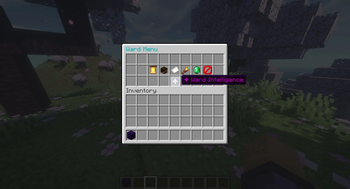
Right-clicking the ward block opens a management menu titled with the ward's name. A Nether Star header at the top shows the ward's tier, radius, member count, location, and ID. Every button describes what it does, shows its current state where it has one, and tells you what a click will do. The menu adapts based on who is clicking:
Owner / Admin view — full management access:
| Item | Action |
|---|---|
| Name Tag — Rename | Set a custom name for this ward (see Ward names below) |
| Feather — Entry Message | Set a custom message visitors see on entry. Supports & color codes and &#RRGGBB hex. Placeholders: %ward%, %owner%, %tier%, %radius%. Type clear to remove |
| Bell — Entry Alerts | Turn entry notifications on/off for this ward. Glows while on |
| Player Head — Members | Add and remove members and set their trust levels |
| Paper — History | Closes the menu and shows the last 20 entry log entries in chat |
| Spyglass — Show Radius | Draw a purple particle boundary for 10 seconds. Only you can see it; click again to restart it |
| Iron Sword — Allow PVP | Per-ward toggle to allow outsiders to PVP inside this ward. Glows while on |
| Bone — Allow Mob Damage | Per-ward toggle to allow outsiders to damage animals/mobs inside this ward. Glows while on |
| Ender Eye — Ward Intelligence | (Super Ward only) Access the feature tracking system |
Member view — read-only access:
| Item | Action |
|---|---|
| Paper — History | View the last 20 entry log entries in chat |
| Spyglass — Show Radius | Visualize the ward boundary (only you can see it) |
Chat prompts — Rename, Entry Message, and Add Member ask you to type in chat. Type cancel to back out; a prompt you ignore expires after 60 seconds. If what you typed is rejected, the prompt stays open so you can try again.
Ward names — Click Rename in the ward menu and type a name in chat, or run /ward rename <name> and right-click the ward block you own within 60 seconds. Use /ward rename cancel to abandon a pending selection. Names must have 1 to 32 visible characters, no spaces, and be unique across the server. & color codes and &#RRGGBB hex colors are kept for display; commands like /ward tp <name> match the name without its colors. Renaming keeps the ward's permanent ID.
Member Management
From the Members screen, each current member is shown as a player skull. Click Add Member and type a player name in chat to add someone (or use /ward addmember <player>). The ward's member limit is enforced at time of addition, and the button grays out when the ward is full. Players who are already members, and the ward owner, can't be added again.
Click a skull to open the Trust sub-menu. Each level lists what it can and cannot do, and the current one glows:
- Visitor — can interact but not build or break
- Member — full access (default)
- Remove Member — click it twice within the confirm window (
pickup.confirm_ms, default 5 seconds). No shift-click needed, so it works for Bedrock players too
Super Ward — Ward Intelligence
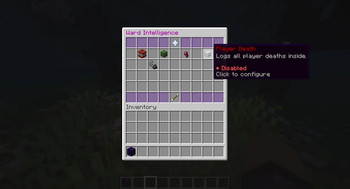
Super wards include a Ward Intelligence menu with five independently toggleable tracking features:
| Feature | What It Tracks |
|---|---|
| Creeper Alert | Alerts the owner when a creeper explodes inside the ward |
| Mob Kills Player | Logs and alerts when a mob kills a player inside the ward |
| Mob Kills Entity | Logs when a mob kills any non-player entity inside the ward |
| Player Death | Logs every player death inside the ward |
| Explosion Log | Logs all explosions inside the ward |
Each feature has its own sub-menu where you can toggle it on/off (it glows while on), view recent logs (last 20 entries, shown in chat), or clear the log history. Clear Logs sits apart from View Logs and takes two clicks within the confirm window, so a stray click can't wipe your history. All data is persisted to the database and wiped automatically when the ward is destroyed.
Economy Shop
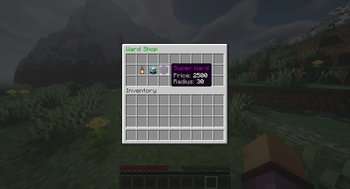
If Vault is installed with an economy provider (e.g. EssentialsX), players can purchase ward items directly using /ward shop. Each ward shows its price, member limit, and number of Ward Intelligence features, with a red line if you can't afford it. Each click buys one ward, and bought wards stack with crafted ones of the same tier. Prices are set per tier in config.yml. If a player's inventory is full, purchased items drop at their feet so they are never lost.
Commands
| Command | Description |
|---|---|
/ward | Show help |
/ward shop | Open the ward shop (requires Vault) |
/ward list [page] | List your wards with names, tiers, worlds, and coords (8 per page) |
/ward rename <name> | Within 60 seconds, right-click the ward block you own to give it that name; /ward rename cancel aborts |
/ward who | Show who owns the ward you are standing in and your access level |
/ward tp <id|name> | Teleport to one of your wards |
/ward compass [id|name] | Point your compass at a ward |
/ward transfer <player> | Offer your nearby ward to another player (they must accept) |
/ward transfer <id> <player> | Offer a specific ward to another player |
/ward accept / /ward decline | Accept or decline a pending ward transfer offer |
/ward addmember <player> | Add a member to your nearby ward |
/ward removemember <player> | Remove a member from your nearby ward |
/ward info [id|name] | Show info about a nearby or specific ward |
/ward nearby [radius] | List wards within radius blocks (default 100, max 500), sorted by distance |
/ward admin list [player] | (admin) List all wards, optionally filtered by player |
/ward admin delete <id|name> | (admin) Delete a ward by ID or name |
/ward admin tp <id|name> | (admin) Teleport to any ward |
/ward admin stats | (admin) Show total wards, per-world breakdown, members, and owner count |
/ward admin cleanup <days> | (admin) Preview, then confirm-delete wards of owners offline ≥ N days |
/ward admin migrate mysql | (admin) Copy all ward data from SQLite to MySQL |
/ward reload | (admin) Reload config and re-register recipes |
Permissions
| Node | Description |
|---|---|
wards.admin | Full administrative access — bypass protection, delete any ward |
wards.place | Allows placing ward blocks (default: true for all players) |
wards.player.<N> | Cap how many wards a player can own (e.g. wards.player.3) |
Visual & Sound Effects
Particles
- Ambient — a subtle
END_RODeffect floats above each ward block so you always know where your wards are (configurable type and interval) - Placement burst — confirms a new ward was created
- Deletion burst — fires when a ward is broken or picked up
- Radius preview — purple particle square shows your claim boundary for 10 seconds via the Show Radius button
Sounds (all configurable in config.yml → sounds:, set to "" to disable individually)
| Key | When It Plays |
|---|---|
ward_place | Ward block is placed |
ward_break | Ward is broken/removed |
ward_pickup | Ward is picked up via sneak+right-click |
entry_alert | Visitor enters a ward |
menu_click | Menu buttons, toggles, and the first click of a two-click confirm |
menu_success | A menu action completed: purchase, member added or removed, name saved |
menu_error | A menu action was refused: can't afford, no permission, invalid input |
Entry Warnings
When a non-member enters a ward they see an action bar notification showing the ward name and owner. The ward owner can set a fully custom entry message from the ward menu with & color codes and &#RRGGBB hex colors. Supported placeholders: %ward%, %owner%, %tier%, %radius%. The visitor warning can be toggled globally in config.yml.
Ward Compass
/ward compass sets your compass to point at your nearest ward in the current world. Specify an ID or name to target a specific ward. No special item required — any compass in your inventory works.
Ownership Transfer
/ward transfer <player> while standing in a ward offers ownership to another player. Use /ward transfer <id> <player> to offer from anywhere. The recipient must be online and accept within 60 seconds (configurable via transfer.request_timeout_seconds) using the clickable [ACCEPT] / [DECLINE] chat buttons — or /ward accept / /ward decline. The recipient's ward limit is checked before the transfer completes. Admins transfer instantly, including to offline players.
Nearby Wards
/ward nearby [radius] lists all wards within the given radius (default 100 blocks, max 500), sorted by distance. Shows each ward's name, tier, owner, and distance.
Anti-Abuse
- Ward items cannot be used as crafting ingredients
- Ward items cannot be inserted into beacon payment slots
- Wards cannot be placed overlapping an existing ward
- Picking up a ward block requires a second sneak+right-click confirmation within a configurable window (default 5 seconds) to prevent accidents
- Breaking the ward block directly also returns the ward item instead of dropping the raw material
- Removing a member or clearing Ward Intelligence logs takes two clicks within the same window
- Ward menus only respond to clicks on the menu's own slots; items in your own inventory can't be dragged into or bought through a menu
- MachinaWards recognizes its own menus directly rather than by title, so another plugin's menu with the same name is never affected
Database
MachinaWards stores all ward data in a database. Two backends are supported:
SQLite (default — no setup required)
database:
  type: sqlite
Data is stored in plugins/MachinaWards/MachinaWards.db.
MySQL / MariaDB
database:
  type: mysql
  mysql:
    host: localhost
    port: 3306
    database: machinawards
    username: root
    password: ""
The MySQL driver must be available on the classpath. Use /ward admin migrate mysql to copy existing SQLite data to MySQL before switching.
Configuration Reference
Everything is configurable in config.yml:
| Section | Key | Default | Description |
|---|---|---|---|
database | type | sqlite | sqlite or mysql |
region | shape | column | column (square column, unlimited height) or cube (height also limited by radius) |
worlds | — | [] | Whitelist of worlds where wards can be placed. Empty = all worlds |
height | min_y / max_y | -64 / 320 | Restrict ward placement to a height range |
alerts | enabled | true | Master toggle for entry alerts |
alerts | cooldown_ms | 90000 | Minimum ms between alerts for the same intruder in the same ward |
alerts | title_format | &6Ward alert | Title shown to ward owner on entry |
alerts | actionbar_format | &e%player% entered &f%ward% | Action bar text shown to owner/members |
entry | show_warning_to_visitor | true | Show the entry action bar to the visitor |
entry | warning_format | &c⚠ Entering &f%ward% &c— owned by &f%owner% | Default visitor warning (overridden per-ward by Entry Message) |
pickup | confirm_ms | 5000 | Confirmation window in ms for sneak+right-click pickup and two-click menu confirms (Remove Member, Clear Logs) |
transfer | request_timeout_seconds | 60 | How long a /ward transfer offer stays valid |
protection | (see table above) | true | Individual protection category toggles |
trust_levels | enabled | true | If false, Visitors have full Member access |
members | notify_on_add | true | Notify players when they are added to a ward |
members | notify_on_remove | true | Notify players when they are removed from a ward |
sounds | ward_place, menu_click etc. | (see above) | Sound effect per event, "" to disable |
particles | enabled | true | Toggle ambient ward particles |
particles | type | END_ROD | Bukkit Particle enum name |
particles | interval_ticks | 40 | Ticks between each particle pulse |
wards.<tier> | display_name | — | Display name with color codes |
wards.<tier> | result_material | — | Bukkit material for the ward block |
wards.<tier> | price | — | Economy price (requires Vault) |
wards.<tier> | radius | — | Protection radius in blocks |
wards.<tier> | max_members | — | Member cap; -1 = unlimited |
wards.<tier> | features | — | List of Ward Intelligence feature IDs to enable for this tier |
wards.<tier> | custom_recipe | — | 3×3 list of material names for the crafting recipe |
Color support: all text fields accept & color codes and &#RRGGBB hex colors.
Dependencies
- Paper / Purpur 1.21 through 26.x — one jar covers all versions (Java 21+ for 1.21.x servers, Java 25+ for 26.1+ servers)
- Plain Spigot is supported only by legacy v1.9.1 — v2.x uses the Adventure API bundled with Paper/Purpur
- Vault (optional) — required only for the economy shop
- MySQL/MariaDB (optional) — only if using the MySQL database backend
Галерея