COWMODSКаталог модов

Wandering Traveler

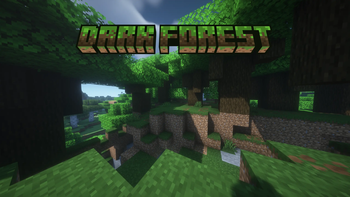
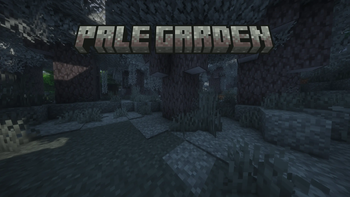
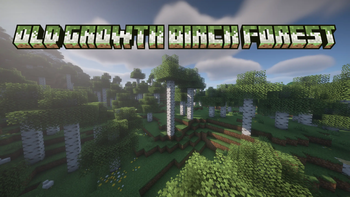
Shows an RPG-style title in hand made 3D art whenever you enter a new biome or dimension. Comes with 67 titles for vanilla dimensions and biomes, supports modded biomes and works without a resource pack

Автор: ChillPavz4 тыс.16обновлён 18 окт. 2026 г.
ПриключенияДекорУтилиты

Описание

Wandering Traveler shows the name of a biome or dimension on screen when you enter it. Most titles are 3D artwork made from the blocks of the biome they name, and all of them ship inside the mod, so there is no resource pack to install and nothing to turn on.

Titles

68 titles have their own artwork: 56 Overworld biomes, 5 Nether biomes, 4 End biomes and the three dimensions. Each one uses the materials of its biome. The Deep Dark is made of sculk, Cherry Grove of cherry wood and blossom, Eroded Badlands of banded terracotta, and Lush Caves of moss and azalea with glow berries along the edges. Warm Ocean uses all five corals, the Nether title has lava underneath it so the letters are lit from below, and Soul Sand Valley uses soul fire with bone along its edges.

A biome without artwork still gets a title in plain text, using the biome's own name. That includes every biome added by a mod or a datapack, so no biome goes without a title and you never see a raw id in place of a name.

Biome borders

Titles are paced so that crossing borders does not fill the screen with names.

  • A biome is announced once you are 3 blocks inside it, so walking along an edge or a riverbank does not keep bringing up titles. Rivers and beaches narrower than 6 blocks are skipped when you walk straight across them
  • If you cross several borders in a few seconds, you see the first title and the one for the biome you end up in. The ones in between are skipped rather than shown late
  • Every title fades fully in, stays on screen, and fades fully out. Once a title starts fading out it finishes, even if you step back into that biome
  • Underground, surface biomes are not announced, because the biome above you is not the one you are in. Lush Caves, Dripstone Caves, the Deep Dark and modded cave biomes still get their titles
  • Going through a portal shows the dimension's title, followed by the biome you arrive in

Settings

Most players will not need to change anything, but nearly every part of how titles look and behave can be adjusted, and each setting has a reset button. The settings screen opens from the mods list.

TabWhat you can change
GeneralTitles on or off, plain text instead of artwork, dimension titles
AppearanceSeparate sizes for short, medium and long names, plus the size, color and shadow of plain text
PlacementNine positions on the screen, all clear of the hotbar and the crosshair, with nudges for fine tuning
TimingFade in, time on screen, fade out, minimum time on screen, and how far into a biome you need to be
When to ShowTitles while flying with an elytra, and surface biomes while you are underground
RepeatsShow every title, skip recently seen ones, or show each one only once; a cooldown for the same title; skipping the biome you spawn in; a list of biomes to never show

New Artwork

Each new title takes me about an hour or two to make, and some mods add close to a hundred biomes, so artwork for modded biomes and dimensions will be added gradually. Modded dimensions will come first, followed by biome mods, starting with popular mods that add fewer biomes and working up to the larger ones. This order may change depending on what players are most interested in.

Until a biome has artwork, it shows its own name in plain text, and a resource pack can give it an artwork title in the meantime.

Adding titles with a resource pack

A resource pack can give any biome or dimension an artwork title, including ones from mods that have none, and it can also replace the artwork of the titles that ship with the mod. A title is one PNG image at assets/wanderingtraveler/textures/title/<namespace>/<name>.png, named after the biome or dimension id, so terralith:cave_forest is textures/title/terralith/cave_forest.png. The image can be any width, and it is scaled to the same height as every other title. No code or registration is needed. A pack only needs to include the titles it covers, and two packs that cover different titles work together.

Both replacing one of the mod's titles and adding a title for a modded biome were tested in game with a separate pack. If something does not work, report it and it will be fixed as quickly as possible. Step by step instructions are coming to the wiki.

Compatibility

The mod is client side only. Servers do not need it, so it works on Realms and on servers you do not run. It contains no mixins, so it does not change the code of Minecraft or of other mods. Titles are drawn as part of the HUD, which means shaders do not affect them.

One download per loader covers every supported version:

LoaderMinecraft versions
Fabric1.20 to 26.3
NeoForge1.20.1 to 26.3
Forge1.20, 1.20.1, 1.21.1 and 1.21.11

Quilt should work, but it has not been tested.

Dependencies

ModFabricNeoForgeForge
Fabric APIRequiredn/an/a
Cloth ConfigRequiredRequiredOptional
Cloth Config Forgen/an/aOptional, 1.21.11 only
Mod MenuOptionaln/an/a

Cloth Config only provides the settings screen. Where it is optional, the titles work exactly the same without it, on their default settings. It is optional on every Forge version, and on 1.20 and 1.20.1 for every loader. On Forge 1.21.11 the settings screen comes from Cloth Config Forge instead, which is a separate project, so the launcher will not install it for you.

Mod Menu only adds the Config button on Fabric. NeoForge and Forge have one in their own mods list.

Common questions

Does it work in an existing world? Yes. It does not touch world generation or saved data.

Do modded biomes work? Yes. They show as plain text straight away, and a resource pack can give any of them an artwork title.

Does it work on a server? Yes, and only you need it installed, because it is client side.

Can I hide the title for one biome? Yes. Add it to the list of biomes to never show, in the Repeats tab.

Can I use it in a modpack? Yes, and there is no need to ask.

Credits

An original mod, not a fork or a port of anything.

Галерея
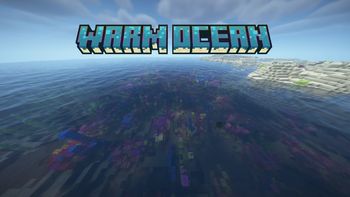
Warm OceanDark ForestPale GardenOld Growth Birch Forest

Последние версии

Все версии →
release

Wandering Traveler 1.6.0 (Fabric)

1.6.0+fabric
18 окт. 2026 г.956Minecraft: 1.20, 1.20.1, 1.21, 1.21.1, 1.21.2, 1.21.3, 1.21.4, 1.21.5, 1.21.6, 1.21.7, 1.21.8, 1.21.9, 1.21.10, 1.21.11, 26.1, 26.1.1, 26.1.2, 26.2, 26.3fabric, quilt
Скачать
Что нового
**Every title is now a single image**, which keeps more of the artwork's detail and makes titles much easier to add with a resource pack. ## Versions - Fabric: 1.20 to 26.3 - NeoForge: 1.20.1 to 26.3 - Forge: 1.20, 1.20.1, 1.21.1 and 1.21.11 The file picks the right build for the version it is installed on. Every version and loader above was tested in game for this release. ## Titles - Each title is drawn as one image instead of a row of font characters. They look the same as before at the GUI scales most people play on - No title has less detail than before, and 49 of the 68 now stay sharp up to GUI scale 8, one step higher than before - If a title's image cannot be drawn for any reason, the plain-text title shows instead and the game carries on ## Resource packs - A title is now one PNG at `assets/wanderingtraveler/textures/title/<namespace>/<name>.png`, named after the biome or dimension id. It can be any width, and it is scaled to the same height as every other title - Replacing one of the mod's titles and adding a title for a modded biome (from Biomes O' Plenty) were both tested in game with a separate resource pack - Packs made for the old format, a font file plus several images per title, need converting to one image per title Fabric API and Cloth Config are required, except on 1.20 and 1.20.1, where Cloth Config is optional. Mod Menu is optional and only adds the Config button.
release

Wandering Traveler 1.6.0 (NeoForge)

1.6.0+neoforge
18 окт. 2026 г.209Minecraft: 1.20.1, 1.21, 1.21.1, 1.21.2, 1.21.3, 1.21.4, 1.21.5, 1.21.6, 1.21.7, 1.21.8, 1.21.9, 1.21.10, 1.21.11, 26.1, 26.1.1, 26.1.2, 26.2, 26.3neoforge
Скачать
Что нового
**Every title is now a single image**, which keeps more of the artwork's detail and makes titles much easier to add with a resource pack. ## Versions - Fabric: 1.20 to 26.3 - NeoForge: 1.20.1 to 26.3 - Forge: 1.20, 1.20.1, 1.21.1 and 1.21.11 The file picks the right build for the version it is installed on. Every version and loader above was tested in game for this release. ## Titles - Each title is drawn as one image instead of a row of font characters. They look the same as before at the GUI scales most people play on - No title has less detail than before, and 49 of the 68 now stay sharp up to GUI scale 8, one step higher than before - If a title's image cannot be drawn for any reason, the plain-text title shows instead and the game carries on ## Resource packs - A title is now one PNG at `assets/wanderingtraveler/textures/title/<namespace>/<name>.png`, named after the biome or dimension id. It can be any width, and it is scaled to the same height as every other title - Replacing one of the mod's titles and adding a title for a modded biome (from Biomes O' Plenty) were both tested in game with a separate resource pack - Packs made for the old format, a font file plus several images per title, need converting to one image per title Cloth Config is required, except on 1.20.1, where it is optional. The Config button is in NeoForge's own mods list.
release

Wandering Traveler 1.6.0 (Forge)

1.6.0+forge
18 окт. 2026 г.99Minecraft: 1.20, 1.20.1, 1.21.1, 1.21.11forge
Скачать
Что нового
**Every title is now a single image**, which keeps more of the artwork's detail and makes titles much easier to add with a resource pack. ## Versions - Fabric: 1.20 to 26.3 - NeoForge: 1.20.1 to 26.3 - Forge: 1.20, 1.20.1, 1.21.1 and 1.21.11 The file picks the right build for the version it is installed on. Every version and loader above was tested in game for this release. ## Titles - Each title is drawn as one image instead of a row of font characters. They look the same as before at the GUI scales most people play on - No title has less detail than before, and 49 of the 68 now stay sharp up to GUI scale 8, one step higher than before - If a title's image cannot be drawn for any reason, the plain-text title shows instead and the game carries on ## Resource packs - A title is now one PNG at `assets/wanderingtraveler/textures/title/<namespace>/<name>.png`, named after the biome or dimension id. It can be any width, and it is scaled to the same height as every other title - Replacing one of the mod's titles and adding a title for a modded biome (from Biomes O' Plenty) were both tested in game with a separate resource pack - Packs made for the old format, a font file plus several images per title, need converting to one image per title Cloth Config is optional on every Forge version. Without it the titles work the same on their default settings, and with it you get the settings screen. On 1.20.1 and 1.21.1 that is Cloth Config; on 1.21.11 it is Cloth Config Forge, a separate download.
release

Wandering Traveler 1.5.0 (Fabric)

1.5.0+fabric
6 окт. 2026 г.1,1 тыс.Minecraft: 1.20, 1.20.1, 1.21, 1.21.1, 1.21.2, 1.21.3, 1.21.4, 1.21.5, 1.21.6, 1.21.7, 1.21.8, 1.21.9, 1.21.10, 1.21.11, 26.1, 26.1.1, 26.1.2, 26.2, 26.3fabric, quilt
Скачать
Что нового
**One download per loader now covers every supported Minecraft version**, and titles are calmer at biome borders. ## Versions - Fabric: 1.20 to 26.3 - NeoForge: 1.20.1 to 26.3 - Forge: 1.20, 1.20.1, 1.21.1 and 1.21.11 The file picks the right build for the version it is installed on. Every version and loader above was tested in game for this release. ## Biome borders - A biome is announced once you are **3 blocks** inside it, so walking along an edge, a riverbank or a beach no longer brings up a title every few steps. Rivers and beaches narrower than 6 blocks are skipped when you walk straight across - A title still waiting its turn is dropped as soon as you leave its biome, so nothing shows up for a place you have already left - A title that has started fading out always finishes, even if you step back into its biome. It no longer brightens and starts over ## Timing - Fades always play at full length. The 1.1.0 behaviour, where fades got shorter when borders came quickly, is now the **Faster Fades When Busy** setting, off by default - **Minimum Time on Screen** now defaults to 1 second, up from half a second. A saved config keeps the value it had - The biome title after a dimension title always gets its full fade in. Before, it could fade in over as little as 0.15 seconds ## New settings - **Distance Into a Biome** (Timing): 3 blocks. 0 announces a biome the moment you cross - **Same Title Cooldown** (Repeats): the same title is not shown again for this many seconds, up to 120. Off by default - **End Title When You Leave** (Timing): when you move into a place that will not be announced, the title of the place you left ends early. Off by default ## Fixes - On Minecraft 1.21.2 to 1.21.5 the mod crashed on NeoForge, and saving the settings failed on every loader. Both are fixed - When a dimension title was not followed by a biome title, the next title started half a second late. Fixed - A title could play a second time right after fading out. Fixed ## Coming from 1.0.0 1.20 and 1.21.x were still on 1.0.0, so this release also brings them everything from 1.1.0: every title fades all the way in and out, a new border ends the title on screen once it has had its minimum time instead of making the next one wait, and **Minimum Time Between Titles** is replaced by **Minimum Time on Screen**. Fabric API and Cloth Config are required, except on 1.20 and 1.20.1, where Cloth Config is optional. Mod Menu is optional and only adds the Config button.
release

Wandering Traveler 1.5.0 (NeoForge)

1.5.0+neoforge
6 окт. 2026 г.203Minecraft: 1.20.1, 1.21, 1.21.1, 1.21.2, 1.21.3, 1.21.4, 1.21.5, 1.21.6, 1.21.7, 1.21.8, 1.21.9, 1.21.10, 1.21.11, 26.1, 26.1.1, 26.1.2, 26.2, 26.3neoforge
Скачать
Что нового
**One download per loader now covers every supported Minecraft version**, and titles are calmer at biome borders. ## Versions - Fabric: 1.20 to 26.3 - NeoForge: 1.20.1 to 26.3 - Forge: 1.20, 1.20.1, 1.21.1 and 1.21.11 The file picks the right build for the version it is installed on. Every version and loader above was tested in game for this release. ## Biome borders - A biome is announced once you are **3 blocks** inside it, so walking along an edge, a riverbank or a beach no longer brings up a title every few steps. Rivers and beaches narrower than 6 blocks are skipped when you walk straight across - A title still waiting its turn is dropped as soon as you leave its biome, so nothing shows up for a place you have already left - A title that has started fading out always finishes, even if you step back into its biome. It no longer brightens and starts over ## Timing - Fades always play at full length. The 1.1.0 behaviour, where fades got shorter when borders came quickly, is now the **Faster Fades When Busy** setting, off by default - **Minimum Time on Screen** now defaults to 1 second, up from half a second. A saved config keeps the value it had - The biome title after a dimension title always gets its full fade in. Before, it could fade in over as little as 0.15 seconds ## New settings - **Distance Into a Biome** (Timing): 3 blocks. 0 announces a biome the moment you cross - **Same Title Cooldown** (Repeats): the same title is not shown again for this many seconds, up to 120. Off by default - **End Title When You Leave** (Timing): when you move into a place that will not be announced, the title of the place you left ends early. Off by default ## Fixes - On Minecraft 1.21.2 to 1.21.5 the mod crashed on NeoForge, and saving the settings failed on every loader. Both are fixed - When a dimension title was not followed by a biome title, the next title started half a second late. Fixed - A title could play a second time right after fading out. Fixed ## Coming from 1.0.0 1.20 and 1.21.x were still on 1.0.0, so this release also brings them everything from 1.1.0: every title fades all the way in and out, a new border ends the title on screen once it has had its minimum time instead of making the next one wait, and **Minimum Time Between Titles** is replaced by **Minimum Time on Screen**. Cloth Config is required, except on 1.20.1, where it is optional. The Config button is in NeoForge's own mods list.
release

Wandering Traveler 1.5.0 (Forge)

1.5.0+forge
6 окт. 2026 г.115Minecraft: 1.20, 1.20.1, 1.21.1, 1.21.11forge
Скачать
Что нового
**One download per loader now covers every supported Minecraft version**, and titles are calmer at biome borders. ## Versions - Fabric: 1.20 to 26.3 - NeoForge: 1.20.1 to 26.3 - Forge: 1.20, 1.20.1, 1.21.1 and 1.21.11 The file picks the right build for the version it is installed on. Every version and loader above was tested in game for this release. ## Biome borders - A biome is announced once you are **3 blocks** inside it, so walking along an edge, a riverbank or a beach no longer brings up a title every few steps. Rivers and beaches narrower than 6 blocks are skipped when you walk straight across - A title still waiting its turn is dropped as soon as you leave its biome, so nothing shows up for a place you have already left - A title that has started fading out always finishes, even if you step back into its biome. It no longer brightens and starts over ## Timing - Fades always play at full length. The 1.1.0 behaviour, where fades got shorter when borders came quickly, is now the **Faster Fades When Busy** setting, off by default - **Minimum Time on Screen** now defaults to 1 second, up from half a second. A saved config keeps the value it had - The biome title after a dimension title always gets its full fade in. Before, it could fade in over as little as 0.15 seconds ## New settings - **Distance Into a Biome** (Timing): 3 blocks. 0 announces a biome the moment you cross - **Same Title Cooldown** (Repeats): the same title is not shown again for this many seconds, up to 120. Off by default - **End Title When You Leave** (Timing): when you move into a place that will not be announced, the title of the place you left ends early. Off by default ## Fixes - On Minecraft 1.21.2 to 1.21.5 the mod crashed on NeoForge, and saving the settings failed on every loader. Both are fixed - When a dimension title was not followed by a biome title, the next title started half a second late. Fixed - A title could play a second time right after fading out. Fixed ## Coming from 1.0.0 1.20 and 1.21.x were still on 1.0.0, so this release also brings them everything from 1.1.0: every title fades all the way in and out, a new border ends the title on screen once it has had its minimum time instead of making the next one wait, and **Minimum Time Between Titles** is replaced by **Minimum Time on Screen**. Cloth Config is now optional on every Forge version. Without it the titles work the same on their default settings, and with it you get the settings screen. On 1.20.1 and 1.21.1 that is Cloth Config; on 1.21.11 it is Cloth Config Forge, a separate download.
release

Wandering Traveler 1.1.0 for Minecraft 26.x (Fabric/Quilt)

1.1.0+mc26.x-fabric
24 сент. 2026 г.562Minecraft: 26.1, 26.1.1, 26.1.2, 26.2, 26.3fabric, quilt
Скачать
Что нового
Minecraft 26.3, a new way of pacing titles, and two new pieces of artwork. ## Minecraft 26.3 One file per loader now covers Minecraft 26.1 through 26.3. ## Titles that finish what they start Crossing borders quickly used to cut a title off halfway and swap in the next name, and the next title could take a couple of seconds to arrive. Both are gone. - Every title fades all the way in, sits at full strength for a moment, and fades all the way out, however fast you are moving - A new border ends the title on screen early instead of waiting its turn, so the next one is up about half a second after you cross - The fades get quicker when the borders come quicker, and go back to their full length when you slow down - Step out of a biome and straight back in, and the title that had started fading out fades back in instead ## New and redrawn - **Dappled Forest**, new in 26.3, has a title of its own, which makes 68 - **Cherry Grove** has been redrawn ## Settings **Minimum Time Between Titles** is replaced by **Minimum Time on Screen**: how long a title stays at full strength before a new border can move it along. It starts at half a second. The old setting means nothing under the new pacing, so anyone who had changed it is back on the default. Fabric API and Cloth Config are required. Mod Menu is optional and only supplies the Config button.
release

Wandering Traveler 1.1.0 for Minecraft 26.x (NeoForge)

1.1.0+mc26.x-neoforge
24 сент. 2026 г.45Minecraft: 26.1, 26.1.1, 26.1.2, 26.2, 26.3neoforge
Скачать
Что нового
Minecraft 26.3, a new way of pacing titles, and two new pieces of artwork. ## Minecraft 26.3 One file per loader now covers Minecraft 26.1 through 26.3. ## Titles that finish what they start Crossing borders quickly used to cut a title off halfway and swap in the next name, and the next title could take a couple of seconds to arrive. Both are gone. - Every title fades all the way in, sits at full strength for a moment, and fades all the way out, however fast you are moving - A new border ends the title on screen early instead of waiting its turn, so the next one is up about half a second after you cross - The fades get quicker when the borders come quicker, and go back to their full length when you slow down - Step out of a biome and straight back in, and the title that had started fading out fades back in instead ## New and redrawn - **Dappled Forest**, new in 26.3, has a title of its own, which makes 68 - **Cherry Grove** has been redrawn ## Settings **Minimum Time Between Titles** is replaced by **Minimum Time on Screen**: how long a title stays at full strength before a new border can move it along. It starts at half a second. The old setting means nothing under the new pacing, so anyone who had changed it is back on the default. Cloth Config is required. The Config button comes from NeoForge's own mods list, so nothing else is needed for it.
release

Wandering Traveler 1.0.0 for 1.20 and 1.20.1 (Forge/NeoForge)

1.0.0+mc1.20.1-forge
19 сент. 2026 г.83Minecraft: 1.20, 1.20.1forge, neoforge
Скачать
Что нового
The first release for this Minecraft version. ## Titles **67 hand drawn titles**, each built out of the blocks of the place it names: 55 Overworld biomes, 5 in the Nether, 4 in the End, and one for each of the three dimensions. Everything else still gets a title, taken from the biome's own name, so modded and datapack biomes work the moment they are installed. Nothing is ever missing, and nothing ever arrives as a raw id. ## Pacing Biome borders are messy, and without rules a mod like this fires a title every few seconds. These are the rules. - A run of quick crossings shows the **first** title and the one you **ended up in**. The ones in between are dropped rather than queued up to play at you later - A title never follows itself, so turning around and coming straight back stays silent - Underground, a biome that also exists at the surface is skipped. Lush Caves, Dripstone Caves and the Deep Dark still get their titles, and climbing out into the open announces where you have surfaced - Going through a portal names the dimension, lets it finish, and then names the biome you arrived in ## Settings 25 of them, in six groups, reached from the mods list. - Three size sliders, so a long name can sit smaller than a short one without either being cut off - Nine screen positions, each landing clear of the hotbar, the status bars and the crosshair on its own, with a nudge on each axis if you want one - Fade in, time on screen, fade out, and the minimum gap between two titles - Plain text gets its own size, color and drop shadow, and the shadow follows the text color unless you tell it otherwise - Show every crossing, only places you have not seen recently, or only the first time ever - A list of biomes to skip entirely Cloth Config is what draws that screen, and on this Minecraft version it is **optional**. Without it every title still works and the mod runs on the settings above; you simply cannot change them from the menu. ## Fits anywhere Client side, so a server neither needs it nor knows about it. No mixins, so nothing is injected into Minecraft or into any other mod. Resource packs can add titles for biomes that have none: two files, no code, and packs merge with each other rather than one replacing the next. **One file covers Minecraft 1.20 and 1.20.1, on Forge and on NeoForge.** At this Minecraft version the two loaders are the same thing as far as a mod is concerned, so there is no separate NeoForge download to look for. Cloth Config is optional and adds the settings screen, opened from the mods list. Forge players will find it in the usual place. **NeoForge players may not be offered it**, because Cloth publishes no NeoForge file for this Minecraft version; installing its Forge build works, and skipping it costs nothing but the screen.
release

Wandering Traveler 1.0.0 for 1.20 and 1.20.1 (Fabric/Quilt)

1.0.0+mc1.20.1-fabric
19 сент. 2026 г.37Minecraft: 1.20, 1.20.1fabric, quilt
Скачать
Что нового
The first release for this Minecraft version. ## Titles **67 hand drawn titles**, each built out of the blocks of the place it names: 55 Overworld biomes, 5 in the Nether, 4 in the End, and one for each of the three dimensions. Everything else still gets a title, taken from the biome's own name, so modded and datapack biomes work the moment they are installed. Nothing is ever missing, and nothing ever arrives as a raw id. ## Pacing Biome borders are messy, and without rules a mod like this fires a title every few seconds. These are the rules. - A run of quick crossings shows the **first** title and the one you **ended up in**. The ones in between are dropped rather than queued up to play at you later - A title never follows itself, so turning around and coming straight back stays silent - Underground, a biome that also exists at the surface is skipped. Lush Caves, Dripstone Caves and the Deep Dark still get their titles, and climbing out into the open announces where you have surfaced - Going through a portal names the dimension, lets it finish, and then names the biome you arrived in ## Settings 25 of them, in six groups, reached from the mods list. - Three size sliders, so a long name can sit smaller than a short one without either being cut off - Nine screen positions, each landing clear of the hotbar, the status bars and the crosshair on its own, with a nudge on each axis if you want one - Fade in, time on screen, fade out, and the minimum gap between two titles - Plain text gets its own size, color and drop shadow, and the shadow follows the text color unless you tell it otherwise - Show every crossing, only places you have not seen recently, or only the first time ever - A list of biomes to skip entirely Cloth Config is what draws that screen, and on this Minecraft version it is **optional**. Without it every title still works and the mod runs on the settings above; you simply cannot change them from the menu. ## Fits anywhere Client side, so a server neither needs it nor knows about it. No mixins, so nothing is injected into Minecraft or into any other mod. Resource packs can add titles for biomes that have none: two files, no code, and packs merge with each other rather than one replacing the next. **One file covers Minecraft 1.20 and 1.20.1.** Fabric API is required. Cloth Config is optional and adds the settings screen; Mod Menu is optional and supplies the button that opens it.