COWMODSКаталог модов

VoxelMap-Updated

Minimap and Worldmap. Have an overview of your surroundings, or view the entire world. Create waypoints.

Автор: fantahund1,4 млн668обновлён 24 сент. 2026 г.
ПриключенияУтилиты

Описание

VoxelMap

Minimap and world map for Minecraft. Clean, fast, no clutter.
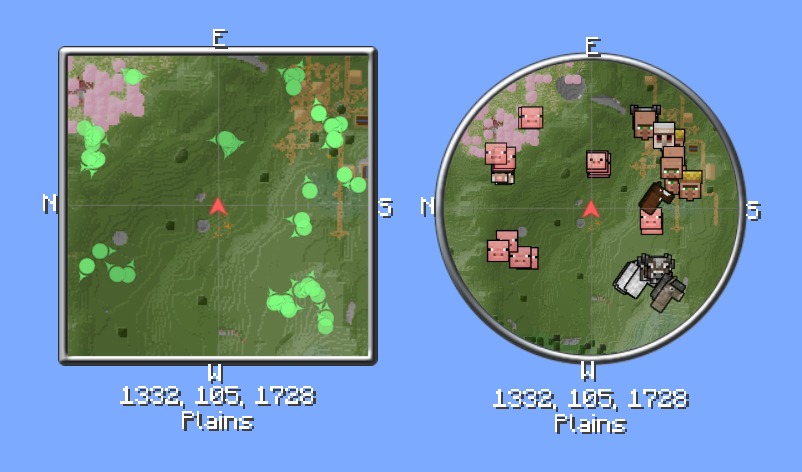
Minimap

Fabric    Forge    NeoForge


About VoxelMap

VoxelMap always shows you where you are. The minimap runs alongside the game, and the fullscreen world map shows everything you've explored so far. On top of that: waypoints, radar, and a few tools that make exploring and building easier.

Client-side only — no server installation required. An optional server-side component lets server owners restrict and configure the map for everyone.


Features

Minimap & World Map

Compact minimap in the corner, fullscreen world map with a keypress. Zoom levels are freely adjustable, rotation with the player is optional.
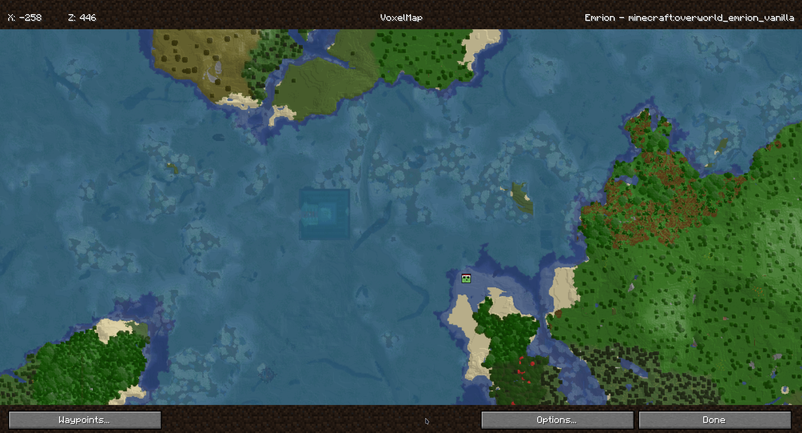
World Map

Waypoints

Set your own markers, give them an icon and color, and toggle visibility per dimension. Waypoints can be shared with other players in chat.
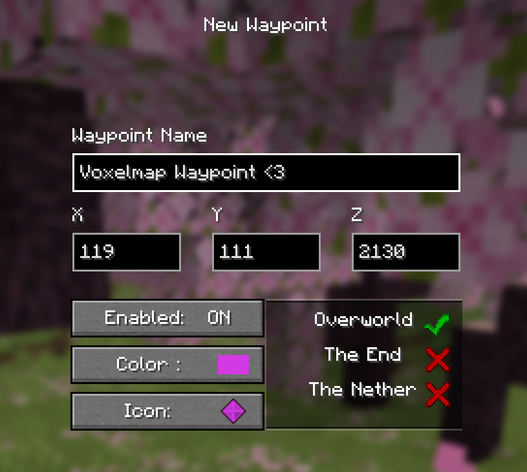
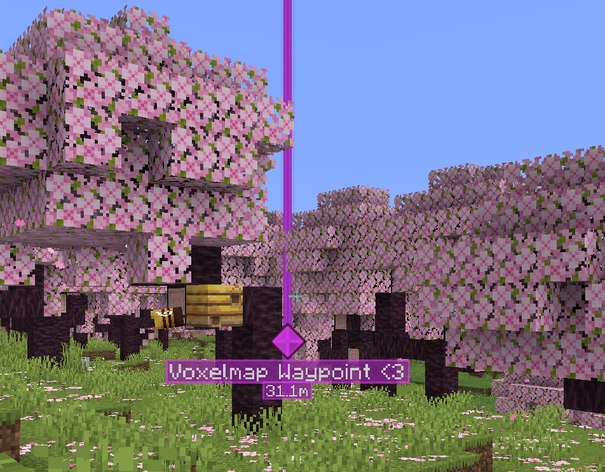
Waypoint menu    Waypoint in the world

Cave Mode

Underground, the map automatically switches to a cave view once the surface is blocked from view.

Radar

Shows nearby players and creatures. Names, helmets, and facing direction can be toggled individually, sneaking players can be hidden.

Biomes & Slime Chunks

Biomes are color-coded on the map or shown as an overlay. Slime chunks can be made visible, on multiplayer servers with the correct seed.

Deathpoints

A waypoint is automatically placed at your death location. Configurable to keep only the most recent one or all of them.

Server Identity

Networks with multiple addresses or proxies can send the client a fixed identity, so waypoints and map data stay the same across every address. Custom alias mappings can also be set manually.


For Server Owners

VoxelMap can be restricted and configured server-side, without players needing to install anything extra. This is not Paper-only — the exact same server-side feature set is available on every platform:

Server softwareWhat to install
FabricThe regular VoxelMap mod jar — it contains the server part
ForgeThe regular VoxelMap mod jar — it contains the server part
NeoForgeThe regular VoxelMap mod jar — it contains the server part
Paper / Spigot-basedThe separate VoxelMap Paper plugin

The mod jar for Fabric, Forge, and NeoForge works on both client and dedicated server. On a dedicated server it activates its server-side part and behaves exactly like the Paper plugin — same options, same config file, same behavior. The Paper plugin exists only because Paper servers can't load mod jars.

Configurable options

  • Allow or block minimap, world map, and waypoints individually
  • Toggle radar for players and mobs separately
  • Allow or disable cave mode
  • Enable or disable deathpoints
  • Custom teleport command for waypoints
  • Fixed server identity, so waypoints and map data persist across multiple addresses or proxies
  • Per-world setting overrides

Config file & reloading

PlatformConfig file
Fabric / Forge / NeoForgeconfig/voxelmap.json
Paperplugins/VoxelMap/voxelmap.json

The file is created with defaults on first start. /voxelmap reload applies changes at runtime and pushes the new settings to all online players — on every platform.

Example: voxelmap.json
{
  "defaultConfig": {
    "radarAllowed": true,
    "radarMobsAllowed": true,
    "radarPlayersAllowed": true,
    "cavesAllowed": true,
    "minimapAllowed": true,
    "worldmapAllowed": true,
    "waypointsAllowed": true,
    "deathWaypointAllowed": true,
    "teleportCommand": "tppos",
    "worldNameSuffix": "",
    "serverIdentity": "MyNetwork"
  },
  "worldOverrides": [
    {
      "worlds": ["world_the_end"],
      "settings": {
        "radarAllowed": false,
        "cavesAllowed": false
      }
    }
  ]
}

Requirements

Runs on Fabric, Forge, and NeoForge. Client-side only — no server installation required to play. The server-side configuration is optional and only intended for server owners who want to restrict the map.


GitHub    Discord

Последние версии

Все версии →
release

VoxelMap-Updated 26.3-1.16.13

26.3-1.16.13
24 сент. 2026 г.13,1 тыс.Minecraft: 26.3fabric
Скачать
Что нового
### Fixed - **Retina / high-DPI displays** — the minimap and all map elements are rendered sharply again instead of at the wrong scale. - **World map on Retina / high-DPI displays** — cursor and click coordinates now match what you see on screen. - **Forge** — the Forge jar is back. It no longer compiled after the GeckoLib radar icons were added, and it was missing the bundled VoxelConfig library it needs to start. ### Changed - Iris compatibility now runs through the shared render path instead of a separate one, so shader users get the same rendering behavior as everyone else.
release

VoxelMap-Updated 26.3-1.16.12

26.3-1.16.12
24 сент. 2026 г.796Minecraft: 26.3neoforge
Скачать
Что нового
### Fixed - **Retina / high-DPI displays** — the minimap and all map elements are rendered sharply again instead of at the wrong scale. - **World map on Retina / high-DPI displays** — cursor and click coordinates now match what you see on screen. - **Forge** — the Forge jar is back. It no longer compiled after the GeckoLib radar icons were added, and it was missing the bundled VoxelConfig library it needs to start. ### Changed - Iris compatibility now runs through the shared render path instead of a separate one, so shader users get the same rendering behavior as everyone else.
release

VoxelMap-Updated 26.3-1.16.13

26.3-1.16.13
24 сент. 2026 г.1,7 тыс.Minecraft: 26.3forge
Скачать
Что нового
### Fixed - **Retina / high-DPI displays** — the minimap and all map elements are rendered sharply again instead of at the wrong scale. - **World map on Retina / high-DPI displays** — cursor and click coordinates now match what you see on screen. - **Forge** — the Forge jar is back. It no longer compiled after the GeckoLib radar icons were added, and it was missing the bundled VoxelConfig library it needs to start. ### Changed - Iris compatibility now runs through the shared render path instead of a separate one, so shader users get the same rendering behavior as everyone else.
release

VoxelMap-Updated 26.3-1.16.12

26.3-1.16.12
17 сент. 2026 г.2,1 тыс.Minecraft: 26.3fabric
Скачать
Что нового
- Iris shaderpacks are now supported: minimap text, waypoint icons and mob icons are rendered correctly again instead of disappearing or showing as oversized pixel blocks. - Mob icons in the mob list and in the entity selection dialog are now generated correctly while a shaderpack is active. Previously only icons that had already been created by the radar looked right. - Mobs using GeckoLib models now get a proper radar icon. Their animated models are read through a GeckoLib compatibility layer, so modded mobs are no longer shown without an icon.
release

VoxelMap-Updated 26.3-1.16.12

26.3-1.16.12
17 сент. 2026 г.197Minecraft: 26.3neoforge
Скачать
Что нового
- Iris shaderpacks are now supported: minimap text, waypoint icons and mob icons are rendered correctly again instead of disappearing or showing as oversized pixel blocks. - Mob icons in the mob list and in the entity selection dialog are now generated correctly while a shaderpack is active. Previously only icons that had already been created by the radar looked right. - Mobs using GeckoLib models now get a proper radar icon. Their animated models are read through a GeckoLib compatibility layer, so modded mobs are no longer shown without an icon.
release

VoxelMap-Updated 26.3-1.16.11

26.3-1.16.11
15 сент. 2026 г.169Minecraft: 26.3neoforge
Скачать
Что нового
✨ New - Minecraft 26.3 support - VoxelConfig extracted into its own standalone library, now used as a shaded dependency 🚀 Performance - Major rework of the persistent (full) world map's caching and update pipeline: region data is now compressed in memory, tile updates are batched/scheduled instead of firing per chunk, and detailed update tasks are cancelled early when zooming out. - World map now uses far less CPU while the map screen is closed — background chunk updates are combined instead of processed individually. - Added an internal profiler for the persistent map pipeline to track update/render cost. - Reworked texture filtering/sampler handling across the mod (arrow, frame, player-skin and map textures); fixed the map's render-target texture using no sampler at all (leftover FIXME). 🐛 Fixed - Fixed missing tile updates and improved overview tile quality/color accuracy for cached regions on the world map. - Fixed red/blue channel swap (RGB/BGR) on cached world map region textures. - Fixed world preview icons after cancelling a data migration. - Loosened overly strict version checking (was rejecting valid installs).
release

VoxelMap-Updated 26.3-1.16.11

26.3-1.16.11
15 сент. 2026 г.872Minecraft: 26.3fabric
Скачать
Что нового
✨ New - Minecraft 26.3 support - VoxelConfig extracted into its own standalone library, now used as a shaded dependency 🚀 Performance - Major rework of the persistent (full) world map's caching and update pipeline: region data is now compressed in memory, tile updates are batched/scheduled instead of firing per chunk, and detailed update tasks are cancelled early when zooming out. - World map now uses far less CPU while the map screen is closed — background chunk updates are combined instead of processed individually. - Added an internal profiler for the persistent map pipeline to track update/render cost. - Reworked texture filtering/sampler handling across the mod (arrow, frame, player-skin and map textures); fixed the map's render-target texture using no sampler at all (leftover FIXME). 🐛 Fixed - Fixed missing tile updates and improved overview tile quality/color accuracy for cached regions on the world map. - Fixed red/blue channel swap (RGB/BGR) on cached world map region textures. - Fixed world preview icons after cancelling a data migration. - Loosened overly strict version checking (was rejecting valid installs).
release

VoxelMap-Updated 26.2-1.16.10

26.2-1.16.10
30 авг. 2026 г.10,5 тыс.Minecraft: 26.2fabric
Скачать
Что нового
🐛 Fixed - Server settings in menu disabled when not connected to a server - Crash fixed with some mods that register their own entities - Fixed server cache bug - No more text/line selection in settings menu - Optimized and stabilized minimap rendering - Fixed waypoint depth-testing - Fixed waypoint rendering issues with shaders - Improved entity armor variant handling 🔧 Changed - VoxelMap no longer writes a message to the server console when sending settings to a client - Removed deprecated compatibility renderer
release

VoxelMap-Updated 26.2-1.16.10

26.2-1.16.10
30 авг. 2026 г.728Minecraft: 26.2neoforge
Скачать
Что нового
🐛 Fixed - Server settings in menu disabled when not connected to a server - Crash fixed with some mods that register their own entities - Fixed server cache bug - No more text/line selection in settings menu - Optimized and stabilized minimap rendering - Fixed waypoint depth-testing - Fixed waypoint rendering issues with shaders - Improved entity armor variant handling 🔧 Changed - VoxelMap no longer writes a message to the server console when sending settings to a client - Removed deprecated compatibility renderer
release

VoxelMap-Updated 26.2-1.16.10

26.2-1.16.10
30 авг. 2026 г.904Minecraft: 26.2forge
Скачать
Что нового
🐛 Fixed - Server settings in menu disabled when not connected to a server - Crash fixed with some mods that register their own entities - Fixed server cache bug - No more text/line selection in settings menu - Optimized and stabilized minimap rendering - Fixed waypoint depth-testing - Fixed waypoint rendering issues with shaders - Improved entity armor variant handling 🔧 Changed - VoxelMap no longer writes a message to the server console when sending settings to a client - Removed deprecated compatibility renderer