COWMODSКаталог модов

Vlast Connect

The mod adds better settings for the “Vlast” server, auto-adding servers, auto-downloading resource packs, Litematica support, backpack functionality improvements, and much more.

7345обновлён 9 дек. 2025 г.
ПроклятыеДекорУтилиты

Описание

RU

🌟 Vlast Connect — модификация для комфортной игры на сервере Vlast

⚠ ВНИМАНИЕ: ДАННЫЙ МОД РАБОТАЕТ ТОЛЬКО НА СЕРВЕРЕ VLAST!

Vlast Connect создан специально для того, чтобы сделать игру на сервере максимально удобной, настраиваемой и приятной. Мод объединяет в себе ряд функций, упрощающих взаимодействие с сервером и улучшающих пользовательский опыт.

🔧 Основные возможности:

  • 🎨 Настройка интерфейса — Изменение интерфейса сохраняет пропорции пользовательского интерфейса на экране.
  • 📦 Быстрый просмотр рюкзаков — удерживай Shift, чтобы видеть содержимое рюкзака.
  • ⚡ Оптимизированный пинг — более стабильное подключение и снижение задержек при игре.
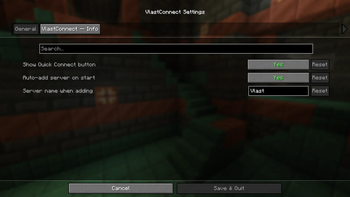
  • 🌍 Автодобавление сервера — сервер автоматически появляется в списке при запуске клиента.
  • 🎶 Автоматическая загрузка ресурсов — нужный пакет сервера скачивается и применяется сразу при подключении.
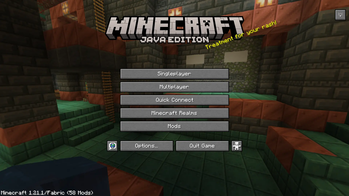
  • 🔗 Кнопка быстрого входа — подключайся к серверу всего в один клик.
  • 👕 Управление скинами — удобные настройки внешнего вида прямо в игре.
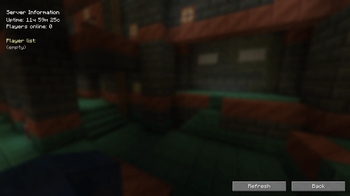
  • ℹ️ Информационная кнопка — всегда под рукой актуальная информация о сервере.

🚧 Статус разработки

Мод находится в стадии активной разработки. Некоторые функции уже работают, другие находятся в процессе реализации и будут добавляться в будущих версиях.

МОД БУДЕТ КОНФЛИКТОВАТЬ С МОДАМИ ПО ТИПУ:

  • Skin Shuffle
  • Skin Restorer
  • Skin Swapper
  • Skin Overrides
  • RE: Skin

и так далее...

ENG

🌟 Vlast Connect — a modification for comfortable gameplay on the Vlast server

⚠ ATTENTION: THIS MOD ONLY WORKS ON THE VLAST SERVER!

Vlast Connect was created specifically to make gameplay on the server as convenient, customizable, and enjoyable as possible. The mod combines a number of features that simplify interaction with the server and improve the user experience.

🔧 Key features:

  • 🎨 Interface customization — Changing the interface preserves the proportions of the UI on the screen.
  • 📦 Quick backpack preview — hold Shift to see the contents of the backpack.
  • ⚡ Optimized ping — more stable connection and reduced lag while playing.
  • 🌍 Auto-add server — the server automatically appears in the list when the client is launched.
  • 🎶 Automatic resource loading — the required server package is downloaded and applied immediately upon connection.
  • 🔗 Quick join button — connect to the server with just one click.
  • 👕 Skin management — convenient appearance settings right in the game.
  • ℹ️ Info button — up-to-date information about the server is always at your fingertips.

🚧 Development status

The mod is currently in active development. Some features are already working, while others are in the process of being implemented and will be added in future versions.

THE MOD WILL CONFLICT WITH MODS SUCH AS:

  • Skin Shuffle
  • Skin Restorer
  • Skin Swapper
  • Skin Overrides
  • RE: Skin

and so on...

Галерея

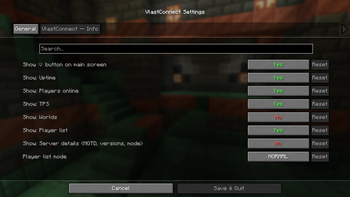
New buttonsMod settings 1Mod settings 2Server information

Последние версии

Все версии →
release

Vlast Connect 2.3.8

2.3.8
9 дек. 2025 г.354Minecraft: 1.21, 1.21.1, 1.21.2, 1.21.3, 1.21.4, 1.21.5, 1.21.6, 1.21.7, 1.21.8, 1.21.9, 1.21.10, 1.21.11fabric
Скачать
Что нового
Fixed kicks from server after server messages. Restored skins for licenses. Temporarily disabled cloaks. Fixed bugs with kicks from single worlds.
release

Vlast Connect 2.3.5

2.3.5
30 нояб. 2025 г.46Minecraft: 1.21, 1.21.1, 1.21.2, 1.21.3, 1.21.4, 1.21.5, 1.21.6, 1.21.7, 1.21.8, 1.21.9, 1.21.10fabric
Скачать
Что нового
- Fixed resource pack installation - Fixed panel button - Added new notifications - Fixed crash in mod - Fixed deletion of old mod versions
release

Vlast Connect 2.3.2

2.3.2
23 нояб. 2025 г.36Minecraft: 1.21, 1.21.1, 1.21.2, 1.21.3, 1.21.4, 1.21.5, 1.21.6, 1.21.7, 1.21.8, 1.21.9, 1.21.10fabric
Скачать
Что нового
Localization errors fixed Auto-update errors fixed
release

Vlast Connect 2.3.1

2.3.1
23 нояб. 2025 г.23Minecraft: 1.21, 1.21.1, 1.21.2, 1.21.3, 1.21.4, 1.21.5, 1.21.6, 1.21.7, 1.21.8, 1.21.9, 1.21.10fabric
Скачать
Что нового
- Notifications added - Button styles changed - Resource pack loading bugs fixed - Button placement bugs fixed - Crashes on versions 1.21.4-6 fixed
release

Vlast Connect 2.0.0

2.0.0
4 нояб. 2025 г.59Minecraft: 1.21, 1.21.1, 1.21.2, 1.21.3, 1.21.4, 1.21.5, 1.21.6, 1.21.7, 1.21.8, 1.21.9, 1.21.10fabric
Скачать
Что нового
- Improved button design - Fixed bugs with design and crashes - Fixed screen size for buttons - Added new buttons and settings for resource packs
release

Vlast Connect 1.8.1

1.8.1
3 окт. 2025 г.44Minecraft: 1.21, 1.21.1, 1.21.2, 1.21.3, 1.21.4, 1.21.5, 1.21.6, 1.21.7, 1.21.8, 1.21.9fabric
Скачать
Что нового
- Added incomplete support for new versions. - Added the ability to change button size in the editor. - Improved skin system. - Added warnings. - Added update checking.
release

Vlast Connect 1.7.1

1.7.1
29 сент. 2025 г.38Minecraft: 1.21.1fabric
Скачать
Что нового
- Fixed bugs with incompatible mods. - Optimized code. - Added skin support for servers using VlastConnect. - Improved Gallery design. - Added the ability to view the contents of backpacks from the ExBacks plugin using the Shift key. - Fixed the placement of buttons on the main menu.
release

Vlast Connect 1.6.1

1.6.1
18 сент. 2025 г.31Minecraft: 1.21.1fabric
Скачать
Что нового
* Fixed cape loading
release

Vlast Connect 1.6.0

1.6.0
18 сент. 2025 г.30Minecraft: 1.21.1fabric
Скачать
Что нового
* Added a button for editing the MENU. * Added support for unique skins without restrictions. * Fixed bugs with placeholders. * Improved code optimization. * Improved configuration, more flexible settings. * Fixed a bug that caused buttons to break when measuring the size of the game or interface. * Added new dependencies and warnings.
beta

Vlast Connect 1.0.2

1.0.2
16 сент. 2025 г.37Minecraft: 1.21.1fabric
Скачать
Что нового
1. Fixed spam errors in the console 1. Added plugin avatar 1. Added plugin description 1. Added information button to the main screen