

VisualParticles Better
Advanced 2D & 3D visual particle effects with customizable rendering modes.
Автор: okilmilo2 тыс.7обновлён 14 сент. 2026 г.
Утилиты
Описание
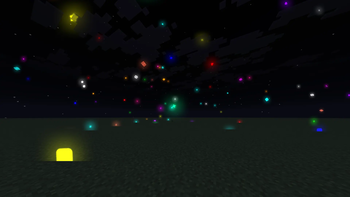
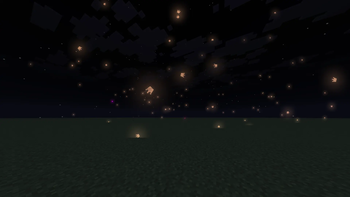
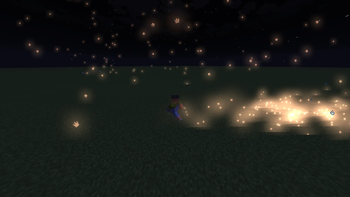
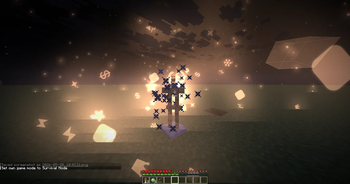
VisualParticle Better is a client-side visual mod that adds stylish, customizable particles to your Minecraft gameplay.
The mod makes combat, movement, projectiles, and totem pops feel more alive with bright glowing particles, smooth motion, and multiple particle styles.

- Custom particle rendering in the world
- Particles when attacking entities ⚔️
- Particles while walking 🚶
- Projectile trail particles 🏹
- Totem pop particle effect 💚
- Multiple particle modes and textures
- Glow effects for particles ✨
- Random color option 🌈
- In-game settings menu
- Opens with Right Shift

You can customize the particle system directly in game:
- Particle mode
- Glow mode
- Enable or disable attack particles
- Enable or disable walking particles
- Enable or disable projectile particles
- Enable or disable totem particles
- Particle amount
- Walk particle amount
- Spread
- Speed
- Lifetime
- Size
- Glow size
Why Use It? 🎮
VisualParticle Better gives Minecraft a cleaner and more dynamic visual feel without changing gameplay.
It is made for players who want more satisfying effects, brighter visuals, and easy customization.
Everything can be adjusted live from the settings menu, so you can quickly make the particles subtle, bright, chaotic, or minimal.
Галерея
Последние версии
Все версии →release
VisualParticles Better 0.0.9
0.0.914 сент. 2026 г.518Minecraft: 1.21.11fabric
Что нового
# Changelog
### - New version 0.0.9 — Minecraft 1.21.11
- Expanded VisualParticle Better into a complete standalone cosmetic particle system.
- Added dedicated ClickGUI sections for Combat, Movement, Projectiles, Blocks, Items, Rendering, and Presets.
- Added separate particle effects for hits, critical hits, incoming damage, deaths, walking, sprinting, jumping, and elytra flight.
- Added trails for arrows, tridents, and fireworks.
- Added effects for block breaking, block placement, block hits, totem pops, and item pickups.
- Added individual shape and density controls for the new particle groups.
- Added four new particle physics styles: Storm, Vortex, Zero Gravity, and Magnetic, while retaining the original Classic physics.
- Added 2D sprite and single-plane 3D particle rendering modes.
- Added a redesigned visual preset gallery with icons, color accents, descriptions, and active-preset highlighting.
- Added Purple PvP, Storm, Arcane, Minimal, Cinematic, and Custom presets.
- Added instant synchronization between selected presets and every ClickGUI control.
- Extended Russian and English localization for all new categories, effects, physics modes, presets, and descriptions.
- Improved particle smoothness with frame interpolation between fixed game ticks.
- Optimized particle rendering with texture batching, a controlled particle limit, and a stable per-frame snapshot.
- Fixed clouds and translucent world layers incorrectly rendering over particles.
- Fixed particles appearing doubled because Hit and Damage effects were triggered together.
- Fixed critical particles rendering directly over regular hit particles.
- Fixed the 3D particle mode drawing two intersecting sprites for a single particle.
- Fixed Damage particles triggering on attacks instead of when the player receives damage.
- Fixed a ConcurrentModificationException that could crash the client while particles were being rendered.
- Fixed clicks passing through an open dropdown and opening or changing another setting underneath it.
- Fixed black-and-purple placeholder cubes by restoring a safe fallback particle texture.
- Updated the mod build version to 0.0.9.
### - Новая версия 0.0.9 — Minecraft 1.21.11
- VisualParticle Better расширен до полноценной самостоятельной косметической системы частиц.
- В ClickGUI добавлены отдельные разделы: «Бой», «Движение», «Снаряды», «Блоки», «Предметы», «Рендеринг» и «Пресеты».
- Добавлены отдельные эффекты для попаданий, критических ударов, полученного урона, смерти, ходьбы, бега, прыжков и полёта на элитрах.
- Добавлены следы для стрел, трезубцев и фейерверков.
- Добавлены эффекты разрушения, установки и удара по блоку, срабатывания тотема и подбора предметов.
- Добавлены отдельные настройки формы и плотности для новых групп частиц.
- Добавлены четыре новых варианта физики: Storm, Vortex, Zero Gravity и Magnetic. Оригинальная физика Classic сохранена.
- Добавлены режимы рендера 2D-спрайтов и одиночных объёмных 3D-частиц.
- Добавлена переработанная галерея пресетов с иконками, цветовыми акцентами, описаниями и отметкой активного пресета.
- Добавлены пресеты Purple PvP, Storm, Arcane, Minimal, Cinematic и Custom.
- Добавлена мгновенная синхронизация выбранного пресета со всеми элементами управления ClickGUI.
- Расширена русская и английская локализация для новых разделов, эффектов, режимов физики, пресетов и описаний.
- Улучшена плавность движения частиц благодаря покадровой интерполяции между фиксированными игровыми тиками.
- Оптимизирован рендер частиц: добавлены группировка по текстурам, контролируемый лимит и стабильный снимок состояния на каждый кадр.
- Исправлено перекрытие частиц облаками и полупрозрачными слоями мира.
- Исправлено двойное появление частиц из-за одновременного срабатывания Hit и Damage эффектов.
- Исправлено наложение критических частиц поверх обычных частиц попадания.
- Исправлен режим 3D, в котором одна частица рисовалась как два пересекающихся спрайта.
- Исправлено неправильное срабатывание Damage-частиц во время атаки: теперь они появляются только при получении урона игроком.
- Исправлен ConcurrentModificationException, который мог вызвать краш клиента во время рендера частиц.
- Исправлено прохождение клика сквозь открытый dropdown, из-за которого открывалась или изменялась другая настройка под ним.
- Исправлено появление чёрно-фиолетовых placeholder-кубов: восстановлена безопасная резервная текстура частиц.
- Версия сборки мода обновлена до 0.0.9.
release
VisualParticles Better 0.0.8
0.0.811 сент. 2026 г.50Minecraft: 1.21.11fabric
Что нового
# Changelog
### - New version 0.0.8 — Minecraft 1.21.11
- Added a completely new ClickGUI designed specifically for VisualParticle Better.
- Added dedicated settings tabs for General, Events, World, Colors, and Presets.
- Added smooth navigation animations, scrolling, dropdown menus, sliders, switches, and rounded panels.
- Improved the ClickGUI layout for a cleaner and more compact appearance.
- Simplified the sidebar and removed unnecessary profile, Premium, and decorative elements.
- Added a redesigned Color Picker with saturation, brightness, hue, transparency, color preview, and HEX controls.
- Added Russian and English language switching directly inside the ClickGUI.
- Added Russia and Great Britain flags to the language selector.
- Added full localization for tabs, particle settings, descriptions, modes, presets, and interface controls.
- Added Discord Rich Presence support for VisualParticle Better.
- Added Discord activity details with Mod Build 0.0.8.
- Added privacy-safe Discord statuses for menus, singleplayer, and multiplayer.
- Added Discord RPC buttons for Modrinth, CurseForge, and GitHub.
- Added complete particle settings for attacks, totems, walking, elytra flight, projectiles, and the surrounding world.
- Added particle shape selection, color presets, custom gradients, physics, amount, spread, speed, lifetime, size, and glow controls.
- Added PvP, Minimal, Cinematic, and Custom particle presets.
- Improved particle movement smoothness with interpolation between game ticks.
- Restored the proper VisualParticle Better bloom and glow appearance.
- Improved glow positioning, scale, transparency, and fade animations.
- Optimized particle and glow rendering for significantly better FPS.
- Fixed jerky particle movement and incorrectly layered glow effects.
- Fixed rendering issues that could cause particles to leave distorted trails.
- Fixed a render-buffer error that could crash the client during particle rendering.
- Reduced the final mod size to approximately 2.6 MB.
- Updated the mod version and Discord build version to 0.0.8.
### - Новая версия 0.0.8 — Minecraft 1.21.11
- Добавлен полностью новый ClickGUI, разработанный специально для VisualParticle Better.
- Добавлены отдельные вкладки настроек: «Главное», «События», «Мир», «Цвета» и «Пресеты».
- Добавлены плавные анимации навигации, прокрутка, выпадающие списки, слайдеры, переключатели и скруглённые панели.
- Улучшена компоновка ClickGUI — интерфейс стал чище и компактнее.
- Упрощена боковая панель, удалены ненужные профильные, Premium и декоративные элементы.
- Добавлен переработанный Color Picker с настройкой насыщенности, яркости, оттенка, прозрачности, предпросмотром цвета и HEX-значением.
- Добавлено переключение русского и английского языка прямо внутри ClickGUI.
- Добавлены флаги России и Великобритании для кнопки выбора языка.
- Добавлена полная локализация вкладок, настроек партиклов, описаний, режимов, пресетов и элементов управления.
- Добавлена поддержка Discord Rich Presence для VisualParticle Better.
- Добавлено отображение Mod Build 0.0.8 в Discord activity.
- Добавлены безопасные Discord-статусы для меню, одиночной и сетевой игры.
- Добавлены Discord RPC кнопки для Modrinth, CurseForge и GitHub.
- Добавлены полные настройки партиклов атаки, тотема, ходьбы, полёта на элитрах, снарядов и окружающего мира.
- Добавлены выбор формы частиц, цветовые пресеты, пользовательские градиенты, физика, количество, разброс, скорость, время жизни, размер и свечение.
- Добавлены пресеты партиклов PvP, Minimal, Cinematic и Custom.
- Улучшена плавность движения партиклов благодаря интерполяции между игровыми тиками.
- Восстановлен правильный внешний вид bloom и glow VisualParticle Better.
- Улучшены позиционирование, масштаб, прозрачность и анимация затухания свечения.
- Оптимизирован рендер партиклов и glow для значительного повышения FPS.
- Исправлено дёрганое движение частиц и неправильное наложение glow-эффектов.
- Исправлены проблемы рендера, из-за которых частицы оставляли кривые следы.
- Исправлена ошибка render buffer, которая могла вызывать краш клиента во время отрисовки частиц.
- Размер итогового мода уменьшен примерно до 2.6 МБ.
- Версия мода и версия сборки в Discord обновлены до 0.0.8.
release
VisualParticles Better 0.0.7-1.21.11
0.0.7-1.21.1115 июл. 2026 г.367Minecraft: 1.21.11fabric
Что нового
# Changelog
### - New version 0.0.7 1.21.11
- Added Discord RPC support for VisualParticle Better.
- Added Discord activity status with the current Minecraft server when available.
- Added Discord activity details with the mod build version, now shown as Mod Build 0.0.7.
- Added Discord RPC buttons for Modrinth + CurseForge and GitHub.
- Added a dedicated mod logo asset for Discord Rich Presence.
- Added Russian and English language switching inside the settings GUI.
- Added country flags for the language button with Russia and Great Britain icons.
- Added full Russian translation for GUI tabs, settings, controls, buttons, presets, dropdowns, and status text.
- Added cleaner localized labels for particle settings and GUI controls.
- Improved the language selector design with a compact flag + language code button.
- Improved GUI edge rendering so the right side no longer leaks outside the rounded window corners.
- Improved 2D UI clipping around scrollbars, panels, and the main window border.
- Improved the settings GUI polish for a cleaner premium-style look.
- Changed the mod version to 0.0.7 for the new build.
- Fixed broken custom font rendering that caused all GUI text to appear as square missing-glyph boxes.
- Fixed Russian text rendering in the settings GUI by returning text drawing to a stable Minecraft font renderer.
- Fixed the language button staying readable after switching between EN and RU.
### - Новая версия 0.0.7 1.21.11
- Добавлена поддержка Discord RPC для VisualParticle Better.
- Добавлен Discord activity status с отображением текущего Minecraft сервера, если он доступен.
- Добавлено отображение версии сборки мода в Discord activity, теперь показывается Mod Build 0.0.7.
- Добавлены Discord RPC кнопки для Modrinth + CurseForge и GitHub.
- Добавлен отдельный логотип мода для Discord Rich Presence.
- Добавлено переключение языка RU / EN прямо внутри GUI настроек.
- Добавлены флаги стран для кнопки языка: Россия и Великобритания.
- Добавлен полный русский перевод для вкладок GUI, настроек, контролов, кнопок, пресетов, dropdown и статусного текста.
- Добавлены более чистые локализованные названия для настроек партиклов и GUI controls.
- Улучшен дизайн language selector: компактная кнопка с флагом и кодом языка.
- Улучшен рендер краев GUI: справа больше не вылезают куски за скругленные углы окна.
- Улучшен 2D UI clipping для scrollbar, панелей и основной рамки окна.
- Улучшена общая полировка GUI, чтобы меню выглядело более premium-style.
- Версия мода изменена на 0.0.7 для новой сборки.
- Исправлен сломанный кастомный font rendering, из-за которого весь текст GUI превращался в квадратные missing-glyph символы.
- Исправлен рендер русского текста в GUI настроек за счет возврата на стабильный Minecraft font renderer.
- Исправлена читаемость кнопки языка после переключения между EN и RU.
release
VisualParticles Better 0.0.6-1.21.11
0.0.6-1.21.119 июл. 2026 г.80Minecraft: 1.21.11fabric
Что нового
# Changelog
### - New version 0.0.6 1.21.11
- Added global GUI rendering changes.
- Added a simple custom OpenGL-style 2D UI rendering system for the settings menu.
- Added smoother rounded rectangles for panels, buttons, sliders, toggles, dropdowns, borders, and color controls.
- Added supersampled UI surfaces to reduce pixelated corners and outlines.
- Added a compact click GUI-style settings screen with categories, cards, and cleaner controls.
- Added dropdown mode selectors for settings with many options.
- Added dropdown selectors for color presets, particle shape, glow mode, world shape, and active preset.
- Added an improved color picker with saturation/brightness area, hue bar, and alpha bar.
- Added direct drag support for changing custom colors in the settings GUI.
- Added better theme color editing for GUI primary and secondary colors.
- Added cleaner particle color editing for attack, movement, projectile, elytra, world, and totem particles.
- Changed old click-to-cycle color controls into a proper interactive color picker.
- Changed the settings GUI layout to make large option lists and color settings easier to use.
- Removed heavy shadow rendering from the GUI for a cleaner and flatter visual style.
- Fixed a screen rendering crash caused by calling Minecraft blur more than once per frame.
### - Новая версия 0.0.6 1.21.11
- Добавлены глобальные изменения GUI.
- Добавлен простой кастомный OpenGL-style 2D UI Rendering для меню настроек.
- Добавлены более плавные закругления для панелей, кнопок, слайдеров, переключателей, dropdown, обводок и цветовых настроек.
- Добавлены supersampled UI surfaces, чтобы уменьшить пиксельные углы и обводки.
- Добавлена компактная click GUI-style гуишка настроек с категориями, карточками и более чистыми контролами.
- Добавлены dropdown mode selectors для настроек с большим количеством вариантов.
- Добавлены dropdown selectors для color presets, particle shape, glow mode, world shape и active preset.
- Добавлен улучшенный color picker с saturation/brightness полем, hue bar и alpha bar.
- Добавлена поддержка drag для изменения custom colors прямо в GUI настроек.
- Добавлено более удобное редактирование цветов темы GUI primary и secondary.
- Добавлено более чистое редактирование цветов партиклов для attack, movement, projectile, elytra, world и totem particles.
- Старые color controls с click-to-cycle заменены на полноценный интерактивный color picker.
- Изменен layout GUI настроек: теперь большие списки вариантов и цветовые настройки использовать удобнее.
- Убраны тяжелые тени из GUI для более чистого и плоского визуального стиля.
- Исправлен краш рендера экрана из-за повторного вызова Minecraft blur в одном кадре.
release
0.0.5-1.21.11
0.0.5-1.21.114 июл. 2026 г.80Minecraft: 1.21.11fabric
Что нового
# Changelog
### - New version 0.0.5 1.21.11
- Added new crystal particles.
- Added more particle color presets: `purple`, `pink`, `cyan`, `green`, `gold`, `orange`, `lime`, `ice`, `fire`, `galaxy`, and `white`.
- Added separate color settings for attack, movement, projectile, elytra, world, and totem particles.
- Added gradient color settings for different particle types.
- Added animated particle gradient support.
- Added a more convenient settings GUI with categories for general settings, events, world particles, colors, and presets.
- Added improved access to particle color and theme settings directly from the in-game menu.
- Changed the color preset selector to support more visual styles.
- Changed particle customization to make movement, combat, world, projectile, elytra, totem, and crystal effects easier to configure.
- In future versions, the mod will use a more professional GUI approach with OpenGL-based custom rendering for the GUI.
### - Новая версия 0.0.5 1.21.11
- Добавлены новые партиклы кристаллов.
- Добавлены новые цветовые пресеты: `purple`, `pink`, `cyan`, `green`, `gold`, `orange`, `lime`, `ice`, `fire`, `galaxy` и `white`.
- Добавлены отдельные настройки цвета для attack, movement, projectile, elytra, world и totem particles.
- Добавлены настройки градиента для разных типов партиклов.
- Добавлена поддержка анимированного градиента партиклов.
- Добавлена более удобная GUI с категориями для основных настроек, событий, world particles, цветов и пресетов.
- Добавлен более удобный доступ к настройкам цветов и темы прямо из меню мода.
- Изменен выбор цветовых пресетов: теперь доступно больше визуальных стилей.
- Изменена настройка партиклов: теперь проще настраивать movement, combat, world, projectile, elytra, totem и crystal effects.
- В дальнейшем в моде будет задействован более профессиональный подход к GUI с использованием OpenGL-based custom rendering для интерфейса.
release
VisualParticles Better 0.0.4-1.21.11
0.0.4-1.21.1121 июн. 2026 г.124Minecraft: 1.21.11fabric
Что нового
# Changelog
### - New version 0.0.4 1.21.11
- Added custom preset creation directly from the in-game settings menu.
- Added named user preset saving.
- Added `Save Preset` for updating the selected custom preset.
- Added `Save Config` for saving all current settings to the JSON config.
- Added `elytra trail` particle effects while gliding.
- Changed the settings menu to support built-in and custom preset switching.
- Changed config saving to store both the current settings and all created presets.
- Changed the built-in `PvP`, `Minimal`, and `Cinematic` presets for faster style switching.
### - Новая версия 0.0.4 1.21.11
- Добавлено создание собственных пресетов прямо в меню настроек.
- Добавлено сохранение пользовательских пресетов с любым именем.
- Добавлено сохранение выбранного пользовательского пресета через кнопку `Save Preset`.
- Добавлена кнопка `Save Config` для сохранения всех текущих настроек в JSON-конфиг.
- Добавлен `elytra trail` для полета на элитрах.
- Изменено меню настроек: теперь в нем можно переключать встроенные и пользовательские пресеты.
- Изменено сохранение конфига: теперь сохраняются текущие параметры и список всех созданных пресетов.
- Изменены пресеты `PvP`, `Minimal` и `Cinematic` для быстрого переключения стиля эффектов.
release
VisualParticles Better 0.0.3-1.21.4
0.0.3-1.21.419 июн. 2026 г.171Minecraft: 1.21.4fabric
Что нового
### - New version 1.21.4

- Added support for Minecraft 1.21.4.
- Added compatibility with Fabric Loader 0.18.4.
- Updated Yarn mappings for Minecraft 1.21.4.
- Updated Fabric API support for the 1.21.4 build.
- Updated the mod metadata to target Minecraft 1.21.4.
- Rebuilt the final mod jar for the new supported version.
- Ported the particle rendering system to the Minecraft 1.21.4 rendering API.
- Updated world particle rendering to work correctly on 1.21.4.
- Updated attack, walk, projectile, and totem particle effects for the new version.
- Kept the in-game Right Shift settings menu available in the 1.21.4 build.
- Kept the existing particle color preset system:
- Default
- Blue
- Red
- Random
- Kept direct color preset switching from the in-game settings menu.
- Kept bloom-style glow rendering for particles.
- Prepared the 1.21.4 source version for further testing and release.
release
VisualParticles Better 0.0.3-1.21.11
0.0.3-1.21.1119 июн. 2026 г.58Minecraft: 1.21.11fabric
release
VisualParticles Better 0.0.3
0.0.3-26.1-26.1.216 июн. 2026 г.316Minecraft: 26.1, 26.1.2fabric
Что нового
### - Update 0.0.3

-
- Added support for Minecraft 26.1.x, 26.1.2, and restored compatibility for 1.21.11.
- Added a new particle color preset system:
- Default
- Blue
- Red
- Random
- Added direct color preset switching from the in-game settings menu.
- Added updated particle glow tuning for brighter and more visible particles in the new version.
- Added the same color system changes to the legacy 1.21.11 source version for comparison and further testing.

- Fully reworked the particle renderer for newer 26.1.x builds.
- Reworked glow rendering behavior to better match the old 1.21.11 visual style.
- Restored old-style bloom-based particle rendering behavior instead of the flat fallback look.
- Improved particle brightness and glow intensity in the new version.
- Updated particle visuals to feel closer to the original Visual Particle Better appearance.
- Rebalanced particle glow size and bloom strength for cleaner ambient and event particles.

- Fixed particles rendering with broken square backgrounds instead of proper glow.
- Fixed particle glow textures causing dark or black box artifacts.
- Fixed incorrect fallback rendering that made particles look flat and dull.
- Fixed visual differences between legacy and new renderer behavior as much as possible.
- Fixed color handling so particle presets now switch correctly in-game.
- Fixed build output for the new version after renderer and asset changes.
beta
VisualParticles Better 0.0.2
0.0.220 мая 2026 г.190Minecraft: 1.21.11fabric
Что нового
# Visual Particle Better 0.0.2

- Added new **Particle World** mode with ambient particles around the player.
- Added separate **Event Particles** and **Particle World** tabs in the Right Shift settings menu.
- Added configurable Particle World options:
- particle amount
- particle lifetime
- particle size
- glow size
- particle mode
- physics toggle
- Added live in-game particle configuration without restarting Minecraft.
- Added support for switching particle modes directly from the settings menu.
- Added support for switching glow modes directly from the settings menu.
- Added restored particle icon/texture support for world particles.

- Reworked the Right Shift settings menu back to the classic Minecraft-style GUI.
- Improved separation between event-based particles and ambient world particles.
- Restored the project name and mod id to **Visual Particle Better**.
- Updated build version to **0.0.2**.
- Cleaned up resource paths and mod metadata.
- Cleaned old build artifacts to avoid uploading the wrong jar.

- Fixed particle textures not loading from the correct asset path.
- Fixed particles rendering as large colored squares instead of proper icons.
- Fixed the Right Shift menu crash caused by the screen blur background.
- Fixed build output name so the release jar is now:
`visualparticle-better-0.0.2.jar`
- Fixed missing assets in the release jar.
- Fixed outdated naming from the temporary internal rename.
- Fixed build issues caused by OneDrive placeholder files.