Viper Private Chests
A server-side container protection mod for Fabric that locks blocks via standard [private] or [public] wall signs, utilizing packet-level correction to block griefing while offering team lists, decay systems, and intruder redstone traps.
Описание
Viper Private Chests
Server-side container protection for Fabric servers. Lock chests, barrels, shulkers and more with plain vanilla signs. No client mod required.
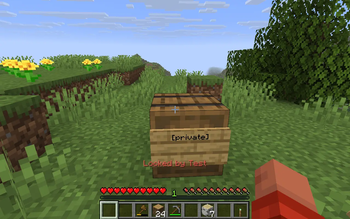
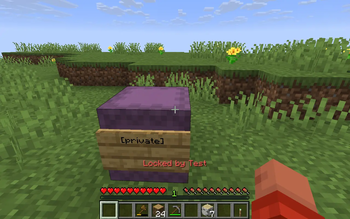
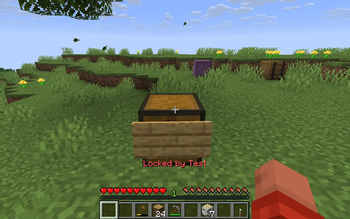
Viper Private Chests protects containers on your server using the simplest system possible: a sign. Place a wall sign on a container, write [private] on the first line, and the container is locked to you. Other players cannot open it, break it, steal from it with hoppers, or blow it up. Everything runs 100 percent on the server, so vanilla Java players and Geyser / Floodgate Bedrock players are protected without installing anything.
What the mod does
- Locks containers with signs. Writing
[private]or[public]on a sign attached to a container creates a persistent lock. Breaking the sign removes the lock, so protection is fully visible and intuitive. - Controls exactly who can open what. Add player names, comma separated name lists, scoreboard teams (
team:Red), or your global trust list ([trusted]) on the remaining sign lines. - Offers public container modes.
[public]for open access,[deposit]for drop-only donation boxes, and[display]for read-only showcases. - Blocks hopper theft. Hoppers and hopper minecarts cannot pull items out of, or push items into, a locked container unless the sign carries the
[hopper]modifier. - Survives explosions. Locked containers and their signs are filtered out of explosion damage, so TNT, creepers, withers and other blasts cannot destroy them.
- Prevents lock bypass by adjacency. Non-owners cannot place a chest next to your locked chest to merge into it, and non-owners cannot overwrite your lock with their own sign.
- Alerts you to intruders. Failed access attempts play a locked sound, show an action bar warning, are written to a per-lock audit log, and can optionally flash nearby redstone wire and lamps so alarm circuits trigger.
- Manages itself over time. Locks can expire after owner inactivity (claim decay), stop protecting when the owner is banned, and stale records for destroyed containers can be purged with one command.
- Gives admins full oversight. An interactive in-game GUI lists every lock, a feather inspection tool shows lock details plus access history, and force-unlock works by coordinates.
- Stores data with the world. All locks, trust lists and audit history are saved alongside the world save, so backups carry your protection data with them.
Protected containers
Chests, trapped chests, barrels, shulker boxes, crafters, dispensers, droppers and chiseled bookshelves. Double chests are handled as one unit: locking either half protects the whole chest.
How to lock a container
- Place a container (chest, barrel, shulker box, and so on).
- Place a wall sign directly onto the container.
- Write
[private]on line 1. - Optionally, use lines 2 to 4 for member names,
team:TeamName, or the[trusted]marker. - Done. The container is locked the moment you finish editing the sign.
To unlock, simply break the sign. To change who has access, edit the sign lines and finish editing again.
Sign markers
| Line content | Effect |
|---|---|
[private] | Private lock on line 1. Only the owner and whitelisted players can open the container. |
[public] | Public lock on line 1. Everyone can open the container. |
[deposit] | Use together with [public]. Anyone can insert items but only the owner and whitelisted players can take items out. Ideal for donation boxes and payment chests. |
[display] | Use together with [public]. Anyone can look inside but nobody except the owner can take items out. Ideal for showcases and prize displays. |
[trusted] | Grants access to everyone on the owner's global trust list (managed with /pchests trust). |
[redstone] | Allows redstone comparators and related automation to read the container. |
[hopper] | Allows hoppers and hopper minecarts to move items in and out of the container. |
team:<name> | Grants access to every member of a vanilla scoreboard team, for example team:Red. |
<player names> | Any other text is treated as player names. Separate multiple names with commas, for example Steve, Alex. |
Marker matching is case insensitive, so [Private] works the same as [private].
Player commands (/pchests)
Every player can use these. No permission level required.
| Command | Description |
|---|---|
/pchests trust add <player> | Adds a player to your global trusted list. Anyone on this list can open your containers whose signs carry the [trusted] marker. |
/pchests trust remove <player> | Removes a player from your global trusted list. |
/pchests trust list | Shows everyone currently on your trusted list. |
/pchests autolock | Toggles auto-lock mode. While enabled, containers you place are automatically locked to you as private, so you never forget to protect a new chest. Run it again to disable. |
Admin commands (/private_chests)
Requires the admin permission level from the config (OP level 3 by default). The list and list_in_area commands open an interactive GUI; the rest answer in chat.
| Command | Description |
|---|---|
/private_chests list | Opens an interactive GUI listing every protected container on the server. |
/private_chests list private | Same GUI, filtered to private locks only. |
/private_chests list public | Same GUI, filtered to public locks only. |
/private_chests list_in_area <radius> | Opens the GUI listing only locks within the given radius (1 to 500 blocks) around your position. |
/private_chests list_in_area <radius> private | Area-filtered GUI showing private locks only. |
/private_chests list_in_area <radius> public | Area-filtered GUI showing public locks only. |
/private_chests info <x> <y> <z> | Prints full details for the lock at those coordinates: owner, type, position, team, trusted mode, hopper and redstone flags, allowed players, creation date, and the last 25 audit log entries (who accessed or was denied, and when). |
/private_chests unlock <x> <y> <z> | Force-removes the lock at those coordinates, for example when the owner quit the server. The previous owner name is confirmed in chat. |
/private_chests cleanup | Scans every lock record and deletes entries whose block is now air or is no longer a protectable container, then reports how many stale records were removed. |
Admins can also overwrite another player's lock by placing their own [private] or [public] sign, which is useful for recovering containers of inactive players.
Inspection tool
Admins holding the configured inspection item (a feather by default) can right-click any locked container to immediately see its owner, lock type, team, trusted mode, hopper flag, and recent audit history in chat. Change the item with the inspectionItem config option.
Configuration
The config file is created on first startup at config/private-chests.json. Delete it and restart to regenerate defaults.
| Option | Default | Description |
|---|---|---|
floodgatePrefix | "." | Username prefix used to recognize Geyser / Floodgate Bedrock players, so trust lists and member names work for them too. |
adminPermissionLevel | 3 | Minimum OP permission level required for /private_chests admin commands, the inspection tool, and overwriting other players' locks. |
maxLocksPerPlayer | 0 | Maximum number of locked containers each player may own. 0 means unlimited. Players who reach the limit are told so when they try to lock another container. |
listMaxEntries | 50 | Maximum number of locks shown in the admin list GUI. |
listPreviewEntries | 20 | Number of preview entries used by the admin list GUI. |
disableProtectionIfOwnerBanned | true | When true, containers stop being protected if their owner is banned from the server. |
enableClaimDecay | true | When true, locks expire automatically after the owner has been inactive for the configured number of days, freeing up old claims. |
daysBeforeClaimDecay | 30 | Days of owner inactivity after which a lock decays when claim decay is enabled. |
inspectionItem | "minecraft:feather" | Item ID admins right-click with to inspect a locked container's details and audit history. |
enableSoundFeedback | true | When true, players who are denied access hear the locked-chest sound. |
enableActionBarAlerts | true | When true, the mod sends action bar messages for lock creation, denied access, and other feedback. Turn off for a quieter experience. |
maxHistoryLogEntries | 25 | Number of audit log entries kept per lock and shown by /private_chests info and the inspection tool. |
allowIntruderRedstonePulse | true | When true, a failed access attempt briefly triggers adjacent redstone wire and lamps, so you can wire alarms, lights, or traps to your containers. |
Installation
- Install Fabric Loader (0.19.3 or newer for Minecraft 1.21.x, 26.1.x and 26.2.x; 0.19.5 or newer for 26.3) and Fabric API for your Minecraft version.
- Download the Viper Private Chests jar that matches your Minecraft version from the Versions page.
- Put the jar into the server's
modsfolder. No mod is needed on players' clients. - Start the server. The config file is generated automatically on first run.
The mod works in singleplayer too: install it in your client profile together with Fabric Loader and Fabric API and your own world is protected the same way.
Requirements
| Minecraft | Fabric Loader | Fabric API | Java |
|---|---|---|---|
| 1.21 through 1.21.11 | 0.19.3+ | 0.141.x | 21+ |
| 26.1 through 26.1.2 | 0.19.3+ | 0.145.x | 25+ |
| 26.2 | 0.19.3+ | 0.154.x | 25+ |
| 26.3 | 0.19.5+ | 0.161.x | 25+ |
Make sure to download the jar built for your exact Minecraft line: the 26.1.x jar covers 26.1 to 26.1.2, while 26.2 and 26.3 each have their own jar.
Good to know
- The mod is fully server-side: vanilla clients see normal signs and normal containers, and Bedrock players through Geyser / Floodgate are supported.
- Signs stay readable and editable, so members, teams and modifiers can be changed at any time by editing the sign.
- Every open, denied attempt and lock change is recorded per container and viewable by admins, which makes griefing investigations straightforward.
Галерея