Player stats
Server-side player stat tracking for Fabric servers. Tracks 30+ stat categories per player with admin commands. No client mod required.
Описание
Player Stats
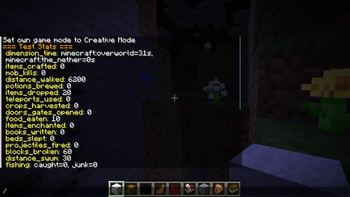
Player Stats is a server-side Fabric mod that tracks detailed per-player statistics and stores them in per-player JSON files. It works by polling each player's vanilla statistic map on a configurable interval and recording only what changed since the last poll, which keeps server overhead near zero. The collected data is exposed in game through admin commands with formatted, color-coded output. Nothing needs to be installed on the client; players join with a vanilla client and are tracked automatically.
How it works
- On every poll interval the mod snapshots each online player's vanilla stats, computes the difference against the previous snapshot, and adds the deltas to that player's persistent profile.
- Profiles are saved to
stats/player_data/<player-uuid>.jsonin the server folder on a configurable save interval, when a player disconnects, and when the server stops. - Tracking starts automatically on server start. No setup is required beyond installing the mod.
- Every tracker category can be enabled or disabled individually in
config/viper_player_stats.json.
Commands
All commands require operator permission level 2. Tab completion is provided for player names, stat types, and limits.
| Command | Description |
|---|---|
/stats list | Lists all tracked stat categories, grouped by section (Mining and Blocks, Combat, Items, Movement, World and Life). |
/stats <player> | Shows a full stat card for a player, grouped into sections. Only sections that contain data are displayed. |
/stats <player> all | Same as above; shows every recorded stat for the player. |
/stats <player> <stat_type> | Shows one stat in detail: a highlighted total plus a top-entries breakdown (for example the most mined blocks or most killed mobs), with a clickable shortcut to the leaderboard. |
/stats <player> <stat_type> <timeframe> | Same detailed view; accepts a timeframe argument (24h, 7d, 30d, all). |
/stats top <stat_type> <limit> | Ranked leaderboard for a stat across all tracked players (limit 1-100). The top 3 ranks are highlighted. Clicking a row opens that player's detail view for the stat. |
/stats reset <player> <stat_type> | Resets one stat category for a player, or use all to wipe the whole profile. |
Tracked stats
| Stat type | Description |
|---|---|
blocks_broken | Blocks broken, counted per block. |
ores_mined | Ores mined, counted per ore block (tag-aware detection). |
items_crafted | Items crafted, counted per item. |
items_dropped | Items dropped, counted per item. |
items_picked_up | Items picked up, counted per item. |
mob_kills | Entity kills, counted per entity type. |
mob_deaths | Deaths caused by entities, counted per entity type. |
food_eaten | Food items eaten, counted per food item. |
deaths | Total deaths, with a breakdown of the top death causes. |
damage_dealt | Damage dealt to entities. |
damage_taken | Damage taken from all sources. |
distance_walked | Distance walked, shown in meters or kilometers. |
distance_flown | Distance flown (elytra/creative), shown in meters or kilometers. |
distance_swum | Distance swum, shown in meters or kilometers. |
jumps | Jumps performed. |
beds_slept | Times slept in a bed. |
trades_made | Villager trades completed. |
items_enchanted | Items enchanted. |
books_written | Books signed. |
potions_brewed | Potions taken from a brewing stand. |
armor_durability_lost | Armor durability damage, tracked per armor slot. |
teleports_used | Teleports used (chorus fruit, ender pearls, commands). |
buckets_emptied_filled | Buckets filled and emptied, counted per bucket type. |
jukebox_plays | Music discs played in a jukebox. |
crops_harvested | Fully grown crops harvested. |
doors_gates_opened | Doors and fence gates opened. |
explosions_caused | Explosions caused (TNT usage). |
projectiles_fired | Projectiles fired (bows, crossbows, tridents), with hit accuracy. |
projectiles_hit | Projectiles that hit a target. |
fishing | Fishing results, split into fish caught and junk caught. |
dimension_time | Time spent in each dimension. |
time_played | Total play time. |
time_since_death | Time since the last death (shown after the first death). |
Configuration
All settings live in config/viper_player_stats.json and are created with defaults on first start. Boolean flags toggle individual trackers; intervals are in server ticks (20 ticks = 1 second).
| Option | Type | Default | Description |
|---|---|---|---|
enabled | boolean | true | Master switch for all tracking. |
saveIntervalTicks | number | 1200 | How often player profiles are written to disk (default every 60 seconds). |
pollIntervalTicks | number | 600 | How often vanilla stats are polled for changes (default every 30 seconds). |
trackBlocksBroken | boolean | true | Track blocks broken. |
trackOresMined | boolean | true | Track ores mined. |
trackCrops | boolean | true | Track crops harvested. |
trackDoorsGates | boolean | true | Track doors and gates opened. |
trackItemsCrafted | boolean | true | Track items crafted. |
trackItemsDropped | boolean | true | Track items dropped. |
trackItemsPickedUp | boolean | true | Track items picked up. |
trackFoodEaten | boolean | true | Track food eaten. |
trackBuckets | boolean | true | Track buckets filled and emptied. |
trackEnchanting | boolean | true | Track items enchanted. |
trackBooks | boolean | true | Track books written. |
trackJukebox | boolean | true | Track jukebox plays. |
trackMobKills | boolean | true | Track entity kills. |
trackMobDeaths | boolean | true | Track deaths caused by entities. |
trackDamage | boolean | true | Track damage dealt and taken. |
trackProjectiles | boolean | true | Track projectiles fired and hits. |
trackExplosions | boolean | true | Track explosions caused. |
trackArmorDurability | boolean | true | Track armor durability loss. |
trackDistance | boolean | true | Track distance walked, flown and swum. |
trackBedsSlept | boolean | true | Track beds slept in. |
trackTrades | boolean | true | Track villager trades. |
trackBrewing | boolean | true | Track potions brewed. |
trackFishing | boolean | true | Track fishing catches. |
trackDimensionTime | boolean | true | Track time spent per dimension. |
trackTeleports | boolean | true | Track teleports used. |
Data storage
- Player profiles:
stats/player_data/<player-uuid>.json(pretty-printed JSON, includes the player name for readability). - Profiles load when a player joins and save on the save interval, on disconnect, and on server stop.
- To wipe a player's data, use
/stats reset <player> allor delete the player's JSON file while the server is stopped.
Installation
- Install Fabric Loader for your Minecraft version (0.15.11 or newer for 1.21.x, 0.18.4 or newer for 26.1.x, the latest loader for 26.2.x and 26.3.x).
- Download the matching Fabric API version and place it in the server
modsfolder. - Download the Player Stats file for your Minecraft version and place it in the server
modsfolder. - Start the server. Tracking starts automatically.
No client-side installation is needed. Requires Java 21 for the 1.21.x file and Java 25 for the 26.x files.
Supported versions
| File | Minecraft | Loader | Java |
|---|---|---|---|
| 1.21.x build | 1.21 - 1.21.11 | Fabric | 21+ |
| 26.1.x build | 26.1 - 26.1.2 | Fabric | 25+ |
| 26.2 build | 26.2 | Fabric | 25+ |
| 26.3 build | 26.3 | Fabric | 25+ |
Галерея