Viper Economy
A server-side Fabric economy mod featuring dynamic virtual or physical currency toggles, multi-database drivers, cross-server Redis syncing, and custom-category interactive /servershop container GUIs with zero client-side requirements.
Описание
Viper Economy
Viper Economy is a server-side Fabric economy mod for Minecraft 1.21.x, 26.1.x, 26.2.x and 26.3.x. It adds virtual or physical currency, a server shop GUI, player chest shops, player-to-player payments and purchasable command rewards (claim blocks, ranks, kits). No client mod is needed: vanilla clients can join and use everything, and the mod also works in singleplayer.
Features
- Virtual currency (number balances stored per player) or physical currency (an item such as diamonds used as money).
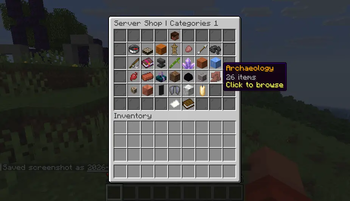
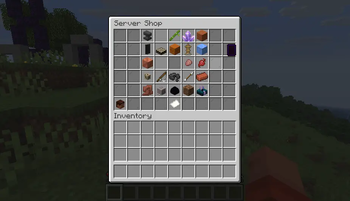
- Server shop GUI with categories, pagination, per-item buy/sell prices, shift-click bulk buy/sell and a configurable purchase tax.
- Player chest shops: attach a sign to a chest to sell its contents, with ownership protection so other players cannot open shop chests.
- Player-to-player payments, balance leaderboard and held-item price checks.
- Command rewards: any shop entry can run console commands on purchase, for example giving claim blocks or a LuckPerms rank, with or without handing over a physical item.
- New accounts automatically receive the configured starting balance. Balances are saved to disk on every change and on server shutdown.
- A daily cap on how much each player can earn from selling, to slow inflation.
Commands
Player commands
| Command | Permission node | Description |
|---|---|---|
/bal [player] | viper-economy.command.bal (viper-economy.command.bal.others to check others) | Show your balance, or another online player's balance |
/pay <player> <amount> | viper-economy.command.pay | Send money from your balance to another player |
/baltop | viper-economy.command.baltop | Show the top 10 balances |
/withdraw <amount> | viper-economy.command.withdraw | Convert balance into physical currency items (physical mode only) |
/topup <amount> | viper-economy.command.baltop | Convert physical currency items from your inventory into balance (physical mode only) |
/worth | viper-economy.command.worth | Show the shop buy and sell price of the item in your main hand |
/buy <item> [amount] | viper-economy.command.buy | Buy an item from the server shop by id, for example /buy minecraft:diamond 5 |
/sell <item> [amount] | viper-economy.command.sell | Sell an item to the server shop by id |
/sell hand [amount] | viper-economy.command.sell | Sell the stack in your main hand, optionally capped to an amount |
/sell all [amount] | viper-economy.command.sell | Sell every matching item of the held type in your inventory |
/servershop | viper-economy.command.servershop | Open the server shop GUI |
Players can also use the shop GUI directly: left-click buys 1, shift-left-click buys a stack, right-click sells 1, shift-right-click sells everything of that item.
Admin commands (server operators only)
| Command | Description |
|---|---|
/givemoney <player> <amount> | Add money to a player's balance |
/takemoney <player> <amount> | Remove money from a player's balance (fails if they cannot cover it) |
/setmoney <player> <amount> | Set a player's balance to an exact value |
/resetmoney <player> | Reset a player's balance to the configured starting balance |
/ecolog | Show the active economy settings and the number of stored accounts |
Configuration
All files live in config/viper-economy/ on the server. config.json is created with defaults on first start. prices.json (500+ entries) is auto-deployed on first start; every registered item appears in the shop, with unpriced items listed as catalog-only until you set prices.
config.json
| Field | Default | Description |
|---|---|---|
economyMode | "VIRTUAL" | "VIRTUAL" stores balances as numbers. "PHYSICAL" counts currency items in inventories instead. |
physicalCurrencyItem | "minecraft:diamond" | Item id used as money when economyMode is "PHYSICAL". |
startingBalance | 1000.0 | Balance granted to new accounts on first join. Also used by /resetmoney. |
dailyAmount | 100.0 | Reserved. Currently only displayed by /ecolog and not granted automatically. |
dailySellLimit | 10000.0 | Maximum total sell value each player can earn per day. Applies to the shop GUI and /sell. |
taxRate | 0.1 | Fraction added on top of every server shop purchase (0.1 = 10 percent). |
pvpBalanceLossPercentage | 0.0 | Reserved. Currently has no effect. |
standaloneCommands | true | Reserved. Currently has no effect; command access is controlled by the permission nodes above (all default to every player, level 0). |
standaloneAdminCommands | false | Reserved. Currently has no effect; admin commands always require operator status. |
scoreboardEnabled | true | Reserved. Currently has no effect; no scoreboard is rendered. |
serverShopEnabled | true | Set to false to disable /servershop and the shop GUI. |
showAllItemsCategory | true | Set to false to hide the All Items category from /servershop. Curated categories stay visible. |
prices.json
Each shop entry maps an item id to its category, transaction stack size, buy price and sell price. A price of 0 means that direction is disabled.
"minecraft:diamond": {
    "category": "gems",
    "stack": 64,
    "unit_buy": 100.0,
    "unit_sell": 50.0
}
| Field | Description |
|---|---|
category | Category key. Must exist under categories; unknown or blank values fall back to the All Items category. |
stack | Bulk quantity for shift-click buying in the GUI. |
unit_buy | Price to buy one from the server shop. 0 means not purchasable. Tax is added on top at purchase time. |
unit_sell | Price the server shop pays for one. 0 means not sellable. Counts toward the daily sell limit. |
commands | Optional list of console commands run when the entry is bought. {player} is replaced with the buyer's name. |
give_item | Optional. Set to false so buying runs only the commands without giving a physical item. Defaults to true. |
Categories map a key to a display name and a display item:
"rewards": {
    "name": "Server Rewards",
    "display_item": "minecraft:nether_star"
}
Command rewards (claim blocks, ranks, kits)
"minecraft:nether_star": {
    "category": "rewards",
    "stack": 1,
    "unit_buy": 5000,
    "unit_sell": 0,
    "give_item": false,
    "commands": ["claimblocks {player} add 1000"]
}
"minecraft:enchanted_golden_apple": {
    "category": "rewards",
    "stack": 1,
    "unit_buy": 10000,
    "unit_sell": 0,
    "give_item": false,
    "commands": ["lp user {player} parent add vip"]
}
Commands run as console with full permissions, and the buyer sees a "Rewards applied!" message. Reward entries show a "Grants perks on purchase" lore line in the shop. Works from both the GUI and /buy.
Chest shops
Player-run shops that trade items for balance money. No sign writing is needed: you build the chest and sign, then link them with a command.
Setup, step by step
- Place a chest (single or double) and attach a wall sign directly to it. Standing signs do not work.
- Put at least one of the item you want to trade into the chest. The sold item is auto-detected from the first non-empty chest slot.
- Look at the sign (within 5 blocks) and run
/shop create buy <price>to sell to customers, or/shop create sell <price>to buy from customers. - The sign is rewritten automatically and the shop opens for business. Restock the chest as it sells out.
The /shop commands
| Command | Parameter | Description |
|---|---|---|
/shop create buy <price> | price: minimum 0.01, per single item | Look at a wall sign on a stocked chest to open a selling shop. Customers buy 1 item per click for price. |
/shop create sell <price> | price: minimum 0.01, per single item | Look at a wall sign on a chest to open a buying shop. Customers sell you 1 item per click and receive price from your balance. |
/shop remove | none (look at the sign) | Delete your targeted shop. Only the owner can use it. |
/shop info | none (look at the sign) | Show owner, type, price and item id of the targeted shop. |
/shop list | none | List all of your shops with type, item and price. |
/shop admin <player> remove | player: any online player; look at the sign | Operator-only (permission level 2 or higher). Removes the targeted sign's shop regardless of owner. |
Creating and removing your own shops needs no special permission. One sign and one chest can each belong to only one shop, and an empty chest cannot become a shop.
Sign layout (written automatically)
| Line | Content | Description |
|---|---|---|
| 1 | [BUY] or [SELL] | Shop type, set by the create command. |
| 2 | Item name | Display name of the traded item, detected from the chest. |
| 3 | $<price> | Price per single item. |
| 4 | Owner name | Shop owner's name, truncated to 14 characters. |
How trading works
- BUY shop: the customer must have enough balance, then 1 item leaves the chest stock, 1 item is given to the customer, the price moves from the customer to the owner (credited even while the owner is offline), and the sign-side display updates.
- SELL shop: the customer must carry the traded item, the chest must have a free slot, and the owner must afford the price. Then 1 item moves from the customer into the chest and the price moves from the owner to the customer.
- Every click trades exactly 1 item. There is no sales tax and no daily sell limit on chest trades.
- Only the owner and server operators can open a shop chest. Other players are blocked with a message when they try.
- Shops are stored in
config/viper-economy/shops.jsonand survive restarts.
Installation
- Install Fabric Loader (0.14.21 or newer on 1.21.x, 0.19.3 or newer on 26.x) and Fabric API for your Minecraft version. Use Java 21 for 1.21.x and Java 25 for 26.x.
- Download the file below that matches your Minecraft version (1.21.x, 26.1, 26.2 or 26.3).
- Put the jar in the server
modsfolder and start the server once. This generatesconfig/viper-economy/config.jsonandprices.json. - Edit the prices to taste. Most changes apply without a restart.
Notes
- Storage is plain JSON files under the server config folder. No database needed.
- The 1.21.x build runs on 1.21 through 1.21.11.
- Requires Fabric API (any version for your Minecraft release).
Галерея