

VebaStickers - Chat Stickers
Universal HD Chat Sticker & Emoji Framework for Minecraft (Java 1.12.x–26.x+ & Bedrock). Zero client mods, 95% ultra-compressed packs, 3x3 mega vitrin, and native GeyserMC crossplay.
Описание

VebaStickers — Universal HD Chat Stickers & Emoji Framework



-7C3AED.svg?style=for-the-badge&logo=box&logoColor=white)
-059669.svg?style=for-the-badge&logo=speedtest&logoColor=white)
The Industry-Standard Server-Side HD Chat Sticker Engine for Minecraft.
Native Support across Java Edition (1.12.x – 26.x+ Game Drops) & Bedrock Edition via GeyserMC.
Send full-scale Telegram/WhatsApp-style HD stickers directly in chat without requiring client mods, Forge, Fabric, or custom launchers.
VebaStickers is an enterprise-grade, high-performance Minecraft plugin engineered to deliver a modern visual messaging experience across Java Edition and Bedrock Edition. Featuring a zero-redundancy texture linking pipeline, pure vanilla container isolation, an interactive player onboarding wizard (PackPromptMenu), dynamic cache purging with instant preference reset, a 4-tier network delivery architecture, real-time 3x3 mega vitrin showcase with a 9-slot interactive hitbox, Shift-Click Burst Send, 3D floating holograms, and 16-language auto-detection, VebaStickers delivers the ultimate chat graphics framework without sacrificing server TPS, player freedom, or network bandwidth.
Key Highlights & Architectural Overview (v1.9.2)
- Pure Vanilla Container Isolation (100% Unmodified Chests): Unlike other plugins that brutally overwrite the global
generic_54.pngcontainer texture and alter every double chest on your server, VebaStickers isolates its custom GUI backgrounds completely. Normal survival and creative chests, Ender chests, and/vsaadmin views retain 100% authentic vanilla textures. The custom Mega Vitrin backdrop is rendered strictly for the sticker showcase using negative-space font glyph overlays (\uF808\uEE01\uF8F0) and OptiGUI hooks. - Interactive Onboarding Setup Wizard (
PackPromptMenu): Empowers every player with personal freedom. Upon initial login (or anytime via/sticker pack), players are greeted with an aesthetic 27-slot setup wizard where they can choose between Full HD + Modern GUI, Stickers Only (Classic Vanilla Chests), or Skip (Text Mode), complete with a one-click preference remember toggle. - Dynamic Cache Purge & Choice Reset (
/vebasticker remove-cache//vsa remove-cache): Server administrators and players can instantly purge the server pack cache, regenerate fresh SHA-1 hashes, unbind old client packs, wipe player onboarding decisions, and immediately re-open the setup wizard on-the-spot for seamless preference reselection. - Overhauled Administrative Dashboard (
/vsa): Symmetrical 6-row layouts with zero missing slots, slate gray glass framing, persistent pagination controls with disabled-state indicators (◀ First Page,Last Page ▶), real-time system health telemetry, and web server diagnostics. - Clean Minimalist Titles & Icons: All GUI title bars have been cleaned of cluttered suffixes (e.g.,
" (Mega 3x3)"has been removed in favor of clean breadcrumbs likeStickers » Catalog), paired with modern single/two-tone vector iconography. - Zero Client Mods (100% Vanilla Compatible): Works natively on default Vanilla Minecraft Java Edition clients (1.12.x through 26.x+ Game Drops) and Bedrock Edition (iOS, Android, Xbox, PlayStation, Switch, Windows 10/11) via GeyserMC & Floodgate.
- Universal Multi-Era Compatibility (1.12.x – 26.x+): A single unified plugin and resource pack bridges legacy 1.12.x (via 2048x2048 HD Unicode sheets and OptiFine CIT), modern 1.14–1.20.4 (
CustomModelData), 1.20.5+ (Item Components), and 1.21.4+ (items/*.jsonmodel definitions). - Zero-Redundancy Texture Linking (95% Pack Size Reduction): Slices 50 MB pack bloat down to ~2.5 MB. Each sticker is stored as a single 128x128 Retina master PNG referenced dynamically across GUI models, font glyphs, and CIT properties without file duplication.
- 3x3 Mega Showcase with 9-Slot Interactive Hitbox: Players can choose between a 28-slot WhatsApp-style gallery and an enlarged 2.6x Mega Showcase. The surrounding 8 slots act as empty border-free canvases while mapping to the center sticker—clicking anywhere in the 3x3 grid sends the sticker instantly.
- Shift + Left Click: "Burst Send": Players can send multiple stickers in rapid succession without the menu closing, mimicking mobile messaging apps (Discord/WhatsApp/Telegram).
- 4-Tier Resilient Pack Delivery: Embedded micro HTTP Server (ports 8085-8095), SSL/TLS reverse proxy (
public-urlfor Nginx/Caddy/Cloudflare), nativeserver.propertiesfallback, and external CDN routing. - Cross-Platform Crossplay (GeyserMC Native): Automatic
.mcpackgeneration and distribution to Geyser's packs directory, touch-friendly Cumulus Form UIs, and Bedrock Emote button shortcut triggers. - Dynamic In-Game Administration: Add new stickers live via URL (
/stickeradmin add <id> <url>) or bulk-import ZIP packs (/stickeradmin import <pack>) with instant hot-reloading and zero server downtime. - 3D Floating Holograms (Java Edition): Spawns temporary, billboarded 3D
TextDisplayholograms above player heads with smooth bobbing animations, automatically hidden from Bedrock players to prevent entity scaling glitches. - Economy & Monetization: Full integration with LuckPerms (rank-based packs), Vault economy (per-sticker/category purchasing), and PlayerPoints.
Technical Feature Matrix
| Feature / Metric | VebaStickers v1.9.2 | ItemsAdder / Oraxen | Standard Chat Emoji Plugins |
|---|---|---|---|
| Primary Architectural Focus | HD Chat Stickers, Emojis & GUI Vitrin | Complete Server Asset Overhaul (Blocks/Items) | Low-Res 16x16 Text Glyphs |
| Container Texture Isolation | 100% Pure Vanilla Preserved (No global chest overrides) | Overwrites generic_54.png globally | None |
| Interactive Player Onboarding | 27-Slot Setup Wizard (Full GUI vs Vanilla vs Text) | None / Forced Pack Prompt | Plain Text Prompt |
| Live Cache Purge & Reset | Instant SHA-1 Purge & In-Game Re-Prompt (/vsa remove-cache) | Manual Server Restart | None |
| Client Requirement | Zero (100% Vanilla Cross-Platform) | Zero (Heavy Custom Resource Pack) | Zero |
| Supported Minecraft Range | 1.12.x – 26.x+ (Universal) | 1.16.5+ or 1.20.4+ | Mostly Modern Only |
| Pack Size for 100 Stickers | ~2.5 MB (Zero-Redundancy Link) | 35 – 60 MB+ | ~5 MB |
| Interactive GUI Showcase | 2.6x Mega Vitrin (9-Slot Hitbox) | Standard 1x Slot Grid | Standard 1x Slot Grid |
| Burst Sending (Keep Open) | Shift + Left Click (Instant Combo) | Not Supported | Not Supported |
| In-Game Upload via URL | Instant Live Compile (/sadmin add) | Complex Config & Manual Pack Rebuild | Manual Texture Pack Editing |
| Bedrock Crossplay Integration | Form UI + .mcpack Auto-Push + Emote Hook | Complex Bedrock Mapping Pipeline | Text-Only or Broken Glyphs |
| Restricted Port Delivery | 4-Tier (HTTP -> Nginx -> Native -> CDN) | Requires Open Port or External Web Host | Manual Setup |
| 3D Floating Visuals | TextDisplay Billboard Hologram | Particles / ArmorStand Hacks | None |
| Legacy 1.12.x HD Quality | 2048x2048 HD Unicode + OptiFine CIT | Unsupported / Dropped | Corrupted / 16x16 Pixelated |
| Multi-Language (i18n) | 16 Languages (Auto-Detect Locale) | Manual Localization | Single Language |
Interactive Setup & Onboarding Wizard (PackPromptMenu)
VebaStickers respects your players' visual preferences. Instead of forcing heavy GUI modifications onto players who prefer classic Minecraft aesthetics, VebaStickers introduces the interactive Pack Prompt Onboarding Wizard:
| 1. Full HD + Modern GUI | 2. Stickers Only (Vanilla Chests) |
|---|---|
 |  |
| 3. Skip Download (Text Mode) | 4. Remember My Preference |
 |  |
The Four Setup Options Explained:
- Full HD + Modern GUI (Slot 11):
- Downloads the complete resource pack.
- Enables HD chat stickers, modern neon inventory window frames, and custom vector icons.
- Recommended for players who want the ultimate, cutting-edge visual overhaul.
- Stickers Only - Vanilla GUI (Slot 13):
- Downloads the sticker resource pack for chat and item slots.
- Preserves 100% classic vanilla Minecraft chests: All GUI menus remain standard vanilla double chests with classic icons (Nether Star, Emerald, Clock, Arrow), while the stickers inside remain full HD emojis!
- Skip Download - Text Mode (Slot 15):
- Declines the resource pack download.
- Stickers display as clean fallback text codes (e.g.
:pepe:) in chat with interactive hover badges. Zero download overhead or network lag.
- Remember My Preference Toggle (Slot 22):
- Allows players to toggle whether the server should remember their decision permanently or re-prompt them upon each login.
- Players can re-open this menu at any time by running
/sticker pack!
Dynamic Cache Purge & Preference Reset (/vebasticker remove-cache):
- When an administrator runs
/vsa remove-cacheor/vebasticker remove-cache, the plugin:- Purges cached SHA-1 checksums and regenerates fresh assets.
- Sends an unbind packet to the client (
Player.removeResourcePacks()) to unload the old pack. - Completely wipes the player's stored decision (
pack_decisionandhas_prompted_pack). - Immediately opens the Pack Prompt Onboarding Wizard so the player can choose their preferred mode again on-the-spot!
- Supports
/vsa remove-cache all(prompts all online players) or/vsa remove-cache <player>(supports online and offline player profiles).
Dual Display Modes: 28-Slot WhatsApp Grid & 3x3 Mega Vitrin & Bedrock Gui
Players can effortlessly switch between two distinct browsing experiences using the in-game display mode toggle:
| WhatsApp Gallery Mode (28-Slot Grid) | Mega Vitrin Mode (Enlarged 3x3 Stage) |
|---|---|
 |  |
Bedrock Edition UI Showcase
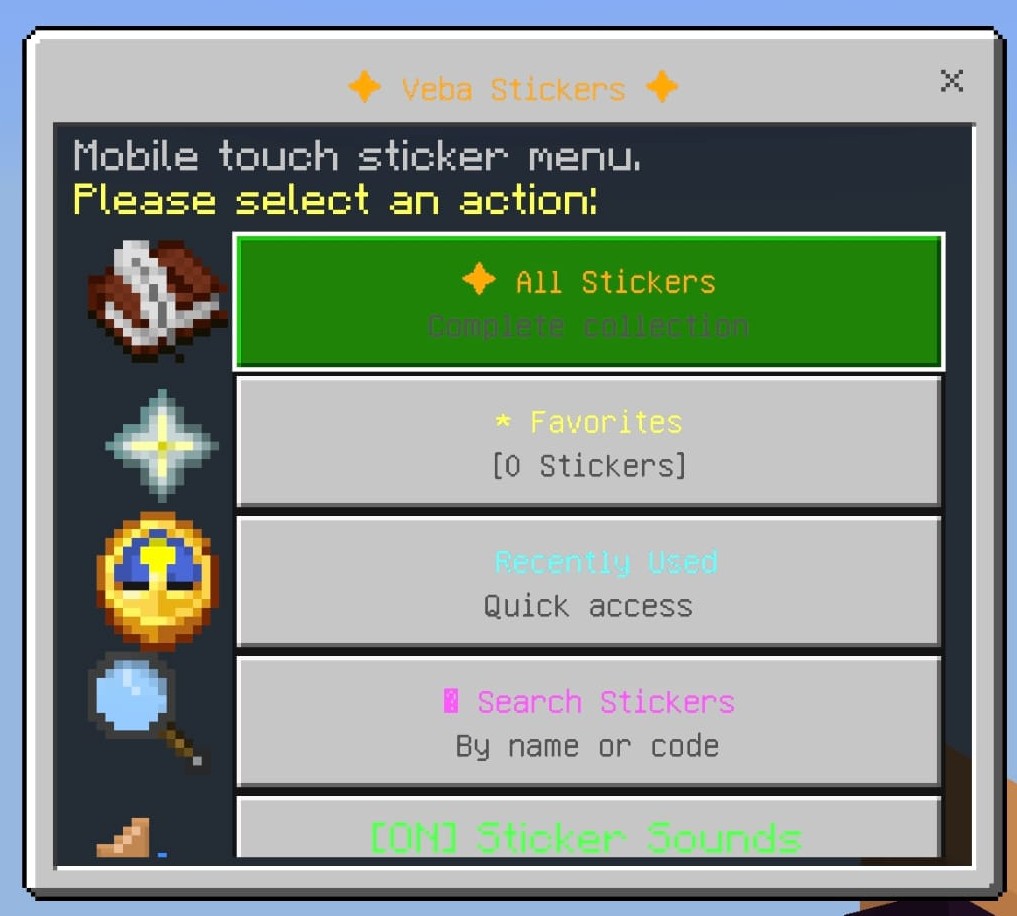 | 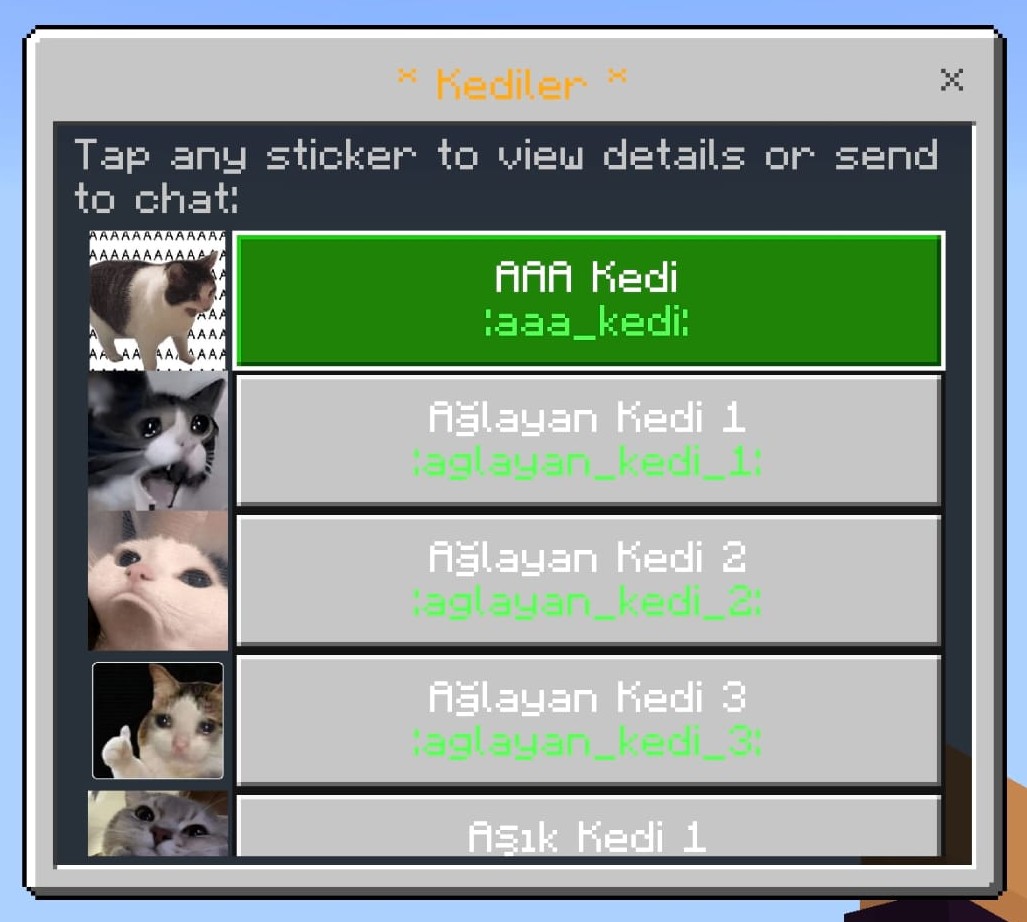 | 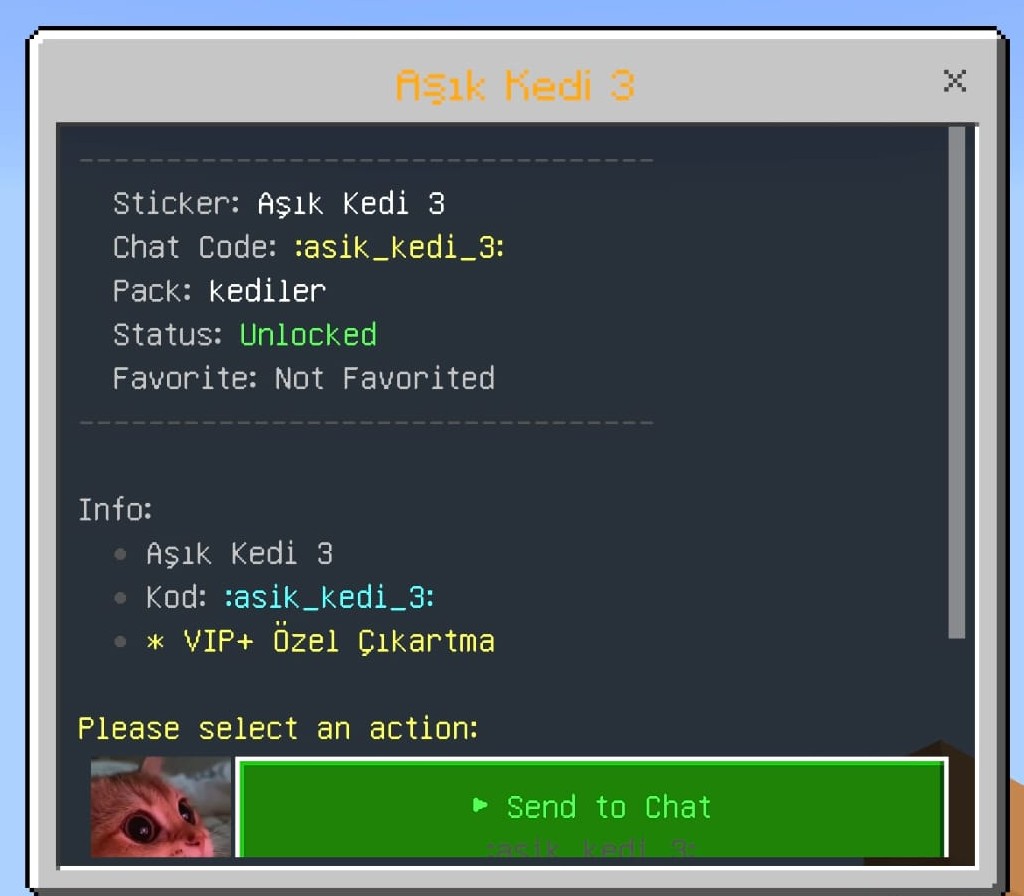 |
1. WhatsApp-Style 28-Slot Gallery Grid (/sticker)
- A dense, multi-sticker layout optimized for rapid chatting and extensive sticker collections.
- Displays 28 stickers per page with category navigation tabs, favorites filter, recents list, sound toggles, and live search.
- When Stickers Only mode is selected, this menu renders inside a 100% authentic vanilla Minecraft chest!
2. 3x3 Mega Vitrin Showcase
- Enlarges the selected sticker to 2.6x scale, commanding center stage.
- Continuous 9-Slot Clickable Hitbox: The surrounding 8 slots act as empty canvas slots while mapping directly to the center sticker. Clicking anywhere within the 3x3 area sends the sticker immediately!
- Pure Container Isolation: Uses zero-width negative-space font glyphs (
\uF808\uEE01\uF8F0) to render the isolated neon frame, leaving normal survival chests completely untouched. - Clean Title Bar: Clean breadcrumb header (e.g.
Stickers » Catalog) without unsightly text suffixes.
Architecture & Technical Pipeline Roadmap
| Pipeline Stage | Technical Operation | Target Runtime |
|---|---|---|
| Stage 1: Asset Ingestion & Retina Processing |
Ingests image via live URL (/sadmin add) or directory sync. Resamples to a crisp 128x128 Retina PNG with aspect ratio preservation and transparent alpha-channel borders.
|
Async Background Thread
|
| Stage 2: Zero-Redundancy Linker | Maintains a single physical PNG on disk. Simultaneously links model JSONs, 2.6x Mega vitrin models, modern items definitions, and OptiFine CIT rules to this master texture without file duplication. |
Unified Texture Storage
|
| Stage 3: Multi-Era Adaptive Compilation |
Generates 1.21.4+ range_dispatch items definitions, 1.16–1.20 custom model data predicates, 2048x2048 unicode_page_e1.png HD sheets for 1.12.x, and in-memory virtual textures/items/ streaming.
|
Universal Resource Pack
|
| Stage 4: Automated Distribution & Crossplay |
Serves pack through 4-tier network failover (Embedded HTTP ports 8085-8095, Nginx SSL, native server.properties, external CDN). Pushes compiled .mcpack directly into GeyserMC packs directory.
|
Java & Bedrock Clients
|
1. Zero-Redundancy Texture Linking & Universal Pack
- Single Source of Truth: All stickers are compiled into standard 128x128 Retina PNGs at
assets/minecraft/textures/item/stickers/<id>.png. - Deduplicated Linking:
models/item/stickers/<id>.jsonreferences"minecraft:item/stickers/<id>"models/item/stickers/<id>_mega.json(2.6x scale) references"minecraft:item/stickers/<id>"font/default.jsonreferences"minecraft:item/stickers/<id>.png"items/paper.json(1.21.4+range_dispatch) references"minecraft:item/stickers/<id>"mcpatcher/cit/stickers/<id>.properties(OptiFine CIT) references"minecraft:item/stickers/<id>"
- Virtual Zip Entry Streaming: To support 1.12.x clients searching for the pre-flattening plural
textures/items/path,ZipOutputStreamstreams a virtual entry on the fly—costing 0 bytes of extra disk space. - Universal Metadata (
pack.mcmeta):{ "pack": { "pack_format": 3, "supported_formats": { "min_inclusive": 3, "max_inclusive": 99 }, "description": "§d§lVebaStickers §7- Universal HD Pack (1.12.x - 26.x+)" } }- 1.12.x clients see native
pack_format: 3and load without warnings. - 1.20.2 through 26.x+ Game Drops clients recognize
supported_formatsand load seamlessly with zero red incompatibility screens.
- 1.12.x clients see native
2. Dual-Font Bridge for 1.12.x Clients
Minecraft 1.12.x lacks JSON bitmap font providers (font/default.json). VebaStickers overcomes this with an algorithmic HD Unicode Sheet Generator:
- Compiles active stickers into a crystal-clear 2048x2048 ARGB sheet (
unicode_page_e1.png,unicode_page_f0.png). - Maps each character (e.g.
\uE101) to a 128x128 cell in a 16x16 grid. - Zero-Message Conversion: Both modern and 1.12 clients receive the same unicode in chat, rendering identical HD graphics natively.
3. Dual-Engine Chat Interception
- Paper / Purpur / Folia Engine (
AsyncChatEvent): Asynchronous, non-blocking chat pipeline using AdventureComponentand customChatRendererimplementations. Zero main-thread lag even under high player traffic. - Spigot Engine (
AsyncPlayerChatEvent): High-compatibility thread-safe fallback pipeline for vanilla Spigot and CraftBukkit servers.
4. 4-Tier Resilient Pack Delivery Pipeline
| Priority Tier | Delivery Mechanism | Configuration Key | Environment & Fallback Condition |
|---|---|---|---|
| Tier 1 | Embedded Micro HTTP Server | http-server.enabled: true | Direct HTTP delivery with port auto-scan & failover (ports 8085-8095). |
| Tier 2 | Nginx / Reverse Proxy / SSL | http-server.public-url | Custom domain delivery via SSL/TLS reverse proxy (https://pack.domain.com). |
| Tier 3 | server.properties Native Handshake | pack-delivery.strategy: AUTO | Writes native resource-pack= and SHA-1 settings for restricted shared hosts. |
| Tier 4 | External CDN Fallback | pack-delivery.fallback-url | Secondary download link for Cloudflare R2, AWS S3, or GitHub Releases. |
- HTTP Range Requests (HTTP 206): Allows resumption of interrupted downloads.
- ETag & 304 Not Modified Caching: Eliminates redundant network transfers when pack content hasn't changed.
- ViaVersion Protocol Detection: Dynamically appends client protocol diagnostics (
?proto=340&target=legacyor?proto=769&target=modern).
In-Game Player Experience
Chat Graphics & Inline Codes
| Java Edition Chat | Bedrock Edition Chat |
|---|---|
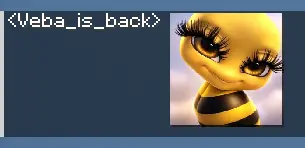 | 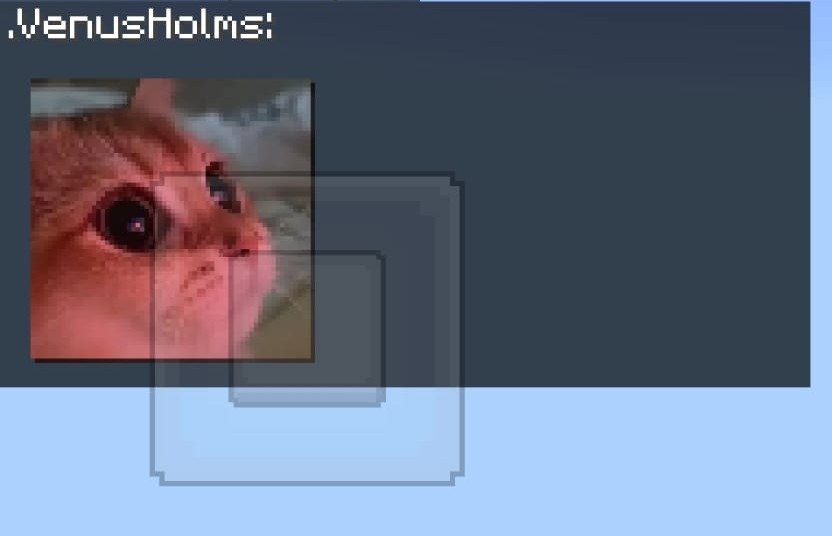 |
- Full-Scale HD Stickers: Send standalone stickers or insert
:sticker_code:inline anywhere within standard sentences. - Smart Emoticon Conversion: Automatically converts standard smileys (
:),<3,:fire:,;)) into vibrant custom stickers. - Rich Hover Tooltips: Displays interactive hover cards showing sticker title, category, required permissions, and author.
- Click Actions: Configure stickers to suggest or run commands when clicked in chat.
- Sticker Mute/Toggle (
/sticker toggle): Players can individually toggle sticker visibility without affecting others.
GUI Catalogs & Burst Send
- Shift + Left Click ("Burst Send"): Send stickers repeatedly without closing the menu.
- Normal Left Click: Sends sticker to chat and closes menu.
- Right Click: Adds or removes sticker from personal favorites (
/sticker favorites). - Interactive Book Catalog (
/sbook): Browse stickers in an interactive book interface. - Double-Tap 'F' Shortcut: Double-tapping the offhand swap key ('F') with empty hands opens the sticker catalog instantly.
- Real-Time Search (
/sticker search <query>): Instant search filtering by name, ID, or chat code.
3D Floating Holograms (Java Edition)
| 3D Billboard Hologram |
|---|
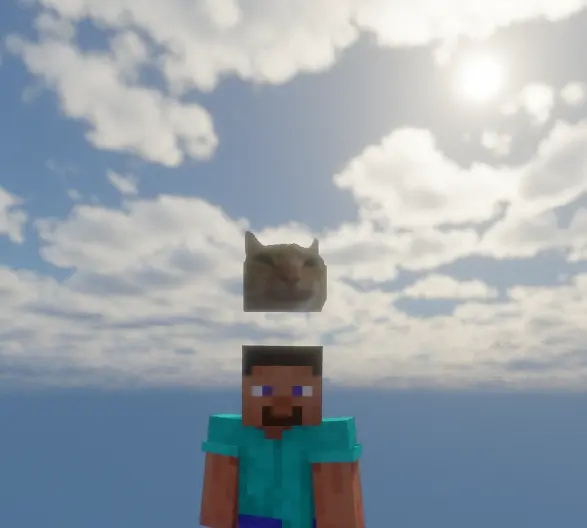 |
- Spawns a floating 3D
TextDisplayentity above the player's head upon sending a sticker. - Billboard Orientation: Always faces nearby viewers automatically.
- Smooth Bobbing Animation: Gentle vertical motion without jerky teleportation.
- Sender Hiding (
hide-from-sender: true): Keeps the sender's own vision clear. - Ghost Entity Prevention: Clean entity removal on chunk unload, player disconnect, or server reload.
Multi-Language Localization (16 Languages)
| Supported Languages Catalog |
|---|
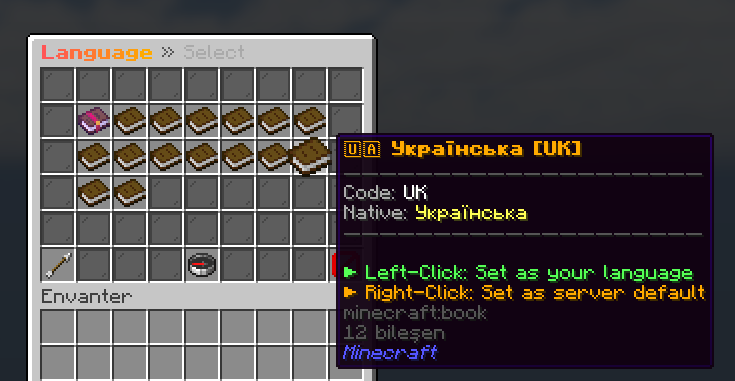 |
Built-in support for 16 languages with automatic client locale detection (per-player-language: true):
en (English), tr (Turkish), de (German), es (Spanish), fr (French), pt (Portuguese), ru (Russian), zh (Chinese), ja (Japanese), ko (Korean), it (Italian), nl (Dutch), pl (Polish), ar (Arabic), hi (Hindi), uk (Ukrainian).
Administrative Operations & Overhauled Dashboard (/vsa)
| Admin Control Panel | Integrity Status Panel |
|---|---|
 |  |
- Symmetrical 6-Row Layouts: Redesigned all 14 administrative views with slate gray glass borders, dedicated header breadcrumbs (Row 0), and persistent footer navigation controls (Row 5).
- Persistent Pagination Arrows: Eliminates asymmetric holes on first/last pages with disabled-state indicators (
◀ First Page,Last Page ▶). - Live Cache Purge (
/vsa remove-cache [all|<player>]): Purges pack cache, forces SHA-1 regeneration, clears stored player choices, and immediately opens the setup onboarding wizard. - Live URL Sticker Ingestion (
/stickeradmin add <id> <url>): Downloads PNG, converts to 128x128 Retina, updates unicode allocations, compiles models, and regenerates the pack live in the background. - Instant Sticker Removal (
/stickeradmin remove <id>): Cleans up assets, models, and font bindings on the fly. - Bulk ZIP Import (
/stickeradmin import <pack>): Bulk-imports complete sticker folders into categories without manual file edits. - Bedrock Pack Sync (
/stickeradmin exportbedrock): Pushes updated.mcpackarchives directly to Geyser. - Live System Status (
/stickeradmin status): Reports active server version, chat engine, TextDisplay status, HTTP port, bandwidth, and download metrics. - 6-Point Integrity Audit (
/stickeradmin verify): Validates textures, models, font providers, ZIP integrity, and SHA-1 checksums automatically.
Commands & Permissions Reference
Player Commands
| Command | Aliases | Description | Permission | Default |
|---|---|---|---|---|
/sticker | /s, /stickers, /emote, /cikartma | Opens main interactive sticker GUI | sticker.gui | Everyone |
/sticker send <id> | — | Sends a specific sticker by identifier | sticker.use | Everyone |
/sticker search <query> | — | Searches stickers by keyword | sticker.gui | Everyone |
/sticker favorites | — | Opens personal favorited stickers | sticker.gui | Everyone |
/sticker lang [code] | — | Opens language selector or sets language | sticker.gui | Everyone |
/sticker toggle | — | Toggles sticker rendering visibility | sticker.gui | Everyone |
/sticker pack | /s rp, /s indir | Re-opens interactive setup onboarding wizard | sticker.gui | Everyone |
/sticker remove-cache | /s clearcache | Purges your pack cache and re-opens setup wizard | sticker.admin | OP |
/sticker help | — | Displays command help menu | sticker.gui | Everyone |
/sbook | /stickerbook, /skitap | Opens sticker collection as a Book GUI | sticker.gui | Everyone |
Administrative Commands
| Command | Aliases | Description | Permission | Default |
|---|---|---|---|---|
/vsa | /stickeradmin gui | Opens the overhauled administrative dashboard | sticker.admin | OP |
/vsa remove-cache [all|<player>] | /sadmin purge-cache | Purges cache, resets choice & prompts setup wizard | sticker.admin | OP |
/stickeradmin add <id> <url> | — | Adds sticker from image URL and recompiles | sticker.admin | OP |
/stickeradmin remove <id> | — | Deletes sticker and updates pack definitions | sticker.admin | OP |
/stickeradmin import <zip> | — | Imports bulk sticker ZIP archive | sticker.admin | OP |
/stickeradmin give <player> <pack> | — | Grants sticker pack access to player | sticker.admin | OP |
/stickeradmin ban <player> [reason] | — | Suspends a player from sending stickers | sticker.admin | OP |
/stickeradmin unban <player> | — | Restores sticker privileges for a player | sticker.admin | OP |
/stickeradmin sync | — | Forces full pack re-generation and SHA-1 update | sticker.admin | OP |
/stickeradmin exportbedrock | — | Compiles and pushes Bedrock .mcpack to Geyser | sticker.admin | OP |
/stickeradmin status | — | Displays web server and delivery diagnostics | sticker.admin | OP |
/stickeradmin verify | — | Runs automated 6-point system verification | sticker.admin | OP |
/stickeradmin reload | /vsa rl | Reloads configurations, stickers, and languages | sticker.admin | OP |
Permission Hierarchy
| Permission Node | Description | Default |
|---|---|---|
sticker.gui | Access to sticker GUI catalogs and basic commands | Everyone (true) |
sticker.use | Permission to send basic stickers in chat | Everyone (true) |
sticker.pack.<category> | Grants access to a specific sticker category | OP |
sticker.category.* | Grants access to all sticker categories | OP |
sticker.bypass.cooldown | Bypasses chat sticker cooldown restrictions | OP |
sticker.admin | Full access to all administrative tools and GUI | OP |
Frequently Asked Questions (FAQ)
1. Does VebaStickers require client-side mods or custom launchers?
No. VebaStickers runs 100% server-side. Vanilla Java Edition and Bedrock Edition clients receive the lightweight resource pack automatically upon joining.
2. How does VebaStickers prevent overwriting standard Minecraft chests?
In v1.9.2, VebaStickers guarantees Pure Vanilla Container Isolation. Normal survival/creative double chests, single chests, Ender chests, and admin menus use the standard vanilla Minecraft texture. Only the custom Mega Vitrin inventory renders custom backgrounds by utilizing invisible negative-space font glyphs (\uF808\uEE01\uF8F0) and OptiGUI title matching (\uEE01), preventing any global texture leaks.
3. What is the difference between "Full HD + Modern GUI" and "Stickers Only"?
- Full HD + Modern GUI: Displays both HD chat stickers and custom modern GUI window borders with custom icons.
- Stickers Only: Downloads the stickers so emojis display in HD in chat and in GUI slots, but keeps the inventory window 100% classic vanilla Minecraft chest style.
4. How can players switch between display modes or reset their choices?
Players can type /sticker pack at any time to open the 27-slot setup wizard and re-select their preference. Administrators can also run /vsa remove-cache [all|<player>] to reset choices and re-prompt the setup wizard.
5. How does VebaStickers support both 1.12.2 and modern 1.21.4 / 26.x+ Game Drops in one pack?
Through our Dual-Font Bridge and Universal metadata architecture:
- Modern clients (1.13+) parse
font/default.jsonand model definitions. - Legacy 1.12.x clients read the auto-generated 2048x2048
unicode_page_e1.pngfont sheet and OptiFine CIT definitions. - The
pack.mcmetaspecifiespack_format: 3withsupported_formats: [3, 99], satisfying both old and new client parsers with zero warnings.
6. What happens if port 8085 is blocked by my server host?
VebaStickers' 4-tier network delivery automatically scans ports 8085-8095. If all HTTP ports are restricted, it seamlessly falls back to updating server.properties native pack delivery or routes through an SSL reverse proxy (http-server.public-url) or external CDN.
7. How does the 3x3 Mega Vitrin showcase work?
Instead of cutting stickers into 9 separate physical files, VebaStickers renders a single 2.6x scaled mega model in the center slot while clearing adjacent slots to AIR. All 9 slots register in the click listener, providing a massive, seamless hitbox.
8. How does Shift + Left Click "Burst Send" work?
Normal Left-Click sends the sticker and closes the inventory. Shift + Left-Click sends the sticker to chat with full sound effects and cooldown validation while keeping the menu open, allowing rapid sticker combos.
9. Are Bedrock Edition players supported?
Yes. With GeyserMC and Floodgate, VebaStickers generates a native .mcpack, delivers touch-friendly Bedrock Form GUIs, and maps the Bedrock Emote button directly to the sticker menu.
License & Telemetry
Copyright (c) Veba. All Rights Reserved.
Provided as an optimized, production-ready plugin binary. Telemetry metrics are gathered anonymously via bStats to monitor version adoption and delivery resilience.



Галерея
