

Vanilla Replays
Record & Playback system in vanilla Minecraft!
Автор: Youly2,6 тыс.49обновлён 18 апр. 2026 г.
Механики игрыТехнологииУтилиты
Описание
Vanilla Replays - Youly

Version 1.1.0 Overview
📇 PRESENTATION
Vanilla Replays is a datapack giving the ability to record and playback player actions, such as position, equipped items, used items and more.
Each actor can be a mannequin entity or a mob wich can be customized (profile, name, skin customization, data values etc), and belongs to a scene. Every actor in the same scene can play their record together (using "Scene Manager" screen)
⚒️ UTILS
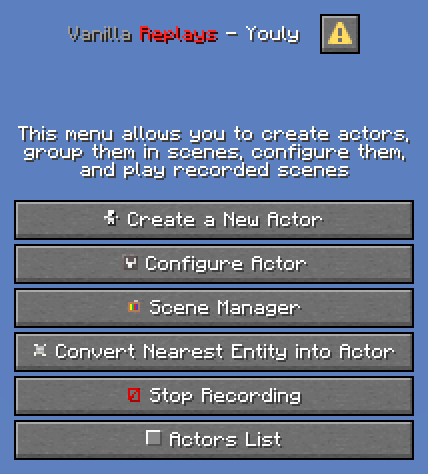
- Press "quick actions" key (default to "G"), or click on "Vanilla Replays" button in pause menu, to open Main Menu.
- Sneak + Right Click on the actor you are looking at to open his Configuration Menu
- Be next to an actor to view his name, ID and scene, above actionbar.
📜 INSTRUCTIONS
- Click on "Create a New Actor" to summon a new actor, by specifying entity type, his name, profile data (it can be player's name, or a profile component), and the scene he belongs to. If the name/profile is a player name and contains digits or spaces, put it in quotes ("name 123" instead of : name 123). Profile works only for "mannequin" entities
- Click on "Configure Actor" and specify Actor'ID to configure actor : playback, record, remove, customize and teleport to.
- Click on "Convert Nearest Entity into Actor" to convert the nearest entity within a radius of 50 blocks, some entity types can't be converted (marker, minecarts & boats, etc)
- Click on "Scene Manager" and specify Scene Name to playback the specified scene name, change its name and pause/resume it.
- Click on "Stop Recording" or Type "trigger vanilla_replays.trigger.stop_recording" in chat to stop the actor you are currently recording.
- Click on "Actors List" to view all loaded actors from nearest to furthest. Click on any actor to open his configuration screen.
⚠️ LIMITATIONS
- For now, all modifications applied to the world (placing/destroying blocks, interacting with entities/blocks) are not recorded.
- You can record interactions between actors if several players each start a recording of an actor at the same time, but doing everything alone is more difficult.
- Mannequin entities & Mobs don't have all animations of held items (aiming with bow/trident, reloading crossbow, etc).
- Mannequin entities & Mobs don't have attack destroy/punch animations.
- Riding pose is recorded but the position and rotation of the vehicle are not.
🚫 KNOWN ISSUES
- ✅ FIXED: Scene names containing spaces cannot be paused/resumed using the "Scene Manager" screen.
Галерея




Последние версии
Все версии →release
Vanilla Replays - 1.21.11 [v1.1.1]
1.1.118 апр. 2026 г.1 тыс.Minecraft: 1.21.11-pre1, 1.21.11-pre2, 1.21.11-pre3, 1.21.11-pre4, 1.21.11-pre5, 1.21.11-rc1, 1.21.11-rc2, 1.21.11-rc3, 1.21.11datapack
Что нового
## Vanilla Replays - by Youly
### Bug fix:
- Scene with names containing spaces cannot be paused/resumed.
### New Feature:
- Actors have a new customization setting: "Hide Target Info" (ON/OFF) that hides the actor’s info and highlighting when selected or closest to a player.
release
Vanilla Replays - 1.21.9-10 [v1.1.1]
1.1.118 апр. 2026 г.146Minecraft: 1.21.9-pre3, 1.21.9-pre4, 1.21.9-rc1, 1.21.9, 1.21.10-rc1, 1.21.10datapack
Что нового
## Vanilla Replays - by Youly
### Bug fix:
- Scene with names containing spaces cannot be paused/resumed.
### New Feature:
- Actors have a new customization setting: "Hide Target Info" (ON/OFF) that hides the actor’s info and highlighting when selected or closest to a player.
release
Vanilla Replays - 1.21.11 [v1.1.0]
1.1.08 янв. 2026 г.478Minecraft: 1.21.11-pre1, 1.21.11-pre2, 1.21.11-pre3, 1.21.11-pre4, 1.21.11-pre5, 1.21.11-rc1, 1.21.11-rc2, 1.21.11-rc3, 1.21.11datapack
Что нового
## Vanilla Replays - by Youly
Added support for 1.21.11.
release
Vanilla Replays - 1.21.9-10 [v1.1.0]
1.1.026 окт. 2025 г.521Minecraft: 1.21.9-pre3, 1.21.9-pre4, 1.21.9-rc1, 1.21.9, 1.21.10-rc1, 1.21.10datapack
Что нового
## Vanilla Replays - by Youly
In this version, you can now record mobs/entities actions.
### New features:
- The Main Menu has a new button _"Convert Nearest Entity into Actor"_ wich converts nearest entity within a radius of 50 blocks into an actor. A screen is shown warning the player that this change is irreversible.
- _"Create a New Actor"_ menu has a new entity field (default to "mannequin") wich can specify what entity type to spawn as an actor (actors can't be created with some entity types such as markers, boats & minecarts, etc).
- Mob actors appear in purple in the _"Actors List"_ menu.
- Certain mob features are recorded, such as sitting pose for tamable mobs, holding items in hand, etc.
- Modded entities can be converted into actors although the presence of bugs may be possible.
### Video Presentation:
<iframe width="560" height="315" src="https://www.youtube-nocookie.com/embed/WMzjwGuMYuQ" title="YouTube video player" frameborder="0" allow="accelerometer; autoplay; clipboard-write; encrypted-media; gyroscope; picture-in-picture; web-share" allowfullscreen></iframe>
release
Vanilla Replays - 1.21.9-10 [v1.0.1]
1.0.120 окт. 2025 г.102Minecraft: 1.21.9-pre3, 1.21.9-pre4, 1.21.9-rc1, 1.21.9, 1.21.10-rc1, 1.21.10datapack
Что нового
## Vanilla Replays - by Youly
A bug fix and a new feature in this version.
### Bug fix:
- _"Always Show Name"_ property in actor customization menu doesn't apply to actor when changes are applied.
### New feature:
- _"Create a New Actor"_ and _"Customize"_ menus have a new warning tooltip when creating a new actor or applying changes.
release
Vanilla Replays - 1.21.9-10 [v1.0.0]
1.0.012 окт. 2025 г.216Minecraft: 1.21.9-pre3, 1.21.9-pre4, 1.21.9-rc1, 1.21.9, 1.21.10-rc1, 1.21.10datapack
Что нового
## Vanilla Replays - by Youly
First version of Vanilla Replays, including player recording with the new mannequins entities.
### Recorded actions :
- Movement & Rotation
- Equipped Items (weapon and equipment)
- Poses: Crouching, Crawling, Swimming, FallFlying, Sleeping
- Dying, Respawning and Totem of Undying Effect
- Consumed Items: Drinking, Eating (even with food & consumable components, particles not implemented)
- Throwable Items: Trident, Wind Charges, All Potions & Bottles, Snowballs, Eggs, Ender Pearl, Firework Rocket
- Bow & Crossbow (even with loaded firework, multishot not implemented)
- Goat Horns sounds (even with custom instrument component)
- Dropped Items (only one itemstack dropped per tick)
- Visuals: Fire, Potion Effects Particles, Hurting (sound and red tint), Size Attribute