

Upgradable Backpack
Dyeable, renamable, wearable, and upgradeable backpacks (9-slots, 18-slots, 26-slots)
Автор: paul90317124,9 тыс.138обновлён 17 нояб. 2025 г.
ХранениеТранспорт
Описание
I made the backpack, which is
- Dyeable through the crafting table.
- Easily renamable using an anvil.
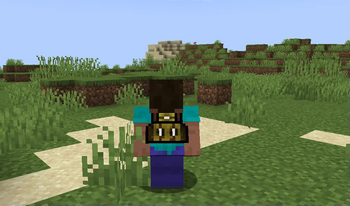
- Wearable in your chest slot.
- Upgradable to get more slots (9 -> 18 -> 26 slots)
Demo Video
How to Use Backpacks
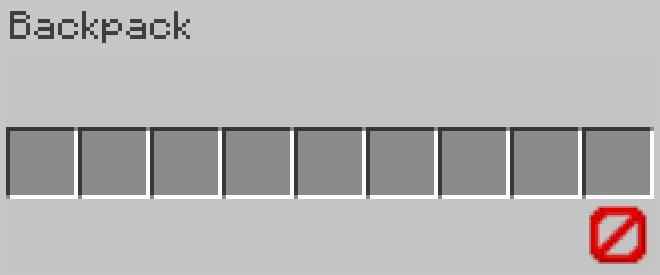
- To store or retrieve items, simply drop the backpack on the ground. It will transform into a barrel, allowing you to manage your items. Click the "Exit" button slot to revert it to a backpack item.
Crafting Recipes
-
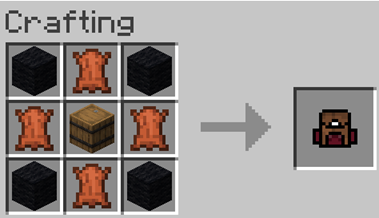
Craft a Small Backpack:
(4 wools, 4 leathers, and a barrel)
-
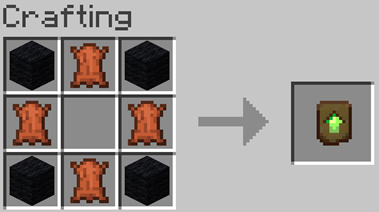
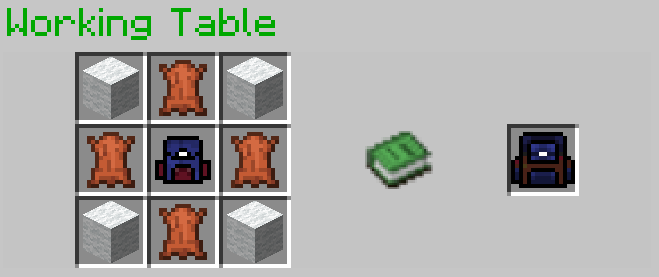
Craft a Backpack Upgrader:
-
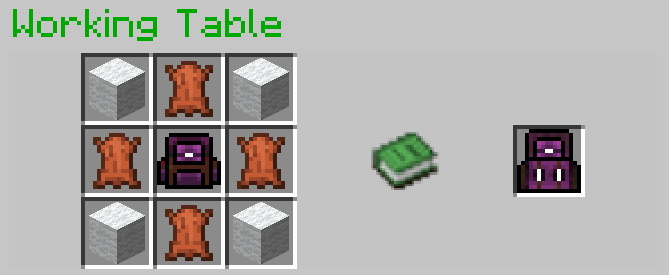
Upgrading to a 26-Slot Backpack:
Place the upgrader into your backpack block.
Галерея
Последние версии
Все версии →release
11.3
11.3+mod17 нояб. 2025 г.1,8 тыс.Minecraft: 1.21.9, 1.21.10fabric, forge, neoforge, quilt
Что нового
Add min, max format for paper 1.21.10
release
11.3
11.317 нояб. 2025 г.1,1 тыс.Minecraft: 1.21.9, 1.21.10datapack
Что нового
Add min, max format for paper 1.21.10
release
11.1
11.1+mod2 нояб. 2025 г.1,2 тыс.Minecraft: 1.21.4, 1.21.5, 1.21.6, 1.21.7, 1.21.8, 1.21.9, 1.21.10fabric, forge, neoforge, quilt
Что нового
fix: backpack overrided the another at the same position.
fix: the backpack equipment didn't upgrade
release
11.1
11.12 нояб. 2025 г.659Minecraft: 1.21.4, 1.21.5, 1.21.6, 1.21.7, 1.21.8, 1.21.9, 1.21.10datapack
Что нового
fix: backpack overrided the another at the same position.
fix: the backpack equipment didn't upgrade
release
v11
11+mod1 нояб. 2025 г.113Minecraft: 1.21.4, 1.21.5, 1.21.6, 1.21.7, 1.21.8, 1.21.9, 1.21.10fabric, forge, neoforge, quilt
Что нового
Upgrade to Minecraft 1.21
release
v11
111 нояб. 2025 г.142Minecraft: 1.21.4, 1.21.5, 1.21.6, 1.21.7, 1.21.8, 1.21.9, 1.21.10datapack
Что нового
Upgrade to Minecraft 1.21
release
v10
v10+mod22 сент. 2023 г.87,6 тыс.Minecraft: 1.17, 1.17.1, 1.18, 1.18.1, 1.18.2, 1.19, 1.19.1, 1.19.2, 1.19.3, 1.19.4, 1.20, 1.20.1, 1.20.2fabric, forge, quilt
Что нового
* Fixed: Custom blocks can't be opened in caves.
* Improved: Dropped-type custom blocks can be created when there are no other items dropped within a 1-block range, instead of 5.
* Simplified: Removed the credit link display.
* Custom Craft Version: 5 (compatible with the same version)
release
v10
v1022 сент. 2023 г.6,2 тыс.Minecraft: 1.17, 1.17.1, 1.18, 1.18.1, 1.18.2, 1.19, 1.19.1, 1.19.2, 1.19.3, 1.19.4, 1.20, 1.20.1, 1.20.2datapack
Что нового
* Fixed: Custom blocks can't be opened in caves.
* Improved: Dropped-type custom blocks can be created when there are no other items dropped within a 1-block range, instead of 5.
* Simplified: Removed the credit link display.
* Custom Craft Version: 5 (compatible with the same version)
---
# README
I made the backpack, which is
- Craft a 9-slot backpack, upgradable to 18 and 26 slots.
- Dyeable through the crafting table.
- Easily renamable using an anvil.
## How to Use Backpacks
* To store or retrieve items, simply drop the backpack on the ground. It will transform into a barrel, allowing you to manage your items. Click the "Exit" button slot to revert it to a backpack item.
> These backpacks can be placed in your chest slot for decorative purposes.
## Crafting Recipes
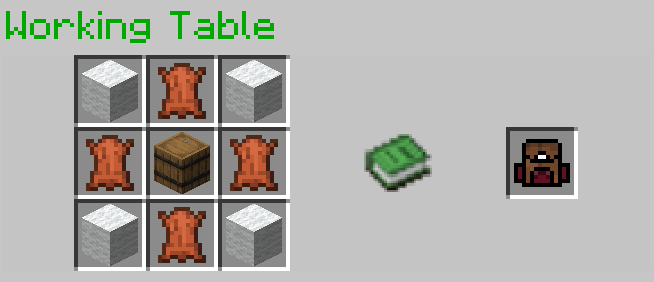
- **Spawning a Working Table:**
To craft the backpacks, start by creating the essential "Working Table". Simply drop a stone pickaxe onto a crafting table block.
- **Crafting a 9-Slot Backpack:**

- **Upgrading to an 18-Slot Backpack:**

- **Upgrading to a 26-Slot Backpack:**
## Optional Installation
- To see the backpack on your character's back when placed in the chest slot, you may install [Optifine](https://optifine.net/downloads); it's optional.
## References
- GUI code is generated by [Easy GUI](https://github.com/paul90317/Minecraft-Easy-GUI)
- The Working Table is a crafting block in [Custom Craft](https://github.com/paul90317/custom-craft/wiki).
- [ChatGPT](https://chat.openai.com/) for gramma improving
## Demo Video
Watch this video to see the backpacks in action!
<iframe width="560" height="315" src="https://www.youtube.com/embed/xaCST1obzZE" title="YouTube video player" frameborder="0" allow="accelerometer; autoplay; clipboard-write; encrypted-media; gyroscope; picture-in-picture; web-share" allowfullscreen></iframe>
release
v9.1
v9.1+mod9 авг. 2023 г.2,1 тыс.Minecraft: 1.17, 1.17.1, 1.18, 1.18.1, 1.18.2, 1.19, 1.19.1, 1.19.2, 1.19.3, 1.19.4, 1.20, 1.20.1fabric, forge, quilt
Что нового
change the item base of the GUI item of the working table to a clay ball, which means you need to change a new resource pack if you want to play this version.
If you are the old player in v9 and you don't play my other data packs, nothing will change if you upgrade to v9.1.
If you want to play my other data packs, you need to upgrade to v9.1 for the compatibility of my other data packs because they share the same resource pack.
the resource pack is at the [dependencies](https://cdn.modrinth.com/data/G4PdFL69/versions/MLbgOVTp/paul90317-resourcepack.zip)
release
v9.1
v9.18 авг. 2023 г.1 тыс.Minecraft: 1.17, 1.17.1, 1.18, 1.18.1, 1.18.2, 1.19, 1.19.1, 1.19.2, 1.19.3, 1.19.4, 1.20, 1.20.1datapack
Что нового
change the item base of the GUI item of the working table to a clay ball, which means you need to change a new resource pack if you want to play this version.
If you are the old player in v9 and you don't play my other data packs, nothing will change if you upgrade to v9.1.
If you want to play my other data packs, you need to upgrade to v9.1 for the compatibility of my other data packs because they share the same resource pack.
the resource pack is at the [dependencies](https://cdn.modrinth.com/data/G4PdFL69/versions/MLbgOVTp/paul90317-resourcepack.zip)