COWMODSКаталог модов

Unbeatably Optimized

Unbeatably Optimized boosts Minecraft: Java Edition's FPS to the maximum and adds features like shader support, zoom and dynamic lighting.

Автор: Lorenz_Kroetzsch12,2 тыс.1обновлён 2 апр. 2025 г.
lightweightОптимизация

Описание

Minecraft: Java Edition has been poorly optimized since its initial release. Many low-end devices can't run it smoothly, and even midrange and high-end devices don't get the FPS they should with their hardware.

Unbeatably Optimized aims to give players the maximum FPS possible using mods that optimize different aspects of the game.

It also adds many features to the game:

  • Shader support
  • Zoom
  • Dynamic lighting
  • Connected textures/glass
  • Cleaner F3 Menu
  • Option to set the render distance higher than possible in vanilla Minecraft
  • More video settings, such as the option to change the fog distance or even disable fog
  • Support for resource packs with custom entity models/textures

So if you want to maximize your FPS in Minecraft: Java Edition, be able to play with shaders, and get many other features on top, you need this modpack!

!!! Important !!!

Allocate more RAM

To get the maximum performance, please follow these steps:

  1. After installing the modpack, go to your library.
  2. Click "Unbeatably Optimized".
  3. Click "Options".
  4. Scroll down until you find "Java Memory".
  5. Ensure "Override global memory settings" is checked.
  6. Drag the slider to about the middle. And you are done.

Bind zoom key correctly

With default key binds, Zoom conflicts with Save Hotbar Activator

  1. Go to Options --> Controls --> Key Binds
  2. Change either Zoom (Hold) or Save Hotbar Activator to some key that's not C, my recommendation: just unbind Save Hotbar Activator, at least, I never use it

Hints:

"How can I turn off the FPS display in the top left corner?"

To disable the FPS display in the top left corner (in newer versions it defaults to being off):

  1. Head to Options -> Video Settings -> Extras.
  2. Disable "Show FPS".

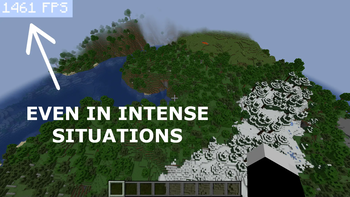
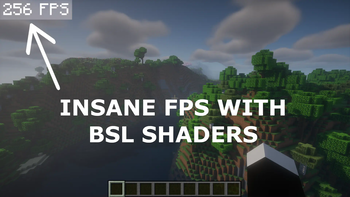
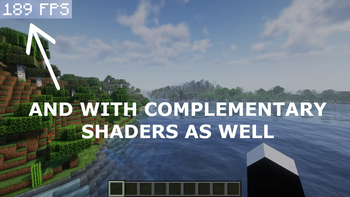
"I want to get crazy FPS like in the Screenshots!"

If you want to get more FPS than your monitor can show (if your PC can handle it, of course):

  1. Head to Options --> Video Settings --> General
  2. Turn off VSync, consider adjusting Max Framerate

Keep in mind that this consumes more power.

Галерея
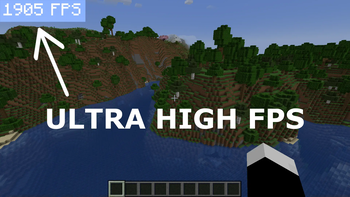
FPS in normal situationFPS in intense situationFPS with BSL shadersFPS with Complementary shaders

Последние версии

Все версии →
beta

Unbeatably Optimized 1.5.0

1.5.0
2 апр. 2025 г.5,7 тыс.Minecraft: 1.21.5fabric
Скачать
Что нового
This is a beta version, because Continuity (adds connected glass and support for Resource Packs with connected textures) is missing, as well as a few other mods. For some reason, FPS with shaders are noticeably worse than in the last version. Probably there is a problem in the current Iris version. Freecam is no longer included in the modpack because I think it has too much cheat potential. However, you can add it yourself if you need it.
release

Unbeatably Optimized 1.4.1

1.4.1
22 мар. 2025 г.891Minecraft: 1.21.4fabric
Скачать
Что нового
A few mods have been updated.
release

Unbeatably Optimized 1.4.0

1.4.0
28 дек. 2024 г.1,1 тыс.Minecraft: 1.21.4fabric
Скачать
Что нового
Unbeatably Optimized for 1.21.4!
beta

Unbeatably Optimized 1.3.0

1.3.0
27 нояб. 2024 г.514Minecraft: 1.21.3fabric
Скачать
Что нового
This is a beta version, because a couple of performance boosting mods are still missing.
beta

Unbeatably Optimized 1.2.0

1.2.0
27 нояб. 2024 г.266Minecraft: 1.21.2fabric
Скачать
Что нового
This is a beta version because it currently lacks connected glass, connected texture pack support, and some performance-boosting mods. From now on, a couple of things in the modpack change: - Resourcify, which allowed you to download resource-packs and shader-packs directly in game, has been removed, because it isn't that useful. - The cleaner F3 menu now has a more vanilla-like appearance. - There are more shaders already in the modpack. - You can press G to toggle gamma. - You can press H to toggle night vision. - You can press F4 to toggle Freecam. - Freecam is a mod that allows you to view your world as if you were in creative mode, without moving your player or being able to perform any other creative mode actions.
release

Unbeatably Optimized 1.1.4

1.1.4
30 окт. 2024 г.980Minecraft: 1.21.1fabric
Скачать
Что нового
Many mods have been updated.
release

Unbeatably Optimized 1.1.3

1.1.3
28 сент. 2024 г.520Minecraft: 1.21.1fabric
Скачать
Что нового
-removed Essentials mod because its marketplace is annoying -updated a view mods
release

Unbeatably Optimized 1.1.2

1.1.2
31 авг. 2024 г.486Minecraft: 1.21.1fabric
Скачать
Что нового
The Essential Mod has been added, allowing players to let other players their worlds. You can also view your scrennshots in-game now.
release

Unbeatably Optimized 1.1.1

1.1.1
24 авг. 2024 г.241Minecraft: 1.21.1fabric
Скачать
Что нового
This is a full release for 1.21.1.
beta

Unbeatably Optimized 1.1.0

1.1.0
21 авг. 2024 г.247Minecraft: 1.21.1fabric
Скачать
Что нового
This is just a **beta** version, it is not 100% complete. Since almost nothing has changed in 1.21.1, I would **recommend using** the latest Unbeatably Optimized version available for **1.21** until a full release for 1.21.1 is out. **EDIT:** There is a full release for 1.21.1 out now!