

FTB Ultimine Rewind
Rewind/undo functionality for FTB Ultimine. Restore mined blocks with Ctrl+Z. Supports partial restoration and creative mode.
Автор: GaLi115,7 тыс.14обновлён 21 авг. 2026 г.
Механики игрыУправлениеУтилиты
Описание
Ultimine Rewind
Add undo/rewind functionality to FTB Ultimine. Made a mistake while vein mining? Press Ctrl+Z to restore your blocks!
Features
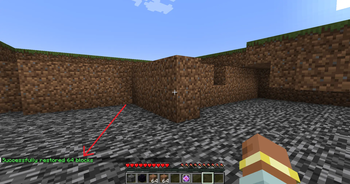
- 🔄 Undo Mining - Press Ctrl+Z to open the restoration interface
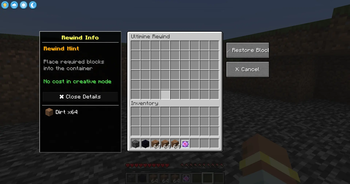
- 📦 Material System - Provide blocks to restore what you mined
- ✨ Creative Mode - No materials needed in creative mode
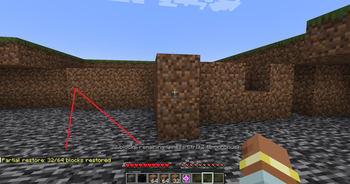
- 🔁 Partial Restore - Restore as many blocks as your materials allow, continue with Ctrl+Z
- 🌍 Multiplayer Safe - Works on servers with anti-dupe protection
- 🎨 Vanilla Style UI - Uses native chest interface
How to Use
- Mine blocks with FTB Ultimine
- Press Ctrl+Z to open the restoration menu
- Place materials into the container (same blocks you mined)
- Click "Restore Blocks" to undo your mining
Partial Restoration
Not enough materials? No problem!
- The mod will restore as many blocks as possible
- Remaining blocks stay in the record
- Press Ctrl+Z again with more materials to continue
Requirements
- Minecraft 1.20.1
- Forge 47.0+
- FTB Ultimine (Required)
Notes
- Block entities (chests, furnaces) are restored empty to prevent item duplication
- Records expire after 10 minutes
- Only the last mining operation can be undone
- Works in both singleplayer and multiplayer
License
GNU LGPL 3.0
Галерея
Последние версии
Все версии →release
Ultimine Rewind 2.0.0 [Forge 1.20.1]
2.0.021 авг. 2026 г.12,4 тыс.Minecraft: 1.20.1forge
Что нового
# Changelog
## [2.0.0]
### Added / 新增
- 新增自适应恢复材料界面,可显示方块数量、材料种类与完整的所需材料列表,并支持滚动浏览
- Added a responsive restoration-material screen that displays block count, material types, and the full required-material list with scrolling support.
- 每名玩家现在最多保留最近 5 次连锁采集的撤回记录
- Each player can now retain up to their 5 most recent Ultimine rewind records.
### Changed / 变更
- 背包中材料充足时,按下 `Ctrl + Z` 会直接执行撤回并自动扣除材料;只有材料不足时才打开材料补充界面
- When the player has enough materials, pressing `Ctrl + Z` now rewinds immediately and consumes the materials automatically; the material-supply screen only opens when materials are missing.
- 撤回材料统计与消耗改为按物品及其标签精确匹配,提升对带有数据的模组物品的兼容性
- Rewind material counting and consumption now precisely match items and their tags, improving compatibility with modded items carrying data.
- 撤回快捷键改为原生组合键映射,默认显示并使用 `Ctrl + Z`,且可在控制设置中重新绑定
- The rewind shortcut now uses a native key-chord mapping, displays and defaults to `Ctrl + Z`, and can be rebound in Controls.
release
Ultimine Rewind 2.1.0 [NeoForge 1.21.1]
2.1.021 авг. 2026 г.12,4 тыс.Minecraft: 1.21.1neoforge
Что нового
# Changelog
## [2.0.0]
### Added / 新增
- 新增自适应恢复材料界面,可显示方块数量、材料种类与完整的所需材料列表,并支持滚动浏览
- Added a responsive restoration-material screen that displays block count, material types, and the full required-material list with scrolling support.
- 每名玩家现在最多保留最近 5 次连锁采集的撤回记录
- Each player can now retain up to their 5 most recent Ultimine rewind records.
### Changed / 变更
- 背包中材料充足时,按下 `Ctrl + Z` 会直接执行撤回并自动扣除材料;只有材料不足时才打开材料补充界面
- When the player has enough materials, pressing `Ctrl + Z` now rewinds immediately and consumes the materials automatically; the material-supply screen only opens when materials are missing.
- 撤回材料统计与消耗改为按物品及其组件精确匹配,提升对带有数据的模组物品的兼容性
- Rewind material counting and consumption now precisely match items and their components, improving compatibility with modded items carrying data.
- 撤回快捷键改为原生组合键映射,默认显示并使用 `Ctrl + Z`,且可在控制设置中重新绑定
- The rewind shortcut now uses a native key-chord mapping, displays and defaults to `Ctrl + Z`, and can be rebound in Controls.
release
Ultimine Rewind 2.0.0 [NeoForge 26.1.2]
2.0.021 авг. 2026 г.1,6 тыс.Minecraft: 26.1.2neoforge
Что нового
# Changelog
## [2.0.0]
### Added / 新增
- 新增自适应恢复材料界面,可显示方块数量、材料种类与完整的所需材料列表,并支持滚动浏览
- Added a responsive restoration-material screen that displays block count, material types, and the full required-material list with scrolling support.
- 每名玩家现在最多保留最近 5 次连锁采集的撤回记录
- Each player can now retain up to their 5 most recent Ultimine rewind records.
### Changed / 变更
- 背包中材料充足时,按下 `Ctrl + Z` 会直接执行撤回并自动扣除材料;只有材料不足时才打开材料补充界面
- When the player has enough materials, pressing `Ctrl + Z` now rewinds immediately and consumes the materials automatically; the material-supply screen only opens when materials are missing.
- 撤回材料统计与消耗改为按物品及其组件精确匹配,提升对带有数据的模组物品的兼容性
- Rewind material counting and consumption now precisely match items and their components, improving compatibility with modded items carrying data.
- 撤回快捷键改为原生组合键映射,默认显示并使用 `Ctrl + Z`,且可在控制设置中重新绑定
- The rewind shortcut now uses a native key-chord mapping, displays and defaults to `Ctrl + Z`, and can be rebound in Controls.
release
Ultimine Rewind 1.21.1-2.0.0
1.21.1-2.0.027 нояб. 2025 г.23,6 тыс.Minecraft: 1.21.1neoforge
Что нового
same of 1.20.1
release
Ultimine Rewind 1.0.1
1.0.117 нояб. 2025 г.64,2 тыс.Minecraft: 1.20.1forge
Что нового
Items with NBT tags can be undone in Creative Mode.
release
Ultimine Rewind 1.0.0
1.0.02 нояб. 2025 г.1,6 тыс.Minecraft: 1.20.1forge
Что нового
First-Version