COWMODSКаталог модов

Tubarcev's Anomalies For Tubakerta

Mod adds a couple of anomalies and Radiation zones and Psi effects from Stalker

Автор: Mr_Light__4183обновлён 31 мая 2026 г.
Механики игры

Описание

⚠️ IMPORTANT: This project is currently in early Alpha development. Many features are still being worked on, mechanics are subject to changeю.

Overview This mod brings the harsh, unforgiving environment of the S.T.A.L.K.E.R. universe into Minecraft. It introduces anomaly, immersive visual effects.

Current Features (Early Build) Even in this early stage, the core technical foundation and several mechanics are implemented:

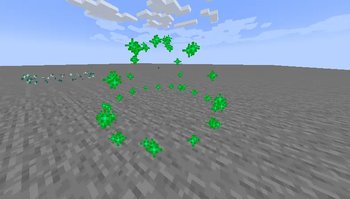
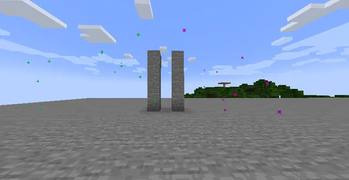
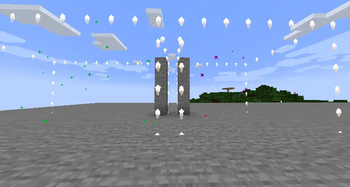
Anomalies: Encounter classic anomalies in the world, currently including Burner (Жарка), Electra (Электра), and Gas (Газировка).

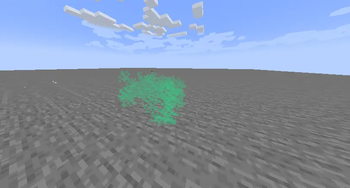
Radiation & Psi-Emissions. Entering irradiated or Psi-zones applies custom visual screen effects to the player and affects gameplay.

Management Tools: Includes a specialized remote control panel item for interacting with or managing the mod's systems.

Custom Client Rendering: The mod features a modular structure with a dedicated client-side system specifically built for rendering anomaly particles, precise damage zones, and immersive screen distortions.

In future:

Protective gear (gas masks, scientific suits) to counter radiation and Psi-emissions.

Integration of and bolts for safe navigation.

Shader Compatibility (Ejection Mechanics)

Atmospheric Emission mechanics were implemented with smooth transitions of sky and fog colors. In a vanilla game (without shaders), everything works automatically.

If you play with shaders (Sodium + Iris): The shaders completely overlap the vanilla rendering of the sky. To make the Ejection look cinematic and the sky turn red, you need to add a special interceptor code to your shaderpack. So far, only Sildur's Vibrant Shaders:

How to adapt the shader:

  1. Open the shaderpacks folder in the game directory.
  2. Open the archive of your shader ('Sildurs Vibrant Shaders v1.56.zip`: https://www.curseforge.com/minecraft/shaders/sildurs-vibrant-shaders) just like a regular folder.
  3. Follow the path shaders/ and find the file `final.fsh'.
  4. Open it in any convenient text editor (Notepad++ is recommended).
  5. Replace the code inside with this one: https://gist.github.com/Light-Tubar/db551516c33e92899e3b6f710d897a55
  6. Save the changes to the final' file.fsh and confirm the archive update.
  7. In the game, press the R key to reset the shaders.

Галерея

ГазировкаГазировкаPsi and Radioactive ZonesPsi and Radioactive Zones

Последние версии

Все версии →
beta

Tubarcev's Anomalies For Tubakerta 0.9.6

0.9.6
31 мая 2026 г.110Minecraft: 1.21.1fabric
Скачать
Что нового
Added pale oak, items made from it, copper rods, chains, lantern, and golems. Improved emission. Added new "/emission" command
beta

Tubarcev's Anomalies For Tubakerta 0.9.5.

0.9.5.
23 мая 2026 г.24Minecraft: 1.21.1fabric
Скачать
Что нового
Emission progress now persists when leaving the world and pauses properly in the menu. Added a cinematic post-blowout weather transition, final-seconds white flashes, and screen-space distortion for Psi-zones. Introduced biome-specific anomaly world generation with a customizable spawn rate GameRule.
beta

Tubarcev's Anomalies For Tubakerta 0.9.4

0.9.4
20 мая 2026 г.23Minecraft: 1.21.1fabric
Скачать
Что нового
English translation added. Ejection progress synchronized between client and server. Added instruction for the Anomaly Creator
beta

Tubarcev's Anomalies For Tubakerta 0.9.3

0.9.3
19 мая 2026 г.21Minecraft: 1.21.1fabric
Скачать
Что нового
Updated death reports
beta

Tubarcev's Anomalies For Tubakerta 0.9.2

0.9.2
19 мая 2026 г.11Minecraft: 1.21.1fabric
Скачать
Что нового
Bolt updated, emission sound improved
beta

Tubarcev's Anomalies For Tubakerta 0.9.0-fix

0.9.0-fix
12 мая 2026 г.19Minecraft: 1.21.1fabric
Скачать
Что нового
Shader Compatibility (Ejection Mechanics) Atmospheric Emission mechanics were implemented with smooth transitions of sky and fog colors. In a vanilla game (without shaders), everything works automatically. If you play with shaders (Sodium + Iris): The shaders completely overlap the vanilla rendering of the sky. To make the Ejection look cinematic and the sky turn red, you need to add a special interceptor code to your shaderpack. So far, only Sildur's Vibrant Shaders: How to adapt the shader: 1. Open the shaderpacks folder in the game directory. 2. Open the archive of your shader ('Sildurs Vibrant Shaders v1.56.zip`: https://www.curseforge.com/minecraft/shaders/sildurs-vibrant-shaders) just like a regular folder. 3. Follow the path `shaders/` and find the file `final.fsh'. 4. Open it in any convenient text editor (Notepad++ is recommended). 5. Replace the code inside with this one: https://gist.github.com/Light-Tubar/8ef56454cabdb304fbb653ecd72480c8 6. Save the changes to the `final' file.fsh` and confirm the archive update. 7. In the game, press the `R` key to reset the shaders.
beta

Tubarcev's Anomalies For Tubakerta 0.9.0

0.9.0
11 мая 2026 г.14Minecraft: 1.21.1fabric
Скачать
Что нового
Shader Compatibility (Ejection Mechanics) Atmospheric Emission mechanics were implemented with smooth transitions of sky and fog colors. In a vanilla game (without shaders), everything works automatically. If you play with shaders (Sodium + Iris): The shaders completely overlap the vanilla rendering of the sky. To make the Ejection look cinematic and the sky turn red, you need to add a special interceptor code to your shaderpack. So far, only Sildur's Vibrant Shaders: How to adapt the shader: 1. Open the shaderpacks folder in the game directory. 2. Open the archive of your shader ('Sildurs Vibrant Shaders v1.56.zip`: https://www.curseforge.com/minecraft/shaders/sildurs-vibrant-shaders) just like a regular folder. 3. Follow the path `shaders/` and find the file `final.fsh'. 4. Open it in any convenient text editor (Notepad++ is recommended). 5. Replace the code inside with this one: https://gist.github.com/Light-Tubar/8ef56454cabdb304fbb653ecd72480c8 6. Save the changes to the `final' file.fsh` and confirm the archive update. 7. In the game, press the `R` key to reset the shaders.
beta

Tubarcev's Anomalies For Tubakerta 0.8.9.4

0.8.9.4
7 мая 2026 г.21Minecraft: 1.21.1fabric
Скачать
Что нового
Added a bolt
beta

Tubarcev's Anomalies For Tubakerta 0.8.8

0.8.8
6 мая 2026 г.16Minecraft: 1.21.1fabric
Скачать
Что нового
/emission start Added "Emissions"
beta

Tubarcev's Anomalies For Tubakerta 0.8.8

0.8.8
6 мая 2026 г.10Minecraft: 1.21.1fabric
Скачать