

Trusted Colors
Adds a sophisticated name-color switching system to the game, complete with live and rec tags as well as an RP tag.
Автор: naetilus2702обновлён 31 июл. 2024 г.
Описание
Color Selection
Using the command:
/trigger color
Will bring up a menu to select a color and status for your in game name
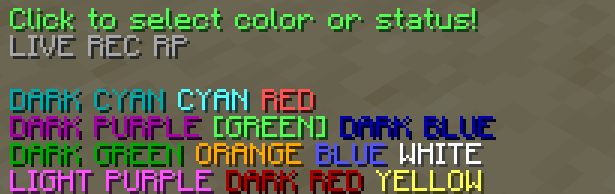
Clicking on the colors will select them and change the actual color of your name.
Status Selection
In the menu there are 3 buttons for different statuses. Clicking on these will make them show up next to your name in game:

Extra Features
An operator can use the command:
/tag add <playername> mod
This will make their name in chat show up with an [OP] tag

The OP tag is compatible with all other tags and colors!
Последние версии
Все версии →release
Trusted Colors
1.031 июл. 2024 г.133Minecraft: 1.21datapack
Что нового
Translated from Swedish to English
release
Trusted Colors
1.031 июл. 2024 г.137Minecraft: 1.19, 1.19.1, 1.19.2, 1.19.3, 1.19.4, 1.20, 1.20.1, 1.20.2, 1.20.3, 1.20.4, 1.20.5, 1.20.6datapack
Что нового
Backported for earlier vesions
Translated from Swedish to English