

Trims Effect
💎Adds configurable potion effects based on worn armor trims🤩, with smart scaling per trim and zero performance impact🚀.
9545обновлён 21 июл. 2026 г.
СнаряжениеМеханики игрыМагия
Описание
✨ TrimEffects (By GoldwarGlory)
- ✨ TrimEffects is a lightweight Paper plugin.
- ✨ Highly configurable, lag-free, and future-safe.
- ✨ It gives potion effects based on worn armor trims.
- ✨ Effects scale with the number of trimmed armor pieces.
- ✨ Edit config.yml easily using in-game config editor. {
/trimseffect edit}
⭐ Features of TrimsEffect
- ⭐ Highly configurable via config.yml
- ⭐ Safe against invalid trims or effects
- ⭐ Multiple trims supported at the same time
- ⭐ Optimized for large servers (500+ players)
- ⭐ Potion effects based on armor trim patterns
- ⭐ Ability to disable crafting of specific trim templates
- ⭐ Reload config without restarting (/trimeffectsreload)
- ⭐ Smart effect scaling depending on how many armor pieces share the same trim
⚙ How to Install TrimsEffect
- ✅ Download the plugin jar
- ✅ Place it in your server’s plugins/ folder
- ✅ Start the server once to generate config.yml
- ✅ Edit the config as you like
- ✅ Run /trimeffects reload or restart the server
🚀 Performance & Safety for servers
- 🚀 No NMS, no packets
- 🚀 Checks only 4 armor items per update
- 🚀 Reload-safe (effects reapply correctly)
- 🚀 Event-based (no repeating tasks, no ticking loops)
- 🚀 Safe config parsing (invalid trims/effects are ignored)
💖 Need help? or report bugs
- ❤️Join my Discord server for updates, support, and suggestions
- ❤️My Modrinth Profile: https://modrinth.com/user/GoldwarGlory
- ❤️My Discord Server: https://discord.gg/qwXHuyJbvX
➕Extra info of TrimsEffect
✅ plugin.yml
name: TrimsEffect
version: 1.0.11
main: me.goldwar.trimeffects.TrimsEffects
api-version: 1.20
author: GoldwarGlory
website: https://modrinth.com/plugin/trimseffect

commands:
  trimseffect:
    description: Main command
permissions:
  trimseffect.reload:
    default: op
    description: Reload the plugin's config
  trimseffect.gui:
    default: true
    description: Open the Trim Effects GUI
  trimseffect.edit:
    default: op
🌟 config.yml
# Basic Info:-
# Color codes use &: example "&6Gold", "&aGreen", "&cRed".
# Potion effect names use Bukkit names: SPEED, STRENGTH, RESISTANCE, etc.
# Effect levels are normal player-facing levels:
# 0 = disabled, 1 = level I, 2 = level II, 3 = level III

settings:
  prefix: "&6[TrimsEffect] &r" # plugin's prefix
  keep-effects-after-milk: true # If true, trim effects come back after a player drinks milk.
  check-for-updates: true # If true, admins with trimseffect.edit are notified when an update is available.
  disabled-worlds: [empty,emty,mty,mt] # Worlds where trim effects should not work.
  un-craftable-trims: [silence,sentry,"*"] # These armor trim templates cannot be crafted.

debug:
  missing-trims: true # should we send logs in console for missing trims in effects
  un-craftable-trims: true # should we send logs in console to get reminded which trims are un-craftable
  display-items: true # should we send logs in console for incorrect material names of display-items
  missing-display-items: true # should we send logs for missing trim-materials in config

gui: # Main /trimseffect gui menu.
  enabled: true # Toggle GUI
  title: "&aTrim Effects" # GUI Title
  size: 54 # Must be 27, 36, 45, or 54.
  show-missing-trims-in-gui: true # If true, GUI will also show the trims that are missing in config.

  display-items:
    default: NETHER_STAR # GUI item used when a trim has no item listed below.

    trims: # Items used by /trimseffect gui and the effects editor.
      silence: SILENCE_ARMOR_TRIM_SMITHING_TEMPLATE
      sentry: SENTRY_ARMOR_TRIM_SMITHING_TEMPLATE
      dune: DUNE_ARMOR_TRIM_SMITHING_TEMPLATE
      coast: COAST_ARMOR_TRIM_SMITHING_TEMPLATE
      wild: WILD_ARMOR_TRIM_SMITHING_TEMPLATE
      ward: WARD_ARMOR_TRIM_SMITHING_TEMPLATE
      eye: EYE_ARMOR_TRIM_SMITHING_TEMPLATE
      vex: VEX_ARMOR_TRIM_SMITHING_TEMPLATE
      tide: TIDE_ARMOR_TRIM_SMITHING_TEMPLATE
      snout: SNOUT_ARMOR_TRIM_SMITHING_TEMPLATE
      rib: RIB_ARMOR_TRIM_SMITHING_TEMPLATE
      spire: SPIRE_ARMOR_TRIM_SMITHING_TEMPLATE
      wayfinder: WAYFINDER_ARMOR_TRIM_SMITHING_TEMPLATE
      raiser: RAISER_ARMOR_TRIM_SMITHING_TEMPLATE
      shaper: SHAPER_ARMOR_TRIM_SMITHING_TEMPLATE
      host: HOST_ARMOR_TRIM_SMITHING_TEMPLATE
      flow: FLOW_ARMOR_TRIM_SMITHING_TEMPLATE
      bolt: BOLT_ARMOR_TRIM_SMITHING_TEMPLATE

effects:
  # Used when a trim does not define custom levels for a piece count.
  default-levels:
    1: 1
    2: 2
    3: 2
    4: 3

  # Trim names must be lowercase.
  # effects: potion effects this trim can give.
  # levels: optional per-piece override for that trim.
  # If levels is missing, default-levels above are used.
  trims:
    silence:
      effects:
        - STRENGTH
        - RESISTANCE
        - ABSORPTION
      levels:
        1:
          STRENGTH: 2
          RESISTANCE: 1
          ABSORPTION: 0
        2:
          STRENGTH: 3
          RESISTANCE: 2
          ABSORPTION: 1

    dune:
      effects:
        - SPEED

    coast:
      effects:
        - WATER_BREATHING

    wild:
      effects:
        - JUMP

    ward:
      effects:
        - RESISTANCE

    eye:
      effects:
        - NIGHT_VISION

    vex:
      effects:
        - HASTE

    tide:
      effects:
        - DOLPHINS_GRACE

    snout:
      effects:
        - FIRE_RESISTANCE

    rib:
      effects:
        - ABSORPTION

    spire:
      effects:
        - REGENERATION

    wayfinder:
      effects:
        - SATURATION

    raiser:
      effects:
        - STRENGTH

    shaper:
      effects:
        - HASTE

    host:
      effects:
        - HEALTH_BOOST

    flow:
      effects:
        - SPEED

    bolt:
      effects:
        - FAST_DIGGING

    # Empty effects means this trim appears in the GUI but gives no effects.
    sentry:
      effects: []
Галерея
Последние версии
Все версии →release
Trims Effect 1.0.14
1.0.1421 июл. 2026 г.252Minecraft: 1.20, 1.20.1, 1.20.2, 1.20.3, 1.20.4, 1.20.5, 1.20.6, 1.21, 1.21.1, 1.21.2, 1.21.3, 1.21.4, 1.21.5, 1.21.6, 1.21.7, 1.21.8, 1.21.9, 1.21.10, 1.21.11, 26.1, 26.1.1, 26.1.2, 26.2bukkit, folia, paper, purpur
Что нового
Fixed glitches of `CONFIG EDITOR` GUI & Added new GUI to view trim's effects. Use command `/te` or `/te gui` to open `TRIM SELECTOR` GUI then click on any trim to open the new `EFFECT VIEWER` GUI.
Thats it for this update. Thanks for using my plugin💓. You can report bugs, ask questions, and suggest features for this plugin in my discord server.
release
Trims Effect 1.0.13
1.0.1322 июн. 2026 г.122Minecraft: 1.20, 1.20.1, 1.20.2, 1.20.3, 1.20.4, 1.20.5, 1.20.6, 1.21, 1.21.1, 1.21.2, 1.21.3, 1.21.4, 1.21.5, 1.21.6, 1.21.7, 1.21.8, 1.21.9, 1.21.10, 1.21.11, 26.1, 26.1.1, 26.1.2, 26.2folia, paper, purpur
Что нового
### 🌟 New config settings:
```yaml
debug:
missing-trims: true # should we send logs in console for missing trims in effects
un-craftable-trims: true # should we send logs in console to get reminded which trims are un-craftable
display-items: true # should we send logs in console for incorrect material names of display-items
missing-display-items: true # should we send logs for missing trim-materials in config
gui:
show-missing-trims-in-gui: true # If true, GUI will also show the trims that are missing in config.
```
### 💛 Reimagined config.yml
- 💛 changed config setting's path
- 💛 cleaned and better config.yml
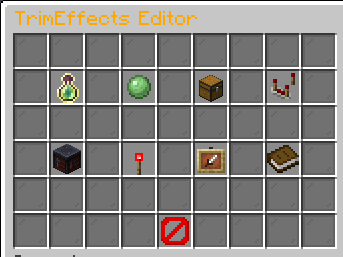
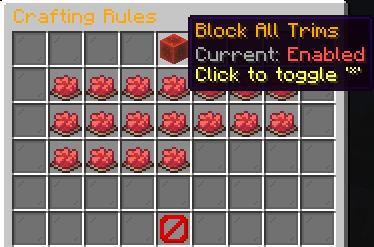
### 😍 Reimagined Config editor GUI
- 😍 Main GUI:
- 😍 Levels editor
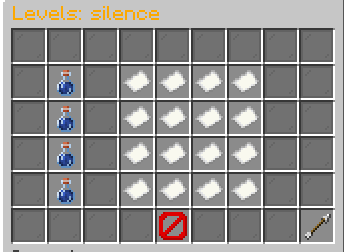
- 😍 Effects Editor
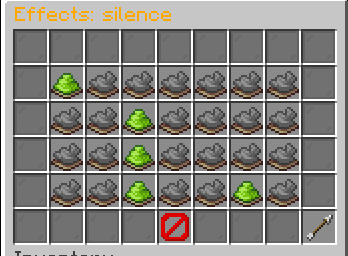
- 😍 Un-craftable Trims Editor
release
Trims Effect 1.0.12
1.0.128 июн. 2026 г.56Minecraft: 1.20, 1.20.1, 1.20.2, 1.20.3, 1.20.4, 1.20.5, 1.20.6, 1.21, 1.21.1, 1.21.2, 1.21.3, 1.21.4, 1.21.5, 1.21.6, 1.21.7, 1.21.8, 1.21.9, 1.21.10, 1.21.11, 26.1, 26.1.1, 26.1.2folia, paper, purpur
Что нового
### 🚀 TrimsEffects Update Changelog
* 🛠️ **Security Fix:** Changed GUI title checks to `InventoryHolder` checks for better reliability.
* 📦 **GUI Pagination:** Added automatic page switching in TrimsEffect & Effects editor GUIs (Buttons auto-appear when the first page is full).
* 🔍 **Missing Trims Detection:** Both GUIs will now automatically display missing trims from your config.
* ⚙️ **New Config Options:** Added `Prefix` customization support.
* 📝 **Developer Logs:** Added advanced debug logs for easier troubleshooting.

---
**Next Update Sneak Peek:** Working on making the plugin 100% configurable with tons of new config settings! Stay tuned.
release
TrimsEffect 1.0.11
1.0.1117 апр. 2026 г.153Minecraft: 1.20, 1.20.1, 1.20.2, 1.20.3, 1.20.4, 1.20.5, 1.20.6, 1.21, 1.21.1, 1.21.2, 1.21.3, 1.21.4, 1.21.5, 1.21.6, 1.21.7, 1.21.8, 1.21.9, 1.21.10, 1.21.11, 26.1, 26.1.1, 26.1.2folia, paper, purpur
Что нового
Just bug fixes + Quality improved :)
release
TrimsEffect-1.0.10
1.0.1016 апр. 2026 г.28Minecraft: 1.20, 1.20.1, 1.20.2, 1.20.3, 1.20.4, 1.20.5, 1.20.6, 1.21, 1.21.1, 1.21.2, 1.21.3, 1.21.4, 1.21.5, 1.21.6, 1.21.7, 1.21.8, 1.21.9, 1.21.10, 1.21.11bukkit, folia, paper, purpur
Что нового
added:
- In-game config editor
- disabled-world setting
- track-version setting
removed:
- gui.show-scaling setting
release
TrimsEffect 1.0.9
1.0.930 мар. 2026 г.41Minecraft: 1.20, 1.20.1, 1.20.2, 1.20.3, 1.20.4, 1.20.5, 1.20.6, 1.21, 1.21.1, 1.21.2, 1.21.3, 1.21.4, 1.21.5, 1.21.6, 1.21.7, 1.21.8, 1.21.9, 1.21.10, 1.21.11folia, paper, purpur
Что нового
New options to configure GUI:
```yaml
# material of trim in /trimseffect gui
trim-materials:
default: SENTRY_ARMOR_TRIM_SMITHING_TEMPLATE
sentry: SENTRY_ARMOR_TRIM_SMITHING_TEMPLATE
vex: VEX_ARMOR_TRIM_SMITHING_TEMPLATE
wild: WILD_ARMOR_TRIM_SMITHING_TEMPLATE
coast: COAST_ARMOR_TRIM_SMITHING_TEMPLATE
dune: DUNE_ARMOR_TRIM_SMITHING_TEMPLATE
ward: WARD_ARMOR_TRIM_SMITHING_TEMPLATE
eye: EYE_ARMOR_TRIM_SMITHING_TEMPLATE
spire: SPIRE_ARMOR_TRIM_SMITHING_TEMPLATE
wayfinder: WAYFINDER_ARMOR_TRIM_SMITHING_TEMPLATE
shaper: SHAPER_ARMOR_TRIM_SMITHING_TEMPLATE
silence: SILENCE_ARMOR_TRIM_SMITHING_TEMPLATE
snout: SNOUT_ARMOR_TRIM_SMITHING_TEMPLATE
tide: TIDE_ARMOR_TRIM_SMITHING_TEMPLATE
rib: RIB_ARMOR_TRIM_SMITHING_TEMPLATE
# newer trims (1.20+ / 1.21+ depending on server version)
raiser: RAISER_ARMOR_TRIM_SMITHING_TEMPLATE
flow: FLOW_ARMOR_TRIM_SMITHING_TEMPLATE
host: HOST_ARMOR_TRIM_SMITHING_TEMPLATE
bolt: BOLT_ARMOR_TRIM_SMITHING_TEMPLATE
```
release
TrimsEffect 1.0.8
1.0.827 мар. 2026 г.25Minecraft: 1.20, 1.20.1, 1.20.2, 1.20.3, 1.20.4, 1.20.5, 1.20.6, 1.21, 1.21.1, 1.21.2, 1.21.3, 1.21.4, 1.21.5, 1.21.6, 1.21.7, 1.21.8, 1.21.9, 1.21.10, 1.21.11folia, paper, purpur
Что нового
## ========🔥TrimsEffect-1.0.8 changelog ========
- ✅Fixed 2 bugs!
- ✅Enchanced GUI!
- ✅Enchanced Command rules!
-> 👀In next update: TrimsEffect Gui will be more configurable! <br>
-> Join my discord to suggest ideas and report bugs about this plugin!
release
TrimsEffect 1.0.7
1.0.78 мар. 2026 г.46Minecraft: 1.20.5, 1.20.6, 1.21, 1.21.1, 1.21.2, 1.21.3, 1.21.4, 1.21.5, 1.21.6, 1.21.7, 1.21.8, 1.21.9, 1.21.10, 1.21.11folia, paper, purpur
release
TrimsEffect 1.0.6
1.0.68 мар. 2026 г.20Minecraft: 1.20, 1.20.1, 1.20.2, 1.20.3, 1.20.4, 1.20.5, 1.20.6, 1.21, 1.21.1, 1.21.2, 1.21.3, 1.21.4, 1.21.5, 1.21.6, 1.21.7, 1.21.8, 1.21.9, 1.21.10, 1.21.11folia, paper, purpur
release
TrimsEffect 1.0.5
1.0.57 мар. 2026 г.25Minecraft: 1.20, 1.20.1, 1.20.2, 1.20.3, 1.20.4, 1.20.5, 1.20.6, 1.21, 1.21.1, 1.21.2, 1.21.3, 1.21.4, 1.21.5, 1.21.6, 1.21.7, 1.21.8, 1.21.9, 1.21.10, 1.21.11folia, paper, purpur
Что нового
## ========TrimsEffect 1.0.5 — Changelog========
### ✨ Added:
- Each trim can now optionally define its own effect levels depending on the number of armor pieces worn.
- Allows different potion levels for 1, 2, 3, or 4 armor pieces.
- Fully configurable inside `trims-effect.<trim>.scaling`.
### 🔧 Improvements
* Cleaner internal trim effect system for better maintainability.
* Improved compatibility with newer Paper/Purpur APIs.
* More flexible configuration design for server owners.
### 🔄 Compatibility
⚠️ **Config format changed in this update.**
If upgrading from older versions:
* Delete the old `config.yml`
* Restart the server to regenerate the new config.
<details>
<summary>New config.yml</summary>
```
# ------------------------------------------------------------
# Trims that CANNOT be crafted (optional feature)
# ------------------------------------------------------------
un-craftable-trims:
- silence
- vex
# ------------------------------------------------------------
# Default effect scaling (used if trim has no custom scaling)
# ------------------------------------------------------------
effect-scaling:
1: 1
2: 2
3: 2
4: 3
# ------------------------------------------------------------
# Trim → Effect mapping
# ------------------------------------------------------------
# effects = potion effects applied
# scaling = OPTIONAL per-trim scaling override
# ------------------------------------------------------------
trims-effect:
silence:
effects:
- STRENGTH
- RESISTANCE
- ABSORPTION
scaling:
1:
STRENGTH: 2
RESISTANCE: 1
ABSORPTION: 0
2:
STRENGTH: 3
RESISTANCE: 2
ABSORPTION: 1
dune:
effects:
- SPEED
coast:
effects:
- WATER_BREATHING
wild:
effects:
- JUMP
ward:
effects:
- RESISTANCE
eye:
effects:
- NIGHT_VISION
vex:
effects:
- HASTE
tide:
effects:
- DOLPHINS_GRACE
snout:
effects:
- FIRE_RESISTANCE
rib:
effects:
- ABSORPTION
spire:
effects:
- REGENERATION
wayfinder:
effects:
- SATURATION
raiser:
effects:
- STRENGTH
shaper:
effects:
- HASTE
host:
effects:
- HEALTH_BOOST
flow:
effects:
- SPEED
bolt:
effects:
- FAST_DIGGING
sentry:
effects: [] # empty = no effects
gui:
enabled: true
title: "&aTrim Effects"
size: 27
show-scaling: false
settings:
milk-consume: true # if true, milk will not remove trim effects
```
</details>