COWMODSКаталог модов

Transporters

Never use powered rails again! This data pack adds useful features to mine carts.

Автор: OceanhavenBlue5509обновлён 5 окт. 2026 г.
Механики игрыТехнологииТранспорт

Описание

About "Transporters"

Transporters is a data pack that adds a few features to minecarts, activated by placing specific colors of wool underneath the tracks, as well as other cart-related features.

Lime / Red wool under tracks

Placing lime wool under the track will give minecarts an "engine" that continually makes them move at maximum speed.

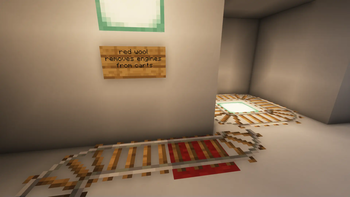
The engine can be removed by placing red wool under a section of track. The engine is also removed when a cart leaves the track.

Purple wool / "endpoint" armor stands

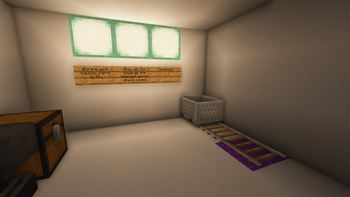
To make carts fly through the air (and even through solid walls) towards a destination, name an armor stand "endpoint" and place it where you want the carts to fly to, then place purple wool under the tracks at the end of a railway, and carts passing over the wool will begin to fly towards the armor stand.

Keep in mind that if you have multiple armor stands named "endpoint," carts will only fly to whichever one is closest to them.

Additionally, note that the chunk your desired enpoint is in must be loaded.

Ziplines via light blue wool + named armor stands

This is identical to the purple wool functionality, with a few bonus features and requirements. You can create multiple flight routes this way without them conflicting.

To use ziplines, place light blue under the end track, and then name an armor stand "startpoint_##" (where ## is a number from 1-32). place the armor stand on the same track the light blue wool is under.

Then name another armor stand "endpoint_##" to match the startpoint, and carts passing over the start point will fly to the end point.

Just like the purple wool, carts will fly to whichever matching endpoint is nearest to them, as long as the chunks are loaded.

Orange wool

Placing orange wool underneath the tracks will destroy carts that pass over it.

Pink / Magenta wool

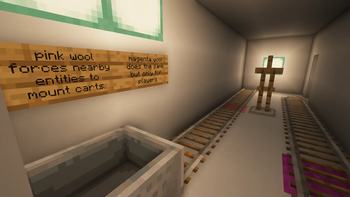
Pink wool will force nearby entities, including players, to ride carts as they pass over it.

Magenta wool behaves the same way, except it only works for players.

Use vanilla activator rails or orange wool to force entities or players to dismount a cart.

"pointer" armor stands

Naming an armor stand "pointer" will turn it into a front-facing arrow attached to nearby carts.

This can behave weirdly if multiple carts are nearby, so using F3+B to show the hitboxes is recommended as an alternative if you run into issues.

Ladders / Shelves

Carts can climb ladders and wooden shelves, and will do so whenever they are in the same block space. The carts will also dismount at the top, in the direction they are facing.

Use ladders if you dont mind players and mobs also climbing them, use shelves if you want it to be carts-only.

Magenta Glazed Terracotta / Tripwire

Carts will change direction and move in the direction specified by the arrow on Magenta Glazed Terracotta placed under a tripwire beneath the cart. Perfect for turning carts around in a tight space!

This behavior does not work with rails due to Minecraft forcing carts to snap to rails, so you will potentially need to recover speed by placing lime wool under the next track section after a direction change.

Routing with lecterns

Lecterns placed next to normal rails will invisibly assign passing carts to a specific route based on the current page number the lectern is turned to, up to 32.

Lecterns placed next to detector rails will test passing carts to see if they match the current page number- and if they do, redstone wires connected to the lectern will be replaced with redstone blocks. If the passing cart does not match, the redstone blocks will revert to redstone wires again. This can be used to create switch track systems to route carts wherever you please!

Detector item frames

Item frames containing detector rail items, and placed adjacent to detector rails, will detect passing carts based on their type or passenger, and replace redstone wires with redstone blocks in a similar manner to the lecterns. The main difference being that the redstone blocks will revert to wires automatically after one second.

Select the desired detection type by rotating the item frame.

Tutorial/Trailer (severely outdated):

https://youtu.be/NAcXhlJShS4

Галерея

Последние версии

Все версии →
release

Ziplines!

2.5.0
5 окт. 2026 г.27Minecraft: 26.2datapack
Скачать
Что нового
* Pointer armor stands now convert to a nicer-looking arrow that uses the hopper item instead of a squished hopper block model * using light blue wool, you can now have multiple flying cart routes, referred to as ziplines internally. name the endpoint armor stand "endpoint_#" (where # can be any number from 1-32), and additionally place an armor stand on the light blue wool named "startpoint_#" (with the # matching the desired endpoint)
release

Transporters 2.4.1

2.4.1
5 июн. 2026 г.33Minecraft: 26.1.1datapack
Скачать
Что нового
* flying carts now go much faster old rail setups in your worlds may need to be changed slightly due to the slightly different flight trajectory the carts now have
release

The Routing Update

2.4.0
23 мая 2026 г.18Minecraft: 26.1.1datapack
Скачать
Что нового
* Carts can now be routed and detected using lecterns and item frames: * place an item frame next to a detector rail, with a detector rail in it, and rotate it to set what kind of cart or passenger to detect. all redstone wires around the item frame will turn into redstone blocks when a matching cart passses by, and the redstone block will return to wire after one second. * place a lectern next to a normal rail and carts will be assigned a route number based on the page the lectern is turned to (up to 32) * place a lectern next to a detector rail and it will turn redstone wires into redstone blocks or back again when a cart with (or without) a matching route passes by.
release

26.1.1 Update

2.3.0
8 мая 2026 г.18Minecraft: 26.1.1datapack
Скачать
Что нового
* updated to minecraft 26.1.1 (possibly works with newer aswell, untested) * Carts now climb wooden shelves in addition to ladders, for situations where you want to build a cart elevator but dont want players and mobs to climb it * Carts now change direction when passing over a tripwire on top of magenta glazed terracotta, pointing it's arrow in the desired direction * does not work with rails due to the way carts snap to rails which prevents command-based directional changes, so tripwires were the next best thing I could add. You may need to place lime wool under the following track segment to maintain speed.
release

The Destroying Orange update

2.2.0
4 сент. 2025 г.50Minecraft: 1.21.8datapack
Скачать
Что нового
- Orange wool now destroys carts that pass over it - Carts can now climb ladders - carts will dismount at the top of ladders based on the direction they are facing. - blocks are now defined by tags - this allows datapack users to modify which blocks activate the different behaviors, without needing to go to github and modify the source code with beet/bolt/etc installed - tags are located under \data\transporters\tags\block
release

game test instances +

2.1.0
1 сент. 2025 г.21Minecraft: 1.21.8datapack
Скачать
Что нового
- Added game tests for most mechanics - did not add for player/entity mounting via pink/magenta wool. i need to think more about the best approach. - "pointer" armor stands now mount carts from up to 2 blocks away rather than a whopping 4
release

Oops! Fixed now!

2.0.1
12 авг. 2025 г.25Minecraft: 1.21.8datapack
Скачать
Что нового
* fixed everything not working because of missing entity tags
alpha

Beet / 1.21.8 update

2.0.0
12 авг. 2025 г.34Minecraft: 1.21.8datapack
Скачать
Что нового
This really changes some things! * beet-ified everything (source now availible on github) * this means all future versions will be made using beet and bolt, the datapack development pipline for minecraft datapacks * The code contained within the installable pack is no longer easily readable or editable as an unfortunate side effect of now using beet * see the github source repository for that! * removed herobrine NOTE: due to an oversight, this version does not work at all. please use 2.0.1 or newer.
release

1.21.4 update

1.0.1
29 янв. 2025 г.62Minecraft: 1.21.4datapack
Скачать
Что нового
update to 1.21.4
release

1.21.0+ update

1.0.0
23 авг. 2024 г.71Minecraft: 1.21, 1.21.1datapack
Скачать
Что нового
* updated to the new format in minecraft 1.21.0+