COWMODSКаталог модов

TradeHub Markets

A fully simulated investment system for Minecraft servers, allowing players to trade stocks, crypto and commodities in a realistic and configurable economy.

Автор: jolupo3400обновлён 1 авг. 2026 г.
Экономика

Описание

TradeHub Market — Simulated Stock Market System for Your Server

Transform your server into a self-contained economy. TradeHub Market brings a fully simulated stock market system to your Paper server—featuring stocks, crypto, commodities, realistic bid-ask spreads, and trading fees. Everything runs entirely locally: no connection to real financial markets, no external APIs, and no ongoing costs.


✨ Features

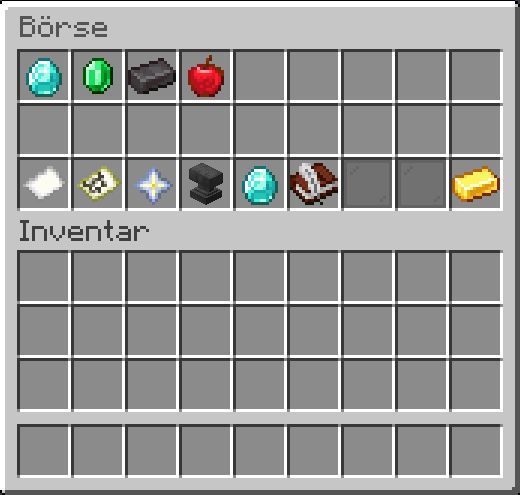
4 Asset Categories Stocks, crypto, commodities, and rare commodities—each category has its own configuration file and menu icon. Comes pre-filled with example assets (Diamond Industries, BitRock, Iron, Gold, and more), but is fully customizable.

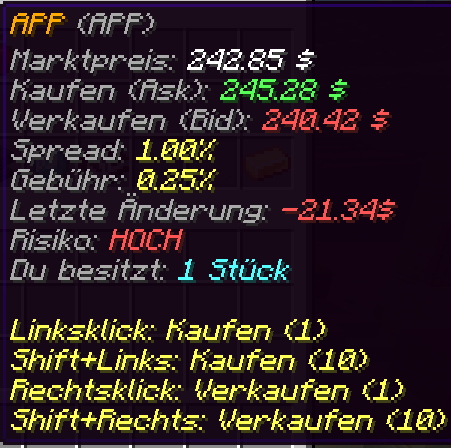
Realistic Trading No more trading exactly at the market price: players buy at the ask price and sell at the bid price. The bid-ask spread and optional broker fees are fully configurable (percentage-based or fixed amounts) and can be disabled entirely if simpler trading is preferred.

Automated Price Simulation Prices for each stock move automatically and randomly within a set volatility range—including minimum and maximum price limits. Each asset also displays a risk level (Low/Medium/High) so players can make informed investment decisions.

Intuitive GUI A single menu for everything: category selection, risk explanations, and account balance & portfolio value at a glance. Buy with left-click, sell with right-click, or buy/sell in batches of 10 by holding Shift.

Full In-Game Asset Management No need to edit YAML files: a dedicated management interface displays all assets, complete with search and category filters. The editor displays all fields at a glance as clickable items; simply click a field and enter a new value in the chat, and the editor automatically reopens with the updated value. Changes are only applied when clicking "Save." Admins can create, edit, duplicate, (de)activate, or delete assets (with a confirmation prompt)—including an automatic backup before every change.

Vault Integration Works with any Vault-compatible economy plugin. It automatically detects multiple registered economy providers and always integrates the best available one, regardless of plugin load order.

Persistent Data Portfolios and current prices are stored in a local SQLite database—asynchronously, without impacting the server tick. Restarts or updates do not reset prices.

Optional Discord Integration Market news can be sent directly to your Discord server—no bot required, just a webhook. Fully controllable via a dedicated admin GUI (on/off, URL configuration, testing, status display); disabled by default. Servers without a Discord connection remain completely unaffected. Nine message types (market events, new/activated/deactivated assets, price records, high volatility) can be toggled individually; embed colors, title prefixes, and footer text are fully customizable—including a local preview and send log right in the admin GUI. Additionally, it offers automatic summary market reports (every 30 minutes, hourly, every 6 hours, or daily) featuring top gainers/losers, a category overview, market sentiment, and key events since the last report. Dynamic Market News The market writes its own story: simulated economic events (e.g., "📈 Crypto on the rise!") appear regularly in the chat, noticeably shifting the price of a specific category. Market trends and volatility evolve organically based on recent events, with built-in safeguards against crashes or 100% spikes. Admins manage event types, categories, frequency, and custom headlines entirely via a dedicated GUI.

Portfolio Performance Profit/loss at a glance: The account display shows the percentage change in value over 1 hour, 12 hours, one day, one week, and since the start—green for gains, red for losses. This runs fully automatically in the background.

Portfolio Statistics Total profit, daily profit, average purchase price per position, and the best/worst currently held investment—all tracked automatically with every buy/sell transaction. Existing holdings from before the update are transparently marked as "Unknown" rather than displaying incorrect figures.

Asset Statistics All-time high/low, moving average price, creation date, trading volume, and the largest price change ever recorded—accessible for any asset via /stocks info <Symbol>.

Optional Trading Hours Each category can be restricted to a specific time window (e.g., stocks only from 08:00 to 20:00, while crypto remains open around the clock) or left open 24/7 by default. Settings are fully configurable via a dedicated admin GUI, including time windows that span across midnight.

Multilingual (German & English) All chat messages are fully translated.

Галерея
Menü

Последние версии

Все версии →
release

TradeHub Markets 1.3.1

1.3.1
1 авг. 2026 г.150Minecraft: 1.21.8, 1.21.9, 1.21.10, 1.21.11, 26.1, 26.1.1, 26.1.2, 26.2paper
Скачать
Что нового
## Version 1.3.1 **Trading Interface Streamlined** 🧹 - 🖥️ The "Create Automatic Order" section (Stop-Loss/Take-Profit as standalone order types with dropdown, trigger selection, and target price) has been removed from the web dashboard. - 📊 The "Open Position (Long/Short)" section remains and has been expanded to include two new, optional input fields: **Stop-Loss** and **Take-Profit** – usable for both Long and Short positions. - ✅ **Automatic validation** when opening a position: - Long: Stop-Loss must be below, Take-Profit must be above the entry price. - Short: Stop-Loss must be above, Take-Profit must be below the entry price. - If values ​​are invalid, a clear, understandable error message appears, displaying the current entry price. - ⚙️ Stop-Loss and Take-Profit values ​​are passed to the trading engine immediately upon opening the position and trigger automatically once the market price reaches the respective value – both fields remain optional; positions can still be opened without them.
release

TradeHub Markets 1.3.0

1.3.0
28 июл. 2026 г.10Minecraft: 1.21.8, 1.21.9, 1.21.10, 1.21.11, 26.1, 26.1.1, 26.1.2, 26.2paper
Скачать
Что нового
## Version 1.3.0 **Leveraged Long/Short Positions** 📈📉⚙️ - 📈 **Long Positions** – bet on rising prices. Freely selectable investment amount and optional leverage (configurable, e.g., 2x/5x/10x). Profit is generated when the price rises. - 📉 **Short Positions** – bet on falling prices. Profit is generated when the price falls; loss occurs when it rises. - 🎚️ **Fully configurable leverage system** – leverage can be enabled/ disabled globally; maximum leverage level is adjustable; leverage can be allowed or restricted per asset category (`positions.leverage.*`). - 📋 **New "Open Positions" menu** – displays asset, symbol, position type, entry price, current market price, investment amount, leverage, current profit/loss (absolute and %), and opening time for each position. Open, close, refresh, and filter by asset or position type directly within the GUI. - 🛡️ **Automatic liquidation** – positions are automatically closed server-side once the configured loss threshold relative to the margin is reached (`positions.liquidation-threshold`). - 📊 **Server-side calculation** automatically accounts for bid/ask spreads, trading fees, current market price, volatility, trading hours, and disabled assets. - 👨‍💼 **Admin configuration** (`config.yml` → `positions:`): Long/short trading can be enabled individually; leverage enabled with a maximum value; minimum capital per position; liquidation limit; trading fee for positions; and allowed asset categories. - 🌐 **Web Dashboard:** New "Open position" section on the asset detail page, as well as a complete position overview with live profit/loss in the portfolio section.
release

TradeHub Markets 1.2.0

1.2.0
16 июл. 2026 г.18Minecraft: 1.21.8, 1.21.9, 1.21.10, 1.21.11, 26.1, 26.1.1, 26.1.2, 26.2paper
Скачать
Что нового
## Version 1.2.0 **Trading Convenience Update** 📋⭐📊 - 📋 **Trade History** – Every buy and sell transaction (in-game and web) is permanently stored in the database. Accessible via a new button in the exchange GUI. Paginated (27 entries/page), filterable by buys, sells, or specific assets. - ⭐ **Watchlist** – Watch or remove assets in the market menu using Shift+Click; a dedicated "Watchlist" button in the exchange GUI displays all watched assets at a glance. Permanently saved. Max entries configurable (`watchlist.max-items`). - 🛑 **Stop-Loss** / 🎯 **Take-Profit** – Automatic sell orders executed when an asset's price reaches a defined price or percentage value. Two trigger types: absolute price or percentage relative to the price at the time of creation. Can be activated, deactivated, and deleted. Created by pressing the Q key on an asset in the market menu. - 📋 **Order Management GUI** – Displays all active Stop-Loss and Take-Profit orders, status, effective trigger price, and current market price. Left-click: Activate/Deactivate; Right-click: Delete. - Orders persist through server restarts (permanently stored in the database). - Chat notification and optional Discord webhook dispatch upon order execution. - Bid/ask spread and trading fees are factored into all automatic orders.
release

TradeHub Markets 1.1.9

1.1.9
16 июл. 2026 г.12Minecraft: 1.21.8, 1.21.9, 1.21.10, 1.21.11, 26.1, 26.1.1, 26.1.2, 26.2paper
Скачать
Что нового
## Version 1.1.9 **Web Dashboard Phase 2 – Login, Portfolio & Trading** 🔐📈 - 🎮 **`/tradehub login`** – generates a cryptographically secure one-time code (format `AB7K-9LQ2`) directly in the Minecraft chat. No password, no registration required. - 🔐 **Secure Login System** – Codes are valid for 5 minutes, single-use only, and deleted immediately after login. Sessions expire automatically (configurable). - 👤 **Portfolio Page** – after logging in: view total assets, account balance, portfolio value, total profit, daily profit, performance overview (1h/12h/day/week/total), best/worst investment, and a complete holdings table showing cost basis and P/L per position. - 📊 **Chart Price Hover** – Hover your mouse over the price chart: a vertical line and tooltip display the price and time of the nearest data point. - 💰 **Web Trading** – Buy and sell stocks directly from the dashboard. Live preview of the total price; error handling for closed markets, insufficient funds, etc. - 🗑️ **`/stocks reset <player> [confirm]`** – Admin command to completely reset a player's portfolio (includes a confirmation prompt). - ⚙️ New configuration options under `web-dashboard.authentication`: `enabled`, `code-validity-minutes`, `max-active-codes`, `session-duration-hours`, `max-sessions-per-player`.
release

TradeHub Markets 1.1.8

1.1.8
16 июл. 2026 г.12Minecraft: 1.21.8, 1.21.9, 1.21.10, 1.21.11, 26.1, 26.1.1, 26.1.2, 26.2paper
Скачать
Что нового
## Version 1.1.8 **Web Dashboard – integrated into the plugin (Dynmap style)** 🌐 - 🎯 **No installation required!** The web dashboard is now served directly from the plugin JAR – just like Dynmap or BlueMap. Place the plugin in the `plugins/` folder, start the server, open the dashboard. - ⚙️ Configuration: `web-dashboard.enabled: true`, `host`, `port` (default: 8123). - 🔗 All API calls are relative (`/api/...`) – works automatically on any IP or domain without needing to modify files.
release

TradeHub Markets 1.1.7

1.1.7
16 июл. 2026 г.8Minecraft: 1.21.8, 1.21.9, 1.21.10, 1.21.11, 26.1, 26.1.1, 26.1.2, 26.2paper
Скачать
Что нового
## Version 1.1.7 **Important Bug Fix** 🐛💰 - 🐛 **Purchases caused an incorrect rise in portfolio performance & daily gain** – a simple purchase was sometimes displayed as a gain of several tens of percent, even though the actual asset value remained unchanged. Fixed! - ✅ Gains/losses now arise exclusively from actual price changes or realized sales. - 🔄 Existing performance history will be automatically reset once upon the first launch after this update (old values ​​were incompatible with the new, correct methodology) – holdings, cost basis, and total gain remain unaffected.
release

TradeHub Markets 1.1.6

1.1.6
16 июл. 2026 г.13Minecraft: 1.21.8, 1.21.9, 1.21.10, 1.21.11, 26.1, 26.1.1, 26.1.2, 26.2paper
Скачать
Что нового
## Changelog ### 1.1.6 - Bugfix: Purchases distorted portfolio performance & daily profit - **Fix: Simply purchasing new assets erroneously increased** portfolio performance (1h/12h/day/week/total in %) and daily profit. Cause: Previously, these two statistics tracked only the raw stock value of the portfolio, without offsetting the cash spent to acquire them. When a purchase occurs, cash is merely converted into stock value—the raw stock value inevitably rises as a result, even though the actual net worth remains unchanged (aside from the small spread or fee actually paid). This issue was particularly pronounced for new players whose "Total" baseline was established only upon their *very first* purchase: a second purchase immediately afterward could cause "Total" performance to spike by tens of percent, even though no price movement had occurred. - **Solution:** Portfolio performance and daily profit are now based on NET WORTH (current account balance + current stock value) rather than just the raw stock value. A purchase converts cash into stock value at a nearly 1:1 ratio (minus the spread/fee actually paid), meaning net worth remains virtually unchanged. Gains or losses now arise exclusively from actual price changes in held positions or from realized sales—exactly as intended. - **Total profit (cost-basis) was unaffected by this bug** and remains correct. - **Migration:** Since old performance snapshots calculated using the flawed methodology are incompatible with the new methodology (the same stored figure would suddenly have a different meaning), the existing performance history (snapshots + "total" baseline) will be automatically reset once upon the first launch following this update. The display will then start fresh; portfolio holdings, cost basis, and total profit remain unaffected.
release

TradeHub Markets 1.1.5

1.1.5
4 июл. 2026 г.10Minecraft: 1.21.8, 1.21.9, 1.21.10, 1.21.11, 26.1, 26.1.1, 26.1.2, 26.2paper
Скачать
Что нового
## Version 1.1.5 **Asset Statistics & Trading Hours** 📊🕒 - 📈📉 **All-time high/low, average price, trading volume, and largest price change** – now available for every asset via `/stocks info <Symbol>`. - 📅 **Creation date** is now tracked for every asset. - 🕒 **Optional trading hours per category** – e.g., stocks only 08:00–20:00, crypto open continuously. Fully configurable in the new "Trading Hours" admin GUI, including time slots spanning midnight. Disabled by default (24/7). - 🛒 Buying and selling are disabled outside of trading hours, with a clear notification indicating the next opening time.
release

TradeHub Markets 1.1.4

1.1.4
4 июл. 2026 г.6Minecraft: 1.21.8, 1.21.9, 1.21.10, 1.21.11, 26.1, 26.1.1, 26.1.2, 26.2paper
Скачать
Что нового
## Version 1.1.4 **Portfolio Statistics Update** 💼 - 💰 **Total Profit** – how much have you earned (or lost) from your trades in total? - 📅 **Daily Profit** – the change in your portfolio's value over the last 24 hours. - 🧮 **Average Purchase Price** – now displayed for every held position. - 🏆 **Best Investment** & 📉 **Worst Investment** – see at a glance which of your positions is performing best or worst. - 🩺 Clean handling of legacy holdings: positions from before this update are honestly marked as "Unknown" instead of displaying incorrect figures.
release

TradeHub Markets 1.1.3

1.1.3
2 июл. 2026 г.8Minecraft: 1.21.8, 1.21.9, 1.21.10, 1.21.11, 26.1, 26.1.1, 26.1.2, 26.2paper
Скачать
Что нового
## Version 1.1.3 **Market Report Update + Important Bug Fix** 📊 - 🐛 **Important Fix:** The "Total" statistic in the portfolio would incorrectly reset to 0% after every server restart, even though the actual historical data remained stored and unchanged. Fixed! - 📊 **Automated Discord market reports** – selectable intervals: every 30 minutes, hourly, every 6 hours, or daily. - 📈📉 **Top Gainers & Top Losers** at a glance. - 📂 **Category summary** and 🌡️ **current market sentiment** (Bullish/Bearish/Stable). - 📰 **Key events since the last report**, including price impact. - ⚙️ Each section can be toggled on/off individually; fully configurable via the admin GUI.