COWMODSКаталог модов

Toggleable Textures

Toggleable Textures is a client-side Fabric mod that lets players switch selected Minecraft block textures between modern and nostalgic historical versions through an in-game menu.

Автор: rajeshnithin23056688обновлён 12 окт. 2026 г.
ДекорУтилиты

Описание

Toggleable Textures Titlecard

Special thanks to CodecraftPlugin for creating the title card artwork!

Another special thanks to Cr1ato for showcasing the mod in a recent YouTube Short!

Watch Cr1ato's Toggleable Textures showcase

Toggleable Textures is a client-side Fabric mod that lets you switch selected Minecraft block and item textures between modern and nostalgic historical versions through an in-game menu.

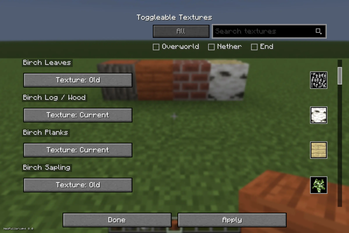
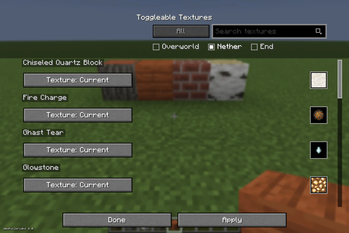
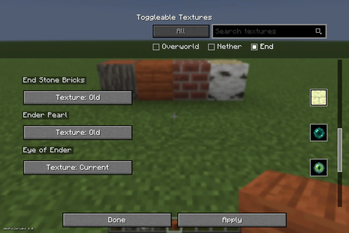
Search for supported textures, preview the available choices, cycle between versions, and click Apply to update them without replacing the entire game with a full resource pack.

Older textures are extracted from your local Minecraft installation, so the mod does not ship Mojang assets.

Features

  • Per-block and per-item texture selection
  • Minecraft-style in-game menu
  • Search bar for supported textures
  • Preview icons for selected textures
  • Apply button so textures only reload when you choose
  • Support for textures from enabled resource packs
  • Client-side only

Installation

CurseForge App

Install Toggleable Textures like any other Fabric mod through the CurseForge App.

Make sure Fabric API is installed. If it is listed as a required dependency, the CurseForge App should install it automatically.

Manual Installation

  1. Install Fabric Loader for Minecraft 26.3: Download the Fabric Installer

  2. Install the appropriate Fabric Loader and Fabric API version for the file you downloaded:

  • Minecraft 1.20.1 — Fabric Loader 0.16.14 — Fabric API 0.92.2+1.20.1 — Requires Java 17
  • Minecraft 26.2 — Fabric Loader 0.19.3 — Fabric API 0.152.2+26.2 — Requires Java 25
  • Minecraft 26.3 — Fabric Loader 0.19.5 — Fabric API 0.160.5+26.3 — Requires Java 25
  1. Download Toggleable Textures.

  2. Place the downloaded .jar file in your .minecraft/mods folder.

  3. Read the old texture support instructions below.

  4. Launch Minecraft using the Fabric profile.

Important: Old Texture Support

To use all of the older texture options, launch the following Minecraft versions at least once through the vanilla Minecraft Launcher:

  • Minecraft 1.5.1
  • Minecraft 1.12.2
  • Minecraft 1.13.2

This gives Toggleable Textures access to your own local game files so it can extract the older textures on your computer.

Using Other Resource Packs

Toggleable Textures can also use textures from downloaded resource packs.

  1. Install Toggleable Textures and Fabric API.
  2. Place the resource pack .zip file in your Minecraft resourcepacks folder.
  3. Launch Minecraft.
  4. Go to Options → Resource Packs.
  5. Enable the resource pack you want to use.
  6. Open the Toggleable Textures menu by pressing =.
  7. Blocks and items changed by the enabled resource pack will display an additional option, such as Pack: <Resource Pack Name>.
  8. Choose Current, Old, or Pack.
  9. Click Apply.

When you disable a resource pack, its texture options automatically disappear from the Toggleable Textures menu.

How to Use

  1. Launch Minecraft with Toggleable Textures installed.
  2. Join a world.
  3. Press = to open the Toggleable Textures menu.
  4. Search for a block or item, or scroll through the list.
  5. Click its texture button to cycle through the available versions.
  6. Click Apply to reload the selected textures.

Keybind

The default key for opening the Toggleable Textures menu is =.

You can change this keybind from Minecraft's Controls menu.

Галерея
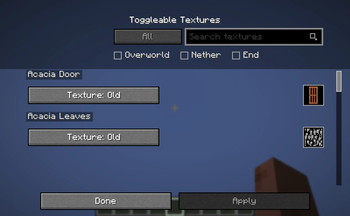
Preview for UIOverworld Filter + (Old + New Blocks Together Side by Side)Nether FilterEnd Dimension Filter

Последние версии

Все версии →
release

Toggleable Textures 1.2.3

1.2.3
12 окт. 2026 г.166Minecraft: 26.3fabric
Скачать
Что нового
- Added Set All to Old/Current buttons to every category. (As per recent request. :)) - Select All to change every supported entry together. - Added confirmation before bulk changes; Apply is still required. - Closing without applying discards pending changes. - Matched category and bulk buttons to the lighter texture-button style. - Kept previews working when returning from confirmation.
release

Toggleable Textures 1.2.2

1.2.2
15 сент. 2026 г.101Minecraft: 26.3fabric
Скачать
Что нового
Updated to 26.3. (Developer's Note - I personally wouldn't use the old map textures, but I have added them in case people would like to, Mojang did a great job creating the new styles for the new maps, and I personally would use them, but again it's up to you, the player.) Make sure to download the correct Fabric Loader for 26.3 (0.19.5)!
release

Toggleable Textures 1.2.1+1.20.1

1.20.1
3 сент. 2026 г.56Minecraft: 1.20.1fabric
Скачать
Что нового
Added a version specifically for 1.20.1.
release

Toggleable Textures 1.2.1

1.2.1
6 авг. 2026 г.195Minecraft: 26.2fabric
Скачать
Что нового
## Toggleable Textures 1.2.1 ### Fixed Bugs - Fixed a resource reload failure that could happen when enabling some custom resource packs. - Improved resource pack compatibility by making Toggleable Textures only provide texture resources for the folder Minecraft is currently loading.
release

Toggleable Textures 1.2.0

1.2.0
29 июл. 2026 г.42Minecraft: 26.2fabric
Скачать
Что нового
## Toggleable Textures 1.2.0 ### Added - Added mob texture support for mobs with known historical texture changes. - Added mob preview renders in the Toggleable Textures menu. - Added resource pack texture choices, allowing supported entries to cycle between `Current`, `Old`, and enabled `Pack` textures when available. - Added support for biome-specific animal textures with an `Apply to All Instances` option. - Added baby animal texture support for applicable animals. - Added additional texture extraction support for historical versions including `1.12.2` and `1.13.2`. ### Improved - Improved texture preview handling for non-block entries. - Improved menu support for blocks, items, and mobs in one unified list. - Improved resource pack detection so unavailable pack choices are hidden instead of shown as missing. - Updated README and mod metadata for the expanded feature set. ### Fixed - Fixed several mob rendering issues with old textures. - Fixed baby animal texture/model issues for supported animals. - Removed mobs from the list where old/current texture differences were not useful or visible. - Fixed various preview sizing and alignment issues.
release

Toggleable Textures 1.1.0

1.1.0
11 июл. 2026 г.45Minecraft: 26.2fabric
Скачать
Что нового
## Toggleable Textures 1.1.0 - MAJOR RELEASE **You can now choose from your own local downloaded texture/resource packs as well!** ### Added - Added support for choosing textures from enabled downloaded resource packs. - Added dynamic detection for resource-pack textures that change blocks/items not normally shown in the menu. - Added pack texture options alongside `Current` and `Old` where available. ### Improved - The menu now updates based on currently enabled resource packs. - Disabled resource packs are no longer shown as missing texture options. - Pack-only entries are removed from the menu when the related resource pack is disabled. ### Fixed - Fixed cases where placed blocks could use a resource pack texture while the menu showed a different selected option.
release

Toggleable Textures 1.0.2

1.0.2
28 июн. 2026 г.34Minecraft: 26.2fabric
Скачать
Что нового
Added more blocks. Added a filter for blocks, and also dimension. Sorted items in game through alphabetical order. Future updates may be adding more missed items.
release

Toggleable Textures 1.0.1

1.0.1
28 июн. 2026 г.10Minecraft: 26.2fabric
Скачать
Что нового
Added more blocks to the menu. (Note: Forgot to add this version before.)
release

ToggleableTextures 1.0.0

1.0.0
22 июн. 2026 г.18Minecraft: 26.2fabric
Скачать
Что нового
# ToggleableTextures 1.0.0 Initial release of ToggleableTextures. ToggleableTextures lets you switch many classic Minecraft block textures between the current look and older 1.5.1-style versions from an in-game menu. ## Features - Per-block texture selection - Minecraft-style texture option buttons - Search bar for quickly finding supported blocks - Preview icons for selected textures - Apply button so textures reload only when you are done changing options - Uses your local Minecraft 1.5.1 files for old textures ## Notes This first release focuses on classic overworld blocks with verified texture changes. To use 1.5.1 texture options, launch Minecraft 1.5.1 once in the vanilla launcher so the old texture files are available locally.