COWMODSКаталог модов

Tinkers Compass

Tinkers Compass is a... new? Way to create WAYpoints.

Автор: haritox7932обновлён 26 июл. 2026 г.
ПриключенияСнаряжениеУтилиты

Описание

Tinkers Compass

Vanilla+ Waypoints

Minecraft has always had a compass.

It can point home.
It can find a Lodestone.
And then... that's about it.

Meanwhile, most waypoint mods solve navigation by covering your screen with markers, minimaps and floating labels. Tinkers Compass takes a different path.

A new WAY to create WAYpoints!

Instead of adding another overlay, it expands Minecraft's own navigation system into something richer, smarter, and naturally integrated into survival gameplay.

No minimaps.
No GPS.
No breaking immersion.

Tinkers Compass expands Minecraft's navigation system with a new compass type that supports multiple lodestones, slot naming, and dimension‑aware mechanics.

Designed Around Vanilla

Every feature is built around mechanics that already exist in Minecraft.

Smithing upgrades.
Cartography.
Anvils.
Grindstones.
Explorer Maps.
Lodestones.

Rather than replacing vanilla progression, Tinkers Compass extends it, making exploration feel like a natural evolution instead of a completely new system.

The result is a navigation experience that feels surprisingly familiar as if it had always belonged in the game.

Meet the Calibrated Compass

The Calibrated Compass is the heart of the mod.

Instead of remembering only a single destination, it stores multiple locations inside one item.

It starts with 4 memory slots, and can be expanded up to 6 through survival progression.

Need to switch destinations?

Simply hold the compass and press Shift + Right Click to cycle between saved locations.

Each slot behaves independently, allowing you to organize your adventures however you like.

  • 🏠 Home Base
  • ⛏️ Mega Mine
  • 🌲 Woodland Mansion
  • 🧪 Trial Chamber
  • 🐉 Stronghold
  • 🏰 Ancient City

No menu hunting.
No giant maps.
Just your compass and you.

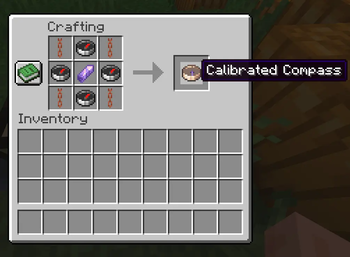
Crafting Recipe

waxed copper chain | compass | waxed copper chain
compass | amethyst shard | compass
waxed copper chain | compass | waxed copper chain\

Slot naming

Rename slots via a custom GUI.
Costs 1 XP level per rename.
Default names: “Calibrated Compass: Lodestone N”.
If no lodestone is assigned, it shows simply “Calibrated Compass”.

Upgrade your compass

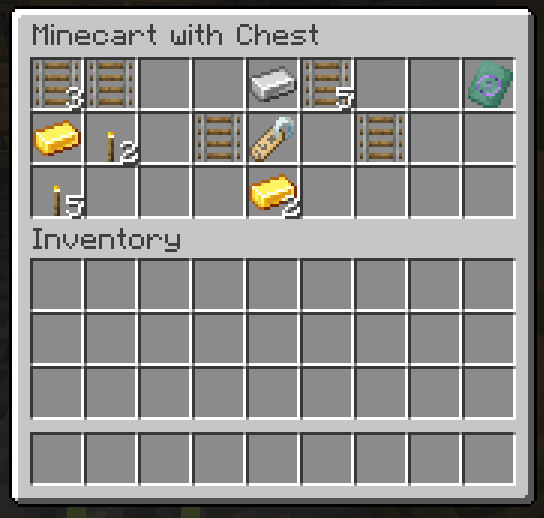
Increase its memory using the Compass Memory Upgrade Smithing Template, discovered during exploration.

Every additional slot is earned—not given.

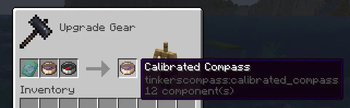
Use the smithing table.
Recipe: paper + calibrated compass + copper ingot → +1 memory slot.
Currently limited to 6 slots maximum (the original 4 + 2 upgrades).

Command fallback

/namecompass available if GUI fails.
Also consumes 1 XP level.

Waypoints That Feel Like Minecraft

Unlike traditional waypoint mods, locations are obtained through gameplay.

Discover Explorer Compasses

Cartographers know more than they tell.

Combine a Compass with an Explorer Map (or a Buried Treasure Map) inside the Cartography Table to create an Explorer Compass.

These mysterious compasses preserve the destination without revealing it immediately.

Later, you can extract that hidden location into your Calibrated Compass using an Anvil.

A treasure map becomes a permanent memory.

Vanilla Lodestones still matter

Regular Lodestone Compasses integrate seamlessly.

Transfer their destination directly into your Calibrated Compass while preserving custom names.

Nothing becomes obsolete.

Everything works together.

Built for survival

Exploration should reward planning—not punish mistakes.

That's why the mod includes several safeguards behind the scenes.

  • Prevents duplicate saved locations.
  • Prevents invalid dimension transfers.
  • Protects upgrade materials when operations fail.
  • Blocks exceeding the maximum slot capacity.
  • Provides clear in-game feedback instead of silently failing.

The goal isn't to add restrictions.

It's to make every saved destination feel meaningful.

Helpful Without Getting In The Way

The interface stays lightweight while still providing the information you need.

Custom tooltips display:

Active slot Slot names Empty memories Broken Lodestones Stored dimensions

Smithing upgrades also include contextual icons and visual hints to make progression intuitive without requiring a wiki.

Under The Hood

Although Tinkers Compass feels like a vanilla feature, a lot happens behind the scenes.

The mod extends Minecraft through carefully designed Mixins that integrate directly with existing mechanics, including:

  • Cartography Tables
  • Anvils
  • Grindstones

Instead of replacing vanilla systems, it teaches them a few new tricks.

This keeps compatibility high while preserving the familiar Minecraft experience.

Current Features

  • 🧭 Calibrated Compass with expandable memory
  • 📍 Up to 6 independent waypoint slots
  • 🔄 Quick slot switching (Shift + Right Click)
  • ⚒️ Smithing-based progression
  • 🗺️ Explorer Compass crafting
  • 🧱 Lodestone integration
  • 🔨 Anvil extraction system
  • 🪨 Grindstone slot wiping
  • 💬 Custom tooltips and UI hints
  • 🛡️ Intelligent validation and safety systems
  • 🌍 Multi-language support

Supported Languages:

- en_Us
- es_Ec (localizad)
- es_Es
- es_Mx
- fr_FR\

Road Ahead

Tinkers Compass is still in active development.

Future updates are planned to further expand exploration while staying faithful to vanilla design.

Some ideas currently on the workbench include:

  • New compass variants
  • More discoverable navigation mechanics
  • Additional progression paths
  • Better visual customization
  • Even deeper integration with Minecraft's exploration systems

Feel free to include this mod in your modpacks!

📜 Version History & Archive

🔍 v0.0.4 Changes (Current Release)
  • RWorkstation Expansion: Fully integrated Anvil data extraction, Grindstone slot clearing, and Cartography Table recipes into the core gameplay loop.
  • Explorer Compass Loop: Introduced a new exploration mechanics loop using a broken-needle compass container to extract map coordinate data.
  • Mixin Architecture: Shifted backend logic to a robust Mixin-based injection system to maximize compatibility and prevent vanilla code conflicts.
  • Enhanced Validation Safeguards: Expanded internal checks to actively block duplicate entries, cross-dimension bleeding, and slot overflow directly inside the workstation UI.
🔍 v0.0.3 Changes
  • Recipe Balancing: The grid layout now strictly requires Waxed Copper Chains (minecraft:waxed_copper_chain) instead of normal copper chains to perfectly match the internal Java data validation channels.
  • Security Update: Integrated smart anti-cheat grid scan that prevents duplicate lodestone links and mixing different dimensions.
  • Inventory Shield: Forced .stacksTo(1) to permanently resolve metadata sharing bugs in grouped items.
📦 v0.0.2 Archive
  • Upgrade System Overhaul: The upgrade method moved from the vanilla crafting table to the Smithing Table.
  • New Items: Introduced the custom Memory Upgrade Smithing Template to guide the modular progression up to 6 slots, discarding the legacy raw materials recipe.
  • Visual Enhancements: Added custom empty slots textures and icons mapping directly to the smithing UI catalog.
🌱 v0.0.1 Legacy Archive
  • Initial Release: The Calibrated Compass was introduced with a baseline capacity of 4 dynamic memory slots.
  • Legacy Upgrade Method: Upgrades from 4 to 6 slots were crafted directly in the standard Crafting Table using paper and a copper ingot.
  • Basic Textures: Standard textures for linked and empty slot selection.

Галерея

Tinkers CompassCalibrated Compass RecipeFind the Memory Upgrade Smithing TemplateUpgrade your compass!

Последние версии

Все версии →
alpha

Tinkers Compass 0.1.1+26.2

0.1.1+26.2
26 июл. 2026 г.415Minecraft: 26.2fabric
Скачать
Что нового
# Tinkers Compass v0.1.1 ## Added ### Your favorite locations are now... protected **Calibrated Compass slots can now be locked** by right-clicking while holding the compass. A locked slot cannot be overwritten by binding a new Lodestone, and its data cannot be erased in a Grindstone. Slots containing broken Lodestones -or no data at all- cannot be locked, and if the tracked Lodestone is ever destroyed, the slot unlocks automatically. Saving a new Lodestone still takes priority when right-clicking directly on one. No accidental locking while trying to bind a location. Every lock and unlock action now comes with both visual and audio feedback. Your compass likes making itself heard. ### The Grindstone learned a few new tricks Lodestone Compasses can now have their Lodestone data erased in a Grindstone. Broken compasses can be cleaned too, and the process works on entire stacks. Once the data is gone, it's gone. You'll have to bind the compass to a Lodestone again. ### You can now extract locations from a Calibrated Compass Place a **Calibrated Compass** together with a **Vanilla Compass** inside a Grindstone to transfer the currently selected slot into a standalone **Lodestone Compass**. **The selected slot is emptied** from the Calibrated Compass**, while the newly created Lodestone Compass keeps **all of its data**. Only one Vanilla Compass is consumed, even if you accidentally insert an entire stack. This process doesn't generate experience. Grindstones have suddenly become very generous. Restrictions apply: - Locked slots cannot be extracted. - Broken Lodestone data cannot be transferred. - Explorer Compass data cannot be extracted. Each case provides its own error message explaining why. ## Changed ### Explorer Compasses wanted some attention Explorer Compasses are now displayed as: **Explorer Compass: {Structure}** The structure name is highlighted in light blue, making it much easier to identify at a glance. Rename a Structure Map in an Anvil before creating the compass, and that custom name becomes the Explorer Compass name as well. You can also rename the Explorer Compass itself later in an Anvil, or while injecting it into a Calibrated Compass. All three methods now share a consistent 2-level renaming cost, because apparently names aren't free. Behind the scenes, the naming system has also been rewritten, making translations much easier to support across every language. ### Broken Lodestones are now... even more broken When the active slot points to a destroyed Lodestone, the compass needle now behaves much more erratically instead of always spinning in the same direction. It feels considerably closer to vanilla's "something is very wrong here" behavior. ### A more informative naming system for your beloved Calibrated Compass Slot names now change color depending on their status. - Red — Broken Lodestone. - Gold — Locked slot. - Light Blue — Explorer Compass data. - White — Normal saved location. - Gray — Default "Lodestone" name when no custom name exists. These states follow a priority system, so only the highest-priority one is shown. Broken beats locked, locked beats Explorer, Explorer beats normal, and normal beats default. ## Anvil adjustments Trying to inject a broken Lodestone Compass into a Calibrated Compass now displays a proper error message instead of silently failing. Structure Maps now require 2 experience levels to rename, matching the cost of every other way of naming an Explorer Compass. Consistency is a beautiful thing. ## Fixed ### Explorer Compass support accidentally opened a few doors that were never supposed to exist. Those doors have now been closed. - Broken Lodestone Compasses can no longer be used to craft a Calibrated Compass. - Broken Lodestone Compasses can no longer be used to upgrade a Calibrated Compass in the Smithing Table. - Attempting either action now provides a proper explanation. - Explorer Compasses can no longer sneak into crafting or Smithing recipes where they don't belong. ## Technical ### Behind-the-scenes cleanup. - Updated deprecated methods across the project. - Added new translation keys to further reduce hardcoded text remanents. - Refactored multiple localization systems. - The project now compiles with zero warnings. My IDE is suspiciously quiet now. ## You might want to read this too Every language file has been updated once again, with improvements across English, Spanish (EC, ES and MX), and French translations. Thanks for testing Tinkers Compass! If you discover bugs, balancing issues, or weird edge cases, let me know on 𝕏: @Harit0x. This mod is being developed with the help of Gemini AI.
beta

Tinkers Compass 0.1.0+26.2

0.1.0+26.2
18 июл. 2026 г.151Minecraft: 26.2fabric
Скачать
Что нового
# Tinkers Compass V0.1.0 (MINECRAFT 26.2) ## Added ### A little more life to your Calibrated Compass! - Switching between slots now plays a sound effect. It isn't much, but it feels way better than complete silence. - Successfully binding a Lodestone now plays a confirmation sound. - Trying to bind an incompatible Lodestone (wrong dimension or already stored in your Calibrated Compass) now has a failure sound too. Your ears deserve feedback as much as your eyes. ### Bundles and Calibrated Compasses finally get along! (Well... you could already store one Calibrated Compass inside a Bundle, but from now on...) - You can now store up to **4 Calibrated Compasses inside a single Bundle**. - The Calibrated Compass still has a stack size of 1, so don't expect to stack them like Cobblestone. \* _This one required a brand new Mixin because... apparently Bundles weren't very interested in cooperating._ ### IT SHINES! - The enchanted glint is now displayed whenever the selected slot of your Calibrated Compass contains a saved Lodestone. \* _No enchantments involved... it just looked too good not to._ ## Changed ### A complete visual overhaul for the Calibrated Compass! - Along the new glint, every single one of its **32 textures** has been redrawn to better match Minecraft's vanilla style. ### Introducing the new look of the Compass Memory Upgrade! - The Compass Memory Upgrade also received a brand-new texture, but... - Apart from its new look, its materials have also changed, so the duplication recipe has been updated. - The updated recipe is now correctly displayed in the vanilla Recipe Book. <details> <summary>New Crafting Recipe</summary> Copper Ingot | Compass Memory Upgrade | Copper Ingot\ Diamond | Gilded Blackstone | Diamond\ Amethyst Shard | Diamond | Amethyst Shard\ \* _Just a reminder: the Compass Memory Upgrade can be found inside Minecart with Chest loot in Mineshafts (10%) or inside Cartographer house chests in Villages (1%)._ </details> ## Fixed - You will now get the Recipe Book notification when unlocking the Calibrated Compass recipe. Better late than never, eh? - Explorer Compasses can no longer be crafted using player-created maps. \* _Only naturally generated maps know enough about the world to guide you._ ## You might want to read this too ### Updated to **Minecraft 26.2**! Now you can save the location of that beautiful sulfur cave you just found... or maybe the place where you will keep all those shiny sulfur cubes. Your future self will probably thank you.\ _**Future alpha releases will most likely target this Minecraft version... until Mojang gives me another reason to update.**_ Thanks for testing **Tinkers Compass**! If you find bugs, balance issues, or weird edge cases, let me know on **𝕏: @Harit0x**. _This mod is being developed with the help of Gemini AI._
beta

Tinkers Compass 0.1.0+26.1.2

0.1.0+26.1.2
18 июл. 2026 г.51Minecraft: 26.1.2fabric
Скачать
Что нового
# Tinkers Compass V0.1.0 (MINECRAFT 26.1.2) ## Added ### A little more life to your Calibrated Compass! - Switching between slots now plays a sound effect. It isn't much, but it feels way better than complete silence. - Successfully binding a Lodestone now plays a confirmation sound. - Trying to bind an incompatible Lodestone (wrong dimension or already stored in your Calibrated Compass) now has a failure sound too. Your ears deserve feedback as much as your eyes. ### Bundles and Calibrated Compasses finally get along! (Well... you could already store one Calibrated Compass inside a Bundle, but from now on...) - You can now store up to **4 Calibrated Compasses inside a single Bundle**. - The Calibrated Compass still has a stack size of 1, so don't expect to stack them like Cobblestone. \* _This one required a brand new Mixin because... apparently Bundles weren't very interested in cooperating._ ### IT SHINES! - The enchanted glint is now displayed whenever the selected slot of your Calibrated Compass contains a saved Lodestone. \* _No enchantments involved... it just looked too good not to._ ## Changed ### A complete visual overhaul for the Calibrated Compass! - Along the new glint, every single one of its **32 textures** has been redrawn to better match Minecraft's vanilla style. ### Introducing the new look of the Compass Memory Upgrade - The Compass Memory Upgrade also received a brand-new texture, but... - Apart from its new look, its materials have also changed, so the duplication recipe has been updated. - The updated recipe is now correctly displayed in the vanilla Recipe Book. <details> <summary>New Crafting Recipe</summary> Copper Ingot | Compass Memory Upgrade | Copper Ingot\ Diamond | Gilded Blackstone | Diamond\ Amethyst Shard | Diamond | Amethyst Shard\ \* _Just a reminder: the Compass Memory Upgrade can be found inside Minecart with Chest loot in Mineshafts (10%) or inside Cartographer house chests in Villages (1%)._ </details> ## Fixed - You will now get the Recipe Book notification when unlocking the Calibrated Compass recipe. Better late than never, eh? - Explorer Compasses can no longer be crafted using player-created maps. \* _Only naturally generated maps know enough about the world to guide you._ ## You might want to read this too This may be the **last update for Minecraft 26.1.2**... or maybe not. I can't promise every alpha will be released for this version.\ Maybe I'll upload one or two more alphas if enough people ask for them. If you want every testing build before the first release... just let me know! Thanks for testing **Tinkers Compass**! If you find bugs, balance issues, or weird edge cases, let me know on **𝕏: @Harit0x**. _This mod is being developed with the help of Gemini AI._
alpha

Tinkers Compass 0.0.4+26.1.2

0.0.4+26.1.2
28 июн. 2026 г.47Minecraft: 26.1.2fabric
Скачать
Что нового
# Tinkers Compass v0.0.4 ## Added ### Explorer Compasses & Cartography **Map to Compass:** You can now craft Explorer Compasses by combining a vanilla compass with any exploration map or buried treasure map inside a Cartography Table.\ The creation process snaps the needle entirely—resulting in a Broken Compass, but don't worry, the underlying spatial structure remains entirely intact so you can safely harvest its coordinates later using the new Anvil mechanics. <details> <summary>Crafting rules:</summary> **In a Cartography Table:**\ Structure/Buried Map\ +\ Vanilla Compass \* You cannot use any lodestoned compass, you need an empty compass.\ \** Structure Map = Any map sold by a Cartographer Villager </details> ### Grindstone Slot Wiping **Wiped Clean:** Placing a **Calibrated Compass** into a **Grindstone** completely erases the data of your currently selected slot.The slot data is permanently deleted and cannot be recovered, but the physical slot structure resets to an empty state, leaving it fully prepped and ready to be used again. ### Anvil Data Ijection **No More Travel?:** Locations can now be directly injected into the currently selected empty slot of your **Calibrated Compass** using an **Anvil**, completely consuming the source item upon success.\ **Vanilla Lodestone Compass:** Inject this kind of data costs 2 XP levels. Renaming the slot using the Anvil text box adds +1 XP level (3 XP total).\ \*Custom names transfer over automatically for free!\ **Explorer Compass:** Data injection costs 5 XP levels. Renaming the slot in the text field adds +2 XP levels (7 XP total).\ \* The Calibrated Compass must be locked to the Overworld dimension or non. ## Changes ### Core Architecture Overhaul **Enter Mixins:** We have completely refactored our backend hooks! The mod now uses a robust Mixin implementation to smoothly inject its custom behaviors directly into Minecraft's native code blocks (Anvil, Grindstone, Cartography Table). This means absolute maximum performance and seamless vanilla compatibility without rigid class overrides. ### Translation Polish The following languages have been updated and rechecked: * es_mx * es_es * fr_fr * es_ec * en_us ### Smart Safeguards **Accident Prevention:** The Java validation code now actively blocks crafting, upgrading, or anvil extraction loops if the player attempts to exceed the 6-slot limit, duplicate an existing saved position, or mix different dimensions on a single needle. If a recipe is blocked, all materials stay 100% safe inside your inventory or workstation, and a helpful error message is sent straight to your chat.  \  \ Thanks for testing Tinkers Compass! If you find bugs, balance issues, or weird edge cases, let me know on X: @Harit0x\ This version was coded in collaboration with Gemini.
alpha

Tinkers Compass 0.0.3+26.1.2

0.0.3+26.1.2
6 июн. 2026 г.54Minecraft: 26.1.2fabric
Скачать
Что нового
# Tinkers Compass v0.0.3 ## Added ### Lodestone Compass Crafting Support You can now craft the **Calibrated Compass** using **Lodestone Compasses**.\ Any saved place — and the custom name of the compass, if it has one from an anvil — will now be preserved inside a slot of the new Calibrated Compass. <details> <summary>The slot used depends on the compass placement in the crafting grid:</summary>    * Top-center → Slot 1 * Middle-right → Slot 2 * Bottom-center → Slot 3 * Middle-left → Slot 4    If the compass used in that position has no stored data, that slot will remain empty and can be filled later. </details> <details> <summary>Crafting rules:</summary> * You can craft it with 0, 1, 2, 3, or 4 Lodestone Compasses. * You cannot craft a Calibrated Compass if two or more Lodestone Compasses point to the same Lodestone. * You cannot craft it if the Lodestone Compasses point to different dimensions.   </details> ### Lodestone-Based Memory Upgrades **Lodestone Compasses** can now also be used to **increase the memory of the Calibrated Compass in the Smithin Table** \ The Lodestone Compass used in the upgrade will be assigned to the **first available empty slot** <details> <summary>Upgrading rules:</summary> * You cannot use a Lodestone Compass that points to a location already saved in the Calibrated Compass. * You cannot use a Lodestone Compass from a different dimension than the one already linked to the Calibrated Compass. If the Calibrated Compass being upgraded is still empty, it will adopt the Lodestone Compass’s dimension as its linked dimension. After that, like any other Calibrated Compass, it will only store locations from a single dimension: Overworld, Nether, or End. \* You can still use empty vanilla compasses, the result will be a brand-new empty slot. </details> ### Tooltips **New tooltips have been added for the Calibrated Compass.**\ The Calibrated Compass now shows which dimension is it linked to.\ The linked dimension depends on the first wapoint assigned by right-clickng a Lodestone (in an empty Calibrated Compass) or by the Lodestoned Compasses used while crafting.\ Holding **shift** reveals:\ * Available slots (4 to 6) * Name of the stored locations **New tooltip has been added to the Compass Memory Upgrade**\ Now users can see: * Ingredients required * Which items can it be applied to * A guide in the smithing table with hoverable messages trough slots. ### Smithing Template Visual Hints When placing the Compass Memory Upgrade in the Smithing Table, the empty ingredients slots now show clearer visual hints.\ One displays the Calibrated Compass outline with a purple needle. (Tinkers Compass compasses) The other shows a vanilla Compass outline with a red needle for an empty or lodestoned compass input. ### Language Support The following languages now have their own translations: * es_mx * es_es * fr_fr All other languages now fallback to en_us by default ## Changes ### Upgrading Template Name As you might noticed, the Memory Upgrade Smithing Template now is simply called Compass Memory Upgrade. ### Calibrated Compass Recipe **Rust-Proof Navigation:** The Calibrated Compass recipe has been updated to strictly requie **Waxed Coppr Chains** instead of standard ones. Why? Because balancing raw dimensional matrix channels is hard enough without your navigation tool rusting away. Keep it waxed, keep it aligned! ### Data System Overhaul We left rigid variables behind, now the compass data system uses a more flexible structure to leave the mod ready for much larger or even unlimited slot expansions in the future! ### Recipe Book Update The Calibrated Compass recipe has been updated in the Recipe Book. It now unlocks when the player obtains a Compass and/or an Amethyst. Sometimes it may still require both — that little inconsistency will be fixed in the next version. ### Translation Polish The en_us translation has been refined, with some terms simplified to make the mod easier to understand for non-native English speakes. (Because, this is the fallback language). The es_ec translation has also been polished, with Ecuadorian expressions added across different text screens and messages. ### Stack Limit Change The Calibrated Compass can no longer be stacked.\ The stack size (for) now is limited to 1, which helps prevent bugs and possible data corruption. ### Smithing Overflow Protection If the Smithing Table is uded to exceed 6 slots, it now clones the inserted items and returns them with all their stored data intact.\ This prevents players from losing a Lodesnoted Compass by accident. ## Fixed ### Inventory Safety The calibrated Compass now behaves properly as a unique data item and no longer stacks in ways that could cause corruption or weird behavior. ### Upgrade Return Logic Attempting to over-upgrade (or miss-upgrade) the compass throug the Smithing Table now safely returns all insterted items instead of fixed ones. ## Technical Notes The code has been cleaned up and simplified to remove classes and data that became obsolete after this version's changes.\ Old rigid structures were replaced with a more scalable architecture, making the project much easier to extend in future phases.\  \  \ Thanks for testing Tinkers Compass! If you find bugs, balance issues, or weird edge cases, let me know on X: @Harit0x\ This version was coded in collaboration with Gemini.
alpha

Tinkers Compass 0.0.2a+26.1.2

0.0.2a+26.1.2
29 мая 2026 г.44Minecraft: 26.1.2fabric
Скачать
Что нового
# Tinkers Compass v0.0.2 ## Added ### Memory Upgrade Smithing Template - To upgrade the Calibrated Compass from 4 up to 6 memory slots, you'll now need a brand-new item: the **Memory Upgrade Smithing Template** - You can find them in: - Mineshafts (10% chance) - Village Cartographer Chests (1% chance) - You can duplicate them with the Minecraft's templates duplication recipe, the block you'll need is the: Waxed Oxidized Cut Copper \* This change makes progression feel more vanilla-like and gives explorers a reason to explore their worlds instead of crafting everything immediately. ### Recipe Book Support - New advancements have been added! - The crafting recipes for the Calibrated Compass and the Smithing Template duplication now unlock naturally through gameplay. - Find a Compass or an Amethyst Shard, and Micraft will teach you how to craft the Calibrated Compass - Find a Memory Upgrade Smithing Template, and Minecraft will teach you how to duplicate it ## Changes ### Smithing Table Rework - Upgrading memory slots no longer requires paper or copper ingots. - To upgrade the Calibrated Compass now you need a Memory Upgrade Smithing Template and a Vanilla Compass ### Translation Fixes - Hardcoded text has been removed. - Every name, message, warning, and error now uses Minecraft's translation system. - Spanish (Ecuador) has been fully updated - English (US) has been fully updated ## Fixed ### Invisible Character Exploits - Players can no longer use invisible characters or blank spaces to create empty slot names. (Or at least I think so — prove me wrong.) - Invalid names are rejected with a new message. - No XP will be consumed if the operation fails. ### XP Protection -Fixed an issue where invalid naming attempts could still consume experience levels. -Your XP is now only spent when a name is successfully saved. ### Command Restrictions - The /namecompass command now properly respects vanilla permissions. - Survival players can no longer bypass restrictions without cheats enabled. ### Maximum Slot Protection - Trying to upgrade a Calibrated Compass that already has 6 slots will return the template and the compass and won't destroy the Calibrated Compass. (This probably never happened to anyone, but now it can't.) ## Technical Notes - Creative inventory tab registration has its own dedicated class. - Internal code structure has been cleaned up to make future updates easier to maintain. Thanks for testing Tinkers Compass! If you find bugs, balance issues, or have ideas for future updates, let me let me know on X: @Harit0x.\ This is only the beginning!
alpha

Calibrated Compass 0.0.1a-26.1.2

0.0.1-26.1.2
20 мая 2026 г.31Minecraft: 26.1.2fabric
Скачать
Что нового
Added: # Calibrated Compass -**New recipe!** Have you ever use your amethyst shards and your copper chains? YES? so you can use them to craft the Calibrated Compass following this recipe on your crafting table: copper chain | compass | copper chain \ compass | amethyst shard | compass \ copper chain | compass | copper chain -You´ll get a **brand new compass with 4 memory slots** (cycle between them by shift + righ clic!), It is calibrated, if a slot is not linked to a lodestone _it will point to true north_! -Name every slot! You won't get lost if you can see where are you going in your compass, will you? You can name your compass slots in a simple, but nice GUI made with all of my hearth. \*Ehhm, this is hard to say, you must have to pay an xp level every time you want to relabel your compasses slots. \*\* Default names are "Calibrated Compass: Lodestone N". (N=slot number) \*\*\* If no lodestone is assigned, it shows simply "Calibrated Compass". ## New craftings🙹 \- Well you already read the Calibrated Compass recipe **BUT** did you expect it to be upgradable? I was feeling like using the smithing table, so you can use yours: paper+**calbirated compass**+copper ingot = **A brand new slot!** *Currently this is limited up to 6 slots max. (The original 4 + 2 upgrades) ## New Command problems with the gui? (I hope not) Name your compass with /namecompass (...yes, this will also take an xp level from you; or it should) ## You might want to read this too - Calibrated Compass dimensions restiction: If one slot is linked to a lodestone in dimension Q, all other slots must also belong to the same dimension. - Of course, the Calibrated Compass texture is functional, each slot shall point correctly to its lodestone (if it is empty, norh) \- The mod is coded by using AI Google assistant.