
TeleportBlockСкачатьСкачатьСкачатьСкачатьСкачатьСкачатьСкачатьСкачатьСкачатьСкачатьСкачатьСкачать
ВЕРСИИ (12)
release
TeleportBlock 2.2.0 Fabric (Initial Release)
fabric_2.2.06 окт. 2026 г.56Minecraft: 1.21.1fabric
Что нового
# Version 2.2.0 (Initial Fabric Release)
First release of Teleport Block for Fabric. It has the same features, look and feel as version 2.2.0 for NeoForge.
## Core Features
1. Teleport Block - a block that teleports players to a linked block
2. Shift+Right Click two blocks to link them together
3. Right-click to teleport to the linked block
4. Passive mode - step on the block to teleport. Hold Shift to walk over it safely
5. Ender pearl teleport - throw a pearl at a linked block to arrive at its partner
6. Cross-dimension links - Overworld, Nether, End and modded dimensions, with distance counted in Overworld-scale coordinates
7. Named links with a Name Tag, and a unique color for every link
8. Markers on vanilla maps - right-click a linked block with a Filled Map
9. Redstone signal relay through the link, and comparator output
10. Safe teleports - blocked into walls, lava, fire and other hazards, and outside the world border
11. Explosion resistance of 1200, light level 15, fire resistant item, immovable by pistons
12. Drops itself when mined with a pickaxe
## Look and Sound
- Particles show the block's state: unlinked, linked, passive or cross-dimension
- Linked blocks send ender particles toward their partner
- The first block selected while linking is outlined with white sparks
- Custom block sounds with subtitles, replaceable by resource packs
- Messages show the Teleport Block icon and are colored by type
## Settings
- In-game settings menu with sliders, toggles, Undo and Reset - opens from Mod Menu
- Separate settings for singleplayer and for servers: `teleportblock-singleplayer.toml` and `teleportblock-server.toml`
- Teleport and ender pearl cooldowns
- Maximum link distance (default 1024 blocks), optionally checked on every teleport
- Optional XP cost per distance, with a maximum and an extra cost between dimensions
- Allow or forbid cross-dimension links, and a dimension blacklist
- Only the owner can change links (for multiplayer)
## Compatibility
- Jade - shows link status, target coordinates, dimension, link name and color
- JEI / REI / EMI - recipe and description visible in recipe viewers
- JourneyMap - linked blocks appear as colored waypoints
- Waystones - link a Teleport Block to a Waystone as a target, including in other dimensions
- FTB Chunks - players cannot teleport into chunks claimed by other teams
- Open Parties and Claims - players cannot teleport into chunks claimed by others
- Mod Menu - settings button in the mod list
- Carry On - Teleport Block cannot be picked up
- Inventory Sorter - Teleport Block is blacklisted from inventory sorting
- Create, Ponder and Create: Aeronautics integrations are NeoForge-only
## Advancements
- Teleport Block - Craft a Teleport Block
- Connected - Link two Teleport Blocks together
- Leap of Faith - Teleport for the first time
- Long Jump - Teleport 10 times
- Traveler - Teleport 100 times
## Localization
Full support for 14 languages: English, Russian, German, Spanish, French, Italian, Japanese, Korean, Dutch, Polish, Brazilian Portuguese, Turkish, Ukrainian, Simplified Chinese
## Requirements
- Fabric API. Forge Config API Port is bundled, nothing else to install
- Fabric releases use even version numbers: 2.2, 2.4, 2.6 and so on
release
TeleportBlock 2.2.0 NeoForge
neoforge_2.2.06 окт. 2026 г.52Minecraft: 1.21.1neoforge
Что нового
# Version 2.2.0
## Cross-Dimension Links
- Teleport Blocks can now be linked across dimensions - Overworld, Nether, End and modded dimensions
- Link them the same way as before: Shift+Right Click the first block, travel to another dimension, Shift+Right Click the second block
- Distance between dimensions uses Overworld-scale coordinates, just like vanilla portals: the Nether counts x8, so a block at 125, 0 in the Nether is right next to 1000, 0 in the Overworld
- Click, passive mode and ender pearl teleports all work across dimensions, with a portal sound on arrival
- Waystone links can now cross dimensions too
- Redstone relay works across dimensions while both blocks are loaded
- Jade shows the dimension of the paired block, and the F3 debug overlay shows its dimension id
## New Look and Sound
- Particles now depend on the block's state: unlinked blocks barely glow, linked blocks draw particles in, passive blocks pull them in from a ring around the block, cross-dimension blocks draw them in from all sides
- Particles fly in from farther away, so their path is easier to see
- Linked blocks send a few purple ender particles straight toward their partner
- Cross-dimension blocks hum quietly
- The first block you select while linking is outlined with soft white sparks
- Effects are now shown at a steady rate (previously a single block showed particles only every few seconds)
- Passive mode particles now really flow into the block
- New block sounds: placing the block sounds like charging a Respawn Anchor, breaking it like depleting one, and footsteps and hits sound like a Lodestone (replacing the placeholder amethyst sounds)
- New sounds have subtitles and can be replaced by resource packs
- Messages now show the Teleport Block icon and are colored by type: red for errors, yellow for cooldowns, green for success, purple for hints
## New Settings
- **Allow cross-dimension links** (on by default). Turning it off keeps existing links - they start working again when it's turned back on
- **Dimension blacklist** - dimensions that can't be linked to or from another dimension (for example `minecraft:the_end`). Links inside a blacklisted dimension still work
- **Extra XP cost between dimensions** - an optional flat cost on top of the distance cost. Free by default
## Compatibility
- **Open Parties and Claims**: players cannot teleport into chunks claimed by others, the same way as with FTB Chunks. Owners, their party and allies (per the claim's settings) can
## Fixes and Performance
- The teleport sound is no longer cut off: you now hear it fully at your destination, and players nearby hear it at both ends
- Map markers appear instantly after using a map on a linked block
- Map markers are refreshed only for maps in hand, instead of scanning every player's inventory
- Map markers now use world coordinates, so blocks on Create: Aeronautics ships no longer place markers far outside the map
- For a pair in different dimensions, only the block in the map's own dimension gets a marker
- Two pairs at the same coordinates in different dimensions no longer share a cooldown
- Breaking a block with an outdated link no longer unlinks its former partner's new pair
- The block now drops itself when mined with a pickaxe
- The REI info page for the block now shows up
- Carry On, Inventory Sorter and Create copycat blacklists now actually apply to the block
## Localization
- All new messages, settings and subtitles translated into all 14 languages
release
TeleportBlock 2.1.0 Neoforge
neoforge_2.1.028 сент. 2026 г.26Minecraft: 1.21.1neoforge
Что нового
# Version 2.1.0
## Settings Menu
- New in-game settings screen: open the Mods list (main menu or pause menu), select Teleport Block and press Config
- Sliders for cooldowns and XP cost, toggles for options, plus Undo and Reset to defaults
- Two modes detected automatically:
- **Singleplayer** - settings for your own worlds (including worlds opened to LAN), editable from the menu
- **Server** - on a dedicated server only the server's settings apply. The singleplayer button is greyed out while you're connected to a server
- Server admins configure `config/teleportblock-server.toml` on the server
- Singleplayer settings are stored in `config/teleportblock-singleplayer.toml`
- **Note:** the old `teleportblock-common.toml` is no longer used. If you changed any values there, set them again in the new file
## Optional Teleport Cost
- Teleports can cost experience points (not levels) based on straight-line distance
- Set the cost per 100 blocks and an optional maximum per teleport
- Free by default. Creative and spectator players are never charged
- Ender pearl teleports are charged the same way
## Multiplayer Options
- **Only owner can change links** (off by default): only the player who linked a pair, or a server operator, can re-link it, rename it or switch its mode. Everyone can still teleport through it. Links made before 2.1 have no owner and stay shared
- **Check distance on every teleport** (off by default): the max link distance is enforced on each teleport, not only when linking. Useful for blocks on Create: Aeronautics ships, which can fly any distance away after linking
## Bug Fixes
- Fixed the game crashing on startup for players without Create installed (the Ponder integration is now only loaded when Create/Ponder is present)
- The mod now declares that it only supports Minecraft 1.21.1, so newer versions show a clear incompatibility message instead of crashing
## Create: Aeronautics / Sable Fixes
- Fixed a crash when teleporting to a linked block on a ship that was out of render distance (GitHub issue #1). The teleport is now cancelled with a message instead of sending you to Sable's internal storage coordinates
- Fixed FTB Chunks protection being bypassable by parking a ship with a Teleport Block inside another team's claim
- Redstone relay, name tags, passive mode toggling and unlinking no longer force-load the chunk of a ship that is far away
## Link Validation
- Broken links are now detected automatically on use: if the paired block was moved (Carry On, WorldEdit, assembling a ship after linking) or replaced, the link is removed with a message instead of teleporting you to an empty spot
- Blocks can no longer be linked across dimensions
## Safer Teleports
- Teleporting into lava, fire, portals, cobwebs, powder snow, sweet berry bushes and wither roses is now blocked
- Passive mode no longer sends you back and forth: the block you arrive on won't trigger until you step off it
- A failed ender pearl teleport no longer eats the pearl silently - it lands normally instead
## Performance
- Redstone signals near a Teleport Block no longer load the paired block's chunk when it is unloaded
## Localization
- All new messages and settings translated into all 14 languages
release
TeleportBlock 2.0.0 Neoforge
neoforge_2.0.03 сент. 2026 г.28Minecraft: 1.21.1neoforge
Что нового
# Version 2.0.0
## Ender Pearl Teleport Improvements
- Ender pearls hitting a linked Teleport Block now respect a cooldown, configurable via `pearl_cooldown_seconds` (default: 1 second)
- Ender pearls now work with Waystone-linked blocks, not just block-to-block links
- Ender pearl teleports use the same unified logic as click and passive teleports, ensuring consistent behavior across all teleport methods
## Tick-Based Cooldowns
- Cooldown system now uses server tick time instead of real-world clock time
- Prevents cooldowns from expiring early during server lag (low TPS)
- Cooldown no longer consumed on a failed teleport (blocked destination or FTB Chunks protection)
## JourneyMap Waypoints
- Waypoints now appear immediately when blocks are linked, without requiring a rejoin
- Waypoints are now created in the correct dimension instead of always defaulting to the Overworld
## Map Markers
- Removed the oversized name plate bar beneath map marker icons that obscured map content
## Recipe Viewer Support
- EMI and REI plugins now display the item description, matching the existing JEI integration
## Internal Improvements
- Unified all teleport paths (click, passive, ender pearl, waystone) into a single method, eliminating three copies of the same logic
- Replaced `java.awt.Color.HSBtoRGB` with a custom implementation for compatibility with headless dedicated server JVMs
- Fixed a potential null pointer exception in cooldown time remaining calculation
- Waystone teleport coordinates now correctly pass through Sable sub-level conversion
- Removed unused import in block registration
- Added `pearl_cooldown_seconds` to the config file
release
TeleportBlock 1.9.0 Neoforge
neoforge_1.9.01 авг. 2026 г.79Minecraft: 1.21.1neoforge
Что нового
# Version 1.9.0
## Passive Portal Mode
- Toggle a linked Teleport Block into passive mode by Shift-right-clicking it with a Teleport Block item in hand
- In passive mode, simply stepping on top of the block teleports you - no right-click needed
- Both blocks in a pair share the same mode (toggling one toggles the other)
- Sneaking cancels the trigger, so you can safely stand on or walk past a passive block without teleporting
- Passive blocks emit a distinct "suction" particle effect instead of the normal idle particles
- Only players are teleported this way - mobs, projectiles, minecarts, and items are unaffected
## Redstone Signal Relay
- Linked Teleport Blocks now relay a direct redstone signal to each other, separate from the existing comparator output
- Signal strength is halved (rounded up) across the link
- Signal resets to 0 automatically when a link is broken
## Per-Link Cooldown
- Teleport cooldown is now tracked per link instead of globally per player
- Using one Teleport Block no longer blocks teleporting through unrelated pairs
- A minimum 1-tick cooldown is enforced for passive mode regardless of config, preventing spam if cooldown is set to 0
## Linking Fixes
- Re-linking an already-linked block now properly unlinks its old partner instead of leaving a dangling connection
- Fixed a bug where toggling passive mode or updating the redstone signal could incorrectly unlink a block's partner
- Fixed a memory leak where pending links and cooldown data could accumulate indefinitely on long-running servers
## Other Changes
- Removed a leftover debug log from the FTB Chunks compatibility check
- Minor stability fixes to item interaction handling
- 14 languages updated with new passive mode translation keys
release
TeleportBlock 1.8.0 NeoForge
neoforge_1.8.024 июн. 2026 г.53Minecraft: 1.21.1neoforge
Что нового
# Version 1.8.0
## Named Links
- Right-click a linked Teleport Block with a renamed Name Tag to name the link pair
- Both blocks in a pair share the same name
- Name Tag is consumed on use
## Link Colors
- Each link pair automatically receives a unique random color
- Colors are generated using HSB color space for maximum visual variety
- Colors are released and reused when links are broken
## Vanilla Map Support
- Right-click a linked Teleport Block with a filled map to mark both portals
- Markers persist across save/reload (stored on the map item)
- Named links display their name above the map icon
- Named links display their name in the link color
## Ender Pearl Teleport
- Throw an Ender Pearl at a linked Teleport Block to teleport to the paired block
- No fall damage from the pearl
- Respects FTB Chunks protection and space checks
## Comparator Output
- Teleport Block outputs redstone signal strength 8 when linked, 0 when not linked
## Jade Integration Updated
- Now displays link name in the link color
- Colored indicator dot next to link status
## JourneyMap Compatibility
- Linked Teleport Blocks automatically appear as waypoints on JourneyMap
- Waypoints use the link color and name
- Waypoints are removed when blocks are broken
## Statistics
- New "Teleportations" stat tracked in the vanilla Statistics screen
- Counts all teleports: right-click, Waystone, and Ender Pearl
## Debug Overlay
- F3 screen shows Teleport Block info when looking at one: target, name, color, uses
## Other Changes
- All status messages now display as overlay (above hotbar) instead of chat
- Teleport Block can no longer be moved by pistons or Create contraptions
- 14 languages updated with all new translation keys
release
TeleportBlock 1.6.0 NeoForge (Initial Release)
neoforge_1.6.03 июн. 2026 г.27Minecraft: 1.21.1neoforge
Что нового
# Version 1.6.0 (Initial Release)
## Core Features
1. Teleport Block — a block that teleports players to a linked block
2. Shift-click two blocks to link them together
3. Right-click to teleport to the linked block
4. Configurable maximum link distance (default 1024 blocks)
5. Configurable cooldown between teleports
6. Explosion resistance of 1200 — virtually indestructible
7. Fire resistant item (like netherite)
8. Portal particles and sound effects
9. Blocks space above target is checked before teleporting — prevents teleporting into walls
## Compatibility
- Jade — shows link status and target coordinates when hovering over the block
- Sable / Create Aeronautics — full support for teleporting on, off and between ships/contraptions
- Waystones — link a Teleport Block to a Waystone as a target. Hold the Teleport Block item and Shift-click a Waystone to link
- FTB Chunks — respects chunk protection. Players cannot teleport into chunks claimed by other teams
- Create — Ponder scenes explaining how to link and use the block. Copycat blocks cannot use - - Teleport Block as a pattern
- JEI / REI / EMI — recipe and description visible in recipe viewers
- Carry On — Teleport Block cannot be picked up
- InventorySorter — Teleport Block is blacklisted from inventory sorting
## Advancements
- Teleport Block — Craft a Teleport Block
- Connected — Link two Teleport Blocks together
- Leap of Faith — Teleport for the first time
- Long Jump — Teleport 10 times - Traveler
— Teleport 100 times
## Localization
Full support for 14 languages: English, Russian, German, Spanish, French, Italian, Japanese, Korean, Dutch, Polish, Brazilian Portuguese, Turkish, Ukrainian, Simplified Chinese
beta
TeleportBlock 1.5.1 NeoForge
neoforge_1.5.12 июн. 2026 г.23Minecraft: 1.21.1neoforge
Что нового
# Teleport Block v1.5.1
## Added/Reworked:
- The connection system with fences/glass panels/walls has been reworked
beta
TeleportBlock 1.5.0 Neoforge
neoforge_1.5.01 июн. 2026 г.22Minecraft: 1.21.1neoforge
Что нового
# Teleport Block v1.5
## Added/Reworked:
- Added JEI/EMI/REI compatibility
- Added Waystones compatibility
- Added Create compatibility
- Added Create Ponder scenes
- Added localizations: English, Russian, Simplified Chinese, German, French, Brazilian Portuguese, Spanish, Korean, Japanese, Polish, Ukrainian, Italian, Dutch, Turkish
- Jade interface coordinate display has been reworked for waystones
beta
TeleportBlock 1.2.0 NeoForge
neoforge_1.2.029 мая 2026 г.19Minecraft: 1.21.1neoforge
Что нового
# Teleport Block v1.2
## Added/Reworked:
- Added Jade+Sable/Create Aeronautics compatibility
- Coordinates system for linked Teleport Blocks in sub-level(Sable) structures has been reworked.
- Jade interface coordinate display has been reworked.
alpha
TeleportBlock 1.1.0 NeoForge
neoforge_1.1.029 мая 2026 г.16Minecraft: 1.21.1neoforge
Что нового
# Teleport Block v1.1
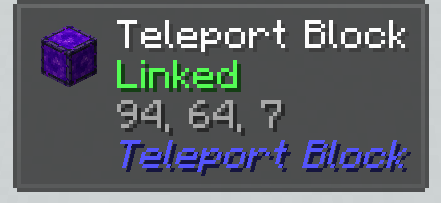
## Added:
- Added Jade compatibility
- 
alpha
TeleportBlock 1.0.0 NeoForge
neoforge_1.0.029 мая 2026 г.19Minecraft: 1.21.1neoforge
Что нового
# Teleport Block v1.0
## Added:
- Added Teleport Block
- Added crafting recipe for the Teleport Block
- Teleportation requires 2 linked Teleport Blocks
- Default teleport distance set to 1024 blocks
- Default cooldown set to 2 seconds
- Added config support through teleportblock-common.toml
- Teleport distance and cooldown duration can be customized in the config file