
COWMODSКаталог модов

Teleport Command

Teleport Commands is a high-performance, Server-Side ONLY teleportation suite for Minecraft. It provides a complete set of player-friendly teleport commands with safety checks, configurable delays, and persistent data storage—no client mods required.

1,3 тыс.2обновлён 25 сент. 2026 г.
УправлениеТехнологииУтилиты

Описание

Teleport Command

A server-side Fabric mod that adds teleportation commands for players. No client mod is required. Vanilla clients can use every feature. The mod only needs to be installed on the server.

Installation

  1. Install Fabric Loader for your Minecraft version.
  2. Install Fabric API.
  3. Download the mod JAR that matches your game version and place it in the server mods folder.
  4. Restart the server. The config file is generated at config/teleport_commands.json on first run.

Supported versions

Mod versionGame versionsLoader
1.0.31.21 - 1.21.11Fabric
1.0.326.1 - 26.1.2Fabric
1.0.326.2Fabric
1.0.326.3Fabric

Commands

CommandDescription
/sethome <name>Save your current position as a personal home.
/home <name>Teleport to one of your homes. With no argument, teleports to the home named home, or your first home if none has that name.
/delhome <name>Delete one of your homes.
/homesList your homes. Click a name to teleport to it, click [X] to delete it.
/defaulthome <name>Verify a home exists and confirm it with a message.
/setwarp <name>Create a warp at your position. Operators create global warps usable by everyone, other players create personal warps.
/warp <name>Teleport to a warp. With no argument, lists all warps available to you.
/delwarp <name>Delete a warp. Operators can delete any warp, other players can only delete their own personal warps.
/renamewarp <old> <new>Rename a warp. Operators can rename any warp.
/tpa <player>Send a teleport request to a player. Player names autocomplete when pressing tab.
/tpahere <player>Ask a player to teleport to your position.
/tpaaccept [player]Accept a teleport request. With no argument, accepts the oldest pending request.
/tpadeny [player]Deny a teleport request. With no argument, denies the oldest pending request.
/backReturn to your last death location.
/spawnTeleport to your bed respawn point, or the world spawn if you have none.
/worldspawnTeleport to the world spawn point.
/rtpRandom teleport to safe ground within the configured radius. The search runs over several server ticks so it never freezes or kicks players.
/wild [dimension]Random teleport with a wider radius. Accepts an optional dimension such as minecraft:the_nether. Can be disabled in the config.

Teleport requests show clickable green [ACCEPT] and red [DENY] buttons in chat, so the target player never has to type a command. Sending a teleport request has a 10 second cooldown per player.

Configuration

The file config/teleport_commands.json is created on first run. Delete it and restart the server to regenerate the defaults. Every command section supports the following options:

SettingDefaultDescription
enabledtrueSet to false to disable the command entirely. Used for example to turn off /wild.
teleport_delay_seconds0Reserved setting, currently has no effect.
default_safety_checktrueCheck that the destination has solid ground, free space and no lava, fire or fluids before teleporting. If the spot is unsafe, the nearest safe spot is used instead.

The rtp and wild sections have additional options:

SettingRTP defaultWild defaultDescription
min_distance10002000Minimum horizontal distance from the world origin for random locations, in blocks.
max_distance500010000Maximum horizontal distance from the world origin for random locations, in blocks.
preload_chunkstruetrueReserved setting, currently has no effect.
safe_modetruefalseWhen true, only locations with solid non-water, non-lava ground pass the safety check, so oceans are skipped. When false, the surface height is used directly, which can be a water surface.

Full default config:

{
  "global": {
    "global_cooldown_seconds": 0
  },
  "commands": {
    "worldspawn": { "enabled": true, "teleport_delay_seconds": 0, "default_safety_check": true },
    "back": { "enabled": true, "teleport_delay_seconds": 0, "default_safety_check": true },
    "home": { "enabled": true, "teleport_delay_seconds": 0, "default_safety_check": true },
    "warp": { "enabled": true, "teleport_delay_seconds": 0, "default_safety_check": true },
    "rtp": {
      "enabled": true,
      "teleport_delay_seconds": 0,
      "default_safety_check": true,
      "min_distance": 1000,
      "max_distance": 5000,
      "preload_chunks": true,
      "safe_mode": true
    },
    "wild": {
      "enabled": true,
      "teleport_delay_seconds": 0,
      "default_safety_check": true,
      "min_distance": 2000,
      "max_distance": 10000,
      "preload_chunks": true,
      "safe_mode": false
    },
    "spawn": { "enabled": true, "teleport_delay_seconds": 0, "default_safety_check": true },
    "tpa": { "enabled": true, "teleport_delay_seconds": 0, "default_safety_check": true }
  }
}

Data storage

Homes, warps and death locations are saved as JSON files under config/teleport-commands/storage/ (homes.json, warps.json, back_locations.json, tpa_requests.json) and survive server restarts.

Галерея
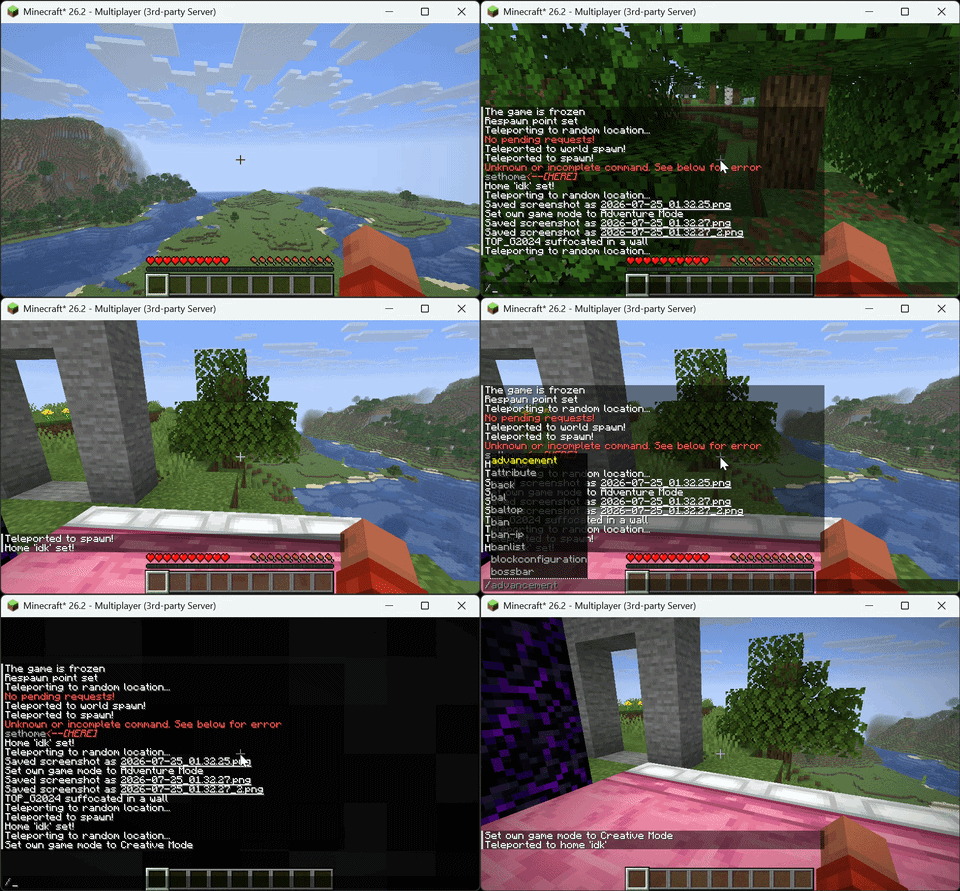
Example Usage💫

Последние версии

Все версии →
release

Teleport Command 1.0.3

1.0.3
25 сент. 2026 г.291Minecraft: 26.3fabric
Скачать
Что нового
Added Minecraft 26.3 support. RTP and Wild now search over server ticks so large searches no longer kick players. New safe_mode and enabled options for rtp and wild. TPA requests show clickable Accept and Deny buttons. Home and warp lists have delete buttons. All chat messages restyled.
release

Teleport Command 1.0.3

1.0.3
25 сент. 2026 г.140Minecraft: 26.2fabric
Скачать
Что нового
Added Minecraft 26.3 support. RTP and Wild now search over server ticks so large searches no longer kick players. New safe_mode and enabled options for rtp and wild. TPA requests show clickable Accept and Deny buttons. Home and warp lists have delete buttons. All chat messages restyled.
release

Teleport Command 1.0.3

1.0.3
25 сент. 2026 г.38Minecraft: 26.1, 26.1.1, 26.1.2fabric
Скачать
Что нового
Added Minecraft 26.3 support. RTP and Wild now search over server ticks so large searches no longer kick players. New safe_mode and enabled options for rtp and wild. TPA requests show clickable Accept and Deny buttons. Home and warp lists have delete buttons. All chat messages restyled.
release

Teleport Command 1.0.3

1.0.3
25 сент. 2026 г.124Minecraft: 1.21, 1.21.1, 1.21.2, 1.21.3, 1.21.4, 1.21.5, 1.21.6, 1.21.7, 1.21.8, 1.21.9, 1.21.10, 1.21.11fabric
Скачать
Что нового
Added Minecraft 26.3 support. RTP and Wild now search over server ticks so large searches no longer kick players. New safe_mode and enabled options for rtp and wild. TPA requests show clickable Accept and Deny buttons. Home and warp lists have delete buttons. All chat messages restyled.
release

Teleport Command 1.0.2

1.0.2
9 сент. 2026 г.94Minecraft: 26.2fabric
Скачать
Что нового
**1. Autosuggest — replaced custom with vanilla.** `/tpa` and `/tpahere` now use Mojang's `EntityArgument.player()` (Yarn: `EntityArgumentType.player()`), the exact same argument vanilla commands like `/msg` and `/tp` use. Player-name suggestions now come from the game itself, not our custom provider — there's no custom code left that could break them. Offline names are rejected by Brigadier automatically. **2. Buttons.** They use the vanilla `RunCommand` click event (verified against Mojang mappings — identical to how vanilla buttons work), so a click runs `/tpaaccept <name>` / `/tpadeny <name>` as the clicking player with zero typing. The old `/tpaaccept` / `/tpadeny` commands still exist as fallback. **3. Proof logging.** Since I can't see your server, I added console logs: `[Teleport] TPA request: Alice -> Bob`, `[Teleport] TPA accepted: ...`, `[Teleport] TPA denied by ...`. After deploying: - Type `/tpa <Tab>` — names should complete (needs 2+ players online to really prove it; solo only shows yourself). - Have someone click ACCEPT — you should see the accept line in the **server console**. If the line appears but no teleport happens, send me that console output and I'll pinpoint it. If no line appears on click, the click never reached the server (client/proxy issue).
release

Teleport Command 1.0.2

1.0.2
9 сент. 2026 г.21Minecraft: 26.1, 26.1.1, 26.1.2fabric
Скачать
Что нового
**1. Autosuggest — replaced custom with vanilla.** `/tpa` and `/tpahere` now use Mojang's `EntityArgument.player()` (Yarn: `EntityArgumentType.player()`), the exact same argument vanilla commands like `/msg` and `/tp` use. Player-name suggestions now come from the game itself, not our custom provider — there's no custom code left that could break them. Offline names are rejected by Brigadier automatically. **2. Buttons.** They use the vanilla `RunCommand` click event (verified against Mojang mappings — identical to how vanilla buttons work), so a click runs `/tpaaccept <name>` / `/tpadeny <name>` as the clicking player with zero typing. The old `/tpaaccept` / `/tpadeny` commands still exist as fallback. **3. Proof logging.** Since I can't see your server, I added console logs: `[Teleport] TPA request: Alice -> Bob`, `[Teleport] TPA accepted: ...`, `[Teleport] TPA denied by ...`. After deploying: - Type `/tpa <Tab>` — names should complete (needs 2+ players online to really prove it; solo only shows yourself). - Have someone click ACCEPT — you should see the accept line in the **server console**. If the line appears but no teleport happens, send me that console output and I'll pinpoint it. If no line appears on click, the click never reached the server (client/proxy issue).
release

Teleport Command 1.0.2

1.0.2
9 сент. 2026 г.62Minecraft: 1.21, 1.21.1, 1.21.2, 1.21.3, 1.21.4, 1.21.5, 1.21.6, 1.21.7, 1.21.8, 1.21.9, 1.21.10, 1.21.11fabric
Скачать
Что нового
**1. Autosuggest — replaced custom with vanilla.** `/tpa` and `/tpahere` now use Mojang's `EntityArgument.player()` (Yarn: `EntityArgumentType.player()`), the exact same argument vanilla commands like `/msg` and `/tp` use. Player-name suggestions now come from the game itself, not our custom provider — there's no custom code left that could break them. Offline names are rejected by Brigadier automatically. **2. Buttons.** They use the vanilla `RunCommand` click event (verified against Mojang mappings — identical to how vanilla buttons work), so a click runs `/tpaaccept <name>` / `/tpadeny <name>` as the clicking player with zero typing. The old `/tpaaccept` / `/tpadeny` commands still exist as fallback. **3. Proof logging.** Since I can't see your server, I added console logs: `[Teleport] TPA request: Alice -> Bob`, `[Teleport] TPA accepted: ...`, `[Teleport] TPA denied by ...`. After deploying: - Type `/tpa <Tab>` — names should complete (needs 2+ players online to really prove it; solo only shows yourself). - Have someone click ACCEPT — you should see the accept line in the **server console**. If the line appears but no teleport happens, send me that console output and I'll pinpoint it. If no line appears on click, the click never reached the server (client/proxy issue).
release

1.0.1

1.0.1
8 сент. 2026 г.43Minecraft: 1.21, 1.21.1, 1.21.2, 1.21.3, 1.21.4, 1.21.5, 1.21.6, 1.21.7, 1.21.8, 1.21.9, 1.21.10, 1.21.11fabric
Скачать
Что нового
- **Fixed /rtp bugs** - **Command GUI improvements**
release

1.0.1

1.0.1
8 сент. 2026 г.7Minecraft: 26.1, 26.1.1, 26.1.2fabric
Скачать
Что нового
- **Fixed /rtp bugs** - **Command GUI improvements**
release

1.0.1

1.0.1
8 сент. 2026 г.14Minecraft: 26.2fabric
Скачать
Что нового
- **Fixed /rtp bugs** - **Command GUI improvements**